Introduction
Photo Organization Tools help individuals and teams manage, sort, and store digital images efficiently. They combine AI, cloud storage, and metadata management to make photo libraries searchable and accessible. the rapid growth of digital media and social content makes organized photo management critical. Professionals, content creators, and marketers rely on these tools to streamline workflows and maintain high-quality assets. Features like tagging, facial recognition, and smart albums improve retrieval and reduce manual effort. Cross-device sync and cloud storage ensure seamless access anytime, anywhere. Selecting the right tool enhances productivity, collaboration, and long-term photo management.
Real-world use cases include:
- Professional photography: Organize client images, portfolios, and shoots.
- Marketing & design teams: Manage campaign images and assets centrally.
- Personal storage: Sort and access personal photos with AI-powered tagging.
- Content creators: Maintain an organized repository for social media or blogs.
- Collaboration: Teams can share albums and edits efficiently across cloud platforms.
Evaluation criteria for buyers include:
- AI-powered tagging and search
- Cross-platform access and mobile support
- Cloud storage and backup options
- Integration with editing and design tools
- Privacy and security compliance
- Sharing and collaboration features
- Performance and reliability
- Ease of organization (tags, albums, folders)
- Pricing and storage limits
Best for: Photographers, content creators, marketing teams, designers, and individuals who manage large volumes of images.
Not ideal for: Users with minimal photo storage needs or those relying solely on basic OS-level folders.
Key Trends in Photo Organization Tools
- AI-based facial recognition and object tagging
- Smart albums and automated categorization
- Cloud-first storage and cross-device syncing
- Integration with design, CMS, and social media platforms
- Enhanced collaboration for teams with shared access
- Privacy-first features with encryption and secure sharing
- Subscription-based pricing with scalable storage
- Offline editing and access support
- Analytics for image usage and engagement
- Automation of duplicate detection and archival
How We Selected These Tools (Methodology)
- Evaluated market adoption and mindshare
- Assessed feature completeness including AI and collaboration
- Verified reliability and performance signals
- Reviewed security and compliance standards
- Checked integrations with editing, CMS, and cloud tools
- Considered customer fit across solo, SMB, mid-market, and enterprise
- Evaluated cross-platform availability and deployment flexibility
- Reviewed pricing, scalability, and storage limits
- Examined documentation, support, and community engagement
- Ensured relevance for 2026+ digital photography and content workflows
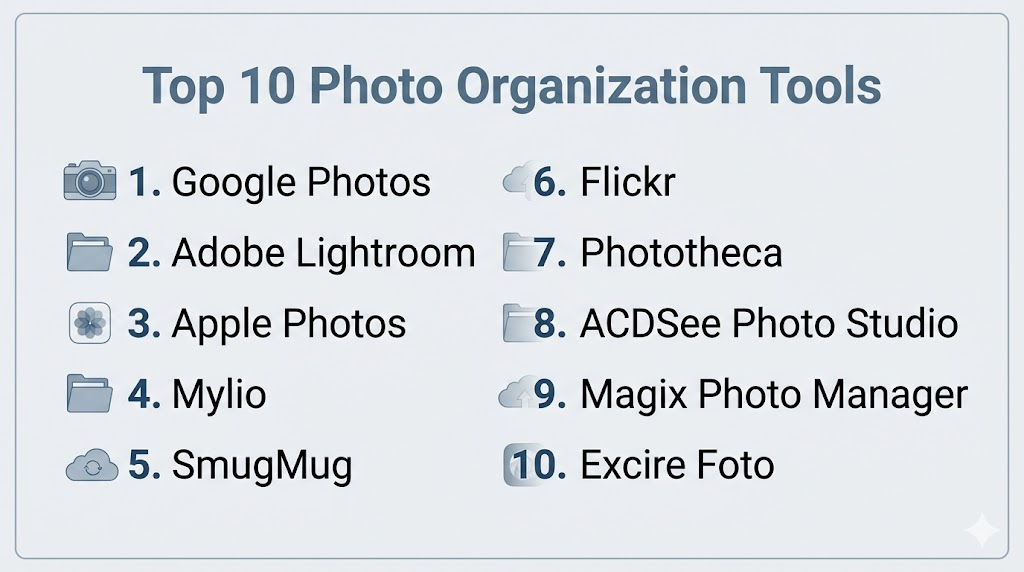
Top 10 Photo Organization Tools
1- Google Photos
Short description: Google Photos is a cloud-based photo management platform offering AI-assisted organization and sharing for personal and team use.
Key Features
- AI-based facial recognition and tagging
- Automated albums and organization
- Cloud storage with high-resolution backups
- Sharing and collaboration features
- Cross-platform sync
- Integrated editing tools
Pros
- Free and accessible
- Strong AI organization
- Easy sharing and collaboration
Cons
- Privacy concerns due to cloud storage
- Limited storage without paid plans
Platforms / Deployment
- Web / iOS / Android / macOS / Windows
- Cloud
Security & Compliance
- Encryption in transit and at rest
- Not publicly stated for compliance certifications
Integrations & Ecosystem
- Google Drive
- Google Workspace apps
- Third-party photo editors
Support & Community
- Help center and tutorials
- Community forums
- Email support
2- Adobe Lightroom
Short description: Adobe Lightroom combines photo editing with organization features, enabling professionals to sort, tag, and manage large image libraries.
Key Features
- Cloud-based library and syncing
- AI auto-tagging and search
- Advanced editing and presets
- Albums, collections, and ratings
- Metadata management
Pros
- Professional editing and organization in one
- AI-assisted search
- Cloud sync across devices
Cons
- Subscription-based
- Complexity for beginners
Platforms / Deployment
- Web / Windows / macOS / iOS / Android
- Cloud
Security & Compliance
- Not publicly stated
Integrations & Ecosystem
- Adobe Creative Cloud
- Photoshop and Illustrator
- Lightroom plugins
Support & Community
- Tutorials and Adobe forums
- Dedicated support plans
3- Apple Photos
Short description: Apple Photos is a native macOS and iOS photo management tool that offers cloud sync, AI-based organization, and seamless sharing within Apple devices.
Key Features
- iCloud sync for all devices
- Facial recognition and AI tagging
- Albums and smart collections
- Built-in editing tools
- Shared albums for collaboration
Pros
- Native integration with Apple ecosystem
- Simple and intuitive interface
- Free with Apple devices
Cons
- Limited cross-platform support
- Less advanced AI compared to specialized tools
Platforms / Deployment
- macOS / iOS
- Cloud (iCloud)
Security & Compliance
- Encryption in iCloud
- Not publicly stated
Integrations & Ecosystem
- iCloud services
- Apple ecosystem apps
- Third-party extensions
Support & Community
- Apple Support
- Forums and tutorials
4- Mylio
Short description: Mylio is a photo management platform focusing on local storage with cross-device sync and offline access, ideal for professional and personal libraries.
Key Features
- Local-first storage with cloud sync
- Facial recognition and tagging
- Album and collection organization
- Device synchronization
- Offline access
Pros
- Works offline
- Cross-device organization
- Private and secure
Cons
- Less robust AI features
- Paid subscription for full features
Platforms / Deployment
- Windows / macOS / iOS / Android
- Cloud / Hybrid
Security & Compliance
- Encryption in transit
- Not publicly stated
Integrations & Ecosystem
- Cloud storage integration
- Mylio apps on multiple devices
Support & Community
- Documentation and tutorials
- Email support
5- SmugMug
Short description: SmugMug provides cloud storage, organization, and portfolio management for photographers, combining client sharing and ecommerce features.
Key Features
- Cloud-based storage
- Galleries and collections
- Client proofing and sharing
- Custom metadata and tagging
- E-commerce integration
Pros
- Professional-grade portfolios
- Secure sharing options
- Monetization features
Cons
- Subscription required
- Focused more on professional photographers
Platforms / Deployment
- Web / iOS / Android / macOS / Windows
- Cloud
Security & Compliance
- SSL encryption
- Not publicly stated
Integrations & Ecosystem
- Adobe Photoshop
- Lightroom
- Social media sharing
Support & Community
- Tutorials and help center
- Customer support
6- Flickr
Short description: Flickr is a photo hosting and management platform that allows tagging, organization, and community sharing for photographers.
Key Features
- Albums and collections
- Tagging and AI search
- Cloud storage
- Privacy controls and sharing
- Community interaction
Pros
- Strong community features
- Large storage capacity
- Tagging and search
Cons
- Limited editing tools
- Some features require subscription
Platforms / Deployment
- Web / iOS / Android
- Cloud
Security & Compliance
- Encryption in transit
- Not publicly stated
Integrations & Ecosystem
- Social media sharing
- API for developers
Support & Community
- Help center
- Community forums
7- Phototheca
Short description: Phototheca is a Windows-based photo management tool for organizing large photo libraries with tagging and albums.
Key Features
- Tagging and smart albums
- Duplicate detection
- Metadata and EXIF editing
- Face recognition
- Library search
Pros
- Powerful organization for large libraries
- Local-first with optional cloud
- Duplicate detection
Cons
- Windows-only
- Limited mobile support
Platforms / Deployment
- Windows
- Cloud optional
Security & Compliance
- Not publicly stated
Integrations & Ecosystem
- Cloud services integration
- Lightroom import
Support & Community
- Documentation
- Email support
8- ACDSee Photo Studio
Short description: ACDSee combines photo editing with organization features, offering hierarchical albums, tagging, and AI-powered search.
Key Features
- Tagging and categories
- Face recognition
- Metadata editing
- Editing tools
- Smart albums
Pros
- All-in-one organization and editing
- AI search
- Professional features
Cons
- Paid subscription
- Complex UI for beginners
Platforms / Deployment
- Windows / macOS / iOS / Android
- Cloud
Security & Compliance
- Not publicly stated
Integrations & Ecosystem
- Photoshop and other editors
- Cloud storage
Support & Community
- Tutorials
- Help center
9- Magix Photo Manager
Short description: Magix Photo Manager is a Windows-based tool for managing, tagging, and searching large photo libraries efficiently.
Key Features
- Face recognition
- Tagging and albums
- Duplicate detection
- Metadata management
- Cloud backup optional
Pros
- Efficient for large libraries
- Duplicate detection
- Face recognition
Cons
- Windows-only
- Less cloud-focused
Platforms / Deployment
- Windows
- Cloud optional
Security & Compliance
- Not publicly stated
Integrations & Ecosystem
- Cloud services
- Windows Explorer integration
Support & Community
- Email support
- Tutorials
10- Excire Foto
Short description: Excire Foto uses AI-based search and tagging to manage and organize large photo libraries on local storage.
Key Features
- AI tagging and search
- Face recognition
- Albums and collections
- Metadata editing
- Duplicate detection
Pros
- AI-powered search
- Fast local organization
- Face recognition
Cons
- No cloud sync by default
- Paid license
Platforms / Deployment
- Windows / macOS
- Local
Security & Compliance
- Not publicly stated
Integrations & Ecosystem
- Lightroom import
- External drives
Support & Community
- Email support
- Documentation
Comparison Table (Top 10)
| Tool Name | Best For | Platform(s) Supported | Deployment | Standout Feature | Public Rating |
|---|---|---|---|---|---|
| Google Photos | Personal & Teams | Web, iOS, Android, macOS, Windows | Cloud | AI auto-tagging | N/A |
| Adobe Lightroom | Professionals | Web, macOS, Windows, iOS, Android | Cloud | Editing + organization | N/A |
| Apple Photos | Mac/iOS Users | macOS, iOS | Cloud (iCloud) | Seamless Apple ecosystem | N/A |
| Mylio | Photographers | Windows, macOS, iOS, Android | Cloud / Hybrid | Offline-first sync | N/A |
| SmugMug | Photographers | Web, macOS, iOS, Android | Cloud | Portfolio management | N/A |
| Flickr | Photographers | Web, iOS, Android | Cloud | Community sharing | N/A |
| Phototheca | Windows Users | Windows | Local / Optional Cloud | Duplicate detection | N/A |
| ACDSee Photo Studio | Professionals | Windows, macOS, iOS, Android | Cloud | AI search & albums | N/A |
| Magix Photo Manager | Windows Users | Windows | Local / Optional Cloud | Face recognition | N/A |
| Excire Foto | Local Library Management | Windows, macOS | Local | AI tagging & search | N/A |
Evaluation & Scoring of Photo Organization Tools
| Tool Name | Core (25%) | Ease (15%) | Integrations (15%) | Security (10%) | Performance (10%) | Support (10%) | Value (15%) | Weighted Total |
|---|---|---|---|---|---|---|---|---|
| Google Photos | 9 | 9 | 8 | 8 | 9 | 8 | 9 | 8.65 |
| Adobe Lightroom | 9 | 8 | 8 | 8 | 9 | 8 | 8 | 8.45 |
| Apple Photos | 8 | 9 | 7 | 8 | 8 | 8 | 8 | 8.25 |
| Mylio | 8 | 8 | 7 | 8 | 8 | 8 | 8 | 8.0 |
| SmugMug | 8 | 8 | 7 | 8 | 8 | 7 | 8 | 8.0 |
| Flickr | 8 | 8 | 7 | 8 | 8 | 7 | 8 | 8.0 |
| Phototheca | 8 | 7 | 7 | 8 | 8 | 7 | 7 | 7.65 |
| ACDSee Photo Studio | 8 | 7 | 7 | 8 | 8 | 7 | 7 | 7.65 |
| Magix Photo Manager | 7 | 7 | 6 | 7 | 8 | 7 | 7 | 7.3 |
| Excire Foto | 8 | 7 | 6 | 7 | 8 | 7 | 7 | 7.45 |
Interpretation: Weighted totals reflect core features, ease of use, integrations, security, performance, support, and value. Higher scores indicate stronger functionality but the ideal tool depends on workflow and device ecosystem.
Which Photo Organization Tool Is Right for You?
Solo / Freelancer
Use Google Photos, Apple Photos, or Excire Foto for personal photo management and local AI tagging.
SMB
Mylio, Phototheca, or Flickr provide collaboration, cross-device sync, and organization for small teams.
Mid-Market
Adobe Lightroom, SmugMug, or ACDSee Photo Studio are suitable for creative teams needing professional editing and organization.
Enterprise
Adobe Lightroom, SmugMug, and Mylio offer scalable solutions with security, cloud storage, and team collaboration.
Budget vs Premium
Free tools like Google Photos or Apple Photos suit individuals; premium subscriptions unlock AI, cloud storage, and advanced analytics.
Feature Depth vs Ease of Use
Professional tools like Lightroom or ACDSee provide advanced editing and AI features but require onboarding; simpler tools like Google Photos prioritize usability.
Integrations & Scalability
Teams needing CMS, cloud storage, or design integration benefit from SmugMug, Lightroom, or Mylio.
Security & Compliance Needs
Enterprise teams should choose tools with encryption, access controls, and cloud security for sensitive content.
Frequently Asked Questions (FAQs)
1. What pricing models do photo organization tools use?
Most offer freemium, subscription-based, or enterprise pricing. Free versions have storage limits, while paid plans unlock cloud storage, AI tagging, and collaboration features.
2. Can these tools organize large photo libraries?
Yes, professional tools like Lightroom, ACDSee, and Mylio handle tens of thousands of images with folders, albums, and AI-powered search.
3. Do they support cross-device access?
Most platforms sync across desktop, mobile, and web, with offline access options for cloud-based or hybrid solutions.
4. Are AI features available?
Yes, AI assists in facial recognition, object detection, auto-tagging, and smart albums, enhancing search and organization.
5. Can teams collaborate using these tools?
Yes, SmugMug, Flickr, Mylio, and Lightroom allow shared albums, collaborative tagging, and cloud-based access.
6. Are these tools secure for sensitive images?
Enterprise-grade solutions provide encryption, access control, and cloud security measures. Free personal tools have basic protections.
7. Can these tools integrate with editing software?
Yes, Adobe Lightroom and ACDSee integrate with Photoshop and other editing apps; SmugMug and Flickr offer external app support.
8. Do they support multiple file formats?
Most tools handle JPG, PNG, RAW, TIFF, and video files for comprehensive media management.
9. Is storage limited?
Cloud-based tools often have tiered storage limits; paid plans expand capacity for high-volume photo libraries.
10. Are there free alternatives?
Yes, Google Photos and Apple Photos offer free storage with basic AI and organization features, suitable for individuals or small teams.
Conclusion
Photo Organization Tools in 2026 help individuals and teams manage, tag, and access images efficiently across devices. Solo users can rely on Google Photos, Apple Photos, or Excire Foto, while SMBs benefit from Mylio, Phototheca, or Flickr for collaboration. Professional teams should consider Adobe Lightroom, SmugMug, or ACDSee for advanced editing and AI tagging. Enterprise solutions offer secure cloud storage, team access, and compliance features. Shortlist 2–3 tools, pilot for workflow integration, and validate AI, collaboration, and security features before full adoption. Proper adoption improves productivity, preserves digital assets, and ensures seamless organization across projects.

Find Trusted Cardiac Hospitals
Compare heart hospitals by city and services — all in one place.
Explore Hospitals
I was exploring photo organization tools, and this content helped me understand how different platforms can make it easier to manage and organize large photo collections.