Introduction
GPU Observability & Profiling Tools help engineering, DevOps, MLOps, platform, AI infrastructure, and high-performance computing teams understand how GPUs are being used, where bottlenecks appear, and why workloads are slow, expensive, unstable, or underutilized. These tools matter now because AI training, LLM inference, computer vision, simulation, rendering, scientific computing, and Kubernetes-based GPU clusters all depend on expensive accelerator infrastructure. A good GPU observability or profiling tool shows metrics such as utilization, memory usage, temperature, power draw, kernel execution, tensor operations, data transfer, queue delays, failed jobs, idle capacity, and workload timelines. Real-world use cases include optimizing AI training jobs, debugging CUDA kernels, monitoring GPU clusters, reducing idle GPU spend, improving inference latency, and troubleshooting thermal or memory bottlenecks. Buyers should evaluate hardware support, profiling depth, observability dashboards, Kubernetes support, framework integrations, alerting, cost visibility, security, ease of setup, and workflow fit.
Real-world Use Cases
- AI training performance optimization: ML engineers can identify slow data loaders, inefficient tensor operations, GPU idle gaps, memory pressure, and poor CPU-GPU overlap during model training.
- LLM inference monitoring: Platform teams can track GPU utilization, memory saturation, latency, batch size behavior, request queues, and failed inference workloads.
- Kubernetes GPU cluster observability: DevOps and MLOps teams can monitor node-level and pod-level GPU metrics across shared clusters.
- CUDA kernel profiling: GPU programmers can inspect kernel execution time, memory throughput, occupancy, warp behavior, and bottlenecks at a low level.
- GPU cost optimization: FinOps and platform teams can identify idle accelerators, underutilized jobs, oversized workloads, and scheduling inefficiencies.
- Thermal and hardware health monitoring: Infrastructure teams can watch GPU temperature, power usage, ECC errors, throttling, fan behavior, and hardware anomalies.
- Framework-level debugging: Data scientists can profile PyTorch or TensorFlow workloads to understand operator-level bottlenecks and training-step behavior.
- Multi-vendor accelerator analysis: HPC and engineering teams can profile NVIDIA, AMD, and Intel GPU workloads depending on hardware stack and tool compatibility.
Evaluation Criteria for Buyers
- Hardware coverage: Check whether the tool supports NVIDIA, AMD, Intel, cloud GPUs, bare-metal GPUs, virtual GPUs, or Kubernetes GPU nodes.
- Profiling depth: Buyers should evaluate whether the tool provides system traces, kernel metrics, framework traces, hardware counters, memory analysis, or high-level dashboards.
- Observability coverage: Look for utilization, memory, temperature, power, errors, throttling, job status, pod-level metrics, node health, and cost signals.
- Framework integrations: ML teams should check PyTorch, TensorFlow, JAX, CUDA, ROCm, OpenCL, SYCL, and Kubernetes integration depth.
- Kubernetes support: GPU clusters need pod attribution, namespace views, node labels, DCGM integration, Prometheus export, and workload correlation.
- Ease of setup: Some tools are simple agents or exporters, while others require profiling sessions, command-line setup, permissions, or code instrumentation.
- Alerting and reporting: Production teams need alerts for idle GPUs, failed jobs, memory pressure, thermal issues, degraded nodes, and unusual utilization.
- Performance overhead: Profiling tools can add overhead, so buyers should separate always-on monitoring from deep profiling workflows.
- Security and access control: Review RBAC, SSO, audit logs, encryption, data retention, and permissions for telemetry and traces.
- Cost and value: Compare free vendor tools, open-source stacks, enterprise observability platforms, cloud monitoring costs, and saved GPU spend.
Best for
Best for: AI infrastructure teams, MLOps engineers, DevOps teams, CUDA developers, data scientists, HPC teams, platform engineers, and organizations running expensive GPU workloads.
It is useful for teams that need to monitor GPU clusters, profile training jobs, optimize inference latency, debug accelerator bottlenecks, and reduce wasted GPU capacity.
It also fits companies scaling LLMs, computer vision, simulation, rendering, genomics, scientific computing, or GPU-backed SaaS workloads.
Not ideal for: Teams running only small CPU workloads or occasional GPU experiments that do not justify deep monitoring and profiling setup.
It may also feel too technical for non-engineering users who only need basic cloud cost summaries or simple infrastructure dashboards.
For basic needs, cloud provider metrics, built-in framework logs, or simple nvidia-smi checks may be enough.
Key Trends in GPU Observability & Profiling Tools
- AI infrastructure cost pressure is increasing: GPUs are expensive and often scarce, so teams need better visibility into idle time, queue delays, scheduling inefficiency, and wasted capacity.
- LLM inference observability is becoming a separate priority: Training and inference have different performance patterns, so teams now track token latency, batch behavior, memory pressure, and serving throughput.
- Kubernetes GPU monitoring is becoming standard: More AI workloads run on Kubernetes, making pod-level GPU attribution, namespace views, and Prometheus-style telemetry essential.
- System-wide profiling is more important than isolated kernel profiling: Bottlenecks often come from CPU scheduling, data loading, networking, storage, or framework overhead, not only GPU kernels.
- Framework-level profilers are more widely used: PyTorch, TensorFlow, and experiment tracking tools are increasingly used to connect model behavior with GPU performance.
- GPU telemetry is moving into mainstream observability platforms: Datadog, Grafana, Prometheus, and other observability stacks now commonly include GPU dashboards and alerts.
- Multi-vendor GPU profiling is gaining importance: NVIDIA remains dominant in many AI workloads, but AMD ROCm and Intel GPU tooling are increasingly relevant in HPC and heterogeneous computing.
- Automated recommendations are becoming more common: Observability tools are starting to suggest rightsizing, scheduling improvements, idle GPU cleanup, and performance remediation steps.
- Thermal, power, and hardware health matter more at scale: Large GPU clusters need proactive alerts for overheating, throttling, power draw, ECC errors, and degraded hardware.
- Security and governance are becoming part of AI observability: Teams need access controls, tenant boundaries, audit trails, and policy-based visibility for shared accelerator environments.
How We Selected These Tools
The tools below were selected using practical buyer-focused evaluation logic for GPU observability and profiling workflows.
- Market adoption and recognition among AI infrastructure teams, CUDA developers, MLOps teams, HPC engineers, and platform teams
- Feature completeness across monitoring, tracing, profiling, alerting, dashboards, hardware counters, and framework-level analysis
- Hardware ecosystem fit for NVIDIA, AMD, Intel, Kubernetes, cloud GPU platforms, and hybrid accelerator environments
- Profiling depth for system-wide traces, kernel-level metrics, framework timelines, memory usage, and workload-level bottlenecks
- Observability value for production GPU clusters, node health, job attribution, idle capacity, and alerting
- Integration ecosystem across Prometheus, Grafana, Datadog, PyTorch, TensorBoard, Weights & Biases, Kubernetes, CUDA, ROCm, and Intel oneAPI
- Ease of deployment including CLI tools, exporters, agents, dashboards, cloud-hosted products, and self-hosted stacks
- Security posture signals such as RBAC, SSO, encryption, audit logs, deployment model, and telemetry handling
- Customer fit across segments including individual developers, research labs, startups, enterprises, cloud teams, and HPC centers
- Long-term value based on saved GPU cost, faster debugging, improved utilization, reduced outages, and better model performance
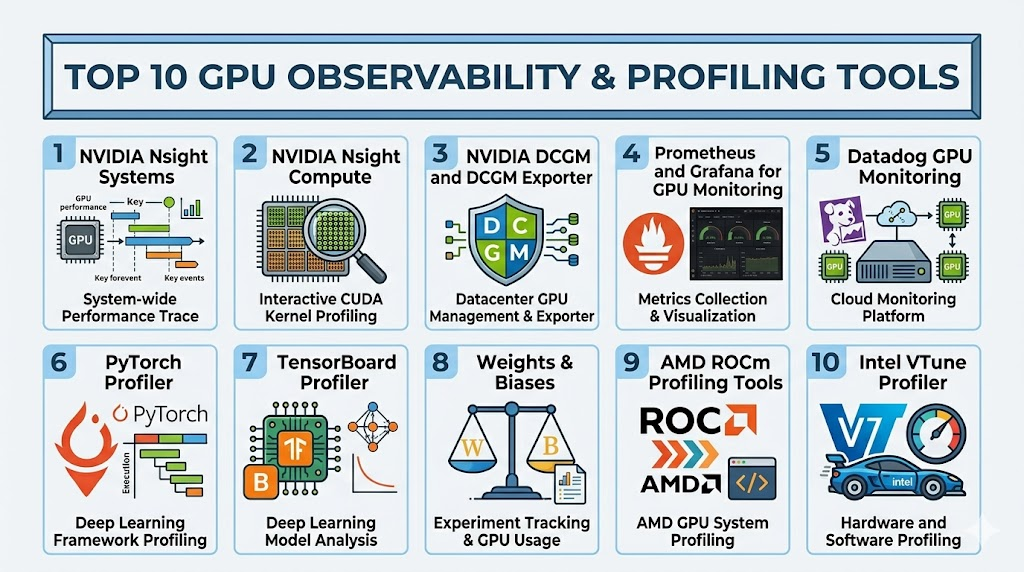
Top 10 GPU Observability & Profiling Tools
1- NVIDIA Nsight Systems
Short description: NVIDIA Nsight Systems is a system-wide performance analysis tool for understanding how CPU, GPU, OS runtime, CUDA APIs, frameworks, and application timelines interact. It is best for developers and performance engineers who need to see end-to-end bottlenecks rather than only isolated kernel metrics.
Key Features
- System-wide CPU and GPU timeline analysis
- CUDA API tracing and runtime visibility
- Multi-threaded application profiling
- GPU workload, CPU activity, and OS runtime correlation
- Command-line and graphical analysis workflows
- Support for scaling analysis across complex accelerated applications
- Useful for AI, HPC, graphics, robotics, and simulation workloads
Pros
- Excellent for identifying CPU-GPU overlap issues and timeline gaps
- Strong fit for CUDA applications and NVIDIA GPU environments
- Helps locate bottlenecks outside the GPU kernel itself
Cons
- NVIDIA-focused, so it is not a universal multi-vendor profiler
- Requires profiling workflow knowledge for best results
- Not designed as an always-on production observability platform
Platforms / Deployment
Windows / Linux / macOS support may vary by version and target
Local profiling / CLI / GUI / NVIDIA ecosystem
Security & Compliance
Not publicly stated for full compliance details. Buyers should validate encryption, audit logs, RBAC, SOC 2, ISO 27001, GDPR, HIPAA, and enterprise access controls if used in regulated workflows.
Integrations & Ecosystem
Nsight Systems fits CUDA developers, AI performance engineers, HPC teams, and system optimization workflows inside the NVIDIA ecosystem. It is commonly used alongside Nsight Compute, CUDA Toolkit, framework profilers, and cluster monitoring tools.
- CUDA Toolkit workflows
- NVIDIA GPU software stack
- CLI profiling automation
- GUI timeline analysis
- HPC and AI workload profiling
- Complementary use with Nsight Compute
Support & Community
NVIDIA provides official documentation, developer resources, forums, release notes, and ecosystem support. Teams using large GPU deployments should standardize profiling workflows and train developers on trace interpretation.
2- NVIDIA Nsight Compute
Short description: NVIDIA Nsight Compute is a kernel-level profiler for CUDA and NVIDIA OptiX workloads, designed to inspect GPU kernels, memory behavior, occupancy, throughput, and low-level performance metrics. It is best for CUDA developers who need deep GPU kernel optimization.
Key Features
- CUDA kernel profiling
- NVIDIA OptiX profiling support
- Hardware counter collection
- Memory throughput and occupancy analysis
- Guided performance analysis
- CLI and GUI workflows
- Report comparison and post-processing support
Pros
- Strong kernel-level detail for NVIDIA GPU optimization
- Useful guided analysis for finding performance bottlenecks
- Works well with Nsight Systems for full profiling coverage
Cons
- Focused on NVIDIA CUDA and OptiX workloads
- Requires GPU performance knowledge to interpret metrics correctly
- Not intended for high-level infrastructure monitoring
Platforms / Deployment
Windows / Linux / macOS host support may vary
Local profiling / CLI / GUI / NVIDIA CUDA ecosystem
Security & Compliance
Not publicly stated for full enterprise compliance controls. Buyers should validate audit logs, RBAC, encryption, SOC 2, ISO 27001, GDPR, HIPAA, and regulated-environment requirements separately.
Integrations & Ecosystem
Nsight Compute is most useful when developers need to tune kernels, memory access, and instruction-level behavior. It fits tightly with CUDA, Nsight Systems, and NVIDIA developer workflows.
- CUDA Toolkit
- NVIDIA OptiX
- Kernel report exports
- CLI automation
- Nsight Systems companion workflow
- HPC and AI optimization workflows
Support & Community
NVIDIA provides official documentation, tutorials, developer forums, and CUDA ecosystem guidance. Teams should pair it with code review and benchmarking practices for repeatable optimization.
3- NVIDIA DCGM and DCGM Exporter
Short description: NVIDIA Data Center GPU Manager and DCGM Exporter help teams monitor NVIDIA GPU health and metrics, often exposing telemetry into Prometheus for Kubernetes and data center observability. It is best for production GPU fleet monitoring rather than code-level profiling.
Key Features
- NVIDIA data center GPU telemetry
- GPU utilization, memory, temperature, power, and error metrics
- DCGM Exporter for Prometheus metrics
- Kubernetes GPU monitoring support
- Health diagnostics and hardware-level signals
- Integration with dashboards and alerts
- Useful for cluster, node, and fleet monitoring
Pros
- Strong foundation for NVIDIA GPU observability
- Works well with Prometheus and Grafana stacks
- Useful for Kubernetes GPU clusters and production telemetry
Cons
- NVIDIA-focused
- Requires dashboard and alert setup unless using a managed platform
- Does not replace deep profiling tools like Nsight Systems or Nsight Compute
Platforms / Deployment
Linux / Kubernetes / NVIDIA data center GPUs
Self-hosted / Prometheus exporter / Cluster monitoring
Security & Compliance
Not publicly stated for full compliance controls. Buyers should validate access controls, Prometheus security, RBAC, encryption, audit logs, SOC 2, ISO 27001, GDPR, HIPAA, and retention policies in their own deployment.
Integrations & Ecosystem
DCGM Exporter is commonly used with Prometheus, Grafana, Kubernetes, and observability platforms to collect and visualize GPU metrics.
- Prometheus
- Grafana
- Kubernetes
- NVIDIA GPU Operator
- Datadog and other observability platforms
- Alertmanager workflows
Support & Community
NVIDIA provides official documentation and open-source resources for DCGM Exporter. Community dashboards and Kubernetes examples are widely used, but teams should customize alerts for their own hardware and workload profile.
4- Prometheus and Grafana for GPU Monitoring
Short description: Prometheus and Grafana form a widely used open-source observability stack for GPU monitoring when paired with exporters such as DCGM Exporter. It is best for teams that want self-hosted dashboards, alerts, and long-term GPU telemetry across Kubernetes or bare-metal environments.
Key Features
- Metrics collection through Prometheus
- GPU dashboards through Grafana
- Alerting through Alertmanager or Grafana alerting
- Kubernetes node and pod-level observability
- Integration with DCGM Exporter and other exporters
- Custom dashboards and query flexibility
- Open-source and self-managed deployment options
Pros
- Flexible and widely adopted observability stack
- Strong fit for Kubernetes and infrastructure teams
- Highly customizable dashboards and alerts
Cons
- Requires setup, maintenance, and dashboard design
- Long-term storage may need additional tooling
- Profiling depth depends on exporters and collected metrics
Platforms / Deployment
Linux / Kubernetes / Cloud / On-premises
Self-hosted / Hybrid / Cloud-managed options vary
Security & Compliance
Security and compliance depend on deployment. Buyers should configure RBAC, authentication, encryption, audit logs, data retention, network access, SOC 2, ISO 27001, GDPR, and HIPAA controls according to their environment.
Integrations & Ecosystem
Prometheus and Grafana are useful for GPU teams that want a vendor-neutral observability layer and the ability to combine GPU metrics with CPU, memory, network, storage, and application signals.
- DCGM Exporter
- Kubernetes
- Alertmanager
- Grafana dashboards
- Cloud metrics exporters
- Long-term storage backends
Support & Community
Prometheus and Grafana have large open-source communities, documentation, dashboards, and commercial support options through ecosystem vendors. Teams should define ownership for dashboard maintenance and alert quality.
5- Datadog GPU Monitoring
Short description: Datadog GPU Monitoring helps teams observe GPU capacity, health, performance, and cost signals inside a broader cloud and infrastructure observability platform. It is best for organizations already using Datadog that want GPU metrics correlated with applications, Kubernetes, logs, and AI workloads.
Key Features
- GPU capacity and utilization monitoring
- Performance, health, and hardware telemetry
- Kubernetes and infrastructure correlation
- Alerts and dashboards for AI workloads
- Integration with NVIDIA DCGM Exporter
- Cost and idle capacity visibility features may vary
- Unified logs, metrics, traces, and infrastructure context
Pros
- Strong for teams already using Datadog
- Useful correlation between GPU metrics and application behavior
- Good fit for production AI workloads and cluster operations
Cons
- Pricing can become significant at scale
- Deep kernel profiling still requires specialist tools
- Best value depends on Datadog adoption across the stack
Platforms / Deployment
Web / Linux / Kubernetes / Cloud environments
Cloud SaaS / Agent-based / Integration-based
Security & Compliance
Datadog provides enterprise security capabilities, but specific controls should be validated directly. SSO/SAML, MFA, encryption, audit logs, RBAC, SOC 2, ISO 27001, GDPR, HIPAA, and data residency details depend on plan and configuration.
Integrations & Ecosystem
Datadog fits organizations that need GPU metrics connected with service health, logs, traces, Kubernetes, infrastructure, and cloud spend.
- NVIDIA DCGM Exporter
- Kubernetes
- Cloud providers
- Logs and APM
- Infrastructure monitoring
- Alerting and dashboards
Support & Community
Datadog provides documentation, support tiers, onboarding resources, and enterprise customer success options. Buyers should estimate metric volume and cost before large-scale GPU rollout.
6- PyTorch Profiler
Short description: PyTorch Profiler is a framework-level profiling tool for analyzing PyTorch model performance, operator execution, CPU-GPU activity, memory behavior, and training-step bottlenecks. It is best for ML engineers optimizing PyTorch training and inference workloads.
Key Features
- PyTorch operator-level profiling
- CPU and GPU activity analysis
- Memory profiling support
- TensorBoard plugin support
- Trace export and timeline visualization
- Training step and model bottleneck analysis
- Useful for deep learning model optimization
Pros
- Strong fit for PyTorch model developers
- Helps identify framework-level bottlenecks before low-level CUDA tuning
- Integrates with familiar ML development workflows
Cons
- PyTorch-focused
- Profiling overhead should be managed carefully
- Does not replace cluster-level GPU monitoring
Platforms / Deployment
Python / Linux / Windows / macOS support varies
Local / Cloud notebooks / ML training environments
Security & Compliance
Not publicly stated for full compliance details. Security depends on where profiling traces are stored and shared. Buyers should validate encryption, access control, PII handling, SOC 2, ISO 27001, GDPR, and HIPAA requirements in their environment.
Integrations & Ecosystem
PyTorch Profiler works best inside PyTorch model development and performance debugging pipelines.
- PyTorch
- TensorBoard
- Chrome trace viewer style workflows
- Python training scripts
- Cloud notebooks
- Experiment tracking tools
Support & Community
PyTorch has strong open-source documentation, tutorials, community support, and ecosystem examples. Teams should document profiling recipes for repeatable model optimization.
7- TensorBoard Profiler
Short description: TensorBoard Profiler helps machine learning teams visualize training performance, trace execution, inspect input pipeline behavior, and analyze TensorFlow workloads. It is best for TensorFlow users who want model-level performance visibility inside a familiar visualization environment.
Key Features
- TensorFlow model profiling
- Training trace visualization
- Input pipeline analysis
- Device performance insights
- Step-time and operation-level analysis
- TensorBoard dashboards
- Useful for model training bottleneck diagnosis
Pros
- Strong fit for TensorFlow workflows
- Familiar visualization interface for ML teams
- Useful for input pipeline and training-step analysis
Cons
- TensorFlow-focused
- Not a production GPU fleet monitoring solution
- Advanced users may still need hardware-level profilers
Platforms / Deployment
Python / TensorFlow environments / Web dashboard
Local / Cloud notebook / Self-hosted visualization
Security & Compliance
Not publicly stated for full compliance details. Security depends on how TensorBoard logs are stored, hosted, and accessed. Buyers should validate authentication, encryption, access control, SOC 2, ISO 27001, GDPR, HIPAA, and data retention.
Integrations & Ecosystem
TensorBoard Profiler fits TensorFlow development workflows where model-level traces and training visualizations are important.
- TensorFlow
- TensorBoard
- Cloud notebooks
- Training logs
- Model development workflows
- Trace visualization
Support & Community
TensorBoard has broad ML community usage, official documentation, and many examples. Teams should secure shared TensorBoard instances and avoid exposing training logs publicly.
8- Weights & Biases
Short description: Weights & Biases is an ML experiment tracking and observability platform that helps teams monitor experiments, visualize metrics, compare runs, track artifacts, and integrate with model training workflows. It is best for ML teams that want experiment-level observability tied to performance and infrastructure signals.
Key Features
- Experiment tracking and run comparison
- Training metrics, charts, and dashboards
- Artifact and model version tracking
- System metrics logging including GPU-related signals depending on setup
- Integration with PyTorch, TensorFlow, and other frameworks
- Team collaboration and reporting
- Sweep and hyperparameter tracking
Pros
- Strong for ML experiment visibility and collaboration
- Useful for comparing GPU-backed training runs
- Good integration with model development workflows
Cons
- Not a low-level GPU kernel profiler
- Enterprise controls and pricing should be reviewed carefully
- GPU detail depends on instrumentation and environment setup
Platforms / Deployment
Web / Python / Cloud / Local tracking options vary
Cloud SaaS / Self-managed or private deployment options may vary
Security & Compliance
Specific controls should be validated directly. SSO/SAML, MFA, encryption, audit logs, RBAC, SOC 2, ISO 27001, GDPR, HIPAA, and private deployment options depend on plan and configuration.
Integrations & Ecosystem
Weights & Biases fits ML teams that need model performance, experiment metadata, and infrastructure context in one collaborative workflow.
- PyTorch
- TensorFlow
- JAX workflows
- Hugging Face ecosystem
- Kubernetes and training jobs depending on setup
- CI/CD and MLOps pipelines
Support & Community
Weights & Biases provides documentation, tutorials, community examples, and enterprise support options. Buyers should review data governance, artifact storage, and private deployment requirements.
9- AMD ROCm Profiling Tools
Short description: AMD ROCm Profiling Tools, including ROCm Systems Profiler and ROCProfiler-related tooling, help developers analyze CPU and GPU activity, HIP workloads, kernel behavior, and AMD GPU performance. They are best for teams using AMD Instinct or ROCm-based accelerator environments.
Key Features
- ROCm Systems Profiler for CPU-GPU tracing
- ROCProfiler tooling for HIP and ROCm application profiling
- Kernel performance and hardware counter analysis
- Host, device, and communication activity tracing
- Command-line profiling workflows
- AMD GPU optimization support
- Useful for HPC and AI workloads on AMD hardware
Pros
- Strong fit for AMD GPU and ROCm environments
- Useful for HIP workload optimization
- Important for multi-vendor accelerator strategies
Cons
- AMD ROCm ecosystem knowledge is required
- Tooling may feel less familiar to NVIDIA-centered teams
- Not intended as a universal production observability platform by itself
Platforms / Deployment
Linux / AMD ROCm environments
Local profiling / CLI / Self-managed workflows
Security & Compliance
Not publicly stated for full compliance details. Buyers should validate access controls, trace storage, encryption, audit logs, SOC 2, ISO 27001, GDPR, HIPAA, and regulated workload requirements separately.
Integrations & Ecosystem
ROCm Profiling Tools are relevant for AMD GPU developers, HPC teams, and AI workloads running on ROCm.
- ROCm
- HIP applications
- AMD GPU hardware
- CLI profiling workflows
- HPC environments
- Trace and counter analysis
Support & Community
AMD provides ROCm documentation, technical blogs, release notes, and community resources. Teams should validate version compatibility with hardware, drivers, frameworks, and cluster environments.
10- Intel VTune Profiler
Short description: Intel VTune Profiler helps developers analyze CPU and GPU offload performance, identify whether applications are CPU-bound or GPU-bound, and optimize heterogeneous workloads using Intel hardware and programming models. It is best for teams working with Intel GPUs, oneAPI, SYCL, OpenCL, or CPU-GPU offload applications.
Key Features
- GPU offload analysis
- CPU and GPU activity correlation
- GPU compute and media hotspot analysis
- Support for SYCL, OpenCL, and OpenMP offload workflows
- Performance characterization for heterogeneous applications
- CLI and GUI profiling workflows
- Useful for Intel oneAPI optimization
Pros
- Strong fit for Intel heterogeneous computing
- Helps identify whether workloads are CPU-bound or GPU-bound
- Useful for CPU-GPU correlation and offload analysis
Cons
- Best suited to Intel ecosystem workloads
- Not a general production GPU observability platform
- Requires performance engineering knowledge for best results
Platforms / Deployment
Windows / Linux / Intel hardware environments
Local profiling / CLI / GUI / oneAPI ecosystem
Security & Compliance
Not publicly stated for full compliance details. Buyers should validate encryption, access control, trace handling, audit logs, SOC 2, ISO 27001, GDPR, HIPAA, and regulated workload requirements separately.
Integrations & Ecosystem
Intel VTune Profiler fits developers optimizing Intel CPU and GPU workloads, especially in oneAPI and heterogeneous computing environments.
- Intel oneAPI
- SYCL
- OpenCL
- OpenMP offload
- Intel GPU workflows
- HPC and engineering applications
Support & Community
Intel provides official documentation, tutorials, optimization guides, and developer support resources. Teams should align profiling workflows with Intel compiler and oneAPI versions.
Comparison Table
| Tool Name | Best For | Platform Supported | Deployment | Standout Feature | Public Rating |
|---|---|---|---|---|---|
| NVIDIA Nsight Systems | System-wide CPU-GPU profiling | Windows / Linux / macOS support varies | Local / CLI / GUI | End-to-end timeline analysis | N/A |
| NVIDIA Nsight Compute | CUDA kernel optimization | Windows / Linux / macOS support varies | Local / CLI / GUI | Deep kernel-level metrics | N/A |
| NVIDIA DCGM and DCGM Exporter | NVIDIA fleet and cluster monitoring | Linux / Kubernetes | Self-hosted / Prometheus exporter | Production GPU telemetry | N/A |
| Prometheus and Grafana | Custom GPU dashboards | Linux / Kubernetes / Cloud | Self-hosted / Hybrid | Flexible open-source monitoring | N/A |
| Datadog GPU Monitoring | Enterprise GPU observability | Web / Linux / Kubernetes / Cloud | SaaS / Agent-based | GPU metrics correlated with full-stack observability | N/A |
| PyTorch Profiler | PyTorch model optimization | Python / ML environments | Local / Cloud notebooks | Operator-level training analysis | N/A |
| TensorBoard Profiler | TensorFlow profiling | Python / TensorFlow / Web dashboard | Local / Self-hosted | Training trace visualization | N/A |
| Weights & Biases | ML experiment observability | Web / Python / Cloud | SaaS / Private options vary | Experiment tracking with GPU metrics | N/A |
| AMD ROCm Profiling Tools | AMD GPU optimization | Linux / ROCm | Local / CLI | ROCm and HIP performance profiling | N/A |
| Intel VTune Profiler | Intel GPU offload analysis | Windows / Linux | Local / CLI / GUI | CPU-GPU offload correlation | N/A |
Evaluation & Scoring of GPU Observability & Profiling Tools
| Tool Name | Core 25% | Ease 15% | Integrations 15% | Security 10% | Performance 10% | Support 10% | Value 15% | Weighted Total 0–10 |
|---|---|---|---|---|---|---|---|---|
| NVIDIA Nsight Systems | 9 | 7 | 8 | 7 | 9 | 8 | 9 | 8.20 |
| NVIDIA Nsight Compute | 9 | 6 | 8 | 7 | 9 | 8 | 9 | 8.05 |
| NVIDIA DCGM and DCGM Exporter | 9 | 7 | 9 | 7 | 8 | 8 | 9 | 8.25 |
| Prometheus and Grafana | 8 | 7 | 10 | 8 | 8 | 8 | 10 | 8.45 |
| Datadog GPU Monitoring | 8 | 9 | 9 | 9 | 8 | 9 | 7 | 8.45 |
| PyTorch Profiler | 8 | 8 | 8 | 7 | 8 | 8 | 10 | 8.20 |
| TensorBoard Profiler | 8 | 8 | 8 | 7 | 8 | 8 | 10 | 8.20 |
| Weights & Biases | 8 | 9 | 9 | 8 | 8 | 9 | 7 | 8.30 |
| AMD ROCm Profiling Tools | 8 | 6 | 7 | 7 | 8 | 7 | 9 | 7.55 |
| Intel VTune Profiler | 8 | 7 | 7 | 7 | 8 | 8 | 8 | 7.65 |
Which GPU Observability & Profiling Tool Is Right for You?
Solo / Freelancer
Solo developers working on CUDA or ML optimization should start with framework and vendor-native tools. PyTorch Profiler, TensorBoard Profiler, NVIDIA Nsight Systems, and NVIDIA Nsight Compute are practical starting points depending on framework and hardware. If the goal is basic monitoring, DCGM Exporter with a simple dashboard may be enough.
SMB
Small AI teams and startups should balance setup effort with GPU cost visibility. Prometheus and Grafana with DCGM Exporter is a strong self-hosted route for Kubernetes clusters, while Datadog GPU Monitoring is easier if the team already uses Datadog. For model optimization, PyTorch Profiler and TensorBoard Profiler should be part of the developer workflow.
Mid-Market
Mid-market teams usually need both production monitoring and deep profiling. A practical stack may combine DCGM Exporter, Prometheus, Grafana, Datadog, Nsight Systems, and framework profilers. Teams should create dashboards for utilization, memory, power, temperature, errors, job attribution, and idle capacity.
Enterprise
Enterprises need scalable monitoring, tenant-aware dashboards, security controls, audit trails, and cost optimization across many GPU nodes. Datadog GPU Monitoring, Prometheus and Grafana, NVIDIA DCGM, and Kubernetes-native integrations are strong candidates. Deep profiling should remain available through Nsight, ROCm, VTune, and framework tools for performance engineering teams.
Budget vs Premium
Budget-focused teams can start with NVIDIA DCGM Exporter, Prometheus, Grafana, PyTorch Profiler, TensorBoard Profiler, Nsight Systems, and Nsight Compute. These can provide strong value without immediately adopting a premium observability platform. Premium tools such as Datadog and enterprise ML platforms may be worth it when teams need managed dashboards, alerts, correlation, governance, and support.
Feature Depth vs Ease of Use
For feature depth, choose Nsight Compute, Nsight Systems, ROCm Profiling Tools, or Intel VTune Profiler based on hardware. For ease of use in production dashboards, choose Datadog, Prometheus and Grafana, or managed observability platforms. For model-level work, PyTorch Profiler, TensorBoard Profiler, and Weights & Biases are easier for ML teams than low-level kernel tools.
Integrations & Scalability
GPU observability should connect with Kubernetes, Prometheus, Grafana, Datadog, ML frameworks, experiment tracking, CI/CD, cloud metrics, and job schedulers. Kubernetes teams should prioritize DCGM Exporter, pod attribution, namespace dashboards, and alert routing. ML teams should ensure profiling data connects back to experiments, model versions, datasets, and training jobs.
Security & Compliance Needs
GPU telemetry can expose workload names, model names, user identifiers, cluster topology, performance traces, and infrastructure details. Teams should control access to dashboards, traces, logs, and profiling artifacts. Enterprise buyers should validate SSO, RBAC, audit logs, encryption, retention policies, data residency, and separation between tenants or teams.
Frequently Asked Questions
1. What are GPU Observability & Profiling Tools?
GPU Observability & Profiling Tools help teams understand how GPUs are used across applications, clusters, training jobs, inference services, and hardware fleets.
Observability tools track metrics like utilization, memory, temperature, power, errors, and job health.
Profiling tools go deeper into timelines, kernels, operators, and bottlenecks.
Together, they help teams improve performance, reliability, and GPU cost efficiency.
2. What is the difference between GPU monitoring and GPU profiling?
GPU monitoring is usually always-on and tracks production metrics such as utilization, memory, temperature, power, and errors.
GPU profiling is usually used during debugging or optimization to inspect detailed timelines, kernels, operators, and hardware counters.
Monitoring helps teams know something is wrong, while profiling helps explain why it is wrong.
Most mature GPU teams need both approaches.
3. Which tool is best for NVIDIA GPU profiling?
For NVIDIA environments, NVIDIA Nsight Systems is strong for system-wide timeline analysis, while NVIDIA Nsight Compute is strong for CUDA kernel-level analysis.
NVIDIA DCGM and DCGM Exporter are better for production monitoring and cluster telemetry.
Many teams use all three together because they answer different questions.
The right choice depends on whether the issue is application flow, kernel performance, or fleet health.
4. Which tool is best for Kubernetes GPU monitoring?
For Kubernetes GPU monitoring, NVIDIA DCGM Exporter with Prometheus and Grafana is a common and practical setup for NVIDIA GPU clusters.
It can expose GPU telemetry and support dashboards for utilization, memory, power, temperature, and errors.
Managed platforms such as Datadog GPU Monitoring can simplify alerting and full-stack correlation.
Teams should ensure metrics can be mapped to nodes, pods, namespaces, and workloads.
5. Which tool is best for PyTorch model profiling?
PyTorch Profiler is the most natural starting point for PyTorch model profiling because it shows CPU and GPU activity, operators, memory behavior, and training-step bottlenecks.
It can work with TensorBoard-style visualization workflows and trace exports.
For deeper CUDA kernel investigation, teams may pair it with NVIDIA Nsight Systems or Nsight Compute.
This layered approach helps move from model-level bottlenecks to hardware-level detail.
6. Do GPU profiling tools add overhead?
Yes, profiling tools can add overhead because they collect traces, counters, timelines, and detailed execution data.
The overhead depends on the tool, collection mode, workload size, and metrics selected.
Teams should avoid running heavy profiling continuously in production unless carefully controlled.
Always-on monitoring should be lightweight, while deep profiling should be used for targeted investigations.
7. What common mistakes should teams avoid?
A common mistake is watching only GPU utilization and ignoring memory bandwidth, CPU bottlenecks, storage delays, data loading, and network overhead.
Teams also often confuse high utilization with efficient utilization.
Another mistake is using kernel profilers before checking system-level timelines and framework bottlenecks.
Good GPU troubleshooting moves from cluster metrics to application traces to kernel-level details.
8. Can these tools reduce GPU cloud cost?
Yes, GPU observability tools can help reduce cost by identifying idle GPUs, underutilized jobs, oversized instances, failed workloads, and inefficient scheduling.
Dashboards and alerts can show where expensive accelerators are not being used effectively.
Profiling can also reduce cost by making training or inference jobs faster.
Cost savings depend on whether teams act on the insights and improve scheduling or code.
9. What integrations should buyers check first?
Buyers should check integration with Kubernetes, Prometheus, Grafana, Datadog, PyTorch, TensorFlow, CUDA, ROCm, job schedulers, cloud metrics, and CI/CD systems.
They should also validate whether metrics can be linked to users, teams, namespaces, models, and workloads.
For enterprise use, identity integration and dashboard access control are important.
The best tool is one that fits existing engineering workflows.
10. What alternatives exist to GPU observability and profiling tools?
Alternatives include cloud provider GPU metrics, nvidia-smi scripts, framework logs, job scheduler reports, custom Prometheus exporters, and manual benchmarking.
These may be enough for small experiments or early prototypes.
Dedicated GPU observability and profiling tools are better when workloads become expensive, distributed, performance-sensitive, or production-critical.
Teams should upgrade tooling when GPU debugging starts consuming too much engineering time.
Conclusion
GPU Observability & Profiling Tools help teams understand accelerator performance, hardware health, workload efficiency, training bottlenecks, inference latency, and GPU cost waste across modern AI and high-performance computing environments. The best tool depends on hardware stack, workload type, team maturity, deployment model, budget, and whether the priority is production monitoring or deep performance profiling. NVIDIA Nsight Systems and Nsight Compute are strong for NVIDIA performance engineering, NVIDIA DCGM and DCGM Exporter are essential for NVIDIA fleet telemetry, Prometheus and Grafana provide flexible open-source monitoring, Datadog GPU Monitoring supports managed full-stack observability, PyTorch Profiler and TensorBoard Profiler help ML teams debug framework-level bottlenecks, Weights & Biases connects training experiments with metrics, and AMD ROCm Profiling Tools plus Intel VTune Profiler matter for non-NVIDIA accelerator environments. The best next step is to shortlist tools based on your GPU vendor and workload, run a small pilot on real training or inference jobs, validate dashboards and profiling outputs, review security controls, and standardize the toolchain that gives both engineers and platform teams actionable visibility.

Find Trusted Cardiac Hospitals
Compare heart hospitals by city and services — all in one place.
Explore Hospitals
I learned that GPU monitoring involves much more than usage stats—it’s also important for performance tuning and troubleshooting.