Introduction
Function-as-a-Service (FaaS) is a cloud computing model that allows developers to run discrete pieces of code (functions) without managing the underlying server infrastructure. Instead of provisioning or maintaining servers, the cloud provider automatically scales and executes functions in response to events or API calls. FaaS is a core component of serverless architectures, enabling teams to build highly scalable, event-driven applications with minimal operational overhead. FaaS continues to grow in relevance due to the adoption of microservices, edge computing, AI/ML workloads, and event-driven architectures. It allows teams to respond quickly to demand spikes, reduce operational complexity, and optimize costs by paying only for execution time and resources consumed.
Real-world use cases include:
- Deploying APIs and backend services without managing servers.
- Automating event-driven workflows such as file processing or message queue handling.
- Running real-time data analytics pipelines or AI inference tasks.
- Integrating microservices with cloud-based services and databases.
- Executing scheduled tasks, batch jobs, and automation scripts.
Evaluation criteria for buyers:
- Supported languages and runtimes.
- Event trigger and integration flexibility.
- Cold start latency and execution performance.
- Observability, logging, and debugging capabilities.
- Scalability, concurrency, and resource limits.
- Security, identity, and access management.
- Deployment and orchestration flexibility.
- Developer experience, CLI, SDKs, and CI/CD support.
- Cost predictability and usage-based billing.
- Vendor ecosystem and portability.
Best for: Developers, DevOps teams, cloud architects, SaaS companies, and enterprises looking for event-driven applications or microservices that scale automatically.
Not ideal for: Teams running long-lived processes, workloads with strict latency requirements, or organizations that require full control over server infrastructure.
Key Trends in FaaS
- Increasing adoption of AI/ML workloads on serverless functions.
- Edge FaaS for low-latency, globally distributed applications.
- Enhanced observability and monitoring with integrated metrics, logs, and traces.
- Multi-cloud and hybrid FaaS deployments to reduce vendor lock-in.
- Improved security and compliance, including IAM, RBAC, and encryption.
- Event-driven architecture adoption for APIs, automation, and microservices.
- Pay-per-use pricing models driving cost optimization.
- Integration with CI/CD pipelines for automated deployments.
- Growing use of container-based FaaS for flexible workloads.
- Focus on developer experience, including CLI, SDKs, and frameworks.
How We Selected These Tools
- Evaluated market adoption and mindshare.
- Analyzed feature completeness and developer capabilities.
- Considered performance, reliability, and latency benchmarks.
- Reviewed security posture, compliance support, and access controls.
- Assessed ecosystem and integration depth with cloud services and DevOps tools.
- Measured customer fit across solo developers, SMBs, mid-market, and enterprise.
- Balanced fully managed, edge-focused, and containerized FaaS offerings.
- Evaluated documentation, community support, and onboarding resources.
- Prioritized 2026+ relevance and continuous updates.
- Avoided tools lacking sufficient adoption or enterprise credibility.
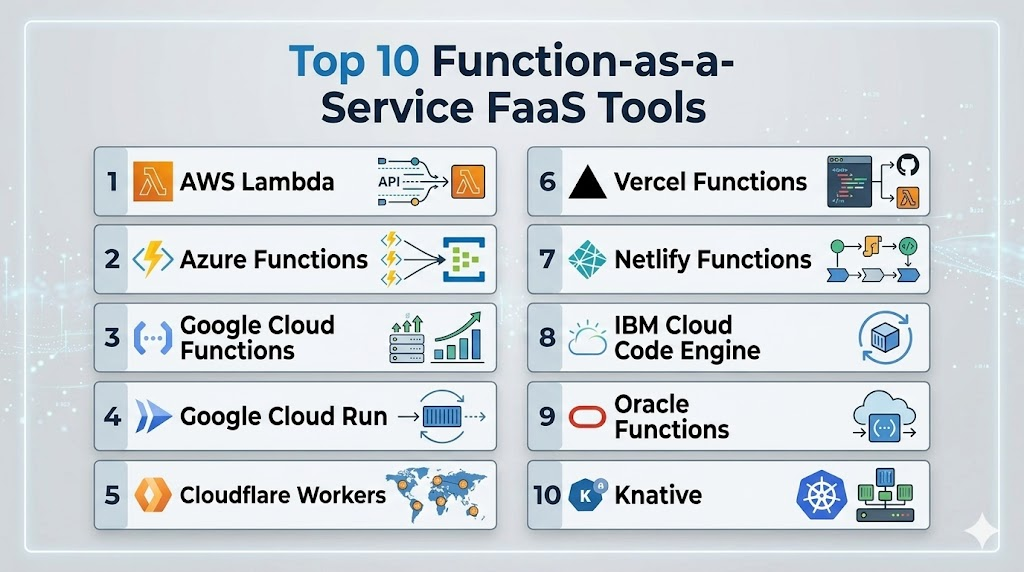
Top 10 Function-as-a-Service Tools
1- AWS Lambda
Short description: Executes code in response to events, fully managed by AWS, ideal for cloud-native applications and automation.
Key Features
- Multiple language support: Node.js, Python, Java, Go, and more.
- Automatic scaling per request volume.
- Deep integration with AWS services (S3, DynamoDB, API Gateway).
- Versioning, aliases, and environment variables.
- Event-driven execution with triggers from storage, messaging, or HTTP.
- Built-in monitoring with CloudWatch.
- Pay-per-use pricing model.
Pros
- Mature ecosystem with global adoption.
- Scales automatically without server management.
- Strong integration with AWS services.
Cons
- Vendor lock-in risk.
- Cold starts can affect latency-sensitive functions.
- Costs can accumulate with high-volume triggers.
Platforms / Deployment
Web / Linux / Windows / macOS
Cloud
Security & Compliance
- Supports IAM, RBAC, MFA, encrypted variables.
- SOC 2, ISO 27001, and GDPR-ready.
Integrations & Ecosystem
- AWS API Gateway, S3, DynamoDB, EventBridge, SQS.
- CI/CD pipelines like CodePipeline, GitHub Actions.
- Infrastructure as code with Terraform, SAM.
Support & Community
- Extensive AWS documentation, tutorials, and enterprise support.
- Large community for troubleshooting and shared patterns.
2- Azure Functions
Short description: Event-driven compute service from Microsoft Azure, optimized for enterprise and .NET workloads.
Key Features
- Triggers from HTTP, storage, queues, and Event Hubs.
- Supports multiple runtimes: .NET, Node.js, Python, Java, PowerShell.
- Flexible hosting: Consumption, Premium, Dedicated plans.
- Integration with Azure Logic Apps, API Management.
- Built-in monitoring and logging with Azure Monitor.
- Deployment via Git or CI/CD pipelines.
- Serverless scaling with autoscaling and concurrency control.
Pros
- Ideal for Microsoft ecosystem and enterprise environments.
- Flexible deployment plans.
- Good developer tooling and integrations.
Cons
- Best suited for Azure-centric teams.
- Premium features increase cost.
- Latency considerations for some runtime languages.
Platforms / Deployment
Web / Windows / Linux / macOS
Cloud / Hybrid
Security & Compliance
- Supports Azure IAM, encryption, and private networking.
- Compliance features depend on Azure region and configuration.
Integrations & Ecosystem
- Azure Storage, Event Hubs, API Management.
- GitHub Actions, Azure DevOps pipelines.
- Azure Monitor and Application Insights.
Support & Community
- Strong Microsoft support, extensive documentation, active community forums.
3- Google Cloud Functions
Short description: Google’s FaaS offering for event-driven applications and lightweight automation tasks.
Key Features
- HTTP, Cloud Storage, Pub/Sub, and Firestore triggers.
- Multiple runtime support: Node.js, Python, Go, Java.
- Automatic scaling from zero to thousands of requests.
- Integrated with Google Cloud Monitoring and Logging.
- Simple deployment via gcloud CLI or CI/CD pipelines.
- Supports serverless APIs and background processing.
- Environment variables and secrets management.
Pros
- Easy for Google Cloud users.
- Good integration with cloud-native services.
- Lightweight and fast to deploy.
Cons
- Limited runtime duration (max execution time).
- Cold starts can impact latency.
- Less flexible than container-based serverless.
Platforms / Deployment
Web / Linux / Windows / macOS
Cloud
Security & Compliance
- IAM, encryption at rest/in transit, audit logs.
- Compliance depends on Google Cloud configuration.
Integrations & Ecosystem
- Pub/Sub, Firestore, Cloud Storage.
- Cloud Build and CI/CD workflows.
- Firebase integration for web/mobile apps.
Support & Community
- Google Cloud documentation, tutorials, and enterprise support options.
4- Google Cloud Run
Short description: Fully managed serverless platform for containerized workloads with automatic scaling.
Key Features
- Runs containers with any runtime or framework.
- HTTP-based event triggers.
- Autoscaling, including scale-to-zero.
- Integration with Cloud Build and Cloud Run Jobs.
- Supports stateless web services and APIs.
- Pay-per-use pricing based on execution time.
- Logging and monitoring via Cloud Monitoring.
Pros
- Flexible container-based execution.
- Cloud-native scaling without infrastructure management.
- Supports modern microservices.
Cons
- Requires container packaging knowledge.
- Stateless workloads only.
- Best value within Google Cloud ecosystem.
Platforms / Deployment
Web / Linux / Windows / macOS
Cloud
Security & Compliance
- IAM, VPC connectors, audit logging.
- Compliance features via Google Cloud.
Integrations & Ecosystem
- Cloud Build, Artifact Registry.
- Event-driven triggers with Pub/Sub.
- CI/CD pipelines and observability integrations.
Support & Community
- Official documentation, active developer community, enterprise support.
5- Cloudflare Workers
Short description: Edge-deployed serverless functions to run globally near users, ideal for low-latency web applications and APIs.
Key Features
- Deploys code globally across Cloudflare’s edge network.
- Supports JavaScript, TypeScript, WebAssembly.
- Event-driven HTTP, queue, and KV triggers.
- Integrates with Cloudflare KV, Durable Objects, R2 storage.
- Autoscaling and scale-to-zero capabilities.
- Developer-friendly CLI and Git integration.
- Edge caching and routing logic.
Pros
- Extremely low-latency global execution.
- Ideal for API, middleware, and edge computation.
- Fast developer iteration cycles.
Cons
- Edge-specific design may require code adaptation.
- Not suitable for long-running server processes.
- Deep value comes with Cloudflare ecosystem adoption.
Platforms / Deployment
Web / Linux / Windows / macOS
Cloud / Edge
Security & Compliance
- Platform-level encryption, access controls, and secrets management.
- Compliance depends on Cloudflare plan and configuration.
Integrations & Ecosystem
- KV storage, Durable Objects, R2.
- Webhooks, queues, and external API integration.
- Git workflow integration for automated deployment.
Support & Community
- Cloudflare documentation, community forum, examples, enterprise support.
6- Vercel Functions
Short description: Serverless platform optimized for frontend and full-stack web applications, commonly with Next.js.
Key Features
- Serverless and edge function support.
- Git-based deployment and automatic previews.
- API routes and middleware integration.
- Autoscaling with zero infrastructure management.
- Environment variables and secrets support.
- Supports Jamstack and static frontend apps.
- Integrates with analytics and edge caching.
Pros
- Excellent for web teams and frontend developers.
- Fast deployment and preview environments.
- Strong framework integration (Next.js).
Cons
- Not suitable for complex enterprise backends.
- Premium features may increase cost.
- Limited long-running execution support.
Platforms / Deployment
Web / Linux / Windows / macOS
Cloud / Edge
Security & Compliance
- Encrypted connections, access control, environment variable protection.
- Enterprise compliance varies by plan.
Integrations & Ecosystem
- GitHub, GitLab, Bitbucket.
- Frontend frameworks like Next.js.
- Webhooks, APIs, analytics platforms.
Support & Community
- Documentation, community examples, enterprise support.
7- Netlify Functions
Short description: Serverless backend for web and Jamstack projects to handle APIs, automation, and events.
Key Features
- Event-driven serverless functions.
- Git-based deployments.
- Scheduled functions and triggers.
- Integration with Netlify hosting and forms.
- API and automation workflow support.
- Environment variable management.
- Developer preview deployments.
Pros
- Simple backend for web developers.
- Git workflow integration.
- Good for Jamstack sites.
Cons
- Not ideal for complex backends.
- Limited scalability compared to enterprise FaaS.
- Works best within Netlify ecosystem.
Platforms / Deployment
Web / Linux / Windows / macOS
Cloud
Security & Compliance
- Access control, encrypted communication, team permissions.
- Compliance depends on enterprise configuration.
Integrations & Ecosystem
- Git providers, headless CMS, external APIs.
- Forms, authentication, webhook integrations.
Support & Community
- Documentation, active developer community, support options.
8- IBM Cloud Code Engine
Short description: Runs containers, applications, and batch jobs serverlessly on IBM Cloud with autoscaling.
Key Features
- Supports containers, jobs, functions.
- Autoscaling and scale-to-zero.
- Integration with IBM Cloud services.
- Supports APIs, batch processing, and automation.
- Developer-friendly container-based workflows.
- Logging and monitoring.
- Pay-per-use billing.
Pros
- Flexible workload execution.
- Good for IBM Cloud customers.
- Supports containers and batch workloads.
Cons
- Smaller ecosystem than AWS or Azure.
- Cloud expertise required.
- Best value is inside IBM Cloud.
Platforms / Deployment
Web / Linux / Windows / macOS
Cloud
Security & Compliance
- IBM Cloud IAM, audit logging, encryption.
- Compliance depends on IBM configuration.
Integrations & Ecosystem
- IBM Cloud services, container registry.
- Event-driven triggers and DevOps tools.
- APIs and enterprise integrations.
Support & Community
- Enterprise IBM support, documentation, cloud guidance.
9- Oracle Functions
Short description: Oracle’s serverless platform on Oracle Cloud Infrastructure for APIs, automation, and enterprise cloud functions.
Key Features
- Event-driven functions using Fn Project.
- Container-based deployment.
- Integration with Oracle Cloud services.
- Supports enterprise workloads, automation, and data events.
- Identity and access management.
- Logging and observability.
Pros
- Enterprise cloud-ready.
- Integrates with Oracle Cloud applications.
- Supports container-based workloads.
Cons
- Limited ecosystem beyond Oracle Cloud.
- Best for Oracle Cloud users.
- Some learning curve for Fn Project.
Platforms / Deployment
Web / Linux / Windows / macOS
Cloud
Security & Compliance
- IAM, encrypted communication, audit logging.
- Compliance depends on Oracle configuration.
Integrations & Ecosystem
- OCI services, databases, API Gateway.
- CI/CD pipelines and container registries.
Support & Community
- Oracle documentation and enterprise support.
10- Knative
Short description: Open-source serverless platform for Kubernetes, enabling autoscaling functions, container workloads, and event-driven applications.
Key Features
- Serverless workloads on Kubernetes.
- Autoscaling including scale-to-zero.
- Eventing framework for triggers.
- Container-based deployment.
- Portable across clouds and clusters.
- Observability with Prometheus and Grafana.
- Extensible open-source ecosystem.
Pros
- Kubernetes portability.
- Flexible serverless workloads.
- Open-source and extensible.
Cons
- Requires Kubernetes expertise.
- More operational responsibility than managed FaaS.
- Setup and monitoring are complex.
Platforms / Deployment
Linux / Kubernetes
Self-hosted / Hybrid / Cloud
Security & Compliance
- Security depends on Kubernetes and cluster configuration.
- Compliance is implementation-dependent.
Integrations & Ecosystem
- Kubernetes-native tools, CI/CD pipelines.
- Container registries, Istio or Kourier.
- Event sources, observability tools.
Support & Community
- Open-source community, active adoption for Kubernetes platform teams.
Comparison Table
| Tool Name | Best For | Platform(s) Supported | Deployment | Standout Feature | Public Rating |
|---|---|---|---|---|---|
| AWS Lambda | Event-driven apps | Web, Linux, Windows, macOS | Cloud | Deep AWS integration | N/A |
| Azure Functions | Microsoft and enterprise | Web, Linux, Windows, macOS | Cloud / Hybrid | Event triggers & bindings | N/A |
| Google Cloud Functions | Google Cloud lightweight functions | Web, Linux, Windows, macOS | Cloud | Event-driven & easy deployment | N/A |
| Google Cloud Run | Serverless containers | Web, Linux, Windows, macOS | Cloud | Container-based serverless | N/A |
| Cloudflare Workers | Edge compute | Web, Linux, Windows, macOS | Cloud / Edge | Global edge execution | N/A |
| Vercel Functions | Frontend-first web apps | Web, Linux, Windows, macOS | Cloud / Edge | Git-based deployment & previews | N/A |
| Netlify Functions | Jamstack and websites | Web, Linux, Windows, macOS | Cloud | Simple web backend | N/A |
| IBM Cloud Code Engine | Container workloads | Web, Linux, Windows, macOS | Cloud | Serverless containers & jobs | N/A |
| Oracle Functions | Oracle Cloud | Web, Linux, Windows, macOS | Cloud | Enterprise integration | N/A |
| Knative | Kubernetes serverless | Linux / Kubernetes | Self-hosted / Hybrid / Cloud | Portable serverless on K8s | N/A |
Evaluation & Scoring of FaaS Platforms
| Tool Name | Core 25% | Ease 15% | Integrations 15% | Security 10% | Performance 10% | Support 10% | Value 15% | Weighted Total |
|---|---|---|---|---|---|---|---|---|
| AWS Lambda | 9 | 8 | 10 | 9 | 8 | 9 | 8 | 8.7 |
| Azure Functions | 8 | 8 | 9 | 9 | 8 | 9 | 8 | 8.4 |
| Google Cloud Functions | 8 | 8 | 8 | 8 | 8 | 8 | 8 | 8.0 |
| Google Cloud Run | 9 | 8 | 9 | 8 | 9 | 8 | 8 | 8.5 |
| Cloudflare Workers | 8 | 8 | 8 | 8 | 9 | 8 | 8 | 8.2 |
| Vercel Functions | 8 | 9 | 8 | 7 | 8 | 8 | 8 | 8.1 |
| Netlify Functions | 7 | 9 | 7 | 7 | 7 | 8 | 8 | 7.6 |
| IBM Cloud Code Engine | 7 | 7 | 7 | 8 | 8 | 8 | 7 | 7.4 |
| Oracle Functions | 7 | 7 | 7 | 8 | 7 | 8 | 7 | 7.3 |
| Knative | 8 | 6 | 8 | 7 | 8 | 7 | 8 | 7.5 |
Which FaaS Tool Is Right for You?
Solo / Freelancer
- Vercel Functions, Netlify Functions, Cloudflare Workers – simple, web- and API-focused serverless.
- Lightweight, cost-effective, and quick to deploy.
SMB
- AWS Lambda, Azure Functions, Google Cloud Run, Cloudflare Workers – scalable, flexible, and cloud-integrated.
- Choose based on current cloud provider and application architecture.
Continuing from the decision guide section, here is the remaining complete blog content:
Mid-Market
- AWS Lambda, Azure Functions, Google Cloud Run, and Cloudflare Workers are strong choices for mid-market companies.
- These tools support scalable APIs, event-driven workflows, cloud integrations, and production-grade deployment patterns.
- Mid-market teams should focus on monitoring, CI/CD integration, cost controls, and security governance before expanding FaaS usage.
Enterprise
- AWS Lambda, Azure Functions, Google Cloud Run, IBM Cloud Code Engine, Oracle Functions, and Knative are suitable for enterprise environments.
- Enterprises should prioritize IAM, audit logs, networking controls, data residency, enterprise support, and integration with existing cloud platforms.
- Knative is useful for Kubernetes-focused enterprises that want more portability and control.
Budget vs Premium
- For budget-conscious teams, Netlify Functions, Cloudflare Workers, Google Cloud Functions, and entry-level cloud function plans are practical starting points.
- Premium environments usually need AWS Lambda, Azure Functions, Google Cloud Run, or enterprise-focused platforms with stronger governance, monitoring, and support.
- Buyers should evaluate total cost, including execution time, requests, logs, data transfer, storage, and observability.
Feature Depth vs Ease of Use
- For ease of use, Vercel Functions, Netlify Functions, and Cloudflare Workers are good choices because they offer quick deployment and developer-friendly workflows.
- For deeper cloud features, AWS Lambda, Azure Functions, and Google Cloud Run provide stronger event integrations, security controls, and enterprise architecture support.
- For maximum control, Knative is powerful but requires Kubernetes expertise.
Integrations & Scalability
- Choose AWS Lambda if your workloads depend heavily on AWS services such as S3, DynamoDB, API Gateway, SQS, and EventBridge.
- Choose Azure Functions if your team uses Microsoft Azure, Azure DevOps, Event Hubs, Service Bus, and enterprise identity services.
- Choose Google Cloud Run or Google Cloud Functions if your stack is built around Google Cloud, Pub/Sub, Cloud Storage, Firestore, and Cloud Build.
- Choose Cloudflare Workers if global edge performance and low-latency API logic are important.
- Choose Knative if portability across Kubernetes environments is a major requirement.
Security & Compliance Needs
- Security-focused teams should review IAM, RBAC, secrets management, encryption, audit logging, private networking, deployment approvals, and data residency.
- AWS Lambda, Azure Functions, and Google Cloud Run are strong options for organizations that need mature cloud security controls.
- IBM Cloud Code Engine and Oracle Functions may fit enterprises already using IBM Cloud or Oracle Cloud.
- Knative can support strict internal governance, but security depends heavily on Kubernetes configuration and platform engineering maturity.
Frequently Asked Questions
1- What is Function-as-a-Service?
Function-as-a-Service is a cloud model where developers run small pieces of code called functions without managing servers.
The platform automatically handles execution, scaling, availability, and infrastructure management.
It is commonly used for APIs, automation, event processing, and backend tasks.
2- How is FaaS different from serverless?
FaaS is one type of serverless computing focused on running functions in response to events.
Serverless is broader and can include serverless containers, databases, storage, workflows, and backend services.
In simple terms, FaaS is a major part of the serverless ecosystem.
3- Which FaaS tool is best for beginners?
Vercel Functions, Netlify Functions, Cloudflare Workers, and Google Cloud Functions are easier starting points for many beginners.
They provide simple deployment workflows and are useful for APIs, webhooks, and frontend-driven applications.
For AWS users, AWS Lambda is also beginner-friendly once the basic AWS services are understood.
4- Is AWS Lambda the best FaaS platform?
AWS Lambda is one of the most mature and widely used FaaS platforms, especially for AWS-based applications.
However, it is not always the best choice for every team.
Azure Functions, Google Cloud Run, Cloudflare Workers, and Knative may be better depending on cloud ecosystem, latency needs, and workload type.
5- What are common FaaS pricing models?
Most FaaS platforms use usage-based pricing based on requests, execution duration, memory, CPU, and sometimes data transfer.
Some platforms also include free tiers, premium plans, or enterprise pricing.
Teams should calculate real workload costs because logs, networking, storage, and observability can increase total spend.
6- What are common mistakes in FaaS adoption?
Common mistakes include poor IAM design, weak monitoring, too many small functions, unclear ownership, and lack of cost controls.
Teams may also ignore cold starts, timeout limits, retries, and event failure handling.
A good FaaS implementation should include testing, observability, security reviews, and rollback planning.
7- Are FaaS platforms secure?
FaaS platforms can be secure when configured with least-privilege permissions, encrypted secrets, audit logs, and controlled deployment workflows.
The main risks usually come from overly broad permissions, exposed endpoints, insecure dependencies, and poor event validation.
Security should be designed from the start, not added after deployment.
8- Can FaaS support AI workloads?
Yes, FaaS can support lightweight AI tasks such as document processing, API-based inference, automation workflows, summarization jobs, and event-driven AI pipelines.
For heavy training, GPU workloads, or long-running inference, dedicated AI infrastructure may be better.
FaaS works best when AI tasks are short, scalable, and triggered by events.
9- Can I migrate from one FaaS provider to another?
Yes, migration is possible, but it may require code, trigger, permission, and deployment changes.
Each provider has its own event model, runtime behavior, IAM system, and service integrations.
Using containers, infrastructure as code, and clean architecture can reduce lock-in.
10- What are alternatives to FaaS?
Alternatives include serverless containers, Kubernetes, virtual machines, managed app platforms, platform-as-a-service, and traditional container orchestration.
For long-running workloads, containers or VMs may be more predictable.
For lightweight event-driven tasks, FaaS is often simpler and more cost-efficient.
Conclusion
Function-as-a-Service platforms help teams build event-driven applications without managing server infrastructure, making them valuable for APIs, automation, integrations, data processing, and lightweight AI workflows. The best FaaS tool depends on your cloud ecosystem, workload type, latency needs, developer skills, governance requirements, and budget. AWS Lambda is a strong fit for AWS-centric teams, Azure Functions works well for Microsoft and enterprise environments, Google Cloud Functions and Google Cloud Run are useful for Google Cloud workloads, while Cloudflare Workers, Vercel Functions, and Netlify Functions are excellent for web and edge use cases. IBM Cloud Code Engine, Oracle Functions, and Knative are better suited for specific enterprise or Kubernetes-driven strategies. The best next step is to shortlist two or three tools, test them with a real workload, review performance and cost, validate security controls, and then choose the platform that aligns best with your long-term architecture.

Find Trusted Cardiac Hospitals
Compare heart hospitals by city and services — all in one place.
Explore Hospitals
Function-as-a-Service (FaaS) platforms are most effective when they enable developers to build and deploy event-driven applications without managing servers or infrastructure. By automatically handling provisioning, scaling, execution, monitoring, and billing based on actual usage, these serverless solutions help organizations accelerate development, reduce operational overhead, optimize costs, and deliver highly scalable applications with greater agility.