Introduction
Case Management Platforms (CMPs) are software solutions designed to handle complex, dynamic workflows that require human judgment alongside automated processes. They enable organizations to track, manage, and resolve cases—ranging from customer service requests and insurance claims to legal matters and compliance investigations—in a centralized, auditable, and efficient manner.
These platforms have become essential as enterprises increasingly rely on multi-channel operations and require real-time visibility and collaboration across departments. By providing structured workflows, automation, and reporting, CMPs help organizations reduce resolution times, ensure compliance, and improve customer satisfaction.
Real-world use cases include:
- Managing customer support tickets across multiple channels
- Handling insurance claims from submission to resolution
- Tracking legal cases and regulatory compliance workflows
- Coordinating IT incident response and service requests
- Automating HR case management such as grievances or onboarding issues
Key evaluation criteria for buyers:
- Workflow and process automation capabilities
- Case tracking and lifecycle management
- Low-code/no-code configuration options
- Analytics and reporting features
- Integration with CRM, ERP, BPM, and RPA systems
- Security and compliance support
- Scalability and multi-department support
- Role-based access and collaboration features
- User interface and ease of adoption
- Vendor support and community
Best for: Customer support teams, legal and compliance departments, HR, IT service management, and medium-to-large enterprises.
Not ideal for: Small organizations with minimal case tracking needs or highly standardized processes that do not require complex decision logic.
Key Trends in Case Management Platforms
- AI-powered case triaging and automated decision recommendations
- Integration with BPM, RPA, and ERP systems for seamless automation
- Low-code/no-code design for citizen developers and business users
- Cloud-first platforms supporting hybrid and multi-tenant architectures
- Real-time collaboration and multi-channel case updates
- Advanced analytics and dashboards for case performance monitoring
- Enhanced security and compliance features including audit trails and GDPR adherence
- Mobile accessibility for field operations and remote work
- Subscription-based pricing models with scalable tiers
- Focus on end-to-end workflow orchestration
How We Selected These Tools (Methodology)
- Assessed market adoption and enterprise presence
- Evaluated workflow automation and rule engine capabilities
- Reviewed integration potential with BPM, CRM, ERP, and RPA systems
- Considered AI/ML features and decision support capabilities
- Examined security posture, audit, and compliance certifications
- Analyzed low-code/no-code usability for business users
- Verified support, training, and community resources
- Considered scalability and multi-department suitability
- Compared platform performance and reliability signals
- Evaluated pricing flexibility and total cost of ownership
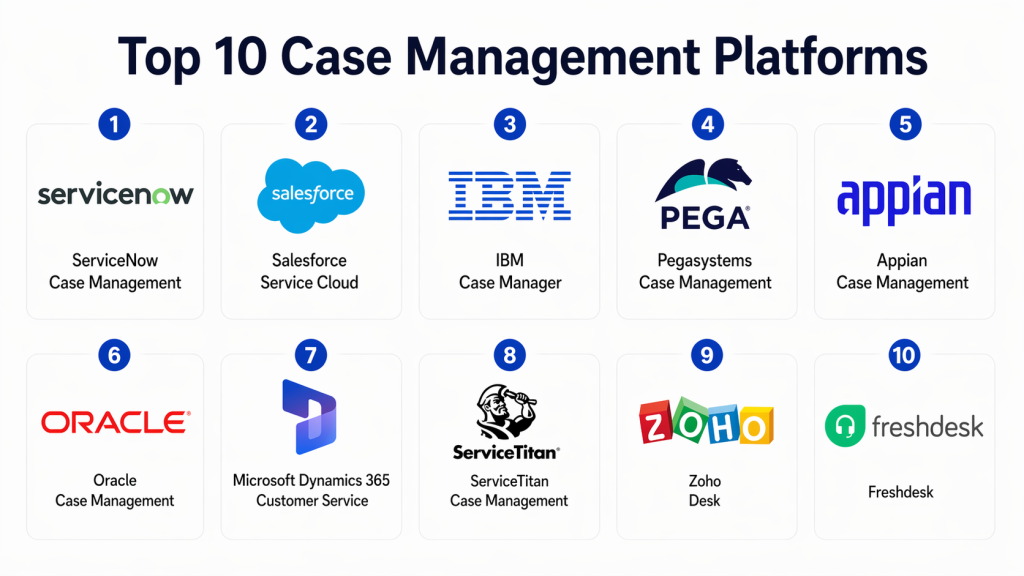
Top 10 Case Management Platforms
#1 — ServiceNow Case Management
Short description: ServiceNow CMP provides a comprehensive solution for IT service, HR, and customer case workflows with automation and AI-based insights.
Key Features
- Multi-channel case capture and routing
- AI-based recommendations and triaging
- Integrated reporting and dashboards
- Workflow automation and orchestration
- Low-code customization tools
- SLA management and alerts
Pros
- Enterprise-grade scalability
- Strong ecosystem and integrations
Cons
- Higher cost for SMBs
- Steep learning curve for advanced features
Platforms / Deployment
- Web / iOS / Android / Cloud
Security & Compliance
- SOC 2, ISO 27001, GDPR, RBAC
Integrations & Ecosystem
- ERP, CRM, ITSM systems
- APIs and integration hub
- Pre-built connectors
Support & Community
- Extensive documentation and global support
#2 — Salesforce Service Cloud
Short description: Salesforce Service Cloud enables case management for customer service, including automation, AI, and omnichannel support.
Key Features
- Omnichannel case routing
- AI-driven insights and automation
- Knowledge base integration
- SLA tracking and reporting
- Workflow automation via Flow Builder
Pros
- Tight CRM integration
- AI-assisted case prioritization
Cons
- Pricing can be high for small teams
- Limited offline capabilities
Platforms / Deployment
- Web / iOS / Android / Cloud
Security & Compliance
- GDPR, SOC 2, MFA
Integrations & Ecosystem
- Salesforce CRM, ERP connectors, APIs
- AppExchange ecosystem for plugins
Support & Community
- Extensive Salesforce community and support tiers
#3 — IBM Case Manager
Short description: IBM Case Manager centralizes case information, automates workflows, and provides analytics across enterprise departments.
Key Features
- Dynamic case workflows
- Integration with BPM and analytics platforms
- Rule-based decision automation
- Document and content management
- Audit and compliance reporting
Pros
- Strong integration and enterprise support
- Advanced workflow customization
Cons
- Complex deployment
- Requires training for business users
Platforms / Deployment
- Web / Windows / Linux / Cloud / On-prem
Security & Compliance
- SOC 2, ISO 27001, RBAC
Integrations & Ecosystem
- BPM, ERP, CRM
- APIs for extensibility
Support & Community
- IBM enterprise support and user forums
#4 — Pegasystems Case Management
Short description: Pega Case Management provides AI-driven, low-code solutions for customer service, HR, and operational workflows.
Key Features
- AI-assisted decision routing
- Low-code workflow design
- Dynamic case lifecycle management
- Analytics and dashboards
- Multi-channel case capture
Pros
- Strong AI and predictive analytics
- Flexible, low-code interface
Cons
- Licensing complexity
- High cost for small deployments
Platforms / Deployment
- Web / Cloud / Hybrid
Security & Compliance
- ISO 27001, SOC 2
Integrations & Ecosystem
- CRM, ERP, BPM integration
- APIs for automation
Support & Community
- Enterprise support, Pega community
#5 — Appian Case Management
Short description: Appian CMP offers low-code automation for case-based processes with real-time analytics and integration capabilities.
Key Features
- Low-code case modeling
- Integration with BPM and RPA
- Workflow automation
- Real-time monitoring and dashboards
- Collaboration and document management
Pros
- Rapid deployment with low-code
- Real-time insights and dashboards
Cons
- Limited AI capabilities compared to Pega
- Subscription cost
Platforms / Deployment
- Web / iOS / Android / Cloud
Security & Compliance
- SOC 2, ISO 27001, GDPR
Integrations & Ecosystem
- ERP, CRM, BPM systems
- APIs for extension
Support & Community
- Enterprise support, Appian community
#6 — Oracle Case Management
Short description: Oracle Case Management integrates with Oracle Cloud apps to manage cases, automate decisions, and provide analytics.
Key Features
- Case lifecycle management
- Automated workflows
- Analytics and dashboards
- Integration with Oracle Cloud apps
- SLA monitoring
Pros
- Tight integration with Oracle ecosystem
- Enterprise scalability
Cons
- Best suited for Oracle environments
- Implementation complexity
Platforms / Deployment
- Web / Cloud / Hybrid
Security & Compliance
- SOC 2, ISO 27001
Integrations & Ecosystem
- Oracle ERP, CRM, BPM
- APIs and connectors
Support & Community
- Oracle enterprise support
#7 — Microsoft Dynamics 365 Customer Service
Short description: Dynamics 365 provides case management for customer service teams with automation, AI, and integration into Microsoft ecosystems.
Key Features
- Case routing and management
- AI-powered insights
- Omnichannel customer support
- Knowledge management
- Workflow automation via Power Automate
Pros
- Seamless Microsoft integration
- AI-assisted case handling
Cons
- Limited advanced workflow customization
- Licensing complexity
Platforms / Deployment
- Web / Windows / iOS / Android / Cloud
Security & Compliance
- GDPR, SOC 2
Integrations & Ecosystem
- Microsoft 365, Power Platform, ERP
- APIs and connectors
Support & Community
- Microsoft support and community forums
#8 — ServiceTitan Case Management
Short description: ServiceTitan focuses on service-based businesses to manage field cases, scheduling, and customer interactions.
Key Features
- Field service case management
- Customer communication tracking
- Workflow automation
- Analytics and reporting
- Mobile app for field staff
Pros
- Strong field service focus
- Mobile accessibility
Cons
- Limited non-service industry applicability
- Smaller ecosystem
Platforms / Deployment
- Web / iOS / Android / Cloud
Security & Compliance
- Not publicly stated
Integrations & Ecosystem
- CRM, ERP, mobile apps
- APIs for extension
Support & Community
- Enterprise support, documentation
#9 — Zoho Desk
Short description: Zoho Desk offers cloud-based case management for customer support teams with multi-channel capabilities.
Key Features
- Ticket and case management
- AI-based automation and recommendations
- SLA management
- Multi-channel support (email, chat, phone)
- Analytics and dashboards
Pros
- Cost-effective for SMBs
- Multi-channel support
Cons
- Limited enterprise-grade customization
- Less suitable for complex workflows
Platforms / Deployment
- Web / iOS / Android / Cloud
Security & Compliance
- GDPR, ISO 27001
Integrations & Ecosystem
- CRM, ERP, RPA
- APIs and integrations
Support & Community
- Online documentation, support plans
#10 — Freshdesk
Short description: Freshdesk provides cloud-based case management for customer support with automation and collaboration tools.
Key Features
- Ticket and case management
- Workflow automation
- SLA and escalation rules
- Multi-channel support
- Reporting and dashboards
Pros
- User-friendly interface
- Affordable for small to mid-sized teams
Cons
- Limited advanced workflow customization
- Enterprise scalability limitations
Platforms / Deployment
- Web / iOS / Android / Cloud
Security & Compliance
- GDPR, ISO 27001
Integrations & Ecosystem
- CRM, ERP, collaboration tools
- APIs for custom integrations
Support & Community
- Online documentation, community forums
Comparison Table (Top 10)
| Tool Name | Best For | Platform(s) Supported | Deployment | Standout Feature | Public Rating |
|---|---|---|---|---|---|
| ServiceNow | Enterprise IT & HR | Web / iOS / Android | Cloud | AI-powered triaging | N/A |
| Salesforce Service Cloud | Customer support | Web / iOS / Android | Cloud | Omnichannel automation | N/A |
| IBM Case Manager | Enterprise compliance | Web / Windows / Linux | Cloud / On-prem | Dynamic case workflows | N/A |
| Pega Case Management | AI-driven case routing | Web / Cloud / Hybrid | Cloud / Hybrid | Predictive AI routing | N/A |
| Appian Case Management | Low-code automation | Web / iOS / Android | Cloud | Real-time analytics | N/A |
| Oracle Case Management | Oracle environments | Web / Cloud / Hybrid | Cloud / Hybrid | ERP integration | N/A |
| Dynamics 365 Customer Service | Microsoft ecosystem | Web / Windows / iOS / Android | Cloud | Power Automate workflows | N/A |
| ServiceTitan | Field service businesses | Web / iOS / Android | Cloud | Field service focus | N/A |
| Zoho Desk | SMB customer support | Web / iOS / Android | Cloud | Multi-channel support | N/A |
| Freshdesk | SMB support teams | Web / iOS / Android | Cloud | Affordable, user-friendly | N/A |
Evaluation & Scoring of Case Management Platforms
| Tool Name | Core (25%) | Ease (15%) | Integrations (15%) | Security (10%) | Performance (10%) | Support (10%) | Value (15%) | Weighted Total |
|---|---|---|---|---|---|---|---|---|
| ServiceNow | 9 | 8 | 9 | 9 | 9 | 8 | 7 | 8.55 |
| Salesforce Service Cloud | 8 | 8 | 8 | 8 | 8 | 7 | 7 | 7.95 |
| IBM Case Manager | 8 | 7 | 8 | 8 | 8 | 7 | 7 | 7.85 |
| Pega Case Management | 9 | 7 | 8 | 8 | 8 | 7 | 7 | 8.05 |
| Appian Case Management | 8 | 8 | 7 | 7 | 7 | 6 | 7 | 7.25 |
| Oracle Case Management | 8 | 7 | 8 | 8 | 8 | 7 | 7 | 7.85 |
| Dynamics 365 Customer Service | 8 | 8 | 7 | 8 | 8 | 7 | 7 | 7.9 |
| ServiceTitan | 7 | 8 | 7 | 7 | 7 | 6 | 7 | 7.0 |
| Zoho Desk | 7 | 8 | 7 | 7 | 7 | 6 | 8 | 7.2 |
| Freshdesk | 7 | 8 | 7 | 7 | 7 | 6 | 8 | 7.2 |
Interpretation: Higher weighted totals indicate suitability for enterprise-scale operations, complex workflows, and multi-channel case management, while lower scores favor SMB use or simpler workflows.
Which Case Management Platforms Tool Is Right for You?
Solo / Freelancer
- Zoho Desk or Freshdesk for simple case tracking and automation
SMB
- Appian, ServiceTitan, or Zoho Desk for low-code and workflow automation
Mid-Market
- Dynamics 365, Salesforce Service Cloud for integrated CRM and case management
Enterprise
- ServiceNow, IBM Case Manager, Pega for high-volume, complex, multi-department workflows
Budget vs Premium
- Budget: Freshdesk, Zoho Desk
- Premium: ServiceNow, Pega, IBM Case Manager
Feature Depth vs Ease of Use
- Feature-rich: ServiceNow, Pega, IBM Case Manager
- Ease-of-use: Freshdesk, Zoho Desk, Appian
Integrations & Scalability
- Enterprise-ready: ServiceNow, Pega, Salesforce Service Cloud
- Moderate: Appian, Freshdesk
Security & Compliance Needs
- Enterprise-grade: IBM Case Manager, ServiceNow, Pega
- Standard compliance: Freshdesk, Zoho Desk
Frequently Asked Questions (FAQs)
1. What is a Case Management Platform?
A CMP is software that centralizes case tracking, automates workflows, and enables collaboration to resolve issues efficiently.
2. Can non-technical users manage cases?
Yes, low-code/no-code platforms like Appian or Zoho Desk allow business users to configure workflows without coding.
3. How do CMPs integrate with other systems?
They typically offer APIs, pre-built connectors, and native integration with CRM, ERP, BPM, and RPA platforms.
4. Are CMPs secure for enterprise use?
Enterprise CMPs offer RBAC, MFA, encryption, audit logs, and comply with SOC 2, ISO 27001, and GDPR standards.
5. What industries benefit most from CMPs?
Customer service, field service, insurance, healthcare, IT service management, and legal operations.
6. How long does deployment take?
It can range from a few weeks for SMBs to several months for enterprise-scale deployments with complex workflows.
7. Can CMPs incorporate AI for case management?
Yes, leading platforms provide AI-driven triaging, predictive analytics, and decision recommendations.
8. What are common mistakes in CMP adoption?
- Overcomplicating workflows
- Poor integration planning
- Lack of governance and monitoring
9. Do CMPs support cloud deployment?
Yes, most offer cloud, on-premises, or hybrid deployment models.
10. What alternatives exist for CMPs?
BPM suites, RPA platforms, and help desk software can be alternatives for specific case tracking needs.
Conclusion
Case Management Platforms streamline complex workflows, improve collaboration, and enhance operational efficiency while ensuring compliance and auditability. Selecting the right platform depends on organizational size, workflow complexity, integration requirements, and AI needs. SMBs can benefit from Zoho Desk or Freshdesk, while enterprises achieve scale and flexibility with ServiceNow, Pega, or IBM Case Manager. Evaluating 2–3 platforms and running a pilot ensures suitability, integration, and compliance readiness

Find Trusted Cardiac Hospitals
Compare heart hospitals by city and services — all in one place.
Explore Hospitals
This explains how case management tools help organize complex workflows like claims, support cases, and compliance tasks in one system.