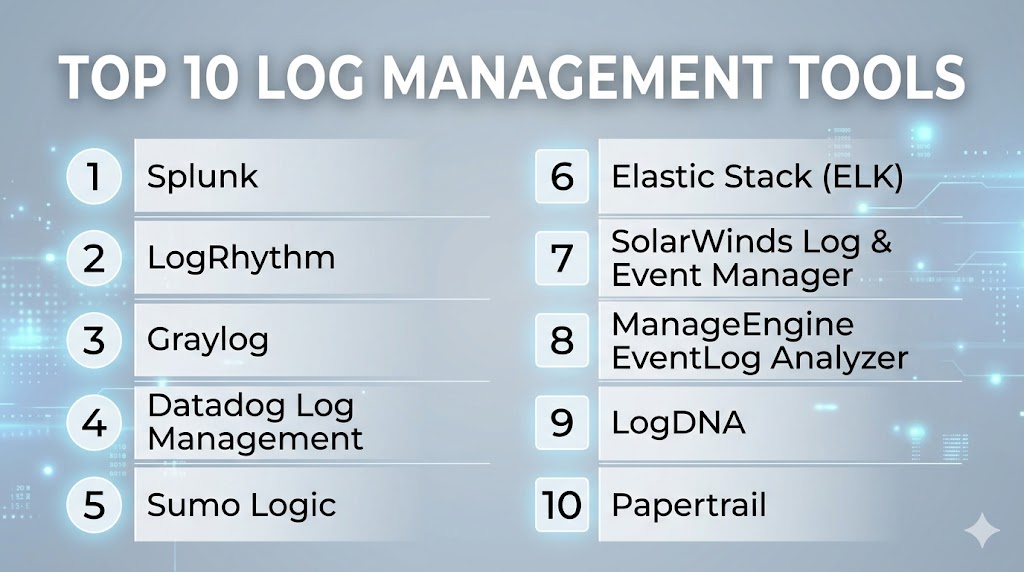
Introduction
Log Management Tools are software platforms designed to collect, store, analyze, and visualize logs from various systems, applications, and infrastructure components. They help IT teams gain real-time insights into system health, troubleshoot issues, ensure compliance, and monitor security threats. With the rise of cloud-native architectures, distributed applications, and hybrid IT environments, effective log management has become critical for operational efficiency and cybersecurity.
Organizations rely on log management to detect anomalies, audit system activity, and ensure regulatory compliance. For example, a financial firm can monitor transaction logs for suspicious behavior, while a DevOps team can track microservices events to prevent outages. Retail businesses may analyze logs to identify usage patterns in e-commerce systems, and healthcare providers can maintain secure audit trails for sensitive patient data. Additionally, cybersecurity teams use log aggregation to detect potential attacks across networks and endpoints.
Best for: IT operations teams, DevOps engineers, cybersecurity teams, SMBs to large enterprises, industries with regulatory requirements such as finance, healthcare, and e-commerce.
Not ideal for: Organizations with minimal digital infrastructure, single-application setups, or those that prefer lightweight monitoring built into individual applications instead of centralized log management.
Key criteria for evaluation include:
- Scalability to handle large volumes of log data
- Real-time monitoring and alerting capabilities
- Integration with existing IT and security tools
- Ease of use and dashboard flexibility
- Support for cloud, hybrid, and on-premises environments
- Security and compliance standards
- Advanced analytics and AI-driven insights
- Cost-effectiveness
- Community and vendor support
- Customization and API accessibility
Key Trends in Log Management Tools
- AI-powered anomaly detection to identify unusual patterns automatically.
- Cloud-native deployments with serverless or containerized log collection.
- Integration with SIEM and security analytics platforms for enhanced threat detection.
- Automated log parsing and indexing to reduce manual intervention.
- Compliance reporting tools for GDPR, HIPAA, SOC 2, and ISO 27001 adherence.
- Centralized dashboards supporting multi-cloud and hybrid infrastructure.
- Predictive analytics to anticipate system failures before they occur.
- Flexible pricing models including usage-based, subscription, and open-source options.
- High-performance storage solutions to manage petabyte-scale logs efficiently.
- Collaboration features for DevOps and security teams to share insights and alerts.
How We Selected These Tools (Methodology)
- Evaluated market adoption and mindshare across industries.
- Assessed feature completeness including parsing, visualization, alerting, and analytics.
- Reviewed reliability and performance in high-volume log environments.
- Verified security posture including encryption, access controls, and compliance certifications.
- Considered integration capabilities with cloud, monitoring, and security platforms.
- Analyzed customer fit across SMB, mid-market, and enterprise segments.
- Prioritized developer-first and open-source options where widely used.
- Focused on modern AI and automation capabilities.
- Included tools with strong support and active community ecosystems.
- Balanced tools across price tiers and deployment models for versatility.
Top 10 Log Management Tools
#1 — Splunk
Short description : Splunk provides a robust platform for collecting, searching, monitoring, and analyzing machine-generated data. It serves enterprise IT operations, security, and DevOps teams with scalable log analytics.
Key Features
- Real-time log aggregation and indexing
- Advanced dashboards and visualizations
- AI-driven anomaly detection
- Automated alerts and incident workflows
- App ecosystem for extended functionality
- Search Processing Language (SPL) for deep queries
- Multi-cloud support
Pros
- Highly scalable for enterprise environments
- Strong analytics and reporting capabilities
- Rich third-party integrations
Cons
- Can be expensive for large datasets
- Steeper learning curve for SPL
- Resource-intensive deployment
Platforms / Deployment
- Web, Windows, Linux
- Cloud / Self-hosted / Hybrid
Security & Compliance
- RBAC, SSO, MFA, encryption
- SOC 2, ISO 27001, GDPR
Integrations & Ecosystem
Supports extensive integrations including AWS, Azure, ServiceNow, Jira, and Kubernetes.
- APIs for custom extensions
- Third-party apps from Splunkbase
- Integration with SIEM tools
- Alerts and ticketing connectors
- Cloud-native service connectors
Support & Community
Varies; offers enterprise support tiers, documentation, and active community forums.
#2 — LogRhythm
Short description : LogRhythm is a security-focused log management platform that combines log collection, monitoring, and SIEM capabilities, ideal for cybersecurity teams in mid-market and enterprise organizations.
Key Features
- Unified log collection and normalization
- Real-time threat detection and AI-driven analytics
- Compliance automation and audit reporting
- Workflow orchestration for incident response
- Customizable dashboards and alerts
- Cloud and on-premises support
Pros
- Strong security and compliance features
- Automated response and threat detection
- Scalable for large enterprise deployments
Cons
- Higher cost for smaller organizations
- Setup and customization require expertise
- Some advanced features are add-ons
Platforms / Deployment
- Web, Windows, Linux
- Cloud / Self-hosted / Hybrid
Security & Compliance
- SOC 2, ISO 27001, HIPAA, GDPR
- Encryption, MFA, RBAC, audit logs
Integrations & Ecosystem
Connects with SIEM, ticketing systems, cloud platforms, and network devices.
- APIs for automation
- SOC integrations
- Third-party connectors for DevOps pipelines
- Security orchestration and automation
Support & Community
Varies; includes enterprise support, training, and documentation resources.
#3 — Graylog
Short description : Graylog is an open-source log management solution offering real-time log collection, processing, and visualization. Suitable for DevOps teams and small to mid-sized enterprises.
Key Features
- Centralized log aggregation
- Stream-based processing
- Real-time alerts
- Flexible dashboard creation
- Extensible with plugins
- Cloud and on-premises options
Pros
- Open-source with enterprise support
- Easy to deploy and scale
- Active community and plugin ecosystem
Cons
- Enterprise features require paid subscription
- Less polished UI compared to competitors
- Limited AI/ML capabilities
Platforms / Deployment
- Web, Linux
- Cloud / Self-hosted
Security & Compliance
- SSO, LDAP, encryption
- Not publicly stated for certifications
Integrations & Ecosystem
- Supports Elasticsearch, MongoDB
- APIs for custom integrations
- Plugin marketplace
- Syslog, SNMP, and cloud connectors
Support & Community
Strong community forums; enterprise support varies.
#4 — Datadog Log Management
Short description : Datadog provides cloud-native log management with full observability, combining metrics, traces, and logs for DevOps and SRE teams.
Key Features
- Real-time log collection and analytics
- Integrated with monitoring and APM
- AI-driven anomaly detection
- Log rehydration and archival
- Flexible dashboards and alerting
- Multi-cloud environment support
Pros
- Unified observability platform
- Easy to set up and scale
- Strong analytics and visualization
Cons
- Can become expensive at scale
- Limited on-premises deployment
- Advanced features require subscription tiers
Platforms / Deployment
- Web
- Cloud
Security & Compliance
- SOC 2, ISO 27001, GDPR
- SSO, MFA, encryption
Integrations & Ecosystem
- AWS, Azure, GCP integrations
- APIs and webhooks
- Monitoring, APM, and security tools integration
Support & Community
Varies; extensive documentation, webinars, and community forums.
#5 — Sumo Logic
Short description : Sumo Logic is a cloud-native machine data analytics platform with advanced log management and security analytics, ideal for DevOps and security operations.
Key Features
- Cloud-native log aggregation
- Real-time monitoring and dashboards
- Machine learning-based anomaly detection
- Compliance and auditing tools
- Pre-built apps for cloud services
Pros
- Fully cloud-based, highly scalable
- Built-in analytics and AI features
- Rapid deployment
Cons
- Subscription cost can be high for heavy ingestion
- Limited self-hosting options
- Learning curve for complex queries
Platforms / Deployment
- Web
- Cloud
Security & Compliance
- SOC 2, ISO 27001, GDPR
- Encryption, SSO, MFA
Integrations & Ecosystem
- Cloud platforms (AWS, Azure, GCP)
- APIs and SDKs
- SIEM, monitoring, and alerting integrations
Support & Community
Varies; offers enterprise support and knowledge base.
#6 — Elastic Stack (ELK)
Short description : Elastic Stack (Elasticsearch, Logstash, Kibana) is an open-source log management and analytics platform, widely adopted by developers and enterprises for centralized logging.
Key Features
- Powerful search and analytics engine
- Log ingestion and parsing via Logstash
- Visualization with Kibana dashboards
- Scalable architecture for big data
- Machine learning features for anomaly detection
Pros
- Open-source and extensible
- Strong search capabilities
- Large community support
Cons
- Requires setup and maintenance expertise
- Can be resource-intensive
- Enterprise features require subscription
Platforms / Deployment
- Web, Linux, Windows
- Cloud / Self-hosted / Hybrid
Security & Compliance
- SSO, encryption, RBAC
- Not publicly stated
Integrations & Ecosystem
- Supports multiple data sources and plugins
- APIs for customization
- Integrates with cloud platforms and alerting systems
Support & Community
Active open-source community; paid support available.
#7 — SolarWinds Log & Event Manager
Short description : SolarWinds LEM provides security-focused log management for SMB and enterprise IT environments, combining log aggregation, correlation, and real-time alerts.
Key Features
- Log collection and correlation
- Real-time alerts and dashboards
- Compliance reporting for PCI, HIPAA
- Automated incident response
- Threat intelligence feeds
Pros
- Good for compliance and security
- Easy alert configuration
- Pre-built reporting templates
Cons
- Primarily Windows-focused
- Limited AI/ML capabilities
- Requires dedicated resources
Platforms / Deployment
- Windows, Web
- Self-hosted / Hybrid
Security & Compliance
- Encryption, audit logs
- Compliance: PCI, HIPAA
- RBAC
Integrations & Ecosystem
- SIEM, ticketing systems, network devices
- APIs for custom workflows
- Security feeds integration
Support & Community
Varies; enterprise support available; documentation is solid.
#8 — ManageEngine EventLog Analyzer
Short description : ManageEngine EventLog Analyzer delivers log management and SIEM features with a focus on compliance and real-time monitoring for IT security teams.
Key Features
- Centralized log collection and storage
- Real-time alerts and dashboards
- Pre-configured compliance reports
- File integrity monitoring
- User activity tracking
Pros
- Cost-effective for mid-market
- Strong compliance reporting
- Easy to deploy
Cons
- UI may be less modern
- Limited advanced analytics
- Can be complex for large-scale environments
Platforms / Deployment
- Windows, Linux
- Cloud / Self-hosted / Hybrid
Security & Compliance
- SOC 2, HIPAA, PCI DSS
- Encryption, SSO, audit logs
Integrations & Ecosystem
- Integrates with ticketing and SIEM tools
- APIs for custom alerts
- Cloud service connectors
Support & Community
Varies; documentation and technical support available.
#9 — LogDNA
Short description : LogDNA is a cloud-based log management solution designed for developers and DevOps teams to monitor, search, and analyze logs with minimal setup.
Key Features
- Real-time log streaming
- Full-text search and filtering
- Centralized dashboards
- Multi-cloud support
- API and CLI access
- Alerting and notifications
Pros
- Easy to deploy and scale
- Developer-friendly interface
- Cloud-native with minimal overhead
Cons
- Lacks extensive on-prem options
- Advanced analytics require subscriptions
- Limited compliance reporting
Platforms / Deployment
- Web, Linux
- Cloud
Security & Compliance
- SOC 2, ISO 27001
- Encryption, SSO, MFA
Integrations & Ecosystem
- Integrates with Kubernetes, AWS, Azure
- APIs for CI/CD pipelines
- Alerting and collaboration tools
Support & Community
Varies; documentation and chat support available.
#10 — Papertrail
Short description : Papertrail provides simple, cloud-based log aggregation and search for developers and small IT teams, emphasizing speed and ease of use.
Key Features
- Centralized log collection
- Real-time search and alerts
- Lightweight deployment
- Log retention policies
- Easy integration with existing tools
Pros
- Simple and fast to set up
- Affordable for small teams
- Minimal maintenance
Cons
- Limited advanced analytics
- Smaller scale compared to enterprise tools
- Fewer compliance features
Platforms / Deployment
- Web, Linux, Windows
- Cloud
Security & Compliance
- Encryption, audit logs
- Not publicly stated
Integrations & Ecosystem
- Integrates with Slack, PagerDuty, GitHub
- API for automation
- Supports cloud and on-prem sources
Support & Community
Varies; support via documentation, tickets, and email.
Comparison Table (Top 10)
| Tool Name | Best For | Platform(s) Supported | Deployment | Standout Feature | Public Rating |
|---|---|---|---|---|---|
| Splunk | Enterprise IT & Security | Web, Windows, Linux | Cloud / Self-hosted / Hybrid | AI-driven analytics | N/A |
| LogRhythm | Security teams | Web, Windows, Linux | Cloud / Self-hosted / Hybrid | Threat detection | N/A |
| Graylog | DevOps & SMBs | Web, Linux | Cloud / Self-hosted | Open-source extensibility | N/A |
| Datadog Log Management | DevOps & SRE | Web | Cloud | Unified observability | N/A |
| Sumo Logic | Cloud-native teams | Web | Cloud | AI-powered insights | N/A |
| Elastic Stack (ELK) | Developers & Enterprises | Web, Linux, Windows | Cloud / Self-hosted / Hybrid | Search & analytics | N/A |
| SolarWinds LEM | SMB/Enterprise Security | Windows, Web | Self-hosted / Hybrid | Compliance reporting | N/A |
| ManageEngine EventLog Analyzer | Mid-market IT & Security | Windows, Linux | Cloud / Self-hosted / Hybrid | Compliance dashboards | N/A |
| LogDNA | DevOps & Developers | Web, Linux | Cloud | Real-time log streaming | N/A |
| Papertrail | Small IT teams | Web, Linux, Windows | Cloud | Quick setup & search | N/A |
Evaluation & Scoring of Log Management Tools
| Tool Name | Core (25%) | Ease (15%) | Integrations (15%) | Security (10%) | Performance (10%) | Support (10%) | Value (15%) | Weighted Total (0–10) |
|---|---|---|---|---|---|---|---|---|
| Splunk | 9 | 7 | 9 | 9 | 9 | 8 | 6 | 8.3 |
| LogRhythm | 8 | 7 | 8 | 9 | 8 | 7 | 6 | 7.8 |
| Graylog | 7 | 8 | 7 | 7 | 7 | 7 | 8 | 7.3 |
| Datadog | 8 | 9 | 8 | 8 | 9 | 8 | 7 | 8.4 |
| Sumo Logic | 8 | 8 | 7 | 8 | 8 | 7 | 7 | 7.8 |
| Elastic Stack | 9 | 6 | 8 | 7 | 8 | 7 | 8 | 7.9 |
| SolarWinds LEM | 7 | 7 | 6 | 8 | 7 | 7 | 7 | 7.1 |
| ManageEngine | 7 | 7 | 7 | 8 | 7 | 6 | 7 | 7.2 |
| LogDNA | 7 | 9 | 7 | 7 | 8 | 6 | 7 | 7.4 |
| Papertrail | 6 | 9 | 6 | 6 | 7 | 6 | 8 | 6.9 |
Interpretation: Higher weighted totals indicate more comprehensive features, integrations, and support. Scores are comparative across these ten tools and not absolute; choose based on team needs, scale, and deployment requirements.
Which Log Management Tool Is Right for You?
Solo / Freelancer
Papertrail or LogDNA offer simple, cloud-based solutions with minimal setup and cost.
SMB
Graylog and ManageEngine EventLog Analyzer provide cost-effective centralization with basic compliance and alerting.
Mid-Market
SolarWinds LEM or LogRhythm offer enhanced security and compliance reporting while remaining manageable in mid-sized IT environments.
Enterprise
Splunk, Datadog, and Sumo Logic provide enterprise-grade scalability, analytics, and advanced AI-driven insights.
Budget vs Premium
Budget options favor open-source or cloud-native lightweight tools. Premium options provide AI analytics, SIEM integration, and comprehensive compliance.
Feature Depth vs Ease of Use
Balance between Elastic Stack (deep customization but steeper learning) and Datadog (easy to deploy, broad observability).
Integrations & Scalability
Enterprise or hybrid IT setups benefit from Splunk and Sumo Logic for extensive integrations and multi-cloud support.
Security & Compliance Needs
Security teams with strict regulatory requirements may prioritize LogRhythm or SolarWinds LEM for robust compliance features.
Frequently Asked Questions (FAQs)
1. What pricing models are common for log management tools?
Pricing varies widely: cloud-native tools often use usage-based subscriptions, while on-premises solutions may charge per server or per user. Open-source options like Graylog may be free with optional paid support.
2. How long does onboarding typically take?
Small cloud-based tools can be ready in hours. Enterprise platforms like Splunk or LogRhythm may take weeks for full deployment, indexing, and dashboard customization.
3. Can log management tools scale for large volumes of data?
Yes, platforms like Splunk, Sumo Logic, and Datadog are designed to handle petabyte-scale logs with high performance.
4. How secure are these tools?
Most provide encryption in transit and at rest, RBAC, MFA, and SSO. Enterprise tools comply with SOC 2, ISO 27001, GDPR, or HIPAA, where publicly stated.
5. Are cloud and on-premises deployment options available?
Many tools offer flexible deployment: cloud, self-hosted, or hybrid. Tools like Datadog are cloud-native, whereas ELK Stack or SolarWinds LEM can be self-hosted.
6. What integrations are typically supported?
Common integrations include cloud platforms (AWS, Azure, GCP), monitoring tools, SIEM, ticketing systems, and DevOps pipelines. APIs often allow custom integrations.
7. Can log management replace SIEM?
Log management focuses on collection, storage, and analysis of logs. Some tools integrate SIEM capabilities, but full security event management may require a dedicated SIEM solution.
8. How difficult is it to switch between tools?
Migration can be complex, especially for enterprise deployments. Data formats, alerting rules, and dashboards may require reconfiguration.
9. What are common implementation mistakes?
Typical mistakes include underestimating log volume, inadequate retention policies, neglecting compliance requirements, and insufficient integration with alerting/monitoring systems.
10. Are open-source options viable?
Yes, tools like Graylog and Elastic Stack provide robust log management. However, enterprises may need paid support or managed services for reliability and compliance.
Conclusion
Choosing the right log management tool requires balancing scale, ease of use, integration, security, and budget. Enterprise teams may prefer Splunk or Datadog for advanced analytics and cloud integration, while SMBs and developers may benefit from Graylog, LogDNA, or Papertrail for simplicity and cost-efficiency. Security-conscious organizations should weigh compliance features in LogRhythm or SolarWinds LEM. Ultimately, the best approach is to evaluate tools against your infrastructure, operational goals, and compliance needs, shortlist a few options, run a pilot, and ensure seamless integration into your existing monitoring and alerting workflows.

Find Trusted Cardiac Hospitals
Compare heart hospitals by city and services — all in one place.
Explore Hospitals
Log management can become expensive when every system sends large amounts of data all the time. It helps to decide which logs are really needed for troubleshooting, security, and compliance instead of keeping everything forever. This can reduce storage costs while still keeping the information teams need during an incident.