Introduction
3D Scan & Photogrammetry Software helps users turn physical objects, buildings, landscapes, rooms, products, and environments into accurate digital 3D models. These tools use images, LiDAR scans, laser scan data, depth sensors, or drone imagery to create meshes, point clouds, textures, measurements, and visual assets for design, inspection, mapping, gaming, architecture, manufacturing, heritage preservation, and digital twin projects.
This category matters because teams now need faster capture, cleaner reconstruction, better automation, and easier handoff into CAD, BIM, GIS, game engines, and visualization tools. Instead of building every model manually, users can capture real-world spaces or objects and convert them into usable digital assets.
Real-world use cases:
- Creating 3D models from drone photos
- Capturing buildings, rooms, and construction sites
- Digitizing products, sculptures, artifacts, and assets
- Building point clouds for surveying and engineering
- Creating textured models for games, AR, VR, and visualization
Buyers should evaluate:
- Capture method support
- Mesh and point cloud quality
- Accuracy and measurement tools
- Drone, LiDAR, and camera compatibility
- Export formats
- Ease of cleanup and editing
- CAD, BIM, GIS, and game engine integrations
- Automation features
- Collaboration options
- Security and data control
Best for: surveyors, architects, engineers, construction teams, game artists, VFX studios, drone mapping teams, cultural heritage teams, manufacturers, and creators who need to convert physical environments or objects into digital 3D models.
Not ideal for: users who only need simple 2D images, basic product photography, manual 3D modeling from scratch, or lightweight visual editing without measurement, reconstruction, or 3D asset output.
Key Trends in 3D Scan & Photogrammetry Software
- AI-assisted reconstruction is making photo-to-3D workflows faster and easier for non-specialist users.
- Mobile LiDAR capture is becoming more useful for quick room scans, site documentation, and early design workflows.
- Drone-based photogrammetry continues to be important for mapping, construction, mining, agriculture, and infrastructure inspection.
- Cloud processing is helping teams process large image sets without relying only on local workstations.
- Reality capture data is increasingly used in BIM, digital twins, AR, VR, and industrial visualization.
- Teams are looking for better cleanup tools to reduce manual mesh repair and point cloud editing.
- Export flexibility is becoming a key buying factor because users need files for CAD, GIS, 3D engines, and design software.
- Collaboration features matter more as construction, engineering, and survey teams work across locations.
- Security expectations are rising for projects involving infrastructure, factories, government sites, and sensitive facilities.
- Pricing flexibility is important because users may need anything from occasional mobile scans to enterprise-grade survey workflows.
How We Selected These Tools
The tools below were selected based on practical relevance, recognition in 3D scanning and photogrammetry workflows, feature depth, output quality, deployment flexibility, and fit across different user groups.
Evaluation factors included:
- Strength in photogrammetry, LiDAR, point clouds, or laser scanning
- Usefulness for professional and creative workflows
- Support for high-quality mesh, texture, and measurement output
- Compatibility with drones, cameras, scanners, or mobile capture devices
- Export support for common 3D, CAD, BIM, and GIS formats
- Adoption across architecture, engineering, construction, surveying, gaming, and visualization
- Ease of use for beginners and professionals
- Ability to handle large datasets
- Integration with broader design and production ecosystems
- Support, documentation, and learning resources
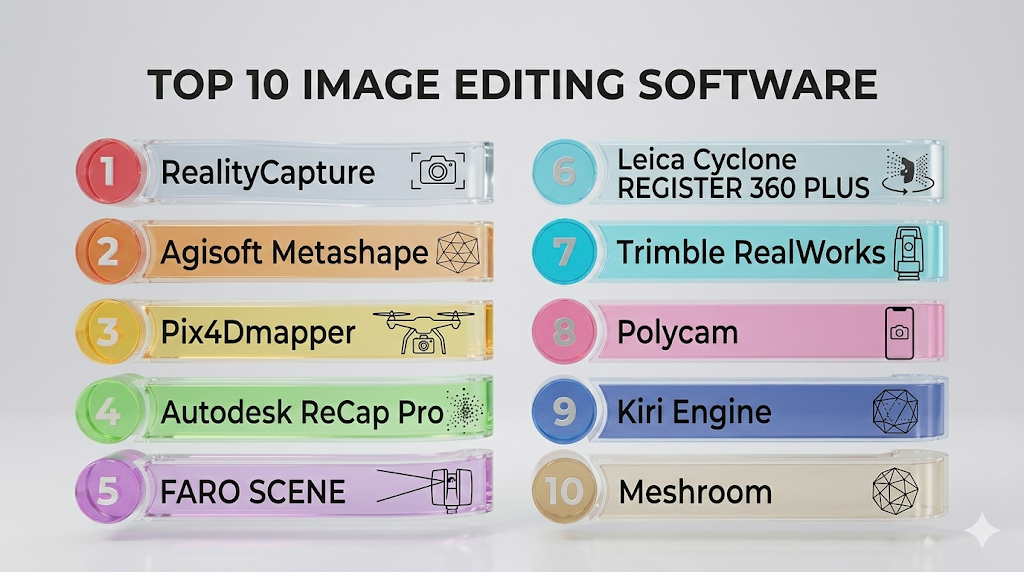
Top 10 3D Scan & Photogrammetry Software Tools
1 — RealityCapture
Short description: RealityCapture is a high-performance photogrammetry tool used to create 3D models from photos and laser scan data. It is popular among visual effects teams, game artists, survey professionals, and creators who need fast reconstruction and detailed outputs.
Key Features
- Photo-based 3D reconstruction
- Laser scan and image alignment support
- High-resolution mesh generation
- Texture creation tools
- Fast processing for large datasets
- Export support for common 3D formats
- Useful for games, VFX, mapping, and digital assets
Pros
- Strong speed and reconstruction quality
- Useful for professional visual and technical workflows
- Good fit for detailed asset creation
Cons
- May require learning for advanced workflows
- Hardware quality can affect processing performance
- Cleanup may still require external tools
Platforms / Deployment
Windows / Desktop
Security & Compliance
Not publicly stated
Integrations & Ecosystem
RealityCapture fits well into 3D production pipelines where users need to move scanned assets into modeling, rendering, game, or visualization tools.
- 3D modeling workflows
- Game engine pipelines
- VFX asset creation
- Mesh editing tools
- Texture workflows
- Drone and camera-based capture workflows
Support & Community
RealityCapture has strong documentation, tutorials, and a broad professional community across game development, VFX, scanning, and photogrammetry workflows.
2 — Agisoft Metashape
Short description: Agisoft Metashape is a widely used photogrammetry platform for generating 3D models, orthomosaics, point clouds, and terrain data from images. It is used by surveyors, researchers, drone mapping teams, archaeologists, and visualization professionals.
Key Features
- Dense point cloud generation
- Mesh and texture creation
- Orthomosaic generation
- Digital elevation model support
- Camera calibration tools
- Ground control point support
- Batch processing workflows
Pros
- Strong photogrammetry feature set
- Useful for surveying, mapping, and research
- Flexible for both object and terrain capture
Cons
- Interface may feel technical for beginners
- Processing large projects requires strong hardware
- Some workflows need careful calibration
Platforms / Deployment
Windows / macOS / Linux / Desktop
Security & Compliance
Not publicly stated
Integrations & Ecosystem
Agisoft Metashape works well with drone mapping, GIS, research, and 3D asset workflows where accurate image-based reconstruction is required.
- GIS workflows
- Drone imagery
- Surveying projects
- Research datasets
- 3D mesh exports
- Mapping outputs
Support & Community
Agisoft Metashape has documentation, user forums, tutorials, and a strong community among photogrammetry, mapping, research, and heritage documentation users.
3 — Pix4Dmapper
Short description: Pix4Dmapper is a professional photogrammetry solution focused on drone mapping, surveying, construction, agriculture, and inspection workflows. It helps users process aerial imagery into maps, point clouds, models, and measurable outputs.
Key Features
- Drone image processing
- Orthomosaic generation
- Point cloud creation
- 3D mesh output
- Measurement tools
- Ground control point workflows
- Mapping and inspection outputs
Pros
- Strong fit for drone mapping
- Useful for survey and inspection teams
- Good workflow for measurable outputs
Cons
- More specialized toward aerial data
- Pricing may be high for occasional users
- Requires good capture planning for best results
Platforms / Deployment
Windows / Desktop / Cloud options vary by product
Security & Compliance
Not publicly stated
Integrations & Ecosystem
Pix4Dmapper fits well into mapping, drone operations, surveying, agriculture, construction, and inspection workflows.
- Drone platforms
- GIS tools
- Survey workflows
- Construction documentation
- Agriculture mapping
- Inspection reporting
Support & Community
Pix4D has strong documentation, training resources, and support materials for professional mapping and drone-based photogrammetry users.
4 — Autodesk ReCap Pro
Short description: Autodesk ReCap Pro helps users create, clean, view, and manage reality capture data from laser scans and photogrammetry workflows. It is especially useful for architecture, engineering, construction, BIM, and infrastructure teams.
Key Features
- Point cloud processing
- Laser scan data support
- Reality capture cleanup
- Registration workflows
- BIM workflow compatibility
- Measurement and visualization tools
- Export to Autodesk ecosystem tools
Pros
- Strong fit for BIM and AEC teams
- Works well with Autodesk design workflows
- Useful for scan-to-model projects
Cons
- Best value often comes inside Autodesk-heavy environments
- Not mainly focused on creative photogrammetry
- Large scan data can require strong workstation resources
Platforms / Deployment
Windows / Desktop / Cloud-connected workflows
Security & Compliance
Autodesk products commonly include enterprise security features, but specific compliance details vary by plan and product. Verify directly before purchase.
Integrations & Ecosystem
Autodesk ReCap Pro is especially useful when reality capture data needs to move into design, engineering, and BIM workflows.
- Autodesk Revit
- AutoCAD workflows
- BIM coordination
- Construction documentation
- Point cloud exports
- Scan-to-model workflows
Support & Community
Autodesk provides documentation, learning resources, enterprise support options, and a large professional community across architecture, engineering, and construction.
5 — FARO SCENE
Short description: FARO SCENE is a laser scan processing and registration platform designed for users working with FARO scanners and point cloud datasets. It is often used in construction, engineering, forensics, facility documentation, and industrial measurement workflows.
Key Features
- Laser scan registration
- Point cloud processing
- Scan visualization
- Measurement tools
- Data cleanup workflows
- Scanner ecosystem compatibility
- Export options for downstream tools
Pros
- Strong fit for laser scanning workflows
- Useful for technical and industrial environments
- Works well with FARO hardware ecosystem
Cons
- Best suited to users already working with laser scanners
- May be excessive for simple photo-to-3D needs
- Learning curve for advanced scan registration
Platforms / Deployment
Windows / Desktop
Security & Compliance
Not publicly stated
Integrations & Ecosystem
FARO SCENE is commonly used in professional scan-to-documentation workflows where precise point cloud handling matters.
- FARO scanner workflows
- Point cloud exports
- CAD and BIM workflows
- Industrial documentation
- Forensics workflows
- Facility mapping
Support & Community
FARO provides product documentation, training resources, and support options for professional scanning and measurement users.
6 — Leica Cyclone REGISTER 360 PLUS
Short description: Leica Cyclone REGISTER 360 PLUS is a professional point cloud registration and reality capture tool for survey, construction, engineering, and infrastructure teams. It is designed for users handling laser scan data and high-accuracy site documentation.
Key Features
- Point cloud registration
- Laser scan alignment
- Site documentation workflows
- Visual registration tools
- Large dataset handling
- Quality control features
- Export support for downstream platforms
Pros
- Strong for professional laser scanning
- Good fit for survey and infrastructure teams
- Useful when accuracy and registration quality matter
Cons
- More advanced than casual users need
- Works best in professional scanner workflows
- May require training for efficient use
Platforms / Deployment
Windows / Desktop
Security & Compliance
Not publicly stated
Integrations & Ecosystem
Leica Cyclone REGISTER 360 PLUS fits into high-accuracy scanning ecosystems where point cloud data must be processed and shared with design or analysis tools.
- Leica scanner workflows
- Surveying platforms
- BIM workflows
- Infrastructure documentation
- Point cloud exports
- Engineering review tools
Support & Community
Leica provides professional documentation, training, and support for users working in survey, scanning, and infrastructure environments.
7 — Trimble RealWorks
Short description: Trimble RealWorks is a point cloud processing and analysis solution for surveyors, engineers, and geospatial professionals. It helps teams register, clean, analyze, and export scan data for design, measurement, and documentation.
Key Features
- Point cloud registration
- Survey-grade scan processing
- Measurement and analysis tools
- Modeling from scan data
- Inspection workflows
- Export to CAD and geospatial tools
- Large dataset support
Pros
- Strong for survey and geospatial users
- Good technical analysis capabilities
- Useful for scan-based engineering workflows
Cons
- More technical than creator-focused tools
- Best suited to professional scanning workflows
- May require training and strong hardware
Platforms / Deployment
Windows / Desktop
Security & Compliance
Not publicly stated
Integrations & Ecosystem
Trimble RealWorks is useful for survey, geospatial, infrastructure, and engineering teams that need precise point cloud workflows.
- Trimble scanner workflows
- Survey workflows
- CAD exports
- Geospatial analysis
- Engineering documentation
- Inspection workflows
Support & Community
Trimble provides documentation, training resources, and professional support for survey and geospatial users.
8 — Polycam
Short description: Polycam is a mobile-friendly 3D scanning tool that supports photo-based capture and LiDAR-based scanning on supported devices. It is useful for creators, designers, real estate professionals, architects, and small teams needing fast reality capture.
Key Features
- Mobile 3D scanning
- Photo-based capture
- LiDAR capture on supported devices
- Mesh and texture generation
- Room and object scanning
- Web viewing and sharing
- Export options for common 3D workflows
Pros
- Easy to use for beginners
- Fast capture using mobile devices
- Useful for quick real-world asset capture
Cons
- Not as advanced as survey-grade tools
- Accuracy depends on device and capture quality
- Complex cleanup may require external software
Platforms / Deployment
iOS / Android / Web / Cloud
Security & Compliance
Not publicly stated
Integrations & Ecosystem
Polycam works well for quick mobile capture and export into design, visualization, AR, VR, and 3D content workflows.
- 3D file exports
- AR and VR workflows
- Design visualization
- Web sharing
- Creator workflows
- Room scanning use cases
Support & Community
Polycam has user documentation, tutorials, and a growing creator community focused on mobile scanning and accessible 3D capture.
9 — Kiri Engine
Short description: Kiri Engine is a mobile and web-based 3D scanning platform for creating 3D models from photos and supported scanning methods. It is useful for creators, educators, hobbyists, small studios, and teams needing accessible photogrammetry workflows.
Key Features
- Photo-to-3D capture
- Mobile scanning workflow
- Cloud processing
- Mesh generation
- Texture output
- Export support
- Beginner-friendly capture process
Pros
- Accessible for non-technical users
- Good for quick object scanning
- Useful for education, creators, and small projects
Cons
- Not intended for high-end survey-grade accuracy
- Advanced cleanup may need separate tools
- Output quality depends heavily on photo quality
Platforms / Deployment
iOS / Android / Web / Cloud
Security & Compliance
Not publicly stated
Integrations & Ecosystem
Kiri Engine fits simple 3D capture workflows where users need to create and export models for design, education, visualization, or creative use.
- 3D model exports
- Creator workflows
- Educational use cases
- AR and visualization
- Basic asset creation
- Mobile scanning workflows
Support & Community
Kiri Engine offers learning resources and community-driven usage across mobile scanning, photogrammetry, and creator workflows.
10 — Meshroom
Short description: Meshroom is an open-source photogrammetry tool built around image-based 3D reconstruction. It is useful for technical users, researchers, artists, and developers who want a free and customizable photogrammetry workflow.
Key Features
- Open-source photogrammetry workflow
- Node-based processing pipeline
- Camera pose estimation
- Dense reconstruction
- Mesh generation
- Texture creation
- Customizable workflow stages
Pros
- Open-source and flexible
- Useful for learning and experimentation
- Good fit for technical users and researchers
Cons
- Less beginner-friendly than polished commercial tools
- Hardware and setup requirements can be demanding
- Support depends more on community resources
Platforms / Deployment
Windows / Linux / Desktop
Security & Compliance
Not publicly stated
Integrations & Ecosystem
Meshroom is useful for users who want open workflows and more control over photogrammetry processing stages.
- Open-source pipelines
- Research workflows
- 3D mesh exports
- Visual effects experiments
- Custom reconstruction workflows
- Developer-led experimentation
Support & Community
Meshroom has community documentation, open-source discussions, and technical learning resources, but commercial support is limited compared with enterprise tools.
Comparison Table
| Tool Name | Best For | Platform(s) Supported | Deployment | Standout Feature | Public Rating |
|---|---|---|---|---|---|
| RealityCapture | Fast photogrammetry and 3D asset creation | Windows | Desktop | High-speed reconstruction | N/A |
| Agisoft Metashape | Survey, research, mapping, and photogrammetry | Windows, macOS, Linux | Desktop | Dense point cloud and mapping workflows | N/A |
| Pix4Dmapper | Drone mapping and aerial photogrammetry | Windows | Desktop / Cloud options vary | Drone-based mapping outputs | N/A |
| Autodesk ReCap Pro | BIM and scan-to-model workflows | Windows | Desktop / Cloud-connected | Autodesk ecosystem compatibility | N/A |
| FARO SCENE | Laser scan registration | Windows | Desktop | FARO scanner workflow support | N/A |
| Leica Cyclone REGISTER 360 PLUS | Survey-grade scan registration | Windows | Desktop | Professional point cloud registration | N/A |
| Trimble RealWorks | Survey and geospatial point cloud processing | Windows | Desktop | Technical scan analysis | N/A |
| Polycam | Mobile 3D scanning | iOS, Android, Web | Cloud | Easy mobile LiDAR and photo capture | N/A |
| Kiri Engine | Simple mobile photogrammetry | iOS, Android, Web | Cloud | Accessible photo-to-3D capture | N/A |
| Meshroom | Open-source photogrammetry | Windows, Linux | Desktop / Self-hosted style | Node-based open workflow | N/A |
Evaluation & Scoring of 3D Scan & Photogrammetry Software
| Tool Name | Core 25% | Ease 15% | Integrations 15% | Security 10% | Performance 10% | Support 10% | Value 15% | Weighted Total |
|---|---|---|---|---|---|---|---|---|
| RealityCapture | 9 | 7 | 8 | 6 | 9 | 8 | 8 | 8.1 |
| Agisoft Metashape | 9 | 7 | 8 | 6 | 8 | 8 | 8 | 7.9 |
| Pix4Dmapper | 8 | 7 | 8 | 6 | 8 | 8 | 7 | 7.5 |
| Autodesk ReCap Pro | 8 | 7 | 9 | 7 | 8 | 8 | 7 | 7.8 |
| FARO SCENE | 8 | 6 | 8 | 6 | 8 | 8 | 7 | 7.4 |
| Leica Cyclone REGISTER 360 PLUS | 9 | 6 | 8 | 6 | 9 | 8 | 7 | 7.8 |
| Trimble RealWorks | 8 | 6 | 8 | 6 | 8 | 8 | 7 | 7.4 |
| Polycam | 7 | 9 | 7 | 5 | 7 | 7 | 8 | 7.3 |
| Kiri Engine | 6 | 9 | 6 | 5 | 6 | 6 | 8 | 6.7 |
| Meshroom | 7 | 5 | 6 | 5 | 6 | 6 | 9 | 6.4 |
Scores are comparative and should be used as a starting point, not a final buying decision. A higher score does not automatically mean the tool is best for every team. Survey teams may value accuracy and registration depth, while creators may care more about ease of use and export flexibility. Always test tools with your own capture data before making a final choice.
Which 3D Scan & Photogrammetry Software Tool Is Right for You?
Solo / Freelancer
Solo creators, designers, and freelancers should prioritize ease of use, fast capture, affordable pricing, and simple exports. Polycam and Kiri Engine are strong options for quick mobile scans, while Meshroom works well for technical users who want an open-source workflow.
SMB
Small and medium teams should look for tools that balance quality, training effort, and workflow compatibility. Agisoft Metashape, RealityCapture, and Pix4Dmapper are practical choices depending on whether the team focuses on objects, environments, or drone mapping.
Mid-Market
Mid-market teams often need stronger collaboration, repeatable workflows, and better integration with CAD, BIM, GIS, or production tools. Autodesk ReCap Pro, Pix4Dmapper, Agisoft Metashape, and RealityCapture can fit well depending on the use case.
Enterprise
Enterprise buyers should focus on accuracy, support, security review, scanner compatibility, and ecosystem fit. Leica Cyclone REGISTER 360 PLUS, Trimble RealWorks, FARO SCENE, and Autodesk ReCap Pro are better suited for professional scan management, engineering, infrastructure, and construction workflows.
Budget vs Premium
Budget-conscious users can start with Meshroom, Polycam, or Kiri Engine for accessible scanning and learning. Premium tools make more sense when the work involves survey accuracy, large datasets, enterprise workflows, or professional deliverables.
Feature Depth vs Ease of Use
Mobile tools are easier to learn but may not provide deep control over scan registration, georeferencing, or advanced reconstruction settings. Professional desktop tools offer more control but require better hardware, training, and capture discipline.
Integrations & Scalability
If the scanned output needs to move into CAD, BIM, GIS, game engines, or rendering workflows, choose a tool with strong export support. Autodesk ReCap Pro is strong for Autodesk-heavy environments, while RealityCapture and Agisoft Metashape are useful for broader 3D pipelines.
Security & Compliance Needs
For sensitive projects, verify data storage, access control, encryption, admin controls, cloud processing behavior, and audit requirements before adoption. If scans include private facilities, industrial sites, hospitals, government buildings, or restricted areas, security review should happen before uploading data to cloud platforms.
Frequently Asked Questions
1. What is 3D scan and photogrammetry software?
3D scan and photogrammetry software converts photos, LiDAR scans, laser scan data, or depth capture into digital 3D models. These outputs can include meshes, textures, point clouds, maps, and measurement-ready files.
2. What is the difference between 3D scanning and photogrammetry?
3D scanning often uses LiDAR, structured light, laser scanners, or depth sensors to capture shape and distance. Photogrammetry uses overlapping photos to reconstruct 3D geometry from image data.
3. Which tool is best for beginners?
Polycam and Kiri Engine are easier for beginners because they support mobile capture and simplified workflows. Users who want more control can later move to tools like RealityCapture or Agisoft Metashape.
4. Which tool is best for drone mapping?
Pix4Dmapper and Agisoft Metashape are strong options for drone-based mapping workflows. They support aerial imagery processing, map outputs, point clouds, and measurement-focused deliverables.
5. Which tool is best for BIM workflows?
Autodesk ReCap Pro is a practical choice for BIM and scan-to-model workflows, especially for teams already using Autodesk tools. Leica, FARO, and Trimble solutions are also strong for professional point cloud workflows.
6. Can mobile scanning replace professional laser scanning?
Mobile scanning is useful for quick capture, visualization, and early documentation. Professional laser scanning is still better for high-accuracy survey, construction, industrial, and infrastructure projects.
7. What hardware do I need for photogrammetry?
You need a camera or drone that can capture clear, overlapping images. For large projects, a powerful computer with strong CPU, GPU, memory, and storage is helpful.
8. What file formats should buyers check?
Buyers should check support for common mesh, point cloud, CAD, BIM, GIS, and texture formats. The right format depends on whether the output goes into design, mapping, rendering, AR, VR, or engineering tools.
9. Are cloud-based photogrammetry tools secure?
Security depends on the vendor, plan, storage model, and processing workflow. For sensitive scan data, verify encryption, access control, admin permissions, and data retention before uploading files.
10. What are common mistakes when using photogrammetry software?
Common mistakes include poor lighting, blurry images, too few overlapping photos, reflective surfaces, weak capture planning, and ignoring scale references. Good capture quality is just as important as the software.
11. Can these tools create game-ready assets?
Yes, some tools can create textured 3D assets for games, AR, VR, and visualization. However, game-ready assets often need cleanup, retopology, optimization, and texture refinement in other 3D tools.
12. How should teams choose between open-source and commercial tools?
Open-source tools are good for learning, experimentation, and flexible workflows. Commercial tools are better when teams need support, speed, polished workflows, enterprise features, or reliable production output.
Conclusion
3D Scan & Photogrammetry Software is now an important part of digital design, survey, construction, engineering, creative production, and real-world asset capture. The best tool depends on what you are scanning, how accurate the output needs to be, what hardware you use, and where the final model needs to go. Mobile tools are excellent for fast and simple capture, while professional photogrammetry and laser scan platforms are better for large projects, technical accuracy, and enterprise workflows. Teams should compare capture quality, processing speed, export formats, integrations, support, security expectations, and total workflow fit before making a final decision. A practical next step is to shortlist 2–3 tools, run a pilot with your own scan data, validate integrations and security needs, and then scale the tool across the team once accuracy, usability, and output quality are confirmed.

Find Trusted Cardiac Hospitals
Compare heart hospitals by city and services — all in one place.
Explore Hospitals
Even the best 3D scanning software can give poor results if photos have low overlap, lighting changes, or objects move during capture. Teams should define simple capture guidelines and use the same process for repeated scans. This can make the final models more consistent and reduce the time spent fixing bad data later.