Introduction
API Aggregators help businesses connect to many third-party applications through one unified API, connector framework, or integration layer. Instead of building and maintaining separate integrations for every CRM, HRIS, ATS, accounting, payroll, email, calendar, ticketing, ecommerce, or finance platform, teams can use an API aggregator to normalize data, manage authentication, handle API changes, and speed up product integration work. API Aggregators matter now because SaaS products are expected to integrate with many customer systems from day one. Buyers want faster onboarding, cleaner data sync, fewer engineering bottlenecks, and reliable integrations across many software categories.
Real-world use cases include:
- SaaS product integrations
- HR, payroll, and accounting data sync
- CRM and marketing automation integrations
- Email, calendar, and communication APIs
- Embedded integrations for customer-facing SaaS
- Workflow automation between business systems
What buyers should evaluate:
- Supported integration categories
- Unified data model quality
- API documentation
- Authentication and token handling
- Real-time sync and webhook support
- Error handling and observability
- Security and compliance posture
- Customization flexibility
- Pricing model
- Support and implementation help
Best for: API Aggregators are best for SaaS companies, fintech platforms, HR tech vendors, accounting software providers, developer teams, product managers, integration engineers, and enterprises that need to connect many third-party apps without building every integration from scratch.
Not ideal for: API Aggregators may not be ideal when a company only needs one or two simple integrations, requires deep custom behavior for one specific API, or must control every part of the integration stack internally.
Key Trends in API Aggregators
- Unified APIs are becoming a product growth tool: SaaS buyers expect native integrations, so API aggregators help vendors ship integrations faster and improve customer onboarding.
- Embedded integrations are replacing manual connector builds: Product teams increasingly want integration platforms that can be embedded into the customer experience rather than handled only by internal engineering teams.
- AI agents need reliable tool access: As AI workflows expand, API aggregators help agents connect with CRMs, calendars, HR systems, accounting apps, support tools, and collaboration platforms.
- Observability is becoming essential: Teams now expect logs, sync status, retries, error details, webhook tracking, and admin dashboards to troubleshoot integration issues.
- Security expectations are rising: OAuth handling, token storage, encryption, RBAC, SSO, audit logs, and least-privilege access are becoming must-have requirements.
- Vertical-specific aggregators are gaining traction: Some platforms specialize in HR, payroll, accounting, commerce, or communications instead of trying to cover every software category.
- Customization still matters: Unified APIs simplify integration, but teams often need custom fields, passthrough requests, mapping rules, and business-specific data handling.
- Pricing transparency is a major concern: API aggregators may charge by connected account, integration, task, API call, or customer, so buyers must understand scaling costs.
- Data quality is now a differentiator: A strong aggregator does more than connect APIs. It normalizes objects, handles edge cases, reconciles data, and reduces manual cleanup.
- Enterprises want governance and control: Larger companies need access controls, environment separation, audit logs, data residency details, and support for security reviews.
How We Selected These Tools
The Top 10 API Aggregators were selected using a practical SaaS and developer infrastructure evaluation model:
- Market adoption and developer mindshare across SaaS, fintech, HR tech, accounting, and embedded integration use cases
- Feature completeness across unified APIs, connectors, authentication, sync, observability, and admin tooling
- Integration category coverage across CRM, HRIS, ATS, accounting, payroll, ticketing, marketing, email, and communication systems
- Developer experience, including API documentation, SDKs, sandbox support, and implementation clarity
- Reliability and sync architecture, including error handling, retries, webhook support, and monitoring
- Security posture signals, including OAuth handling, access controls, encryption, SSO, and auditability
- Customization flexibility for edge cases, passthrough APIs, custom fields, and mapping logic
- Customer fit across segments, from early SaaS startups to mid-market and enterprise teams
- Pricing and scalability fit for growing products and integration-heavy businesses
- Long-term relevance in modern SaaS integration and automation architecture
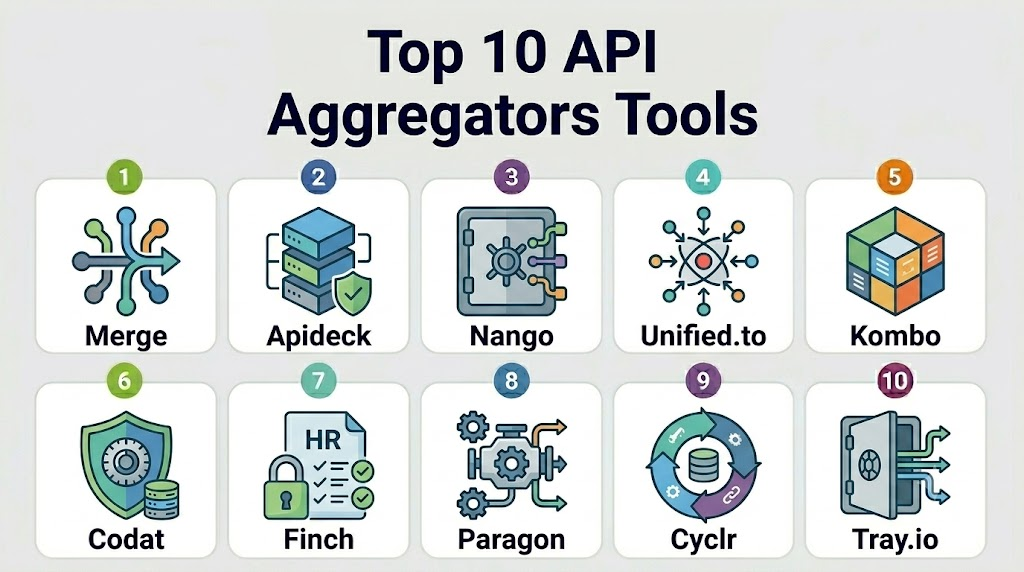
Top 10 API Aggregators Tools
1- Merge
Short description: Merge is a unified API platform that helps B2B SaaS companies integrate with many categories of business software through normalized APIs. It is useful for teams that want to ship customer-facing integrations faster across HR, ATS, CRM, accounting, ticketing, and related systems.
Key Features
- Unified APIs across multiple SaaS categories
- Prebuilt connectors for common business applications
- Normalized data models
- Webhooks and sync capabilities
- Authentication handling
- Integration management dashboard
- Developer-focused documentation and tooling
Pros
- Strong fit for B2B SaaS teams building customer-facing integrations
- Covers multiple software categories
- Helps reduce ongoing connector maintenance
Cons
- Unified models may not cover every edge case
- Pricing can scale with usage and connected accounts
- Deep customization may require additional engineering work
Platforms / Deployment
Web / Cloud / API-based deployment
Security & Compliance
Security and compliance details should be verified during procurement. Buyers should review OAuth handling, encryption, access controls, audit logs, SSO, data processing terms, and compliance documentation.
Integrations & Ecosystem
Merge is useful for SaaS products that need to connect with customer systems across many business software categories.
- HRIS integrations
- ATS integrations
- CRM integrations
- Accounting integrations
- Ticketing integrations
- File storage integrations
Support & Community
Merge provides developer documentation, onboarding resources, and business support options. Support availability may vary by contract, customer size, and implementation complexity.
2- Apideck
Short description: Apideck is a unified API platform that helps SaaS companies connect with multiple third-party applications using normalized APIs and integration components. It is useful for teams that want fast integration coverage with strong developer usability.
Key Features
- Unified APIs across software categories
- Connector marketplace approach
- Developer-focused API documentation
- Authentication and connection handling
- Real-time and cached data options depending on use case
- Vault-style credential management concepts
- Integration monitoring and management tools
Pros
- Strong developer experience
- Useful for SaaS teams that need broad integration coverage
- Flexible approach for multiple API categories
Cons
- Coverage depth varies by integration category
- Teams should validate real-time sync requirements
- Some advanced use cases may need direct API passthrough
Platforms / Deployment
Web / Cloud / API-based deployment
Security & Compliance
Security details should be validated directly. Buyers should review credential handling, encryption, access control, auditability, SSO, and vendor risk documentation.
Integrations & Ecosystem
Apideck supports integration use cases where product teams need unified access to many common business systems.
- CRM integrations
- Accounting integrations
- HR and recruitment systems
- Ecommerce platforms
- File storage systems
- Communication and productivity tools
Support & Community
Apideck provides documentation, developer resources, and support options. Teams should validate support scope, SLAs, and onboarding assistance before choosing a plan.
3- Nango
Short description: Nango is an integration platform focused on helping developers build and manage product integrations with strong control and customization. It is useful for teams that want connector infrastructure without fully depending on rigid unified data models.
Key Features
- OAuth and authentication management
- Integration templates and connector framework
- Sync engine for recurring data pulls
- Webhook and event handling
- Developer control over integration logic
- Observability and logging
- Useful for custom SaaS integration workflows
Pros
- Good fit for engineering teams that want flexibility
- Helps manage auth and sync complexity
- Useful when custom logic matters more than one-size-fits-all models
Cons
- Requires more developer involvement than fully managed unified APIs
- Less suitable for teams wanting no-code integration management
- Coverage depends on connectors and implementation approach
Platforms / Deployment
Web / Cloud / Self-hosted options may vary
Security & Compliance
Security details should be verified directly. Buyers should review OAuth token storage, encryption, access control, audit logs, deployment options, and compliance commitments.
Integrations & Ecosystem
Nango fits teams that want to build integrations faster while retaining engineering control.
- CRM integrations
- HR and ATS systems
- Accounting platforms
- Productivity tools
- Custom APIs
- AI agent tool integrations
Support & Community
Nango provides documentation and developer resources. Support level may vary by plan and implementation needs.
4- Unified.to
Short description: Unified.to is a unified API platform that provides access to multiple SaaS integrations through a single API. It is useful for SaaS companies and developers that need broad connector coverage across business application categories.
Key Features
- Unified API for multiple software categories
- Broad connector catalog
- Normalized data objects
- Authentication handling
- Developer API access
- Multi-category integration support
- Useful for embedded SaaS integrations
Pros
- Broad category coverage
- Useful for fast integration expansion
- Can reduce time spent maintaining individual APIs
Cons
- Buyers should validate connector depth for specific apps
- Complex edge cases may require custom work
- Data model fit should be tested before production rollout
Platforms / Deployment
Web / Cloud / API-based deployment
Security & Compliance
Not publicly stated for all compliance frameworks. Buyers should verify encryption, access controls, data handling, OAuth security, audit logs, and vendor risk documentation.
Integrations & Ecosystem
Unified.to is useful for SaaS vendors that need broad integration coverage across business systems.
- CRM platforms
- HRIS tools
- ATS tools
- Accounting systems
- Communication tools
- Marketing and productivity applications
Support & Community
Unified.to provides developer resources and support options. Buyers should confirm onboarding, support responsiveness, and connector-specific guidance.
5- Kombo
Short description: Kombo is a unified API platform focused mainly on HR, payroll, and recruiting system integrations. It is especially useful for HR tech, recruiting software, workforce management, and employee data products.
Key Features
- HRIS and ATS integrations
- Unified employee and candidate data models
- Payroll and workforce data connectivity
- Authentication handling
- Webhooks and sync support
- Developer-friendly API
- Strong fit for HR tech use cases
Pros
- Strong vertical focus on HR and recruiting
- Useful for HR software vendors that need fast integration coverage
- More focused than broad horizontal platforms
Cons
- Not ideal for companies needing many non-HR categories
- Connector availability should be validated by region and product
- Deep HR edge cases may still require custom mapping
Platforms / Deployment
Web / Cloud / API-based deployment
Security & Compliance
Security details should be verified directly. Buyers should review data protection, access control, encryption, SSO, audit logs, and handling of sensitive employee data.
Integrations & Ecosystem
Kombo fits HR tech products that need to connect with customer HR systems.
- HRIS platforms
- ATS platforms
- Payroll systems
- Employee data sync
- Recruiting workflows
- Workforce management tools
Support & Community
Kombo provides developer documentation and customer support. Teams should validate onboarding support and connector-specific implementation help.
6- Codat
Short description: Codat is a business data API platform focused on financial, accounting, banking, and commerce data connectivity. It is useful for lenders, fintechs, payment providers, banks, and accounting-related SaaS products.
Key Features
- Accounting data APIs
- Banking and commerce data connectivity
- Business financial data aggregation
- Cash-flow and financial insight use cases
- API-based business data access
- Useful for lending and underwriting
- Support for SMB financial data workflows
Pros
- Strong fit for fintech and lending use cases
- Useful for business financial data connectivity
- Good option for accounting and SMB finance workflows
Cons
- Less suitable for broad SaaS categories outside finance
- Coverage should be validated by country and platform
- Some implementations may require financial data expertise
Platforms / Deployment
Web / Cloud / API-based deployment
Security & Compliance
Codat is built for business financial data workflows. Buyers should verify security controls, compliance documentation, encryption, access management, data handling, and audit features.
Integrations & Ecosystem
Codat is useful for platforms that need accounting, banking, and commerce data.
- Accounting software
- Business lending platforms
- Fintech applications
- Payment providers
- Banking systems
- SMB finance workflows
Support & Community
Codat provides documentation, developer resources, and business support. Buyers should confirm regional coverage, onboarding help, and support tiers.
7- Finch
Short description: Finch is a unified API platform focused on employment systems, payroll, benefits, and HR data. It is useful for companies building products that need access to employee, payroll, employer, and benefits information.
Key Features
- Payroll and HR data connectivity
- Employer and employee data access
- Benefits and employment-related integrations
- Unified data models for workforce systems
- API-based access
- Support for HR and fintech products
- Useful for employment data workflows
Pros
- Strong fit for payroll and employment data use cases
- Useful for HR tech, benefits, and workforce finance products
- Vertical focus can provide better relevance than broad API aggregators
Cons
- Narrower category focus than horizontal platforms
- Coverage depends on supported payroll and HR systems
- Not ideal for CRM, accounting, or marketing integrations
Platforms / Deployment
Web / Cloud / API-based deployment
Security & Compliance
Security and compliance details should be verified during procurement. Buyers should review sensitive employee data handling, encryption, access controls, audit logs, and privacy commitments.
Integrations & Ecosystem
Finch fits products that need workforce, payroll, and employment system data.
- Payroll providers
- HRIS systems
- Benefits platforms
- Workforce finance tools
- Employer data workflows
- HR tech products
Support & Community
Finch provides documentation and support resources. Buyers should validate implementation support, data coverage, and connector-specific reliability.
8- Paragon
Short description: Paragon is an embedded integration platform that helps SaaS companies build customer-facing integrations into their products. It is useful for product teams that want integration workflows, UI components, and connector infrastructure without building everything internally.
Key Features
- Embedded integration builder
- Prebuilt connectors
- Integration workflow automation
- Customer-facing integration UI
- OAuth and authentication support
- Admin and monitoring tools
- Useful for SaaS products needing native integrations
Pros
- Strong fit for embedded customer-facing integrations
- Useful for product and engineering teams
- Helps reduce integration UI and workflow development time
Cons
- May be less suitable for teams wanting only a raw unified API
- Custom integration logic may still require engineering
- Pricing should be reviewed based on customer and integration volume
Platforms / Deployment
Web / Cloud
Security & Compliance
Security details should be verified directly. Buyers should review authentication handling, encryption, access controls, SSO, audit logs, and compliance documentation.
Integrations & Ecosystem
Paragon fits SaaS products that want to let customers connect external tools inside the product experience.
- CRM integrations
- Marketing automation
- Productivity apps
- Ticketing tools
- Communication platforms
- Workflow automation
Support & Community
Paragon provides onboarding resources, documentation, and customer support. Support availability may depend on plan and implementation scope.
9- Cyclr
Short description: Cyclr is an embedded integration platform for SaaS companies that want to offer integrations to their customers. It provides connector tools, workflow automation, and integration management capabilities.
Key Features
- Embedded integration platform
- Connector library
- Workflow and automation builder
- White-label integration options
- API and webhook support
- Integration management dashboard
- Useful for SaaS vendors offering integrations to customers
Pros
- Strong fit for SaaS companies needing embedded integrations
- White-label options can support customer-facing use cases
- Workflow builder helps reduce custom integration effort
Cons
- May require implementation planning
- Not purely a unified API platform
- Connector depth should be validated before deployment
Platforms / Deployment
Web / Cloud
Security & Compliance
Security and compliance details should be verified directly. Buyers should review SSO, access control, audit logs, encryption, data handling, and compliance commitments.
Integrations & Ecosystem
Cyclr supports SaaS vendors that want to deliver productized integrations and automation workflows.
- CRM tools
- Marketing tools
- Accounting systems
- Productivity apps
- Customer support tools
- SaaS workflow automation
Support & Community
Cyclr provides documentation, onboarding, and support options. Buyers should validate implementation support and connector maintenance expectations.
10- Tray.io
Short description: Tray.io is an automation and integration platform that helps businesses connect applications, automate workflows, and build integration logic. It is useful for operations, RevOps, IT, and SaaS teams needing flexible workflow automation across APIs.
Key Features
- Workflow automation
- API integration builder
- Connector library
- Data transformation tools
- Enterprise automation workflows
- Support for business operations teams
- Useful for internal and customer-facing integration scenarios
Pros
- Flexible workflow automation capabilities
- Good fit for complex business process integrations
- Useful for enterprise automation and RevOps workflows
Cons
- May be more complex than simple API aggregators
- Not always the best choice for productized unified APIs
- Requires careful governance for large automation environments
Platforms / Deployment
Web / Cloud
Security & Compliance
Tray.io is positioned for enterprise automation and integration workflows. Specific certifications, access controls, audit logs, SSO, encryption, and compliance commitments should be verified during procurement.
Integrations & Ecosystem
Tray.io is useful where businesses need workflow automation across many APIs and SaaS tools.
- CRM and marketing systems
- Revenue operations workflows
- IT automation
- Data sync processes
- Customer support systems
- Enterprise SaaS automation
Support & Community
Tray.io provides documentation, onboarding resources, and enterprise support options. Buyers should validate support tiers, implementation services, and governance guidance.
Comparison Table
| Tool Name | Best For | Platform Supported | Deployment | Standout Feature | Public Rating |
|---|---|---|---|---|---|
| Merge | B2B SaaS unified APIs | Web / API | Cloud | Multi-category unified API | N/A |
| Apideck | Developer-friendly unified APIs | Web / API | Cloud | Broad connector catalog | N/A |
| Nango | Custom developer-controlled integrations | Web / API | Cloud / Self-hosted varies | OAuth and sync infrastructure | N/A |
| Unified.to | Broad SaaS API aggregation | Web / API | Cloud | Wide unified API coverage | N/A |
| Kombo | HR and recruiting integrations | Web / API | Cloud | HRIS and ATS unified API | N/A |
| Codat | Financial and accounting data APIs | Web / API | Cloud | Business financial data aggregation | N/A |
| Finch | Payroll and employment data | Web / API | Cloud | Employment system API aggregation | N/A |
| Paragon | Embedded SaaS integrations | Web | Cloud | Customer-facing integration UI | N/A |
| Cyclr | White-label embedded integrations | Web | Cloud | Embedded integration workflow builder | N/A |
| Tray.io | Enterprise workflow automation | Web | Cloud | Flexible API automation | N/A |
Evaluation and Scoring of API Aggregators
| Tool Name | Core 25% | Ease 15% | Integrations 15% | Security 10% | Performance 10% | Support 10% | Value 15% | Weighted Total 0-10 |
|---|---|---|---|---|---|---|---|---|
| Merge | 9 | 8 | 9 | 8 | 8 | 8 | 8 | 8.35 |
| Apideck | 8 | 8 | 8 | 8 | 8 | 8 | 8 | 8.00 |
| Nango | 8 | 7 | 8 | 8 | 8 | 7 | 9 | 7.95 |
| Unified.to | 8 | 8 | 8 | 7 | 8 | 7 | 8 | 7.75 |
| Kombo | 8 | 8 | 8 | 8 | 8 | 8 | 8 | 8.00 |
| Codat | 8 | 7 | 8 | 8 | 8 | 8 | 8 | 7.85 |
| Finch | 8 | 8 | 8 | 8 | 8 | 7 | 8 | 7.90 |
| Paragon | 8 | 8 | 8 | 8 | 8 | 8 | 7 | 7.85 |
| Cyclr | 8 | 7 | 8 | 8 | 7 | 8 | 7 | 7.60 |
| Tray.io | 8 | 7 | 8 | 8 | 8 | 8 | 7 | 7.75 |
Which API Aggregator Tool Is Right for You?
Solo / Freelancer
Solo developers and small builders should choose a platform that is easy to test, has clear documentation, and does not require heavy implementation work. Apideck, Nango, and Unified.to can be practical options depending on the desired integration category.
If the goal is to build only one or two integrations, direct API integration may still be cheaper and simpler than using an aggregator.
SMB
SMBs should focus on speed, pricing clarity, and connector coverage. Merge, Apideck, Nango, Paragon, and Cyclr are worth evaluating if the business needs customer-facing integrations.
For vertical SaaS teams, category-specific providers such as Kombo, Codat, or Finch may be better than a broad platform.
Mid-Market
Mid-market SaaS companies usually need reliable sync, integration dashboards, customer-facing connection flows, error management, and support. Merge, Paragon, Cyclr, Apideck, and Tray.io are strong options depending on whether the need is unified API access or embedded integration workflows.
At this stage, teams should evaluate integration observability, support SLAs, custom field handling, and long-term scaling costs.
Enterprise
Enterprises should evaluate Tray.io, Merge, Codat, Paragon, Cyclr, and Nango depending on the desired control level. Enterprise buyers should review security controls, data residency, audit logs, SSO, RBAC, procurement readiness, and compliance documentation.
For enterprise automation and internal workflows, Tray.io may be more suitable than a pure unified API provider. For productized SaaS integrations, Merge or Paragon may be stronger.
Budget vs Premium
Budget-conscious teams should avoid buying broad integration coverage before validating customer demand. Start with the integrations customers request most often and measure usage.
Premium platforms may be worth the cost when integrations directly affect sales, onboarding, retention, or enterprise deal requirements.
Feature Depth vs Ease of Use
For ease of use and broad unified APIs, Merge, Apideck, and Unified.to are strong options. For more developer control, Nango may be better.
For embedded integration experiences, Paragon and Cyclr are useful. For vertical-specific depth, Codat, Finch, and Kombo may offer stronger domain relevance.
Integrations and Scalability
Scalable API aggregation requires more than connector count. Teams should evaluate sync reliability, pagination, rate limit handling, webhook support, schema changes, custom fields, logs, retries, and support for customer-specific edge cases.
The best approach is to test the exact integrations your customers use most.
Security and Compliance Needs
Security-focused buyers should review OAuth handling, token storage, encryption, SSO, RBAC, audit logs, data processing terms, and vendor risk documentation.
For sensitive data such as payroll, HR, accounting, or finance information, security and compliance review should happen before implementation, not after launch.
Frequently Asked Questions
1- What is an API Aggregator?
An API Aggregator is a platform that connects multiple third-party APIs through one integration layer. It helps developers avoid building and maintaining separate integrations for every external app.
2- What is the difference between an API Aggregator and a unified API?
A unified API is a type of API aggregator that normalizes multiple similar APIs into one common data model. API aggregators may also include embedded workflows, authentication, automation, and monitoring.
3- Which API Aggregator is best?
There is no single best option for every team. Merge, Apideck, Nango, Unified.to, Kombo, Codat, Finch, Paragon, Cyclr, and Tray.io serve different integration needs.
4- Are API Aggregators only for SaaS companies?
No. They are most common in SaaS, but fintechs, HR tech firms, accounting platforms, enterprises, AI products, and workflow automation teams also use API aggregators.
5- Do API Aggregators replace iPaaS tools?
Not always. API aggregators usually help product teams ship integrations, while iPaaS tools often help internal operations teams automate workflows. Some platforms overlap.
6- What are common mistakes when choosing an API Aggregator?
Common mistakes include choosing by connector count only, ignoring sync quality, skipping security review, underestimating pricing, and not testing real customer use cases.
7- Are unified APIs flexible enough for custom use cases?
Sometimes. Unified APIs simplify common use cases, but very specific workflows may require passthrough APIs, custom fields, mapping logic, or direct integration with the source API.
8- How do API Aggregators handle authentication?
Many aggregators manage OAuth flows, token storage, refresh tokens, and connection status. Buyers should review how credentials are stored and secured.
9- Can API Aggregators support AI agents?
Yes. AI agents need safe, structured access to business systems, and API aggregators can provide controlled connectors to CRMs, calendars, HR tools, accounting apps, and support systems.
10- How should teams compare pricing?
Teams should compare pricing by connected account, API call, integration, customer, task, usage tier, and support level. Scaling costs can vary significantly between vendors.
Conclusion
API Aggregators are becoming essential infrastructure for SaaS companies and digital products that need to connect with many third-party systems quickly and reliably. Merge, Apideck, Nango, Unified.to, Kombo, Codat, Finch, Paragon, Cyclr, and Tray.io each solve different parts of the integration challenge. Some focus on unified APIs, others specialize in HR, payroll, accounting, or embedded workflow automation. The right choice depends on your product category, customer integration demand, engineering resources, data model needs, security expectations, and long-term pricing. A practical next step is to shortlist two or three platforms, test your highest-priority integrations, review sync quality and error handling, validate security controls, and compare total cost before scaling.

Find Trusted Cardiac Hospitals
Compare heart hospitals by city and services — all in one place.
Explore Hospitals
A point worth exploring is how API aggregators handle version changes and deprecations from underlying providers. Strong change management and backward compatibility can make a significant difference in reducing integration disruptions over time.