Introduction
Citation & Reference Managers are software tools designed to help researchers, students, academics, writers, and professionals collect, organize, cite, and format bibliographic references efficiently. In simple terms, they eliminate the manual burden of tracking sources and ensure citations are accurate, consistent, and compliant with academic or publishing standards. these tools are no longer just bibliography generators. They are evolving into AI-assisted research intelligence platforms that integrate PDF reading, annotation, cloud collaboration, and even semantic search over academic libraries. As research output grows exponentially, managing references manually has become impractical for most users.
Common real-world use cases include:
- Writing academic papers, theses, and dissertations
- Managing literature reviews for research projects
- Organizing large PDF libraries for PhD or postdoc work
- Collaborating on research papers across institutions
- Formatting citations for journals, publishers, and conferences
When evaluating Citation & Reference Managers, buyers typically consider:
- Citation style support (APA, MLA, Chicago, IEEE, etc.)
- PDF management and annotation capabilities
- Browser capture and web import quality
- Collaboration and sharing features
- Cloud sync reliability across devices
- Integration with Word processors (Word, Google Docs, LaTeX)
- Storage limits and pricing model
- AI-assisted research and recommendation features
- Security, privacy, and data ownership policies
- Export flexibility (BibTeX, RIS, etc.)
Best for: Students, researchers, universities, academic writers, publishing teams, and knowledge workers dealing with large volumes of sources.
Not ideal for: Casual users who only need occasional citations or one-time bibliography generation (simpler tools or built-in word processor citation tools may be enough).
Key Trends in Citation & Reference Managers
- AI-powered literature discovery and semantic search across PDFs and databases
- Automatic citation generation from raw text, PDFs, or screenshots
- Deep integration with writing assistants and AI editors
- Cloud-first ecosystems with real-time collaboration for research teams
- Increased emphasis on privacy, local-first storage, and encrypted libraries
- Native support for multi-format outputs (BibTeX, RIS, CSL, JSON-LD)
- Browser-based capture tools replacing desktop-only workflows
- Cross-device synchronization becoming standard expectation
- Institutional licensing models expanding in universities and enterprises
- Integration with knowledge management tools (note-taking + research graphs)
How We Selected These Tools (Methodology)
- Market adoption and global academic usage across institutions
- Feature completeness for citation, PDF management, and collaboration
- Reliability of syncing and library integrity under heavy usage
- Integration ecosystem (Word processors, browsers, LaTeX tools)
- Support for multiple citation styles and export formats
- Security and privacy posture based on publicly available information
- Cross-platform availability (web, desktop, mobile support)
- Suitability across different user segments (students to enterprise researchers)
- Longevity and active product development signals
- Community adoption, academic reputation, and institutional usage trends
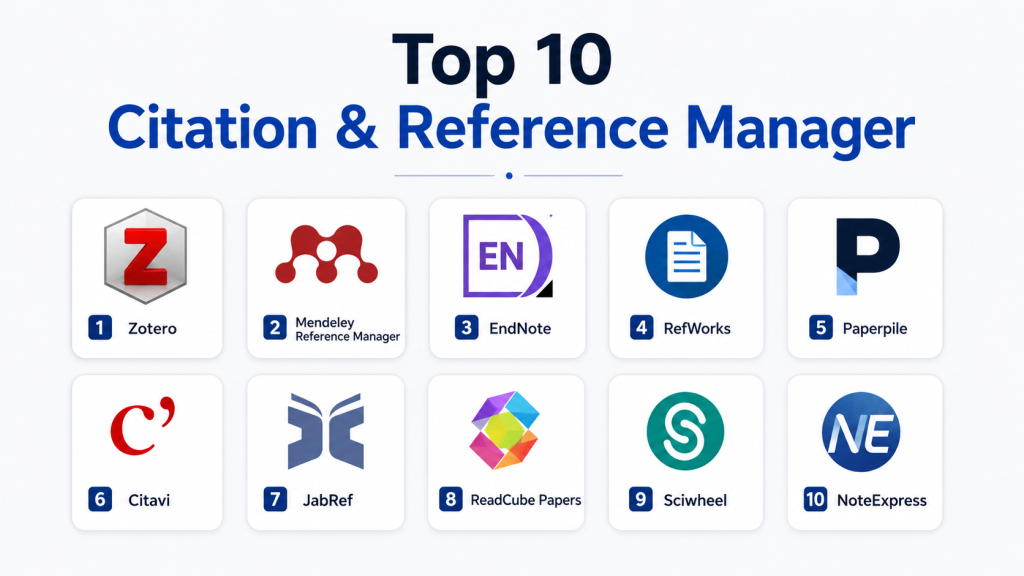
Top 10 Citation & Reference Managers Tools
1 — Zotero
Short description:
Zotero is a widely used open-source reference manager designed for students, researchers, and academics who want powerful citation control with strong flexibility and no vendor lock-in.
Key Features
- One-click browser saving of research papers and webpages
- Automatic metadata extraction from PDFs
- Powerful tagging, folders, and collections system
- Built-in citation style support (thousands of styles available)
- Word processor plugin integration (Word, LibreOffice)
- Group libraries for collaboration
- Local-first storage with optional cloud sync
Pros
- Free and open-source with strong community support
- Highly flexible and customizable
- Excellent for long-term academic research
Cons
- UI feels less modern compared to newer tools
- Cloud storage requires paid plans for large libraries
Platforms / Deployment
- Windows / macOS / Linux / Web
- Hybrid (local + optional cloud sync)
Security & Compliance
- Not publicly stated for formal certifications (SOC 2 / ISO)
- Supports local storage, reducing dependency on cloud exposure
- User-controlled library ownership model
Integrations & Ecosystem
- Microsoft Word, LibreOffice
- Browser connectors (Chrome, Firefox, Edge)
- BibTeX and citation export tools
- APIs and third-party plugins
Support & Community
Strong global academic community, extensive documentation, and active open-source contributions ensure long-term reliability.
2 — Mendeley Reference Manager
Mendeley Reference Manager is a popular academic citation and PDF management tool widely used in universities and research institutions.
Key Features
- PDF library management with annotation tools
- Citation generator with multiple styles
- Cloud sync across devices
- Academic collaboration groups
- Research paper discovery suggestions
- Word plugin integration
- Import from databases and DOIs
Pros
- Strong academic ecosystem support
- Easy onboarding for students
- Integrated research discovery tools
Cons
- Some features locked into ecosystem
- Sync performance varies with large libraries
Platforms / Deployment
- Windows / macOS / Web / iOS / Android
- Cloud-based with desktop clients
Security & Compliance
- Not publicly stated in detail
- Operates under Elsevier ecosystem policies
- Standard encryption practices assumed but not fully disclosed
Integrations & Ecosystem
- Microsoft Word plugin
- DOI and database import support
- Institutional repository integrations
Support & Community
Large academic user base, university-driven adoption, and moderate support documentation.
3 — EndNote
EndNote is an enterprise-grade reference manager commonly used in research institutions, especially in life sciences and medical publishing.
Key Features
- Advanced citation and bibliography management
- Large library handling for professional researchers
- Journal manuscript formatting tools
- Smart grouping and deduplication
- PDF annotation and search
- Cloud sync and sharing
- Extensive citation style library
Pros
- Extremely powerful for large research projects
- Widely accepted in academic publishing
- Strong institutional adoption
Cons
- Expensive compared to alternatives
- Steeper learning curve
Platforms / Deployment
- Windows / macOS
- Cloud + desktop hybrid
Security & Compliance
- Not publicly stated in full detail
- Enterprise-oriented security model
- Institutional licensing options available
Integrations & Ecosystem
- Microsoft Word integration
- PubMed and academic database imports
- Library catalog systems
Support & Community
Strong institutional support, but less community-driven than open-source tools.
4 — RefWorks
RefWorks is a cloud-based reference management system widely used in universities and library systems.
Key Features
- Cloud-based reference storage
- Citation generation in multiple styles
- Easy import from databases
- Collaboration features for teams
- Folder-based organization
- Bibliography export tools
Pros
- Simple cloud-first workflow
- Strong institutional adoption
- Easy for beginners
Cons
- Limited offline functionality
- Less flexible than open-source tools
Platforms / Deployment
- Web-based (cloud SaaS)
Security & Compliance
- Not publicly stated in detail
- Institution-controlled access in many cases
Integrations & Ecosystem
- Library database integrations
- Word processor citation plugins
- Export to BibTeX and RIS
Support & Community
Institutional support model with library-based onboarding.
5 — Paperpile
Paperpile is a modern citation manager designed primarily for cloud-native researchers using Google Workspace.
Key Features
- Deep Google Docs integration
- Chrome-based paper saving
- Cloud library management
- PDF annotation tools
- Citation insertion directly in documents
- Smart tagging and filtering
- Automatic metadata detection
Pros
- Excellent for Google Docs users
- Clean, modern UI
- Fast and lightweight
Cons
- Limited offline functionality
- Strong dependency on Google ecosystem
Platforms / Deployment
- Web / Chrome extension / Cloud
Security & Compliance
- Not publicly stated in detail
- Relies on Google ecosystem security layers
Integrations & Ecosystem
- Google Docs
- Chrome browser
- DOI import tools
Support & Community
Strong documentation and growing academic user base.
6 — Citavi
Citavi is a research and reference management tool combining citation management with knowledge organization.
Key Features
- Reference and task management combined
- Knowledge organization system
- PDF annotation and highlighting
- Citation style support
- Project-based research structuring
- Word integration
Pros
- Strong knowledge organization features
- Ideal for structured academic projects
- Good for thesis writing
Cons
- Windows-first experience
- Limited macOS support
Platforms / Deployment
- Windows / Cloud components
Security & Compliance
- Not publicly stated
Integrations & Ecosystem
- Microsoft Word integration
- Academic import tools
- Export formats like BibTeX
Support & Community
Moderate academic community with structured documentation.
7 — JabRef
JabRef is an open-source reference manager primarily designed for LaTeX users.
Key Features
- Native BibTeX database management
- LaTeX workflow integration
- Duplicate detection
- Metadata fetching from online sources
- Advanced search and filtering
- Lightweight desktop application
Pros
- Excellent for LaTeX users
- Free and open-source
- Lightweight and fast
Cons
- Not beginner-friendly
- Limited non-LaTeX support
Platforms / Deployment
- Windows / macOS / Linux (Desktop)
Security & Compliance
- Not publicly stated
- Local-first data storage
Integrations & Ecosystem
- LaTeX editors (Overleaf workflows via export)
- DOI and metadata fetchers
- BibTeX ecosystem tools
Support & Community
Strong developer community, especially in academia and engineering.
8 — ReadCube Papers
ReadCube Papers is a research-focused reference manager with strong PDF reading and discovery capabilities.
Key Features
- Smart PDF reading interface
- Citation management and organization
- Research discovery recommendations
- Cloud sync across devices
- Annotation and highlighting tools
- Folder and tagging system
Pros
- Excellent PDF reading experience
- Strong discovery engine
- Modern UI
Cons
- Subscription-based model
- Some features locked behind premium tiers
Platforms / Deployment
- Web / Windows / macOS / iOS / Android
Security & Compliance
- Not publicly stated in full detail
Integrations & Ecosystem
- Word processors
- DOI imports
- Academic databases
Support & Community
Professional support with active product development.
9 — Sciwheel
Sciwheel is a collaborative research and citation management platform focused on scientific writing workflows.
Key Features
- Reference management and citation tools
- Collaborative manuscript writing
- Inline annotation and commenting
- PDF storage and organization
- Team-based research workflows
- Journal submission formatting tools
Pros
- Strong collaboration features
- Designed for research teams
- Integrated writing workflow
Cons
- Less popular outside academic circles
- UI can feel dense for beginners
Platforms / Deployment
- Web-based / Cloud
Security & Compliance
- Not publicly stated
Integrations & Ecosystem
- Word integration
- Institutional research systems
- Citation export tools
Support & Community
Academic-focused support with institutional onboarding.
10 — NoteExpress
NoteExpress is a widely used citation manager in several academic regions, particularly known for its structured reference handling.
Key Features
- Reference database management
- Citation formatting and bibliography generation
- PDF import and annotation
- Batch metadata processing
- Folder-based organization
- Word integration
Pros
- Strong academic adoption in specific regions
- Stable reference handling system
- Efficient batch processing
Cons
- Limited global visibility
- UI feels traditional compared to modern tools
Platforms / Deployment
- Windows / Web components (varies)
Security & Compliance
- Not publicly stated
Integrations & Ecosystem
- Microsoft Word integration
- Academic database imports
- Export formats for citation styles
Support & Community
Regional academic support with structured documentation.
Comparison Table (Top 10)
| Tool Name | Best For | Platform(s) Supported | Deployment | Standout Feature | Public Rating |
|---|---|---|---|---|---|
| Zotero | Open-source research workflows | Win/Mac/Linux/Web | Hybrid | Free, extensible ecosystem | N/A |
| Mendeley Reference Manager | Students & academics | Win/Mac/Web/Mobile | Cloud | Academic discovery engine | N/A |
| EndNote | Enterprise research teams | Win/Mac | Hybrid | Advanced manuscript tools | N/A |
| RefWorks | Universities | Web | Cloud | Institution-based access | N/A |
| Paperpile | Google Docs users | Web/Chrome | Cloud | Deep Google Docs integration | N/A |
| Citavi | Thesis & structured research | Windows | Hybrid | Knowledge organization system | N/A |
| JabRef | LaTeX users | Win/Mac/Linux | Desktop | Native BibTeX management | N/A |
| ReadCube Papers | PDF-heavy researchers | Cross-platform | Cloud | Smart PDF reading engine | N/A |
| Sciwheel | Research collaboration | Web | Cloud | Team writing workflows | N/A |
| NoteExpress | Academic institutions | Windows/Web | Hybrid | Batch reference processing | N/A |
Evaluation & Scoring of Citation & Reference Managers
| Tool Name | Core (25%) | Ease (15%) | Integrations (15%) | Security (10%) | Performance (10%) | Support (10%) | Value (15%) | Weighted Total |
|---|---|---|---|---|---|---|---|---|
| Zotero | 9.5 | 8.0 | 9.0 | 8.5 | 9.0 | 9.0 | 10 | 9.1 |
| Mendeley Reference Manager | 9.0 | 9.0 | 8.5 | 8.0 | 8.5 | 8.5 | 8.5 | 8.6 |
| EndNote | 9.5 | 7.5 | 9.0 | 8.5 | 9.0 | 8.5 | 7.0 | 8.5 |
| RefWorks | 8.5 | 8.5 | 8.0 | 8.0 | 8.0 | 8.0 | 8.0 | 8.2 |
| Paperpile | 8.5 | 9.5 | 9.0 | 8.0 | 8.5 | 8.0 | 8.5 | 8.7 |
| Citavi | 8.5 | 7.5 | 8.5 | 8.0 | 8.0 | 8.0 | 8.0 | 8.1 |
| JabRef | 8.0 | 7.0 | 8.5 | 8.5 | 8.5 | 8.0 | 10 | 8.3 |
| ReadCube Papers | 8.5 | 8.5 | 9.0 | 8.0 | 8.5 | 8.5 | 7.5 | 8.5 |
| Sciwheel | 8.0 | 8.0 | 8.5 | 8.0 | 8.0 | 8.0 | 8.0 | 8.1 |
| NoteExpress | 8.0 | 7.5 | 8.0 | 8.0 | 8.0 | 7.5 | 8.5 | 8.0 |
Which Citation & Reference Manager Is Right for You?
Solo / Freelancer
Tools like Zotero or Paperpile are ideal due to simplicity and low cost. Freelancers benefit from lightweight workflows and fast citation insertion.
SMB
Small teams writing reports or research content may prefer Mendeley Reference Manager or ReadCube Papers due to collaboration and cloud sync.
Mid-Market
Organizations with structured research needs often lean toward Citavi or Sciwheel for team workflows and structured writing.
Enterprise
Large research institutions typically standardize on EndNote or RefWorks due to licensing and institutional control.
Budget vs Premium
- Budget-friendly: Zotero, JabRef
- Mid-tier: Mendeley, Paperpile
- Premium: EndNote, ReadCube Papers
Feature Depth vs Ease of Use
- High depth: EndNote, Zotero, JabRef
- High ease: Paperpile, Mendeley, RefWorks
Integrations & Scalability
- Best ecosystem integration: Paperpile (Google Docs), EndNote (Word-heavy workflows)
- Best scalability: Zotero, EndNote
Security & Compliance Needs
- Enterprise-controlled environments: EndNote, RefWorks
- Local-first preference: Zotero, JabRef
- Cloud-first but managed ecosystems: Mendeley, Paperpile
Frequently Asked Questions (FAQs)
1. What is a Citation & Reference Manager?
A Citation & Reference Manager is a tool that stores academic sources and automatically generates citations in required formats.
It helps users avoid manual formatting errors and keeps research organized.
These tools are essential for academic writing and publishing.
2. Are citation managers free?
Some tools like Zotero and JabRef are free and open-source, while others like EndNote are paid.
Many cloud tools use subscription models with tiered storage.
Pricing depends on features, storage, and institutional licensing.
3. Can I switch between citation tools easily?
Yes, most tools support BibTeX, RIS, or CSV export/import.
However, formatting and metadata cleanup may be required after migration.
Large libraries may require careful restructuring.
4. Which tool is best for students?
Zotero and Mendeley Reference Manager are most popular among students.
They are easy to use and integrate with Word and browsers.
Both support major citation styles used in academia.
5. Which tool is best for LaTeX users?
JabRef is highly recommended for LaTeX workflows.
It directly manages BibTeX libraries and integrates smoothly with editors.
It is lightweight and highly customizable.
6. Do citation managers work offline?
Some tools like Zotero and JabRef support offline-first workflows.
Cloud-based tools require internet for full functionality.
Hybrid tools offer partial offline access.
7. Are citation managers safe to use?
Most tools use standard encryption and secure cloud storage.
However, detailed security certifications are not always publicly stated.
Users should avoid storing sensitive proprietary data without verification.
8. Can citation tools handle large research libraries?
Yes, enterprise tools like EndNote handle large-scale libraries efficiently.
Zotero also scales well with proper storage configuration.
Performance depends on system resources and cloud limits.
9. Do citation managers support collaboration?
Yes, many tools allow shared libraries and team projects.
Mendeley, RefWorks, and Sciwheel are strong in collaboration features.
Permissions and access controls vary by platform.
10. What is the biggest mistake users make?
The most common mistake is poor organization of tags and folders.
This leads to duplicated references and confusion in large projects.
Proper metadata cleanup is essential early in the workflow.
Conclusion
Writing assistance tools have become essential in modern content creation workflows.
They help users improve grammar, clarity, tone, and overall communication quality.
In most tools are powered by advanced AI that goes beyond basic proofreading.
They now support full content generation, SEO optimization, and workflow automation.
Different tools serve different needs, from students to enterprise marketing teams.
No single tool is perfect, so selection depends on use case and budget.
Combining multiple tools often delivers the best writing results.
Security, integrations, and ease of use are key factors when choosing a platform.
Ultimately, these tools enhance productivity but human creativity remains irreplaceable.

Find Trusted Cardiac Hospitals
Compare heart hospitals by city and services — all in one place.
Explore Hospitals
Citation and reference managers deliver the greatest value when they organize research sources and automate citation formatting with accuracy and consistency. By supporting multiple citation styles, integrating with academic databases and word processors, and simplifying bibliography creation, these tools help researchers, students, and academics save time while producing well-documented scholarly work.