Introduction
Nonprofit CRM Systems help nonprofits manage relationships with donors, volunteers, members, beneficiaries, event attendees, grant supporters, and community partners in one centralized platform. Unlike a basic spreadsheet or contact database, a nonprofit CRM connects supporter profiles with donation history, communication activity, campaign engagement, volunteer participation, membership records, and reporting. Nonprofits need these systems because donor expectations are becoming more digital, personalized, and data-driven. Teams must understand who their supporters are, how they give, what campaigns they respond to, and how to keep them engaged over time.
Real-world use cases include:
- Managing donor records and giving history
- Tracking fundraising campaigns and appeals
- Segmenting supporters for personalized outreach
- Managing volunteers, members, and event attendees
- Reporting on donor retention, revenue, and engagement
What buyers should evaluate:
- Donor and constituent management
- Fundraising and gift tracking
- Email and communication workflows
- Reporting and dashboards
- Automation and segmentation
- Volunteer or membership support
- Accounting and payment integrations
- Ease of use
- Security and permissions
- Scalability for future growth
Best for: Nonprofits, charities, foundations, schools, churches, associations, healthcare fundraising teams, advocacy groups, and community organizations that need a structured way to manage relationships and fundraising data.
Not ideal for: Very small teams with only a few contacts and occasional donations. In those cases, basic donation tools, spreadsheets, or simple email platforms may be enough until supporter data becomes harder to manage manually.
Key Trends in Nonprofit CRM Systems
- AI-assisted donor insights are becoming more useful for identifying giving patterns, donor segments, and outreach opportunities.
- Personalized donor journeys are replacing generic email blasts as nonprofits focus on retention and long-term engagement.
- Recurring donor management is becoming more important because predictable giving helps nonprofits plan programs more confidently.
- Integrated fundraising and CRM workflows are reducing the need for separate systems for donor data, campaigns, and online giving.
- Mobile-friendly access is becoming important for fundraisers, event teams, volunteer coordinators, and field staff.
- Automation for acknowledgments and follow-ups is helping lean nonprofit teams save time and maintain donor relationships.
- Data hygiene and deduplication are becoming stronger priorities as nonprofits manage donor data across multiple channels.
- Stronger security controls are becoming essential because CRM systems store sensitive supporter and payment-related information.
- Open integrations and APIs are helping nonprofits connect CRM data with accounting, marketing, event, and fundraising platforms.
- Impact reporting is becoming a stronger CRM requirement as donors expect transparency and measurable outcomes.
How We Selected These Tools
The tools in this list were selected using practical nonprofit CRM evaluation criteria:
- Market adoption and recognition among nonprofit organizations
- Strength of donor and constituent management features
- Fundraising, campaign, and gift tracking capabilities
- Ease of use for nonprofit staff and non-technical teams
- Reporting, segmentation, and analytics depth
- Integration ecosystem with fundraising, accounting, email, and payment tools
- Fit across small nonprofits, mid-sized teams, and enterprise organizations
- Security posture signals such as permissions, access controls, and data protection
- Support, onboarding, training, and nonprofit-focused resources
- Overall value based on feature depth, usability, and scalability
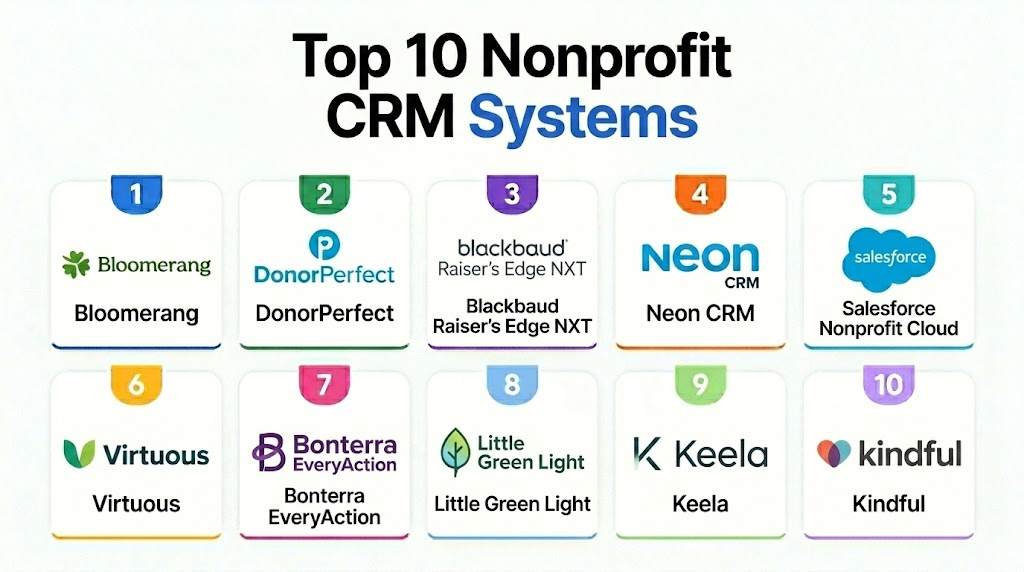
Top 10 Nonprofit CRM Systems Tools
1- Bloomerang
Short description: Bloomerang is a nonprofit CRM and fundraising platform designed to help organizations manage donors, track engagement, and improve retention. It is especially useful for small and mid-sized nonprofits that want donor relationship management, fundraising tools, and communication workflows in one system.
Key Features
- Donor and constituent profiles
- Giving history and engagement tracking
- Online fundraising tools
- Email communication workflows
- Donor retention insights
- Reporting and dashboards
- Integration with nonprofit fundraising tools
Pros
- Strong focus on donor retention and engagement
- User-friendly interface for nonprofit teams
- Good balance of CRM, fundraising, and reporting features
Cons
- May be more than very small nonprofits need
- Advanced needs may require additional tools or integrations
- Pricing may vary depending on database size and features
Platforms / Deployment
- Web
- Cloud
Security & Compliance
Role-based permissions, user access controls, and standard cloud security protections are commonly expected. Specific certifications should be verified directly with the vendor. Additional certifications: Not publicly stated.
Integrations & Ecosystem
Bloomerang fits well into nonprofit technology stacks where donor data needs to connect with fundraising, communication, and reporting workflows. It is useful for organizations that want a donor-centered CRM connected with giving and engagement data.
- Fundraising tools
- Email marketing platforms
- Payment processing workflows
- Accounting systems
- Reporting tools
- API or connector-based integrations where available
Support & Community
Bloomerang provides nonprofit-focused support resources, onboarding guidance, training content, and customer education materials. Its ecosystem is strong for teams that want donor management guidance along with software functionality.
2- DonorPerfect
Short description: DonorPerfect is a donor management and fundraising CRM that helps nonprofits manage gifts, campaigns, appeals, donor records, and reporting. It is a strong fit for organizations that need configurable fundraising workflows and detailed donor tracking.
Key Features
- Donor database and gift tracking
- Campaign and appeal management
- Online donation support
- Automated acknowledgments
- Donor segmentation
- Custom reports and dashboards
- Communication and mailing tools
Pros
- Mature donor management functionality
- Strong reporting and customization options
- Good fit for structured fundraising teams
Cons
- Setup may require planning and training
- Interface may feel complex for new users
- Pricing and add-ons can vary by organization needs
Platforms / Deployment
- Web
- Cloud
Security & Compliance
User permissions, access controls, and secure donor data management are commonly expected. Specific compliance certifications should be verified with the vendor. Additional certifications: Not publicly stated.
Integrations & Ecosystem
DonorPerfect supports common nonprofit workflows across fundraising, accounting, communications, and donor engagement. It is useful for teams that need donor data connected with operational and financial processes.
- Accounting tools
- Payment processors
- Email platforms
- Fundraising tools
- Event systems
- Reporting workflows
Support & Community
DonorPerfect offers training resources, onboarding support, documentation, and customer service options. It is suitable for teams that want a structured donor management system with implementation guidance.
3- Blackbaud Raiser’s Edge NXT
Short description: Blackbaud Raiser’s Edge NXT is an enterprise-grade nonprofit CRM and fundraising platform built for organizations with complex donor, campaign, and development operations. It is commonly suited for larger nonprofits, universities, healthcare foundations, and fundraising departments that need scalable constituent management.
Key Features
- Advanced constituent management
- Gift and campaign tracking
- Major gift and prospect workflows
- Fundraising analytics
- Donor segmentation
- Reporting and dashboards
- Integration with broader nonprofit technology ecosystems
Pros
- Strong enterprise fundraising capabilities
- Deep donor and constituent data management
- Suitable for complex, multi-team development operations
Cons
- Higher learning curve
- Implementation can require more time and resources
- May be too complex for small nonprofits
Platforms / Deployment
- Web
- Cloud
Security & Compliance
Role-based access, permission management, audit capabilities, and enterprise security controls are commonly expected. Specific certifications should be verified directly. Additional certifications: Not publicly stated.
Integrations & Ecosystem
Blackbaud Raiser’s Edge NXT is strongest when used as part of a broader nonprofit technology ecosystem. It can support organizations that need donor data connected with fundraising, finance, analytics, events, and engagement workflows.
- Blackbaud ecosystem tools
- Accounting and finance systems
- Online giving platforms
- Reporting tools
- Email and engagement systems
- APIs and data connectors
Support & Community
Blackbaud provides enterprise support resources, training, documentation, implementation partners, and a large nonprofit user ecosystem. It is best for organizations prepared for structured setup and ongoing platform administration.
4- Neon CRM
Short description: Neon CRM is a nonprofit CRM platform that supports donor management, fundraising, memberships, events, communications, and reporting. It is a strong option for growing nonprofits that need more than basic donation tracking but do not want a highly complex enterprise system.
Key Features
- Donor and constituent profiles
- Online donation forms
- Event management
- Membership management
- Email communication tools
- Workflow automation
- Reporting and dashboards
Pros
- Broad nonprofit CRM functionality
- Useful for organizations managing donors, members, and events
- Good fit for growing nonprofit teams
Cons
- May require setup time to configure workflows
- Some teams may not need the full feature set
- Advanced usage may require staff training
Platforms / Deployment
- Web
- Cloud
Security & Compliance
Role-based permissions, secure access controls, and donor data protection are commonly expected. Specific certifications should be verified directly. Additional certifications: Not publicly stated.
Integrations & Ecosystem
Neon CRM connects nonprofit CRM data with fundraising, email, event, and operational workflows. It is especially useful for organizations that need multiple nonprofit functions connected in one system.
- Payment processors
- Email marketing tools
- Event management workflows
- Accounting systems
- Membership tools
- API-based integrations
Support & Community
Neon CRM provides onboarding support, product documentation, customer support, and nonprofit-focused education resources. It is well suited for organizations that want a CRM with broad operational coverage.
5- Salesforce Nonprofit Cloud
Short description: Salesforce Nonprofit Cloud is a nonprofit-focused CRM built on the Salesforce platform. It is designed for organizations that need highly configurable relationship management, fundraising workflows, program data, reporting, and ecosystem flexibility.
Key Features
- Constituent and relationship management
- Fundraising and donor engagement workflows
- Program and case management support
- Custom dashboards and reporting
- Automation and workflow builder capabilities
- Large app ecosystem
- Strong customization options
Pros
- Highly flexible and scalable
- Strong ecosystem and integration options
- Suitable for complex nonprofit operations
Cons
- Requires implementation expertise
- Can become complex without governance
- Total cost depends on configuration, licenses, and partners
Platforms / Deployment
- Web
- iOS
- Android
- Cloud
Security & Compliance
Role-based access, MFA, audit capabilities, permission controls, and enterprise-grade security options are commonly available in Salesforce environments. Specific nonprofit configuration and certifications should be verified directly. Additional certifications: Not publicly stated.
Integrations & Ecosystem
Salesforce Nonprofit Cloud has one of the broadest ecosystems in the CRM market. It is best for nonprofits that need deep customization, integrations, and long-term platform scalability.
- Salesforce AppExchange ecosystem
- Fundraising tools
- Marketing automation platforms
- Accounting systems
- Data visualization tools
- APIs and custom integrations
Support & Community
Salesforce has extensive documentation, partner support, training resources, and a large community ecosystem. Nonprofits may need experienced implementation partners to configure the platform properly.
6- Virtuous
Short description: Virtuous is a nonprofit CRM and responsive fundraising platform focused on personalized donor engagement, automation, and relationship-building. It is useful for nonprofits that want CRM, fundraising automation, donor insights, and communication workflows in one platform.
Key Features
- Donor CRM and relationship tracking
- Fundraising automation
- Donor segmentation
- Personalized donor journeys
- Online giving support
- Campaign management
- Reporting and analytics
Pros
- Strong donor engagement and personalization focus
- Useful automation capabilities
- Good fit for growing and mid-sized nonprofits
Cons
- Requires thoughtful implementation
- May be more advanced than small teams need
- Pricing and configuration should be reviewed carefully
Platforms / Deployment
- Web
- Cloud
Security & Compliance
Role-based access, secure data management, and permissions are commonly expected. Specific certifications should be verified directly with the vendor. Additional certifications: Not publicly stated.
Integrations & Ecosystem
Virtuous works well for organizations that want to connect donor CRM data with fundraising, marketing, and engagement workflows. It is especially relevant for nonprofits focused on personalized supporter journeys.
- Online giving tools
- Email marketing systems
- Payment processors
- Analytics platforms
- Website tools
- API-based integrations
Support & Community
Virtuous provides onboarding resources, customer support, product documentation, and fundraising education materials. It is suitable for teams that want both software and strategy support for donor engagement.
7- Bonterra EveryAction
Short description: Bonterra EveryAction is a nonprofit CRM and engagement platform that supports fundraising, advocacy, donor management, marketing automation, and supporter communication. It is a good fit for nonprofits that combine fundraising with advocacy, outreach, and supporter mobilization.
Key Features
- Donor and supporter management
- Fundraising workflows
- Advocacy and campaign engagement
- Email and communication tools
- Marketing automation
- Reporting and analytics
- Segmentation and targeting
Pros
- Strong for advocacy and supporter engagement
- Combines fundraising and outreach workflows
- Useful for nonprofits with campaign-driven operations
Cons
- May be too broad for simple fundraising teams
- Setup can require planning
- Pricing and packaging may vary
Platforms / Deployment
- Web
- Cloud
Security & Compliance
Standard access controls, user permissions, and cloud security features are commonly expected. Specific certifications should be verified with the vendor. Additional certifications: Not publicly stated.
Integrations & Ecosystem
Bonterra EveryAction is useful for nonprofits that need donor CRM connected with campaign action, advocacy, email, and fundraising workflows. It works well for organizations that rely on supporter mobilization.
- Fundraising systems
- Email and advocacy tools
- Payment workflows
- Reporting platforms
- Data management tools
- Integrations vary by package
Support & Community
Bonterra offers nonprofit-focused support, onboarding resources, and product guidance. It is best for organizations prepared to manage a broader engagement platform rather than a simple donor database.
8- Little Green Light
Short description: Little Green Light is a donor management and nonprofit CRM system designed for small and mid-sized nonprofits that need practical fundraising, donor tracking, and reporting tools. It is often valued for affordability and usability.
Key Features
- Donor and constituent records
- Gift tracking
- Fundraising campaign management
- Acknowledgment workflows
- Reporting and exports
- Contact segmentation
- Integration with donation and communication tools
Pros
- Practical and affordable for smaller nonprofits
- Strong donor tracking fundamentals
- Easier to manage than many enterprise systems
Cons
- Less advanced than enterprise nonprofit CRMs
- May require integrations for broader fundraising needs
- Interface and automation depth may not fit complex teams
Platforms / Deployment
- Web
- Cloud
Security & Compliance
Standard cloud security protections and user access controls are commonly expected. Specific certifications should be verified directly. Additional certifications: Not publicly stated.
Integrations & Ecosystem
Little Green Light is useful for nonprofits that need a core donor database connected with donation forms, email tools, and accounting workflows. It works well when teams want practical donor management without excessive complexity.
- Donation platforms
- Email marketing tools
- Accounting systems
- Payment processors
- Reporting exports
- API or connector-based workflows where available
Support & Community
Little Green Light provides documentation, support resources, and nonprofit-focused help materials. It is a practical choice for teams that want usable donor management without heavy implementation demands.
9- Keela
Short description: Keela is a nonprofit CRM and fundraising platform designed to help organizations manage donors, campaigns, communications, and reporting. It is a good fit for small and growing nonprofits that want a modern system with fundraising and engagement features.
Key Features
- Donor and contact management
- Fundraising campaign tracking
- Email communication tools
- Donation forms
- Reporting dashboards
- Donor segmentation
- Automation workflows
Pros
- Modern nonprofit CRM experience
- Good for small and growing organizations
- Useful donor communication and campaign tools
Cons
- May not fit complex enterprise requirements
- Advanced customization may be limited
- Integration needs should be evaluated carefully
Platforms / Deployment
- Web
- Cloud
Security & Compliance
Standard user permissions, access controls, and cloud data protection are commonly expected. Specific certifications should be verified with the vendor. Additional certifications: Not publicly stated.
Integrations & Ecosystem
Keela supports common nonprofit workflows around fundraising, donor communication, and campaign reporting. It is best for teams that want an accessible CRM with useful engagement features.
- Donation tools
- Email platforms
- Payment processors
- Accounting workflows
- Reporting tools
- Integration availability varies by plan
Support & Community
Keela provides customer support, onboarding resources, and nonprofit education materials. It is suitable for teams that want a modern CRM but still need guidance during setup.
10- Kindful
Short description: Kindful is a nonprofit donor management and fundraising CRM known for donor tracking, online giving, reporting, and integrations. It is relevant for organizations that want donor data, fundraising activity, and giving workflows connected in one environment.
Key Features
- Donor profiles and giving history
- Online donation tracking
- Campaign management
- Reporting and analytics
- Donor segmentation
- Recurring giving support
- Integration-friendly donor data workflows
Pros
- Strong donor management fundamentals
- Useful fundraising and giving visibility
- Good fit for nonprofits that value integrations
Cons
- Product availability and packaging should be verified based on current vendor structure
- May require integration planning
- Advanced needs may require additional ecosystem tools
Platforms / Deployment
- Web
- Cloud
Security & Compliance
Standard access controls and secure cloud data practices are commonly expected. Specific certifications should be verified directly. Additional certifications: Not publicly stated.
Integrations & Ecosystem
Kindful has been known for connecting donor data with nonprofit tools and online giving workflows. It is useful for organizations that want donor information to move across fundraising, accounting, and communication systems.
- Donation tools
- Accounting systems
- Email platforms
- Payment processors
- Reporting tools
- Integration availability varies
Support & Community
Support and onboarding availability may depend on current product packaging and vendor structure. Organizations should verify support options, migration resources, and long-term platform roadmap before selecting it.
Comparison Table
| Tool Name | Best For | Platform(s) Supported | Deployment | Standout Feature | Public Rating |
|---|---|---|---|---|---|
| Bloomerang | Donor retention and engagement | Web | Cloud | Donor engagement tracking | N/A |
| DonorPerfect | Configurable donor management | Web | Cloud | Gift and campaign tracking | N/A |
| Blackbaud Raiser’s Edge NXT | Enterprise fundraising teams | Web | Cloud | Advanced constituent management | N/A |
| Neon CRM | Growing nonprofits and memberships | Web | Cloud | Broad nonprofit CRM workflows | N/A |
| Salesforce Nonprofit Cloud | Highly configurable nonprofit operations | Web, iOS, Android | Cloud | Platform flexibility | N/A |
| Virtuous | Personalized donor engagement | Web | Cloud | Responsive fundraising automation | N/A |
| Bonterra EveryAction | Advocacy and supporter engagement | Web | Cloud | Fundraising plus advocacy workflows | N/A |
| Little Green Light | Small and mid-sized nonprofits | Web | Cloud | Affordable donor management | N/A |
| Keela | Modern small nonprofit CRM | Web | Cloud | Fundraising and communication tools | N/A |
| Kindful | Donor data and giving workflows | Web | Cloud | Integration-friendly donor management | N/A |
Evaluation & Scoring of Nonprofit CRM Systems
| Tool Name | Core (25%) | Ease (15%) | Integrations (15%) | Security (10%) | Performance (10%) | Support (10%) | Value (15%) | Weighted Total (0–10) |
|---|---|---|---|---|---|---|---|---|
| Bloomerang | 9 | 8 | 8 | 8 | 8 | 8 | 8 | 8.30 |
| DonorPerfect | 9 | 7 | 8 | 8 | 8 | 8 | 8 | 8.10 |
| Blackbaud Raiser’s Edge NXT | 10 | 6 | 9 | 9 | 9 | 8 | 6 | 8.30 |
| Neon CRM | 9 | 8 | 8 | 8 | 8 | 8 | 8 | 8.30 |
| Salesforce Nonprofit Cloud | 10 | 6 | 10 | 9 | 9 | 8 | 6 | 8.45 |
| Virtuous | 9 | 7 | 8 | 8 | 8 | 8 | 7 | 7.95 |
| Bonterra EveryAction | 9 | 7 | 8 | 8 | 8 | 8 | 7 | 7.95 |
| Little Green Light | 8 | 9 | 7 | 7 | 8 | 8 | 9 | 8.05 |
| Keela | 8 | 8 | 7 | 7 | 8 | 8 | 8 | 7.75 |
| Kindful | 8 | 8 | 8 | 7 | 8 | 7 | 8 | 7.85 |
Which Nonprofit CRM Systems Tool Is Right for You?
Solo / Freelancer
Solo fundraisers, consultants, and very small nonprofit teams should prioritize simplicity, fast setup, and low administrative overhead. Little Green Light, Keela, and Bloomerang can be practical options depending on budget and required features. These tools help manage donor records, gifts, and communications without forcing small teams into overly complex enterprise workflows.
For solo users, the biggest risk is overbuying. A powerful CRM will not help if the team does not have time to configure, maintain, and use it properly. Choose a platform that makes donor data easy to update, reports simple to generate, and follow-ups easy to manage.
SMB
Small and mid-sized nonprofits usually need stronger donor management than spreadsheets but may not need a heavily customized enterprise platform. Bloomerang, DonorPerfect, Neon CRM, Little Green Light, and Keela are strong options for this segment. They can support donor profiles, donation tracking, email communication, segmentation, and campaign reporting in a manageable way.
SMBs should focus on usability, support quality, and total cost of ownership. A CRM should help staff save time, not create a new administrative burden. The best fit is usually a platform that balances fundraising depth with practical day-to-day ease of use.
Mid-Market
Mid-market nonprofits often manage multiple campaigns, donor segments, events, recurring donors, and communication streams. Neon CRM, DonorPerfect, Bloomerang, Virtuous, and Bonterra EveryAction can fit well depending on whether the organization prioritizes fundraising, donor engagement, advocacy, or automation. These platforms provide deeper workflows than entry-level systems while remaining more accessible than full enterprise environments.
At this stage, integrations become much more important. Teams should evaluate how the CRM connects with accounting, email marketing, payment processing, event tools, and reporting systems. A mid-market nonprofit should choose a CRM that supports current operations and future growth without requiring a near-term migration.
Enterprise
Large nonprofits, universities, healthcare foundations, associations, and national organizations usually need enterprise-grade constituent management, complex reporting, permissions, integrations, and governance. Salesforce Nonprofit Cloud and Blackbaud Raiser’s Edge NXT are strong candidates for highly complex operations. Virtuous and Bonterra EveryAction may also fit organizations that prioritize donor engagement, automation, advocacy, and campaign workflows.
Enterprise buyers should involve fundraising, IT, finance, legal, and operations stakeholders early in the process. Data migration, integrations, permissions, reporting, and training can significantly affect success. The best enterprise CRM is not only powerful; it must also be properly implemented and governed.
Budget vs Premium
Budget-focused nonprofits should consider Little Green Light, Keela, and practical configurations of Bloomerang or DonorPerfect. These tools can provide donor tracking, gifts, acknowledgments, and reporting without requiring the same level of investment as complex enterprise platforms. They are useful when the priority is getting organized quickly and improving donor visibility.
Premium systems such as Salesforce Nonprofit Cloud, Blackbaud Raiser’s Edge NXT, Virtuous, and Bonterra EveryAction are better suited for organizations with complex fundraising operations, larger databases, multi-team workflows, or advanced reporting needs. The higher investment may be worthwhile when the CRM becomes a core operational system across fundraising, programs, advocacy, and finance.
Feature Depth vs Ease of Use
For maximum feature depth, Salesforce Nonprofit Cloud, Blackbaud Raiser’s Edge NXT, DonorPerfect, Neon CRM, and Virtuous are strong options. These platforms can support more advanced donor management, automation, reporting, and integrations. They are best for organizations with the staff capacity to manage configuration and training.
For ease of use, Little Green Light, Keela, and Bloomerang are often more approachable for smaller teams. These platforms focus on practical donor management and fundraising workflows without overwhelming users. The right choice depends on whether your organization values simplicity or deep customization more.
Integrations & Scalability
Organizations with multiple systems should prioritize integration planning before choosing a CRM. Salesforce Nonprofit Cloud, Blackbaud Raiser’s Edge NXT, Neon CRM, Bloomerang, DonorPerfect, and Virtuous are worth evaluating when data must connect across fundraising, accounting, marketing, event, and reporting tools. Strong integrations help reduce duplicate data entry and improve data accuracy.
Scalability is not only about database size. It also includes user permissions, reporting complexity, campaign volume, automation needs, and future program expansion. A CRM should support where your nonprofit is going, not just where it is today.
Security & Compliance Needs
Nonprofit CRM systems store sensitive donor information, giving history, contact details, communication records, and sometimes payment-related data. Organizations should evaluate MFA, role-based access, audit logs, encryption, permissions, data export controls, and vendor security documentation. Security should be reviewed before implementation, not after donor data has already been migrated.
Larger nonprofits should involve IT and legal teams in the buying process. Organizations operating across regions may also need to evaluate privacy requirements, data residency, and consent management. A CRM should protect donor trust as carefully as it supports fundraising growth.
Frequently Asked Questions
1. What is a Nonprofit CRM System?
A Nonprofit CRM System is software that helps organizations manage relationships with donors, volunteers, members, beneficiaries, and supporters. It centralizes contact records, giving history, communications, campaigns, and engagement data. This helps nonprofits build stronger relationships and make better fundraising decisions.
2. How is a nonprofit CRM different from a regular CRM?
A regular CRM is usually designed for sales teams, while a nonprofit CRM is built around donors, gifts, campaigns, volunteers, memberships, and constituent relationships. Nonprofit CRMs often include fundraising workflows, donation tracking, acknowledgments, and donor retention reporting. This makes them more suitable for mission-driven organizations.
3. What features should a nonprofit CRM include?
A good nonprofit CRM should include donor profiles, gift tracking, segmentation, reporting, communication tools, donation management, and integrations. Larger organizations may also need automation, major gift workflows, membership management, volunteer tracking, and advanced permissions. The best feature set depends on organizational size and fundraising maturity.
4. How much does nonprofit CRM software cost?
Pricing varies widely depending on the platform, database size, users, modules, and implementation needs. Some tools are more affordable for small nonprofits, while enterprise platforms may require larger budgets and partner support. Nonprofits should evaluate license fees, onboarding, integrations, migration, training, and add-ons.
5. How long does CRM implementation take?
Implementation can take a short time for simple systems and longer for complex enterprise deployments. Timeline depends on data migration, integrations, staff training, workflow configuration, and reporting requirements. Teams should clean donor data and define processes before starting implementation.
6. What are common mistakes when choosing a nonprofit CRM?
Common mistakes include choosing based only on price, ignoring data migration, overlooking integrations, and underestimating staff training needs. Some nonprofits also select tools that are either too basic or too complex for their actual capacity. A pilot or guided demo can help reduce selection risk.
7. Can nonprofit CRM systems integrate with donation tools?
Yes, many nonprofit CRM systems integrate with donation platforms, payment processors, accounting software, email tools, and event systems. Integrations help keep donor records updated and reduce manual data entry. Buyers should verify whether integrations are native, third-party, API-based, or limited by plan.
8. What security features should nonprofits check?
Nonprofits should evaluate MFA, role-based permissions, encryption, audit logs, user access controls, and secure data handling practices. Organizations should also ask vendors about privacy policies and compliance documentation. Donor trust depends on both strong fundraising and responsible data protection.
9. When should a nonprofit move from spreadsheets to a CRM?
A nonprofit should consider moving to a CRM when donor records, donation history, email lists, and reporting become difficult to manage manually. If staff are spending too much time updating spreadsheets or reconciling data, a CRM can improve accuracy and efficiency. Growth in donations, campaigns, or volunteers is usually a strong signal.
10. What is the best nonprofit CRM for small organizations?
The best CRM for a small nonprofit depends on budget, staff skills, donor volume, and fundraising goals. Little Green Light, Keela, Bloomerang, and DonorPerfect can be good options depending on needs. Small teams should prioritize ease of use, reliable support, and essential donor management features.
Conclusion
Nonprofit CRM Systems are essential for organizations that want to manage donor relationships, improve fundraising visibility, personalize communication, and make better decisions from supporter data. The best platform depends on your nonprofit’s size, budget, fundraising maturity, internal capacity, and integration needs. Bloomerang, DonorPerfect, Neon CRM, Little Green Light, and Keela are strong options for small and mid-sized nonprofits, while Salesforce Nonprofit Cloud and Blackbaud Raiser’s Edge NXT are better suited for large or complex organizations. Virtuous and Bonterra EveryAction are useful when donor engagement, automation, advocacy, and campaign workflows are priorities. Instead of choosing based only on brand recognition, nonprofits should shortlist two or three tools, review data migration needs, run demos with real workflows, validate integrations and security requirements, and select the CRM that can support both current operations and long-term mission growth.

Find Trusted Cardiac Hospitals
Compare heart hospitals by city and services — all in one place.
Explore Hospitals
Nonprofit CRM systems are most effective when they help organizations build deeper relationships with donors, volunteers, and supporters. By centralizing contact data, tracking engagement, and automating communication workflows, these platforms enable nonprofits to improve fundraising efforts, increase retention, and better advance their missions.