Introduction
Patch management tools are software solutions designed to automate, streamline, and monitor the process of applying software updates and patches across devices, operating systems, and applications within an organization. In today’s fast-paced IT environment, staying up to date with security patches and software updates is crucial to reduce vulnerabilities, ensure regulatory compliance, and maintain system performance.
Organizations face increasing pressure from cyber threats, ransomware attacks, and compliance requirements. Patch management tools help mitigate these risks by enabling IT teams to schedule updates, monitor deployment status, and report on compliance. Typical use cases include:
- Automating updates across desktops, laptops, and servers.
- Ensuring compliance with industry regulations like GDPR or HIPAA.
- Reducing the window of exposure for newly discovered vulnerabilities.
- Managing third-party software patches for productivity and security applications.
- Integrating patching workflows with IT service management systems.
Key evaluation criteria buyers should consider:
- Platform coverage (Windows, macOS, Linux)
- Deployment model (cloud, on-premises, hybrid)
- Automation capabilities
- Reporting and audit functions
- Integration with existing IT tools
- Security and compliance support
- Patch testing and rollback features
- Ease of use
- Vendor support and community
- Pricing and scalability
Best for: IT managers, system administrators, and security teams in SMBs to enterprise organizations that require reliable patch automation and compliance tracking. Industries such as finance, healthcare, education, and manufacturing benefit significantly.
Not ideal for: Small teams with minimal IT infrastructure or organizations with limited device diversity may find built-in OS update mechanisms sufficient. Open-source alternatives may be considered if budget constraints outweigh the need for enterprise features.
Key Trends in Patch Management Tools
- AI-driven patch prioritization: Tools are increasingly using AI to recommend critical patches based on threat intelligence.
- Automation and orchestration: Automatic deployment, scheduling, and rollback features minimize human intervention.
- Unified endpoint management integration: Patch tools integrate with broader EMM/MDM systems for cohesive endpoint control.
- Cloud-native deployments: Many vendors offer SaaS solutions, reducing on-prem infrastructure overhead.
- Compliance reporting: Built-in templates for standards like HIPAA, GDPR, PCI DSS, and ISO 27001.
- Third-party application patching: Beyond OS updates, tools now support popular business software.
- Patch testing and staging environments: Simulated rollouts prevent disruptions in production.
- Mobile device support: Tools are extending coverage to iOS and Android devices.
- Integration with ITSM and ticketing systems: Automation triggers patch approvals or alerts in existing workflows.
- Flexible pricing models: Subscription-based, per-device, or enterprise licensing options.
How We Selected These Tools (Methodology)
- Evaluated market adoption and mindshare based on enterprise deployments.
- Assessed feature completeness including OS and third-party patch coverage.
- Considered reliability and performance signals from user reviews and vendor claims.
- Verified security posture, including compliance support and access controls.
- Reviewed integration and ecosystem capabilities with ITSM, MDM, and monitoring tools.
- Tested customer fit across segments, including SMB, mid-market, and enterprise.
- Analyzed automation and AI capabilities for proactive patching.
- Reviewed reporting and auditing functions to support compliance.
- Checked ease of deployment and management across diverse IT environments.
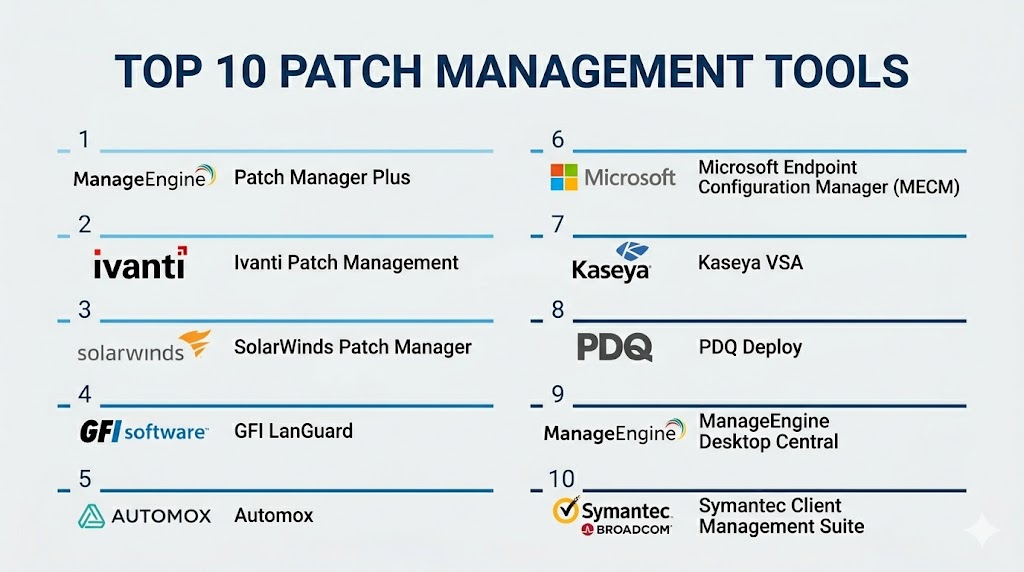
Top 10 Patch Management Tools
#1 — ManageEngine Patch Manager Plus
Short description: ManageEngine Patch Manager Plus automates patch deployment across Windows, macOS, and Linux systems. Designed for SMBs to enterprise IT teams, it ensures comprehensive patch coverage for OS and third-party applications.
Key Features
- Automated patch scanning and deployment
- Third-party application patching
- Patch testing and rollback
- Compliance reporting dashboards
- Role-based access control
- Integration with ITSM systems
- Mobile device patch support
Pros
- Extensive third-party software coverage
- Strong compliance and reporting features
Cons
- UI can be complex for beginners
- Advanced reporting may require additional setup
Platforms / Deployment
- Windows, macOS, Linux
- Cloud / On-premises / Hybrid
Security & Compliance
- RBAC, encryption, audit logs
- SOC 2, ISO 27001, GDPR
Integrations & Ecosystem
Integrates with ServiceDesk Plus, SCCM, Active Directory.
- APIs for custom integrations
- ITSM workflows
- SIEM alerts
- Endpoint management systems
Support & Community
Varies / Not publicly stated
#2 — Ivanti Patch Management
Short description: Ivanti offers automated patching solutions for operating systems and third-party applications, targeting enterprises seeking centralized management and enhanced security posture.
Key Features
- Patch automation for Windows and Linux
- Third-party application patching
- Vulnerability assessment
- Rollback support
- Centralized reporting
- Policy-based patch deployment
Pros
- Enterprise-grade scalability
- Tight integration with security workflows
Cons
- Higher learning curve
- Complex licensing structure
Platforms / Deployment
- Windows, Linux
- Cloud / On-premises / Hybrid
Security & Compliance
- MFA, encryption, RBAC
- Not publicly stated for certifications
Integrations & Ecosystem
Integrates with Ivanti EPM, SCCM, and vulnerability scanners.
- ITSM connectors
- Automation scripts
- API extensibility
Support & Community
Documentation and vendor support provided; active community forums.
#3 — SolarWinds Patch Manager
Short description: SolarWinds Patch Manager simplifies Windows patch management and third-party updates, focusing on networked IT environments and scalable enterprise deployment.
Key Features
- Centralized patch dashboard
- Automated patch approvals
- Third-party application patching
- Compliance reporting templates
- Role-based access
Pros
- Easy integration with SCCM
- Streamlined Windows patch management
Cons
- Limited Linux/macOS support
- Less suited for SMBs with diverse OS
Platforms / Deployment
- Windows
- On-premises / Hybrid
Security & Compliance
- Audit logs, RBAC
- Not publicly stated for certifications
Integrations & Ecosystem
Integrates with SCCM, Active Directory, and monitoring tools.
- API support
- IT workflow automation
Support & Community
Comprehensive vendor documentation and active support.
#4 — GFI LanGuard
Short description: GFI LanGuard provides patch management and vulnerability scanning for SMBs and mid-sized enterprises, emphasizing network security and compliance.
Key Features
- Automated OS and application patching
- Network vulnerability scanning
- Patch testing and scheduling
- Compliance reporting
- Centralized dashboard
Pros
- Strong security focus
- Affordable SMB-friendly solution
Cons
- Limited cloud integration
- UI may feel dated
Platforms / Deployment
- Windows, macOS, Linux
- On-premises / Hybrid
Security & Compliance
- RBAC, audit logs
- Not publicly stated
Integrations & Ecosystem
- Active Directory, endpoint management
- APIs for custom workflows
Support & Community
Vendor support available; moderate user community.
#5 — Automox
Short description: Automox is a cloud-native patch management platform enabling IT teams to automate OS and third-party application patching with a focus on simplicity and remote management.
Key Features
- Cloud-first patch deployment
- Cross-platform OS support
- Third-party application patching
- Policy-driven automation
- Real-time compliance reporting
- Endpoint visibility
Pros
- Cloud-native, no on-prem infrastructure
- Easy to deploy and manage remotely
Cons
- Limited offline patching capabilities
- Advanced features may require premium plan
Platforms / Deployment
- Windows, macOS, Linux
- Cloud
Security & Compliance
- MFA, RBAC, audit logs
- Not publicly stated
Integrations & Ecosystem
Integrates with ITSM, endpoint monitoring, APIs for automation.
- Slack/Teams notifications
- SIEM feeds
- Custom scripting
Support & Community
24/7 support; growing community forums.
#6 — Microsoft Endpoint Configuration Manager (MECM)
Short description: MECM, formerly SCCM, provides enterprise-grade patch management for Windows environments with centralized deployment and reporting.
Key Features
- Automated Windows updates
- Third-party software patching
- Compliance tracking and reporting
- Role-based access
- Integration with Active Directory
Pros
- Enterprise-ready
- Deep integration with Microsoft ecosystem
Cons
- Complex setup and management
- Limited cross-platform support
Platforms / Deployment
- Windows
- On-premises / Hybrid
Security & Compliance
- SSO/SAML, RBAC
- ISO 27001, Not publicly stated
Integrations & Ecosystem
- Active Directory, Intune, Azure services
- APIs for automation
- IT workflow connectors
Support & Community
Extensive documentation and strong Microsoft support community.
#7 — Kaseya VSA
Short description: Kaseya VSA provides patch management within a broader RMM platform for MSPs and IT teams, automating OS and software updates.
Key Features
- OS and third-party patching
- Automated deployment policies
- Compliance dashboards
- Remote agent management
- Rollback and testing support
Pros
- Integrated RMM suite
- Scalable for MSPs
Cons
- Pricing can be high for small teams
- Complexity for non-MSP environments
Platforms / Deployment
- Windows, macOS, Linux
- Cloud / On-premises / Hybrid
Security & Compliance
- MFA, audit logs, encryption
- Not publicly stated
Integrations & Ecosystem
- ITSM, monitoring, APIs
- RMM connectors
- Scripting support
Support & Community
Vendor support and community forums available.
#8 — PDQ Deploy
Short description: PDQ Deploy offers lightweight patch management for Windows desktops and servers, focusing on SMBs needing rapid deployment.
Key Features
- Software and OS patching
- Predefined package library
- Scheduling and automation
- Reporting and notifications
- Remote deployment
Pros
- Simple and easy to use
- Affordable SMB solution
Cons
- Limited macOS/Linux support
- Lacks enterprise features
Platforms / Deployment
- Windows
- On-premises
Security & Compliance
- Not publicly stated
Integrations & Ecosystem
- Integrates with PDQ Inventory
- Basic scripting support
Support & Community
Vendor support available; moderate community.
#9 — ManageEngine Desktop Central
Short description: Desktop Central combines patch management with endpoint management and asset control for SMBs and enterprises.
Key Features
- OS and third-party patching
- Endpoint management
- Asset inventory and software distribution
- Compliance reporting
- Remote control and troubleshooting
Pros
- Comprehensive endpoint management
- Integrated patch and asset management
Cons
- Can be complex to configure
- Overkill for small teams
Platforms / Deployment
- Windows, macOS, Linux, Android, iOS
- Cloud / On-premises / Hybrid
Security & Compliance
- RBAC, audit logs
- ISO 27001, SOC 2 (Not publicly stated)
Integrations & Ecosystem
- ITSM connectors, APIs
- Endpoint monitoring tools
- Custom workflows
Support & Community
Documentation, vendor support, and active forums.
#10 — Symantec Client Management Suite
Short description: Symantec CMS offers patch management integrated with endpoint security and asset management for mid-market to enterprise IT environments.
Key Features
- OS and third-party patching
- Endpoint protection integration
- Asset and inventory management
- Automated scheduling and deployment
- Reporting and compliance tracking
Pros
- Tight integration with Symantec security stack
- Centralized endpoint management
Cons
- Complex licensing
- Limited macOS/Linux support compared to Windows
Platforms / Deployment
- Windows, limited macOS
- On-premises / Hybrid
Security & Compliance
- RBAC, audit logs
- Not publicly stated
Integrations & Ecosystem
- Security products, ITSM connectors
- APIs for automation
- Monitoring systems
Support & Community
Vendor support; moderate community engagement.
Comparison Table (Top 10)
| Tool Name | Best For | Platform(s) Supported | Deployment | Standout Feature | Public Rating |
|---|---|---|---|---|---|
| ManageEngine Patch Manager Plus | SMBs & Enterprise | Windows, macOS, Linux | Cloud/On-prem/Hybrid | Third-party patching | N/A |
| Ivanti Patch Management | Enterprise | Windows, Linux | Cloud/On-prem/Hybrid | Vulnerability-driven patching | N/A |
| SolarWinds Patch Manager | Enterprise | Windows | On-prem/Hybrid | Integration with SCCM | N/A |
| GFI LanGuard | SMB/Mid-market | Windows, macOS, Linux | On-prem/Hybrid | Network vulnerability scanning | N/A |
| Automox | SMB/Enterprise | Windows, macOS, Linux | Cloud | Cloud-native automation | N/A |
| Microsoft Endpoint Configuration Manager | Enterprise | Windows | On-prem/Hybrid | Deep Microsoft ecosystem integration | N/A |
| Kaseya VSA | MSPs/Enterprise | Windows, macOS, Linux | Cloud/On-prem/Hybrid | RMM integration | N/A |
| PDQ Deploy | SMB | Windows | On-prem | Rapid deployment | N/A |
| ManageEngine Desktop Central | SMB/Enterprise | Windows, macOS, Linux, iOS, Android | Cloud/On-prem/Hybrid | Endpoint & patch management | N/A |
| Symantec Client Management Suite | Mid-market/Enterprise | Windows | On-prem/Hybrid | Security stack integration | N/A |
Evaluation & Scoring of Patch Management Tools
| Tool Name | Core (25%) | Ease (15%) | Integrations (15%) | Security (10%) | Performance (10%) | Support (10%) | Value (15%) | Weighted Total (0–10) |
|---|---|---|---|---|---|---|---|---|
| ManageEngine Patch Manager Plus | 9 | 7 | 8 | 8 | 8 | 7 | 8 | 8.2 |
| Ivanti Patch Management | 9 | 6 | 8 | 8 | 8 | 7 | 7 | 7.9 |
| SolarWinds Patch Manager | 8 | 7 | 7 | 7 | 8 | 7 | 7 | 7.5 |
| GFI LanGuard | 7 | 7 | 6 | 7 | 7 | 6 | 8 | 7.0 |
| Automox | 8 | 8 | 7 | 7 | 8 | 7 | 8 | 7.7 |
| Microsoft Endpoint Configuration Manager | 9 | 6 | 9 | 8 | 9 | 7 | 7 | 7.9 |
| Kaseya VSA | 8 | 6 | 8 | 7 | 8 | 7 | 7 | 7.5 |
| PDQ Deploy | 7 | 8 | 6 | 6 | 7 | 6 | 8 | 7.1 |
| ManageEngine Desktop Central | 8 | 7 | 8 | 7 | 8 | 7 | 7 | 7.5 |
| Symantec Client Management Suite | 8 | 6 | 7 | 7 | 8 | 6 | 7 | 7.2 |
Interpretation: Scores are comparative and reflect feature richness, ease of use, integrations, and security. Higher weighted totals indicate tools that provide stronger overall value across diverse IT environments. Buyers should consider specific deployment needs, platform coverage, and compliance requirements when selecting a tool.
Which Patch Management Tool Is Right for You?
Solo / Freelancer
- PDQ Deploy or Automox are simple, cloud-ready, and cost-effective for small setups.
SMB
- ManageEngine Patch Manager Plus or GFI LanGuard provide comprehensive coverage with moderate complexity and pricing.
Mid-Market
- Automox or Kaseya VSA offer scalability and cross-platform support.
Enterprise
- Ivanti Patch Management, Microsoft Endpoint Configuration Manager, or SolarWinds Patch Manager provide enterprise-grade features, compliance reporting, and deep integrations.
Budget vs Premium
- Budget-conscious: PDQ Deploy, GFI LanGuard
- Premium enterprise: Ivanti, MECM, Automox
Feature Depth vs Ease of Use
- High feature depth: Ivanti, MECM
- Easy-to-use: Automox, PDQ Deploy
Integrations & Scalability
- Kaseya VSA and ManageEngine Desktop Central provide strong RMM and ITSM integration capabilities for scaling teams.
Security & Compliance Needs
- Enterprises with strict compliance requirements should prioritize tools with audit logs, RBAC, and built-in compliance reporting like ManageEngine Patch Manager Plus, Ivanti, or MECM.
Frequently Asked Questions (FAQs)
1. How much do patch management tools cost?
Pricing varies widely based on the number of endpoints, deployment model, and feature set. Some tools offer subscription models, while others require upfront licensing. SMBs can find affordable cloud options, whereas enterprises may require premium suites.
2. How long does it take to implement a patch management tool?
Implementation ranges from a few hours for cloud-native solutions to several weeks for enterprise on-prem deployments with extensive integrations.
3. Can these tools patch third-party applications?
Yes. Many modern tools, including ManageEngine, Automox, and Ivanti, support automated patching for widely used third-party software.
4. Are patch management tools secure?
Leading tools include RBAC, MFA, encryption, and audit logs. Certifications like SOC 2 or ISO 27001 are available with some vendors, while others provide internal security controls.
5. Do I need patch management for cloud endpoints?
Yes. Patch management tools now extend coverage to cloud-hosted servers, virtual machines, and hybrid IT environments to maintain security compliance.
6. Can patch deployment be automated?
Yes. Most tools support automated scanning, deployment scheduling, and rollback policies to minimize downtime.
7. How do I choose between cloud and on-prem deployment?
Cloud solutions simplify setup and maintenance, while on-prem provides full control and may suit strict regulatory environments.
8. Can patch management tools integrate with ITSM systems?
Yes. Many tools provide built-in integrations with ServiceNow, Jira, and other ITSM platforms to automate approvals and workflow notifications.
9. What are common mistakes when implementing patch management?
Common pitfalls include skipping testing phases, underestimating cross-platform patch requirements, and failing to align with compliance reporting needs.
10. Are open-source options viable?
Some open-source tools exist but often require manual configuration and lack enterprise features, reporting, and support.
Conclusion
Patch management tools have become essential for organizations of all sizes to maintain security, reduce operational risks, and stay compliant with industry regulations. Modern solutions offer AI-driven automation, third-party software patching, and integration with broader IT workflows, enabling IT teams to focus on strategic initiatives rather than manual updates. Selection depends on organizational size, endpoint diversity, compliance needs, and budget constraints. Buyers should evaluate platform coverage, automation capabilities, integrations, and support when creating a shortlist. Running a pilot deployment and reviewing reporting and rollback capabilities ensures that the chosen solution aligns with organizational security and operational goals. Investing in the right patch management tool today can prevent costly vulnerabilities and enhance IT efficiency across the enterprise.

Find Trusted Cardiac Hospitals
Compare heart hospitals by city and services — all in one place.
Explore Hospitals
Patch management also needs a plan for systems that cannot be patched right away. Older applications or critical devices may need extra testing before an update is applied. Keeping track of these exceptions and setting a clear deadline for review can help prevent temporary exceptions from becoming permanent risks.