Introduction
Workflow orchestration tools are software platforms designed to automate, schedule, and manage complex business processes across multiple systems and teams. These tools allow organizations to coordinate tasks, data flows, and decision points seamlessly, improving operational efficiency and reducing errors caused by manual intervention. with increasingly hybrid IT environments, cloud services, and AI-driven automation, workflow orchestration has become critical for businesses aiming to optimize processes, maintain compliance, and accelerate digital transformation initiatives.
Real-world use cases include:
- Automating multi-step business approvals across departments.
- Integrating data pipelines for analytics and reporting.
- Orchestrating DevOps workflows for continuous integration and delivery.
- Managing cross-system order processing in e-commerce or logistics.
- Coordinating AI/ML model training, deployment, and monitoring pipelines.
Evaluation criteria for buyers:
- Ease of use and low-code/no-code capabilities.
- Scalability and performance under high workflow volumes.
- Integration flexibility with existing systems and APIs.
- Security, compliance, and governance features.
- Monitoring, alerting, and observability for workflow failures.
- AI/ML or automation capabilities.
- Deployment options (cloud, hybrid, on-premises).
- Vendor support, documentation, and community strength.
- Cost and licensing models.
- Flexibility to handle ad-hoc and scheduled workflows.
Best for: IT teams, DevOps engineers, business process owners, SMBs to large enterprises, and organizations requiring multi-system automation and cross-functional workflows.
Not ideal for: Small teams with simple task automation needs, organizations relying solely on single-system automation, or when lightweight task scheduling tools suffice.
Key Trends in Workflow Orchestration
- AI-driven automation: Integration of AI to optimize task scheduling and detect workflow anomalies.
- Cloud-native platforms: Shift to SaaS-first orchestration with auto-scaling and global availability.
- Event-driven orchestration: Support for reactive workflows triggered by events across systems.
- Low-code/No-code interfaces: Empowering business users to build and modify workflows easily.
- Observability and analytics: Advanced monitoring dashboards with predictive failure alerts.
- Hybrid deployments: Seamless orchestration across cloud, on-premises, and edge systems.
- Security and compliance: Built-in RBAC, encryption, audit logs, and GDPR/HIPAA compliance.
- Microservices orchestration: Managing complex containerized workflows in Kubernetes environments.
- Cost transparency: Usage-based billing and optimization for cloud resources.
- Integration ecosystem expansion: Connectors to SaaS apps, databases, APIs, and AI platforms.
How We Selected These Tools (Methodology)
- Evaluated market adoption, reputation, and mindshare across industries.
- Assessed completeness of core orchestration features, including scheduling, automation, and monitoring.
- Reviewed reliability and performance under high-volume workflows.
- Checked security posture including authentication, encryption, and audit capabilities.
- Examined integration breadth and ecosystem extensibility.
- Considered suitability for various organizational sizes and types of workflows.
- Factored in vendor support quality and community strength.
- Prioritized platforms that support modern AI and hybrid-cloud requirements.
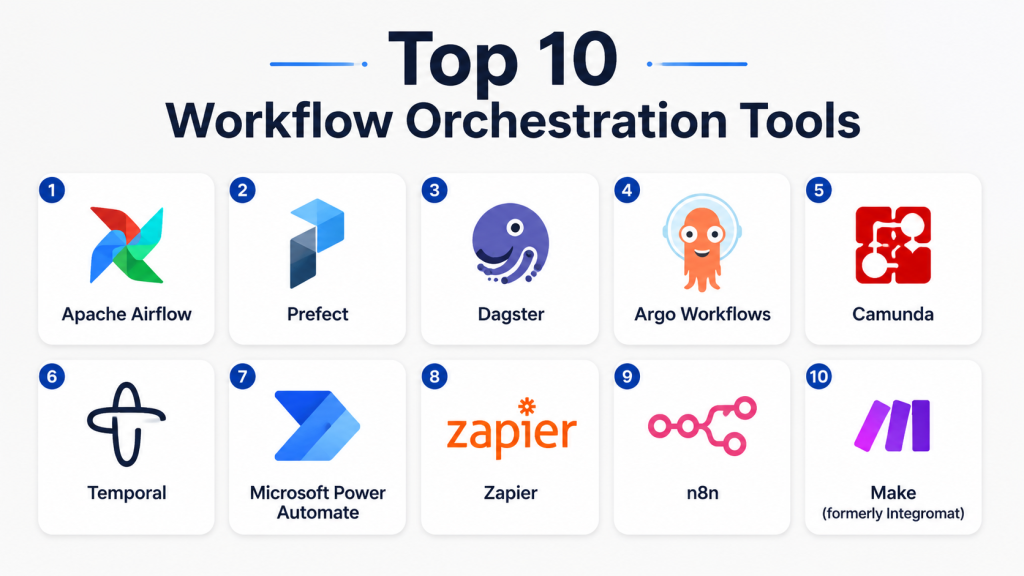
Top 10 Workflow Orchestration Tools
1- Apache Airflow
Short description: Open-source workflow orchestration platform designed for data pipelines and complex ETL processes. Ideal for data engineers and analytics teams.
Key Features
- DAG-based workflow scheduling and execution.
- Rich Python API for task customization.
- Extensible with custom operators and plugins.
- Scalable distributed execution via Celery or Kubernetes.
- Web-based monitoring and alerting dashboard.
Pros
- Highly flexible for custom workflows.
- Strong open-source community and plugin ecosystem.
- Supports complex dependencies and retries.
Cons
- Requires Python knowledge for advanced workflows.
- Can be challenging to maintain at scale without expert operations.
- Limited native low-code capabilities.
Platforms / Deployment
- Web / Linux / Cloud
- Self-hosted / Cloud (via managed services)
Security & Compliance
Not publicly stated
Integrations & Ecosystem
Airflow integrates extensively with data warehouses, cloud platforms, and messaging queues.
- AWS, GCP, Azure connectors
- Hadoop, Spark, BigQuery
- Slack/email for notifications
- REST APIs for external services
Support & Community
- Strong community support via forums and GitHub.
- Documentation comprehensive but technical.
- Commercial support via managed Airflow providers.
2- Prefect
Short description: Modern workflow orchestration platform focused on simplicity, observability, and hybrid cloud execution for data workflows.
Key Features
- Python-first workflow design.
- Cloud or self-hosted execution options.
- Built-in observability with retries and logging.
- Hybrid execution for sensitive data.
- Dynamic task mapping and caching.
Pros
- Simple deployment and configuration.
- Strong monitoring and alerting capabilities.
- Hybrid execution preserves data privacy.
Cons
- Relatively newer; smaller community than Airflow.
- Enterprise features may require paid plans.
Platforms / Deployment
- Web / Linux / Cloud / Windows
- Cloud / Self-hosted / Hybrid
Security & Compliance
Not publicly stated
Integrations & Ecosystem
- Cloud connectors for AWS, GCP, Azure
- Database and ETL integrations
- API and Python library extensibility
Support & Community
- Official documentation robust.
- Slack and forum community.
- Professional support tiers available.
3- Dagster
Short description: Orchestration tool for data pipelines emphasizing type safety, observability, and developer-friendly workflow design.
Key Features
- Type-safe pipeline and asset definitions.
- Observability with event logging and dashboards.
- Supports local, cloud, and containerized execution.
- Modular and reusable pipeline components.
- Python-native API for workflows.
Pros
- Strong developer ergonomics.
- Excellent for asset-centric workflows.
- Robust observability and error handling.
Cons
- Learning curve for non-developers.
- Smaller integration ecosystem than older tools.
Platforms / Deployment
- Web / Linux / macOS
- Cloud / Self-hosted / Hybrid
Security & Compliance
Not publicly stated
Integrations & Ecosystem
- Python libraries and SDKs
- Cloud storage connectors
- API-based integrations
Support & Community
- Active GitHub and community Slack.
- Comprehensive documentation.
- Commercial support available via enterprise plans.
4- Argo Workflows
Short description: Kubernetes-native workflow orchestration for containerized applications and CI/CD pipelines.
Key Features
- YAML-based workflow definition.
- Kubernetes-native execution and scaling.
- Supports DAGs and steps-based workflows.
- Artifact passing between tasks.
- Integration with CI/CD pipelines.
Pros
- Excellent for containerized cloud-native workloads.
- Highly scalable on Kubernetes clusters.
- Good for DevOps and ML pipelines.
Cons
- Requires Kubernetes expertise.
- Limited low-code capabilities for business users.
Platforms / Deployment
- Linux / Cloud / Kubernetes
- Self-hosted / Cloud-native
Security & Compliance
Not publicly stated
Integrations & Ecosystem
- Kubernetes ecosystem (Helm, K8s CRDs)
- CI/CD systems (GitLab, Jenkins)
- Artifact repositories
Support & Community
- Strong open-source community.
- Documentation detailed for DevOps users.
- Commercial support via enterprise partners.
5- Camunda
Short description: Enterprise-grade workflow and decision automation platform supporting BPMN, DMN, and CMMN standards.
Key Features
- Graphical modeling of workflows.
- Decision automation with DMN rules engine.
- Java-based workflow execution.
- REST API and connectors for integrations.
- Enterprise monitoring and reporting.
Pros
- Strong compliance with BPMN standards.
- Scalable for enterprise process automation.
- Good monitoring and governance tools.
Cons
- Java-centric; may require developer resources.
- Enterprise licensing can be costly.
Platforms / Deployment
- Web / Windows / Linux
- Cloud / Self-hosted / Hybrid
Security & Compliance
Not publicly stated
Integrations & Ecosystem
- REST API for external systems.
- Connector library for ERP, CRM, and databases.
- Cloud messaging and event queues.
Support & Community
- Extensive documentation and community forums.
- Enterprise support available.
- Training and certification programs.
6- Temporal
Short description: Reliable microservices orchestration platform for long-running workflows and event-driven automation.
Key Features
- Fault-tolerant workflow execution.
- SDKs for multiple programming languages.
- State persistence and retry mechanisms.
- Highly scalable for distributed systems.
- Event-driven architecture support.
Pros
- Excellent reliability for long-running workflows.
- Strong developer-focused API.
- Scalable across cloud and on-premises.
Cons
- Requires coding expertise.
- Limited visual workflow modeling.
Platforms / Deployment
- Linux / Cloud / Web
- Cloud / Self-hosted / Hybrid
Security & Compliance
Not publicly stated
Integrations & Ecosystem
- APIs and SDKs for Java, Go, Python.
- Cloud and database connectors.
- Messaging systems (Kafka, RabbitMQ).
Support & Community
- Active GitHub community.
- Documentation detailed.
- Enterprise support options exist.
7- Microsoft Power Automate
Short description: Low-code workflow automation platform for business users to integrate apps, automate approvals, and tasks across Microsoft 365 and beyond.
Key Features
- Drag-and-drop workflow designer.
- Pre-built connectors for 400+ apps.
- Conditional logic, loops, and triggers.
- AI Builder for intelligent automation.
- Integration with Teams, SharePoint, Dynamics.
Pros
- Low-code; accessible for non-developers.
- Strong Microsoft ecosystem support.
- Rapid deployment for common workflows.
Cons
- Limited for highly complex or large-scale pipelines.
- Licensing can become expensive with scale.
Platforms / Deployment
- Web / Windows / iOS / Android
- Cloud / Hybrid
Security & Compliance
- SSO, MFA, RBAC
- SOC 2, ISO 27001, GDPR (as Microsoft provides)
Integrations & Ecosystem
- Microsoft 365 suite
- Popular SaaS apps
- Custom connectors via APIs
Support & Community
- Official Microsoft documentation and training.
- Large community forums.
- Tiered enterprise support.
8- Zapier
Short description: Cloud-based automation tool enabling non-technical users to connect apps and automate simple workflows.
Key Features
- Thousands of pre-built app integrations.
- Multi-step automation (“Zaps”).
- Event-based triggers and conditional logic.
- Webhooks and custom app connectors.
- Scheduled and real-time workflow execution.
Pros
- Extremely user-friendly.
- Rapid deployment of simple automations.
- Supports small teams and SMBs effectively.
Cons
- Limited for complex or high-volume workflows.
- Less suitable for enterprise-grade orchestration.
Platforms / Deployment
- Web / Cloud
- Cloud-only
Security & Compliance
Not publicly stated
Integrations & Ecosystem
- 5,000+ SaaS applications
- Webhooks and API integration
- Email and messaging apps
Support & Community
- Online knowledge base and tutorials.
- Community forums active.
- Paid support tiers.
9- n8n
Short description: Open-source low-code workflow automation tool for connecting apps and services with custom logic.
Key Features
- Visual workflow designer.
- Self-hosted or cloud options.
- Supports conditional logic and loops.
- Connects to databases, APIs, and messaging apps.
- Extensible via custom nodes.
Pros
- Open-source with strong flexibility.
- Supports on-premises deployment for data control.
- Easy to extend via custom nodes.
Cons
- May require technical setup for self-hosting.
- Smaller enterprise adoption than commercial alternatives.
Platforms / Deployment
- Web / Linux / Windows / macOS
- Cloud / Self-hosted / Hybrid
Security & Compliance
Not publicly stated
Integrations & Ecosystem
- APIs and webhooks
- Databases and messaging systems
- Custom integrations via nodes
Support & Community
- Active open-source community.
- Documentation comprehensive.
- Paid cloud support options.
10- Make (formerly Integromat)
Short description: Visual workflow automation tool for SMBs and teams, enabling complex integrations without coding.
Key Features
- Drag-and-drop scenario builder.
- Connects multiple apps and services.
- Conditional paths, loops, and error handling.
- Scheduling and event-based triggers.
- Real-time monitoring and logs.
Pros
- Intuitive visual interface.
- Affordable for SMBs.
- Extensive pre-built app connectors.
Cons
- Limited suitability for enterprise-scale pipelines.
- Some advanced logic may be cumbersome visually.
Platforms / Deployment
- Web / Cloud
- Cloud-only
Security & Compliance
Not publicly stated
Integrations & Ecosystem
- SaaS apps and services
- APIs and webhooks
- Email and messaging integrations
Support & Community
- Knowledge base and tutorials.
- Online community forums.
- Tiered support for premium plans.
Comparison Table (Top 10)
| Tool Name | Best For | Platform(s) Supported | Deployment | Standout Feature | Public Rating |
|---|---|---|---|---|---|
| Apache Airflow | Data engineers | Web/Linux | Self-hosted / Cloud | DAG-based pipelines | N/A |
| Prefect | Hybrid data workflows | Web/Linux/Windows | Cloud / Self-hosted / Hybrid | Observability + hybrid execution | N/A |
| Dagster | Developer-friendly pipelines | Web/Linux/macOS | Cloud / Self-hosted / Hybrid | Type-safe assets | N/A |
| Argo Workflows | Kubernetes CI/CD | Linux/Cloud | Self-hosted / Cloud-native | K8s-native execution | N/A |
| Camunda | Enterprise process automation | Web/Windows/Linux | Cloud / Self-hosted / Hybrid | BPMN & DMN support | N/A |
| Temporal | Microservices orchestration | Linux/Web | Cloud / Self-hosted / Hybrid | Fault-tolerant workflows | N/A |
| Microsoft Power Automate | Business users | Web/Windows/iOS/Android | Cloud / Hybrid | Low-code automation | N/A |
| Zapier | SMBs & small teams | Web | Cloud | Thousands of app integrations | N/A |
| n8n | Open-source SMB automation | Web/Linux/Windows/macOS | Cloud / Self-hosted / Hybrid | Low-code, self-hosted | N/A |
| Make | SMBs & non-technical users | Web | Cloud | Visual scenario builder | N/A |
Evaluation & Scoring of Workflow Orchestration Tools
| Tool Name | Core (25%) | Ease (15%) | Integrations (15%) | Security (10%) | Performance (10%) | Support (10%) | Value (15%) | Weighted Total (0–10) |
|---|---|---|---|---|---|---|---|---|
| Apache Airflow | 9 | 6 | 8 | 6 | 8 | 7 | 9 | 7.6 |
| Prefect | 8 | 8 | 7 | 6 | 7 | 7 | 8 | 7.5 |
| Dagster | 8 | 7 | 6 | 6 | 7 | 7 | 8 | 7.3 |
| Argo Workflows | 7 | 6 | 7 | 6 | 8 | 6 | 7 | 6.8 |
| Camunda | 8 | 6 | 7 | 7 | 8 | 7 | 6 | 7.2 |
| Temporal | 8 | 6 | 6 | 7 | 9 | 6 | 7 | 7.2 |
| Microsoft Power Automate | 7 | 9 | 8 | 8 | 7 | 8 | 7 | 7.8 |
| Zapier | 6 | 9 | 8 | 7 | 6 | 7 | 8 | 7.2 |
| n8n | 7 | 7 | 7 | 6 | 7 | 6 | 8 | 7.0 |
| Make | 6 | 9 | 7 | 6 | 6 | 7 | 7 | 7.0 |
Which Workflow Orchestration Tool Is Right for You?
Solo / Freelancer
- Use Zapier or Make for simple app automations.
- Low-cost, easy to deploy, minimal technical setup.
SMB
- Microsoft Power Automate or n8n provide low-code automation.
- Support integration across cloud apps and internal systems.
Mid-Market
- Prefect or Dagster for data-centric pipelines and hybrid workflows.
- Balance flexibility, observability, and developer productivity.
Enterprise
- Camunda, Temporal, or Argo Workflows for scalable, mission-critical orchestration.
- Strong governance, compliance, and monitoring capabilities.
Budget vs Premium
- Budget: Zapier, Make, n8n – low-cost, quick deployment.
- Premium: Camunda, Temporal, Argo – higher cost, enterprise-grade features, security, and SLAs.
Feature Depth vs Ease of Use
- High depth: Apache Airflow, Temporal, Camunda – require technical expertise.
- High ease: Zapier, Make, Power Automate – low-code, user-friendly.
Integrations & Scalability
- Broad integrations: Zapier, Power Automate.
- Highly scalable: Argo, Temporal, Camunda for enterprise pipelines.
Security & Compliance Needs
- Enterprises should prioritize tools with RBAC, audit logging, encryption, and SOC/GDPR compliance, such as Power Automate, Camunda, or Temporal.
Frequently Asked Questions (FAQs)
1- What is a workflow orchestration tool?
A workflow orchestration tool automates and coordinates multi-step processes across systems and teams, ensuring tasks execute in order, with monitoring and error handling.
2- How much do these tools cost?
Costs vary from free/open-source (Airflow, n8n) to subscription-based SaaS (Power Automate, Zapier) and enterprise licensing (Camunda, Temporal). Pricing often scales with workflow volume.
3- Can non-technical users use these tools?
Low-code/no-code platforms like Power Automate, Zapier, and Make are user-friendly. Technical tools like Airflow, Temporal, or Argo require developer expertise.
4- How secure are workflow orchestration platforms?
Security varies; look for RBAC, SSO/SAML, MFA, encryption, audit logging, and compliance certifications such as SOC 2 or GDPR.
5- Do they support cloud and on-premises workflows?
Many tools like Prefect, n8n, Camunda, and Argo support hybrid deployments. Cloud-native platforms (Zapier, Make) are cloud-only.
6- How scalable
are these tools?
Enterprise-grade tools (Argo, Temporal, Camunda) scale to thousands of concurrent tasks, while SMB-focused tools handle moderate workflow volumes.
7- Can these tools integrate with existing apps?
Yes, most provide connectors, APIs, or SDKs. Low-code tools focus on pre-built integrations; developer-first platforms allow custom extensions.
8- What are common mistakes in adoption?
Common errors include overcomplicating workflows, insufficient monitoring setup, ignoring governance, and underestimating integration complexity.
9- Can these tools manage AI/ML workflows?
Yes, tools like Prefect, Dagster, and Argo Workflows can orchestrate data pipelines, ML model training, and deployment.
10- How do I switch platforms?
Migrating requires mapping existing workflows, exporting definitions, testing in the new environment, and ensuring integration and security compliance.
Conclusion
Selecting the right workflow orchestration tool depends on team size, technical expertise, workflow complexity, and organizational requirements. SMBs and non-technical users benefit from low-code options like Zapier, Make, or Power Automate, while enterprises and data-centric teams benefit from Airflow, Temporal, Camunda, or Argo Workflows for scalable, reliable, and auditable process automation. Evaluate integration requirements, security posture, and support before committing. Start by shortlisting 2–3 tools, run a pilot, validate performance and security, then scale across teams.

Find Trusted Cardiac Hospitals
Compare heart hospitals by city and services — all in one place.
Explore Hospitals
One practical consideration in workflow orchestration tools is how they handle long-running, stateful workflows under partial failures. Without strong state persistence and idempotency guarantees, recovering workflows reliably without duplicating tasks can become a major operational challenge at scale.