Introduction
OCR (Optical Character Recognition) and Document Capture Software convert physical and digital documents into machine-readable text, enabling automated data extraction, indexing, and workflow integration. an organizations face increasing volumes of structured and unstructured data from invoices, forms, contracts, and scanned records. OCR tools are now critical for improving operational efficiency, reducing manual entry errors, and enabling AI-powered document workflows. Modern solutions integrate with enterprise content management systems, CRM, ERP, and analytics platforms to streamline end-to-end business processes. Key use cases include automated invoice processing, identity verification, contract analysis, regulatory compliance, and digitization of legacy documents. Buyers should evaluate recognition accuracy, multi-language support, integration capabilities, workflow automation, AI-enhanced features, deployment flexibility, scalability, security, and reporting capabilities.
Best for: Enterprises, SMBs, and institutions in finance, healthcare, legal, and logistics sectors that need automated document digitization and processing.
Not ideal for: Organizations with minimal document volumes or those relying solely on basic PDF and office tools without advanced extraction requirements.
Key Trends in OCR & Document Capture Software .
- AI/ML-enhanced OCR for higher accuracy and handwriting recognition
- Multi-language recognition and global compliance support
- Cloud-first and hybrid deployment models for enterprise accessibility
- Automated batch processing and high-volume document handling
- Integration with ECM, DMS, ERP, and CRM platforms
- Real-time document classification and data extraction
- Enhanced security features including encryption, audit logs, and access control
- Subscription and pay-per-use pricing models
- Mobile and remote capture using smartphone cameras and scanners
- RPA (Robotic Process Automation) integration for workflow automation
How We Selected These Tools (Methodology)
- Evaluated market adoption and mindshare among enterprises
- Assessed feature completeness, including batch processing and AI recognition
- Reviewed performance and reliability for high-volume document capture
- Verified security posture and compliance certifications
- Analyzed integration capabilities with ERP, CRM, DMS, and workflow tools
- Considered customer fit across SMB, mid-market, and enterprise
- Evaluated AI-enhanced features for automated classification and extraction
- Checked ease of implementation and onboarding
- Reviewed vendor support and community resources
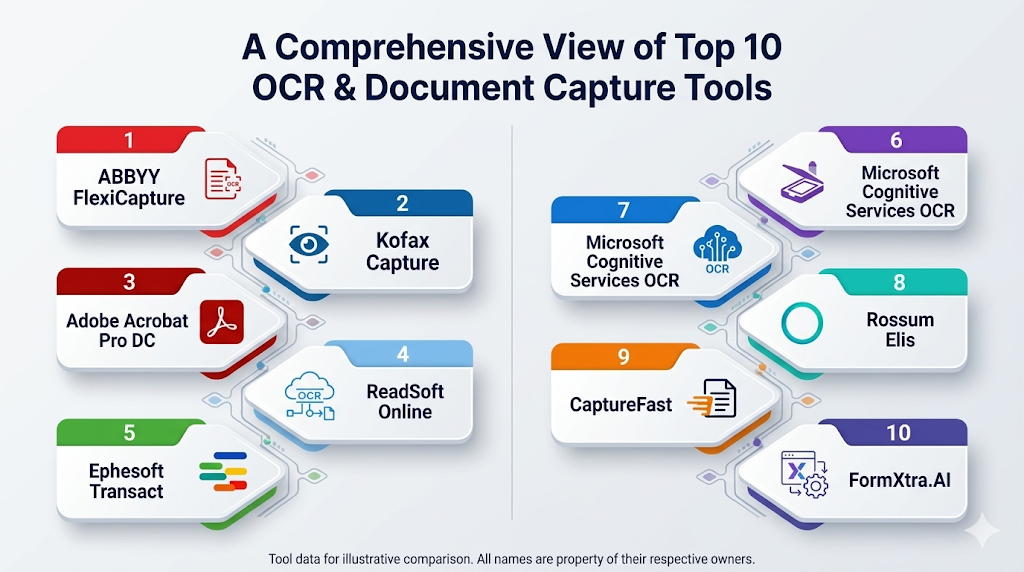
Top 10 OCR & Document Capture Tools
1- ABBYY FlexiCapture
Short description: Enterprise-grade OCR and document capture for structured and unstructured documents, ideal for finance, healthcare, and logistics.
Key Features
- Advanced OCR and handwriting recognition
- Multi-language support
- AI-based data classification
- Batch and high-volume processing
- Integration APIs
Pros
- High recognition accuracy
- Scalable for enterprise workloads
- Strong AI-assisted extraction
Cons
- Complex implementation
- Premium pricing
Platforms / Deployment
- Windows, Web
- Cloud / On-premises / Hybrid
Security & Compliance
- SSO/SAML, MFA, encryption
- GDPR, ISO 27001, SOC 2
Integrations & Ecosystem
Integrates with ECM, ERP, RPA, and analytics platforms.
- SAP
- Microsoft 365
- UiPath
- REST APIs
Support & Community
Professional support, documentation, and active community.
2- Kofax Capture
Short description: Enterprise document capture and processing platform with automated workflow integration.
Key Features
- Intelligent OCR and classification
- Multi-channel capture (scanners, emails, mobile)
- Workflow automation
- High-volume batch processing
- Cloud and on-prem options
Pros
- Supports diverse document types
- Strong integration with ECM and ERP
- Scalable and reliable
Cons
- Complex UI for beginners
- Higher cost for full-feature deployment
Platforms / Deployment
- Windows, Web
- Cloud / On-premises / Hybrid
Security & Compliance
- Encryption, audit logs, MFA
- SOC 2, ISO 27001
Integrations & Ecosystem
- SAP
- Microsoft SharePoint
- Salesforce
- UiPath
Support & Community
Vendor documentation, training, and enterprise support.
3- Adobe Acrobat Pro DC
Short description: Desktop and cloud OCR software for PDF and scanned documents, widely used across SMB and enterprise teams.
Key Features
- OCR and text recognition
- PDF to editable formats
- Batch scanning and conversion
- Form and signature processing
- Cloud and desktop deployment
Pros
- High OCR accuracy for standard documents
- Familiar interface for office users
- Cloud collaboration features
Cons
- Limited enterprise automation
- Subscription-based pricing
Platforms / Deployment
- Windows, macOS, iOS, Android
- Cloud / Desktop
Security & Compliance
- Encryption, MFA, SSO
- SOC 2, ISO 27001
Integrations & Ecosystem
- Microsoft Office
- Adobe Sign
- ECM platforms
Support & Community
Documentation, professional support, and online tutorials.
4- ReadSoft Online
Short description: Cloud-based document capture and invoice processing solution for finance and accounting teams.
Key Features
- Invoice OCR extraction
- Automated approval workflows
- Multi-format support
- Integration with ERP systems
- Cloud deployment
Pros
- Reduces manual invoice processing
- Cloud-native, accessible remotely
- Integrates well with SAP and finance software
Cons
- Limited on-premises support
- Requires ERP familiarity
Platforms / Deployment
- Web
- Cloud
Security & Compliance
- Encryption, MFA
- GDPR
Integrations & Ecosystem
- SAP
- Microsoft Dynamics
- Other ERP connectors
Support & Community
Documentation and professional support available.
5- Ephesoft Transact
Short description: Intelligent document capture with AI and machine learning for automated classification and extraction.
Key Features
- AI-powered document classification
- Multi-language OCR
- Workflow automation
- High-volume batch processing
- Cloud or on-premises deployment
Pros
- Accurate classification for complex documents
- Reduces manual data entry
- Scalable
Cons
- Setup can be complex
- Premium pricing for full features
Platforms / Deployment
- Windows, Web
- Cloud / On-premises / Hybrid
Security & Compliance
- SSO, MFA, encryption
- SOC 2, ISO 27001
Integrations & Ecosystem
- ECM and ERP systems
- RPA platforms
- REST APIs
Support & Community
Professional support, online documentation, and training.
6- OmniPage Ultimate
Short description: OCR software for desktop and enterprise with high-volume document scanning and conversion capabilities.
Key Features
- Multi-language OCR
- PDF and image conversion
- Batch processing
- Automation scripts
- Cloud storage integration
Pros
- High accuracy for scanned documents
- Flexible format support
- Suitable for enterprise and SMB
Cons
- Desktop-focused, limited cloud workflow
- Learning curve for advanced automation
Platforms / Deployment
- Windows, macOS
- Cloud / Desktop
Security & Compliance
- Encryption, audit logs
- Not publicly stated
Integrations & Ecosystem
- ECM platforms
- Cloud storage (Google Drive, Dropbox)
- API support
Support & Community
Documentation and professional support.
7- Microsoft Cognitive Services OCR
Short description: Cloud-based OCR API for developers, enabling custom document capture and analysis.
Key Features
- REST API for OCR
- Multi-language recognition
- Integration with AI services
- Batch processing support
- Real-time text extraction
Pros
- Flexible for custom applications
- Scalable via cloud
- Integrates with other Microsoft AI services
Cons
- Requires developer expertise
- No standalone UI
Platforms / Deployment
- Cloud / API
Security & Compliance
- Encryption, MFA
- GDPR, SOC 2
Integrations & Ecosystem
- Azure ecosystem
- Logic Apps
- Power Automate
Support & Community
Documentation, developer forums, professional support.
8- Rossum Elis
Short description: Cloud-native OCR and invoice capture platform using AI for automated data extraction.
Key Features
- AI-based invoice parsing
- Multi-language support
- ERP integration
- Automated workflow routing
- Cloud deployment
Pros
- Reduces invoice processing time
- AI improves accuracy with each dataset
- Cloud-first, fast deployment
Cons
- Limited offline capabilities
- Premium pricing for advanced features
Platforms / Deployment
- Web
- Cloud
Security & Compliance
- Encryption, MFA
- GDPR
Integrations & Ecosystem
- SAP
- Oracle
- ERP and accounting platforms
Support & Community
Documentation, training, professional support.
9- CaptureFast
Short description: Simple, cloud-based OCR and document capture tool for small to mid-sized businesses.
Key Features
- Invoice and form capture
- Cloud-based OCR
- PDF, image, and email processing
- Automated workflow integration
- Multi-format export
Pros
- Quick setup
- Affordable for SMBs
- Cloud-based access
Cons
- Limited enterprise scalability
- Fewer advanced AI features
Platforms / Deployment
- Web, iOS, Android
- Cloud
Security & Compliance
- Encryption
- GDPR
Integrations & Ecosystem
- Cloud storage and accounting software
- Zapier integration
- REST APIs
Support & Community
Documentation and email support.
10- FormXtra.AI
Short description: AI-powered document capture for automated classification, data extraction, and validation.
Key Features
- AI-based document recognition
- Multi-language OCR
- Validation rules
- ERP and workflow integration
- Cloud deployment
Pros
- High accuracy for structured/unstructured documents
- Reduces manual validation
- Cloud-based scalability
Cons
- Learning curve for setup
- Premium pricing for enterprise modules
Platforms / Deployment
- Web
- Cloud
Security & Compliance
- Encryption, MFA
- GDPR
Integrations & Ecosystem
- ERP systems
- ECM platforms
- REST API
Support & Community
Documentation, training, professional support.
Comparison Table (Top 10)
| Tool Name | Best For | Platform(s) Supported | Deployment | Standout Feature | Public Rating |
|---|---|---|---|---|---|
| ABBYY FlexiCapture | Enterprise capture | Windows, Web | Cloud / On-prem / Hybrid | AI-based OCR & classification | N/A |
| Kofax Capture | Enterprise capture | Windows, Web | Cloud / On-prem / Hybrid | Multi-channel capture | N/A |
| Adobe Acrobat Pro DC | PDF OCR & conversion | Windows, macOS, iOS, Android | Cloud / Desktop | High-fidelity PDF OCR | N/A |
| ReadSoft Online | Invoice processing | Web | Cloud | Cloud invoice capture | N/A |
| Ephesoft Transact | Intelligent OCR | Windows, Web | Cloud / On-prem / Hybrid | AI-based classification | N/A |
| OmniPage Ultimate | Desktop OCR | Windows, macOS | Cloud / Desktop | Batch and script automation | N/A |
| Microsoft Cognitive Services OCR | Developer API | Cloud | Cloud / API | Cloud-based OCR API | N/A |
| Rossum Elis | Invoice capture | Web | Cloud | AI-driven invoice parsing | N/A |
| CaptureFast | SMB capture | Web, iOS, Android | Cloud | Simple cloud OCR | N/A |
| FormXtra.AI | AI capture | Web | Cloud | Validation & structured extraction | N/A |
Evaluation & Scoring of OCR & Document Capture Tools
| Tool Name | Core (25%) | Ease (15%) | Integrations (15%) | Security (10%) | Performance (10%) | Support (10%) | Value (15%) | Weighted Total (0–10) |
|---|---|---|---|---|---|---|---|---|
| ABBYY FlexiCapture | 9 | 7 | 8 | 9 | 9 | 8 | 7 | 8.3 |
| Kofax Capture | 9 | 6 | 8 | 9 | 9 | 7 | 7 | 8.1 |
| Adobe Acrobat Pro DC | 8 | 8 | 7 | 8 | 8 | 7 | 7 | 7.7 |
| ReadSoft Online | 7 | 8 | 7 | 8 | 7 | 7 | 7 | 7.3 |
| Ephesoft Transact | 9 | 7 | 8 | 9 | 8 | 7 | 7 | 8.1 |
| OmniPage Ultimate | 8 | 7 | 7 | 8 | 8 | 7 | 7 | 7.6 |
| Microsoft Cognitive Services OCR | 8 | 6 | 8 | 8 | 8 | 6 | 7 | 7.5 |
| Rossum Elis | 8 | 7 | 7 | 8 | 8 | 7 | 7 | 7.6 |
| CaptureFast | 7 | 8 | 6 | 7 | 7 | 6 | 7 | 7.0 |
| FormXtra.AI | 8 | 7 | 7 | 8 | 8 | 7 | 7 | 7.6 |
Interpretation: Higher weighted totals indicate better performance in core OCR capabilities, usability, integrations, security, and value. Scores are comparative across tools, not absolute.
Which OCR & Document Capture Tool Is Right for You?
Solo / Freelancer
CaptureFast, Adobe Acrobat Pro DC, or Smallpdf for occasional document digitization and conversion.
SMB
ReadSoft Online, Rossum Elis, or OmniPage Ultimate provide cloud-based automation with moderate volume handling.
Mid-Market
Ephesoft Transact, ABBYY FlexiCapture, or Kofax Capture deliver advanced workflow automation, multi-channel capture, and AI-based extraction.
Enterprise
ABBYY FlexiCapture, Kofax Capture, and Ephesoft Transact offer high-volume, multi-language, and AI-powered enterprise-scale OCR.
Budget vs Premium
Lightweight SMB solutions are cost-effective. Enterprise-grade tools like ABBYY, Kofax, and Ephesoft are premium.
Feature Depth vs Ease of Use
ABBYY, Kofax, and Ephesoft provide deep AI-assisted features; Adobe Acrobat Pro DC, CaptureFast, and ReadSoft Online are easier to deploy.
Integrations & Scalability
Enterprise OCR integrates with ERP, ECM, and RPA platforms for large-scale processing.
Security & Compliance Needs
Tools like ABBYY, Kofax, and Ephesoft provide encryption, audit trails, and GDPR/SOC2 compliance.
Frequently Asked Questions (FAQs)
1. What pricing models are typical?
Most OCR tools offer subscription-based cloud pricing, while enterprise on-premises deployments may require annual or perpetual licensing based on users and volumes.
2. How long does implementation take?
SMB deployments can be operational in a few days to weeks; enterprise-scale solutions require months for integration, workflow setup, and testing.
3. Are these tools secure for sensitive documents?
Yes, top tools provide encryption, multi-factor authentication, SSO, and audit logs, often compliant with SOC 2, GDPR, and ISO 27001 standards.
4. Can these tools integrate with existing systems?
Most provide APIs or native connectors for ECM, ERP, CRM, and RPA platforms to enable automated workflows.
5. How do they improve efficiency?
OCR and document capture eliminate manual data entry, enable automated batch processing, and reduce human error across large volumes of documents.
6. What common mistakes occur during adoption?
Common pitfalls include skipping user training, poor workflow design, inadequate template setup, and ignoring validation for extraction accuracy.
7. Are these solutions scalable?
Yes, enterprise tools handle thousands of documents daily across multiple departments and locations, maintaining performance and accuracy.
8. Can SMBs benefit?
Absolutely. CaptureFast, ReadSoft Online, and Adobe Acrobat Pro DC provide cost-effective automation and digitization for smaller teams.
9. How does AI enhance document capture?
AI improves text recognition, document classification, data extraction, and multi-language support, reducing manual validation.
10. How easy is migration between tools?
Migration requires template mapping, workflow adaptation, and vendor support for bulk document migration and integration continuity.
Conclusion
OCR and Document Capture Software is essential for digitizing, extracting, and automating information from physical and digital documents. SMBs benefit from CaptureFast, ReadSoft Online, and Adobe Acrobat Pro DC for cost-effective, easy-to-deploy solutions. Mid-market teams gain efficiency from Ephesoft Transact, Rossum Elis, and OmniPage Ultimate with AI-assisted extraction and automated workflows. Enterprises rely on ABBYY FlexiCapture, Kofax Capture, and Ephesoft Transact for high-volume, multi-language, and fully integrated document capture at scale. Key considerations include integration, workflow automation, and security compliance. Organizations should shortlist 2–3 tools, run a pilot, and validate extraction accuracy and integrations before full deployment to ensure optimal ROI.

Find Trusted Cardiac Hospitals
Compare heart hospitals by city and services — all in one place.
Explore Hospitals
I learned how OCR and document capture software can save time by converting scanned files into editable text. I’d like to learn more about how businesses use these tools in daily work.