Introduction
Remote Monitoring & Management RMM Tools are software platforms designed to help IT teams and managed service providers MSPs monitor, manage, and secure endpoints, servers, and IT infrastructure from a centralized dashboard. These tools enable proactive monitoring, remote troubleshooting, patch management, automation, and asset tracking across distributed environments. RMM tools have become essential due to increasing remote work, hybrid IT environments, and growing cybersecurity threats. Modern RMM platforms now integrate AI-driven monitoring, automated remediation, endpoint detection, scripting automation, and deep integrations with ITSM and cybersecurity systems.
Real-world use cases include:
- Remote endpoint monitoring and maintenance
- Automated patch management and updates
- IT asset tracking and inventory management
- Remote troubleshooting and support
- Security monitoring and threat detection
Evaluation Criteria for Buyers
- Endpoint monitoring and management capabilities
- Automation and scripting features
- Patch management efficiency
- Security and threat detection features
- Integration with ITSM and security tools
- Scalability for MSP and enterprise use
- Performance monitoring and reporting
- Ease of deployment and usability
- Multi-tenant support for MSPs
- Pricing and operational efficiency
Best for: Managed service providers MSPs, IT operations teams, enterprise IT departments, cybersecurity teams, and organizations managing distributed endpoints.
Not ideal for: Very small businesses with minimal IT infrastructure or organizations that do not manage multiple endpoints.
Key Trends in RMM Tools
- AI-driven endpoint monitoring is improving proactive issue detection
- Automation-first RMM platforms are reducing manual IT workload
- Integration with cybersecurity tools is becoming standard
- Cloud-native RMM solutions are replacing legacy on-prem systems
- Zero trust security models are being integrated into RMM platforms
- Predictive analytics is enabling proactive IT maintenance
- Unified ITSM and RMM platforms are becoming more common
- Remote work growth is increasing demand for endpoint visibility
- Script automation and no-code workflows are expanding adoption
- Real-time observability is improving infrastructure control
How We Selected These Tools (Methodology)
- Market adoption among MSPs and enterprises
- Endpoint management capabilities
- Automation and scripting strength
- Security and compliance readiness
- Integration ecosystem with ITSM and security tools
- Scalability for large IT environments
- Patch management effectiveness
- Performance monitoring capabilities
- Ease of deployment and usability
- Vendor reliability and support ecosystem
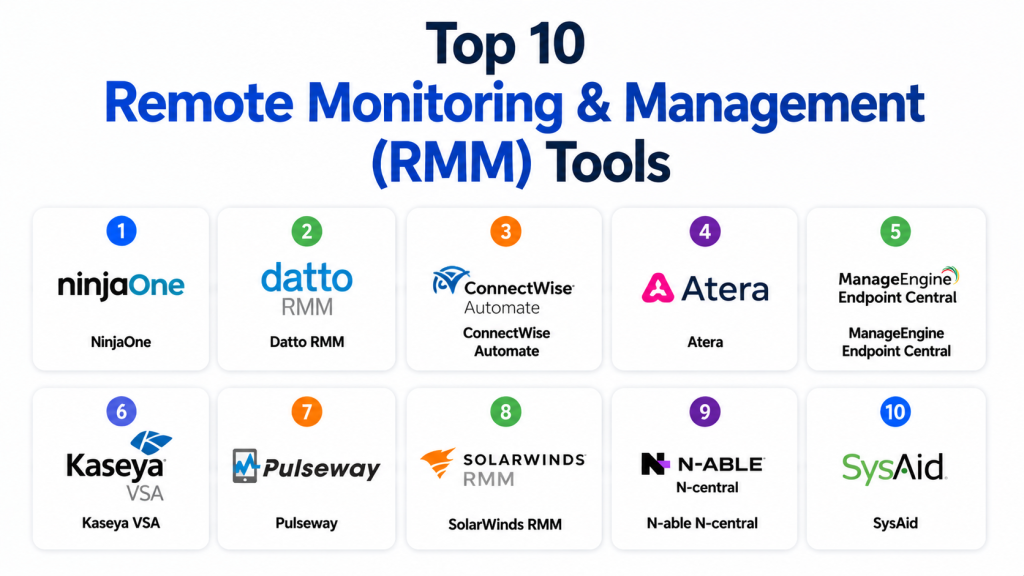
Top 10 Remote Monitoring & Management RMM Tools
1 — NinjaOne
Short description: A modern RMM platform designed for IT teams and MSPs to manage endpoints, automate tasks, and monitor systems efficiently.
Key Features
- Endpoint monitoring and alerting
- Patch management automation
- Remote access and control
- Script automation engine
- IT asset tracking
- Backup management tools
- Real-time performance monitoring
Pros
- Easy to use interface
- Strong automation capabilities
- Fast deployment
Cons
- Limited advanced enterprise customization
- Pricing may scale with endpoints
Platforms / Deployment
Cloud
Security & Compliance
SSO/SAML, MFA, encryption, audit logs (others not publicly stated)
Integrations & Ecosystem
Supports ITSM and security ecosystem integrations.
- ServiceNow
- ConnectWise
- Microsoft 365
- APIs
Support & Community
Strong MSP-focused support and onboarding resources.
2 — Datto RMM
Short description: Cloud-based RMM platform focused on MSPs with strong automation and backup integration capabilities.
Key Features
- Endpoint monitoring
- Automated patch management
- Scripting and automation tools
- Remote access capabilities
- Backup integration
- Alerting system
- Reporting dashboards
Pros
- Strong MSP focus
- Reliable backup integration
- Good scalability
Cons
- UI can feel complex
- Advanced features require training
Platforms / Deployment
Cloud
Security & Compliance
SSO/SAML, MFA, encryption (others not publicly stated)
Integrations & Ecosystem
Strong integration with MSP and IT ecosystems.
- Autotask
- IT Glue
- Microsoft 365
- APIs
Support & Community
Good MSP support and documentation.
3 — ConnectWise Automate
Short description: Enterprise-grade RMM solution designed for automation-heavy IT environments and MSP operations.
Key Features
- Advanced automation engine
- Endpoint monitoring
- Patch management
- Remote desktop control
- Scripting tools
- Asset tracking
- Performance analytics
Pros
- Extremely powerful automation
- Highly customizable
- Strong MSP adoption
Cons
- Complex learning curve
- Heavy setup requirements
Platforms / Deployment
Cloud / On-premise
Security & Compliance
SSO, MFA, encryption (others not publicly stated)
Integrations & Ecosystem
Deep MSP ecosystem integration.
- ConnectWise Manage
- Microsoft 365
- PSA tools
- APIs
Support & Community
Strong enterprise MSP support network.
4 — Atera
Short description: All-in-one RMM and PSA platform designed for IT teams and MSPs with pay-per-technician pricing model.
Key Features
- Real-time monitoring
- Patch management
- Remote access tools
- Automation scripting
- Ticketing system
- IT asset management
- Reporting dashboards
Pros
- Simple pricing model
- Easy to deploy
- Good SMB/MSP balance
Cons
- Limited enterprise depth
- Advanced customization is limited
Platforms / Deployment
Cloud
Security & Compliance
SSO, MFA, encryption (others not publicly stated)
Integrations & Ecosystem
Supports ITSM and productivity integrations.
- Microsoft 365
- Zendesk
- Jira
- APIs
Support & Community
Good support and onboarding experience.
5 — ManageEngine Endpoint Central
Short description: Unified endpoint management and RMM platform for IT teams managing large-scale infrastructure.
Key Features
- Endpoint monitoring
- Patch management
- Software deployment
- Remote troubleshooting
- Asset inventory
- Configuration management
- Security compliance tools
Pros
- Strong IT management suite
- Cost-effective enterprise solution
- Wide feature coverage
Cons
- UI feels less modern
- Requires configuration expertise
Platforms / Deployment
Cloud / On-premise
Security & Compliance
SSO/SAML, MFA, encryption (others not publicly stated)
Integrations & Ecosystem
Supports enterprise IT ecosystems.
- Active Directory
- ServiceNow
- Microsoft 365
- APIs
Support & Community
Strong enterprise IT support structure.
6 — Kaseya VSA
Short description: Enterprise RMM platform focused on automation, patch management, and IT infrastructure control for MSPs.
Key Features
- Endpoint monitoring
- Patch automation
- Remote control tools
- IT scripting engine
- Alert management
- Asset tracking
- Compliance reporting
Pros
- Strong automation tools
- Scalable for MSPs
- Deep IT control features
Cons
- Complex interface
- Setup can be heavy
Platforms / Deployment
Cloud / Hybrid
Security & Compliance
SSO/SAML, MFA, encryption (others not publicly stated)
Integrations & Ecosystem
Strong MSP ecosystem integrations.
- IT Glue
- ConnectWise
- Microsoft 365
- APIs
Support & Community
Enterprise MSP-focused support.
7 — Pulseway
Short description: Mobile-first RMM platform designed for real-time IT monitoring and remote control.
Key Features
- Mobile endpoint monitoring
- Remote control access
- Automation workflows
- Patch management
- Alert notifications
- IT asset tracking
- Reporting tools
Pros
- Excellent mobile experience
- Easy setup
- Real-time monitoring
Cons
- Limited enterprise depth
- Advanced customization is limited
Platforms / Deployment
Cloud
Security & Compliance
SSO, MFA, encryption (others not publicly stated)
Integrations & Ecosystem
Supports IT and cloud integrations.
- Microsoft 365
- Slack
- Zendesk
- APIs
Support & Community
Good support with growing MSP adoption.
8 — SolarWinds RMM
Short description: Cloud-based RMM platform offering endpoint monitoring, automation, and IT management tools.
Key Features
- Endpoint monitoring
- Patch management
- Remote access tools
- Automation workflows
- Asset tracking
- Performance monitoring
- Reporting dashboards
Pros
- Simple deployment
- Good monitoring tools
- Strong reporting features
Cons
- Limited advanced automation
- Smaller innovation pace
Platforms / Deployment
Cloud
Security & Compliance
SSO, MFA, encryption (others not publicly stated)
Integrations & Ecosystem
Supports IT monitoring ecosystem.
- SolarWinds suite
- Microsoft 365
- Slack
- APIs
Support & Community
Good IT-focused support resources.
9 — N-able N-central
Short description: Enterprise RMM platform designed for MSPs with strong automation and security capabilities.
Key Features
- Endpoint monitoring
- Patch management
- Scripting automation
- Remote access tools
- Security monitoring
- Asset tracking
- Reporting dashboards
Pros
- Strong MSP focus
- Advanced automation
- Good scalability
Cons
- Complex setup
- UI can be dense
Platforms / Deployment
Cloud / Hybrid
Security & Compliance
SSO/SAML, MFA, encryption (others not publicly stated)
Integrations & Ecosystem
Supports MSP and IT integrations.
- Microsoft 365
- ConnectWise
- IT Glue
- APIs
Support & Community
Strong MSP support ecosystem.
10 — SysAid
Short description: ITSM and RMM hybrid platform combining service desk and endpoint management capabilities.
Key Features
- Endpoint monitoring
- Ticketing system
- Automation workflows
- Asset management
- Remote support tools
- SLA tracking
- Reporting dashboards
Pros
- Strong ITSM + RMM hybrid
- Easy integration of workflows
- Good SMB to mid-market fit
Cons
- Limited deep RMM features
- UI can feel outdated
Platforms / Deployment
Cloud / On-premise
Security & Compliance
SSO, MFA, encryption (others not publicly stated)
Integrations & Ecosystem
Supports ITSM ecosystem integrations.
- Microsoft 365
- Jira
- Active Directory
- APIs
Support & Community
Standard IT support and documentation.
Comparison Table
| Tool Name | Best For | Platform(s) Supported | Deployment | Standout Feature | Public Rating |
|---|---|---|---|---|---|
| NinjaOne | MSPs & IT teams | Web | Cloud | Easy automation | N/A |
| Datto RMM | MSP operations | Web | Cloud | Backup integration | N/A |
| ConnectWise Automate | Advanced MSPs | Web | Cloud/On-premise | Deep automation | N/A |
| Atera | SMB IT teams | Web | Cloud | Simple pricing | N/A |
| ManageEngine | Enterprise IT | Web | Cloud/On-premise | Endpoint suite | N/A |
| Kaseya VSA | MSP automation | Web | Cloud/Hybrid | Scripting engine | N/A |
| Pulseway | Mobile IT teams | Web/Mobile | Cloud | Mobile-first RMM | N/A |
| SolarWinds RMM | IT monitoring | Web | Cloud | Monitoring tools | N/A |
| N-able N-central | MSP enterprise | Web | Cloud/Hybrid | Security automation | N/A |
| SysAid | ITSM + RMM | Web | Cloud/On-premise | Hybrid ITSM + RMM | N/A |
Evaluation & Scoring of RMM Tools
| Tool Name | Core (25%) | Ease (15%) | Integrations (15%) | Security (10%) | Performance (10%) | Support (10%) | Value (15%) | Weighted Total |
|---|---|---|---|---|---|---|---|---|
| NinjaOne | 9 | 9 | 8.5 | 8.5 | 9 | 8.5 | 8.5 | 8.7 |
| Datto RMM | 9 | 8 | 9 | 8.5 | 9 | 8.5 | 8 | 8.6 |
| ConnectWise | 9.5 | 7.5 | 9 | 9 | 9 | 8.5 | 7.5 | 8.6 |
| Atera | 8.5 | 9 | 8 | 8 | 8 | 8 | 9 | 8.4 |
| ManageEngine | 9 | 7.5 | 8.5 | 9 | 9 | 8.5 | 8 | 8.4 |
| Kaseya VSA | 9 | 7.5 | 8.5 | 9 | 9 | 8.5 | 7.5 | 8.5 |
| Pulseway | 8 | 9 | 8 | 8 | 8 | 8 | 8.5 | 8.2 |
| SolarWinds | 8 | 8.5 | 8 | 8 | 8 | 8 | 8.5 | 8.2 |
| N-able | 9 | 7.5 | 8.5 | 9 | 9 | 8.5 | 8 | 8.4 |
| SysAid | 8 | 8 | 8 | 8 | 8 | 8 | 8.5 | 8.1 |
Scores are comparative and reflect automation depth, scalability, and IT management strength.
Which RMM Tool Is Right for You?
Solo / Freelancer
Pulseway and Atera are ideal due to simplicity and mobile-first design.
SMB
Atera, NinjaOne, and SolarWinds RMM offer balanced features and ease of use.
Mid-Market
ManageEngine and Datto RMM provide strong scalability and automation.
Enterprise
ConnectWise Automate, Kaseya VSA, and N-able N-central are best for large IT environments.
Budget vs Premium
Atera is budget-friendly, while ConnectWise and Kaseya are premium enterprise tools.
Feature Depth vs Ease of Use
ConnectWise offers deep automation; Pulseway offers ease of use.
Integrations & Scalability
N-able, Datto, and NinjaOne provide strong ecosystem integrations.
Security & Compliance Needs
Enterprise MSP tools like N-able and ConnectWise are best for regulated environments.
Frequently Asked Questions
1. What is an RMM tool?
An RMM tool helps IT teams monitor, manage, and maintain endpoints and IT systems remotely.
It allows real-time visibility into devices, servers, and networks.
It also supports automation for routine IT tasks.
This improves efficiency and reduces manual effort.
2. Who uses RMM software?
RMM tools are mainly used by MSPs and IT departments in organizations.
They help manage multiple client environments from a single dashboard.
Enterprises also use them for internal IT operations.
They are essential for managing distributed systems.
3. Why are RMM tools important?
RMM tools help detect and fix IT issues before they become critical.
They reduce downtime and improve system reliability.
They also automate maintenance tasks like patching.
This improves overall IT productivity.
4. What features do RMM tools offer?
They include endpoint monitoring, patch management, and remote access.
They also offer automation, reporting, and alerting features.
Some tools include security monitoring and scripting.
Advanced platforms also support AI-based insights.
5. Are RMM tools cloud-based?
Yes, most modern RMM tools are cloud-based for easier access and scalability.
Some also offer hybrid or on-premise deployment options.
Cloud systems allow remote access from anywhere.
They are widely preferred in modern IT environments.
6. Do RMM tools support automation?
Yes, automation is a core feature of RMM platforms.
They can automate updates, patching, and routine IT tasks.
This reduces manual workload for IT teams.
It also improves operational efficiency.
7. Can RMM tools manage security?
Yes, many RMM tools include basic security monitoring features.
They help detect vulnerabilities and unusual system behavior.
Some also integrate with cybersecurity tools.
This improves overall IT security posture.
8. Are RMM tools expensive?
Pricing depends on features, scale, and number of endpoints.
SMB tools are more affordable, while enterprise tools are costly.
Most vendors offer subscription-based pricing models.
Costs increase with advanced automation features.
9. What industries use RMM tools?
RMM tools are used in IT services, healthcare, finance, and telecom.
They are also widely used by MSPs managing multiple clients.
Any organization with IT infrastructure can benefit.
They are especially useful for remote environments.
10. What should I check before choosing an RMM tool?
You should evaluate scalability, automation features, and integrations.
Security and compliance capabilities are also important.
Ease of use and pricing should match your needs.
Always test before final selection.
Conclusion
Remote Monitoring & Management RMM Tools are essential for modern IT operations, enabling organizations to monitor, secure, and manage distributed IT environments efficiently. Platforms like NinjaOne, Datto RMM, and ConnectWise Automate dominate the MSP space, while Atera and Pulseway offer simpler and more flexible solutions for SMBs. The right RMM tool depends on your infrastructure size, automation needs, integration requirements, and budget. Organizations should shortlist tools, test real monitoring scenarios, and validate automation workflows before final selection to ensure long-term operational efficiency.

Find Trusted Cardiac Hospitals
Compare heart hospitals by city and services — all in one place.
Explore Hospitals
I now understand how RMM tools help IT teams remotely monitor, manage, and secure multiple devices from a single dashboard, improving efficiency and reducing downtime. I’d like to explore more about which RMM platforms are best for MSPs and small IT teams.