Introduction
Corporate card management tools help businesses issue, control, monitor, and reconcile company cards used by employees, departments, projects, and vendors. Instead of relying on shared cards, manual approvals, delayed receipts, and month-end surprises, these platforms give finance teams real-time control over spending limits, card rules, approvals, merchant categories, budgets, and accounting sync. They matter now because companies are moving toward faster spend visibility, tighter cash control, automated reconciliation, and policy enforcement before money leaves the business. Modern teams also need virtual cards for subscriptions, travel cards for employees, department cards for budget owners, and audit-ready records for finance and compliance reviews.
Real World Use Cases
- Issuing virtual cards for software subscriptions and vendor payments
- Giving employees controlled cards for travel, meals, and field expenses
- Setting department-level budgets and approval rules
- Matching card transactions with receipts automatically
- Syncing card spend with accounting, ERP, and finance systems
Evaluation Criteria for Buyers
- Physical and virtual card management
- Spend limits and budget controls
- Approval workflow flexibility
- Receipt capture and transaction matching
- Accounting and ERP integrations
- Real-time reporting and analytics
- Policy enforcement and audit trails
- Mobile app usability
- Multi-currency and global card support
- Security, admin controls, and compliance posture
Best for: Corporate card management tools are best for CFOs, finance controllers, founders, accounting teams, operations leaders, procurement teams, and growing businesses that need controlled employee spending, virtual cards, travel cards, subscription cards, and real-time finance visibility.
Not ideal for: Very small businesses with only one or two cardholders may not need a dedicated corporate card management platform. A basic business credit card, accounting software, or simple expense tracker may be enough until spending volume, employee count, or approval complexity increases.
Key Trends in Corporate Card Management Tools
- Virtual cards are becoming standard: Finance teams increasingly use virtual cards for vendors, SaaS subscriptions, contractors, online purchases, and one-time payments instead of sharing physical cards.
- Real-time spend controls are replacing after-the-fact reviews: Modern tools help finance teams set limits, merchant rules, approval requirements, and budget controls before transactions happen.
- AI-assisted receipt matching is improving reconciliation: Platforms are using automation to match receipts, card transactions, merchant data, categories, and accounting fields with less manual effort.
- Corporate cards and expense management are merging: Many platforms now combine card issuing, receipt capture, reimbursements, bill payments, travel expenses, approvals, and accounting sync in one workflow.
- Finance teams want cleaner month-end close: Corporate card tools help reduce missing receipts, unclear transactions, delayed approvals, and manual reconciliation work.
- Multi-entity and multi-currency support is more important: Global teams need local cards, entity-based controls, currency handling, tax treatment, and region-specific approval flows.
- Spend visibility is becoming leadership-level data: CFOs and founders want dashboards showing spend by team, vendor, category, project, cost center, and employee.
- Security and access controls are now buying priorities: Buyers increasingly evaluate role-based access, SSO, MFA, audit logs, approval history, card freeze controls, and user permissions.
- Vendor and subscription control is a major use case: Companies use dedicated cards for software subscriptions to identify unused tools, stop surprise renewals, and manage recurring payments.
- Finance stack integration matters more than standalone features: The best tool is often the one that works cleanly with accounting, ERP, HRIS, payroll, procurement, and communication tools.
How We Selected These Tools
The tools below were selected using practical buyer-focused evaluation logic for corporate card management, spend control, finance automation, and scalability.
- Market adoption and mindshare: Preference was given to platforms commonly recognized by finance teams, startups, SMBs, mid-market companies, and enterprises.
- Card management depth: Tools were evaluated for physical cards, virtual cards, spend limits, transaction controls, merchant restrictions, and cardholder management.
- Expense and receipt automation: Strong tools should help capture receipts, match transactions, enforce policies, and reduce month-end manual work.
- Finance workflow support: Approval routing, budgets, cost centers, accounting fields, reimbursement workflows, and audit trails were considered important.
- Integrations and ecosystem: Platforms with accounting, ERP, HRIS, procurement, travel, and communication integrations were prioritized.
- Scalability: Tools were assessed for their ability to support growing teams, multiple departments, multiple entities, global operations, and complex approval structures.
- Security posture signals: Admin controls, role-based access, audit history, user permissions, and enterprise controls were considered where confidently known.
- Customer segment fit: The final list includes options for startups, SMBs, finance-led mid-market teams, distributed companies, and enterprise environments.
- Practical usability: Employee mobile experience, ease of receipt submission, and finance team admin experience were included in the evaluation.
- Balanced category coverage: The list includes card-first platforms, spend management suites, travel and expense platforms, and finance automation systems.
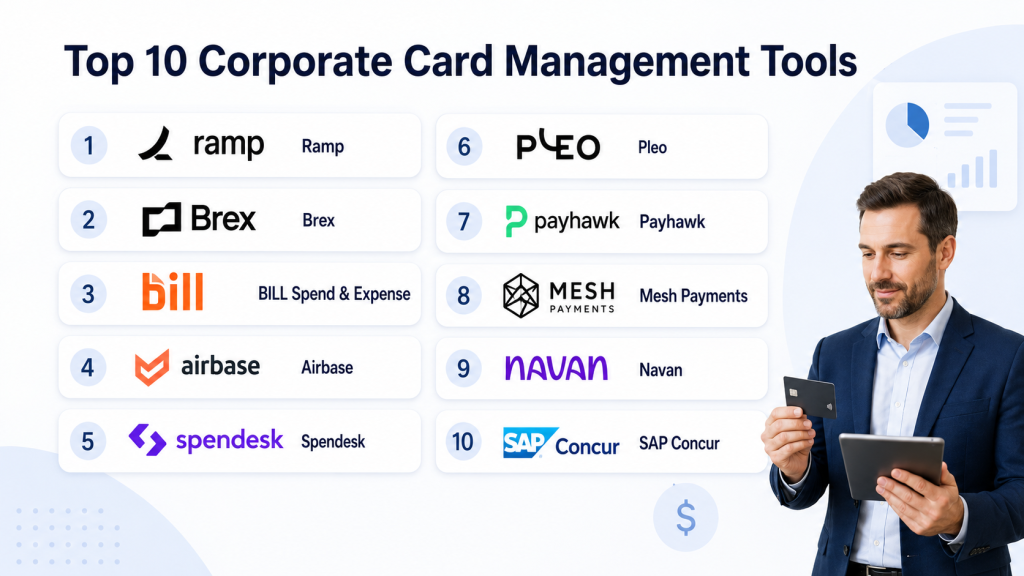
Top 10 Corporate Card Management Tools
1 — Ramp
Short description: Ramp is a spend management platform that combines corporate cards, virtual cards, expense management, approvals, reimbursements, bill payments, and finance reporting. It is best for companies that want real-time spend control and automation across card-based expenses.
Key Features
- Corporate cards and virtual cards
- Real-time spend controls and limits
- Receipt capture and automated transaction matching
- Expense approvals and policy enforcement
- Budget tracking and spend visibility
- Accounting and ERP integrations
- Reporting dashboards for finance teams
Pros
- Strong visibility into company-wide card spend
- Good fit for businesses that want cards plus spend automation
- Helps reduce manual receipt chasing and reconciliation work
Cons
- Best suited for companies comfortable with card-led finance workflows
- Availability and card features may vary by region
- Some advanced workflows may require careful setup
Platforms / Deployment
Web / iOS / Android
Cloud
Security & Compliance
Ramp provides business-grade admin controls, approval workflows, permissions, and audit-supporting records. Specific certifications and compliance details should be verified directly during vendor review.
Integrations & Ecosystem
Ramp connects corporate card activity with broader finance operations, making it useful for teams that want card spend to flow into accounting and reporting systems with less manual work.
- Accounting integrations
- ERP integrations
- HRIS integrations
- Expense and reimbursement workflows
- Bill payment workflows
- Reporting and export options
Support & Community
Ramp provides onboarding resources, documentation, customer support, and finance-focused educational content. Support depth may vary by customer size, plan, and implementation needs.
2 — Brex
Short description: Brex is a corporate card and spend management platform built for startups, growing companies, and finance teams that need controlled employee spending. It combines corporate cards, reimbursements, budgets, travel, and finance workflow automation.
Key Features
- Corporate cards and virtual cards
- Spend limits and budget controls
- Automated receipt collection and matching
- Expense policy workflows
- Travel and reimbursement support
- Accounting system integrations
- Real-time spend reporting
Pros
- Strong fit for startups and scaling companies
- Combines cards, expenses, budgets, and finance controls
- Useful for teams that want modern spend visibility
Cons
- Eligibility and availability may vary by business profile and region
- May be more than needed for very small companies
- Advanced finance workflows may require setup and governance
Platforms / Deployment
Web / iOS / Android
Cloud
Security & Compliance
Brex provides administrative controls, cardholder permissions, transaction monitoring, and approval workflows. Specific certifications and compliance documentation should be confirmed directly.
Integrations & Ecosystem
Brex works well for companies that want corporate card transactions, expense workflows, and finance systems connected in one operational flow.
- Accounting integrations
- ERP integrations
- HR and identity integrations
- Travel-related workflows
- Budget and reporting workflows
- API and export options
Support & Community
Brex offers documentation, onboarding resources, support channels, and customer success options. Larger organizations may receive more structured implementation assistance.
3 — BILL Spend & Expense
Short description: BILL Spend & Expense, formerly associated with Divvy, provides corporate cards, budgeting, expense tracking, and spend controls for businesses that want visibility into card-based spending. It is often used by SMBs and growing finance teams.
Key Features
- Corporate card management
- Budget-based card controls
- Virtual card support
- Expense tracking and receipt capture
- Real-time spend visibility
- Approval and policy workflows
- Accounting system sync
Pros
- Strong budget-centered card management
- Useful for SMBs and growing teams
- Helps finance teams track card spend by department or budget
Cons
- Feature depth may vary depending on account setup
- Global availability should be validated
- May not fit every complex enterprise finance stack
Platforms / Deployment
Web / iOS / Android
Cloud
Security & Compliance
BILL Spend & Expense includes admin controls, user permissions, and spend governance features. Specific compliance certifications should be reviewed directly with the vendor.
Integrations & Ecosystem
The platform connects card spend with expense tracking, budgets, and accounting workflows, helping teams reduce manual reconciliation.
- Accounting software integrations
- Budget management workflows
- Receipt capture tools
- Cardholder management
- Reporting exports
- Finance workflow connections
Support & Community
BILL provides documentation, support resources, onboarding materials, and customer support options. Support level may vary by product package and customer type.
4 — Airbase
Short description: Airbase is a spend management platform that combines corporate cards, reimbursements, bill payments, procurement workflows, and accounting automation. It is best for mid-market finance teams that want to manage non-payroll spend in one system.
Key Features
- Corporate card and virtual card management
- Expense reimbursement workflows
- AP automation and bill payments
- Approval routing and policy controls
- Vendor and purchase request workflows
- Accounting and ERP integrations
- Spend visibility dashboards
Pros
- Strong fit for finance teams managing multiple spend types
- Combines cards, AP, expenses, and approvals
- Good for companies that need centralized spend governance
Cons
- May be too advanced for very small teams
- Implementation requires finance process planning
- Best value is usually seen when using multiple spend workflows
Platforms / Deployment
Web
Cloud
Security & Compliance
Airbase provides role-based permissions, approval workflows, audit trails, and finance administration controls. Specific certifications should be verified during procurement.
Integrations & Ecosystem
Airbase is designed to connect card spend with procurement, AP, accounting, and finance operations, helping teams manage spend before and after payment.
- NetSuite
- QuickBooks
- Sage Intacct
- HRIS integrations
- Approval workflow tools
- Reporting and accounting exports
Support & Community
Airbase provides onboarding, documentation, finance operations resources, and customer support. Larger customers may receive structured implementation and customer success support.
5 — Spendesk
Short description: Spendesk is a spend management platform that offers corporate cards, virtual cards, expense claims, invoice approvals, budgets, and finance reporting. It is especially useful for companies that want better control over decentralized team spending.
Key Features
- Physical and virtual cards
- Spend limits and approval rules
- Expense claims and receipt capture
- Budget tracking
- Invoice approval workflows
- Accounting integrations
- Spend reporting by team and category
Pros
- Strong for companies needing card and budget control
- Useful for distributed teams and department-level spend
- Good balance of employee usability and finance oversight
Cons
- Regional availability should be checked carefully
- May require setup for approval rules and budget ownership
- Very small teams may not need the full platform
Platforms / Deployment
Web / iOS / Android
Cloud
Security & Compliance
Spendesk includes user permissions, approval controls, card management settings, and finance governance workflows. Specific compliance certifications should be verified directly.
Integrations & Ecosystem
Spendesk connects card payments, expense claims, invoices, and accounting workflows so finance teams can manage spending from request to reconciliation.
- Accounting tools
- ERP systems
- Invoice approval workflows
- Card transaction feeds
- Budget and reporting workflows
- Export and finance reporting options
Support & Community
Spendesk offers onboarding support, documentation, customer success resources, and finance-focused guidance. Support availability may vary by region and customer plan.
6 — Pleo
Short description: Pleo provides company cards, expense automation, receipt capture, spending limits, and finance reporting for businesses that want simpler employee spending control. It is widely used by teams that need easy card issuing and clear expense workflows.
Key Features
- Company cards for employees
- Virtual card support
- Spending limits and card controls
- Receipt capture through mobile app
- Expense categorization
- Accounting integrations
- Team-level spend visibility
Pros
- Simple employee experience
- Good fit for SMBs and growing teams
- Helps reduce receipt chasing and card sharing
Cons
- Availability depends on supported regions
- May not fit highly complex enterprise workflows
- Advanced ERP needs should be validated before purchase
Platforms / Deployment
Web / iOS / Android
Cloud
Security & Compliance
Pleo provides cardholder controls, admin permissions, spend limits, and transaction records. Specific compliance certifications should be verified directly.
Integrations & Ecosystem
Pleo connects card transactions and receipts with accounting workflows, helping finance teams keep employee spend organized and easier to reconcile.
- Accounting software integrations
- Mobile receipt capture
- Team and department workflows
- Card transaction exports
- Budget and approval workflows
- Reporting options
Support & Community
Pleo provides help resources, onboarding documentation, customer support, and business finance content. Support availability may vary by country and plan.
7 — Payhawk
Short description: Payhawk is a global spend management platform that combines corporate cards, expense management, accounts payable, procurement workflows, and ERP integrations. It is a strong fit for multi-entity and international finance teams.
Key Features
- Corporate cards and virtual cards
- Multi-entity spend management
- Expense automation and receipt capture
- AP and procurement workflow support
- Approval rules and policy controls
- ERP and accounting integrations
- Real-time spend reporting
Pros
- Strong fit for international and multi-entity organizations
- Combines cards, expenses, AP, and procurement workflows
- Useful for companies needing global spend visibility
Cons
- May be more complex than needed for small local teams
- Regional card availability should be confirmed
- Implementation may require finance and ERP planning
Platforms / Deployment
Web / iOS / Android
Cloud
Security & Compliance
Payhawk provides business-grade admin controls, approval workflows, permissions, and spend governance capabilities. Specific security certifications should be reviewed directly with the vendor.
Integrations & Ecosystem
Payhawk is designed for companies that need card and spend data connected to ERP, accounting, HR, and finance operations across entities.
- ERP integrations
- Accounting integrations
- HRIS integrations
- AP workflow support
- Procurement workflow support
- Reporting and analytics exports
Support & Community
Payhawk provides onboarding, documentation, implementation guidance, and customer support. Enterprise and multi-entity customers may receive more structured support.
8 — Mesh Payments
Short description: Mesh Payments is a spend management platform focused on corporate cards, virtual cards, subscription management, travel spend, and real-time finance controls. It is useful for companies that want flexible card workflows across vendors and employees.
Key Features
- Virtual and physical card management
- Spend controls and approval workflows
- Subscription and vendor payment tracking
- Receipt capture and transaction matching
- Budget and policy management
- Travel and employee spend workflows
- Accounting integrations
Pros
- Strong for virtual card and subscription control
- Useful for finance teams managing distributed spend
- Helps improve visibility into recurring and vendor payments
Cons
- Regional availability should be validated
- May not be the best fit for very small teams
- Enterprise requirements should be checked carefully
Platforms / Deployment
Web / iOS / Android
Cloud
Security & Compliance
Mesh Payments provides admin controls, permissions, approval workflows, and spend governance features. Specific certifications should be confirmed directly.
Integrations & Ecosystem
Mesh Payments connects card activity with accounting, travel, subscriptions, and vendor spend workflows, supporting better finance visibility.
- Accounting integrations
- ERP integrations
- Subscription management workflows
- Travel spend workflows
- Approval tools
- Reporting exports
Support & Community
Mesh Payments provides onboarding support, documentation, and customer assistance. Support depth may vary by plan, customer size, and region.
9 — Navan
Short description: Navan combines travel management, corporate cards, expense management, and spend reporting. It is best for companies where business travel and corporate card spending are closely connected.
Key Features
- Corporate card support
- Travel booking and policy controls
- Expense automation and receipt capture
- Transaction matching
- Approval workflows
- Reimbursement support
- Spend reporting and analytics
Pros
- Strong fit for travel-heavy organizations
- Combines travel, cards, and expenses in one workflow
- Helps finance teams connect trip data with card spend
Cons
- May be more than needed for companies with little travel
- Regional availability and card features should be checked
- Setup may require travel policy configuration
Platforms / Deployment
Web / iOS / Android
Cloud
Security & Compliance
Navan includes admin controls, approval workflows, policy settings, and business travel governance features. Specific compliance certifications should be verified directly.
Integrations & Ecosystem
Navan is useful when companies want travel booking, card spend, expense reporting, and accounting sync to work together.
- Accounting integrations
- ERP integrations
- HRIS integrations
- Travel supplier ecosystem
- Corporate card workflows
- Reporting exports
Support & Community
Navan provides documentation, onboarding, customer support, and business travel assistance. Support experience may vary by plan, region, and travel program complexity.
10 — SAP Concur
Short description: SAP Concur is a mature travel and expense management platform used by many larger organizations. While it is not only a corporate card platform, it supports corporate card transaction management, reconciliation, expense reporting, travel workflows, and enterprise finance controls.
Key Features
- Corporate card transaction import and matching
- Expense report automation
- Travel and expense management
- Policy enforcement and approval workflows
- Audit-ready expense records
- ERP and accounting integrations
- Reporting and analytics
Pros
- Strong fit for enterprise travel and expense programs
- Mature controls for complex approval and compliance needs
- Broad integration ecosystem for large finance teams
Cons
- Can feel complex for small teams
- Implementation may require planning and admin support
- Not as card-first as newer spend management platforms
Platforms / Deployment
Web / iOS / Android
Cloud
Security & Compliance
SAP Concur supports enterprise administration, user permissions, approval workflows, and audit-supporting records. Specific certifications and compliance details vary by SAP environment, region, and plan.
Integrations & Ecosystem
SAP Concur is commonly used where corporate card transactions need to connect with travel, expenses, ERP, accounting, audit, and finance workflows.
- SAP ecosystem integrations
- ERP integrations
- Accounting integrations
- Corporate card feeds
- Travel booking workflows
- Reporting and analytics connectors
Support & Community
SAP Concur provides enterprise support, documentation, partner implementation services, onboarding resources, and customer support options. Support depth depends on agreement, region, and deployment complexity.
Comparison Table
| Tool Name | Best For | Platform(s) Supported | Deployment | Standout Feature | Public Rating |
|---|---|---|---|---|---|
| Ramp | Companies wanting real-time card and spend control | Web, iOS, Android | Cloud | Corporate cards with automated spend visibility | N/A |
| Brex | Startups and fast-growing teams | Web, iOS, Android | Cloud | Corporate cards with budgets and finance workflows | N/A |
| BILL Spend & Expense | SMBs needing budget-based card controls | Web, iOS, Android | Cloud | Budget-centered corporate card management | N/A |
| Airbase | Mid-market finance teams | Web | Cloud | Cards, AP, expenses, and approvals together | N/A |
| Spendesk | Distributed teams and department spending | Web, iOS, Android | Cloud | Cards, budgets, invoices, and expense claims | N/A |
| Pleo | SMBs needing easy employee cards | Web, iOS, Android | Cloud | Simple company cards and receipt capture | N/A |
| Payhawk | Multi-entity and international companies | Web, iOS, Android | Cloud | Global spend management with cards and ERP workflows | N/A |
| Mesh Payments | Companies managing virtual cards and subscriptions | Web, iOS, Android | Cloud | Virtual card and subscription spend control | N/A |
| Navan | Travel-heavy organizations | Web, iOS, Android | Cloud | Travel, corporate cards, and expenses together | N/A |
| SAP Concur | Enterprises with complex T&E workflows | Web, iOS, Android | Cloud | Mature travel, expense, and card transaction workflows | N/A |
Evaluation & Scoring of Corporate Card Management Tools
The scoring below is comparative and designed to help buyers understand relative strengths across core card management, usability, integrations, security, reliability, support, and value. It is not a universal ranking for every company.
| Tool Name | Core 25% | Ease 15% | Integrations 15% | Security 10% | Performance 10% | Support 10% | Value 15% | Weighted Total |
|---|---|---|---|---|---|---|---|---|
| Ramp | 9.3 | 8.8 | 8.8 | 8.6 | 8.8 | 8.4 | 8.8 | 8.84 |
| Brex | 9.0 | 8.7 | 8.6 | 8.5 | 8.7 | 8.3 | 8.5 | 8.65 |
| BILL Spend & Expense | 8.5 | 8.4 | 8.3 | 8.2 | 8.4 | 8.1 | 8.6 | 8.38 |
| Airbase | 8.8 | 8.0 | 8.7 | 8.6 | 8.5 | 8.3 | 8.1 | 8.43 |
| Spendesk | 8.6 | 8.6 | 8.3 | 8.3 | 8.4 | 8.1 | 8.3 | 8.39 |
| Pleo | 8.2 | 8.8 | 8.0 | 8.1 | 8.2 | 8.0 | 8.5 | 8.28 |
| Payhawk | 8.9 | 8.2 | 8.8 | 8.6 | 8.5 | 8.2 | 8.0 | 8.48 |
| Mesh Payments | 8.5 | 8.4 | 8.2 | 8.3 | 8.3 | 8.0 | 8.2 | 8.31 |
| Navan | 8.5 | 8.4 | 8.5 | 8.4 | 8.5 | 8.3 | 8.1 | 8.39 |
| SAP Concur | 8.3 | 7.5 | 9.2 | 8.9 | 8.8 | 8.5 | 7.6 | 8.35 |
Which Corporate Card Management Tool Is Right for You?
Solo / Freelancer
Solo professionals usually do not need a full corporate card management platform unless they manage multiple projects, contractors, client budgets, or recurring vendor payments. A simple business card with basic accounting integration may be enough.
If a solo operator wants better receipt capture and software subscription visibility, lightweight options like Pleo, BILL Spend & Expense, or basic card workflows inside expense platforms can be practical. Avoid enterprise-heavy systems unless your business has advanced reporting or client reimbursement needs.
SMB
SMBs need simple card issuing, clear spending limits, easy receipt capture, and smooth accounting sync. Pleo, BILL Spend & Expense, Ramp, Brex, and Spendesk are strong options depending on region and company needs.
For SMBs, the best tool is usually the one employees will actually use. Mobile receipt capture, simple card controls, and clean accounting exports matter more than complex enterprise features.
Mid-Market
Mid-market companies need stronger controls across departments, budgets, approval levels, vendors, subscriptions, and accounting systems. Ramp, Brex, Airbase, Payhawk, Spendesk, Mesh Payments, and Navan can be strong options depending on whether the company needs card-first control, AP automation, global cards, or travel integration.
Mid-market buyers should evaluate cost centers, custom fields, card permissions, approval logic, audit records, and ERP integration before choosing a platform.
Enterprise
Enterprises need advanced controls, global policy enforcement, multi-entity support, security reviews, ERP integrations, audit readiness, and scalable administration. SAP Concur is strong for enterprise travel and expense environments, while Payhawk, Airbase, Navan, Ramp, and Brex may also be relevant depending on geography and workflow priorities.
Enterprise buyers should involve finance, IT, procurement, security, HR, and regional business owners in the evaluation process. The tool must fit both finance governance and employee usability.
Budget vs Premium
Budget-focused companies should prioritize core card controls, receipt capture, and accounting sync. Pleo, BILL Spend & Expense, and simpler setups from card-first tools may be practical starting points.
Premium buyers should consider Ramp, Brex, Airbase, Payhawk, Navan, Spendesk, or SAP Concur if they need advanced workflows, multi-entity reporting, travel integration, procurement controls, AP automation, or enterprise governance.
Feature Depth vs Ease of Use
Pleo, BILL Spend & Expense, Ramp, and Brex often appeal to companies that want a modern and simple employee experience. Airbase, Payhawk, SAP Concur, and Navan may offer deeper finance workflows, but they can require more implementation planning.
A simple company should not overbuy. A complex company should not choose a tool only because the interface looks easy. The right balance depends on spending volume, finance team maturity, and integration requirements.
Integrations & Scalability
Integrations are one of the most important buying factors. Buyers should test whether card transactions sync correctly with accounting codes, cost centers, departments, tax rules, entities, projects, and approval data.
Growing businesses should also evaluate whether the platform can support new subsidiaries, currencies, users, card policies, approval levels, and reporting needs over time.
Security & Compliance Needs
Security-focused buyers should evaluate SSO, MFA, role-based access, audit logs, card freeze controls, approval history, user permissions, and data export options. Companies in regulated industries should also confirm vendor security documentation before rollout.
Finance teams should avoid giving broad card access without approval rules, spend limits, and clear policy ownership. Corporate card tools are most effective when paired with strong internal controls.
Frequently Asked Questions
1. What is a corporate card management tool?
A corporate card management tool helps companies issue, control, monitor, and reconcile employee and department cards. It usually includes virtual cards, physical cards, spend limits, receipts, approvals, and reporting.
2. How is corporate card management different from expense management?
Expense management focuses on tracking and reimbursing employee expenses. Corporate card management focuses on controlling company card spend before and during transactions, often with limits, merchant rules, virtual cards, and real-time visibility.
3. Do corporate card tools support virtual cards?
Yes, many modern platforms support virtual cards for subscriptions, vendors, online purchases, travel, and one-time payments. Virtual cards are useful because they reduce shared card risk and make vendor-level tracking easier.
4. Are corporate card management tools secure?
Most business-grade tools include admin controls, user permissions, spend limits, approval workflows, and transaction history. Buyers should verify SSO, MFA, audit logs, encryption, role-based access, and vendor security documentation.
5. How much do corporate card management tools cost?
Pricing varies by provider, region, card program, number of users, spend volume, features, and support needs. Some platforms bundle pricing with card usage, while others charge subscription or platform fees.
6. Can these tools integrate with accounting software?
Yes, many corporate card platforms integrate with accounting and ERP tools. Buyers should test chart of accounts mapping, department fields, tax handling, approval data, attachments, and reconciliation workflows before rollout.
7. What are common mistakes when choosing a corporate card platform?
Common mistakes include choosing only based on rewards, ignoring accounting sync, skipping security review, failing to define card policies, and not testing receipt capture with real employees before rollout.
8. Can corporate card tools help control SaaS subscriptions?
Yes, virtual cards can be assigned to specific vendors or subscriptions. This helps finance teams identify recurring payments, stop unused software spend, prevent surprise renewals, and track vendor ownership.
9. How long does implementation take?
Implementation depends on company size, cardholder count, approval complexity, accounting integrations, and regional requirements. Small teams can often start faster, while mid-market and enterprise rollouts need more planning.
10. Can employees use these tools on mobile?
Most modern corporate card platforms provide mobile apps for receipt capture, transaction review, approvals, card controls, and notifications. Mobile usability should be tested during the pilot phase.
Conclusion
Corporate card management tools help finance teams move from reactive expense review to proactive spend control. The best platform depends on your company size, region, card needs, travel volume, accounting stack, approval complexity, and security requirements. Ramp and Brex are strong choices for modern card-led spend management, while BILL Spend & Expense, Pleo, and Spendesk can fit SMB and growing-team needs. Airbase and Payhawk are strong for broader finance operations, AP, procurement, and multi-entity workflows. Mesh Payments is useful for virtual card and subscription control, Navan is strong when travel and card spending are connected, and SAP Concur remains relevant for complex enterprise travel and expense environments. The right next step is to shortlist two or three tools, run a pilot with real cardholders and real transactions, validate accounting sync, review security controls, and confirm that employees and finance teams can use the system comfortably before scaling it across the business.

Find Trusted Cardiac Hospitals
Compare heart hospitals by city and services — all in one place.
Explore Hospitals
Corporate card management tools are most valuable when they help businesses control employee spending, manage corporate cards, and maintain visibility over company expenses through a centralized platform. By providing card issuance and controls, spending limits, transaction monitoring, receipt capture, expense categorization, approval workflows, policy enforcement, real-time alerts, reconciliation, reporting, and integration with accounting and expense management systems, these platforms enable organizations to improve spending control, reduce administrative work, strengthen financial oversight, prevent unauthorized expenses, and streamline corporate expense management.