Introduction
CCTV Monitoring Software helps users view, record, manage, search, and analyze video from CCTV cameras across homes, offices, warehouses, schools, hospitals, factories, retail stores, campuses, and multi-site properties. It acts as the control center for live video feeds, recorded footage, motion alerts, camera health, storage, playback, user permissions, and incident review. This category matters because CCTV is no longer only about passive recording. Modern systems now support remote monitoring, AI-based detection, cloud access, mobile alerts, multi-site dashboards, access control integration, and smarter search tools. Buyers need software that is reliable, secure, scalable, and compatible with their existing camera hardware.
Real World Use Cases:
- Monitoring live CCTV feeds from multiple cameras
- Reviewing recorded footage after incidents
- Detecting motion, people, vehicles, and unusual activity
- Managing camera health, storage, and user access
- Supporting investigations with search, playback, and evidence export
Evaluation Criteria for Buyers:
- Camera compatibility and ONVIF support
- Live view and playback performance
- Recording, storage, and retention flexibility
- Motion detection and AI analytics
- Remote access and mobile monitoring
- Multi-camera and multi-site management
- User roles, permissions, and audit logs
- Integration with alarms, access control, and sensors
- Ease of setup and daily operation
- Security, updates, and long-term support
Best for: Security teams, facility managers, IT teams, homeowners, small businesses, warehouses, schools, hospitals, factories, retail stores, property managers, and multi-site organizations that need centralized CCTV visibility, recording, playback, and incident response workflows.
Not ideal for: Very small users with one basic camera may not need dedicated CCTV monitoring software. A simple camera mobile app, DVR interface, or NVR system may be enough when there is no need for advanced search, multi-user access, analytics, remote monitoring, or multi-site management.
Key Trends in CCTV Monitoring Software
- AI detection is becoming more common: CCTV systems increasingly support people detection, vehicle detection, object classification, motion filtering, and event-based alerts to reduce false alarms.
- Cloud and hybrid CCTV models are growing: Buyers want remote access, centralized dashboards, and easier multi-site monitoring, but many still keep local storage for cost, control, or compliance reasons.
- Cybersecurity is now a core buying factor: CCTV systems connect to networks and store sensitive video, so buyers need strong passwords, user permissions, firmware updates, encryption, MFA, and secure remote access.
- Open camera compatibility remains important: Many organizations already have cameras from different brands, so ONVIF support and IP camera compatibility are important selection factors.
- Mobile monitoring is expected: Security teams and business owners want live view, alerts, playback, and system status directly from mobile apps.
- Edge recording and local storage remain relevant: DVRs, NVRs, NAS systems, and local servers are still used where bandwidth, privacy, or retention cost matters.
- Multi-site security dashboards are in demand: Retail chains, schools, warehouses, and property managers need one interface to monitor many locations.
- Video search is improving: Modern tools help users search by time, motion, camera, event type, object, or zone instead of manually reviewing long recordings.
- Integration with access control is increasing: CCTV footage is more valuable when connected with door events, alarms, visitor logs, intrusion sensors, and intercom systems.
- Subscription models need careful review: Cloud CCTV platforms may charge by camera, storage duration, AI features, or monitoring capabilities, so long-term cost matters.
How We Selected These Tools
The tools below were selected using practical CCTV monitoring and security operations evaluation logic:
- Market recognition among home users, small businesses, security teams, integrators, and enterprise buyers
- Support for live view, recording, playback, alerts, and camera management
- Compatibility with IP cameras, ONVIF devices, DVRs, NVRs, and cloud camera systems where applicable
- Fit across DIY users, SMBs, mid-market teams, and enterprise security environments
- Strength of motion detection, AI analytics, event search, and alerting capabilities
- Remote access, mobile app, and browser-based monitoring experience
- Storage flexibility across local, cloud, hybrid, and network-based recording
- User access controls, admin permissions, and auditability
- Ecosystem support, documentation, community strength, and integrator availability
- Practical value for reducing monitoring effort, improving incident response, and managing security footage
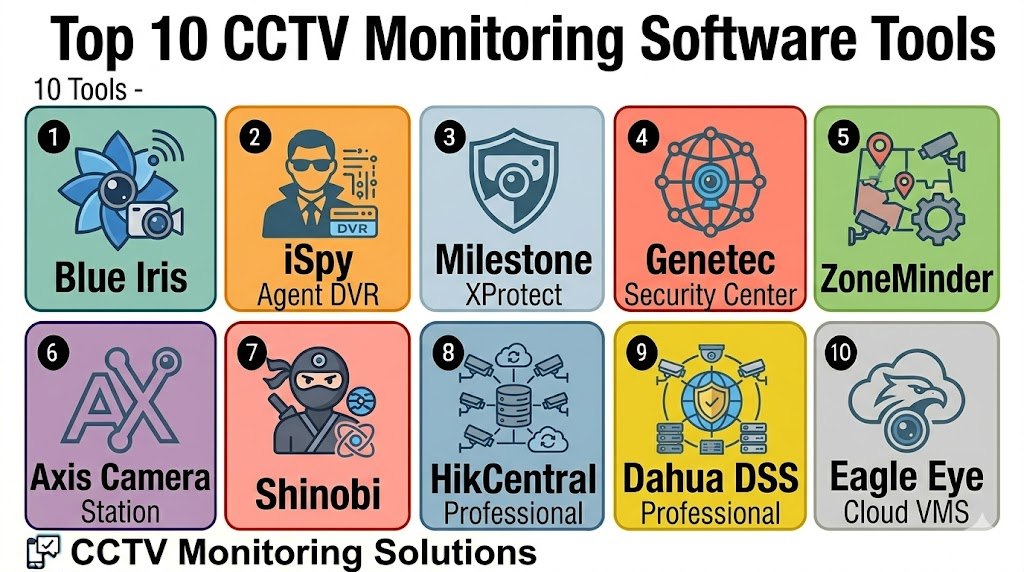
Top 10 CCTV Monitoring Software Tools
1- Blue Iris
Short description: Blue Iris is CCTV monitoring and recording software widely used by DIY users, homeowners, small businesses, and advanced camera enthusiasts. It is best for users who want strong local control, IP camera compatibility, motion alerts, and flexible Windows-based recording.
Key Features
- Live view and multi-camera monitoring
- IP camera and ONVIF camera support
- Motion detection and alert workflows
- Local recording and playback
- Remote access and mobile app support
- Camera grouping and scheduling
- Integration options for advanced users
Pros
- Strong choice for DIY and small business CCTV setups
- Flexible local recording and configuration options
- Good value for users comfortable managing their own system
Cons
- Requires Windows-based setup and maintenance
- Configuration can be technical for beginners
- Hardware performance depends on camera count and recording settings
Platforms / Deployment
Windows / iOS / Android
Self-hosted / Local / Hybrid
Security & Compliance
Varies / N/A. Buyers should configure user accounts, remote access, passwords, network security, firewall rules, updates, and storage permissions carefully.
Integrations & Ecosystem
Blue Iris works well for users who want flexible local CCTV monitoring with broad camera support.
- IP cameras
- ONVIF-compatible cameras
- Local storage
- Mobile access
- Home automation integrations where configured
- Alert and notification workflows
Support & Community
Blue Iris has product documentation, user forums, online tutorials, and a strong DIY community. Support depth may depend on user technical skill and self-managed setup.
2- iSpy Agent DVR
Short description: iSpy Agent DVR is flexible CCTV and video monitoring software for cameras, microphones, motion detection, remote access, and local or self-hosted video surveillance setups. It is useful for DIY users, small offices, and technical users who want customizable monitoring.
Key Features
- Live camera monitoring
- Motion and sound detection
- Remote browser access
- Multi-camera recording
- Event alerts and scheduling
- Camera and microphone support
- Local and self-hosted deployment flexibility
Pros
- Flexible for DIY and technical users
- Works with many camera types
- Useful for budget-conscious CCTV monitoring setups
Cons
- Setup may require technical knowledge
- Interface and configuration may feel complex for beginners
- Support expectations should be reviewed before business-critical use
Platforms / Deployment
Windows / macOS / Linux / Web / iOS / Android access varies
Self-hosted / Local / Hybrid
Security & Compliance
Varies / N/A. Buyers should validate remote access security, account permissions, encryption settings, network exposure, update practices, and storage protection.
Integrations & Ecosystem
iSpy Agent DVR is useful for users who want camera monitoring with flexible deployment and technical customization.
- IP cameras
- USB cameras
- ONVIF cameras
- Microphones
- Local storage
- Browser-based access
Support & Community
iSpy Agent DVR has documentation, community resources, and user guidance. It is best suited for users comfortable with technical setup and troubleshooting.
3- Milestone XProtect
Short description: Milestone XProtect is an open-platform video management system used for professional CCTV and IP video surveillance environments. It is suitable for organizations that need camera flexibility, enterprise scalability, integrations, and strong security operations workflows.
Key Features
- Professional video management system
- Live view, playback, and recording
- Broad IP camera and ONVIF support
- Multi-site and enterprise scalability
- User roles and permissions
- Evidence export and investigation workflows
- Integration with analytics and access control systems
Pros
- Strong fit for professional and enterprise CCTV environments
- Large camera and integration ecosystem
- Scalable for complex sites and multi-location deployments
Cons
- Implementation may require certified integrators
- Licensing and infrastructure planning can be complex
- More advanced than needed for very small setups
Platforms / Deployment
Web / Windows / Mobile access varies
On-premises / Hybrid / Cloud options vary
Security & Compliance
Varies / N/A. Buyers should validate MFA, RBAC, encryption, audit logs, retention policies, camera authentication, and secure remote access directly.
Integrations & Ecosystem
Milestone XProtect is valuable when CCTV monitoring must connect with broader security systems.
- IP cameras and ONVIF devices
- Access control systems
- Alarm systems
- Video analytics
- Intercoms and sensors
- Evidence and investigation workflows
Support & Community
Milestone has a mature partner ecosystem, documentation, training resources, certified integrators, and enterprise support options. Support experience may vary by reseller and deployment size.
4- Genetec Security Center
Short description: Genetec Security Center is a unified physical security platform that includes video surveillance, access control, ALPR, communications, and security operations. It is best for enterprises, campuses, public sector, and large organizations that need CCTV monitoring as part of a broader security environment.
Key Features
- Unified CCTV and access control management
- Live monitoring and playback
- Incident and event management
- Multi-site security operations
- ALPR and communications support
- Role-based access and audit workflows
- Hybrid and cloud options depending on setup
Pros
- Strong unified security platform
- Good fit for large and complex environments
- Connects CCTV with access control and incident workflows
Cons
- May be too broad for basic CCTV monitoring
- Implementation can require planning and specialist support
- Pricing and licensing should be reviewed carefully
Platforms / Deployment
Web / Windows / Mobile access varies
Cloud / On-premises / Hybrid / Varies
Security & Compliance
Varies / N/A. Buyers should validate SSO, MFA, RBAC, encryption, audit logs, user permissions, retention controls, and cybersecurity requirements directly.
Integrations & Ecosystem
Genetec Security Center fits organizations that want CCTV monitoring connected with enterprise physical security operations.
- CCTV and IP cameras
- Access control
- ALPR systems
- Intrusion and alarms
- Intercoms and communications
- Security operations dashboards
Support & Community
Genetec provides enterprise documentation, implementation partners, training, and support resources. Support depth may vary by project complexity and deployment model.
5- ZoneMinder
Short description: ZoneMinder is an open-source video surveillance software platform for monitoring, recording, and managing cameras. It is useful for technical users, Linux users, DIY security projects, and organizations that want open-source CCTV monitoring flexibility.
Key Features
- Open-source CCTV monitoring
- Live view and recording
- Motion detection
- Multi-camera support
- Web-based interface
- Event review and playback
- Linux-based deployment
Pros
- Open-source and flexible
- Good for technical users and custom CCTV projects
- No traditional vendor lock-in
Cons
- Setup and maintenance require technical skill
- Interface may not be as polished as commercial platforms
- Business support and accountability may be limited
Platforms / Deployment
Linux / Web
Self-hosted / Local
Security & Compliance
Not publicly stated. Buyers must manage server hardening, user permissions, secure remote access, software updates, storage protection, and network security themselves.
Integrations & Ecosystem
ZoneMinder works well for users who want open-source CCTV monitoring and are comfortable managing their own infrastructure.
- IP cameras
- Local storage
- Linux servers
- Motion detection workflows
- Web access
- Community integrations
Support & Community
ZoneMinder has an open-source community, documentation, forums, and user-contributed guidance. It is better for technical users than non-technical businesses.
6- Shinobi
Short description: Shinobi is a modern open-source CCTV and NVR software platform designed for live monitoring, recording, and camera management. It is useful for developers, technical teams, and users who want a web-based self-hosted CCTV solution.
Key Features
- Web-based CCTV monitoring
- Multi-camera recording
- Motion detection
- IP camera support
- User management
- Local server deployment
- API-friendly architecture
Pros
- Flexible self-hosted CCTV platform
- Good fit for technical users and custom deployments
- Modern web-based interface compared with some older tools
Cons
- Setup requires technical knowledge
- Support model may not suit all business-critical deployments
- Performance depends on server hardware and configuration
Platforms / Deployment
Linux / Web
Self-hosted / Local / Hybrid
Security & Compliance
Not publicly stated. Buyers should secure server access, user accounts, remote access, storage, network exposure, and update practices.
Integrations & Ecosystem
Shinobi is useful for users who want a customizable self-hosted video monitoring setup.
- IP cameras
- Local recording
- Web dashboards
- API workflows
- Motion detection
- Custom integrations
Support & Community
Shinobi has documentation, community resources, and developer-oriented support paths. It is best for users comfortable with self-hosting and technical configuration.
7- HikCentral Professional
Short description: HikCentral Professional is a video surveillance and security management platform commonly used with Hikvision camera ecosystems. It supports CCTV monitoring, video playback, alarms, access control, and centralized security management for small to large deployments.
Key Features
- Centralized CCTV camera management
- Live view and playback
- Alarm and event management
- Access control integration options
- Multi-site support
- Video wall and monitoring workflows
- Device health and system management
Pros
- Strong fit for Hikvision-based camera environments
- Useful for centralized CCTV and security operations
- Supports larger deployments with multiple devices and sites
Cons
- Best value depends on Hikvision ecosystem alignment
- Buyers should review cybersecurity, compliance, and regional procurement policies carefully
- Integration with non-Hikvision systems should be validated
Platforms / Deployment
Windows / Web / iOS / Android access varies
On-premises / Hybrid / Varies
Security & Compliance
Varies / N/A. Buyers should validate user permissions, encryption, audit logs, device firmware policies, camera authentication, remote access controls, and procurement requirements directly.
Integrations & Ecosystem
HikCentral Professional fits organizations using Hikvision cameras and related security devices.
- Hikvision cameras
- NVR and storage systems
- Access control workflows
- Alarm systems
- Video wall monitoring
- Mobile access
Support & Community
Support is commonly provided through Hikvision channels, distributors, and security integrators. Support quality may vary by region and installation partner.
8- Dahua DSS Professional
Short description: Dahua DSS Professional is a surveillance management platform for Dahua camera, recorder, access control, and security ecosystems. It is useful for organizations that want centralized CCTV monitoring, event handling, video playback, and security device management.
Key Features
- Centralized CCTV monitoring
- Live view and recording management
- Playback and event search
- Alarm and access control integration options
- Multi-site device management
- Video wall support
- Security device health visibility
Pros
- Strong fit for Dahua-based CCTV deployments
- Useful for centralized monitoring and security operations
- Supports integrated video and alarm workflows
Cons
- Best value depends on Dahua ecosystem use
- Buyers should review cybersecurity and procurement policies carefully
- Non-Dahua compatibility should be validated before rollout
Platforms / Deployment
Windows / Web / Mobile access varies
On-premises / Hybrid / Varies
Security & Compliance
Varies / N/A. Buyers should validate user access, encryption, audit logs, device firmware updates, secure remote access, and regional compliance requirements directly.
Integrations & Ecosystem
Dahua DSS Professional fits organizations using Dahua cameras, NVRs, and related security products.
- Dahua cameras
- Dahua recorders
- Access control devices
- Alarm systems
- Video wall monitoring
- Mobile monitoring workflows
Support & Community
Support is typically available through Dahua partners, distributors, and security integrators. Support quality depends on region, deployment complexity, and installer expertise.
9- Axis Camera Station
Short description: Axis Camera Station is CCTV and video management software designed for Axis camera environments. It is well suited for small and mid-sized businesses that use Axis cameras and want reliable live view, recording, playback, and device management.
Key Features
- Live view and video recording
- Axis camera management
- Playback and search tools
- Event alerts and camera health visibility
- Access control integration options
- Mobile viewing support
- Local recording infrastructure
Pros
- Strong fit for Axis camera deployments
- Simple and reliable for many SMB and mid-market CCTV needs
- Good alignment between hardware and software
Cons
- Best value comes with Axis camera ecosystem
- Less open than broad VMS platforms
- Large enterprise deployments may need deeper planning
Platforms / Deployment
Windows / Mobile access varies
On-premises / Hybrid options vary
Security & Compliance
Varies / N/A. Buyers should validate user roles, encryption, camera firmware management, device authentication, audit logs, and remote access security directly.
Integrations & Ecosystem
Axis Camera Station is practical for organizations standardizing on Axis cameras and related devices.
- Axis IP cameras
- Axis access control options
- Audio and intercom devices
- Event and alert workflows
- Mobile viewing
- Local recording systems
Support & Community
Axis provides product documentation, partner resources, technical support, and camera configuration guidance. Support depth may vary by reseller and system size.
10- Eagle Eye Cloud VMS
Short description: Eagle Eye Cloud VMS is a cloud video management platform for businesses that want remote CCTV monitoring, cloud recording, camera flexibility, and multi-site visibility. It is useful for distributed companies, retail stores, offices, logistics sites, and commercial facilities.
Key Features
- Cloud CCTV monitoring
- Live view and recorded playback
- Multi-site camera management
- Cloud bridge architecture
- AI and video analytics support
- Mobile and browser access
- Camera migration and compatibility support
Pros
- Strong fit for cloud-first and multi-site businesses
- Useful for remote CCTV monitoring
- Can support camera migration through bridge-based architecture
Cons
- Subscription and storage costs should be reviewed
- Internet bandwidth and retention planning are important
- Advanced enterprise integrations should be validated
Platforms / Deployment
Web / iOS / Android
Cloud / Hybrid
Security & Compliance
Varies / N/A. Buyers should validate MFA, user roles, encryption, audit logs, retention settings, camera access controls, and cloud data governance directly.
Integrations & Ecosystem
Eagle Eye Cloud VMS works well for organizations moving from traditional CCTV to cloud-managed video operations.
- IP cameras
- ONVIF camera workflows
- Cloud bridges
- AI analytics
- Access control workflows
- Multi-site dashboards
Support & Community
Eagle Eye provides documentation, partner support, onboarding resources, and technical assistance. Support experience may vary by reseller, camera environment, and deployment model.
Comparison Table
| Tool Name | Best For | Platform Supported | Deployment | Standout Feature | Public Rating |
|---|---|---|---|---|---|
| Blue Iris | DIY users and small business CCTV | Windows, iOS, Android | Self-hosted / Local / Hybrid | Flexible local CCTV recording | N/A |
| iSpy Agent DVR | Technical users and self-hosted monitoring | Windows, macOS, Linux, Web, mobile varies | Self-hosted / Local / Hybrid | Flexible camera and motion detection workflows | N/A |
| Milestone XProtect | Professional and enterprise VMS | Web, Windows, mobile varies | On-premises / Hybrid / Cloud varies | Open-platform camera and integration ecosystem | N/A |
| Genetec Security Center | Unified enterprise security | Web, Windows, mobile varies | Cloud / On-premises / Hybrid / Varies | CCTV plus access control and security operations | N/A |
| ZoneMinder | Open-source Linux CCTV projects | Linux, Web | Self-hosted / Local | Open-source CCTV monitoring | N/A |
| Shinobi | Modern self-hosted CCTV setups | Linux, Web | Self-hosted / Local / Hybrid | Web-based self-hosted NVR platform | N/A |
| HikCentral Professional | Hikvision camera environments | Windows, Web, mobile varies | On-premises / Hybrid / Varies | Centralized Hikvision security management | N/A |
| Dahua DSS Professional | Dahua camera environments | Windows, Web, mobile varies | On-premises / Hybrid / Varies | Centralized Dahua CCTV and alarm management | N/A |
| Axis Camera Station | Axis camera deployments | Windows, mobile varies | On-premises / Hybrid varies | Tight Axis camera integration | N/A |
| Eagle Eye Cloud VMS | Cloud-first multi-site CCTV | Web, iOS, Android | Cloud / Hybrid | Cloud CCTV with multi-site visibility | N/A |
Evaluation & Scoring of CCTV Monitoring Software
| Tool Name | Core 25% | Ease 15% | Integrations 15% | Security 10% | Performance 10% | Support 10% | Value 15% | Weighted Total |
|---|---|---|---|---|---|---|---|---|
| Blue Iris | 8.3 | 7.8 | 8.0 | 7.2 | 8.2 | 7.6 | 8.8 | 8.1 |
| iSpy Agent DVR | 8.1 | 7.5 | 8.0 | 7.1 | 8.0 | 7.3 | 8.6 | 7.9 |
| Milestone XProtect | 9.4 | 7.7 | 9.5 | 8.4 | 9.0 | 8.7 | 7.6 | 8.7 |
| Genetec Security Center | 9.5 | 7.6 | 9.4 | 8.6 | 9.1 | 8.7 | 7.4 | 8.7 |
| ZoneMinder | 7.8 | 6.8 | 7.6 | 6.9 | 7.7 | 7.0 | 8.9 | 7.6 |
| Shinobi | 8.0 | 7.3 | 7.8 | 7.0 | 7.9 | 7.2 | 8.5 | 7.8 |
| HikCentral Professional | 8.6 | 8.0 | 8.2 | 7.7 | 8.5 | 8.0 | 8.0 | 8.2 |
| Dahua DSS Professional | 8.5 | 8.0 | 8.1 | 7.6 | 8.4 | 8.0 | 8.1 | 8.2 |
| Axis Camera Station | 8.3 | 8.5 | 8.0 | 8.0 | 8.5 | 8.2 | 8.1 | 8.3 |
| Eagle Eye Cloud VMS | 8.7 | 8.6 | 8.5 | 8.0 | 8.5 | 8.2 | 8.0 | 8.5 |
Which CCTV Monitoring Software Tool Is Right for You?
Solo / Freelancer
Solo users, small offices, and homeowners should focus on affordability, simple camera setup, local recording, and easy remote access. Blue Iris, iSpy Agent DVR, ZoneMinder, Shinobi, and Axis Camera Station can work depending on technical skill and camera hardware.
If the user wants cloud access with less local maintenance, Eagle Eye Cloud VMS may be better than self-hosted tools.
SMB
Small and mid-sized businesses need reliable live view, playback, motion alerts, retention control, user permissions, and mobile monitoring. Blue Iris, Axis Camera Station, Eagle Eye Cloud VMS, HikCentral Professional, Dahua DSS Professional, and iSpy Agent DVR are practical candidates.
SMBs should prioritize ease of operation, support availability, camera compatibility, and storage planning.
Mid-Market
Mid-market organizations often need multi-camera dashboards, multi-site visibility, evidence export, alert routing, and integration with alarms or access control. Milestone XProtect, Genetec Security Center, Eagle Eye Cloud VMS, Axis Camera Station, HikCentral Professional, and Dahua DSS Professional can fit depending on camera ecosystem.
This segment should validate security policies, retention requirements, remote access, and integrator support before rollout.
Enterprise
Enterprise teams need strong governance, scalability, integrations, redundancy, audit logs, cybersecurity, and incident investigation workflows. Milestone XProtect, Genetec Security Center, Eagle Eye Cloud VMS, Axis Camera Station, HikCentral Professional, and Dahua DSS Professional are stronger options for larger deployments.
Enterprise buyers should involve IT, security, facilities, procurement, legal, and compliance teams before final selection.
Budget vs Premium
Budget-conscious users should evaluate Blue Iris, iSpy Agent DVR, ZoneMinder, Shinobi, and Axis Camera Station depending on hardware and technical skill. These options can reduce software cost but may require more local setup and maintenance.
Premium buyers should consider Milestone XProtect, Genetec Security Center, Eagle Eye Cloud VMS, HikCentral Professional, and Dahua DSS Professional when support, scalability, integrations, and centralized operations matter more.
Feature Depth vs Ease of Use
If ease of use matters most, Axis Camera Station, Eagle Eye Cloud VMS, HikCentral Professional, and Dahua DSS Professional are strong starting points. If feature depth and open integration matter more, Milestone XProtect and Genetec Security Center should be reviewed closely.
For technical DIY control, Blue Iris, iSpy Agent DVR, ZoneMinder, and Shinobi offer flexibility but require more setup effort.
Integrations & Scalability
CCTV monitoring software should be checked for compatibility with IP cameras, ONVIF, DVRs, NVRs, access control, alarms, sensors, intercoms, and mobile apps. Milestone XProtect, Genetec Security Center, Eagle Eye Cloud VMS, Axis Camera Station, HikCentral Professional, and Dahua DSS Professional are strong choices for integration-focused deployments.
For multi-site growth, test camera onboarding, bandwidth, retention, remote playback, user roles, and alert routing.
Security & Compliance Needs
CCTV software manages sensitive video, camera credentials, user access, incident footage, exports, and sometimes access control events. Buyers should review MFA, RBAC, encryption, secure remote access, camera firmware, audit logs, retention policies, watermarking, and evidence export controls.
Organizations in healthcare, education, retail, government, and critical infrastructure should include IT security and compliance teams before deployment.
Frequently Asked Questions
1. What is CCTV Monitoring Software?
CCTV Monitoring Software helps users view, record, search, and manage video from CCTV cameras.
It can support live monitoring, playback, motion alerts, recording schedules, and user access controls.
Some tools also support AI detection, mobile access, and multi-site dashboards.
It is useful when basic camera apps or DVR interfaces are not enough.
2. Who needs CCTV Monitoring Software?
Homeowners, small businesses, warehouses, schools, hospitals, retail stores, factories, and security teams can use it.
It is especially useful when multiple cameras, users, locations, or retention rules must be managed.
Organizations that need evidence export, remote access, or incident review benefit the most.
Very small setups may only need a basic camera app.
3. How much does CCTV Monitoring Software cost?
Pricing varies by vendor, camera count, storage model, deployment type, support level, and advanced features.
Self-hosted tools may reduce software cost but require local hardware and maintenance.
Cloud platforms may charge recurring subscription fees by camera or storage duration.
Buyers should calculate total cost over several years.
4. What is the difference between CCTV software and VMS?
CCTV software usually refers broadly to tools for monitoring and recording security camera footage.
VMS, or Video Management Software, is often a more advanced platform for enterprise video operations.
A VMS may include integrations, user governance, evidence workflows, analytics, and multi-site management.
The right choice depends on scale and security requirements.
5. Can CCTV Monitoring Software work with any camera?
Not always. Many tools support IP cameras and ONVIF-compatible cameras, but compatibility varies by model.
Some platforms work best with their own camera ecosystem.
Buyers should check camera brand, protocol, firmware, stream format, and recording support before purchase.
Testing with real cameras is strongly recommended.
6. Which CCTV Monitoring Software is best for small businesses?
Blue Iris, Axis Camera Station, Eagle Eye Cloud VMS, iSpy Agent DVR, HikCentral Professional, and Dahua DSS Professional can be practical options.
The best fit depends on camera brand, budget, technical skill, and storage needs.
Small businesses should prioritize easy playback, reliable recording, and mobile access.
Support availability is also important.
7. Which CCTV Monitoring Software is best for enterprise teams?
Milestone XProtect, Genetec Security Center, Eagle Eye Cloud VMS, Axis Camera Station, HikCentral Professional, and Dahua DSS Professional are strong enterprise candidates.
They support larger camera deployments, integrations, user permissions, and investigation workflows.
Enterprise buyers should review cybersecurity, compliance, and long-term scalability.
A pilot deployment is recommended before full rollout.
8. What are common mistakes when choosing CCTV software?
Common mistakes include ignoring camera compatibility, underestimating storage needs, and choosing remote access without securing it properly.
Teams also forget to define user roles, retention policies, and evidence export rules.
Another mistake is buying advanced software without staff training.
Testing real workflows helps avoid costly mistakes.
9. Can CCTV Monitoring Software support AI alerts?
Yes, many modern platforms support AI or analytics features such as people detection, vehicle detection, object detection, motion filtering, and intrusion alerts.
Analytics accuracy depends on camera quality, lighting, placement, and software configuration.
Some AI features may require specific cameras, licenses, or cloud plans.
Buyers should test analytics before relying on them for security decisions.
10. What are alternatives to CCTV Monitoring Software?
Alternatives include DVR interfaces, NVR systems, standalone camera apps, cloud camera subscriptions, and traditional security monitoring services.
These may work for small setups with limited cameras and simple review needs.
Dedicated CCTV software becomes useful when camera count, users, storage, and investigation needs grow.
The right option depends on risk, budget, and operational complexity.
Conclusion
CCTV Monitoring Software helps users centralize live camera viewing, recording, playback, alerts, storage, and incident review across homes, offices, stores, campuses, and enterprise facilities. The best platform depends on camera compatibility, storage preference, budget, technical skill, remote monitoring needs, cybersecurity requirements, and long-term scalability. Blue Iris, iSpy Agent DVR, ZoneMinder, and Shinobi are strong options for DIY and self-hosted users, while Axis Camera Station, HikCentral Professional, and Dahua DSS Professional fit camera ecosystem-driven deployments. Milestone XProtect and Genetec Security Center are stronger for enterprise and professional security operations, while Eagle Eye Cloud VMS is a strong choice for cloud-first multi-site monitoring. The smartest next step is to shortlist two or three tools, test them with real cameras, validate live view and playback, review storage and security settings, and run a pilot before full deployment.

Find Trusted Cardiac Hospitals
Compare heart hospitals by city and services — all in one place.
Explore Hospitals
CCTV monitoring software is most valuable when it helps organizations centrally monitor, record, and manage video surveillance across multiple locations to enhance security and operational awareness. By providing live video streaming, video recording, AI-powered motion and object detection, intelligent alerts, remote access, video analytics, incident investigation, user access controls, cloud storage, and integration with access control, alarm, and security systems, these platforms improve threat detection, strengthen security operations, accelerate incident response, and provide comprehensive visibility into monitored environments.