Introduction
Access Control Management Software helps organizations control who can enter buildings, rooms, floors, gates, labs, data centers, warehouses, offices, schools, hospitals, and restricted areas. It manages users, credentials, doors, schedules, permissions, visitor access, audit trails, alarms, and physical security workflows from one central system. This category matters because physical access is now more connected, mobile, cloud-managed, and compliance-driven. Organizations need more than key cards and door readers. They need remote administration, mobile credentials, identity integrations, video linkage, visitor workflows, emergency lockdown, and strong security governance.
Real World Use Cases:
- Managing employee, contractor, visitor, and tenant access
- Issuing mobile credentials, cards, PINs, or fobs
- Controlling access to offices, data centers, labs, and restricted zones
- Reviewing door events, failed access attempts, and audit logs
- Integrating access control with video surveillance and alarms
Evaluation Criteria for Buyers:
- Door, site, and user scalability
- Mobile credential and card support
- Cloud, on-premises, or hybrid deployment
- Integration with video surveillance and alarms
- Identity provider and HR system integration
- Visitor and contractor access workflows
- Emergency lockdown and access schedules
- Audit logs, reporting, and compliance support
- Security controls such as MFA, RBAC, and encryption
- Hardware compatibility and installer ecosystem
Best for: IT teams, physical security teams, facility managers, corporate offices, schools, hospitals, data centers, warehouses, manufacturing sites, property managers, coworking operators, and multi-site enterprises that need secure, centralized, and auditable building access control.
Not ideal for: Very small offices with one door and low security requirements may not need advanced access control software. A basic smart lock, keypad system, or standalone door controller may be enough until user count, compliance needs, or multi-site access complexity grows.
Key Trends in Access Control Management Software
- Mobile credentials are becoming mainstream: Many organizations are moving from plastic cards and fobs toward smartphone-based credentials for employees, tenants, and contractors.
- Cloud access control is growing fast: Cloud-managed platforms allow security teams to manage doors, users, sites, reports, and alerts remotely without maintaining heavy local servers.
- Hybrid deployment remains important: Enterprises, government sites, healthcare facilities, and critical infrastructure may still need on-premises or hybrid models for control, resilience, and compliance.
- Video and access control are converging: Door events are more useful when linked with camera footage, alarms, intercoms, visitor logs, and incident workflows.
- Identity integration is becoming standard: Access control systems increasingly connect with HR systems, Active Directory, Entra ID, Okta, Google Workspace, and other identity sources.
- Zero-trust thinking is influencing physical security: Buyers want least-privilege access, role-based permissions, time-based rules, audit trails, and automated deprovisioning.
- Visitor access is becoming more digital: Temporary QR codes, mobile passes, reception workflows, and contractor access rules are replacing manual sign-in processes.
- Emergency lockdown and safety workflows matter more: Schools, offices, campuses, and public sites need fast lockdown, evacuation, and mustering capabilities.
- Cybersecurity review is now essential: Access control platforms connect to doors, controllers, networks, mobile apps, and identity systems, so security review is now part of procurement.
- Subscription models are reshaping costs: Cloud platforms often use per-door, per-user, or per-site subscriptions, while traditional systems may include licensing, servers, support, and maintenance.
How We Selected These Tools
The tools below were selected using practical access control and physical security evaluation logic:
- Market recognition among physical security, IT, real estate, enterprise, education, healthcare, and commercial office buyers
- Strength of access control workflows such as users, credentials, doors, groups, schedules, and permissions
- Support for mobile credentials, key cards, fobs, PINs, and modern identity workflows
- Deployment flexibility across cloud, on-premises, and hybrid environments
- Ability to integrate with video surveillance, alarms, intercoms, visitor systems, and building operations
- Scalability across single sites, multi-site offices, campuses, and global enterprises
- Security posture signals such as MFA, RBAC, audit logs, encryption, and admin controls
- Ease of use for admins, guards, facilities teams, and everyday users
- Strength of hardware ecosystem, installer network, documentation, and support options
- Practical value for improving building security, reducing manual access work, and simplifying access governance
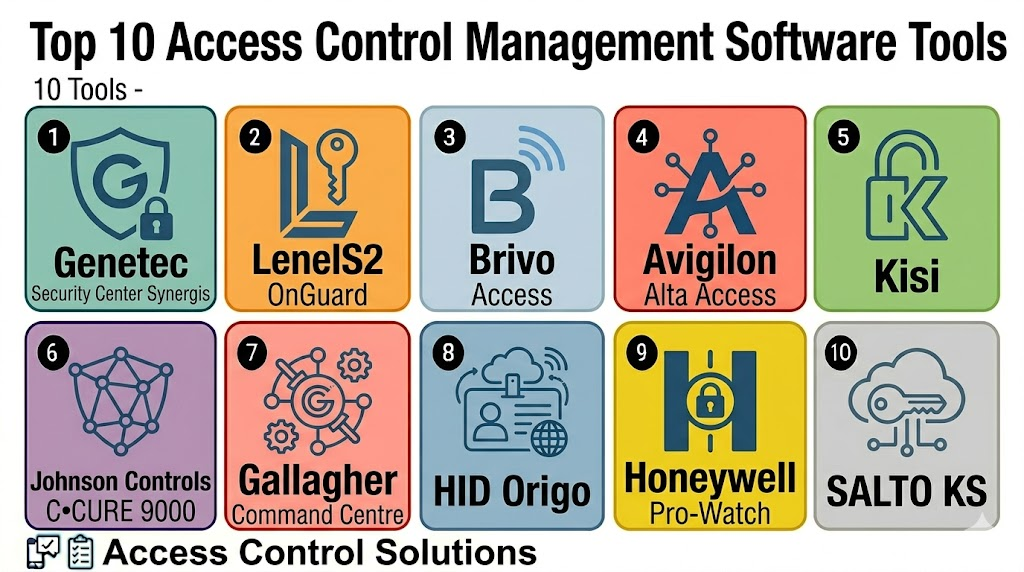
Top 10 Access Control Management Software Tools
1- Genetec Security Center Synergis
Short description: Genetec Security Center Synergis is an enterprise access control solution within the broader Genetec unified security platform. It is best for organizations that want access control connected with video surveillance, ALPR, intrusion, communications, and security operations.
Key Features
- Enterprise access control management
- Unified security platform with video and access workflows
- Door, credential, schedule, and cardholder management
- Event monitoring and alarm handling
- Role-based permissions and audit visibility
- Multi-site and campus support
- Integration with physical security systems
Pros
- Strong fit for enterprise and public sector security environments
- Useful when access control must work with video surveillance
- Scales well for complex sites and multi-location operations
Cons
- May be too broad for small offices
- Implementation often requires trained integrators
- Licensing and architecture should be carefully planned
Platforms / Deployment
Web / Windows / Mobile access varies
Cloud / On-premises / Hybrid / Varies
Security & Compliance
Varies / N/A. Buyers should validate SSO, MFA, RBAC, encryption, audit logs, retention settings, identity integration, and compliance requirements directly.
Integrations & Ecosystem
Genetec is strongest when access control is part of a unified security command environment.
- Video surveillance
- Intrusion and alarms
- Intercoms and communications
- ALPR workflows
- Identity and directory systems
- Visitor and incident workflows
Support & Community
Genetec provides enterprise documentation, training, partner implementation, and support resources. Support quality may vary by reseller, region, and deployment complexity.
2- LenelS2 OnGuard
Short description: LenelS2 OnGuard is an enterprise access control and security management platform used by large organizations, campuses, government sites, and regulated environments. It is suitable for buyers that need advanced access governance, integrations, and scalable physical security operations.
Key Features
- Enterprise-grade access control
- Cardholder and credential management
- Alarm monitoring and event response
- Visitor and identity workflow integration options
- Multi-site and large facility support
- Video and security system integrations
- Reporting and audit workflows
Pros
- Strong fit for large and complex security environments
- Mature enterprise access control platform
- Useful for organizations needing deep control and customization
Cons
- Implementation can be complex
- Smaller teams may find it more than they need
- Long-term administration requires trained security staff
Platforms / Deployment
Web / Windows / Mobile access varies
On-premises / Hybrid / Cloud options vary
Security & Compliance
Varies / N/A. Buyers should validate RBAC, MFA, encryption, audit logs, directory integration, user permissions, and compliance needs directly.
Integrations & Ecosystem
LenelS2 OnGuard is useful when access control must integrate with broader enterprise security infrastructure.
- Video surveillance systems
- Visitor management tools
- Identity directories
- Intrusion alarms
- Badge and credential systems
- Enterprise reporting workflows
Support & Community
Support is usually delivered through certified integrators, partners, and vendor support channels. Training and professional implementation are important for complex deployments.
3- Brivo Access
Short description: Brivo Access is a cloud-based access control platform for managing doors, users, mobile credentials, cards, permissions, and multi-site security from a browser or mobile app. It is useful for commercial offices, property managers, distributed businesses, and modern cloud-first security teams.
Key Features
- Cloud-based door and user management
- Mobile credentials and card support
- Multi-site access control administration
- Remote locking and unlocking workflows
- Event logs and reporting
- Visitor and property access workflows
- Integration with video and workplace systems
Pros
- Strong fit for cloud-first access control
- Easy remote administration across sites
- Good option for commercial real estate and distributed offices
Cons
- Subscription cost should be reviewed carefully
- Hardware and controller compatibility must be validated
- Highly customized enterprise workflows may require planning
Platforms / Deployment
Web / iOS / Android
Cloud
Security & Compliance
Varies / N/A. Buyers should validate MFA, RBAC, encryption, audit logs, mobile credential security, access reports, and admin controls directly.
Integrations & Ecosystem
Brivo works well for organizations that want cloud-managed access control connected with property and workplace workflows.
- Mobile credentials
- Access control panels and readers
- Video surveillance integrations
- Visitor management
- Workplace platforms
- Identity and directory workflows
Support & Community
Brivo provides documentation, partner support, onboarding resources, and technical support. Support experience may vary by installer and deployment size.
4- Avigilon Alta Access
Short description: Avigilon Alta Access, formerly known as Openpath, is a cloud-based access control platform focused on mobile credentials, remote management, video integration, and modern workplace access. It is useful for offices, multi-tenant buildings, schools, gyms, and distributed organizations.
Key Features
- Cloud-based access management
- Mobile credentials and touchless access
- Remote door control and monitoring
- Rules, alerts, and access events
- Multi-site user and door administration
- Integration with Avigilon video security
- APIs and webhook options depending on plan
Pros
- Strong mobile credential experience
- Good fit for modern offices and multi-site teams
- Useful integration with video and cloud security workflows
Cons
- Best value depends on compatible hardware ecosystem
- Subscription model should be reviewed over long-term use
- Advanced enterprise requirements may need higher-tier plans
Platforms / Deployment
Web / iOS / Android
Cloud
Security & Compliance
Varies / N/A. Buyers should validate MFA, RBAC, encryption, mobile credential protection, audit logs, API security, and data retention policies directly.
Integrations & Ecosystem
Avigilon Alta Access works well when access control needs to connect with modern cloud security and video workflows.
- Avigilon video security
- Mobile credentials
- Door controllers and readers
- APIs and webhooks
- Visitor and workplace systems
- Multi-site security dashboards
Support & Community
Support is typically delivered through Avigilon and Motorola Solutions channels, plus partner installers. Buyers should validate onboarding, migration, and technical support expectations.
5- Kisi
Short description: Kisi is a cloud-based access control platform for offices, coworking spaces, gyms, schools, and distributed workplaces. It supports mobile access, door scheduling, remote management, visitor access, and integrations with workplace and identity systems.
Key Features
- Cloud access control administration
- Mobile unlock and digital credentials
- Door schedules and permissions
- Multi-site management
- Visitor and temporary access workflows
- Event history and audit visibility
- Integration with workplace and identity tools
Pros
- Strong fit for modern offices and coworking spaces
- Easy mobile access experience for users
- Practical cloud management for distributed locations
Cons
- Hardware and installation requirements should be validated
- Subscription cost can grow with doors and sites
- Deep enterprise security workflows may need careful review
Platforms / Deployment
Web / iOS / Android
Cloud
Security & Compliance
Varies / N/A. Buyers should validate MFA, admin roles, mobile credential security, encryption, audit logs, identity integration, and data retention settings directly.
Integrations & Ecosystem
Kisi works well for workplaces that need app-based access control connected with modern office tools.
- Mobile credentials
- Door readers and controllers
- Visitor management workflows
- Identity and directory systems
- Workplace tools
- API-based integrations
Support & Community
Kisi provides documentation, setup guidance, customer support, and partner resources. Support quality may vary by deployment size and installation partner.
6- Johnson Controls C•CURE 9000
Short description: Johnson Controls C•CURE 9000 is an enterprise access control and security management platform used in large buildings, campuses, government facilities, healthcare, and critical infrastructure. It is suitable for organizations that need powerful access management and security integration depth.
Key Features
- Enterprise access control management
- Credential and personnel administration
- Alarm and event monitoring
- Visitor and badging workflows
- Video and intrusion integration support
- Multi-site and large-scale deployment support
- Reporting and audit capabilities
Pros
- Strong enterprise access control depth
- Good fit for regulated and security-sensitive environments
- Supports complex workflows and integrations
Cons
- May require specialist implementation
- More complex than cloud-native SMB tools
- Hardware and integration planning is important
Platforms / Deployment
Windows / Web and mobile access vary
On-premises / Hybrid / Varies
Security & Compliance
Varies / N/A. Buyers should validate RBAC, audit logs, encryption, identity integration, MFA options, emergency workflows, and compliance requirements directly.
Integrations & Ecosystem
C•CURE 9000 is valuable when access control must connect with enterprise physical security systems.
- Video surveillance
- Intrusion detection
- Visitor management
- Badging systems
- HID mobile credential workflows
- Enterprise security operations
Support & Community
Support is typically delivered through Johnson Controls, authorized partners, and certified integrators. Training and professional services are important for complex installations.
7- Gallagher Command Centre
Short description: Gallagher Command Centre is an enterprise security and access control platform for facilities that need strong access governance, perimeter security, intrusion, compliance, and operational visibility. It is often used in critical infrastructure, commercial, education, healthcare, and government environments.
Key Features
- Enterprise access control management
- Intrusion and perimeter security integration
- Cardholder and credential administration
- Alarm and event handling
- Site lockdown and emergency workflows
- Multi-site security management
- Reporting and compliance support
Pros
- Strong fit for high-security and complex environments
- Useful for access control plus intrusion and perimeter workflows
- Supports enterprise-grade operational security requirements
Cons
- More advanced than needed for small businesses
- Requires careful implementation and partner support
- Buyers should validate regional support and hardware ecosystem fit
Platforms / Deployment
Windows / Web and mobile access vary
On-premises / Hybrid / Varies
Security & Compliance
Varies / N/A. Buyers should validate role controls, audit logs, encryption, alarm handling, user lifecycle controls, and compliance needs directly.
Integrations & Ecosystem
Gallagher Command Centre is suitable when physical access control is part of a broader security and risk management environment.
- Door access systems
- Intrusion detection
- Perimeter security
- Video integrations
- Visitor workflows
- Compliance and reporting systems
Support & Community
Gallagher provides partner-led deployment, documentation, training, and support resources. Support experience may vary by certified channel partner and region.
8- HID Origo
Short description: HID Origo is a cloud platform that supports mobile identities and credential lifecycle workflows for access control ecosystems. It is useful for organizations that want secure mobile credential issuance, management, and integration with compatible access control systems.
Key Features
- Mobile identity and credential management
- Cloud-based credential lifecycle workflows
- Smartphone-based access support
- Integration with compatible access control systems
- Credential issuance and revocation
- User experience improvement over physical cards
- Enterprise identity support depending on setup
Pros
- Strong fit for mobile credential strategy
- Useful for replacing or supplementing physical cards
- Works across compatible HID-enabled access environments
Cons
- Not a complete standalone access control system for every use case
- Requires compatible readers, systems, and credential setup
- Buyers should validate ecosystem compatibility carefully
Platforms / Deployment
Web / iOS / Android
Cloud / Hybrid
Security & Compliance
Varies / N/A. Buyers should validate mobile identity security, credential encryption, access policies, admin controls, integration security, and lifecycle governance directly.
Integrations & Ecosystem
HID Origo is best when organizations want mobile credentials connected with existing physical access systems.
- HID mobile credentials
- Compatible access control systems
- Mobile devices
- Reader ecosystems
- Credential lifecycle workflows
- Identity and enterprise security workflows
Support & Community
HID provides documentation, technical resources, partner support, and credential ecosystem guidance. Deployment often involves integrators and compatible hardware planning.
9- Honeywell Pro-Watch
Short description: Honeywell Pro-Watch is an enterprise access control and security management platform for commercial buildings, campuses, industrial facilities, and regulated environments. It helps teams manage doors, users, alarms, credentials, events, and integrated security systems.
Key Features
- Enterprise access control management
- Door, credential, and cardholder administration
- Alarm and event monitoring
- Video and security system integration options
- Multi-site support
- Reporting and audit workflows
- Security operations support
Pros
- Strong fit for Honeywell-aligned security environments
- Useful for enterprise and industrial facilities
- Supports access control and broader security operations
Cons
- Implementation may require certified integrators
- Smaller offices may prefer simpler cloud-native tools
- Integration and hardware compatibility should be validated
Platforms / Deployment
Windows / Web and mobile access vary
On-premises / Hybrid / Varies
Security & Compliance
Varies / N/A. Buyers should validate RBAC, audit logs, encryption, directory integration, remote access, user permissions, and compliance needs directly.
Integrations & Ecosystem
Honeywell Pro-Watch is useful when access control must work with broader building and security systems.
- Honeywell security ecosystem
- Video surveillance systems
- Intrusion and alarms
- Badge and credential systems
- Reporting tools
- Enterprise security operations
Support & Community
Honeywell provides documentation, support channels, partner implementation, and technical resources. Support depth may vary by region, integrator, and system size.
10- SALTO KS
Short description: SALTO KS is a cloud-based access control platform for managing smart locks, doors, users, mobile access, and remote access permissions. It is useful for commercial offices, coworking spaces, gyms, hospitality, rental properties, and distributed locations.
Key Features
- Cloud-based smart access management
- Mobile keys and credential workflows
- Remote user and door administration
- Smart lock ecosystem support
- Access schedules and permissions
- Event history and alerts
- Multi-site management
Pros
- Strong fit for smart lock and cloud access use cases
- Useful for distributed properties and flexible spaces
- Mobile access is practical for modern users
Cons
- Best value depends on SALTO-compatible hardware
- Enterprise integrations should be validated carefully
- Subscription and lock hardware costs should be reviewed
Platforms / Deployment
Web / iOS / Android
Cloud
Security & Compliance
Varies / N/A. Buyers should validate mobile credential protection, admin roles, audit logs, remote access security, encryption, and user lifecycle controls directly.
Integrations & Ecosystem
SALTO KS works well for organizations that want cloud-managed smart locks and mobile access workflows.
- SALTO smart locks
- Mobile keys
- Cloud access control
- User and door management
- Property and coworking workflows
- Access event reporting
Support & Community
SALTO provides product documentation, installer support, and access control expertise. Support quality may vary by region, partner, and deployment model.
Comparison Table
| Tool Name | Best For | Platform Supported | Deployment | Standout Feature | Public Rating |
|---|---|---|---|---|---|
| Genetec Security Center Synergis | Unified enterprise security | Web, Windows, mobile varies | Cloud / On-premises / Hybrid / Varies | Access control connected with unified security | N/A |
| LenelS2 OnGuard | Large enterprise access governance | Web, Windows, mobile varies | On-premises / Hybrid / Cloud varies | Mature enterprise access management | N/A |
| Brivo Access | Cloud-first commercial access control | Web, iOS, Android | Cloud | Remote door and user management | N/A |
| Avigilon Alta Access | Mobile-first cloud access control | Web, iOS, Android | Cloud | Mobile credentials and cloud access workflows | N/A |
| Kisi | Modern offices and coworking spaces | Web, iOS, Android | Cloud | App-based access and workplace integrations | N/A |
| Johnson Controls C•CURE 9000 | Enterprise and high-security facilities | Windows, web and mobile vary | On-premises / Hybrid / Varies | Deep enterprise access and alarm management | N/A |
| Gallagher Command Centre | Critical infrastructure and secure sites | Windows, web and mobile vary | On-premises / Hybrid / Varies | Access control plus intrusion and perimeter security | N/A |
| HID Origo | Mobile identity and credential lifecycle | Web, iOS, Android | Cloud / Hybrid | Mobile credential management | N/A |
| Honeywell Pro-Watch | Honeywell-aligned enterprise facilities | Windows, web and mobile vary | On-premises / Hybrid / Varies | Enterprise access and security operations | N/A |
| SALTO KS | Smart lock and cloud access management | Web, iOS, Android | Cloud | Cloud-managed smart locks and mobile keys | N/A |
Evaluation & Scoring of Access Control Management Software
| Tool Name | Core 25% | Ease 15% | Integrations 15% | Security 10% | Performance 10% | Support 10% | Value 15% | Weighted Total |
|---|---|---|---|---|---|---|---|---|
| Genetec Security Center Synergis | 9.4 | 7.7 | 9.4 | 8.6 | 9.0 | 8.7 | 7.4 | 8.7 |
| LenelS2 OnGuard | 9.3 | 7.4 | 9.0 | 8.5 | 8.9 | 8.5 | 7.3 | 8.5 |
| Brivo Access | 8.6 | 8.8 | 8.4 | 8.0 | 8.5 | 8.2 | 8.0 | 8.5 |
| Avigilon Alta Access | 8.8 | 8.9 | 8.6 | 8.1 | 8.6 | 8.3 | 7.8 | 8.5 |
| Kisi | 8.3 | 8.8 | 8.2 | 7.8 | 8.3 | 8.0 | 8.1 | 8.3 |
| Johnson Controls C•CURE 9000 | 9.2 | 7.3 | 8.8 | 8.4 | 8.9 | 8.5 | 7.2 | 8.4 |
| Gallagher Command Centre | 9.0 | 7.5 | 8.6 | 8.4 | 8.8 | 8.4 | 7.4 | 8.4 |
| HID Origo | 8.0 | 8.5 | 8.6 | 8.3 | 8.4 | 8.2 | 7.8 | 8.3 |
| Honeywell Pro-Watch | 8.9 | 7.4 | 8.6 | 8.2 | 8.7 | 8.3 | 7.5 | 8.3 |
| SALTO KS | 8.3 | 8.6 | 8.0 | 7.8 | 8.3 | 8.0 | 8.1 | 8.2 |
Which Access Control Management Software Tool Is Right for You?
Solo / Freelancer
Solo operators, small studios, and very small offices usually do not need enterprise access control management software. A smart lock, keypad lock, or simple cloud door access system may be enough for basic entry control.
If mobile access and remote unlock are important, Kisi, SALTO KS, Brivo Access, or Avigilon Alta Access may be practical starting points depending on hardware and site needs.
SMB
Small and mid-sized businesses need simple door management, user permissions, mobile credentials, event logs, and remote administration. Brivo Access, Avigilon Alta Access, Kisi, SALTO KS, and HID Origo-enabled setups are strong candidates.
SMBs should prioritize ease of use, installer availability, hardware cost, mobile access, and access event visibility.
Mid-Market
Mid-market organizations often need multi-site management, visitor access, identity integrations, video linkage, role-based permissions, and stronger reporting. Brivo Access, Avigilon Alta Access, Genetec Synergis, Kisi, SALTO KS, and Honeywell Pro-Watch can fit depending on architecture.
This segment should validate user lifecycle workflows, identity sync, reporting, admin permissions, and integration with video surveillance.
Enterprise
Enterprise organizations need governance, scalability, compliance, emergency workflows, video integration, audit logs, and security operations depth. Genetec Security Center Synergis, LenelS2 OnGuard, C•CURE 9000, Gallagher Command Centre, Honeywell Pro-Watch, and HID Origo are strong enterprise choices.
Enterprise buyers should involve IT, physical security, facilities, legal, compliance, HR, and procurement before standardizing access control.
Budget vs Premium
Budget-conscious buyers should evaluate Kisi, SALTO KS, Brivo Access, and Avigilon Alta Access for simpler cloud-managed access scenarios. These tools can reduce server overhead and simplify administration.
Premium buyers should evaluate Genetec, LenelS2, C•CURE, Gallagher, and Honeywell Pro-Watch when scale, compliance, integrations, and security operations maturity matter more than lowest cost.
Feature Depth vs Ease of Use
If ease of use matters most, Brivo Access, Avigilon Alta Access, Kisi, and SALTO KS are strong starting points. If feature depth and enterprise control matter more, Genetec, LenelS2, C•CURE, Gallagher, and Honeywell Pro-Watch should be reviewed closely.
The best platform should match the organization’s security maturity and not create unnecessary administration burden.
Integrations & Scalability
Access control software should be checked for integration with video surveillance, alarms, identity systems, visitor management, HR systems, intercoms, elevators, parking systems, and workplace platforms. Genetec, LenelS2, C•CURE, Gallagher, Brivo, and Avigilon Alta are strong options for integration-focused environments.
For multi-site growth, buyers should test provisioning, credential revocation, mobile access, reports, and emergency workflows.
Security & Compliance Needs
Access control platforms manage sensitive data such as identities, credentials, door activity, visitor logs, employee movement patterns, and security events. Buyers should review MFA, RBAC, encryption, audit logs, data retention, emergency access, secure APIs, and mobile credential policies.
Regulated organizations should also confirm compliance requirements, local data rules, security certifications, and incident investigation workflows before rollout.
Frequently Asked Questions
1. What is Access Control Management Software?
Access Control Management Software helps organizations manage who can enter doors, rooms, buildings, floors, and restricted areas.
It controls users, credentials, schedules, permissions, access events, and door activity from one system.
Many platforms also integrate with video surveillance, alarms, visitor systems, and identity tools.
It is useful for improving physical security and access governance.
2. Who needs Access Control Management Software?
Offices, schools, hospitals, warehouses, data centers, factories, coworking spaces, and multi-site companies can use it.
It is most useful when many employees, contractors, visitors, or tenants need controlled access.
Organizations with compliance, audit, or restricted-area requirements benefit strongly.
Very small offices may only need a simple smart lock or keypad.
3. How much does Access Control Management Software cost?
Pricing varies by vendor, number of doors, users, sites, credentials, hardware, integrations, and deployment model.
Cloud systems often use recurring subscriptions, while on-premises systems may include licenses, servers, and maintenance.
Hardware, installation, cards, readers, and support also affect total cost.
Buyers should calculate total cost over several years.
4. What is cloud-based access control?
Cloud-based access control lets admins manage doors, users, credentials, and events through a web or mobile interface.
It reduces the need for heavy local server management and supports remote administration.
Cloud systems are useful for distributed offices and property managers.
Buyers should review data security, uptime, subscription cost, and hardware compatibility.
5. What are mobile credentials?
Mobile credentials allow users to unlock doors using a smartphone instead of a physical card or fob.
They can improve convenience and reduce card printing or replacement work.
Mobile access depends on compatible readers, phones, apps, and access control platforms.
Organizations should review security, user experience, and lifecycle management before rollout.
6. Which tool is best for small businesses?
Brivo Access, Avigilon Alta Access, Kisi, SALTO KS, and some HID Origo-enabled systems are practical options for many small businesses.
They support remote access control, mobile credentials, and cloud administration.
The best fit depends on door count, hardware, budget, and installer availability.
Small businesses should prioritize ease of use and support.
7. Which tool is best for enterprise teams?
Genetec Security Center Synergis, LenelS2 OnGuard, C•CURE 9000, Gallagher Command Centre, and Honeywell Pro-Watch are strong enterprise options.
They support large sites, integrations, audits, security operations, and complex access policies.
Enterprise buyers should validate scalability, cybersecurity, and compliance requirements.
A pilot with real users and doors is recommended.
8. What are common mistakes when choosing access control software?
Common mistakes include buying software before checking hardware compatibility, ignoring identity integration, and underestimating installation work.
Teams also forget to define user roles, visitor access, emergency lockdown rules, and credential revocation processes.
Another mistake is choosing a tool without reviewing cybersecurity controls.
A pilot deployment helps avoid expensive access failures.
9. Can access control software integrate with video surveillance?
Yes, many access control platforms integrate with video surveillance, alarms, intercoms, and visitor management systems.
This allows teams to match door events with video footage and investigate incidents faster.
Integration depth varies by vendor, camera platform, and deployment model.
Buyers should test real workflows before relying on integrations.
10. What are alternatives to Access Control Management Software?
Alternatives include mechanical keys, keypad locks, standalone smart locks, paper visitor logs, and basic door controller systems.
These may work for small sites with low security complexity.
As user count, doors, sites, and compliance needs grow, manual methods become risky and hard to audit.
Dedicated access control software is better for scalable and secure access management.
Conclusion
Access Control Management Software helps organizations secure physical spaces, manage user permissions, issue credentials, monitor door activity, and connect access events with broader security workflows. The best platform depends on company size, door count, deployment preference, credential strategy, hardware environment, integrations, and compliance needs. Genetec Security Center Synergis, LenelS2 OnGuard, Johnson Controls C•CURE 9000, Gallagher Command Centre, and Honeywell Pro-Watch are strong choices for enterprise and high-security environments. Brivo Access, Avigilon Alta Access, Kisi, SALTO KS, and HID Origo are strong options for cloud access, mobile credentials, and modern workplace access needs. The smartest next step is to shortlist two or three tools, test them with real doors and users, validate mobile credentials and integrations, review security controls, and run a pilot before full deployment.

Find Trusted Cardiac Hospitals
Compare heart hospitals by city and services — all in one place.
Explore Hospitals
Access control management software is most valuable when it helps organizations securely control, monitor, and manage physical access to buildings, facilities, and restricted areas through a centralized platform. By providing role-based access permissions, credential management, biometric and mobile authentication, real-time access monitoring, visitor integration, audit logs, remote administration, security alerts, compliance reporting, and integration with surveillance, HR, and identity management systems, these platforms enhance security, streamline access management, improve regulatory compliance, and provide complete visibility over facility access and user activity.