Introduction
Remote Patient Monitoring RPM platforms help healthcare organizations track patient health data outside the hospital, clinic, or care facility. In simple terms, these platforms connect patients, medical devices, care teams, alerts, dashboards, and clinical workflows so providers can monitor conditions such as hypertension, diabetes, heart failure, respiratory disease, post-surgical recovery, and chronic care needs from a distance. RPM matters now because healthcare delivery is moving beyond traditional visits. Providers need better ways to support aging populations, reduce readmissions, improve chronic disease management, and keep patients engaged between appointments. Modern RPM platforms are also becoming more AI-assisted, device-connected, reimbursement-aware, and EHR-integrated.
Real-world use cases include:
- Chronic disease monitoring for blood pressure, glucose, weight, oxygen saturation, and symptoms.
- Hospital-at-home programs for patients who need close monitoring outside inpatient settings.
- Post-discharge monitoring to reduce avoidable readmissions.
- Population health programs for high-risk patient groups.
- Care management workflows for nurse teams, virtual care teams, and specialty clinics.
What buyers should evaluate:
- Device ecosystem and supported medical devices.
- EHR integration with existing clinical systems.
- Patient experience for older adults and non-technical users.
- Clinical alerts and escalation workflows.
- Care team dashboards and triage efficiency.
- Security and privacy controls for patient data.
- Billing and reimbursement workflow support where applicable.
- Scalability across clinics, hospitals, and health systems.
- Implementation support including device logistics and patient onboarding.
- Analytics and reporting for outcomes, operations, and program performance.
Best for: RPM platforms are best for hospitals, health systems, physician groups, specialty clinics, home health organizations, payers, and virtual care teams that need structured remote monitoring for chronic, acute, or post-acute care programs. They are especially useful for organizations managing high-risk populations or value-based care models.
Not ideal for: RPM platforms may not be necessary for small practices with very limited remote care needs, organizations without clinical staff to review patient data, or teams that only need simple telehealth video visits. In those cases, a basic patient portal, telehealth platform, or care management tool may be enough.
Key Trends in Remote Patient Monitoring RPM Platforms
- AI-assisted triage is becoming more practical: RPM platforms are increasingly using AI to surface high-risk patients, reduce alert fatigue, summarize patient trends, and help care teams prioritize outreach.
- Hospital-at-home and hybrid care are expanding: RPM is moving beyond chronic disease programs into acute care-at-home, post-surgical recovery, oncology monitoring, and transitional care workflows.
- EHR-first integration is now a buyer priority: Healthcare teams want RPM data to flow into daily workflows instead of forcing clinicians to work in disconnected dashboards.
- Device logistics are a major differentiator: Shipping, setup, connectivity, replacement, battery management, and patient support are often just as important as software features.
- Patient engagement is becoming simpler and more inclusive: Platforms are improving SMS reminders, cellular devices, multilingual content, accessibility, and low-friction patient experiences.
- Security expectations are rising: Buyers increasingly expect encryption, role-based access, audit trails, secure identity management, vendor risk documentation, and clear privacy practices.
- Reimbursement and documentation workflows matter: RPM programs often require time tracking, consent capture, device setup records, clinical notes, and reporting support.
- Interoperability is becoming a core requirement: APIs, HL7, FHIR, EHR connectors, device normalization, and data export options are important for long-term scalability.
- Specialty-specific RPM is growing: Cardiology, nephrology, pulmonology, endocrinology, maternal health, oncology, and post-acute care teams need different monitoring pathways.
- Outcome measurement is becoming more important: Buyers want dashboards that show enrollment, adherence, escalations, clinical improvement, utilization reduction, and operational ROI.
How We Selected These Tools Methodology
The following tools were selected using a practical buyer-focused evaluation approach:
- Market adoption and mindshare: We prioritized RPM platforms that are widely recognized in healthcare, virtual care, chronic care, hospital-at-home, or device-connected monitoring.
- Feature completeness: Tools were evaluated for patient monitoring, alerts, dashboards, device support, communication, analytics, and care workflow depth.
- Clinical workflow fit: Preference was given to platforms that support real care team operations rather than only collecting raw device data.
- Device ecosystem: RPM platforms with broad device compatibility or strong device logistics capabilities were considered more relevant.
- Integration potential: EHR integration, APIs, device data normalization, and interoperability were important selection factors.
- Security posture signals: We looked for platforms designed for healthcare use cases, with clear attention to privacy, access control, and regulated data handling.
- Scalability: Tools were considered across provider groups, health systems, home health, payers, and enterprise virtual care programs.
- Patient usability: Platforms that support simple onboarding, reminders, cellular devices, mobile access, or care team assistance were prioritized.
- Support and implementation: RPM success depends heavily on training, onboarding, device setup, and operational support, so these factors were included.
- Balanced category coverage: The list includes enterprise platforms, virtual care platforms, device-data infrastructure, chronic care tools, and hospital-at-home solutions.
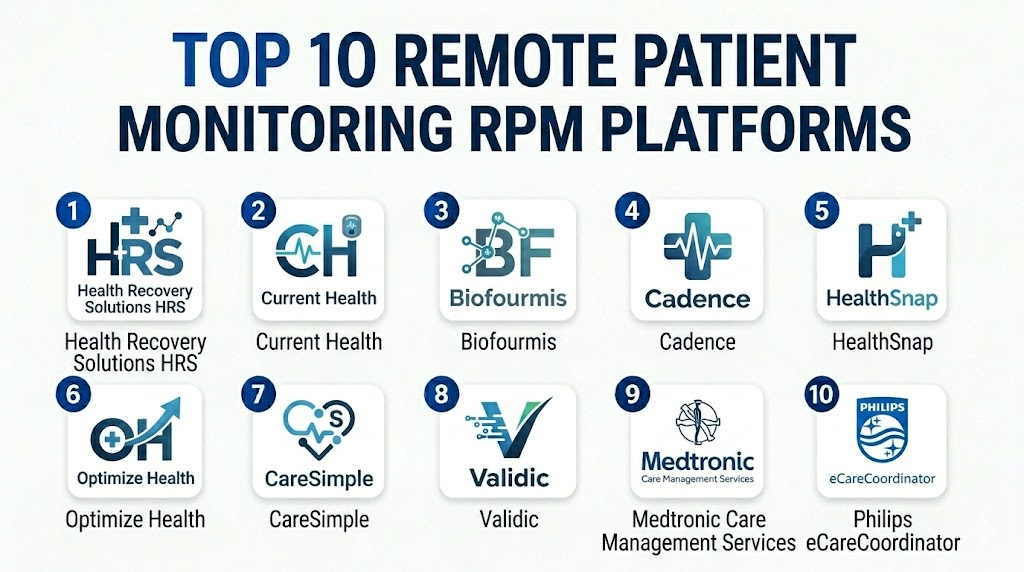
Top 10 Remote Patient Monitoring RPM Platforms Tools
1 — Health Recovery Solutions HRS
Short description: Health Recovery Solutions HRS is a remote patient monitoring and telehealth platform built for providers, health systems, home health agencies, and post-acute care programs. It focuses on patient engagement, clinical monitoring, care team workflows, and readmission reduction.
Key Features
- Patient-facing tablet and mobile experiences for remote engagement.
- Support for connected devices such as blood pressure monitors, scales, pulse oximeters, and other common RPM devices.
- Clinical dashboards for monitoring patient vitals, symptoms, and adherence.
- Telehealth and communication tools for provider-patient interaction.
- Educational content and care plans to improve patient understanding.
- Alerting workflows to help care teams identify patients who need attention.
- Reporting tools for program performance and patient monitoring outcomes.
Pros
- Strong fit for home health, post-acute, and hospital readmission reduction programs.
- Patient engagement tools are practical for ongoing monitoring.
- Designed around clinical workflows rather than only device data collection.
Cons
- May require implementation planning for larger patient populations.
- Device logistics and workflow design can add operational complexity.
- Pricing and contract details are not always publicly transparent.
Platforms / Deployment
Web / iOS / Android
Cloud
Security & Compliance
Healthcare-focused platform. Specific certifications such as SOC 2 or ISO 27001 are Not publicly stated in this context. Buyers should verify:
- MFA
- SSO/SAML
- Encryption
- Audit logs
- RBAC
- HIPAA-related documentation
- Business associate agreement availability
Integrations & Ecosystem
HRS is commonly positioned for provider workflows that need device data, patient engagement, and clinical team coordination. Integration needs should be validated during procurement because RPM programs often require EHR, device, billing, and analytics alignment.
Common ecosystem areas include:
- EHR and clinical workflow integrations
- Connected RPM devices
- Telehealth workflows
- Care management programs
- Reporting and analytics
- Patient communication tools
Support & Community
HRS is a recognized RPM vendor with healthcare implementation experience. Support typically depends on contract scope, onboarding model, device program size, and enterprise needs. Documentation, training, and care team enablement should be reviewed during vendor evaluation.
2 — Current Health
Short description: Current Health is a care-at-home and remote patient monitoring platform used for home-based care, hospital-at-home, and post-acute monitoring programs. It is well suited for health systems and enterprise care teams that need continuous monitoring and virtual care coordination.
Key Features
- Remote monitoring for acute and chronic care-at-home use cases.
- Support for connected devices and patient data collection.
- Care team dashboards for monitoring patient status and escalation.
- Workflow support for hospital-at-home and virtual care programs.
- Patient engagement and communication capabilities.
- Data-driven monitoring to help identify changing patient risk.
- Enterprise-oriented care delivery model for large healthcare organizations.
Pros
- Strong fit for hospital-at-home and advanced care-at-home models.
- Enterprise-focused capabilities for health systems.
- Supports broader virtual care transformation, not just basic RPM.
Cons
- May be more than smaller practices need.
- Implementation can require significant operational planning.
- Cost and deployment model may be better suited to larger organizations.
Platforms / Deployment
Web / iOS / Android
Cloud
Security & Compliance
Healthcare-focused platform. Specific public certification details should be verified directly with the vendor. If not provided during procurement, write: Not publicly stated.
Buyers should validate:
- Encryption
- RBAC
- Audit logs
- Identity management
- HIPAA support
- Vendor risk documentation
- Data retention controls
Integrations & Ecosystem
Current Health is typically evaluated as part of a broader care-at-home ecosystem. Buyers should assess how it connects to EHR workflows, care coordination systems, device supply chains, and analytics environments.
Common ecosystem areas include:
- EHR connectivity
- Connected medical devices
- Care-at-home workflows
- Virtual nursing workflows
- Clinical operations dashboards
- Enterprise analytics
Support & Community
Support is usually enterprise-oriented and may include implementation planning, workflow design, training, and program scaling support. Buyers should confirm onboarding scope, device support responsibilities, support SLAs, and clinical workflow assistance.
3 — Biofourmis
Short description: Biofourmis provides connected health and remote monitoring technology for care delivery across different patient populations. It is often considered for advanced virtual care, digital therapeutics, chronic disease programs, and clinical-grade patient monitoring.
Key Features
- Connected health platform for remote patient monitoring.
- Support for continuous and episodic monitoring use cases.
- Data-driven insights for patient status and care needs.
- Virtual care support for chronic and acute care pathways.
- Potential fit for health systems, payers, and life sciences use cases.
- Patient engagement and digital care journey support.
- Analytics-oriented approach to remote care programs.
Pros
- Strong fit for advanced remote care and digital health programs.
- Useful for organizations that need more than basic device monitoring.
- Can support broader care continuum strategies.
Cons
- May require more implementation effort than simpler RPM tools.
- Best suited for organizations with mature virtual care goals.
- Public pricing and detailed deployment information may be limited.
Platforms / Deployment
Web / iOS / Android
Cloud
Security & Compliance
Healthcare-focused platform. Specific certification claims should be verified directly with the vendor. If unavailable, use Not publicly stated.
Recommended buyer checks:
- HIPAA support
- Encryption
- Access controls
- Audit logs
- Data processing agreements
- Device data governance
- Enterprise security documentation
Integrations & Ecosystem
Biofourmis is positioned around connected care and may be part of larger virtual care, hospital, payer, or life sciences ecosystems. Integration depth should be validated against the buyer’s EHR, data warehouse, device strategy, and care management workflows.
Common ecosystem areas include:
- Connected medical devices
- Clinical workflows
- EHR systems
- Analytics environments
- Care management programs
- Research and digital health initiatives
Support & Community
Support is likely to vary by customer segment and deployment size. Enterprise buyers should evaluate implementation services, clinical workflow design, data integration support, and ongoing customer success resources.
4 — Cadence
Short description: Cadence is a remote patient monitoring and chronic care platform focused on ongoing care for patients with chronic conditions. It is designed for health systems and provider organizations that want a structured virtual care extension for high-risk patients.
Key Features
- Remote monitoring for chronic disease management.
- Care team workflows for ongoing patient engagement.
- Support for vitals tracking and clinical escalation.
- Virtual care model designed to support provider organizations.
- Patient communication and follow-up workflows.
- Clinical programs for common chronic conditions.
- Operational support around RPM program delivery.
Pros
- Strong fit for chronic care and long-term patient monitoring.
- Helpful for organizations seeking a more service-enabled RPM model.
- Can reduce burden on in-house teams by supporting structured workflows.
Cons
- May not be ideal for organizations wanting full self-service control.
- Best fit depends on alignment with existing clinical operations.
- Pricing and service model may require detailed vendor discussion.
Platforms / Deployment
Web / iOS / Android
Cloud
Security & Compliance
Healthcare-focused platform. Specific security certifications and controls should be verified directly. If not confirmed, use Not publicly stated.
Buyers should evaluate:
- HIPAA readiness
- Encryption
- SSO/SAML
- RBAC
- Audit logs
- Data sharing terms
- Clinical documentation controls
Integrations & Ecosystem
Cadence is often evaluated by health systems that need RPM connected to care delivery operations. Integration planning should include EHR workflows, patient enrollment, clinical escalation, billing documentation, and reporting.
Common ecosystem areas include:
- EHR workflows
- Connected devices
- Chronic care programs
- Patient communication
- Care team operations
- Reporting dashboards
Support & Community
Cadence is service-oriented and may provide onboarding and operational support depending on customer agreement. Buyers should confirm patient onboarding responsibilities, care team staffing model, escalation rules, reporting cadence, and support SLAs.
5 — HealthSnap
Short description: HealthSnap is a virtual care management and RPM platform designed for providers that need chronic care monitoring, patient engagement, and program management. It is often considered by practices and healthcare groups building RPM and chronic care management programs.
Key Features
- Remote patient monitoring workflows for chronic conditions.
- Virtual care management support.
- Connected device data capture and patient tracking.
- Clinical dashboards for care teams.
- Patient engagement tools and communication workflows.
- Reporting for program operations and outcomes.
- Support for practice-focused RPM implementation.
Pros
- Good fit for provider groups and practices building RPM programs.
- Combines monitoring with care management workflows.
- Practical for chronic condition management.
Cons
- Buyers should validate enterprise scalability for very large health systems.
- Device coverage and integration depth should be checked carefully.
- Public details on security certifications may be limited.
Platforms / Deployment
Web / iOS / Android
Cloud
Security & Compliance
Healthcare-focused platform. Specific certifications are Not publicly stated in this context unless confirmed directly by the vendor.
Evaluate:
- MFA
- Role-based permissions
- Encryption
- Audit logs
- HIPAA support
- BAA availability
- Data export policies
Integrations & Ecosystem
HealthSnap is built around virtual care and RPM program execution. Buyers should validate EHR integrations, device workflows, documentation support, and billing-related workflow alignment.
Common ecosystem areas include:
- EHR systems
- Connected devices
- Chronic care workflows
- Patient engagement tools
- Reporting and analytics
- Care coordination processes
Support & Community
Support may include onboarding, program setup, training, and customer success resources. Buyers should ask about implementation timelines, device support, patient troubleshooting, billing workflow training, and ongoing account support.
6 — Optimize Health
Short description: Optimize Health is a remote patient monitoring and chronic care platform for healthcare providers that want to monitor patients, manage care workflows, and support reimbursement-aware RPM operations. It is commonly evaluated by clinics and healthcare groups scaling RPM programs.
Key Features
- RPM workflows for chronic disease management.
- Connected device support for patient vitals.
- Clinical dashboards and patient monitoring queues.
- Alerts and care team task management.
- Patient communication and engagement tools.
- Reporting for program performance.
- Workflow support for RPM operations and documentation.
Pros
- Practical fit for provider groups and specialty clinics.
- Focuses on operational RPM program management.
- Useful for teams that need monitoring, outreach, and reporting in one workflow.
Cons
- Implementation success depends on care team adoption.
- Buyers should validate integration depth with their EHR.
- Public details around certifications and pricing may be limited.
Platforms / Deployment
Web / iOS / Android
Cloud
Security & Compliance
Healthcare-focused platform. Specific certification details are Not publicly stated unless verified directly.
Buyers should confirm:
- HIPAA support
- Encryption
- RBAC
- Audit logging
- MFA
- SSO options
- Data access controls
Integrations & Ecosystem
Optimize Health is typically part of a provider RPM workflow that may include EHR documentation, patient devices, care team notes, and billing support. Integration requirements should be mapped before rollout.
Common ecosystem areas include:
- EHR systems
- RPM devices
- Billing workflows
- Patient messaging
- Clinical dashboards
- Program analytics
Support & Community
Support generally depends on customer plan and implementation needs. Buyers should review onboarding assistance, staff training, device setup support, patient support model, and service-level expectations.
7 — CareSimple
Short description: CareSimple is a remote patient monitoring platform focused on making RPM easier for providers, payers, and care teams. It supports device-enabled monitoring, patient engagement, and operational workflows for chronic care and virtual care programs.
Key Features
- RPM platform for providers and payers.
- Device-enabled patient data collection.
- Patient-friendly onboarding and monitoring workflows.
- Clinical dashboards for care teams.
- Support for chronic condition monitoring.
- Reporting and analytics for care programs.
- Workflow support for virtual care operations.
Pros
- Strong focus on simplifying RPM operations.
- Useful for organizations that need device, software, and workflow support.
- Good fit for chronic care and population health use cases.
Cons
- Buyers should validate exact device catalog and EHR integration requirements.
- Enterprise customization may depend on contract scope.
- Public pricing and detailed security documentation may require vendor review.
Platforms / Deployment
Web / iOS / Android
Cloud
Security & Compliance
Healthcare-focused platform. Specific public security certifications should be verified with the vendor. If not confirmed, use Not publicly stated.
Evaluate:
- HIPAA support
- Encryption
- RBAC
- Audit trails
- MFA
- SSO/SAML
- Data processing terms
Integrations & Ecosystem
CareSimple is positioned as an RPM solution that can support device logistics, monitoring workflows, and clinical operations. Buyers should review EHR integration, device connectivity, patient onboarding, and reporting needs.
Common ecosystem areas include:
- EHR systems
- Connected medical devices
- Payer workflows
- Chronic care programs
- Population health reporting
- Patient communication tools
Support & Community
CareSimple support may include onboarding, device operations, implementation assistance, and customer success depending on agreement. Buyers should confirm support hours, escalation process, training, patient support, and account management.
8 — Validic
Short description: Validic is a healthcare data connectivity and remote monitoring platform known for normalizing data from many connected devices and digital health sources. It is best for organizations that need strong device data infrastructure and EHR-connected remote monitoring workflows.
Key Features
- Broad connected device data integration.
- Data normalization across multiple device types.
- Remote monitoring workflow support.
- EHR-oriented data flow and clinical integration.
- APIs for digital health and connected care programs.
- Real-time alerts and patient monitoring support.
- Scalable infrastructure for enterprise healthcare organizations.
Pros
- Strong fit for device data interoperability.
- Useful for health systems with complex integration needs.
- Good option when device flexibility and data normalization are priorities.
Cons
- May be more infrastructure-focused than service-heavy RPM platforms.
- Requires integration planning and technical stakeholder involvement.
- Smaller practices may prefer more turnkey RPM solutions.
Platforms / Deployment
Web / API
Cloud
Security & Compliance
Healthcare-focused platform. Specific security certifications should be verified directly. If not confirmed, use Not publicly stated.
Buyers should assess:
- API security
- Encryption
- RBAC
- Audit logging
- HIPAA support
- Data governance
- Vendor risk documentation
Integrations & Ecosystem
Validic is especially relevant when a healthcare organization needs to connect many devices and digital health data sources into clinical workflows. It can support organizations that want an enterprise data layer for RPM and connected health.
Common ecosystem areas include:
- EHR systems
- APIs
- Connected devices
- Wearables
- Digital health applications
- Enterprise analytics platforms
Support & Community
Validic is likely to involve technical onboarding, integration support, and enterprise implementation planning. Buyers should evaluate API documentation, developer support, integration timelines, device catalog, and customer success resources.
9 — Medtronic Care Management Services
Short description: Medtronic Care Management Services supports remote monitoring and care management programs, especially where connected devices, chronic disease support, and clinical workflows are important. It is a strong fit for organizations that value medical device experience and established healthcare infrastructure.
Key Features
- Remote monitoring and care management capabilities.
- Strong association with medical device ecosystems.
- Support for chronic condition monitoring programs.
- Clinical workflow support for provider teams.
- Patient engagement and monitoring processes.
- Reporting to support care program management.
- Potential fit for large healthcare organizations and specialty programs.
Pros
- Strong healthcare and medical device background.
- Useful for clinical programs where device reliability matters.
- Enterprise credibility for healthcare buyers.
Cons
- May be less flexible than newer digital-first RPM platforms in some workflows.
- Buyers should validate current product fit and integration options.
- Public details may vary by solution and region.
Platforms / Deployment
Web / Varies by solution
Cloud / Hybrid options may vary
Security & Compliance
Healthcare-focused vendor. Specific product-level certifications and controls should be confirmed during procurement. If not confirmed, use Not publicly stated.
Buyers should verify:
- Encryption
- Access controls
- Audit logs
- HIPAA-related documentation
- Device data security
- Business associate agreement terms
- Regional compliance requirements
Integrations & Ecosystem
Medtronic’s ecosystem can be especially relevant for organizations that already use medical devices or clinical programs connected to Medtronic solutions. Integration scope should be validated at the product and region level.
Common ecosystem areas include:
- Medical devices
- Provider workflows
- Care management programs
- Clinical reporting
- EHR connectivity
- Specialty care programs
Support & Community
Support is generally enterprise and healthcare-oriented, but the exact model may vary by product and market. Buyers should evaluate implementation services, clinical training, device support, technical support, and escalation pathways.
10 — Philips eCareCoordinator
Short description: Philips eCareCoordinator is a remote patient monitoring and telehealth solution designed for care teams managing patients outside traditional care settings. It is often considered by healthcare organizations that want enterprise virtual care, chronic care, and connected monitoring workflows.
Key Features
- Remote patient monitoring workflows for care teams.
- Support for connected patient data and clinical review.
- Patient engagement and virtual care coordination.
- Clinical dashboards for monitoring and escalation.
- Reporting capabilities for program management.
- Enterprise healthcare orientation.
- Potential fit for chronic care and home monitoring programs.
Pros
- Backed by a major healthcare technology brand.
- Good fit for enterprise healthcare environments.
- Useful for organizations with broader connected care strategies.
Cons
- May require more implementation planning than lightweight RPM tools.
- Buyers should validate current product availability and regional fit.
- Pricing and integration details may not be publicly transparent.
Platforms / Deployment
Web / Varies by solution
Cloud / Hybrid options may vary
Security & Compliance
Healthcare-focused solution. Specific product-level certifications and security controls should be confirmed directly. If not confirmed, use Not publicly stated.
Evaluate:
- HIPAA support
- Encryption
- SSO/SAML
- RBAC
- Audit logging
- Data residency
- Vendor security documentation
Integrations & Ecosystem
Philips eCareCoordinator may fit into broader clinical technology environments, especially where enterprise care coordination and connected care programs are already in place. Integration planning should include EHR workflows, patient data sources, care pathways, and reporting needs.
Common ecosystem areas include:
- EHR systems
- Connected devices
- Enterprise clinical systems
- Telehealth workflows
- Care coordination
- Analytics and reporting
Support & Community
Support is generally enterprise-oriented and may include implementation, training, technical assistance, and account management. Buyers should confirm support scope, service levels, regional availability, documentation, and clinical workflow assistance.
Comparison Table Top 10
| Tool Name | Best For | Platform(s) Supported | Deployment Cloud/Self-hosted/Hybrid | Standout Feature | Public Rating |
|---|---|---|---|---|---|
| Health Recovery Solutions HRS | Home health, post-acute care, readmission reduction | Web, iOS, Android | Cloud | Patient engagement and post-acute RPM workflows | N/A |
| Current Health | Hospital-at-home and enterprise care-at-home programs | Web, iOS, Android | Cloud | Advanced remote care-at-home monitoring | N/A |
| Biofourmis | Connected care, digital health, advanced virtual care | Web, iOS, Android | Cloud | Data-driven connected health platform | N/A |
| Cadence | Chronic care programs for health systems | Web, iOS, Android | Cloud | Service-enabled chronic condition monitoring | N/A |
| HealthSnap | Provider groups and chronic care management | Web, iOS, Android | Cloud | RPM plus virtual care management workflows | N/A |
| Optimize Health | Clinics and practices scaling RPM programs | Web, iOS, Android | Cloud | Operational RPM program management | N/A |
| CareSimple | Providers and payers needing simplified RPM | Web, iOS, Android | Cloud | Device-enabled turnkey RPM workflow | N/A |
| Validic | Enterprise device data connectivity and normalization | Web, API | Cloud | Broad device data integration and normalization | N/A |
| Medtronic Care Management Services | Device-connected chronic care and enterprise programs | Web, varies by solution | Cloud / Hybrid may vary | Medical device ecosystem strength | N/A |
| Philips eCareCoordinator | Enterprise virtual care and connected monitoring | Web, varies by solution | Cloud / Hybrid may vary | Enterprise connected care coordination | N/A |
Evaluation & Scoring of Remote Patient Monitoring RPM Platforms
| Tool Name | Core 25% | Ease 15% | Integrations 15% | Security 10% | Performance 10% | Support 10% | Value 15% | Weighted Total 0–10 |
|---|---|---|---|---|---|---|---|---|
| Health Recovery Solutions HRS | 9 | 8 | 8 | 8 | 8 | 8 | 8 | 8.25 |
| Current Health | 9 | 7 | 8 | 8 | 9 | 8 | 7 | 8.10 |
| Biofourmis | 9 | 7 | 8 | 8 | 8 | 8 | 7 | 7.95 |
| Cadence | 8 | 8 | 7 | 8 | 8 | 8 | 8 | 7.85 |
| HealthSnap | 8 | 8 | 7 | 7 | 8 | 8 | 8 | 7.75 |
| Optimize Health | 8 | 8 | 7 | 7 | 8 | 7 | 8 | 7.60 |
| CareSimple | 8 | 8 | 7 | 7 | 8 | 8 | 8 | 7.75 |
| Validic | 8 | 7 | 9 | 8 | 8 | 7 | 7 | 7.80 |
| Medtronic Care Management Services | 8 | 7 | 7 | 8 | 8 | 8 | 7 | 7.60 |
| Philips eCareCoordinator | 8 | 7 | 7 | 8 | 8 | 8 | 7 | 7.60 |
Which Remote Patient Monitoring RPM Platforms Tool Is Right for You?
Solo / Freelancer
Solo clinicians or independent consultants usually do not need a heavy enterprise RPM platform unless they are supporting a formal provider program. A lightweight, practice-friendly RPM vendor may be more suitable than a hospital-at-home platform.
Recommended direction:
- Choose HealthSnap, Optimize Health, or CareSimple if you need a practical RPM workflow.
- Avoid complex enterprise platforms unless you have strong implementation resources.
- Prioritize simple patient onboarding, device logistics, and clear support.
SMB
Small and midsize healthcare practices need RPM tools that are easy to launch, simple for staff, and practical for chronic care programs. They should avoid platforms that require heavy IT support unless they have technical resources.
Recommended direction:
- Choose HealthSnap for chronic care and virtual care management.
- Choose Optimize Health for RPM operations and provider workflows.
- Choose CareSimple for simplified device-enabled monitoring.
- Validate billing documentation, patient support, and EHR workflow fit.
Mid-Market
Mid-market provider groups and regional healthcare organizations need stronger integration, analytics, role-based workflows, and support for multiple care teams. They may need to monitor thousands of patients across different clinics or conditions.
Recommended direction:
- Choose HRS for post-acute, home health, and readmission reduction.
- Choose Cadence for service-enabled chronic care.
- Choose Validic if device data integration is a major priority.
- Choose CareSimple or HealthSnap if ease of deployment is more important than deep customization.
Enterprise
Large health systems, payers, and hospital networks need scalability, integration depth, security review readiness, and support for complex care models. Enterprise buyers should spend more time on architecture, data governance, device logistics, and operational staffing.
Recommended direction:
- Choose Current Health for hospital-at-home and enterprise care-at-home.
- Choose Biofourmis for advanced connected care and digital health programs.
- Choose Philips eCareCoordinator for enterprise connected care coordination.
- Choose Medtronic Care Management Services where medical device ecosystem strength matters.
- Choose Validic for enterprise device data normalization and interoperability.
Budget vs Premium
Budget-sensitive buyers should focus on platforms that simplify implementation and reduce operational burden. Premium buyers should focus on advanced monitoring, enterprise integrations, hospital-at-home workflows, and analytics.
- Budget-conscious: HealthSnap, Optimize Health, CareSimple.
- Balanced: HRS, Cadence, Validic.
- Premium / enterprise: Current Health, Biofourmis, Philips eCareCoordinator, Medtronic Care Management Services.
Pricing is often quote-based, so buyers should compare total cost, not just software fees. Include devices, shipping, patient support, integration work, onboarding, training, and ongoing program management.
Feature Depth vs Ease of Use
Feature-rich platforms are valuable when you need advanced workflows, but ease of use matters because RPM depends on patient adherence and care team adoption.
- Choose HRS if patient engagement and post-acute workflows matter most.
- Choose Current Health or Biofourmis if advanced remote care depth is required.
- Choose CareSimple, HealthSnap, or Optimize Health if ease of deployment is a top priority.
- Choose Validic if device data connectivity is more important than patient-facing simplicity.
Integrations & Scalability
RPM programs can fail when device data sits outside clinical workflows. Before selecting a platform, map how data will move between devices, RPM dashboards, EHRs, billing systems, analytics tools, and care management processes.
Best fit by integration need:
- Validic: Strong fit for device data normalization and APIs.
- Current Health: Strong fit for enterprise care-at-home workflows.
- HRS: Good fit for post-acute and home health workflow integration.
- Philips eCareCoordinator: Good fit for enterprise connected care environments.
- CareSimple: Practical fit for integrated RPM operations.
Security & Compliance Needs
Healthcare organizations should treat RPM platforms as sensitive patient data systems. Security review should happen before contract signing, not after rollout.
Important security questions:
- Does the vendor support encryption in transit and at rest?
- Are audit logs available?
- Does the platform support role-based access control?
- Is MFA or SSO available?
- Can the vendor sign a business associate agreement if required?
- How is device data stored, transmitted, and retained?
- What happens when a patient leaves the program?
- Can data be exported or deleted according to policy?
For high-security enterprise environments, consider Current Health, Biofourmis, Validic, Philips eCareCoordinator, or Medtronic Care Management Services, but verify all controls directly.
Frequently Asked Questions FAQs
1. What is a Remote Patient Monitoring RPM platform?
A Remote Patient Monitoring platform collects health data from patients outside the clinic using connected devices and digital workflows. Care teams use the data to monitor conditions, detect changes, communicate with patients, and support timely clinical decisions.
2. How much does an RPM platform cost?
RPM pricing is usually quote-based and can depend on patient volume, devices, integrations, implementation, support, and care management services. Buyers should compare total program cost, including hardware, shipping, onboarding, training, and support.
3. Which RPM platform is best for hospitals?
Hospitals and health systems should evaluate Current Health, Biofourmis, HRS, Philips eCareCoordinator, Medtronic Care Management Services, and Validic. The best choice depends on hospital-at-home needs, device strategy, EHR integration, and security requirements.
4. Which RPM platform is best for small practices?
Small practices may prefer HealthSnap, Optimize Health, or CareSimple because they are more practical for chronic care monitoring and provider workflows. The best option depends on how much support the practice needs for devices, onboarding, and documentation.
5. What devices are commonly used with RPM platforms?
Common RPM devices include blood pressure cuffs, weight scales, pulse oximeters, glucometers, thermometers, heart rate monitors, and wearables. Device support varies by platform, so buyers should confirm exact device compatibility before signing.
6. Can RPM platforms integrate with EHR systems?
Many RPM platforms offer EHR integration or workflow connectivity, but depth varies widely. Some support direct EHR data flow, while others rely on exports, APIs, notes, or manual workflows. Always validate integration with your specific EHR.
7. What are common RPM implementation mistakes?
Common mistakes include choosing tools before defining workflows, underestimating device logistics, ignoring patient onboarding, failing to train staff, and not setting alert escalation rules. RPM success depends on clinical operations as much as software.
8. Are RPM platforms secure?
RPM platforms should use strong security controls because they handle patient health data. Buyers should verify encryption, access controls, audit logs, MFA, SSO, vendor risk documentation, and privacy obligations instead of assuming compliance.
9. How long does RPM onboarding take?
Implementation timelines vary based on patient volume, device setup, EHR integration, staff training, and workflow complexity. A small clinic may launch faster, while an enterprise hospital-at-home program may need phased rollout and deeper planning.
10. Can RPM platforms scale across multiple clinics?
Yes, many RPM platforms can scale across multiple clinics or care teams, but scalability depends on device logistics, integrations, user permissions, reporting, support model, and clinical staffing. Mid-market and enterprise buyers should test scalability during pilot programs.
11. What alternatives exist to RPM platforms?
Alternatives include telehealth platforms, patient portals, care management software, chronic care management tools, EHR-native workflows, and custom device integration solutions. These may work if you do not need structured device-based monitoring.
12. How should buyers switch from one RPM platform to another?
Start by mapping active patients, device inventory, historical data, integrations, staff workflows, and contract terms. Run a phased migration, communicate clearly with patients, and avoid switching everything at once without a continuity plan.
Conclusion
Remote Patient Monitoring RPM platforms are becoming essential for healthcare organizations that want to extend care beyond the clinic, support chronic disease management, reduce avoidable utilization, and improve patient engagement. The best platform depends on your care model, patient population, device needs, integration environment, security requirements, and internal staffing. HRS is strong for post-acute and home health programs, Current Health and Biofourmis fit advanced enterprise care-at-home strategies, Validic is powerful for device data infrastructure, and HealthSnap, Optimize Health, and CareSimple are practical options for provider groups building scalable RPM programs. No single platform is the universal winner. The smartest next step is to shortlist two or three tools, run a focused pilot with real patients and care teams, validate EHR and device workflows, review security documentation, and compare total cost before scaling.

Find Trusted Cardiac Hospitals
Compare heart hospitals by city and services — all in one place.
Explore Hospitals
Remote Patient Monitoring (RPM) platforms are most effective when they continuously collect and share patient health data between home and healthcare providers. By integrating connected medical devices, real-time alerts, analytics, and electronic health records, these solutions support proactive care, improve chronic disease management, reduce unnecessary hospital visits, and enhance patient engagement.