Introduction
Package Managers are software tools that automate the process of installing, updating, configuring, and managing software dependencies across operating systems, programming languages, and development environments. They simplify software distribution by helping developers and IT teams efficiently manage libraries, frameworks, binaries, and application packages without manually handling dependency chains or compatibility issues. package managers remain essential because modern software development relies heavily on open-source ecosystems, cloud-native architectures, containerized deployments, and automated CI/CD pipelines. As supply-chain security concerns continue increasing, organizations also expect package managers to provide stronger dependency verification, vulnerability scanning, provenance tracking, and secure package distribution capabilities.
Real-World Use Cases
- Application Dependency Management: Development teams use package managers to automatically install and maintain application dependencies across programming environments. This reduces manual configuration work and helps maintain consistent builds across development, testing, and production systems.
- CI/CD Pipeline Automation: DevOps teams integrate package managers into automated pipelines to download libraries, update dependencies, and validate application builds during continuous integration and deployment workflows.
- Container and Cloud-Native Development: Kubernetes and container-based applications rely heavily on package managers for dependency management, runtime components, and infrastructure automation across distributed environments.
- Enterprise Software Standardization: Large organizations use internal package repositories and governance controls to standardize approved software libraries, reduce dependency risks, and improve operational consistency across teams.
- Security and Vulnerability Management: Security teams use package managers with dependency scanning and provenance verification to identify vulnerable packages, outdated libraries, and compromised open-source dependencies before deployment.
- Cross-Platform Developer Workflows: Developers working across Windows, macOS, Linux, and cloud-native environments use package managers to maintain consistent development environments and simplify onboarding processes.
Evaluation Criteria for Buyers
- Dependency management capabilities
- Ecosystem and package availability
- Security and package verification
- Performance and reliability
- Enterprise governance controls
- CI/CD integration support
- Cross-platform compatibility
- Community adoption and maturity
- Scalability for large environments
- Automation and developer experience
Best for
Developers, DevOps engineers, platform engineering teams, cloud-native organizations, enterprise IT teams, software vendors, and organizations managing large-scale software development workflows.
Not ideal for
Organizations with minimal software development requirements or environments relying mostly on static, manually managed software deployments.
Key Trends in Package Managers
- Supply-chain security scanning is becoming a core package manager capability.
- AI-assisted dependency optimization and remediation are emerging rapidly.
- Software provenance and signed package verification adoption is increasing.
- Internal enterprise artifact repositories continue expanding.
- Cloud-native and container-focused package management is accelerating.
- SBOM generation and dependency transparency are becoming standard.
- Cross-platform package ecosystem interoperability is improving.
- Runtime vulnerability analysis integration is increasing.
- Immutable infrastructure and GitOps workflows are influencing package distribution.
- Open-source dependency governance is becoming a strategic priority.
How We Selected These Tools (Methodology)
- Evaluated ecosystem popularity and package availability
- Compared dependency management reliability
- Assessed security and package verification capabilities
- Reviewed developer productivity and usability
- Compared CI/CD and automation integrations
- Evaluated enterprise scalability and governance features
- Analyzed community adoption and support maturity
- Considered cloud-native and container ecosystem compatibility
- Included both developer-focused and enterprise-focused tools
- Prioritized actively maintained ecosystems with strong long-term relevance
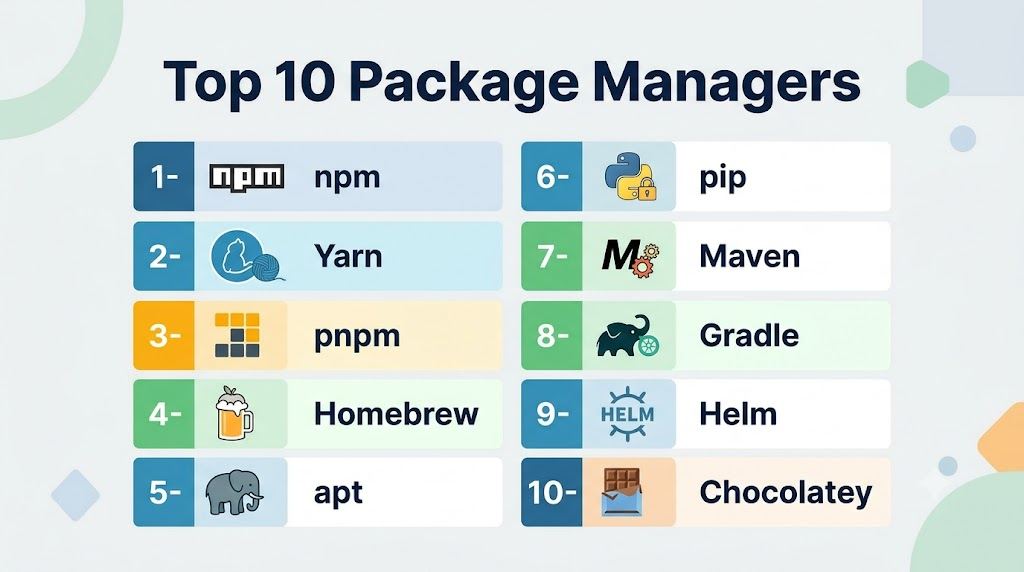
Top 10 Package Managers
1- npm
Short description: npm is the default package manager for Node.js and one of the largest software package ecosystems in the world. Developers use it to install, manage, and distribute JavaScript libraries and applications across frontend, backend, and cloud-native environments. It remains foundational for modern web development workflows.
Key Features
- JavaScript dependency management
- Massive package ecosystem
- Version management
- Package publishing
- Security audit tools
- Workspace support
- CI/CD integration
Pros
- Extremely large ecosystem
- Strong developer adoption
- Excellent JavaScript ecosystem integration
Cons
- Dependency complexity can become difficult
- Supply-chain security risks require monitoring
- Large dependency trees may impact performance
Platforms / Deployment
Windows / macOS / Linux
Security & Compliance
Supports package signing, vulnerability auditing, dependency analysis, and package integrity verification workflows.
Integrations & Ecosystem
npm integrates deeply with JavaScript, frontend, backend, and cloud-native development ecosystems.
- Node.js
- React
- Angular
- Vue.js
- GitHub Actions
- CI/CD platforms
Support & Community
Massive open-source community and one of the most mature developer ecosystems globally.
2- Yarn
Short description: Yarn is a JavaScript package manager designed to improve dependency management performance, consistency, and security. It is widely used in enterprise frontend and monorepo environments where deterministic builds and workspace management are critical. Many large-scale development teams prefer Yarn for advanced dependency workflows.
Key Features
- Fast dependency installation
- Workspace management
- Deterministic lockfiles
- Offline package caching
- Monorepo support
- Plug’n’Play architecture
- Security auditing
Pros
- Excellent monorepo management
- Faster dependency handling
- Improved build consistency
Cons
- Advanced features may require learning
- Some compatibility issues with older tooling
- Ecosystem fragmentation with npm
Platforms / Deployment
Windows / macOS / Linux
Security & Compliance
Supports dependency verification, integrity checking, and deterministic package resolution.
Integrations & Ecosystem
Works broadly across modern JavaScript ecosystems and enterprise frontend workflows.
- Node.js
- React
- TypeScript
- Monorepo tooling
- CI/CD platforms
Support & Community
Strong open-source community and large enterprise adoption.
3- pnpm
Short description: pnpm is a modern JavaScript package manager focused on performance efficiency and disk-space optimization. It uses a content-addressable storage model that significantly reduces redundant package duplication. Developers increasingly adopt pnpm for large monorepo and cloud-native development environments.
Key Features
- Efficient package storage
- Fast installations
- Monorepo support
- Strict dependency isolation
- Workspace management
- Deterministic builds
- Dependency optimization
Pros
- Excellent performance efficiency
- Reduced disk usage
- Strong monorepo capabilities
Cons
- Smaller ecosystem familiarity
- Some tooling compatibility issues
- Learning curve for strict dependency rules
Platforms / Deployment
Windows / macOS / Linux
Security & Compliance
Supports package integrity verification and dependency isolation mechanisms.
Integrations & Ecosystem
Integrates with modern JavaScript development workflows and monorepo tooling.
- Node.js
- Turborepo
- Nx
- CI/CD systems
Support & Community
Rapidly growing developer adoption and active ecosystem support.
4- Homebrew
Short description: Homebrew is a widely used package manager for macOS and Linux environments that simplifies software installation and system package management. Developers and DevOps teams use it extensively for local development environments and CLI tooling installation. It remains a standard package manager in developer workstations.
Key Features
- macOS package management
- CLI software installation
- Formula management
- Dependency resolution
- Open-source package ecosystem
- Version control support
- Linux compatibility
Pros
- Excellent developer experience
- Large software catalog
- Easy local environment setup
Cons
- Primarily workstation-focused
- Enterprise governance limited
- Dependency conflicts occasionally occur
Platforms / Deployment
macOS / Linux
Security & Compliance
Supports package integrity validation and trusted formula distribution workflows.
Integrations & Ecosystem
Integrates strongly with developer workstation and automation environments.
- GitHub
- Developer CLI tools
- macOS environments
- Linux distributions
Support & Community
Very large open-source developer community.
5- apt
Short description: apt is the default package manager for Debian-based Linux distributions including Ubuntu. It is widely used in enterprise Linux environments, cloud infrastructure, and server administration workflows. Organizations rely heavily on apt for operating system package management and infrastructure automation.
Key Features
- Linux package management
- Repository management
- Dependency resolution
- Secure package updates
- Repository signing
- Automation support
- System upgrade management
Pros
- Extremely stable ecosystem
- Excellent enterprise Linux compatibility
- Strong automation support
Cons
- Linux-focused usage
- User experience less developer-centric
- Dependency conflicts may occur in complex environments
Platforms / Deployment
Linux
Security & Compliance
Supports repository signing, package integrity verification, and secure update distribution.
Integrations & Ecosystem
Deeply integrated into Linux infrastructure and automation environments.
- Ubuntu
- Debian
- Ansible
- Infrastructure automation platforms
Support & Community
Massive Linux ecosystem adoption and mature enterprise reliability.
6- pip
Short description: pip is the standard package manager for Python and is widely used in data science, AI, automation, and backend development workflows. Developers use it to install and manage Python libraries across local, cloud, and enterprise environments. It remains essential to the Python ecosystem.
Key Features
- Python dependency management
- Package installation
- Virtual environment support
- PyPI integration
- Requirements management
- Version handling
- Automation support
Pros
- Huge Python ecosystem
- Essential for AI and data science
- Strong developer familiarity
Cons
- Dependency conflicts can become complex
- Virtual environment management required
- Enterprise governance limited by default
Platforms / Deployment
Windows / macOS / Linux
Security & Compliance
Supports package integrity checks and dependency management workflows. Additional governance often requires supplementary tooling.
Integrations & Ecosystem
Widely integrated into Python and AI development ecosystems.
- Python
- Jupyter
- TensorFlow
- FastAPI
- CI/CD systems
Support & Community
One of the largest developer ecosystems globally.
7- Maven
Short description: Maven is a widely used Java package and build management platform commonly deployed in enterprise application development environments. It helps manage dependencies, builds, testing, and project lifecycle automation. Large enterprises continue relying heavily on Maven-based Java ecosystems.
Key Features
- Java dependency management
- Build lifecycle automation
- Repository management
- Plugin ecosystem
- Enterprise scalability
- CI/CD integration
- Dependency versioning
Pros
- Strong enterprise Java ecosystem
- Mature build automation
- Excellent dependency governance
Cons
- XML configuration complexity
- Slower learning curve
- Large projects may require optimization
Platforms / Deployment
Windows / macOS / Linux
Security & Compliance
Supports signed artifacts, repository governance, and dependency verification workflows.
Integrations & Ecosystem
Deeply integrated into enterprise Java environments.
- Java
- Spring
- Jenkins
- Nexus Repository
- Enterprise CI/CD systems
Support & Community
Extremely mature enterprise ecosystem and strong community support.
8- Gradle
Short description: Gradle is a flexible build automation and dependency management platform commonly used in Java, Android, and enterprise software development. It provides advanced customization capabilities and improved build performance for modern application delivery workflows.
Key Features
- Build automation
- Dependency management
- Incremental builds
- Multi-language support
- Android development integration
- CI/CD compatibility
- Plugin extensibility
Pros
- Highly customizable workflows
- Strong Android ecosystem integration
- Better performance optimization than traditional builds
Cons
- Configuration complexity
- Learning curve for advanced scripting
- Large build environments require tuning
Platforms / Deployment
Windows / macOS / Linux
Security & Compliance
Supports dependency verification and enterprise repository integrations.
Integrations & Ecosystem
Integrates broadly across enterprise application development environments.
- Android Studio
- Jenkins
- Java ecosystems
- Enterprise DevOps workflows
Support & Community
Strong enterprise adoption and mature developer ecosystem.
9- Helm
Short description: Helm is the dominant package manager for Kubernetes applications and cloud-native deployment workflows. Organizations use Helm charts to package, version, and deploy Kubernetes applications consistently across clusters and environments.
Key Features
- Kubernetes package management
- Helm charts
- Versioned deployments
- Templating support
- Release rollback
- Repository management
- Cloud-native automation
Pros
- Essential for Kubernetes ecosystems
- Simplifies cloud-native deployments
- Strong DevOps adoption
Cons
- Kubernetes expertise required
- Chart complexity can increase quickly
- Governance varies across repositories
Platforms / Deployment
Linux / macOS / Windows
Security & Compliance
Supports signed Helm charts and Kubernetes deployment governance workflows.
Integrations & Ecosystem
Deeply integrated into cloud-native and Kubernetes ecosystems.
- Kubernetes
- Argo CD
- Flux
- CI/CD systems
- Cloud platforms
Support & Community
Massive Kubernetes ecosystem adoption and strong CNCF alignment.
10- Chocolatey
Short description: Chocolatey is a Windows package manager designed for software automation, workstation provisioning, and enterprise software deployment workflows. IT teams and developers use it extensively for automating Windows software installation and updates.
Key Features
- Windows software automation
- Package repository management
- PowerShell integration
- Enterprise deployment support
- Automation workflows
- Centralized package control
- Infrastructure provisioning
Pros
- Excellent Windows automation support
- Strong enterprise workstation management
- Useful DevOps integration capabilities
Cons
- Windows-focused ecosystem
- Enterprise features may require premium licensing
- Some packages vary in maintenance quality
Platforms / Deployment
Windows
Security & Compliance
Supports package verification, repository governance, and enterprise deployment controls.
Integrations & Ecosystem
Integrates with Windows automation and DevOps environments.
- PowerShell
- Azure DevOps
- Windows Server
- Enterprise IT systems
Support & Community
Strong Windows administration community and enterprise adoption.
Comparison Table (Top 10)
| Tool Name | Best For | Platform Supported | Deployment | Standout Feature | Public Rating |
|---|---|---|---|---|---|
| npm | JavaScript ecosystems | Multi-platform | Self-hosted | Largest JS ecosystem | N/A |
| Yarn | Monorepos | Multi-platform | Self-hosted | Workspace management | N/A |
| pnpm | Performance optimization | Multi-platform | Self-hosted | Efficient dependency storage | N/A |
| Homebrew | macOS development | macOS/Linux | Self-hosted | Developer workstation automation | N/A |
| apt | Linux infrastructure | Linux | Self-hosted | Enterprise Linux stability | N/A |
| pip | Python ecosystems | Multi-platform | Self-hosted | AI and Python ecosystem support | N/A |
| Maven | Enterprise Java | Multi-platform | Self-hosted | Build lifecycle management | N/A |
| Gradle | Modern build automation | Multi-platform | Self-hosted | Flexible build customization | N/A |
| Helm | Kubernetes packaging | Multi-platform | Hybrid | Kubernetes application deployment | N/A |
| Chocolatey | Windows automation | Windows | Self-hosted | Windows package automation | N/A |
Evaluation & Scoring Table
| Tool Name | Core 25% | Ease 15% | Integrations 15% | Security 10% | Performance 10% | Support 10% | Value 15% | Weighted Total |
|---|---|---|---|---|---|---|---|---|
| npm | 10 | 9 | 10 | 8 | 8 | 10 | 10 | 9.30 |
| Yarn | 9 | 8 | 9 | 8 | 9 | 9 | 9 | 8.80 |
| pnpm | 9 | 8 | 8 | 8 | 10 | 8 | 10 | 8.85 |
| Homebrew | 8 | 10 | 8 | 7 | 8 | 9 | 10 | 8.55 |
| apt | 9 | 8 | 8 | 9 | 9 | 10 | 10 | 9.00 |
| pip | 10 | 8 | 9 | 7 | 8 | 10 | 10 | 8.95 |
| Maven | 9 | 7 | 9 | 8 | 8 | 9 | 9 | 8.45 |
| Gradle | 9 | 7 | 9 | 8 | 9 | 9 | 8 | 8.50 |
| Helm | 9 | 8 | 10 | 8 | 9 | 9 | 9 | 8.90 |
| Chocolatey | 8 | 9 | 8 | 8 | 8 | 8 | 9 | 8.30 |
Which Package Manager Tool Is Right for You?
Solo / Freelancer
- Lightweight, easy-to-use tools like npm, pip, or Homebrew.
- Focus on fast setup, local development, and minimal overhead.
SMB
- Use npm, Yarn, Composer, or Chocolatey for multi-developer teams.
- Support for private registries and automated updates is beneficial.
Mid-Market
- Cargo, NuGet, and Composer with private repositories and CI/CD integration.
- Focus on reproducibility, security scanning, and version locking.
Enterprise
- Enterprise-grade npm, Chocolatey, NuGet with private registries, audit compliance, and team policies.
- Emphasize centralized package management and governance.
Budget vs Premium
- Open-source managers (npm, pip, Cargo) are free, sufficient for most developers.
- Paid solutions or enterprise versions provide SLA-backed support, audit logs, and private hosting.
Feature Depth vs Ease of Use
- Developers prioritize deep dependency control (Yarn PnP, pip virtualenv).
- Non-technical teams may prefer simplicity and pre-packaged binaries (Homebrew, Chocolatey).
Integrations & Scalability
- Essential for CI/CD, containerization, and multi-platform deployments.
- Enterprise environments benefit from registries supporting automation, APIs, and internal mirrors.
Security & Compliance Needs
Enterprises handling sensitive data should evaluate registry compliance and access control policies.
Use tools with package signing, audit capabilities, and vulnerability alerts.
Frequently Asked Questions
1. What is a package manager?
A package manager is a tool that automates software installation, dependency handling, updates, and version management. Developers and IT teams use package managers to simplify software deployment workflows. They help maintain consistent environments across systems. Modern development ecosystems rely heavily on them.
2. Why are package managers important?
Package managers reduce manual software installation effort and help prevent dependency conflicts. They improve developer productivity, automation, and deployment consistency. Modern CI/CD and cloud-native environments depend heavily on package automation. They also simplify software updates and maintenance.
3. What is the difference between npm and Yarn?
Both npm and Yarn manage JavaScript dependencies, but Yarn emphasizes deterministic builds, workspace management, and performance optimization. npm remains the default Node.js package manager with a larger ecosystem. Many enterprises choose based on workflow preferences. Both continue evolving actively.
4. Is Helm a package manager?
Yes. Helm is a package manager specifically designed for Kubernetes applications. It uses Helm charts to package and deploy applications consistently across clusters. Kubernetes teams rely heavily on Helm for deployment automation. It is considered foundational in cloud-native ecosystems.
5. Are package managers secure?
Modern package managers support package signing, integrity verification, and vulnerability scanning capabilities. However, open-source supply-chain risks still require careful governance and dependency monitoring. Organizations often combine package managers with security scanning tools. Runtime governance is becoming increasingly important.
6. What is a lockfile?
A lockfile records exact dependency versions used in a project to ensure consistent installations across environments. This improves reproducibility and reduces compatibility issues. npm, Yarn, and pnpm all use lockfiles. Deterministic dependency management is essential in enterprise environments.
7. Can package managers work in CI/CD pipelines?
Yes. Package managers are heavily integrated into CI/CD pipelines to automate dependency installation, updates, and build validation. This improves deployment consistency and reduces manual operational work. Most modern DevOps workflows depend on automated package management. Integration support is now standard.
8. What industries rely heavily on package managers?
Technology companies, SaaS providers, AI organizations, financial services firms, gaming companies, and enterprise software vendors all rely heavily on package management workflows. Open-source ecosystems are central to modern development. Adoption spans nearly every software-driven industry.
9. What is dependency sprawl?
Dependency sprawl occurs when applications accumulate excessive or poorly managed software dependencies. This increases security, performance, and maintenance risks over time. Modern package managers help reduce this problem through dependency governance and auditing features. Enterprise visibility is increasingly important.
10. How should organizations choose a package manager?
Organizations should evaluate ecosystem compatibility, security capabilities, developer workflows, performance, automation support, and infrastructure alignment. Different package managers work better for different programming languages and deployment environments. Pilot testing and developer feedback are valuable before standardization. Long-term ecosystem maturity also matters.
Conclusion
Package Managers remain foundational to modern software development, cloud-native infrastructure, and enterprise DevOps automation. As organizations increasingly depend on open-source ecosystems, distributed architectures, AI development environments, and automated CI/CD workflows, package management platforms have evolved far beyond simple software installers. Tools such as npm, Yarn, pnpm, Helm, Maven, Gradle, pip, and apt now play critical roles in dependency governance, software distribution, infrastructure automation, and supply-chain security. The best package manager depends heavily on programming language ecosystems, deployment models, operating environments, and organizational governance requirements. Enterprises should shortlist tools aligned with their development stacks, validate security and automation capabilities, run pilot deployments inside production-like workflows, and establish long-term dependency governance strategies before standardizing on a package management ecosystem.

Find Trusted Cardiac Hospitals
Compare heart hospitals by city and services — all in one place.
Explore Hospitals