Introduction
App Distribution Platforms (Enterprise) are specialized tools that help organizations deploy, manage, and distribute mobile or desktop applications securely across large teams, business units, or external partners. In plain terms, they allow IT teams to ensure that the right versions of apps reach the right devices efficiently while maintaining compliance and security standards. In 2026, as enterprise mobility continues to expand, managing app distribution at scale is essential for operational efficiency, security, and employee productivity.
Real-world use cases include:
- Internal enterprise app deployment: Distributing custom business applications to employees across multiple regions.
- Beta testing programs: Rolling out pre-release versions to select users while collecting feedback.
- Device management integration: Deploying apps alongside corporate device management policies.
- Compliance-driven distribution: Ensuring apps meet internal security policies and external regulations.
- Update management: Seamlessly updating enterprise apps without interrupting workflows.
What buyers should evaluate:
- Platform compatibility (iOS, Android, Windows, macOS)
- Security features including encryption and SSO
- Scalability to handle large enterprise deployments
- Integration with MDM, CI/CD, and analytics tools
- User access control and permission management
- Reporting and audit capabilities
- Ease of use and automated workflows
- Update and rollback management
- Support for beta and internal testing programs
- Cost model and licensing flexibility
Best for: IT administrators, enterprise mobile teams, DevOps and development teams, organizations with large-scale mobile or desktop app deployments across multiple offices or regions.
Not ideal for: Small startups, solo developers, or teams with minimal deployment needs where app stores alone suffice for distribution.
Key Trends in App Distribution Platforms for 2026 and Beyond
- AI-assisted rollout planning to optimize deployment timing and impact.
- Enhanced security and compliance for enterprise apps, including SOC 2, ISO, and GDPR alignment.
- Zero-touch deployment integrated with MDM/EMM solutions for automated provisioning.
- Cross-platform support for iOS, Android, Windows, and macOS apps.
- Integration with CI/CD pipelines for automated testing and deployment.
- Analytics-driven distribution to track adoption and usage patterns.
- Role-based access and SSO integration for secure internal distribution.
- Cloud-native and hybrid deployment options for flexibility.
- Scalable beta testing with phased rollout and feedback capture.
- Subscription and flexible licensing models catering to SMBs and enterprise needs.
How We Selected These Tools (Methodology)
- Evaluated market adoption and customer mindshare among enterprises.
- Reviewed feature completeness for distribution, update management, and access control.
- Assessed reliability and performance under large-scale deployments.
- Checked security posture including encryption, SSO, audit logs, and compliance.
- Examined integration with MDM, CI/CD, analytics, and collaboration tools.
- Considered suitability across company sizes: SMB to large enterprise.
- Investigated ease of deployment and end-user adoption.
- Analyzed vendor support quality and community engagement.
- Prioritized solutions with transparent pricing models and flexible licensing.
- Factored in update/rollback capabilities and beta testing support.
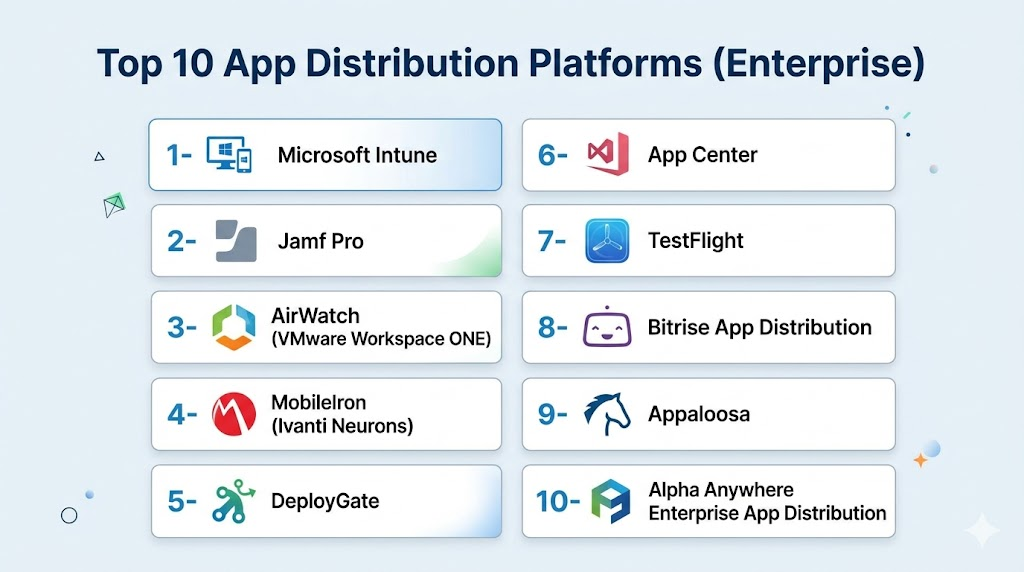
Top 10 App Distribution Platforms Enterprise
1- Microsoft Intune
Short description: Microsoft Intune enables secure enterprise app distribution and device management across Windows, iOS, and Android. Ideal for organizations in the Microsoft ecosystem managing thousands of devices. It streamlines deployment and access control while maintaining compliance.
Key Features
- App deployment and update management
- Device compliance policies
- Conditional access and SSO integration
- Integration with Microsoft 365 and Azure AD
- Reporting and audit capabilities
- Mobile threat defense integration
Pros
- Seamless integration with Microsoft ecosystem
- Strong security and compliance features
Cons
- Learning curve for non-Microsoft environments
- Some advanced features require additional licensing
Platforms / Deployment
- Windows / iOS / Android / macOS
- Cloud
Security & Compliance
- SSO, MFA, RBAC, encryption
- SOC 2, ISO 27001, GDPR
Integrations & Ecosystem
Integrates with Microsoft tools and enterprise workflows.
- Azure AD / Microsoft 365
- CI/CD pipelines
- MDM/EMM solutions
- Endpoint security platforms
Support & Community
Comprehensive Microsoft documentation and enterprise support; active community forums.
2- Jamf Pro
Short description: Jamf Pro is focused on macOS and iOS device management, offering secure enterprise app distribution and management. It is suitable for organizations heavily using Apple devices to manage apps at scale.
Key Features
- App deployment and inventory management
- Device compliance and configuration policies
- Automated updates and patch management
- Conditional access and SSO
- Advanced reporting and analytics
Pros
- Best-in-class for Apple environments
- Streamlined user experience for end users
Cons
- Limited support for non-Apple devices
- Premium pricing for small organizations
Platforms / Deployment
- macOS / iOS
- Cloud / Hybrid
Security & Compliance
- SSO, encryption, audit logs
- Not publicly stated for SOC 2/ISO
Integrations & Ecosystem
Works with Apple services and enterprise IT workflows.
- Apple Business Manager
- Mobile device management solutions
- CI/CD tools for iOS app deployment
Support & Community
Strong Apple-focused support and active user community.
3- AirWatch (VMware Workspace ONE)
Short description: AirWatch provides enterprise app distribution and device management across platforms. Ideal for organizations with diverse devices needing unified control and security policies. It supports large-scale deployment, updates, and monitoring.
Key Features
- Multi-platform app deployment
- Device and app compliance enforcement
- SSO and conditional access
- Reporting and analytics dashboards
- Integration with VMware ecosystem
Pros
- Cross-platform support
- Enterprise-grade security and compliance
Cons
- Complex setup for smaller teams
- Cost can be high for large device counts
Platforms / Deployment
- Windows / iOS / Android / macOS
- Cloud / Hybrid
Security & Compliance
- SSO, MFA, encryption, RBAC
- SOC 2, ISO 27001
Integrations & Ecosystem
- VMware Workspace ONE
- MDM/EMM platforms
- CI/CD and analytics tools
- Collaboration suites
Support & Community
Enterprise support available; extensive documentation and knowledge base.
4- MobileIron (Ivanti Neurons)
Short description: MobileIron offers secure enterprise app deployment and endpoint management. It suits organizations that require policy-driven app distribution and device security across large fleets of devices.
Key Features
- Secure app deployment
- Device and compliance policy enforcement
- SSO and authentication management
- Analytics and reporting
- Integration with security tools
Pros
- Strong security features
- Supports large enterprise fleets
Cons
- Setup complexity for SMBs
- Limited app store integration compared to others
Platforms / Deployment
- iOS / Android / Windows / macOS
- Cloud / Hybrid
Security & Compliance
- SSO, encryption, audit logs
- Not publicly stated
Integrations & Ecosystem
- Endpoint security solutions
- CI/CD pipelines
- Collaboration and analytics platforms
Support & Community
Enterprise-grade support and active professional community.
5- DeployGate
Short description: DeployGate streamlines beta app distribution for developers and enterprises. It is ideal for organizations needing easy feedback collection during testing and staged deployments across teams.
Key Features
- App distribution for testing and production
- User feedback collection
- Version management and rollback
- Team collaboration dashboards
- Push notifications for updates
Pros
- Simple deployment and feedback workflow
- Supports multiple platforms
Cons
- Limited enterprise policy enforcement
- Advanced analytics may be lacking
Platforms / Deployment
- iOS / Android
- Cloud
Security & Compliance
- Not publicly stated
Integrations & Ecosystem
- CI/CD pipeline integration
- Issue tracking tools
- Slack / email notifications
Support & Community
Responsive support; growing developer community.
6- HockeyApp / App Center
Short description: Microsoft’s App Center provides app distribution, crash analytics, and beta testing management. Suitable for enterprise development teams needing end-to-end deployment and monitoring.
Key Features
- App distribution and beta testing
- Crash analytics
- Automated builds and CI/CD integration
- User metrics and engagement tracking
- Version and release management
Pros
- Strong Microsoft integration
- Supports automated deployment workflows
Cons
- Some analytics features limited
- Transition from HockeyApp may require adjustments
Platforms / Deployment
- iOS / Android / Windows
- Cloud
Security & Compliance
- SSO, encryption
- Not publicly stated for SOC 2/ISO
Integrations & Ecosystem
- Azure DevOps
- Slack / Teams
- CI/CD pipelines
Support & Community
Official Microsoft support; active developer community.
7- TestFlight
Short description: TestFlight allows beta testing and distribution of iOS apps to internal and external users. Best suited for Apple-centric teams needing controlled test deployments and feedback collection.
Key Features
- Beta testing and app distribution
- Test user management
- Version control and release notes
- Crash reporting
- Feedback collection
Pros
- Easy for iOS beta distribution
- Native Apple ecosystem support
Cons
- Only supports iOS devices
- Limited enterprise policy features
Platforms / Deployment
- iOS
- Cloud
Security & Compliance
- Not publicly stated
Integrations & Ecosystem
- Xcode / CI/CD pipelines
- Apple Business Manager
Support & Community
Official Apple support and documentation; active developer forums.
8- Bitrise App Distribution
Short description: Bitrise supports automated build, testing, and distribution for mobile apps. Ideal for DevOps-driven teams needing CI/CD integrated app deployment.
Key Features
- Automated builds and deployments
- Integration with CI/CD workflows
- Beta testing distribution
- Version management
- Feedback and analytics
Pros
- CI/CD integration simplifies workflows
- Supports multiple platforms
Cons
- Less focused on enterprise policy management
- Pricing scales with app volume
Platforms / Deployment
- iOS / Android
- Cloud
Security & Compliance
- Not publicly stated
Integrations & Ecosystem
- GitHub / GitLab / Bitbucket
- Slack / email notifications
- Analytics platforms
Support & Community
Developer-oriented support; growing online community.
9- Appaloosa
Short description: Appaloosa provides secure app distribution for internal teams, with enterprise-grade access control and reporting. Best for organizations requiring controlled internal deployment.
Key Features
- App deployment and management
- Role-based access control
- Analytics dashboards
- Version management and updates
- User feedback collection
Pros
- Strong security for internal apps
- Simplified access control
Cons
- Limited CI/CD integration
- Smaller ecosystem than larger competitors
Platforms / Deployment
- iOS / Android
- Cloud
Security & Compliance
- Not publicly stated
Integrations & Ecosystem
- MDM solutions
- Slack / email notifications
- Analytics platforms
Support & Community
Responsive support; documentation available.
10- Alpha Anywhere Enterprise App Distribution
Short description: Alpha Anywhere provides enterprise app deployment with integrated low-code development, suitable for businesses building and distributing mobile and web apps internally.
Key Features
- Enterprise app distribution
- Low-code development environment
- Update management and version control
- Role-based access and permissions
- Reporting and analytics
Pros
- Combines app development with distribution
- Supports complex enterprise workflows
Cons
- Steeper learning curve
- Licensing costs can be high
Platforms / Deployment
- iOS / Android / Web
- Cloud / Hybrid
Security & Compliance
- Not publicly stated
Integrations & Ecosystem
- MDM platforms
- CI/CD pipelines
- Enterprise analytics tools
Support & Community
Enterprise-grade support; detailed documentation.
Comparison Table (Top 10)
| Tool Name | Best For | Platform(s) Supported | Deployment | Standout Feature | Public Rating |
|---|---|---|---|---|---|
| Microsoft Intune | Enterprise Microsoft users | Windows / iOS / Android / macOS | Cloud | Seamless Microsoft integration | N/A |
| Jamf Pro | Apple-focused enterprises | macOS / iOS | Cloud / Hybrid | Best-in-class Apple management | N/A |
| AirWatch (Workspace ONE) | Large cross-platform deployments | Windows / iOS / Android / macOS | Cloud / Hybrid | Multi-platform control | N/A |
| MobileIron (Ivanti Neurons) | Enterprise security & compliance | iOS / Android / Windows / macOS | Cloud / Hybrid | Policy-driven management | N/A |
| DeployGate | Beta testing & staged rollouts | iOS / Android | Cloud | Simple feedback collection | N/A |
| App Center | Microsoft ecosystem apps | iOS / Android / Windows | Cloud | CI/CD + analytics | N/A |
| TestFlight | iOS beta testing | iOS | Cloud | Apple-native beta deployment | N/A |
| Bitrise App Distribution | CI/CD-integrated deployment | iOS / Android | Cloud | Automated builds & deployment | N/A |
| Appaloosa | Internal enterprise apps | iOS / Android | Cloud | Controlled access & analytics | N/A |
| Alpha Anywhere | Enterprise low-code apps | iOS / Android / Web | Cloud / Hybrid | Low-code + distribution | N/A |
Evaluation & Scoring of App Distribution Platforms
| Tool Name | Core (25%) | Ease (15%) | Integrations (15%) | Security (10%) | Performance (10%) | Support (10%) | Value (15%) | Weighted Total (0–10) |
|---|---|---|---|---|---|---|---|---|
| Microsoft Intune | 9 | 8 | 9 | 9 | 9 | 8 | 8 | 8.8 |
| Jamf Pro | 8 | 8 | 7 | 8 | 8 | 7 | 7 | 7.8 |
| AirWatch | 9 | 7 | 8 | 9 | 9 | 8 | 7 | 8.3 |
| MobileIron | 8 | 7 | 7 | 8 | 8 | 7 | 7 | 7.6 |
| DeployGate | 7 | 9 | 6 | 7 | 7 | 7 | 8 | 7.4 |
| App Center | 8 | 7 | 7 | 7 | 8 | 7 | 7 | 7.4 |
| TestFlight | 7 | 9 | 6 | 7 | 7 | 7 | 7 | 7.1 |
| Bitrise | 7 | 8 | 8 | 7 | 8 | 7 | 7 | 7.5 |
| Appaloosa | 7 | 8 | 6 | 7 | 7 | 7 | 7 | 7.1 |
| Alpha Anywhere | 8 | 7 | 7 | 7 | 8 | 7 | 7 | 7.5 |
Which App Distribution Platform Tool Is Right for You?
Solo / Freelancer
- DeployGate and TestFlight offer easy setup, lightweight beta deployment, and simple feedback collection for individual developers or small teams.
SMB
- App Center, Bitrise, and DeployGate balance cost and features for growing teams needing automated deployment and basic analytics.
Mid-Market
- AirWatch, MobileIron, and Alpha Anywhere provide enterprise-grade security, policy control, and cross-platform distribution.
Enterprise
- Microsoft Intune, Jamf Pro, and AirWatch deliver large-scale deployment, compliance management, and advanced reporting suitable for multi-regional enterprises.
Budget vs Premium
- Budget-friendly: DeployGate, TestFlight, Appaloosa
- Premium/Enterprise: Microsoft Intune, AirWatch, Jamf Pro, Alpha Anywhere
Feature Depth vs Ease of Use
- Easy and developer-friendly: DeployGate, TestFlight
- Feature-rich enterprise solutions: Microsoft Intune, AirWatch, Jamf Pro
Integrations & Scalability
- Enterprises should select platforms that integrate with CI/CD, MDM, analytics, and identity management solutions for scalable deployments.
Security & Compliance Needs
- Enterprises with stringent regulatory requirements should prioritize Intune, AirWatch, and Jamf Pro for SOC 2, ISO, and audit-ready deployments.
Frequently Asked Questions (FAQs)
- Can these platforms deploy apps to both iOS and Android devices?
Yes, most enterprise app distribution platforms like Intune, AirWatch, and App Center support both iOS and Android. Some tools are Apple-exclusive like Jamf Pro and TestFlight. - Do they support beta testing?
Yes, DeployGate, TestFlight, and App Center allow controlled beta testing, enabling teams to collect user feedback before production release. - How do these platforms integrate with CI/CD pipelines?
Many platforms, including Bitrise, App Center, and AirWatch, provide API access or built-in integrations for automated builds, testing, and deployment workflows. - Are there security features like SSO and encryption?
Enterprise tools such as Intune, AirWatch, and Jamf Pro support SSO, encryption, RBAC, and audit logs to maintain compliance and secure app distribution. - Can I manage updates and rollbacks efficiently?
Yes, enterprise platforms provide version control, automated updates, and rollback capabilities to minimize disruptions during app deployment. - Do these tools support multi-device management?
Yes, they allow IT teams to distribute apps across multiple devices, platforms, and geographies, ensuring consistency and compliance. - What is the typical pricing model?
Pricing varies from subscription-based per user/device to enterprise licensing with volume discounts. Some platforms offer free tiers for smaller teams. - Are analytics and reporting included?
Most platforms include dashboards to track installations, app usage, adoption rates, and beta testing feedback to inform IT and product decisions. - Can these platforms integrate with MDM or EMM solutions?
Yes, platforms like Intune, AirWatch, and MobileIron integrate tightly with MDM/EMM tools to enforce policies, compliance, and device management. - Is platform selection different for SMBs versus enterprises?
Yes, SMBs can prioritize ease of use and cost-effective solutions like DeployGate, whereas enterprises should consider scalability, compliance, and multi-platform integrations.
Conclusion
Choosing the right enterprise app distribution platform ensures secure, reliable, and scalable app delivery across your organization. Small teams can leverage DeployGate or TestFlight for simple beta testing and controlled rollouts. Mid-market and enterprise companies benefit from Microsoft Intune, AirWatch, or Jamf Pro for advanced security, compliance, and cross-platform support. Integration with CI/CD pipelines, MDM solutions, and analytics enhances operational efficiency. Teams should shortlist 2–3 platforms, run a pilot, and validate usability and security. The right platform streamlines deployment, improves adoption, and maintains organizational control.

Find Trusted Cardiac Hospitals
Compare heart hospitals by city and services — all in one place.
Explore Hospitals
I am learning about enterprise app distribution, and this content helped me understand how different platforms can simplify the secure deployment and management of applications.