Introduction
Terminology management tools are software systems designed to create, store, maintain, and enforce consistent use of approved terms across languages, teams, and digital products. In simple terms, they act as a “single source of truth” for language—ensuring that every product, document, and translation uses the same approved vocabulary. terminology management has become a critical part of global content operations. As companies scale into multiple markets, inconsistent terminology can cause confusion, legal risk, brand inconsistency, and poor user experience. Modern tools now go far beyond simple glossaries—they integrate with translation systems, AI engines, and content pipelines to enforce terminology automatically in real time.
Real-world use cases:
- Ensuring consistent product naming across global marketing campaigns
- Enforcing legal and compliance terminology in regulated industries
- Supporting multilingual software UI consistency
- Improving translation accuracy in localization workflows
- Aligning brand voice across documentation, support, and UX writing
What buyers should evaluate:
- Centralized terminology database capabilities
- AI-assisted term suggestion and enforcement
- Integration with TMS, CMS, and developer tools
- Multilingual and cross-domain support
- Workflow governance and approval systems
- API availability and automation support
- Scalability for enterprise-scale term libraries
- Searchability and tagging structure
- Version control and change tracking
- Security and access control features
Best for: Localization teams, technical writers, product managers, translators, and enterprise content teams managing multilingual content at scale.
Not ideal for: Small teams with single-language content or minimal translation needs.
Key Trends in Terminology Management Tools
- AI-powered terminology extraction from large content datasets
- Real-time term enforcement during translation and content creation
- Deep integration with translation management systems (TMS)
- NLP-based detection of inconsistent or outdated terminology
- Automated glossary updates based on usage patterns
- Cross-platform terminology synchronization across CMS, TMS, and product tools
- Cloud-native centralized terminology repositories
- API-first architecture for automation pipelines
- Governance workflows for enterprise terminology approval
- Increased focus on multilingual brand voice consistency
How We Selected These Tools
- Market adoption across enterprise localization ecosystems
- Depth of terminology management capabilities
- Integration strength with translation and content platforms
- Support for AI-assisted workflows
- Scalability for large multilingual organizations
- Workflow governance and approval features
- API availability and extensibility
- Reliability in enterprise content environments
- Balance of usability and advanced control
- Active use in modern localization and content pipelines
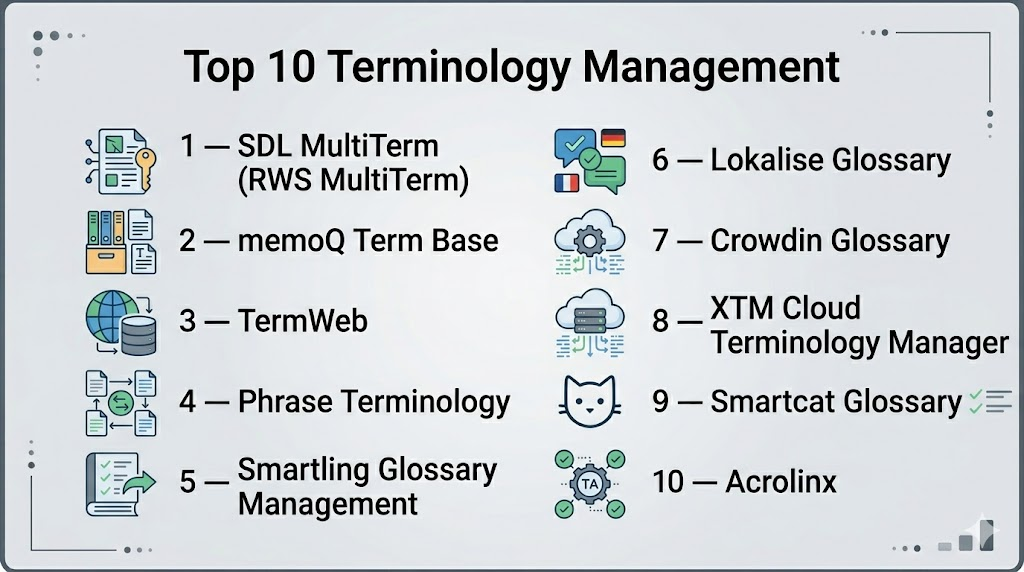
Top 10 Terminology Management Tools
1 — SDL MultiTerm (RWS MultiTerm)
SDL MultiTerm is one of the most widely used enterprise terminology management systems, designed for structured termbase creation and integration with translation workflows.
Key Features
- Centralized terminology database management
- Advanced term relationships (synonyms, forbidden terms, variants)
- Integration with translation environments
- Multi-language term support
- Import/export for large termbases
- Custom metadata fields for terminology governance
- Advanced search and filtering
Pros
- Highly structured enterprise terminology control
- Strong integration with translation tools
- Proven industry adoption
Cons
- Complex setup and maintenance
- Less modern UI compared to newer tools
Platforms / Deployment
- Windows / Cloud / Hybrid
Security & Compliance
- Not publicly stated
Integrations & Ecosystem
SDL MultiTerm integrates heavily with translation systems and enterprise content tools.
- Translation memory systems
- CMS platforms
- TMS ecosystems
- API-based extensions
Support & Community
Strong enterprise documentation and professional support channels.
2 — memoQ Term Base
memoQ includes a powerful terminology module widely used by professional translators and localization teams.
Key Features
- Term extraction and management
- Context-based term suggestions
- Multi-language term databases
- Integration with translation workflows
- Quality assurance term checks
- Import/export glossary formats
- Collaborative terminology editing
Pros
- Strong linguistic accuracy
- Easy integration with translation workflows
- Trusted by professional linguists
Cons
- Less suitable as a standalone enterprise governance tool
- UI complexity for new users
Platforms / Deployment
- Windows / Cloud / Hybrid
Security & Compliance
- Not publicly stated
Integrations & Ecosystem
- Translation environments
- CMS integrations
- API support
- Localization pipelines
Support & Community
Strong professional user base and training materials.
3 — TermWeb (RWS TermWeb)
TermWeb is a cloud-based terminology management system designed for collaborative enterprise environments.
Key Features
- Centralized termbase storage
- Workflow-based term approval system
- Multi-language terminology management
- Advanced search and tagging
- Role-based access control
- API-based integration
- Term lifecycle management
Pros
- Strong collaborative governance
- Cloud-based accessibility
- Scalable enterprise structure
Cons
- Requires configuration for advanced workflows
- Not ideal for small teams
Platforms / Deployment
- Web / Cloud
Security & Compliance
- Not publicly stated
Integrations & Ecosystem
- TMS integrations
- CMS systems
- API connectivity
- Enterprise content platforms
Support & Community
Enterprise-level support and documentation.
4 — Phrase Terminology
Phrase includes integrated terminology management designed for modern localization workflows.
Key Features
- Centralized termbase management
- AI-assisted term suggestions
- Real-time term validation during translation
- Workflow integration with TMS
- Multi-language support
- Glossary version control
- API-first architecture
Pros
- Strong integration with translation workflows
- Modern cloud-native design
- Easy collaboration features
Cons
- Advanced governance features limited compared to legacy systems
- Requires platform ecosystem usage
Platforms / Deployment
- Web / Cloud
Security & Compliance
- Not publicly stated
Integrations & Ecosystem
- Git-based systems
- CMS platforms
- Developer APIs
- Translation workflows
Support & Community
Strong documentation and enterprise onboarding support.
5 — Smartling Glossary Management
Smartling provides terminology management as part of its broader localization platform.
Key Features
- Centralized glossary system
- In-context terminology enforcement
- Translation workflow integration
- Automated QA checks for terminology consistency
- API-based term updates
- Real-time collaboration tools
- AI-assisted translation alignment
Pros
- Strong enterprise integration
- Seamless workflow embedding
- Good automation support
Cons
- Less effective as standalone terminology tool
- Enterprise-focused pricing model
Platforms / Deployment
- Web / Cloud
Security & Compliance
- Not publicly stated
Integrations & Ecosystem
- CMS systems
- Enterprise APIs
- Translation pipelines
- Developer tools
Support & Community
Enterprise-grade support with dedicated onboarding.
6 — Lokalise Glossary
Lokalise offers lightweight but powerful terminology management for developer-focused teams.
Key Features
- Glossary creation and management
- Context-based term usage enforcement
- Integration with CI/CD pipelines
- Translation memory linkage
- API access for automation
- Collaboration tools
- Real-time updates
Pros
- Easy developer integration
- Fast onboarding
- Strong automation capabilities
Cons
- Limited enterprise governance depth
- Not ideal for very large termbases
Platforms / Deployment
- Web / Cloud
Security & Compliance
- Not publicly stated
Integrations & Ecosystem
- GitHub / GitLab
- Figma
- APIs
- CI/CD systems
Support & Community
Strong developer documentation and support resources.
7 — Crowdin Glossary
Crowdin provides built-in terminology management as part of its localization platform.
Key Features
- Glossary and termbase creation
- Context-aware term suggestions
- Translation workflow integration
- AI-assisted terminology alignment
- Multi-language support
- Git integration
- QA checks for term consistency
Pros
- Strong developer ecosystem
- Flexible workflows
- Good balance of features and usability
Cons
- UI can feel dense
- Requires setup for advanced usage
Platforms / Deployment
- Web / Cloud
Security & Compliance
- Not publicly stated
Integrations & Ecosystem
- GitHub / GitLab
- Jira
- Slack
- API integrations
Support & Community
Active community and strong documentation.
8 — XTM Terminology Manager
XTM Cloud provides enterprise-grade terminology governance as part of its localization suite.
Key Features
- Structured termbase management
- Workflow-based approval systems
- Multi-language terminology control
- Advanced search and filtering
- Role-based permissions
- Integration with QA workflows
- API-based term management
Pros
- Strong enterprise governance
- Highly scalable
- Advanced workflow control
Cons
- Complex onboarding
- Less intuitive interface
Platforms / Deployment
- Web / Cloud
Security & Compliance
- Not publicly stated
Integrations & Ecosystem
- Enterprise TMS systems
- CMS integrations
- API connectivity
- Content platforms
Support & Community
Enterprise consulting and support options available.
9 — Smartcat Glossary
Smartcat includes terminology tools within its AI-driven translation platform.
Key Features
- Glossary creation and management
- AI-assisted term suggestions
- Translation workflow integration
- Freelancer collaboration support
- API-based updates
- Real-time usage tracking
- Translation memory linking
Pros
- Easy to use
- Strong AI-assisted workflows
- Good for distributed teams
Cons
- Limited advanced governance features
- Less control for large enterprises
Platforms / Deployment
- Web / Cloud
Security & Compliance
- Not publicly stated
Integrations & Ecosystem
- CMS tools
- APIs
- Translation workflows
- Marketplace ecosystem
Support & Community
Good documentation and community-driven support.
10 — Acrolinx
Acrolinx is an AI-powered content governance platform with strong terminology enforcement capabilities.
Key Features
- AI-driven terminology enforcement
- Content consistency checks
- Style guide integration
- Real-time writing assistance
- Multichannel content governance
- API-based content validation
- Analytics for content quality
Pros
- Strong enterprise content governance
- Excellent AI-driven consistency checks
- Works across multiple content systems
Cons
- Enterprise-focused and complex
- Not a pure translation tool
Platforms / Deployment
- Web / Cloud / Hybrid
Security & Compliance
- Not publicly stated
Integrations & Ecosystem
- CMS platforms
- Content creation tools
- API integrations
- Enterprise writing systems
Support & Community
Enterprise-grade support with structured onboarding.
Comparison Table (Top 10)
| Tool Name | Best For | Platform(s) Supported | Deployment | Standout Feature | Public Rating |
|---|---|---|---|---|---|
| SDL MultiTerm | Enterprise terminology | Windows/Cloud | Hybrid | Structured termbases | N/A |
| memoQ | Linguists | Windows/Cloud | Hybrid | Translation integration | N/A |
| TermWeb | Enterprises | Web | Cloud | Governance workflows | N/A |
| Phrase | Modern localization teams | Web | Cloud | AI term suggestions | N/A |
| Smartling | Enterprises | Web | Cloud | In-context glossary enforcement | N/A |
| Lokalise | Developers | Web | Cloud | CI/CD integration | N/A |
| Crowdin | Dev teams | Web | Cloud | Git-based glossary | N/A |
| XTM Cloud | Large enterprises | Web | Cloud | Workflow governance | N/A |
| Smartcat | SMB teams | Web | Cloud | AI-assisted glossary | N/A |
| Acrolinx | Content governance teams | Web | Cloud/Hybrid | AI content consistency | N/A |
Evaluation & Scoring of Terminology Management Tools
| Tool Name | Core (25%) | Ease (15%) | Integrations (15%) | Security (10%) | Performance (10%) | Support (10%) | Value (15%) | Weighted Total |
|---|---|---|---|---|---|---|---|---|
| SDL MultiTerm | 9 | 6 | 8 | 7 | 9 | 8 | 7 | 8.0 |
| memoQ | 8 | 7 | 8 | 7 | 8 | 8 | 8 | 7.9 |
| TermWeb | 8 | 7 | 8 | 8 | 8 | 8 | 7 | 8.0 |
| Phrase | 8 | 9 | 9 | 7 | 8 | 8 | 8 | 8.3 |
| Smartling | 9 | 8 | 9 | 7 | 9 | 8 | 7 | 8.4 |
| Lokalise | 8 | 9 | 9 | 7 | 8 | 8 | 8 | 8.2 |
| Crowdin | 8 | 9 | 9 | 7 | 8 | 8 | 9 | 8.3 |
| XTM Cloud | 9 | 6 | 8 | 8 | 9 | 8 | 7 | 8.1 |
| Smartcat | 7 | 9 | 8 | 7 | 7 | 7 | 9 | 7.9 |
| Acrolinx | 9 | 7 | 9 | 8 | 8 | 8 | 7 | 8.2 |
Which Terminology Management Tool Is Right for You?
Solo / Freelancer
memoQ or Smartcat is suitable for lightweight terminology tracking and translation support.
SMB
Crowdin, Lokalise, and Phrase provide a balance of automation and usability.
Mid-Market
Smartling and Phrase are strong choices for scaling terminology governance.
Enterprise
SDL MultiTerm, TermWeb, XTM Cloud, and Acrolinx provide advanced governance and structured control.
Budget vs Premium
- Budget-friendly: Smartcat, Crowdin
- Premium enterprise: Smartling, Acrolinx, SDL MultiTerm
Feature Depth vs Ease of Use
- Deep control: SDL MultiTerm, Acrolinx, XTM Cloud
- Easy use: Lokalise, Smartcat, Phrase
Integrations & Scalability
- Best integrations: Phrase, Crowdin, Lokalise
- Best scalability: Smartling, XTM Cloud, Acrolinx
Security & Compliance Needs
Enterprise buyers should request official documentation directly, as many compliance details are not publicly stated.
Frequently Asked Questions (FAQs)
1. What is terminology management?
It is the process of creating and maintaining a consistent set of approved terms used across translations, documentation, and product content.
2. Why is terminology management important?
It ensures brand consistency, reduces translation errors, and improves clarity across multilingual content.
3. Do these tools use AI?
Yes, many modern tools use AI for term extraction, suggestion, and enforcement.
4. Can terminology tools integrate with translation systems?
Yes, most tools integrate directly with TMS platforms, CMS systems, and developer workflows.
5. Are these tools cloud-based?
Most modern tools are cloud-based, but some legacy systems also support desktop or hybrid deployment.
6. Who uses terminology management tools?
Localization teams, translators, technical writers, product managers, and enterprise content teams.
7. Can small teams use these tools?
Yes, but simpler tools like Crowdin or Smartcat are better suited for smaller teams.
8. What is a termbase?
A termbase is a structured database of approved terms, definitions, and language equivalents.
9. Can I migrate terminology between tools?
Yes, most platforms support import/export of termbases, though formatting may require adjustments.
10. Do these tools support multilingual content?
Yes, they are specifically designed to manage terminology across multiple languages.
Conclusion
Terminology management tools are essential for maintaining consistent language across global products, especially as organizations scale into multiple markets. They reduce confusion, improve translation quality, and ensure that brand messaging remains unified across all channels. The right tool depends on your workflow complexity, team size, and governance needs. Instead of choosing a single solution upfront, it is better to shortlist a few tools, test them with real content, and evaluate how well they integrate into your localization and content ecosystem.

Find Trusted Cardiac Hospitals
Compare heart hospitals by city and services — all in one place.
Explore Hospitals
Thanks for sharing this article. I am learning about terminology management tools, and this content helped me understand how they can improve consistency and accuracy across translation and content projects.