Introduction
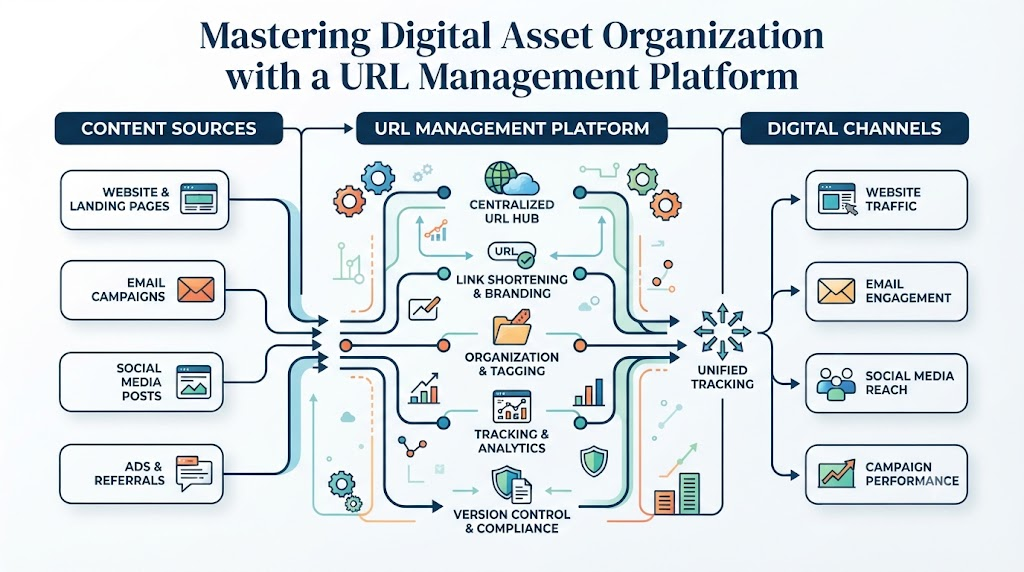
As digital landscapes expand, managing web assets across multiple channels has become a formidable challenge for creators, marketers, and enterprises. Every campaign launch, blog post, social media update, and portfolio page introduces new web addresses that require categorization, maintenance, and tracking. When these web links are scattered across spreadsheets, browser bookmarks, and message threads, teams experience operational friction, lost marketing opportunities, and diminished search performance.In this guide, you will learn how a unified URL management platform transforms digital asset workflows. We will explore the mechanics of automated broken link monitoring, campaign URLsNow structure, professional portfolio creation, and digital footprint protection. By understanding best practices in link governance, you can optimize content workflows, enhance user experience, and ensure your brand maintains a seamless online presence.
What is a URL Management Tool?
A URL management tool is a dedicated software application designed to organize, catalog, monitor, and route web links within a centralized dashboard. Rather than saving web addresses in disconnected browser folders or static text documents, users store links inside structured digital environments with custom tagging, metadata, and automated auditing capabilities.
How URL Management Works
At its core, a URL management tool ingests web addresses and enriches them with descriptive metadata. When a user adds a link, the system extracts critical page parameters, including page titles, status codes, and open graph details. These links are categorized into structured directories, allowing users to apply contextual labels, filter by target audience, and set automated health checks.
Why Link Organization Matters
Unorganized web links create significant workflow bottlenecks. Team members waste valuable time searching for correct destination pages, testing expired landing pages, or sharing incorrect campaign links with partners. Systematic link organization ensures every web asset remains accessible, verified, and correctly attributed.
Benefits of Centralized URL Management
Adopting a link management platform eliminates operational silos. Centralization offers several clear advantages:
- Instant Accessibility: Quickly retrieve verified links across departments.
- Proactive Maintenance: Automatically flag broken or redirected destination pages.
- Enhanced Security: Standardize published links to prevent security risks and domain misdirections.
- Scalable Asset Management: Keep pace with growing content archives without adding overhead.
Why Link Management is Important
Strategic link management directly influences productivity, user satisfaction, and search visibility. When organizations view links as valuable assets rather than transient strings of text, operational clarity improves significantly.
       ┌─────────────────────────────────────────────────────────┐
       │             Centralized Link Infrastructure             │
       └────────────────────────────┬────────────────────────────┘
                                    │
         ┌──────────────────────────┼──────────────────────────┐
         ▼                          ▼                          ▼
┌──────────────────┐       ┌──────────────────┐       ┌──────────────────┐
│ Productivity &   │       │ User Experience  │       │ Search Engine    │
│ Collaboration    │       │ & Trust          │       │ Optimization     │
└──────────────────┘       └──────────────────┘       └──────────────────┘
Better Organization & Productivity
Finding the correct link for an email campaign, client deliverable, or documentation page should not require searching through older emails. Centralized link systems let team members retrieve verified assets in seconds, reducing administrative friction and boosting daily output.
Easier Collaboration
Shared link collections eliminate version control issues. When marketing, sales, and development teams work from the same dashboard, everyone uses the correct, updated destination links across all channels.
Better User Experience & SEO Performance
Search engines like Google prioritize sites that offer clear user journeys and minimal broken links. According to guidelines from Google Search Central, maintaining functional crawl paths and valid status codes helps search crawlers index content efficiently. Furthermore, standards published by the W3C emphasize URI stability as a core principle of web architecture. Broken links damage user trust and cause search engine crawlers to drop indexing priority on decaying pages.
Essential Features of a Modern Link Management Platform
Modern platforms offer robust features designed to streamline complex digital environments. Understanding these capabilities helps organizations choose the right solution for their workflows.
URL Organization, Folders & Tagging
Advanced categorization relies on hierarchical folders and flexible tagging systems. A top-tier URL organizer tool allows users to filter links by department, campaign phase, media type, or project urgency.
Search, Filtering & Sharing
Deep search capabilities let users find assets by keyword, domain, creation date, or status code. Group sharing features make it easy to distribute verified link collections to internal team members or external clients securely.
Team Collaboration & Access Control
Role-based access management ensures sensitive destination URLs remain protected while allowing team members to curate, update, or audit designated link collections.
Core Feature Comparison
| Platform Feature | Basic Bookmarks | Spreadsheet Tracking | Dedicated URL Platform |
| Centralized Storage | No (Local to Device) | Yes (Cloud Shared) | Yes (Global Dashboard) |
| Status Code Checking | Manual Only | Manual Only | Automated Real-Time |
| Custom Categorization | Basic Folders | Manual Columns | Hierarchical Folders & Tags |
| Team Permission Controls | None | Basic File Sharing | Granular Role-Based Access |
| Visual Metadata Extraction | No | No | Automated Extraction |
Automatic Broken Link Monitoring
Link rot—the natural tendency of web links to become broken over time—poses a continuous risk to digital brands. Web pages move, site structures change, and external references vanish.
Why Broken Links Harm Websites
When a visitor clicks a link and encounters a 404 error, user trust drops immediately. For commercial sites, broken links on landing pages or pricing sheets cause direct revenue loss.
[ Active User / Search Engine Crawler ]
                 │
                 ▼
     [ Target Destination URL ]
                 │
                 ├─── Status: 200 OK ────────► [ Seamless User Experience ]
                 │
                 └─── Status: 404 / 500 ─────► [ Lost Traffic & SEO Penalty ]
Automated Auditing and URL Health Tracking
Implementing automatic broken link monitoring changes link maintenance from a manual chore to a background automation. A dedicated URL health monitoring tool routinely pings destination servers, checking for standard HTTP responses:
- 200 OK: The page is active and serving content normally.
- 301/302 Redirect: The page has moved permanently or temporarily.
- 404 Not Found: The page no longer exists and requires immediate fixing.
- 500 Server Error: The host server is experiencing technical issues.
Receiving automatic notifications when status codes change allows teams to fix broken links before they harm user experience or search rankings.
Campaign Link Management for Marketers
Marketers handle hundreds of distinct web addresses across email newsletters, paid search ads, guest content, and partner networks. Managing these links systematically is crucial for clean campaign execution.
Using a dedicated campaign link management tool allows marketers to standardize campaign tracking, organize custom parameters, and categorize destination links by traffic source. Marketers can build structured link directories for:
- Landing Pages: Group target URLs by seasonal promotion or conversion goal.
- Social Media Campaigns: Keep track of destination links across multiple platform profiles.
- Affiliate & Content Marketing: Maintain clear records of partner links to ensure proper attribution.
Centralizing campaign links ensures that promotional assets are always verified, updated, and ready to deploy without tracking errors.
Link Portfolio Management for Professionals
For consultants, developers, agency leaders, and executives, presenting a curated showcase of work is critical for professional growth. Scattered portfolios across various platforms diminish visual impact.
By leveraging link portfolio management, professionals can aggregate their top work samples into structured, beautifully presented link collections:
- Articles & Publications: Group guest posts, industry essays, and white papers.
- Case Studies & Projects: Organize project links, client testimonials, and github repositories as highlighted by developers on platforms referenced in the Mozilla Developer Network.
- Media & Case Studies: Highlight podcast appearances, webinar recordings, and video feature spots.
A unified link portfolio creates a single, professional destination for prospects, recruiters, and collaborators to review your complete body of work.
Free Link in Bio Tool for Creators
Social media channels often restrict profiles to a single outgoing link. Creators need an efficient way to guide followers to podcasts, merchandise stores, latest videos, and community channels.
A free link in bio tool turns that single profile URL into a personalized landing page housing all vital links. Creators gain several clear advantages:
- Unified Audience Routing: Direct followers to relevant content channels without constantly changing bio links.
- Brand Customization: Align landing page aesthetics with core visual branding.
- Simplified Content Distribution: Promote new content releases immediately across all social profiles.
To explore how unified landing pages enhance social media discovery, review the features available on the URLsNow Link in Bio portal.
Content Link Management for Bloggers & Publishers
Content producers manage expanding archives of published articles, affiliate recommendations, and research sources. Over time, managing these links manually becomes unsustainable.
A specialized content link management tool helps publishers maintain content integrity by offering structured organizational systems:
                  ┌───────────────────────────────┐
                  │    Publisher Master Hub       │
                  └───────────────┬───────────────┘
                                  │
         ┌────────────────────────┼────────────────────────┐
         ▼                        ▼                        ▼
┌──────────────────┐     ┌──────────────────┐     ┌──────────────────┐
│ Content Archives │     │ Reference Library│     │ Affiliate Links  │
│ (Internal Posts) │     │ (Research Sources│     │ (Monetization)   │
└──────────────────┘     └──────────────────┘     └──────────────────┘
- Content Archiving: Categorize published posts by topic, publication date, and target audience.
- Resource Tracking: Store external research references and citation links for easy retrieval during updates.
- Affiliate Link Audit: Keep track of commercial destination links to ensure monetized links remain active and accurately routed.
Regular content audits prevent broken references and keep older articles performing well in search engine results.
Digital Footprint Management
Every article, social media channel, interview, and business directory listing contributes to your online presence. Without proactive management, older assets decay and paint an outdated picture of your brand.
Using a digital footprint management tool allows individuals and companies to systematically catalog their digital holdings. Maintaining an updated index of web assets helps you:
- Protect Online Reputation: Ensure published links point to accurate, secure domain names.
- Standardize Brand Identity: Update outdated domain references, bio links, and business entries across third-party platforms.
- Ensure Asset Longevity: Preserve access to key corporate announcements, coverage, and digital collateral over time.
URLsNow for Different User Types
A centralized management hub adapts to the unique needs of diverse digital roles:
- Bloggers: Organize published content, manage internal linking structures, and clean up broken external citations.
- Content Creators: Streamline multi-platform content sharing using personalized link-in-bio landing pages.
- Digital Marketers: Track campaign links across paid, organic, and email channels from a single dashboard via URLsNow Campaign Management.
- Businesses: Maintain a master registry of official corporate pages, press kits, and customer-facing resources.
- Agencies: Manage distinct client link collections, monitor destination health, and share curated deliverables effortlessly.
- Developers: Organize API documentation links, code repositories, and technical reference guides efficiently.
- Freelancers: Build polished link portfolios showcasing client case studies, testimonials, and service offerings.
- Students: Curate research sources, academic citations, and project references in shared digital work environments.
Best Practices for Managing URLs Effectively
To maintain clean link architecture, follow these industry-proven management practices:
- Establish a Consistent Categorization Structure: Group links using intuitive folder hierarchies and clear tags (e.g.,
Marketing / 2026 / Q3_Ad_Campaign). - Automate Routine Health Checks: Set up scheduled status checks to identify 404 errors before visitors encounter them.
- Standardize Naming Conventions: Give saved links descriptive titles rather than relying on raw web strings.
- Conduct Quarterly Audits: Periodically review stored assets, archiving obsolete links and updating changed destination addresses.
- Centralize Shared Assets: Stop distributing links via chat applications; use controlled, shared dashboards like URLsNow Dashboard.
Common URL Management Mistakes
Avoid these common pitfalls to keep your digital asset library organized and effective:
- Relying on Browser Bookmarks: Local bookmarks cannot be easily searched, audited, or shared across team environments.
- Ignoring Broken External Links: Failing to monitor outbound links hurts user experience and damages your SEO standing, as highlighted in digital marketing studies by HubSpot.
- Neglecting Metadata: Saving raw links without context makes search and organization frustrating over time.
- Allowing Unmonitored Link Rot: Letting older campaign links expire without redirects alienates incoming traffic.
- Exposing Unsecured Links: Sharing unverified or shortened web addresses can raise security concerns among cautious users.
The Future of URL Management
As digital content creation accelerates, link management is shifting from passive storage to intelligent web governance.
Key developments shaping the future of web link management include:
- Intelligent Auto-Categorization: System algorithms analyzing destination content to apply relevant labels automatically.
- Predictive Health Monitoring: Predictive alerts warning users of domain expirations or server degradation before links fail.
- Integrated Asset Ecosystems: Unified hubs bridging link routing, content analytics, and digital asset management.
- Enhanced Privacy & Compliance: Automated auditing to ensure outbound links meet modern security standards and data handling policies.
How URLsNow Helps Users Stay Organized
URLsNow offers a unified ecosystem designed to resolve the complexities of modern link management. By providing a clean interface alongside powerful automated features, the platform simplifies how individuals and businesses manage their web presence.
                         ┌─────────────────────────┐
                         │   URLsNow Dashboard     │
                         └────────────┬────────────┘
                                      │
     ┌───────────────────┬────────────┴───────────┬───────────────────┐
     ▼                   ▼                        ▼                   ▼
┌───────────────┐ ┌───────────────┐      ┌───────────────┐   ┌───────────────┐
│ Link Health   │ │ Collections & │      │ Campaign &    │   │ Personalized  │
│ Monitoring    │ │ Categorization│      │ Portfolio Hub │   │ Link in Bio   │
└───────────────┘ └───────────────┘      └───────────────┘   └───────────────┘
Through the central hub, users can categorize web addresses into structured folders using URLsNow Collections. Automated health monitors scan saved links continuously, alerting account owners to status code changes or broken destinations.
For creators and professionals, the platform combines link curation with distribution tools. Whether you are building a custom landing page with URLsNow Portfolio Management or setting up a personal bio profile, URLsNow ensures your links remain organized, functional, and impactfully presented.
Frequently Asked Questions (FAQ)
1.What is a URL management tool?
A URL management tool is a cloud-based application that allows users to organize, categorize, track, and monitor web links within a centralized dashboard. Unlike simple browser bookmarks, these tools offer advanced capabilities such as HTTP status code monitoring, custom tagging, team permissions, and metadata extraction, helping individuals and organizations maintain a clean digital asset repository.
2.Why is proactive link management important for businesses?
Proactive link management prevents operational friction, preserves search engine rankings, and protects user trust. When business links break or lead to outdated pages, potential customers encounter frustrating errors, which can harm brand reputation and conversion rates. Centralizing web links ensures teams always share correct, verified destination URLs across all marketing and corporate channels.
3.How does automatic broken link monitoring work?
Automatic broken link monitoring continuously tests saved destination URLs by sending light background requests to destination web servers. The system checks returned HTTP status codes (such as 200 OK, 301 Redirect, or 404 Not Found). If a link breaks or returns a server error, the platform flags the issue, allowing managers to fix or update the link immediately.
4.What is URL health monitoring?
URL health monitoring involves tracking the operational performance, accessibility, and status of stored web addresses. Beyond identifying simple 404 errors, health monitoring detects slow-responding destinations, unexpected redirects, server downtime, and domain expirations. This continuous oversight ensures that outbound marketing, documentation, and affiliate links remain reliable for end users.
5.What is a link portfolio and who should build one?
A link portfolio is a curated, visually organized showcase of web links representing an individual’s or company’s best digital work. Freelancers, developers, journalists, agencies, and consultants use link portfolios to present articles, case studies, client repositories, and media appearances in a single professional destination for prospective clients or employers.
6.How does a link in bio tool benefit social media creators?
Most social media platforms restrict account profiles to one external web link. A link in bio tool creates a single personalized landing page containing multiple categorized links to a creator’s latest content, store, videos, and channels. This centralized page helps creators direct social traffic efficiently without constantly altering profile settings.
7.Can organizing URLs improve overall website SEO performance?
Yes, systematic link management indirectly supports search engine optimization. According to SEO analysis frameworks from platforms like Ahrefs and Semrush, maintaining valid crawl paths, removing internal 404 errors, and maintaining accurate redirects helps search engine crawlers index web pages efficiently while delivering a better overall user experience.
8.How does team collaboration function within a link management platform?
Team collaboration features allow multiple users to access, curate, and update shared link collections from a single workspace. Administrators assign specific user permissions, controlling who can edit, delete, or share specific folders. This shared environment eliminates version control issues and keeps team members aligned on the correct assets.
9.Who should use the URLsNow platform?
URLsNow is built for anyone who manages numerous web links daily. This includes bloggers organizing content libraries, digital marketers tracking ad campaigns, content creators managing social bios, businesses safeguarding corporate assets, and agencies sharing verified deliverables with clients.
10.How frequently should organizations audit their web links?
Organizations should run continuous automated monitoring for critical user-facing links and perform manual audits quarterly. Routine reviews allow teams to archive outdated campaign resources, refresh destination URLs, and ensure that published digital assets reflect current business priorities.
Conclusion
Managing digital web assets effectively is no longer optional in today’s fast-paced digital environment. Scattered bookmarks, untracked campaign links, and unmonitored dead pages lead directly to lost traffic, lower productivity, and damaged user trust. Adopting a centralized URL management platform gives individuals and businesses full control over their web presence, ensuring every link remains organized, secure, and fully operational.By implementing systematic link organization, setting up automated status monitoring, and creating curated link collections, organizations eliminate workflow silos and build a scalable foundation for digital asset governance. Whether you are a creator optimizing social discovery, a marketer tracking complex multi-channel campaigns, or a business protecting your online reputation, proactive link management turns chaotic link collections into structured digital assets. Explore modern URL management practices today to streamline your workflows, boost SEO performance, and take control of your digital footprint.

Find Trusted Cardiac Hospitals
Compare heart hospitals by city and services — all in one place.
Explore Hospitals