Introduction
PLC Programming Tools are specialized software platforms that enable engineers and developers to program, simulate, and manage programmable logic controllers (PLCs) used in industrial automation. These tools provide a structured environment for designing logic sequences, testing processes, debugging, and deploying PLC programs to a range of industrial hardware.
PLC programming remains a foundational aspect of industrial automation, manufacturing, robotics, and process control systems. Efficient tools can save significant time during development, reduce errors, and ensure safety compliance across critical operations.
Real-world use cases include:
- Designing automated manufacturing assembly lines
- Configuring control logic for robotic systems
- Programming conveyor belts and material handling systems
- Managing industrial process control in chemical plants
- Simulating PLC programs before deployment to prevent downtime
Best for: Industrial automation engineers, control system designers, process engineers, and manufacturing operations teams.
Not ideal for: Hobbyists or teams without access to PLC hardware, or organizations not heavily invested in industrial automation.
Key Trends in PLC Programming Tools
- Increasing support for standard IEC 61131-3 programming languages
- Integration with SCADA and Industrial IoT platforms
- Cloud-based development environments for remote programming
- Simulation and virtual commissioning before hardware deployment
- AI-assisted programming and predictive diagnostics
- Enhanced collaboration and version control for engineering teams
- Cross-platform support including Windows, macOS, and Linux
- Security improvements with encrypted communication and user authentication
- Subscription and SaaS-based licensing models
- Growing focus on supporting hybrid environments and legacy PLC systems
How We Selected These Tools (Methodology)
- Evaluated market adoption and brand recognition
- Reviewed supported PLC hardware and programming standards
- Assessed simulation, debugging, and testing capabilities
- Examined performance, reliability, and uptime in industrial deployments
- Verified integration support with SCADA, MES, HMI, and IoT systems
- Evaluated security and compliance features
- Analyzed ease of use and onboarding process for engineers
- Considered scalability for enterprise and multi-plant deployments
- Balanced enterprise, SMB, and open-source options
- Verified community support and available training resources
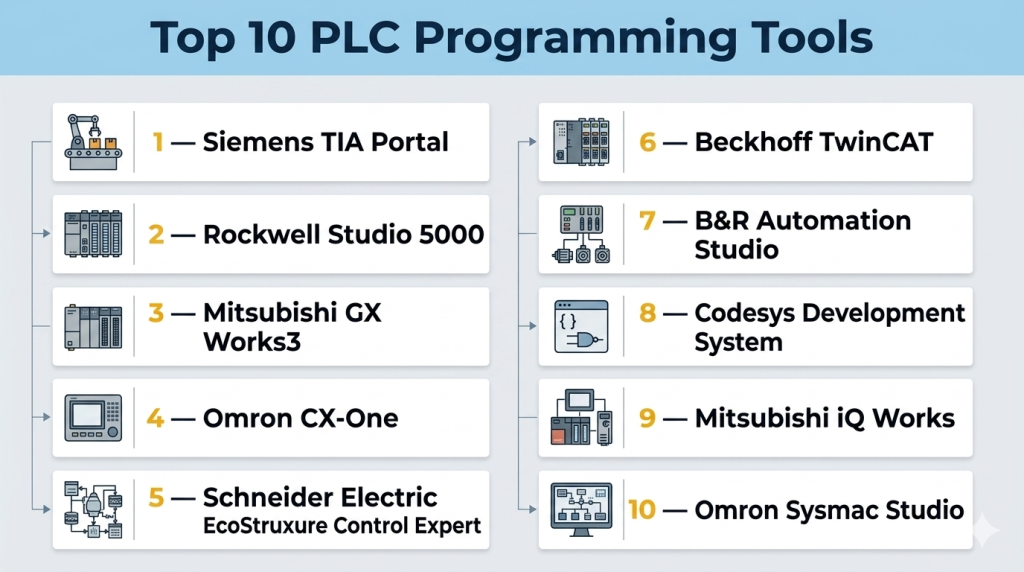
Top 10 PLC Programming Tools
#1 — Siemens TIA Portal
Short description: Siemens TIA Portal is an integrated engineering platform for programming Siemens PLCs and automation devices. It combines programming, simulation, and diagnostics in a single interface for industrial automation engineers.
Key Features
- Supports Ladder Logic, Function Block Diagram, and Structured Text
- Integrated simulation and virtual commissioning
- Diagnostics and error tracking tools
- Hardware configuration and parameter management
- Integrated HMI and SCADA support
- Centralized project management
- Multi-user collaboration
Pros
- Comprehensive toolset for Siemens hardware
- Strong simulation and diagnostics
- Streamlined project management
Cons
- High licensing cost
- Steep learning curve for new users
Platforms / Deployment
- Windows
- Hybrid
Security & Compliance
- Not publicly stated
Integrations & Ecosystem
Supports Siemens SCADA, HMI, and IoT devices
- Siemens PLCs
- WinCC SCADA
- MindSphere integration
- OPC UA connectivity
Support & Community
- Extensive documentation
- Siemens support and training available
- Active user community
#2 — Rockwell Studio 5000
Short description: Rockwell Studio 5000 is used for Allen-Bradley PLC programming, enabling design, simulation, and deployment of industrial automation projects.
Key Features
- Supports Ladder Logic, Structured Text, and Function Block programming
- Integrated simulation and testing
- Device configuration and project management
- Diagnostics and fault monitoring
- HMI integration through FactoryTalk View
Pros
- Reliable platform for Allen-Bradley devices
- Strong diagnostics and monitoring
- Integrated HMI support
Cons
- Complex setup for multi-site operations
- Expensive licenses
Platforms / Deployment
- Windows
- Hybrid
Security & Compliance
- Not publicly stated
Integrations & Ecosystem
- Allen-Bradley PLCs
- FactoryTalk software
- OPC and IoT integrations
Support & Community
- Rockwell technical support
- Documentation and training programs
#3 — Mitsubishi GX Works3
Short description: Mitsubishi GX Works3 is a programming suite for Mitsubishi PLCs, offering programming, simulation, and project management capabilities for industrial automation.
Key Features
- Supports Ladder, Structured Text, and Function Block languages
- Simulation and debugging tools
- Multi-project management
- Diagnostics and monitoring
- HMI integration
Pros
- User-friendly interface
- Strong simulation features
- Reliable for Mitsubishi hardware
Cons
- Limited cross-hardware support
- Steep learning curve for complex applications
Platforms / Deployment
- Windows
- Hybrid
Security & Compliance
- Not publicly stated
Integrations & Ecosystem
- Mitsubishi PLCs and HMI devices
- OPC server connectivity
- IoT platform integration
Support & Community
- Technical support and training
- Community forums for troubleshooting
#4 — Omron CX-One
Short description: Omron CX-One is a suite for Omron PLC programming, combining configuration, programming, and monitoring tools in one environment.
Key Features
- Supports Ladder, Function Block, and Structured Text
- Network configuration and monitoring
- Simulation and debugging
- Device diagnostics
- HMI integration
Pros
- Easy device configuration
- Real-time monitoring
- Supports multiple Omron PLC models
Cons
- Limited advanced analytics
- Windows only
Platforms / Deployment
- Windows
- Hybrid
Security & Compliance
- Not publicly stated
Integrations & Ecosystem
- Omron PLCs
- Sysmac Studio
- OPC connectivity
Support & Community
- Documentation and training
- Omron support available
#5 — Schneider Electric EcoStruxure Control Expert
Short description: EcoStruxure Control Expert is Schneider Electric’s programming tool for Modicon PLCs, offering programming, simulation, and monitoring in one interface.
Key Features
- Supports IEC 61131-3 programming languages
- Simulation and virtual commissioning
- Device management and diagnostics
- SCADA and HMI integration
- Project collaboration
Pros
- Comprehensive for Modicon devices
- Advanced simulation
- Strong integration with EcoStruxure ecosystem
Cons
- Learning curve for beginners
- Enterprise-focused pricing
Platforms / Deployment
- Windows
- Hybrid
Security & Compliance
- Not publicly stated
Integrations & Ecosystem
- Modicon PLCs
- SCADA/HMI systems
- EcoStruxure IoT platforms
Support & Community
- Technical support
- Online training and community forums
#6 — Beckhoff TwinCAT
Short description: TwinCAT is Beckhoff’s automation software, enabling PLC programming, motion control, and industrial IoT integration in one platform.
Key Features
- Supports IEC 61131-3 languages
- Motion control integration
- Real-time simulation and debugging
- Device management and monitoring
- Open interface for IoT and OPC UA
Pros
- Strong for motion and robotics control
- Real-time simulation
- Flexible integration options
Cons
- Complex interface for beginners
- Requires Beckhoff hardware for full features
Platforms / Deployment
- Windows
- Hybrid
Security & Compliance
- Not publicly stated
Integrations & Ecosystem
- Beckhoff PLCs
- TwinCAT HMI
- OPC UA, IoT connectivity
Support & Community
- Documentation and training
- Support packages available
#7 — B&R Automation Studio
Short description: Automation Studio is B&R’s integrated environment for PLC, motion, and visualization programming in industrial automation.
Key Features
- PLC programming with IEC 61131-3 languages
- Integrated motion control and robotics
- HMI and visualization integration
- Simulation and debugging tools
- Device and project management
Pros
- Unified environment for PLC, motion, and HMI
- Strong visualization capabilities
- Efficient debugging
Cons
- Enterprise-focused pricing
- Hardware-specific optimizations
Platforms / Deployment
- Windows
- Hybrid
Security & Compliance
- Not publicly stated
Integrations & Ecosystem
- B&R PLCs and HMIs
- OPC UA support
- IoT connectivity
Support & Community
- Technical support
- Online forums and documentation
#8 — Codesys Development System
Short description: Codesys is a hardware-independent PLC programming platform that supports IEC 61131-3 languages for multiple industrial controllers.
Key Features
- Multi-vendor PLC support
- IEC 61131-3 languages
- Simulation and debugging
- Device management and visualization
- Open SDK and API support
Pros
- Hardware-independent
- Open and flexible
- Strong community support
Cons
- Some advanced features require licenses
- Learning curve for complex applications
Platforms / Deployment
- Windows / Linux
- Hybrid
Security & Compliance
- Not publicly stated
Integrations & Ecosystem
- Multiple PLC vendors
- OPC UA, Modbus
- Visualization and HMI tools
Support & Community
- Active user community
- Documentation and tutorials
#9 — Mitsubishi iQ Works
Short description: iQ Works is an integrated automation suite for Mitsubishi PLCs, combining programming, simulation, and diagnostics.
Key Features
- Ladder and Function Block programming
- Network configuration
- Simulation and testing
- HMI integration
- Diagnostics and maintenance tools
Pros
- Integrated suite for Mitsubishi automation
- Strong simulation
- Efficient diagnostics
Cons
- Limited to Mitsubishi devices
- Windows only
Platforms / Deployment
- Windows
- Hybrid
Security & Compliance
- Not publicly stated
Integrations & Ecosystem
- Mitsubishi PLCs
- HMI and SCADA systems
- IoT integration
Support & Community
- Documentation and training
- Technical support
#10 — Omron Sysmac Studio
Short description: Sysmac Studio provides Omron PLC programming with integrated motion control, vision, and robotics support.
Key Features
- PLC programming
- Motion and robotic control
- HMI and visualization integration
- Simulation and debugging
- Network management
Pros
- Unified environment for PLC and motion control
- Strong simulation tools
- Supports robotics integration
Cons
- Omron hardware required for full capabilities
- Windows only
Platforms / Deployment
- Windows
- Hybrid
Security & Compliance
- Not publicly stated
Integrations & Ecosystem
- Omron PLCs
- HMI and SCADA
- Robotics APIs
Support & Community
- Technical support available
- Online documentation and tutorials
Comparison Table (Top 10)
| Tool Name | Best For | Platform(s) Supported | Deployment | Standout Feature | Public Rating |
|---|---|---|---|---|---|
| Siemens TIA Portal | Siemens PLCs | Windows | Hybrid | Integrated simulation & project management | N/A |
| Rockwell Studio 5000 | Allen-Bradley PLCs | Windows | Hybrid | Integrated HMI & diagnostics | N/A |
| Mitsubishi GX Works3 | Mitsubishi PLCs | Windows | Hybrid | Multi-language programming | N/A |
| Omron CX-One | Omron PLCs | Windows | Hybrid | Network configuration & monitoring | N/A |
| Schneider EcoStruxure | Modicon PLCs | Windows | Hybrid | Simulation & analytics | N/A |
| Beckhoff TwinCAT | Beckhoff PLCs | Windows | Hybrid | Motion & IoT integration | N/A |
| B&R Automation Studio | B&R PLCs | Windows | Hybrid | Unified PLC & motion control | N/A |
| Codesys | Multi-vendor PLCs | Windows/Linux | Hybrid | Hardware-independent programming | N/A |
| Mitsubishi iQ Works | Mitsubishi PLCs | Windows | Hybrid | Integrated diagnostics | N/A |
| Omron Sysmac Studio | Omron PLCs | Windows | Hybrid | PLC + robotics integration | N/A |
Evaluation & Scoring of PLC Programming Tools
| Tool Name | Core | Ease | Integrations | Security | Performance | Support | Value | Weighted Total |
|---|---|---|---|---|---|---|---|---|
| Siemens TIA Portal | 9 | 7 | 8 | 7 | 9 | 8 | 7 | 8.0 |
| Rockwell Studio 5000 | 9 | 7 | 8 | 7 | 9 | 8 | 7 | 8.0 |
| Mitsubishi GX Works3 | 8 | 8 | 7 | 7 | 8 | 7 | 7 | 7.6 |
| Omron CX-One | 8 | 8 | 7 | 7 | 8 | 7 | 7 | 7.6 |
| Schneider EcoStruxure | 9 | 7 | 8 | 7 | 9 | 8 | 7 | 8.0 |
| Beckhoff TwinCAT | 9 | 7 | 8 | 7 | 9 | 8 | 7 | 8.0 |
| B&R Automation Studio | 8 | 7 | 7 | 7 | 8 | 7 | 7 | 7.4 |
| Codesys | 8 | 7 | 8 | 7 | 8 | 7 | 8 | 7.6 |
| Mitsubishi iQ Works | 8 | 8 | 7 | 7 | 8 | 7 | 7 | 7.6 |
| Omron Sysmac Studio | 8 | 8 | 7 | 7 | 8 | 7 | 7 | 7.6 |
Scores are comparative, showing relative strengths across features, usability, and value.
Which PLC Programming Tool Is Right for You?
Solo / Freelancer
Use Codesys or Omron CX-One for hardware-independent or small-scale development projects.
SMB
Small to medium plants benefit from Mitsubishi GX Works3 or Sysmac Studio for integrated PLC and automation control.
Mid-Market
Mid-sized manufacturing facilities may choose Siemens TIA Portal or Rockwell Studio 5000 for multi-device orchestration.
Enterprise
Large industrial deployments should consider Schneider EcoStruxure, Beckhoff TwinCAT, or B&R Automation Studio for advanced analytics, motion control, and scalability.
Budget vs Premium
Open-source or single-vendor platforms may lower upfront costs. Enterprise solutions provide additional analytics, simulation, and hardware support.
Feature Depth vs Ease of Use
Select solutions with simulation and debugging for complex automation; simpler tools are sufficient for standard PLC programming.
Integrations & Scalability
Ensure SCADA, HMI, MES, and IoT integrations. Enterprise deployments require scalable software for multiple production lines.
Security & Compliance Needs
Check for access control, project encryption, audit logs, and compliance with industry standards for industrial control systems.
Frequently Asked Questions (FAQs)
1. What is a PLC programming tool?
A PLC programming tool is software that allows engineers to develop, simulate, debug, and deploy control logic for programmable logic controllers.
2. Which programming languages are supported?
Most tools support IEC 61131-3 standard languages such as Ladder Logic, Function Block Diagram, Structured Text, and Sequential Function Charts.
3. Can I simulate PLC programs without hardware?
Yes, most platforms provide virtual simulation and debugging capabilities to test logic before deployment.
4. Are these tools hardware-specific?
Some tools like Siemens TIA Portal and Rockwell Studio 5000 are vendor-specific, while Codesys supports multiple PLC vendors.
5. Do they integrate with SCADA and HMI systems?
Yes, integration with SCADA, HMI, and MES is a standard feature for enterprise deployments.
6. What are the main benefits?
They improve development efficiency, reduce errors, enable predictive maintenance, and ensure safe industrial operations.
7. Is training required to use these tools?
Yes, professional training or tutorials are recommended due to complex features and PLC programming standards.
8. Can small businesses use these tools?
Yes, smaller deployments can use Codesys, Sysmac Studio, or CX-One depending on hardware availability.
9. How is licensing handled?
Licensing varies by vendor, with options for perpetual licenses, subscriptions, or floating licenses for enterprise use.
10. What are common mistakes in PLC programming adoption?
Neglecting integration planning, skipping simulation, and underestimating training requirements can lead to inefficiencies.
Conclusion
PLC Programming Tools are essential for industrial automation, providing the software foundation for controlling complex processes and autonomous systems. Selecting the right platform depends on hardware compatibility, feature depth, simulation capabilities, integration needs, and organizational scale. Small teams may benefit from Codesys or Omron CX-One, while enterprises may require Siemens TIA Portal, Rockwell Studio 5000, or Schneider EcoStruxure for advanced features and large-scale deployments. Evaluating simulation capabilities, debugging tools, fleet integration, and security is critical. Organizations should shortlist potential platforms, conduct pilot testing, and ensure integration with SCADA, HMI, and MES to achieve reliable and efficient automation operations.

Find Trusted Cardiac Hospitals
Compare heart hospitals by city and services — all in one place.
Explore Hospitals
If a controller or engineering PC fails, the team should be able to quickly restore the correct program and configuration instead of rebuilding it from memory. Keeping tested backups with clear version names can save a lot of downtime during an emergency. This is especially important for machines that cannot afford long production stops.