Introduction
Product Lifecycle Management (PLM) Tools are software solutions designed to manage a product’s journey from ideation through design, development, manufacturing, and end-of-life. PLM centralizes product data, streamlines collaboration among teams, and ensures consistency in design, engineering, and manufacturing processes. PLM is critical for reducing time-to-market, improving product quality, and maintaining regulatory compliance.
Organizations face increasingly complex supply chains, distributed teams, and faster product cycles. PLM Tools help businesses standardize workflows, capture knowledge, and improve visibility across the product lifecycle.
Real-world use cases:
- Coordinating design and engineering teams to reduce errors and rework
- Managing product data, BOMs, and revisions in manufacturing
- Ensuring compliance with industry standards and regulations
- Facilitating cross-functional collaboration between R&D, marketing, and supply chain
- Tracking product performance and customer feedback for continuous improvement
Key evaluation criteria:
- Centralized product data management
- Integration with CAD, ERP, and QMS systems
- Workflow automation for approvals and changes
- Version control and revision tracking
- Collaboration features across departments
- Compliance and regulatory support
- Analytics and reporting dashboards
- Scalability for enterprise or SMB needs
- Deployment options (cloud, on-premise, hybrid)
- Security and user access controls
Best for: Engineering teams, product managers, manufacturing firms, and enterprises seeking streamlined collaboration and lifecycle oversight.
Not ideal for: Small companies with minimal product complexity, teams without formal design or manufacturing processes, or organizations needing only basic project tracking.
Key Trends in PLM Tools
- Cloud-native PLM solutions enabling global team collaboration
- Integration with CAD, ERP, and MES systems for seamless data flow
- AI-driven analytics for design optimization and lifecycle forecasting
- Collaboration and social PLM features for cross-functional teamwork
- Regulatory compliance features for ISO, FDA, and other standards
- Mobile and remote access for distributed engineering teams
- Digital twin and simulation integration for advanced product validation
- Configurable workflows and change management for faster approvals
- Flexible pricing models including subscription-based SaaS
- Focus on sustainability and end-of-life product tracking
How We Selected These Tools (Methodology)
- Market adoption and recognition in manufacturing, engineering, and R&D
- Feature completeness covering design, collaboration, and lifecycle workflows
- Reliability, uptime, and enterprise-grade performance signals
- Security posture and compliance capabilities
- Integration with CAD, ERP, QMS, and other enterprise systems
- Customer fit across SMB, mid-market, and large enterprises
- Support quality, documentation, and community engagement
- Scalability for global operations and distributed teams
- Cost-effectiveness and ROI potential
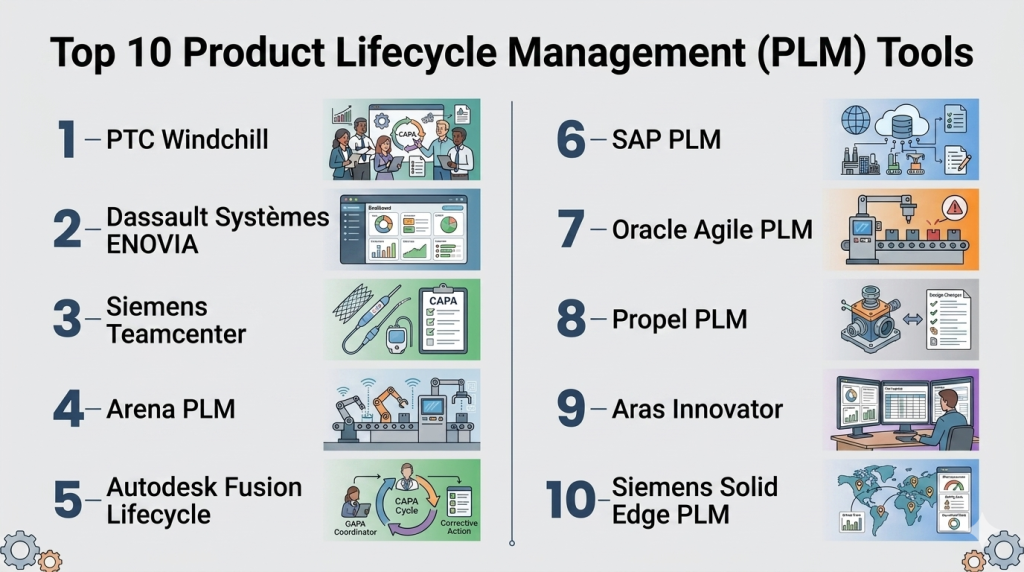
Top 10 Product Lifecycle Management (PLM) Tools
#1 — PTC Windchill
Short description: Enterprise-grade PLM with advanced CAD integrations, change management, and product data governance for engineering-heavy industries.
Key Features
- CAD integration and version control
- Change and configuration management
- BOM management and product data tracking
- Workflow automation and approvals
- Collaboration dashboards and reporting
- Compliance tracking for regulated industries
Pros
- Strong enterprise-level capabilities
- Deep CAD and engineering integration
Cons
- Complex setup and learning curve
- Higher cost for smaller organizations
Platforms / Deployment
- Web / Windows / Cloud / Hybrid
Security & Compliance
- SSO/SAML, RBAC, audit logs
- ISO 9001, ISO 13485, ITAR
Integrations & Ecosystem
Integrates with CAD tools, ERP, and QMS for seamless product data flow.
- CAD systems (Creo, SolidWorks)
- ERP platforms
- API access for custom workflows
Support & Community
- Enterprise support and professional services
- Extensive documentation and training
- Active global user community
#2 — Dassault Systèmes ENOVIA
Short description: Collaborative PLM with lifecycle governance, project management, and regulatory compliance features suitable for global enterprises.
Key Features
- Product data and BOM management
- Collaboration across R&D, supply chain, and manufacturing
- Change management workflows
- Compliance and audit tracking
- Analytics and KPI dashboards
Pros
- Highly configurable for large organizations
- Strong collaboration tools
Cons
- Steep learning curve
- Cost-intensive for SMBs
Platforms / Deployment
- Web / Cloud / Hybrid
Security & Compliance
- SSO, encryption, audit logs
- ISO 9001, ISO 13485
Integrations & Ecosystem
- CAD, ERP, and QMS systems
- API access for custom integrations
- PLM ecosystem apps
Support & Community
- 24/7 enterprise support
- Training programs
- Large professional community
#3 — Siemens Teamcenter
Short description: Centralizes product data, integrates with CAD, and streamlines workflows from design to manufacturing for enterprises in engineering-heavy industries.
Key Features
- Product data and document management
- Change and configuration management
- BOM and lifecycle management
- CAD integration and visualization
- Workflow automation and reporting
Pros
- Scalable for global operations
- Strong engineering and CAD support
Cons
- Complex configuration
- Implementation requires expertise
Platforms / Deployment
- Web / Windows / Cloud / Hybrid
Security & Compliance
- SSO, encryption, audit trails
- ISO 9001, ISO 13485
Integrations & Ecosystem
- CAD systems (Solid Edge, NX)
- ERP and MES
- API and extension support
Support & Community
- Enterprise support packages
- Knowledge base and training
- Active user forums
#4 — Arena PLM
Short description: Cloud-native solution for SMBs and mid-market companies, providing product data management and collaboration without heavy IT overhead.
Key Features
- Cloud-based PLM for distributed teams
- BOM and document control
- Change management workflows
- Supplier collaboration
- Reporting dashboards
Pros
- Quick deployment
- Intuitive and user-friendly interface
Cons
- Limited enterprise customization
- Some advanced analytics not included
Platforms / Deployment
- Web / Cloud
Security & Compliance
- MFA, encryption, audit logs
- ISO 9001, FDA 21 CFR Part 11
Integrations & Ecosystem
- ERP and QMS integration
- Supplier portals
- API support
Support & Community
- Standard support tiers
- Online training resources
- Growing community
#5 — Autodesk Fusion Lifecycle
Short description: Cloud PLM with strong CAD integrations, process automation, and flexible workflows suitable for mid-market engineering teams.
Key Features
- Product and BOM management
- Change and issue tracking
- Workflow automation
- CAD integrations
- Collaboration and reporting dashboards
Pros
- Cloud-first and mobile-friendly
- Easy to configure for mid-market companies
Cons
- Less suited for large-scale enterprises
- Limited compliance features
Platforms / Deployment
- Web / Cloud / iOS / Android
Security & Compliance
- MFA, encryption, audit logs
- ISO 9001
Integrations & Ecosystem
- Autodesk CAD tools
- ERP and QMS
- API-enabled workflows
Support & Community
- Documentation and online support
- Training resources
- Active user community
#6 — SAP PLM
Short description: Integrates with SAP ERP to manage product data, engineering changes, and compliance for enterprises with large-scale operations.
Key Features
- Product data and BOM management
- Change and release management
- Workflow automation
- Compliance tracking
- Analytics dashboards
Pros
- Strong ERP integration
- Enterprise-grade features
Cons
- Complexity for implementation
- Less agile for small teams
Platforms / Deployment
- Web / Cloud / Hybrid
Security & Compliance
- SSO, audit logs, encryption
- ISO 9001, ISO 13485
Integrations & Ecosystem
- SAP ERP
- CAD and QMS systems
- API and extension support
Support & Community
- Enterprise support
- Professional services
- Large global community
#7 — Oracle Agile PLM
Short description: Provides product lifecycle governance, collaboration, and compliance tracking for large manufacturing enterprises.
Key Features
- Product and BOM management
- Change management and workflow automation
- Supplier and quality integration
- Compliance reporting
- Analytics dashboards
Pros
- Strong enterprise features
- Robust integration ecosystem
Cons
- High learning curve
- Expensive for small teams
Platforms / Deployment
- Web / Cloud / Hybrid
Security & Compliance
- SSO, encryption, audit logs
- ISO 9001, FDA 21 CFR Part 11
Integrations & Ecosystem
- ERP, CAD, and QMS integration
- Supplier portals
- API and extension capabilities
Support & Community
- Enterprise support
- Knowledge base and professional training
- Large user community
#8 — Propel PLM
Short description: Cloud PLM with built-in Salesforce integration, ideal for companies needing product data management and collaboration tied to CRM processes.
Key Features
- Cloud-based PLM
- BOM and document control
- Change management workflows
- CRM integration
- Analytics dashboards
Pros
- Tight Salesforce integration
- Easy cloud deployment
Cons
- Less suited for heavy engineering CAD needs
- Limited enterprise customization
Platforms / Deployment
- Web / Cloud
Security & Compliance
- MFA, encryption, audit logs
- ISO 9001
Integrations & Ecosystem
- Salesforce
- ERP integration
- API support
Support & Community
- Standard support tiers
- Documentation and training
- Growing community
#9 — Aras Innovator
Short description: Flexible PLM with open architecture for enterprises seeking customization, scalability, and integration across complex systems.
Key Features
- Open architecture PLM
- Product data and BOM management
- Workflow and change management
- Compliance tracking
- Integration with CAD and ERP
Pros
- Highly customizable
- Scales for complex enterprises
Cons
- Requires skilled administrators
- Complex initial setup
Platforms / Deployment
- Web / Cloud / Hybrid
Security & Compliance
- SSO, encryption, audit logs
- ISO 9001, ISO 13485
Integrations & Ecosystem
- CAD, ERP, and QMS
- API-enabled customizations
- Enterprise ecosystem
Support & Community
- Enterprise support packages
- Professional services
- Active user community
#10 — Siemens Solid Edge PLM
Short description: PLM providing product data management and collaboration tools optimized for engineering and manufacturing teams using Siemens CAD solutions.
Key Features
- CAD data and document management
- Change management and approvals
- Collaboration tools
- BOM and lifecycle reporting
- Workflow automation
Pros
- Strong CAD integration
- Engineering-focused
Cons
- Limited scalability outside Siemens ecosystem
- Setup may require technical support
Platforms / Deployment
- Web / Windows / Cloud
Security & Compliance
- MFA, audit logs, encryption
- ISO 9001
Integrations & Ecosystem
- Siemens CAD (Solid Edge, NX)
- ERP and QMS
- API extensions
Support & Community
- Documentation and support
- Professional services
- Community forums
Comparison Table (Top 10)
| Tool Name | Best For | Platforms Supported | Deployment | Standout Feature | Public Rating |
|---|---|---|---|---|---|
| PTC Windchill | Engineering-heavy enterprises | Web | Cloud/Hybrid | CAD integration | N/A |
| Dassault ENOVIA | Large global enterprises | Web | Cloud/Hybrid | Collaboration & governance | N/A |
| Siemens Teamcenter | Manufacturing enterprises | Web | Cloud/Hybrid | Global scalability | N/A |
| Arena PLM | SMB & mid-market | Web | Cloud | Cloud-native ease-of-use | N/A |
| Autodesk Fusion Lifecycle | Mid-market engineering | Web | Cloud/iOS/Android | CAD integration & automation | N/A |
| SAP PLM | Large-scale enterprise | Web | Cloud/Hybrid | ERP integration | N/A |
| Oracle Agile PLM | Enterprise manufacturing | Web | Cloud/Hybrid | Workflow automation | N/A |
| Propel PLM | Companies using Salesforce | Web | Cloud | CRM integration | N/A |
| Aras Innovator | Highly customized enterprises | Web | Cloud/Hybrid | Open architecture | N/A |
| Siemens Solid Edge PLM | Engineering & manufacturing | Web/Windows | Cloud | Siemens CAD integration | N/A |
Evaluation & Scoring of PLM Tools
| Tool Name | Core (25%) | Ease (15%) | Integrations (15%) | Security (10%) | Performance (10%) | Support (10%) | Value (15%) | Weighted Total (0–10) |
|---|---|---|---|---|---|---|---|---|
| PTC Windchill | 9 | 7 | 9 | 9 | 9 | 8 | 7 | 8.3 |
| ENOVIA | 9 | 7 | 8 | 9 | 9 | 8 | 6 | 8.1 |
| Teamcenter | 9 | 7 | 8 | 9 | 9 | 8 | 6 | 8.1 |
| Arena PLM | 7 | 9 | 7 | 8 | 8 | 7 | 7 | 7.6 |
| Fusion Lifecycle | 8 | 8 | 7 | 8 | 8 | 7 | 7 | 7.7 |
| SAP PLM | 9 | 7 | 9 | 9 | 9 | 8 | 6 | 8.2 |
| Oracle Agile PLM | 9 | 7 | 8 | 9 | 9 | 8 | 6 | 8.1 |
| Propel PLM | 7 | 9 | 7 | 8 | 8 | 7 | 7 | 7.6 |
| Aras Innovator | 8 | 7 | 9 | 8 | 8 | 7 | 7 | 7.8 |
| Solid Edge PLM | 8 | 8 | 7 | 8 | 8 | 7 | 7 | 7.7 |
Which PLM Tool Is Right for You?
Solo / Freelancer
Cloud-based PLM like Arena PLM or Propel PLM is ideal for lightweight projects and SMB use.
SMB
Mid-market teams benefit from Fusion Lifecycle or Arena PLM for ease-of-use and CAD integration.
Mid-Market
PTC Windchill or Teamcenter provide deeper CAD and workflow support for growing engineering teams.
Enterprise
ENOVIA, SAP PLM, or Aras Innovator serve multinational operations with complex integrations and governance needs.
Budget vs Premium
Budget tools focus on ease-of-use and core data management. Premium platforms deliver advanced analytics, CAD integrations, and enterprise-scale workflows.
Feature Depth vs Ease of Use
Enterprise tools offer more configurability but require training. SaaS options prioritize simplicity and faster adoption.
Integrations & Scalability
Select tools that connect to ERP, QMS, and CAD systems for scalable and consistent product management.
Security & Compliance
Enterprises should prioritize solutions with role-based access, audit trails, and ISO/FDA compliance.
Frequently Asked Questions (FAQs)
1. What is PLM software?
PLM software manages the full lifecycle of a product, centralizing data, workflows, and collaboration from concept to retirement.
2. What pricing models exist?
PLM pricing typically follows subscription-based SaaS, enterprise licenses, or user-based models depending on scale and deployment.
3. Do PLM tools integrate with CAD and ERP systems?
Yes, most tools support CAD and ERP integrations to centralize product data and ensure workflow consistency.
4. Are PLM tools suitable for small teams?
Yes, cloud-native PLM platforms like Arena or Propel provide lightweight deployment for SMB teams.
5. How do PLM tools ensure compliance?
They provide audit trails, version control, and workflow governance aligned with ISO and industry regulations.
6. Can PLM tools be accessed on mobile devices?
Many modern PLM platforms offer mobile access, enabling remote review and approvals.
7. How long does implementation take?
Small teams can deploy cloud PLM in weeks, while enterprise setups may require months for full integration.
8. What are common mistakes in selecting PLM?
Choosing tools without considering CAD/ERP integration or overestimating internal IT capacity can lead to suboptimal outcomes.
9. How scalable are PLM tools?
Enterprise PLM platforms can scale across global operations, while SMB tools are optimized for mid-market and distributed teams.
10. Are there alternatives to PLM software?
Some teams use document management or project management tools, but these lack centralized product lifecycle governance and CAD integration.
Conclusion
PLM Tools are crucial for managing complex product data, collaboration, and compliance across the lifecycle. From cloud-native platforms for SMBs to enterprise-grade solutions, PLM enables organizations to reduce time-to-market, ensure data consistency, and enhance cross-functional efficiency. Selecting the right tool requires assessing workflow complexity, CAD/ERP integrations, team size, and regulatory requirements. Organizations should shortlist potential platforms, pilot workflows, and validate security and integration capabilities before full-scale adoption to achieve maximum ROI and product quality assurance.

Find Trusted Cardiac Hospitals
Compare heart hospitals by city and services — all in one place.
Explore Hospitals
Even with proper approvals, a new design, BOM update, or workflow change can create unexpected issues downstream. Teams should be able to identify what was changed, restore the previous version, and quickly understand which systems or teams were affected. This can reduce disruption when something goes wrong after a release.