Introduction
Contact management software helps businesses store, organize, update, segment, and use customer, prospect, partner, and vendor contact information from one central place. Instead of keeping contact details scattered across spreadsheets, inboxes, mobile phones, forms, and sales notes, these platforms create a structured contact database that teams can access and maintain with better accuracy. For modern businesses, contact management is no longer just about saving names and phone numbers. It now supports relationship tracking, sales follow-ups, marketing segmentation, customer communication, automation, data enrichment, reporting, and collaboration across teams.
Real-World Use Cases Include
- Sales pipeline management: Sales teams use contact management software to track prospects, monitor communication history, schedule follow-ups, and manage customer relationships throughout the sales cycle.
- Customer onboarding: Service businesses and SaaS companies use these tools to organize onboarding contacts, track implementation progress, and coordinate communication between teams and customers.
- Marketing segmentation: Marketing teams segment contacts based on demographics, behavior, engagement history, geography, industry, or purchase activity to run targeted campaigns.
- Recruitment and staffing: Recruiters manage candidate profiles, interview history, employer contacts, and follow-up schedules from a centralized contact database.
- Client relationship management: Agencies, consultants, lawyers, accountants, and freelancers use contact management systems to maintain long-term client communication and project relationships.
- Event and networking management: Businesses track conference attendees, partners, leads, and networking contacts while organizing follow-ups after events and meetings.
- Support and customer success coordination: Support teams use contact records to maintain ticket history, escalation notes, account ownership, and customer communication logs.
- Vendor and partner management: Organizations maintain supplier, distributor, contractor, and partner contact information for procurement, operations, and collaboration workflows.
- Field sales and remote workforce management: Mobile-friendly contact management tools help traveling sales representatives and field employees access customer information from anywhere.
- Cross-team collaboration: Shared contact databases improve coordination between sales, marketing, operations, finance, and support departments by maintaining a single source of customer information.
Evaluation Criteria for Buyers:
- Ease of contact creation and updates
- Duplicate detection and data cleaning
- Search, filtering, and segmentation
- CRM and email integrations
- Mobile access and usability
- Automation and reminders
- Team collaboration features
- Security and permission controls
- Reporting and activity history
- Scalability and pricing flexibility
Best for: Contact management software is best for sales teams, marketing teams, consultants, recruiters, agencies, small businesses, customer success teams, and growing organizations that need a reliable system to manage relationships and communication history.
Not ideal for: It may not be necessary for individuals with very few contacts or teams already using a full CRM where contact management is only one part of a larger sales, marketing, and service workflow.
Key Trends in Contact Management Software
- AI-assisted contact enrichment is becoming more common, helping teams improve incomplete records with company, role, location, and engagement context.
- Automation-first workflows are reducing manual follow-ups through reminders, sequences, task creation, and trigger-based updates.
- Unified customer views are becoming important as teams want one place to see emails, calls, meetings, notes, tickets, deals, and lifecycle status.
- Privacy and consent management is becoming a stronger requirement, especially for businesses handling marketing outreach and customer communication.
- Mobile-first relationship management is growing as sales teams, field teams, and consultants need access to contact data while traveling.
- Data quality controls such as duplicate merging, validation, lifecycle stages, and ownership rules are now essential.
- Integration depth matters more because contact data must sync with email platforms, calendars, marketing tools, support systems, and accounting apps.
- AI-powered prioritization is helping teams identify high-value contacts, stale relationships, and next-best-action opportunities.
- Lightweight CRM adoption is increasing among SMBs that need more than spreadsheets but less complexity than enterprise CRM platforms.
- Security and role-based access are becoming standard expectations for teams managing sensitive client or prospect information.
How We Selected These Tools
The tools below were selected using practical product and buyer-focused evaluation logic:
- Recognized market presence in contact management, CRM, sales, or relationship management.
- Strong core features for storing, organizing, searching, and updating contact records.
- Fit across different business sizes, including freelancers, SMBs, mid-market teams, and enterprises.
- Integration capabilities with email, calendar, marketing, sales, and collaboration tools.
- Usability for non-technical users and business teams.
- Automation features such as reminders, tasks, workflows, sequences, and activity tracking.
- Security signals such as access controls, authentication options, encryption, and admin settings where known.
- Scalability for growing contact databases and team collaboration.
- Support resources, documentation, onboarding options, and partner ecosystem.
- Balanced coverage across simple contact managers, CRM-style tools, and enterprise-ready platforms.
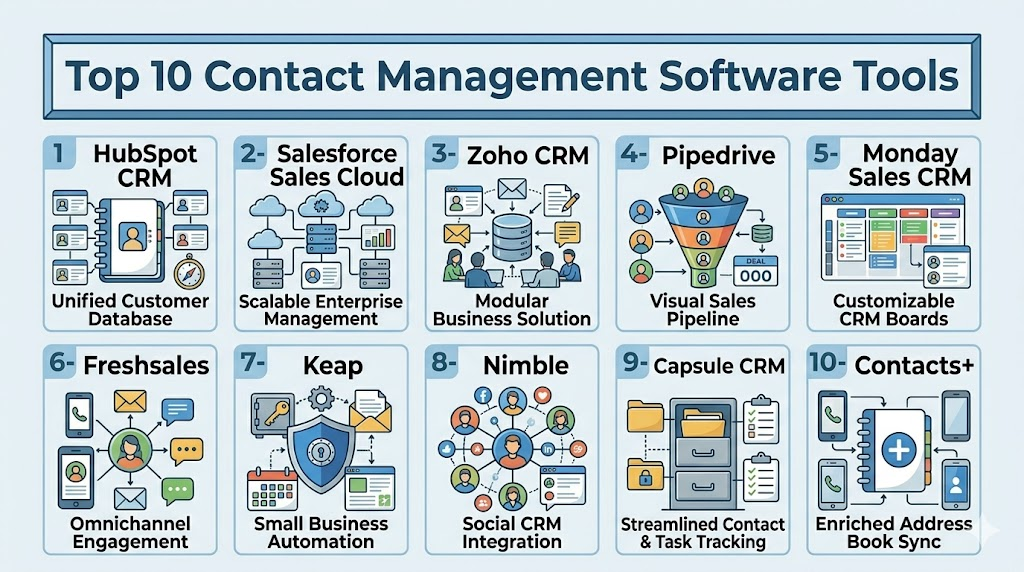
Top 10 Contact Management Software Tools
1- HubSpot CRM
Short description: HubSpot CRM is a widely used customer relationship platform with strong contact management at its core. It is suitable for sales, marketing, support, and operations teams that want a clean contact database connected to communication and pipeline workflows.
Key Features
- Centralized contact database with activity history
- Contact segmentation and list management
- Email tracking and meeting scheduling
- Deal, company, and ticket association
- Workflow automation on paid plans
- Marketing and sales pipeline connectivity
- Reporting dashboards and lifecycle tracking
Pros
- Easy for small teams to start and scale.
- Strong contact, email, marketing, and sales alignment.
- Large integration ecosystem and strong documentation.
Cons
- Advanced automation and reporting may require higher-tier plans.
- Pricing can increase as teams add more hubs and features.
- Customization may feel limited for highly complex enterprise workflows.
Platforms / Deployment
Web / iOS / Android
Cloud
Security & Compliance
HubSpot supports common business security features such as user permissions, MFA, SSO on certain plans, encryption, and audit-style controls depending on edition. Specific compliance coverage can vary by product plan and configuration.
Integrations & Ecosystem
HubSpot has a strong ecosystem for connecting contact records with sales, marketing, service, and operational tools. Its marketplace is useful for teams that want contact data to flow across their business stack.
- Gmail and Outlook
- Slack
- Zoom
- Salesforce
- Shopify
- Zapier
Support & Community
HubSpot offers extensive documentation, training resources, community forums, academy-style learning, onboarding options, and tiered support depending on subscription level.
2- Salesforce Sales Cloud
Short description: Salesforce Sales Cloud is an enterprise-grade CRM platform with powerful contact, account, opportunity, and activity management. It is best for organizations needing scalable customization, reporting, workflow automation, and ecosystem depth.
Key Features
- Contact and account management
- Lead and opportunity tracking
- Activity timeline and task management
- Advanced workflow automation
- Custom objects and fields
- Role-based access and enterprise administration
- Reporting, forecasting, and dashboard capabilities
Pros
- Highly scalable and customizable.
- Strong enterprise ecosystem and partner network.
- Deep reporting and automation capabilities.
Cons
- Can be complex to implement and administer.
- May require dedicated CRM admins or consultants.
- Cost can increase with add-ons and advanced features.
Platforms / Deployment
Web / iOS / Android
Cloud
Security & Compliance
Salesforce supports enterprise-grade controls such as SSO, MFA, encryption options, audit logs, permission sets, role hierarchy, and compliance programs. Specific availability depends on edition and configuration.
Integrations & Ecosystem
Salesforce has one of the largest CRM ecosystems, making it suitable for organizations that need contact data connected across marketing, support, finance, analytics, and custom applications.
- Slack
- Gmail and Outlook
- Marketing automation platforms
- ERP systems
- Data warehouses
- AppExchange ecosystem
Support & Community
Salesforce has extensive documentation, Trailhead learning resources, large community forums, implementation partners, and paid support tiers for enterprise customers.
3- Zoho CRM
Short description: Zoho CRM provides contact management, sales automation, pipeline tracking, and communication tools for SMBs and growing companies. It is especially useful for businesses already using the Zoho ecosystem.
Key Features
- Contact, lead, account, and deal management
- Workflow automation
- Email and telephony integrations
- Contact scoring and segmentation
- Sales pipeline tracking
- Custom fields and modules
- Reporting and dashboards
Pros
- Strong value for SMBs.
- Broad business suite integration.
- Flexible customization for many use cases.
Cons
- User interface may feel dense for new users.
- Advanced configuration can require setup time.
- Some integrations may work best within Zoho’s own ecosystem.
Platforms / Deployment
Web / iOS / Android
Cloud
Security & Compliance
Zoho CRM includes security features such as MFA, role-based access, encryption, audit logs, and administrative controls. Compliance details vary by service, region, and plan.
Integrations & Ecosystem
Zoho CRM connects naturally with Zoho’s broader suite and also supports integrations with common business tools for email, meetings, marketing, support, and finance.
- Zoho Mail
- Zoho Campaigns
- Zoho Desk
- Google Workspace
- Microsoft 365
- Zapier
Support & Community
Zoho provides documentation, help resources, onboarding materials, community forums, and paid support options depending on plan and region.
4- Pipedrive
Short description: Pipedrive is a sales-focused CRM that helps teams manage contacts, leads, deals, and follow-ups in a visual pipeline. It is best for sales teams that want simple contact tracking connected directly to revenue activities.
Key Features
- Contact and organization records
- Visual sales pipeline
- Activity reminders and follow-ups
- Email synchronization and tracking
- Lead management
- Automation workflows
- Sales reporting and forecasting
Pros
- Easy for sales teams to understand and adopt.
- Strong activity-based selling workflow.
- Clean interface focused on pipeline execution.
Cons
- Less suitable for complex enterprise CRM needs.
- Marketing and service features are more limited than full CRM suites.
- Advanced automation may require higher plans.
Platforms / Deployment
Web / iOS / Android
Cloud
Security & Compliance
Pipedrive provides business security features such as encryption, permission management, MFA, and admin controls. Specific compliance claims should be verified by plan and region.
Integrations & Ecosystem
Pipedrive integrates with email, calling, lead generation, marketing, and workflow tools, making it useful for sales teams that need contact activity linked to pipeline movement.
- Gmail and Outlook
- Slack
- Zoom
- Mailchimp
- Zapier
- Lead generation tools
Support & Community
Pipedrive offers product documentation, onboarding resources, support tiers, sales education content, and an active marketplace ecosystem.
5- Monday Sales CRM
Short description: Monday Sales CRM is a flexible CRM built on the Monday.com work management platform. It works well for teams that want contact management, deal tracking, workflow automation, and project visibility in one customizable workspace.
Key Features
- Contact, lead, and account boards
- Customizable pipelines
- Automation recipes
- Email tracking and activity logging
- Team collaboration views
- Dashboards and reporting
- No-code workflow customization
Pros
- Highly visual and flexible.
- Good for teams combining sales and operations.
- Easy customization without heavy technical setup.
Cons
- May require careful setup to avoid messy boards.
- Less traditional CRM depth than enterprise CRM systems.
- Advanced reporting and automation may require higher plans.
Platforms / Deployment
Web / iOS / Android
Cloud
Security & Compliance
Monday.com supports common business security features such as SSO on certain plans, MFA, permissions, encryption, and admin controls. Compliance details vary by plan and product configuration.
Integrations & Ecosystem
Monday Sales CRM connects with communication, email, collaboration, marketing, and automation tools. Its strength is flexible workflow design around contact and deal data.
- Gmail and Outlook
- Slack
- Microsoft Teams
- Zoom
- HubSpot
- Zapier
Support & Community
Monday.com provides a strong knowledge base, templates, webinars, onboarding resources, community content, and tiered customer support.
6- Freshsales
Short description: Freshsales, from Freshworks, is a CRM platform focused on contact management, sales engagement, lead tracking, and pipeline management. It is useful for SMB and mid-market sales teams that want built-in communication and automation features.
Key Features
- Contact and account management
- Lead scoring
- Built-in email and phone capabilities
- Sales pipeline tracking
- Workflow automation
- AI-assisted insights in supported plans
- Reporting and dashboards
Pros
- Good balance of usability and CRM capability.
- Useful built-in communication tools.
- Strong fit for growing sales teams.
Cons
- Some advanced features depend on plan level.
- Customization may not match larger enterprise CRM platforms.
- Ecosystem depth is smaller than Salesforce or HubSpot.
Platforms / Deployment
Web / iOS / Android
Cloud
Security & Compliance
Freshsales includes security features such as encryption, role-based access, MFA options, audit logs on certain plans, and admin controls. Specific compliance coverage varies by Freshworks product and plan.
Integrations & Ecosystem
Freshsales works well with Freshworks products and common business applications, helping teams connect contact records with support, marketing, communication, and productivity workflows.
- Freshdesk
- Freshmarketer
- Google Workspace
- Microsoft 365
- Slack
- Zapier
Support & Community
Freshworks provides documentation, product guides, onboarding resources, support plans, and community content for business users.
7- Keap
Short description: Keap combines contact management, CRM, marketing automation, and sales follow-up tools for small businesses. It is especially useful for service providers, agencies, consultants, and local businesses that want automation around client relationships.
Key Features
- Contact records and segmentation
- Email marketing automation
- Sales pipeline management
- Appointment scheduling
- Invoicing and payment support
- Automated follow-up workflows
- Client activity tracking
Pros
- Strong automation for small businesses.
- Combines CRM and marketing workflows.
- Useful for service-based businesses.
Cons
- May be more than needed for basic contact storage.
- Setup can require planning for automation flows.
- Pricing may be higher than simple contact managers.
Platforms / Deployment
Web / iOS / Android
Cloud
Security & Compliance
Keap provides standard business security controls such as account protection and data security features. Specific compliance details should be treated as varies / N/A unless confirmed for the selected plan.
Integrations & Ecosystem
Keap integrates with business tools commonly used by small businesses for payments, forms, scheduling, marketing, and workflow automation.
- Gmail
- Outlook
- Zapier
- Payment tools
- Form tools
- Scheduling tools
Support & Community
Keap provides documentation, onboarding resources, customer support, educational content, and small-business-focused training materials.
8- Nimble
Short description: Nimble is a relationship-focused CRM designed to bring contacts, social profiles, email history, and business context together. It is useful for consultants, sales professionals, and small teams that prioritize relationship intelligence.
Key Features
- Unified contact records
- Social profile enrichment
- Email and calendar integration
- Relationship history tracking
- Contact segmentation
- Task and follow-up reminders
- Browser extension support
Pros
- Strong relationship context.
- Simple and practical for small teams.
- Useful contact enrichment and profile views.
Cons
- Less suitable for complex enterprise sales operations.
- Advanced automation is limited compared with larger CRM suites.
- Reporting depth may not satisfy larger teams.
Platforms / Deployment
Web / iOS / Android
Cloud
Security & Compliance
Nimble provides standard cloud security features and access controls. Detailed compliance information should be verified directly for specific business requirements.
Integrations & Ecosystem
Nimble integrates with email, calendar, productivity, and social tools, making it useful for professionals who build relationships across multiple communication channels.
- Gmail
- Outlook
- Microsoft 365
- Google Workspace
- Social profile tools
- Browser extensions
Support & Community
Nimble offers documentation, support resources, onboarding content, and educational material focused on relationship-based selling.
9- Capsule CRM
Short description: Capsule CRM is a simple CRM and contact management tool for small businesses that need relationship tracking without heavy complexity. It focuses on contacts, tasks, opportunities, and lightweight pipeline management.
Key Features
- Contact and organization management
- Sales opportunity tracking
- Task and activity management
- Custom fields and tags
- Email integration
- Pipeline reporting
- Team collaboration features
Pros
- Simple and easy to use.
- Good fit for small businesses.
- Clean contact and task management workflow.
Cons
- Less powerful than enterprise CRM platforms.
- Advanced automation may be limited.
- Some teams may outgrow its functionality.
Platforms / Deployment
Web / iOS / Android
Cloud
Security & Compliance
Capsule CRM includes standard business security features such as user permissions and secure cloud access. Specific compliance details should be treated as varies / N/A unless confirmed.
Integrations & Ecosystem
Capsule connects with small business productivity, accounting, email, and workflow tools, helping teams keep contact data connected to daily operations.
- Google Workspace
- Microsoft 365
- Xero
- Mailchimp
- Zapier
- Accounting and productivity tools
Support & Community
Capsule provides documentation, help resources, onboarding support, and practical guidance for small businesses.
10- Contacts+
Short description: Contacts+ is a contact management platform focused on organizing, syncing, deduplicating, and enriching personal and professional contacts. It is useful for professionals and small teams that want cleaner address books across devices and platforms.
Key Features
- Contact synchronization
- Duplicate detection and merging
- Contact enrichment
- Business card scanning
- Tagging and organization
- Cross-platform contact access
- Address book cleanup
Pros
- Strong contact cleanup and syncing.
- Useful for professionals with scattered contacts.
- Simple approach to personal and business contact organization.
Cons
- Not a full CRM for complex sales workflows.
- Limited pipeline and automation depth.
- May not fit larger enterprise sales operations.
Platforms / Deployment
Web / iOS / Android
Cloud
Security & Compliance
Contacts+ provides standard account and data protection features. Detailed enterprise compliance information is not publicly stated.
Integrations & Ecosystem
Contacts+ connects with common contact sources and device ecosystems, helping users unify fragmented address books.
- Google Contacts
- iCloud
- Microsoft contacts
- Mobile address books
- Email contact sources
Support & Community
Contacts+ provides help resources, documentation, support channels, and user guidance focused on contact organization and cleanup.
Comparison Table
| Tool Name | Best For | Platform Supported | Deployment | Standout Feature | Public Rating |
|---|---|---|---|---|---|
| HubSpot CRM | SMBs and growing revenue teams | Web, iOS, Android | Cloud | Contact management connected to sales and marketing | N/A |
| Salesforce Sales Cloud | Enterprise CRM and complex sales teams | Web, iOS, Android | Cloud | Deep customization and ecosystem scale | N/A |
| Zoho CRM | SMBs needing affordable CRM features | Web, iOS, Android | Cloud | Broad Zoho ecosystem integration | N/A |
| Pipedrive | Sales teams focused on pipeline execution | Web, iOS, Android | Cloud | Visual sales pipeline and activity tracking | N/A |
| Monday Sales CRM | Teams wanting flexible no-code CRM workflows | Web, iOS, Android | Cloud | Customizable CRM boards and automation | N/A |
| Freshsales | Growing sales teams needing built-in engagement | Web, iOS, Android | Cloud | Contact management with communication tools | N/A |
| Keap | Small businesses and service providers | Web, iOS, Android | Cloud | CRM plus marketing automation | N/A |
| Nimble | Relationship-focused professionals | Web, iOS, Android | Cloud | Social and relationship intelligence | N/A |
| Capsule CRM | Small businesses needing simple CRM | Web, iOS, Android | Cloud | Lightweight contact and task management | N/A |
| Contacts+ | Professionals needing contact cleanup and sync | Web, iOS, Android | Cloud | Contact deduplication and address book cleanup | N/A |
Evaluation and Scoring of Contact Management Software
| Tool Name | Core 25% | Ease 15% | Integrations 15% | Security 10% | Performance 10% | Support 10% | Value 15% | Weighted Total |
|---|---|---|---|---|---|---|---|---|
| HubSpot CRM | 9 | 9 | 10 | 8 | 9 | 9 | 8 | 8.90 |
| Salesforce Sales Cloud | 10 | 7 | 10 | 9 | 9 | 9 | 7 | 8.75 |
| Zoho CRM | 8 | 8 | 8 | 8 | 8 | 8 | 9 | 8.15 |
| Pipedrive | 8 | 9 | 8 | 8 | 8 | 8 | 8 | 8.15 |
| Monday Sales CRM | 8 | 9 | 8 | 8 | 8 | 8 | 8 | 8.15 |
| Freshsales | 8 | 8 | 8 | 8 | 8 | 8 | 8 | 8.00 |
| Keap | 8 | 7 | 7 | 7 | 8 | 8 | 7 | 7.45 |
| Nimble | 7 | 8 | 7 | 7 | 8 | 7 | 8 | 7.45 |
| Capsule CRM | 7 | 9 | 7 | 7 | 8 | 7 | 8 | 7.65 |
| Contacts+ | 7 | 8 | 6 | 6 | 8 | 7 | 8 | 7.15 |
Which Contact Management Software Tool Is Right for You?
Solo / Freelancer
Solo users usually need a tool that is simple, affordable, and easy to maintain. Contacts+, Nimble, Capsule CRM, and Google-connected workflows can work well for individuals who mainly need clean contact records, reminders, email history, and follow-up organization. Consultants, coaches, recruiters, and freelancers should prioritize mobile access, easy tagging, email integration, and duplicate cleanup rather than heavy enterprise features.
SMB
Small businesses often need more than a contact list but less complexity than a full enterprise CRM. HubSpot CRM, Zoho CRM, Pipedrive, Capsule CRM, and Keap are strong options depending on the business model. Sales-led SMBs may prefer Pipedrive, service-based businesses may like Keap, and teams wanting all-around contact, marketing, and pipeline features may prefer HubSpot or Zoho.
Mid-Market
Mid-market teams usually require better automation, reporting, permissions, and integrations. HubSpot CRM, Freshsales, Monday Sales CRM, Pipedrive, and Zoho CRM can work well for this segment. Buyers should focus on workflow automation, sales process customization, reporting depth, admin controls, and integration with marketing, support, and finance systems.
Enterprise
Enterprises typically need advanced customization, governance, access controls, reporting, integration architecture, and scalable administration. Salesforce Sales Cloud is a strong fit for complex enterprise use cases. HubSpot can also work for many growth-oriented organizations, especially when sales and marketing alignment is a priority. Enterprise buyers should validate security, compliance, data migration, API limits, and implementation support before purchasing.
Budget vs Premium
Budget-conscious teams should compare Zoho CRM, Capsule CRM, Contacts+, and basic CRM plans from broader platforms. These tools can provide solid contact organization without overwhelming costs. Premium platforms like Salesforce and advanced HubSpot plans may offer stronger automation, reporting, ecosystem depth, and scalability, but the extra cost should be justified by business process complexity.
Feature Depth vs Ease of Use
If ease of use matters most, Capsule CRM, Pipedrive, Nimble, and Contacts+ are practical choices. If feature depth matters more, Salesforce, HubSpot, Zoho CRM, and Freshsales provide broader functionality. Teams should avoid choosing the most feature-rich tool if users will not adopt it. Contact management works only when data stays updated and teams actually use the system daily.
Integrations & Scalability
HubSpot, Salesforce, Zoho CRM, Monday Sales CRM, and Pipedrive are strong choices when integrations matter. Businesses should confirm whether the tool connects with email, calendar, marketing automation, forms, support systems, accounting platforms, and reporting tools. Scalability also depends on user permissions, workflow rules, API access, data volume, and customization flexibility.
Security & Compliance Needs
Security-focused buyers should evaluate MFA, SSO, encryption, audit logs, permission controls, data export policies, and compliance documentation. Enterprises and regulated industries should prioritize Salesforce, HubSpot, Zoho CRM, or platforms with clearly documented security controls. Smaller teams should still use MFA, define contact ownership rules, and regularly clean outdated or unnecessary contact data.
Frequently Asked Questions
1- What is contact management software?
Contact management software is a tool that stores and organizes names, emails, phone numbers, companies, notes, communication history, and relationship details. It helps teams manage contacts more reliably than spreadsheets or scattered address books.
2- Is contact management software the same as CRM?
Not always. Contact management focuses mainly on organizing people and relationship details, while CRM usually adds sales pipelines, marketing automation, support workflows, reporting, and revenue management features.
3- What is the best contact management software for small businesses?
HubSpot CRM, Zoho CRM, Capsule CRM, Pipedrive, and Keap are strong options for small businesses. The best choice depends on whether the business needs simple contact storage, sales tracking, marketing automation, or client follow-up workflows.
4- How much does contact management software cost?
Pricing varies widely. Some tools offer free or low-cost entry plans, while advanced CRM platforms charge based on users, features, automation, storage, and add-ons. Buyers should compare total cost, not just starting price.
5- What are common mistakes when choosing contact management software?
Common mistakes include choosing too many features, ignoring data cleanup, skipping user training, failing to define ownership rules, and not checking integrations before purchase. Poor adoption often creates more problems than the software solves.
6- Can contact management software integrate with email and calendars?
Yes. Most modern tools integrate with Gmail, Outlook, Microsoft 365, Google Workspace, calendars, meeting tools, and communication platforms. These integrations help teams track emails, meetings, tasks, and follow-ups from one place.
7- Is contact management software secure?
Most reputable platforms provide standard security controls such as encryption, access permissions, and authentication options. Businesses should still review MFA, SSO, audit logs, data retention, and compliance requirements before choosing a tool.
8- How long does implementation take?
Simple contact management tools can be set up quickly, especially for individuals or small teams. Larger CRM-style deployments may take longer because they involve data migration, field mapping, automation setup, permissions, integrations, and user training.
9- Can I migrate contacts from spreadsheets?
Yes. Most platforms allow importing contacts from CSV files or spreadsheet exports. Before migration, teams should clean duplicates, standardize fields, remove outdated contacts, and define required data fields.
10- What alternatives exist to contact management software?
Alternatives include spreadsheets, phone address books, email contact lists, project management tools, or full CRM systems. Spreadsheets may work for very small contact lists, but they become difficult to maintain as teams and relationships grow.
Conclusion
Contact management software is a foundation for better customer relationships, sales follow-up, marketing segmentation, and business communication. The right tool helps teams move away from scattered spreadsheets and disconnected address books toward a cleaner, more reliable contact database. HubSpot CRM and Salesforce are strong choices for organizations that need broad CRM capabilities, while Zoho CRM, Pipedrive, Freshsales, Monday Sales CRM, and Capsule CRM offer practical options for growing teams. Nimble and Contacts+ are useful for professionals who care about relationship context and contact cleanup, while Keap is valuable for small businesses needing automation around client follow-up. The best choice depends on your company size, workflow complexity, budget, integration needs, and security expectations. Start by shortlisting two or three platforms, test them with real contact data, validate email and calendar integrations, review security controls, and choose the one your team can maintain consistently.

Find Trusted Cardiac Hospitals
Compare heart hospitals by city and services — all in one place.
Explore Hospitals
I didn’t realize contact management tools could help organize relationships and communication so efficiently in one place.