Introduction
Container Platforms are software solutions that enable developers and IT teams to package applications and their dependencies into isolated, lightweight containers. This abstraction ensures consistent performance across multiple environments and simplifies deployment, scaling, and orchestration. In containerization has become a foundational element for cloud-native applications, microservices, and hybrid deployments, providing agility and operational efficiency for modern enterprises.
Real-world use cases include: deploying microservices architectures, automating continuous integration and continuous delivery (CI/CD) pipelines, running scalable web applications across hybrid clouds, isolating legacy and modern applications in development environments, and supporting edge computing workloads. Buyers evaluating container platforms should consider features such as orchestration, multi-cloud support, resource optimization, security controls, monitoring, integrations, automation, developer tooling, scalability, and pricing.
Best for: Developers, DevOps teams, IT administrators, cloud architects, and enterprises running microservices or hybrid cloud applications.
Not ideal for: Organizations with minimal software complexity, single-server applications, or those fully relying on managed PaaS/SaaS without containerization needs.
Key Trends in Container Platforms
- Native Kubernetes integration for orchestration and scaling
- AI and ML-driven workload optimization and predictive scaling
- Multi-cloud and hybrid-cloud support for portability
- Enhanced security through role-based access, policies, and encryption
- Automated CI/CD pipelines and deployment workflows
- GPU containerization for high-performance workloads
- Serverless and edge container deployment support
- Subscription and usage-based pricing models
- Observability and real-time analytics dashboards
- Interoperability with DevOps tooling and infrastructure-as-code
How We Selected These Tools (Methodology)
- Market adoption and overall mindshare in enterprises and SMBs
- Completeness of container orchestration and management features
- Reliability and performance indicators (uptime, latency, scaling)
- Security posture and compliance certifications
- Ecosystem and integration capabilities with CI/CD, cloud, and monitoring tools
- Suitability for multiple company sizes and industry segments
- Support and community engagement
- Automation and AI-powered management features
- Total cost of ownership and licensing flexibility
- Ease of deployment and operational management
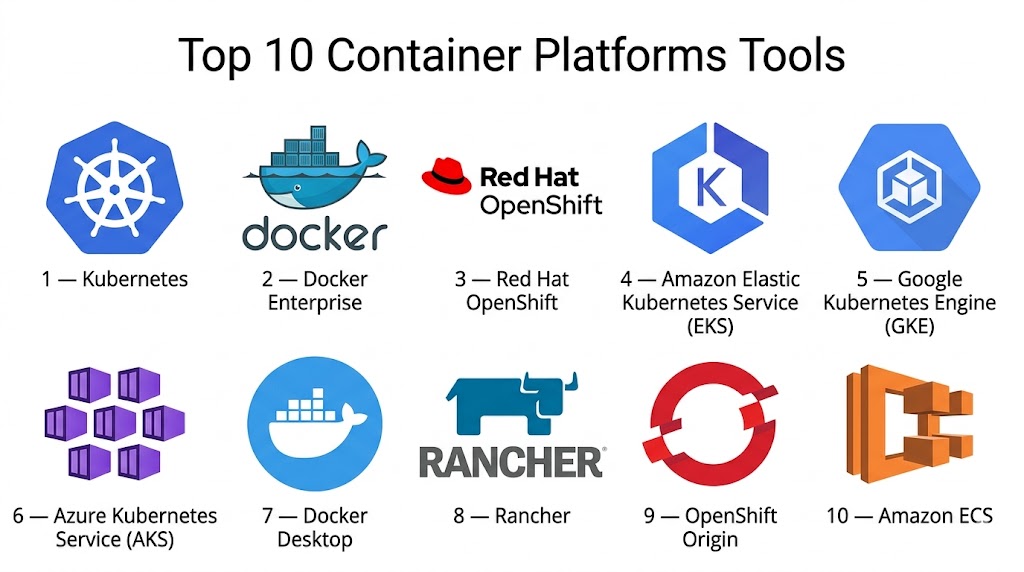
Top 10 Container Platforms Tools
#1 — Kubernetes
Short description: Kubernetes is the leading open-source container orchestration platform, enabling automated deployment, scaling, and management of containerized applications. Ideal for enterprises and cloud-native developers.
Key Features
- Automated container deployment, scaling, and rollback
- Self-healing and auto-recovery of workloads
- Multi-cloud and hybrid deployment support
- Advanced networking and service discovery
- Persistent storage management
- RBAC, secrets management, and security policies
- API-driven automation and extensibility
Pros
- Industry standard for container orchestration
- Highly scalable for large applications
Cons
- Steep learning curve
- Operational complexity for small teams
Platforms / Deployment
- Linux, Windows
- Cloud / On-premises / Hybrid
Security & Compliance
- RBAC, encryption, secrets management
- Not publicly stated
Integrations & Ecosystem
- Works with Helm, Prometheus, Istio
- Cloud provider integrations: AWS, Azure, GCP
- APIs for CI/CD pipelines
Support & Community
- Large global community
- Comprehensive documentation and tutorials
- Multiple vendor-backed support options
#2 — Docker Enterprise
Short description: Docker Enterprise provides enterprise-grade container management and orchestration, building on Docker Engine with security, governance, and multi-cloud support.
Key Features
- Secure container runtime
- Integrated orchestration with Kubernetes
- Image signing and vulnerability scanning
- Multi-cloud deployment support
- Role-based access controls
- Monitoring and logging
- Automated CI/CD integrations
Pros
- Strong container ecosystem and tooling
- Focus on security and compliance
Cons
- Licensing can be complex
- Some features require Kubernetes knowledge
Platforms / Deployment
- Linux, Windows
- Cloud / On-premises / Hybrid
Security & Compliance
- SSO/SAML, MFA, image signing
- Not publicly stated
Integrations & Ecosystem
- CI/CD tools: Jenkins, GitLab
- Cloud providers: AWS, Azure, GCP
- APIs for automation and orchestration
Support & Community
- Vendor support tiers
- Active enterprise community
#3 — Red Hat OpenShift
Short description: OpenShift is a Kubernetes-based container platform providing enterprise-grade orchestration, CI/CD, and developer tools. Suited for hybrid and multi-cloud enterprise deployments.
Key Features
- Kubernetes-native orchestration
- Built-in CI/CD pipelines
- Multi-cloud support
- Developer tooling and templates
- Enterprise security and RBAC
- Monitoring and logging
- GPU-enabled workloads
Pros
- Enterprise-ready with strong security
- Simplified developer experience
Cons
- Higher cost than open-source alternatives
- Steeper learning curve for new teams
Platforms / Deployment
- Linux
- Cloud / On-premises / Hybrid
Security & Compliance
- RBAC, MFA, encryption
- Not publicly stated
Integrations & Ecosystem
- Jenkins, Tekton, CI/CD tools
- Cloud providers: AWS, Azure, GCP
- APIs for automation and DevOps
Support & Community
- Red Hat support tiers
- Active open-source community
#4 — Amazon Elastic Kubernetes Service (EKS)
Short description: Amazon EKS is a managed Kubernetes service, enabling enterprises to run containerized workloads in AWS without managing control planes.
Key Features
- Fully managed Kubernetes control plane
- Automatic scaling and updates
- Integration with AWS services (IAM, VPC, CloudWatch)
- High availability across multiple regions
- GPU support for compute-intensive workloads
- CI/CD pipeline integration
- Automated patching and security updates
Pros
- Reduces operational overhead
- Deep integration with AWS ecosystem
Cons
- Limited to AWS cloud
- Vendor lock-in concerns
Platforms / Deployment
- Linux, Windows
- Cloud
Security & Compliance
- IAM integration, RBAC, encryption
- Not publicly stated
Integrations & Ecosystem
- AWS CloudWatch, CodePipeline, IAM
- Helm charts for application deployment
- APIs for automation
Support & Community
- AWS support tiers
- Large community forums
#5 — Google Kubernetes Engine (GKE)
Short description: GKE is a managed Kubernetes platform on Google Cloud, providing auto-scaling, upgrades, and integrated monitoring for containerized applications.
Key Features
- Fully managed Kubernetes control plane
- Auto-scaling and cluster upgrades
- Multi-zone high availability
- GPU support
- Integrated monitoring and logging
- CI/CD pipeline integration
- Networking and security policies
Pros
- Seamless GCP integration
- Simplified operations
Cons
- Cloud-specific, limited multi-cloud portability
- Learning curve for Kubernetes
Platforms / Deployment
- Linux, Windows
- Cloud
Security & Compliance
- RBAC, encryption
- Not publicly stated
Integrations & Ecosystem
- GCP services: Cloud Build, IAM
- CI/CD tools and APIs
- Helm charts
Support & Community
- Google Cloud support tiers
- Active community forums
#6 — Azure Kubernetes Service (AKS)
Short description: AKS provides managed Kubernetes for Microsoft Azure, enabling enterprise container orchestration with CI/CD, scaling, and integrated monitoring.
Key Features
- Managed Kubernetes control plane
- Auto-scaling and rolling upgrades
- Azure integration for identity and networking
- Monitoring with Azure Monitor
- GPU and high-performance workloads
- CI/CD pipeline integration
- Security and RBAC policies
Pros
- Tight integration with Azure ecosystem
- Simplified Kubernetes management
Cons
- Limited outside Azure cloud
- Azure-specific learning curve
Platforms / Deployment
- Linux, Windows
- Cloud
Security & Compliance
- RBAC, MFA, encryption
- Not publicly stated
Integrations & Ecosystem
- Azure DevOps, Azure Monitor
- Cloud storage and networking services
- APIs for automation
Support & Community
- Azure support tiers
- Active community
#7 — Docker Desktop
Short description: Docker Desktop provides container management for developers on local machines, enabling containerized development, testing, and deployment.
Key Features
- Local container runtime
- Kubernetes integration
- Multi-OS support (Windows, macOS)
- Developer tooling and CLI support
- Image management and versioning
- Networking and volume management
Pros
- Easy local development environment
- Simplifies container workflows
Cons
- Not suitable for enterprise-scale clusters
- Resource intensive on local machines
Platforms / Deployment
- Windows, macOS
- Self-hosted
Security & Compliance
- Container image signing
- Not publicly stated
Integrations & Ecosystem
- CI/CD pipelines via Docker CLI
- Kubernetes integration
- APIs for automation
Support & Community
- Vendor documentation
- Active developer community
#8 — Rancher
Short description: Rancher is a Kubernetes management platform that simplifies cluster deployment, multi-cluster management, and security controls across clouds.
Key Features
- Multi-cluster Kubernetes management
- Role-based access control
- Monitoring and logging integration
- CI/CD integration
- Multi-cloud and hybrid support
- GPU and high-performance workload support
Pros
- Simplifies complex Kubernetes operations
- Supports multi-cloud deployments
Cons
- Adds an additional layer of management
- Learning curve for Kubernetes novices
Platforms / Deployment
- Linux
- Cloud / On-premises / Hybrid
Security & Compliance
- RBAC, encryption
- Not publicly stated
Integrations & Ecosystem
- CI/CD tools: Jenkins, GitLab
- Monitoring: Prometheus, Grafana
- APIs for automation
Support & Community
- Vendor support tiers
- Large open-source community
#9 — OpenShift Origin
Short description: OpenShift Origin (OKD) is the open-source upstream version of OpenShift, enabling container orchestration, CI/CD, and developer productivity features.
Key Features
- Kubernetes orchestration
- Integrated CI/CD pipelines
- Multi-cloud deployment
- Security policies and RBAC
- Developer templates and tooling
- GPU workload support
- Monitoring and logging
Pros
- Open-source flexibility
- Enterprise-grade features without licensing costs
Cons
- Community support only
- Requires Kubernetes expertise
Platforms / Deployment
- Linux
- Cloud / On-premises / Hybrid
Security & Compliance
- RBAC, MFA
- Not publicly stated
Integrations & Ecosystem
- Jenkins, Tekton, CI/CD pipelines
- Cloud provider integrations
- APIs for automation
Support & Community
- Community-driven support
- Active forums and resources
#10 — Amazon ECS
Short description: Amazon Elastic Container Service (ECS) is a fully managed container platform for deploying and scaling Docker containers on AWS.
Key Features
- Managed container orchestration
- Auto-scaling and high availability
- Integration with AWS IAM and VPC
- CI/CD pipeline support
- GPU workloads for compute-intensive tasks
- Monitoring with CloudWatch
Pros
- Fully managed, reduces operational overhead
- Seamless AWS ecosystem integration
Cons
- Limited portability outside AWS
- Vendor lock-in concerns
Platforms / Deployment
- Linux, Windows
- Cloud
Security & Compliance
- IAM, RBAC, encryption
- Not publicly stated
Integrations & Ecosystem
- AWS Cloud services: IAM, CloudWatch, CodePipeline
- Helm charts and APIs
- CI/CD tool integrations
Support & Community
- AWS support tiers
- Large community forums
Comparison Table (Top 10)
| Tool Name | Best For | Platform(s) Supported | Deployment | Standout Feature | Public Rating |
|---|---|---|---|---|---|
| Kubernetes | Enterprise orchestration | Linux, Windows | Cloud / On-prem / Hybrid | Open-source standard | N/A |
| Docker Enterprise | Enterprise container management | Linux, Windows | Cloud / On-prem / Hybrid | Security and governance | N/A |
| Red Hat OpenShift | Hybrid/multi-cloud | Linux | Cloud / On-prem / Hybrid | Enterprise CI/CD | N/A |
| Amazon EKS | AWS workloads | Linux, Windows | Cloud | Managed Kubernetes | N/A |
| Google Kubernetes Engine | GCP workloads | Linux, Windows | Cloud | Auto-scaling and upgrades | N/A |
| Azure Kubernetes Service | Azure workloads | Linux, Windows | Cloud | Azure ecosystem integration | N/A |
| Docker Desktop | Local development | Windows, macOS | Self-hosted | Desktop container management | N/A |
| Rancher | Multi-cluster management | Linux | Cloud / On-prem / Hybrid | Multi-cluster orchestration | N/A |
| OpenShift Origin | Open-source upstream | Linux | Cloud / On-prem / Hybrid | CI/CD pipelines | N/A |
| Amazon ECS | AWS Docker workloads | Linux, Windows | Cloud | Fully managed orchestration | N/A |
Evaluation & Scoring of Container Platforms
| Tool Name | Core (25%) | Ease (15%) | Integrations (15%) | Security (10%) | Performance (10%) | Support (10%) | Value (15%) | Weighted Total (0–10) |
|---|---|---|---|---|---|---|---|---|
| Kubernetes | 9 | 6 | 9 | 7 | 9 | 7 | 8 | 8.0 |
| Docker Enterprise | 8 | 7 | 8 | 8 | 8 | 7 | 7 | 7.7 |
| Red Hat OpenShift | 8 | 7 | 8 | 8 | 8 | 7 | 7 | 7.8 |
| Amazon EKS | 8 | 8 | 7 | 8 | 8 | 7 | 8 | 7.9 |
| GKE | 8 | 8 | 8 | 8 | 8 | 7 | 8 | 8.0 |
| AKS | 8 | 8 | 8 | 8 | 8 | 7 | 8 | 8.0 |
| Docker Desktop | 7 | 9 | 7 | 7 | 7 | 6 | 8 | 7.5 |
| Rancher | 8 | 7 | 8 | 7 | 8 | 7 | 8 | 7.8 |
| OpenShift Origin | 7 | 7 | 7 | 7 | 7 | 6 | 8 | 7.2 |
| Amazon ECS | 8 | 8 | 7 | 8 | 8 | 7 | 8 | 7.9 |
Interpretation: Higher scores indicate stronger performance across core features, usability, integrations, security, and value. Scores are comparative and help prioritize tools based on organizational needs.
Which Container Platforms Tool Is Right for You?
Solo / Freelancer
Docker Desktop and OpenShift Origin offer lightweight, cost-effective development environments.
SMB
Rancher or Docker Enterprise provide easy management and automation for smaller teams.
Mid-Market
Amazon EKS, AKS, and GKE provide scalable, managed services for growing containerized workloads.
Enterprise
Kubernetes, Red Hat OpenShift, and Docker Enterprise are ideal for large-scale, hybrid, or multi-cloud deployments requiring enterprise security, CI/CD, and governance.
Budget vs Premium
- Budget: Docker Desktop, OpenShift Origin
- Premium: Red Hat OpenShift, Amazon EKS, Kubernetes
Feature Depth vs Ease of Use
- Feature-rich: Kubernetes, Red Hat OpenShift
- Easier to use: Docker Desktop, Rancher
Integrations & Scalability
- Complex multi-cloud environments: Kubernetes, Red Hat OpenShift, Rancher
- Simpler environments: Docker Desktop, OpenShift Origin
Security & Compliance Needs
Organizations needing enterprise-grade security should prioritize Red Hat OpenShift, Docker Enterprise, or Kubernetes with proper configurations.
Frequently Asked Questions (FAQs)
1. How are container platforms priced?
Pricing can be subscription-based, usage-based, or free for open-source tools. Enterprise features may require licensing fees.
2. How quickly can I deploy container platforms?
Managed cloud services deploy in hours, while self-hosted platforms may take days to configure.
3. What are common mistakes when implementing containers?
Neglecting orchestration, ignoring security policies, and underestimating monitoring needs are common pitfalls.
4. How secure are container platforms?
Security relies on RBAC, image scanning, encryption, and compliance policies. Enterprise platforms provide stronger guarantees.
5. Can these platforms scale?
Yes, managed services and Kubernetes clusters can scale horizontally and vertically.
6. Which OS platforms are supported?
Most tools support Linux, Windows, and macOS for development; production clusters typically run Linux.
7. How do integrations work?
Integrations connect container platforms to CI/CD pipelines, cloud providers, monitoring, and DevOps tools.
8. Can I migrate containers between platforms?
Yes, with compatible container images and orchestration standards like Kubernetes or Docker Compose.
9. Are these platforms suitable for GPU workloads?
Yes, Kubernetes, OpenShift, EKS, and GKE support GPU-enabled containers for AI/ML workloads.
10. What are alternatives to container platforms?
Alternatives include serverless platforms, VM-based deployments, or traditional application hosting depending on workload requirements.
Conclusion
Container platforms provide the foundation for modern, cloud-native, and hybrid IT infrastructures. The right choice depends on company size, deployment complexity, security requirements, and workload type. Kubernetes, Red Hat OpenShift, and Docker Enterprise are ideal for enterprises requiring robust orchestration and governance, while Docker Desktop and Rancher are excellent for developers and SMBs. Organizations should evaluate multi-cloud support, CI/CD integration, security, and performance, shortlist suitable tools, run pilots, and validate integrations and operational efficiency before full-scale deployment.

Find Trusted Cardiac Hospitals
Compare heart hospitals by city and services — all in one place.
Explore Hospitals
Container platforms can make deployment easier, but teams also need a clear plan for handling containers that fail in production. Knowing how failed containers are restarted, replaced, and logged can make recovery much easier. Testing these failure cases before production can help teams avoid surprises during real incidents.