Introduction
Data Catalog and Metadata Management tools serve as the central nervous system for modern data architecture. In plain English, a data catalog is a structured inventory of an organization’s data assets. It uses metadata—data that describes other data—to help data scientists, analysts, and engineers discover, understand, and trust the information available to them. Think of it as a highly intelligent library catalog that not only tells you where a book is but also who wrote it, who has read it recently, and whether the information inside is still accurate.
In the current landscape of decentralized data and artificial intelligence, these tools have become indispensable. As organizations move toward Data Mesh and Data Fabric architectures, having a unified view of disparate data sources is the only way to maintain control. Metadata management is no longer just about documentation; it is about “Active Metadata,” where the catalog automatically triggers workflows, enforces security policies, and monitors data quality in real-time.
Real-world use cases:
- Self-Service Analytics: Allowing business analysts to find and verify the “Gold Standard” sales table without asking an engineer.
- Regulatory Compliance: Automatically identifying and masking Personally Identifiable Information (PII) to comply with GDPR or CCPA.
- Impact Analysis: Visualizing data lineage to see which downstream dashboards will break if a specific database column is modified.
- Data Governance: Defining ownership and stewardship for critical data assets to ensure accountability.
- AI Readiness: Cataloging high-quality datasets to train machine learning models, ensuring the “garbage in, garbage out” problem is mitigated.
Evaluation criteria for buyers:
- Automation Level: The ability to automatically scan, tag, and classify data using machine learning.
- Data Lineage: The depth and visual clarity of tracking data from source to consumption.
- Search & Discovery: The speed and relevancy of the search engine, including natural language processing.
- Collaboration Features: Support for user ratings, warnings, wikis, and integrated chat.
- Integration Ecosystem: How well it connects with existing BI tools, ETL pipelines, and cloud warehouses.
- Security & Governance: Robustness of role-based access controls (RBAC) and policy enforcement.
- Scalability: Performance when handling millions of metadata objects across multi-cloud environments.
- Data Quality Integration: The ability to see data health scores directly within the catalog.
- User Experience (UX): Ease of use for non-technical business users versus power users.
- Deployment Flexibility: Support for SaaS, on-premises, or hybrid cloud environments.
Best for: Large-scale enterprises with fragmented data, regulated industries (finance, healthcare), and data-driven teams implementing AI and advanced analytics.
Not ideal for: Very small startups with a single data source, or organizations that do not yet have a formal data strategy or dedicated data team.
Key Trends in Data Catalog & Metadata Management
- Active Metadata Orchestration: Moving from passive logs to active systems that use metadata to automatically tune database performance or restrict access based on user behavior.
- AI-Native Discovery: Integration of Large Language Models (LLMs) allows users to find data by asking questions in natural language, such as “Show me the most reliable revenue data for the last quarter.”
- Automated Data Governance: Systems now use “Auto-Classification” to identify sensitive data types across thousands of tables instantly, reducing manual effort by over 80%.
- Data Observability Integration: The merging of cataloging with observability, where the catalog alerts users if a data pipeline is delayed or if data “drift” is detected.
- Decentralized Governance (Data Mesh): Tools are evolving to support domain-specific ownership, allowing different business units to manage their own metadata while adhering to central standards.
- Shift to Metadata Lakes: The emergence of “Open Metadata” standards (like OpenLineage) that allow different tools to share metadata seamlessly without vendor lock-in.
- FinOps for Data: Catalogs are beginning to display the cost associated with specific data assets, helping teams delete unused data and optimize cloud spending.
- Semantic Layers: Catalogs are increasingly hosting the business logic (metrics definitions), ensuring that “Gross Margin” is calculated identically across all company dashboards.
How We Selected These Tools (Methodology)
To select the top 10 metadata management and data cataloging solutions, we followed a comprehensive evaluation framework:
- Market Adoption & Mindshare: We prioritized tools that are widely recognized as leaders by independent research firms and have a significant presence in the enterprise market.
- Feature Completeness: Only tools offering a full suite of discovery, lineage, and governance features were considered for the top spots.
- Automation Prowess: We looked for solutions that demonstrate high levels of AI-driven automation in metadata extraction and classification.
- Security Posture: Evaluation included the presence of enterprise-grade security features like SSO, encryption, and audit logging.
- Integration Depth: We examined how well these tools integrate with the “Modern Data Stack” (Snowflake, Databricks, dbt, Fivetran).
- Customer Success Signals: We analyzed user feedback regarding ease of deployment and long-term ROI.
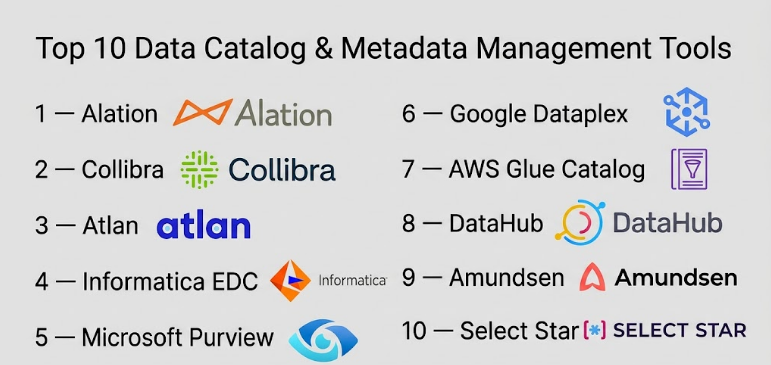
Top 10 Data Catalog & Metadata Management Tools
#1 — Alation
Short description: A pioneer in the data catalog space, Alation combines machine learning with human collaboration to build a “Data Intelligence” platform for the enterprise.
Key Features
- Behavioral I/O Engine: Analyzes query logs to automatically identify the most popular and relevant data assets.
- Intelligent SQL Editor: Provides “Compose” an integrated SQL tool that suggests tables and joins as you type.
- Data Stewardship Workbench: Streamlines the process of assigning owners and managing data documentation.
- Open Connector Framework: Allows for deep integration with virtually any data source, including legacy mainframes.
- Alation Cloud Service: A fully managed SaaS offering that simplifies deployment and scaling.
- Trust Flags: Enables users to mark data as “Endorsed,” “Warning,” or “Deprecated” for better visibility.
Pros
- Exceptional user experience that encourages high adoption among non-technical users.
- Very strong community and customer support network.
Cons
- Pricing is at the premium end of the market, which may be challenging for smaller organizations.
- Initial configuration of advanced lineage can be complex.
Platforms / Deployment
- Web / Windows / macOS
- Cloud / Self-hosted / Hybrid
Security & Compliance
- SSO/SAML, MFA, RBAC, Encryption at rest/transit.
- SOC 2 Type II, GDPR compliant.
Integrations & Ecosystem
Alation boasts one of the most mature integration ecosystems in the industry.
- Snowflake, Databricks, AWS, Azure, GCP
- Tableau, Power BI, Looker
- dbt, Informatica, Manta
Support & Community
Industry-leading documentation and a dedicated “Alation University.” Offers 24/7 global support for enterprise tiers.
#2 — Collibra
Short description: A robust, enterprise-grade data intelligence platform that focuses heavily on data governance, privacy, and compliance for large, regulated organizations.
Key Features
- Collibra Data Catalog: Automated discovery and classification of data assets across the enterprise.
- End-to-End Data Lineage: Visualizes the journey of data with deep technical detail and business context.
- Privacy & Risk Management: Specialized modules for managing GDPR, CCPA, and other regulatory requirements.
- Data Stewardship: Highly customizable workflows for data approvals and change management.
- Policy Manager: Centralized repository for defining and enforcing data usage policies.
- Collibra Marketplace: Access to pre-built connectors and workflow templates.
Pros
- Deepest governance and compliance features available on the market.
- Highly customizable to fit complex organizational structures.
Cons
- The platform has a steep learning curve and usually requires dedicated administrators.
- Implementation can take significantly longer than more modern, lightweight catalogs.
Platforms / Deployment
- Web
- Cloud / Hybrid
Security & Compliance
- SSO, SAML 2.0, MFA, Audit Logs.
- SOC 2, ISO 27001, HIPAA, GDPR.
Integrations & Ecosystem
Collibra is built for the enterprise ecosystem, focusing on deep backend integrations.
- SAP, Oracle, Microsoft SQL Server
- Informatica, Talend
- AWS, Azure, Google Cloud
Support & Community
Extensive professional services and an active community forum. Support is structured with tiered response times.
#3 — Atlan
Short description: A modern, collaborative data workspace designed to feel like “Slack for data,” targeting teams that use the modern data stack.
Key Features
- Automated Data Lineage: Native integration with tools like dbt and Snowflake to build lineage without manual effort.
- Slack Integration: Allows users to search the catalog and see metadata directly within Slack conversations.
- Playbooks: Automated workflows to bulk-tag data or identify PII based on naming patterns.
- Personalized Discovery: Customizes the search experience based on the user’s role (e.g., Data Engineer vs. Marketing Analyst).
- Open API Architecture: Built on top of Apache Atlas, making it highly extensible.
- Visual Data Profiling: Shows data distribution and health directly on the asset page.
Pros
- Extremely fast setup time; often usable within days rather than months.
- Excellent UI/UX that feels modern and intuitive.
Cons
- Primarily focused on the cloud-native data stack; may lack depth for legacy on-premises systems.
- Smaller community compared to established giants like Alation.
Platforms / Deployment
- Web
- Cloud (SaaS)
Security & Compliance
- SSO, RBAC, Data Masking integration.
- SOC 2 Type II, HIPAA (Varies), GDPR.
Integrations & Ecosystem
Deeply integrated with modern, cloud-first technologies.
- Snowflake, Databricks, BigQuery
- dbt, Fivetran, Airflow
- Tableau, Mode, Looker
Support & Community
Known for high-touch customer success and detailed online documentation.
#4 — Informatica Enterprise Data Catalog (EDC)
Short description: An AI-powered catalog that leverages Informatica’s “CLAIRE” engine to provide massive-scale metadata discovery across hybrid environments.
Key Features
- CLAIRE AI Engine: Automatically classifies data, suggests tags, and identifies relationships at scale.
- Hybrid Metadata Scanning: Equally capable of scanning modern cloud warehouses and legacy on-prem databases.
- Detailed Technical Lineage: Provides some of the most granular lineage in the industry, including stored procedures.
- Data Similarity Discovery: Identifies duplicate or similar datasets to help consolidate data assets.
- Integrated Data Quality: Displays Informatica Data Quality scores directly within the catalog view.
- Value-Based Search: Prioritizes search results based on data usage and business value.
Pros
- Unmatched scale for companies with thousands of legacy data sources.
- Part of the broader Informatica Intelligent Data Management Cloud (IDMC).
Cons
- The interface can feel “heavy” and more technical than modern competitors.
- Complex licensing and high cost of ownership.
Platforms / Deployment
- Web / Windows
- Cloud / Self-hosted / Hybrid
Security & Compliance
- Enterprise-grade RBAC, SSO, Audit Trail.
- SOC 2, ISO 27001, HIPAA.
Integrations & Ecosystem
Strongest in traditional enterprise environments but expanding into cloud.
- SAP, Oracle, Teradata
- AWS, Azure, GCP
- Power BI, Tableau
Support & Community
Global enterprise support with 24/7 availability. Extensive training and certification programs.
#5 — Microsoft Purview
Short description: A unified data governance solution that helps manage and govern your on-premises, multi-cloud, and SaaS data.
Key Features
- Automated Data Discovery: Scans data across the Microsoft ecosystem and third-party sources.
- Data Map: A foundation for data discovery and governance that captures metadata automatically.
- Sensitivity Labeling: Integrates with Microsoft 365 to apply the same sensitivity labels to your data assets.
- Workflow Engine: Allows for the creation of automated governance workflows for approvals.
- Data Sharing: Provides a secure way to share data with internal or external users without moving it.
- Insights Reports: Dashboards that show the status of your data estate, including PII concentration.
Pros
- Seamless integration for organizations already heavily invested in the Azure/Microsoft 365 ecosystem.
- Competitive pricing for existing Azure customers.
Cons
- Capabilities for non-Microsoft data sources can be less mature.
- The UI can be confusing as it is split between different Azure portal sections.
Platforms / Deployment
- Web (Azure Portal)
- Cloud (Azure native)
Security & Compliance
- MFA, SSO, Azure Active Directory (Entra ID) integration.
- Extensive Microsoft compliance certifications (SOC 1/2/3, ISO, HIPAA).
Integrations & Ecosystem
Best-in-class for the Microsoft stack.
- Azure SQL, Synapse, Power BI
- AWS S3, SAP
- Microsoft 365 (Information Protection)
Support & Community
Standard Microsoft Azure support tiers apply. Extensive documentation and community via Azure forums.
#6 — Google Cloud Dataplex (formerly Data Catalog)
Short description: An intelligent data fabric that provides a unified way to manage, monitor, and govern data across data lakes, warehouses, and marts on Google Cloud.
Key Features
- Serverless Data Catalog: A fully managed and highly scalable metadata management service.
- Auto-Metadata Extraction: Automatically crawls BigQuery, Pub/Sub, and Cloud Storage.
- Tag Templates: Highly flexible templates for defining custom business metadata.
- Integrated Data Quality: Provides automated data quality checks and profiling.
- Data Lineage API: Automatically captures lineage for BigQuery and Spark jobs.
- Access Control: Centralized policy management across different GCP data services.
Pros
- Incredibly fast and requires zero infrastructure management.
- Superior search capabilities, leveraging Google’s core search technology.
Cons
- Primarily restricted to the Google Cloud ecosystem; limited support for external sources.
- Advanced governance features are not as deep as specialized third-party tools.
Platforms / Deployment
- Web (GCP Console)
- Cloud (Google Cloud native)
Security & Compliance
- IAM integration, SSO, VPC Service Controls.
- SOC 1/2/3, ISO 27001, HIPAA, FedRAMP.
Integrations & Ecosystem
Optimized for the Google Cloud data stack.
- BigQuery, Cloud Storage
- Looker, Vertex AI
- Dataproc, Dataflow
Support & Community
Google Cloud support plans. Active developer community and extensive documentation.
#7 — AWS Glue Data Catalog
Short description: A central metadata repository that acts as an index to the location, schema, and runtime metrics of your data on AWS.
Key Features
- Glue Crawlers: Automatically scan various data stores to infer schemas and populate the catalog.
- Schema Registry: Manages and enforces schemas for streaming data (Kafka, Kinesis).
- Partition Management: Efficiently handles partitioned data in S3 for high-performance querying.
- Lake Formation Integration: Provides fine-grained access control for your data lake.
- Version Control: Keeps track of schema changes over time.
- Serverless Execution: Scales automatically without the need to provision servers.
Pros
- Essential for any data lake built on AWS (S3).
- Extremely cost-effective for high-volume metadata storage.
Cons
- Technical interface is not user-friendly for business users.
- Lacks the collaborative “social” features of tools like Alation or Atlan.
Platforms / Deployment
- Web (AWS Console)
- Cloud (AWS native)
Security & Compliance
- IAM, AWS Lake Formation (Cell-level security).
- SOC 1/2/3, ISO 27001, HIPAA, PCI DSS.
Integrations & Ecosystem
The backbone of the AWS data ecosystem.
- Amazon Athena, Redshift, EMR
- AWS SageMaker, QuickSight
- Apache Spark, Presto
Support & Community
AWS Support plans. Massive community of AWS architects and comprehensive documentation.
#8 — DataHub
Short description: An open-source metadata platform originally developed at LinkedIn, designed for high-scale real-time metadata discovery.
Key Features
- Push-Based Architecture: Allows for real-time metadata updates rather than relying solely on scheduled scans.
- Search and Discovery: High-performance search for tables, topics, and dashboards.
- Automated Lineage: Captures lineage from Airflow, dbt, and other pipeline tools.
- Metadata Health: Provides a framework for viewing data quality and freshness.
- Entity Relationship Maps: Visualizes how different data entities are connected.
- Extensible Data Model: Uses a flexible GMS (Generalized Metadata Service) architecture.
Pros
- No licensing costs (open source), though managed versions are available.
- Very high performance for large, complex data environments.
Cons
- Requires significant engineering effort to deploy and maintain if self-hosted.
- User interface is functional but lacks the polish of premium SaaS products.
Platforms / Deployment
- Web / Docker / Kubernetes
- Self-hosted / Managed SaaS (via Acryl Data)
Security & Compliance
- OIDC, SAML (in managed version), RBAC.
- Not publicly stated (Depends on deployment).
Integrations & Ecosystem
Strong support for the open-source data ecosystem.
- Kafka, Airflow, dbt
- Snowflake, BigQuery, Postgres
- Superset, Looker
Support & Community
Thriving Slack community and extensive GitHub documentation. Professional support available through Acryl Data.
#9 — Amundsen
Short description: An open-source data discovery and metadata engine created at Lyft, focused on improving data analyst productivity.
Key Features
- Page-Rank Based Search: Uses a popularity-based algorithm to show the most used tables first.
- Preview Integration: Allows users to see sample data without leaving the catalog.
- Standard Metadata: Captures table descriptions, column types, and partition keys.
- Lineage Visualizer: Shows upstream and downstream dependencies for each table.
- Curation Tools: Simple interface for users to add descriptions and tags.
- Integrated Quality: Can display results from tools like Great Expectations.
Pros
- Focuses purely on what an analyst needs to be productive.
- Lightweight and relatively easy to get started with compared to DataHub.
Cons
- Narrower scope than full-scale enterprise governance platforms.
- Governance features (like approvals and policies) are limited.
Platforms / Deployment
- Web / Docker
- Self-hosted
Security & Compliance
- OIDC, Flask-based authentication.
- Not publicly stated.
Integrations & Ecosystem
- Hive, Presto, BigQuery
- Airflow, Great Expectations
- Tableau (via community scripts)
Support & Community
Active community of contributors, primarily via Slack and GitHub.
#10 — Select Star
Short description: An automated data discovery platform that focuses on providing an easy-to-use catalog with automatic lineage for the modern data stack.
Key Features
- Automatic Lineage: Maps data from the source database all the way to the specific dashboard tile.
- Popularity Scores: Automatically identifies which data is actually being used by the business.
- Field-Level Lineage: Tracks changes at the column level, not just the table level.
- Data Documentation: AI-assisted tool for writing table and column descriptions.
- Query Analysis: Analyzes your warehouse history to understand how data is joined.
- Collaboration: Integrated commenting and documentation wikis.
Pros
- One of the easiest catalogs to set up for Snowflake/Databricks users.
- Lineage is exceptionally clear and accurate.
Cons
- Focuses primarily on modern cloud stacks; not suitable for legacy on-prem.
- Newer tool with a smaller overall feature set compared to Alation or Collibra.
Platforms / Deployment
- Web
- Cloud (SaaS)
Security & Compliance
- SSO, SAML, RBAC.
- SOC 2 Type II.
Integrations & Ecosystem
Built for the modern data ecosystem.
- Snowflake, BigQuery, Databricks
- Looker, Tableau, Sigma
- dbt, Fivetran
Support & Community
Highly responsive support team and detailed technical documentation.
Comparison Table (Top 10)
| Tool Name | Best For | Platform(s) Supported | Deployment | Standout Feature | Public Rating |
| Alation | Collaborative discovery | Web, Win, Mac | Hybrid | Behavioral I/O Engine | 4.5/5 |
| Collibra | Enterprise Governance | Web | Hybrid | Compliance Workflows | 4.3/5 |
| Atlan | Modern Data Teams | Web | Cloud | Slack/Teams Integration | 4.8/5 |
| Informatica EDC | Hybrid/Legacy Scale | Web, Win | Hybrid | CLAIRE AI Engine | 4.2/5 |
| Microsoft Purview | Azure Ecosystem | Web | Cloud | Sensitivity Labeling | 4.1/5 |
| Google Dataplex | GCP Ecosystem | Web | Cloud | Serverless Search | 4.3/5 |
| AWS Glue Catalog | AWS Data Lakes | Web | Cloud | Partition Management | 4.4/5 |
| DataHub | Open-source Scale | Web | Self-hosted | Push-based Metadata | N/A |
| Amundsen | Analyst Productivity | Web | Self-hosted | Page-Rank Search | N/A |
| Select Star | Automatic Lineage | Web | Cloud | Field-level Lineage | 4.7/5 |
Evaluation & Scoring of Data Catalog & Metadata Management Tools
| Tool Name | Core (25%) | Ease (15%) | Integrations (15%) | Security (10%) | Performance (10%) | Support (10%) | Value (15%) | Weighted Total |
| Alation | 10 | 8 | 9 | 9 | 9 | 10 | 7 | 8.90 |
| Collibra | 10 | 5 | 9 | 10 | 8 | 9 | 6 | 8.15 |
| Atlan | 9 | 10 | 10 | 8 | 8 | 9 | 8 | 8.85 |
| Informatica EDC | 10 | 5 | 8 | 9 | 9 | 9 | 5 | 7.75 |
| Microsoft Purview | 8 | 7 | 8 | 10 | 8 | 8 | 9 | 8.10 |
| Google Dataplex | 8 | 8 | 7 | 10 | 10 | 8 | 9 | 8.35 |
| AWS Glue Catalog | 7 | 6 | 7 | 10 | 10 | 8 | 10 | 8.00 |
| DataHub | 9 | 4 | 9 | 7 | 10 | 6 | 8 | 7.55 |
| Amundsen | 7 | 6 | 7 | 6 | 9 | 5 | 9 | 7.10 |
| Select Star | 8 | 10 | 9 | 8 | 8 | 8 | 8 | 8.30 |
How to interpret these scores:
Scores are based on a 1–10 scale. A high Core score indicates deep technical and governance capabilities. Value scores are higher for tools that offer lower entry prices or high ROI. Weighted Total helps determine the best “all-around” software for a typical enterprise.
Which Data Catalog & Metadata Management Tool Is Right for You?
Solo / Freelancer
For a solo data consultant, Amundsen or the free tier of Atlan is often sufficient. If you are managing a client’s AWS infrastructure, AWS Glue Data Catalog is a natural choice as it requires no overhead.
SMB
Small businesses using a modern cloud stack (Snowflake/BigQuery) should look at Select Star or Atlan. These tools offer fast setup and automated features that a small team can manage without a dedicated “Metadata Administrator.”
Mid-Market
For companies with growing data teams and increasing compliance needs, Alation offers the best balance of user adoption and sophisticated governance. It scales well as the organization matures.
Enterprise
Large, multi-national corporations with a mix of cloud and legacy systems should evaluate Collibra or Informatica EDC. These platforms are built to handle the complexity and regulatory requirements of the world’s largest data estates.
Budget vs Premium
- Budget: AWS Glue Data Catalog, DataHub (Open Source), Amundsen.
- Premium: Alation, Collibra, Informatica EDC.
Feature Depth vs Ease of Use
- Depth: Collibra, Informatica EDC, Houdini (Metaphorically speaking).
- Ease of Use: Atlan, Select Star, Alation.
Integrations & Scalability
- Highest Scalability: DataHub, Informatica EDC, AWS Glue.
- Best Integrations: Atlan, Alation, Microsoft Purview.
Security & Compliance Needs
If your primary concern is data privacy and SOC 2/GDPR compliance, Collibra and Microsoft Purview offer the most integrated security and sensitivity labeling features.
Frequently Asked Questions (FAQs)
- How much do data catalog tools typically cost?
Pricing varies significantly. Open-source options are free but have high operational costs. SaaS tools like Atlan or Select Star usually start between $15,000 and $30,000 per year, while enterprise suites like Collibra can exceed $100,000. - How long does it take to implement a data catalog?
A modern SaaS catalog can be connected to your primary data source in hours, with initial metadata visible within days. However, full enterprise adoption and curation usually take 6 to 12 months. - What is the difference between a Data Catalog and a Data Dictionary?
A data dictionary is a technical document describing a single database’s structure. A data catalog is a broader, searchable platform that covers the entire organization, including social features, lineage, and multi-source indexing. - Do I need a data catalog if I only use one database?
Probably not. If all your data is in one place, a simple documentation tool or a well-maintained data dictionary is usually sufficient. Catalogs prove their value once you have multiple sources and users. - Can a data catalog automatically document my data?
Partially. Modern tools use AI to suggest tags and descriptions based on column names and usage patterns, but human “stewards” are still needed to provide business context and verify accuracy. - How does a data catalog help with GDPR compliance?
Catalogs can automatically scan for patterns like email addresses or credit card numbers, tag them as “Sensitive,” and then trigger access restrictions to ensure only authorized personnel see that data. - What is Data Lineage and why is it important?
Data lineage is a visual map showing where data came from and where it goes. It is critical for “impact analysis”—knowing if changing a table will break a dashboard—and for debugging data errors. - Can I build my own data catalog?
You can use open-source frameworks like DataHub or Amundsen to build a custom solution, but this requires significant engineering resources. Most companies find that buying a SaaS solution offers better ROI. - What is “Active Metadata”?
Active metadata refers to a system that doesn’t just store info but uses it to take action, such as automatically killing a slow query or alerting a user that the table they are looking at hasn’t been updated in 24 hours. - Who is the typical user of a data catalog?
Users include Data Scientists (to find training data), Business Analysts (to verify metrics), Data Engineers (to manage lineage), and Compliance Officers (to audit data usage).
Conclusion
The “best” data catalog is the one that your team actually uses. While technical features like AI-driven lineage are important, the primary goal of metadata management is to build trust in data across the organization. For modern cloud teams, Atlan and Select Star offer the path of least resistance. For complex, regulated enterprises, Collibra and Alation provide the depth needed to stay compliant.Start your journey by identifying your biggest pain point—is it finding data, or is it governing it? Once you know the “Why,” you can use the scoring and comparison tables above to shortlist the two or three tools that will best support your data-driven future.

Find Trusted Cardiac Hospitals
Compare heart hospitals by city and services — all in one place.
Explore Hospitals
Data catalog and metadata management tools are most valuable when they help organizations discover, organize, understand, and govern data assets across complex data environments. By providing data discovery, metadata harvesting, business glossaries, data lineage, classification, search, data ownership, data quality insights, governance workflows, access controls, and integration with databases, data warehouses, data lakes, and analytics platforms, these tools enable organizations to improve data visibility, strengthen governance, increase trust in enterprise data, simplify compliance, and help teams find and use the right data more efficiently.