Introduction
Help Desk & Service Desk Software is a centralized platform that helps organizations manage, track, resolve, and automate customer or employee support requests. These tools streamline ticket management, incident resolution, IT service workflows, and customer communication across multiple channels such as email, chat, phone, and social media. In today’s digital-first business environment, support teams are expected to respond faster, automate repetitive tasks, and deliver consistent service experiences. Modern help desk platforms now include AI-powered ticket routing, self-service portals, automation workflows, SLA management, knowledge bases, and deep integrations with CRM and IT systems.
Real-world use cases include:
- IT service management and internal support
- Customer service ticket handling
- Incident and problem management
- SLA tracking and escalation workflows
- Knowledge base and self-service portals
Evaluation Criteria for Buyers
- Ticket management and automation capabilities
- AI-powered routing and resolution features
- Multi-channel support (email, chat, voice, social)
- Integration with CRM and IT systems
- SLA tracking and workflow customization
- Reporting and analytics depth
- Security and compliance controls
- Ease of deployment and usability
- Scalability for enterprise environments
- Pricing flexibility and value
Best for: IT teams, customer support teams, enterprises, SaaS companies, eCommerce businesses, and managed service providers.
Not ideal for: Very small businesses with minimal support volume or teams that do not require structured ticketing workflows.
Key Trends in Help Desk & Service Desk Software
- AI-powered ticket triaging is reducing manual workload
- Self-service portals are becoming standard for customer support
- Omnichannel support is replacing email-only ticket systems
- Automation workflows are improving SLA compliance
- ITSM and customer service platforms are converging
- Real-time analytics and agent performance tracking are expanding
- Generative AI is assisting in ticket resolution and responses
- Cloud-native service desks are replacing legacy on-prem systems
- Integration with DevOps and ITSM tools is increasing
- Customer experience analytics is becoming more advanced
How We Selected These Tools (Methodology)
- Market adoption and industry recognition
- Ticketing and workflow automation capabilities
- Security and compliance maturity
- Integration ecosystem strength
- AI and automation readiness
- Scalability across SMB and enterprise use cases
- Reporting and analytics capabilities
- Ease of use and implementation speed
- Omnichannel support capabilities
- Customer support and vendor reliability
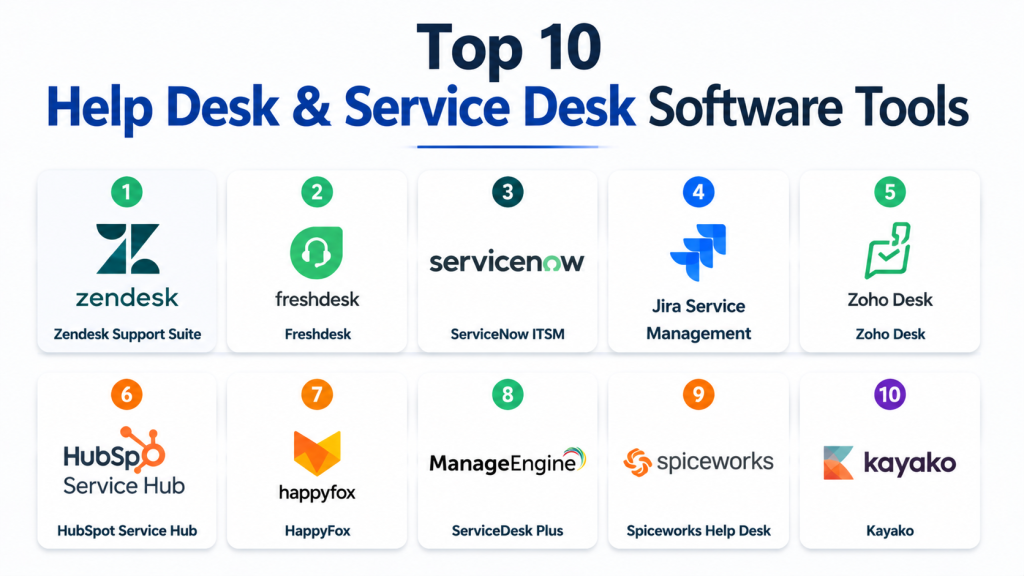
Top 10 Help Desk & Service Desk Software Tools
1 — Zendesk Support Suite
Short description: A widely used customer support platform offering ticketing, automation, and omnichannel service management for businesses of all sizes.
Key Features
- Omnichannel ticketing system
- AI-powered ticket routing
- SLA management
- Knowledge base creation
- Workflow automation
- Reporting dashboards
- Chat and messaging support
Pros
- Easy to use interface
- Strong ecosystem of apps
- Scalable for enterprises
Cons
- Advanced features can be costly
- Customization may require effort
Platforms / Deployment
Cloud
Security & Compliance
SSO/SAML, MFA, encryption, audit logs, RBAC (others not publicly stated)
Integrations & Ecosystem
Strong integration ecosystem with CRM, communication, and productivity tools.
- Salesforce
- Slack
- Shopify
- Microsoft Teams
Support & Community
Extensive documentation and large global user community.
2 — Freshdesk
Short description: Cloud-based help desk software designed for customer support automation and ticket management.
Key Features
- Ticket management system
- AI chatbot support
- SLA management
- Omnichannel communication
- Workflow automation
- Knowledge base
- Reporting tools
Pros
- Affordable pricing
- Easy setup
- Strong SMB usability
Cons
- Limited enterprise customization
- Advanced analytics require upgrades
Platforms / Deployment
Cloud
Security & Compliance
MFA, encryption, SSO (others not publicly stated)
Integrations & Ecosystem
Supports SMB and enterprise integrations.
- Salesforce
- Slack
- Microsoft Teams
- Shopify
Support & Community
Good SMB support and onboarding resources.
3 — ServiceNow ITSM
Short description: Enterprise-grade IT service management platform for incident, problem, and change management workflows.
Key Features
- Incident management system
- Change management workflows
- AI-powered automation
- SLA tracking
- IT asset management
- Service catalog
- Reporting dashboards
Pros
- Extremely powerful for ITSM
- Strong automation capabilities
- Highly scalable
Cons
- Complex implementation
- High cost for small businesses
Platforms / Deployment
Cloud / Hybrid
Security & Compliance
SSO/SAML, MFA, encryption, audit logs, RBAC (others not publicly stated)
Integrations & Ecosystem
Deep IT and enterprise system integration.
- Microsoft 365
- Jira
- Slack
- AWS
Support & Community
Strong enterprise support and global implementation partners.
4 — Jira Service Management
Short description: ITSM and service desk platform built for DevOps and technical support teams.
Key Features
- Incident management
- Change management workflows
- SLA tracking
- Automation rules
- DevOps integration
- Knowledge base support
- Custom workflows
Pros
- Strong DevOps integration
- Flexible workflows
- Great for technical teams
Cons
- Not ideal for non-technical teams
- Requires configuration effort
Platforms / Deployment
Cloud / Self-hosted
Security & Compliance
SSO, MFA, encryption, audit logs (others not publicly stated)
Integrations & Ecosystem
Strong Atlassian ecosystem support.
- Jira Software
- Confluence
- Bitbucket
- Slack
Support & Community
Strong developer and IT community support.
5 — Zoho Desk
Short description: Customer service platform offering help desk automation and omnichannel support.
Key Features
- Ticket management system
- AI assistant (Zia)
- Workflow automation
- SLA tracking
- Knowledge base
- Multichannel support
- Reporting dashboards
Pros
- Affordable pricing
- Strong Zoho ecosystem integration
- Easy to use
Cons
- Limited enterprise depth
- UI customization can be limited
Platforms / Deployment
Cloud
Security & Compliance
MFA, encryption, SSO (others not publicly stated)
Integrations & Ecosystem
Strong integration with Zoho suite.
- Zoho CRM
- Zoho Projects
- Microsoft 365
- Google Workspace
Support & Community
Good SMB-focused support and documentation.
6 — HubSpot Service Hub
Short description: Customer service platform integrated into HubSpot CRM for seamless support and customer experience management.
Key Features
- Ticketing system
- Knowledge base tools
- Live chat support
- Customer feedback tools
- Automation workflows
- Reporting dashboards
- CRM integration
Pros
- Strong CRM integration
- Easy onboarding
- Unified customer view
Cons
- Limited advanced ITSM features
- Can become expensive at scale
Platforms / Deployment
Cloud
Security & Compliance
SSO, MFA, encryption (others not publicly stated)
Integrations & Ecosystem
Deep integration with HubSpot ecosystem.
- HubSpot CRM
- Slack
- Salesforce
- Google Workspace
Support & Community
Strong onboarding and customer success support.
7 — HappyFox
Short description: Help desk software designed for ticket management, automation, and customer support optimization.
Key Features
- Ticketing system
- SLA management
- Workflow automation
- Knowledge base
- Multi-channel support
- Reporting tools
- Asset management
Pros
- Easy to deploy
- Strong automation features
- Good scalability
Cons
- UI feels less modern
- Limited advanced AI features
Platforms / Deployment
Cloud
Security & Compliance
SSO, MFA, encryption (others not publicly stated)
Integrations & Ecosystem
Supports common business integrations.
- Salesforce
- Slack
- Zapier
- Microsoft Teams
Support & Community
Reliable support with standard documentation.
8 — ManageEngine ServiceDesk Plus
Short description: IT service desk platform designed for ITSM, asset management, and enterprise support workflows.
Key Features
- Incident management
- IT asset tracking
- Change management
- SLA workflows
- Automation rules
- Knowledge base
- Reporting tools
Pros
- Strong ITSM capabilities
- Affordable enterprise option
- Good customization
Cons
- UI can feel outdated
- Requires configuration expertise
Platforms / Deployment
Cloud / On-premise
Security & Compliance
SSO/SAML, MFA, encryption (others not publicly stated)
Integrations & Ecosystem
Supports enterprise IT ecosystem integrations.
- Active Directory
- Jira
- Microsoft 365
- APIs
Support & Community
Strong enterprise IT support structure.
9 — Spiceworks Help Desk
Short description: Free IT help desk platform designed for small IT teams and internal support management.
Key Features
- Ticket management system
- IT asset tracking
- Reporting tools
- User support portal
- Email-based ticketing
- Basic automation
- Community support tools
Pros
- Free to use
- Easy setup
- Good for small IT teams
Cons
- Limited scalability
- Basic feature set
Platforms / Deployment
Cloud / On-premise
Security & Compliance
Encryption (others not publicly stated)
Integrations & Ecosystem
Basic integrations for IT workflows.
- Active Directory
- Email systems
- APIs
- Network tools
Support & Community
Strong community-driven support model.
10 — Kayako
Short description: Customer service platform focused on unified inbox and omnichannel support experience.
Key Features
- Unified inbox
- Live chat support
- Ticketing system
- Workflow automation
- Customer journey tracking
- SLA management
- Knowledge base
Pros
- Simple interface
- Good omnichannel support
- Easy onboarding
Cons
- Limited advanced enterprise features
- Smaller ecosystem
Platforms / Deployment
Cloud
Security & Compliance
SSO, MFA, encryption (others not publicly stated)
Integrations & Ecosystem
Supports basic business integrations.
- Salesforce
- Slack
- Zapier
- Email systems
Support & Community
Standard support with documentation and onboarding assistance.
Comparison Table
| Tool Name | Best For | Platform(s) Supported | Deployment | Standout Feature | Public Rating |
|---|---|---|---|---|---|
| Zendesk | Customer support teams | Web, Mobile | Cloud | Omnichannel ticketing | N/A |
| Freshdesk | SMB support teams | Web, Mobile | Cloud | Affordable automation | N/A |
| ServiceNow | Enterprise ITSM | Web | Cloud/Hybrid | IT service automation | N/A |
| Jira Service Management | DevOps teams | Web | Cloud/Self-hosted | DevOps integration | N/A |
| Zoho Desk | SMB customer service | Web, Mobile | Cloud | AI assistant Zia | N/A |
| HubSpot Service Hub | CRM-based support | Web | Cloud | CRM integration | N/A |
| HappyFox | SMB help desk | Web | Cloud | Workflow automation | N/A |
| ManageEngine ServiceDesk | IT departments | Web | Cloud/On-premise | IT asset management | N/A |
| Spiceworks | Small IT teams | Web | Cloud/On-premise | Free help desk | N/A |
| Kayako | Unified support | Web | Cloud | Unified inbox | N/A |
Evaluation & Scoring of Help Desk & Service Desk Software
| Tool Name | Core (25%) | Ease (15%) | Integrations (15%) | Security (10%) | Performance (10%) | Support (10%) | Value (15%) | Weighted Total |
|---|---|---|---|---|---|---|---|---|
| Zendesk | 9 | 8.5 | 9 | 8.5 | 9 | 8.5 | 8 | 8.6 |
| Freshdesk | 8.5 | 9 | 8 | 8 | 8 | 8.5 | 9 | 8.5 |
| ServiceNow | 10 | 7.5 | 9 | 9.5 | 9.5 | 9 | 7.5 | 8.9 |
| Jira Service Mgt | 9 | 8 | 9 | 9 | 9 | 8.5 | 8 | 8.6 |
| Zoho Desk | 8 | 9 | 8 | 8 | 8 | 8 | 9 | 8.3 |
| HubSpot | 8.5 | 9 | 9 | 8.5 | 8 | 8.5 | 8 | 8.4 |
| HappyFox | 8 | 8.5 | 8 | 8 | 8 | 8 | 8.5 | 8.2 |
| ManageEngine | 9 | 7.5 | 8.5 | 9 | 9 | 8.5 | 8 | 8.4 |
| Spiceworks | 7.5 | 9 | 7 | 7.5 | 7.5 | 8 | 10 | 8.0 |
| Kayako | 8 | 8.5 | 8 | 8 | 8 | 8 | 8.5 | 8.2 |
Scores are comparative and based on capability depth, scalability, and ecosystem strength.
Which Help Desk & Service Desk Tool Is Right for You?
Solo / Freelancer
Spiceworks and Freshdesk are best due to simplicity and low cost.
SMB
Zoho Desk, Freshdesk, and HappyFox provide balanced automation and ease of use.
Mid-Market
Zendesk and HubSpot Service Hub offer strong scalability and integrations.
Enterprise
ServiceNow and Jira Service Management are best for complex ITSM environments.
Budget vs Premium
Spiceworks and Zoho Desk are budget-friendly, while ServiceNow is premium enterprise-grade.
Feature Depth vs Ease of Use
ServiceNow offers deep ITSM capabilities, while Freshdesk prioritizes ease of use.
Integrations & Scalability
Zendesk, Jira, and ServiceNow provide the strongest ecosystem support.
Security & Compliance Needs
Enterprise tools like ServiceNow and ManageEngine are best for regulated environments.
Frequently Asked Questions
1. What is help desk software?
Help desk software is a system used to manage customer or internal support tickets in an organized way.
It helps teams track issues from creation to resolution in a structured workflow.
It improves response time and reduces manual tracking work.
Most modern tools also include automation and reporting features.
2. What is service desk software used for?
Service desk software is mainly used for IT service management and enterprise support operations.
It handles incidents, service requests, and change management processes.
It also helps IT teams maintain SLA compliance and operational efficiency.
It is more advanced than a basic help desk system.
3. Who should use help desk tools?
Help desk tools are used by customer support teams, IT departments, SaaS companies, and enterprises.
Any organization that handles multiple support requests can benefit from them.
They help centralize communication and improve service quality.
They are suitable for both small and large businesses.
4. What features are most important in help desk software?
Key features include ticket management, automation, SLA tracking, and reporting dashboards.
Multi-channel support like email, chat, and phone is also important.
Integration with CRM and business tools improves workflow efficiency.
AI-powered automation is becoming a standard feature.
5. Is help desk software cloud-based?
Yes, most modern help desk platforms are cloud-based and accessible from anywhere.
Some enterprise solutions also offer on-premise or hybrid deployment options.
Cloud systems provide better scalability and easier maintenance.
They are widely preferred due to flexibility and lower setup cost.
6. Can help desk software integrate with other tools?
Yes, most help desk systems integrate with CRM, email, chat, and project management tools.
This helps teams work efficiently without switching between multiple platforms.
Integrations improve data flow and customer visibility.
APIs are also available in most modern platforms.
7. What is the difference between help desk and service desk?
Help desk focuses mainly on customer support and ticket resolution.
Service desk includes broader IT service management functions like incident and change management.
Service desk is more suitable for enterprise IT environments.
Help desk is simpler and more customer-focused.
8. Are help desk tools expensive?
Pricing depends on features, users, and enterprise requirements.
SMB tools are usually affordable and subscription-based.
Enterprise solutions can be more expensive due to advanced capabilities.
Most vendors offer flexible pricing plans.
9. Do help desk systems use AI?
Yes, many modern help desk tools use AI for ticket routing and automation.
AI chatbots can handle basic customer queries automatically.
They also help in sentiment analysis and response suggestions.
This improves efficiency and reduces workload on agents.
10. What is the biggest benefit of help desk software?
The biggest benefit is improved customer support efficiency and faster response time.
It organizes all tickets in one system for better tracking.
It reduces manual work through automation features.
It ultimately improves customer satisfaction and service quality.
Conclusion
Help Desk & Service Desk Software has become essential for modern businesses aiming to deliver fast, structured, and efficient support experiences. Platforms like Zendesk, Freshdesk, and Zoho Desk serve SMBs with ease of use and affordability, while enterprise solutions like ServiceNow and Jira Service Management provide deep ITSM capabilities and scalability. The right choice depends on your organization’s size, workflow complexity, integration needs, and support maturity. Businesses should shortlist tools, test workflows in real scenarios, and validate integrations before final adoption to ensure long-term success.

Find Trusted Cardiac Hospitals
Compare heart hospitals by city and services — all in one place.
Explore Hospitals
I now understand how help desk and service desk software helps streamline support by managing tickets, improving response times, and automating issue resolution. I’d like to explore more about which platforms are best for small teams vs large enterprises.