Introduction
Help Desk and Service Desk Software are critical platforms designed to streamline IT support, customer service, and internal operations. These tools enable teams to manage tickets, automate workflows, and resolve issues efficiently, ensuring a better experience for end-users and reducing operational bottlenecks. In today’s fast-paced business environment, with hybrid work models and distributed IT operations, such platforms are increasingly vital for maintaining productivity and customer satisfaction.
Organizations commonly use these tools for IT support, HR request management, facility or maintenance ticketing, customer support, and compliance tracking. The software allows for centralized issue tracking, SLA monitoring, knowledge management, and reporting, making it easier to resolve incidents quickly and prevent recurring problems. Buyers should evaluate criteria such as ticket management, automation capabilities, AI/ML features, integration support, scalability, analytics, user experience, security, deployment flexibility, and total cost of ownership.
Best for: IT managers, support teams, mid-market to enterprise companies, service-oriented industries such as IT, telecom, healthcare, finance, and e-commerce.
Not ideal for: Very small teams with minimal support ticket volume or organizations that rely primarily on email or chat without structured workflow needs.
Key Trends in Help Desk & Service Desk Software
- Growing adoption of AI and ML for automated ticket categorization, routing, and resolution suggestions.
- Integration with CRM, ITSM, and collaboration platforms for seamless workflow management.
- Omnichannel support combining email, chat, phone, and social media interactions.
- Cloud-first deployments are replacing traditional on-premises solutions.
- Self-service portals and knowledge bases for improved user autonomy.
- Predictive analytics to identify recurring issues and optimize staffing.
- Automation of repetitive workflows, reducing human error and improving efficiency.
- Support for multilingual ticketing and global operations.
- Emphasis on security and compliance (SOC 2, ISO 27001, GDPR, HIPAA).
- Flexible subscription and usage-based pricing models for different organization sizes.
How We Selected These Tools (Methodology)
- Evaluated market adoption and brand recognition across enterprise and SMB segments.
- Assessed feature completeness, including automation, AI capabilities, reporting, and knowledge management.
- Reviewed performance and reliability, including uptime, incident response, and system stability.
- Analyzed security and compliance posture, focusing on encryption, authentication, and regulatory standards.
- Considered integration capabilities with CRMs, collaboration tools, and ITSM platforms.
- Measured customer fit across industries and team sizes.
- Prioritized ease of deployment and cloud availability.
- Evaluated vendor support and community resources.
- Examined scalability and customization options for complex workflows.
- Assessed total cost of ownership and pricing flexibility.
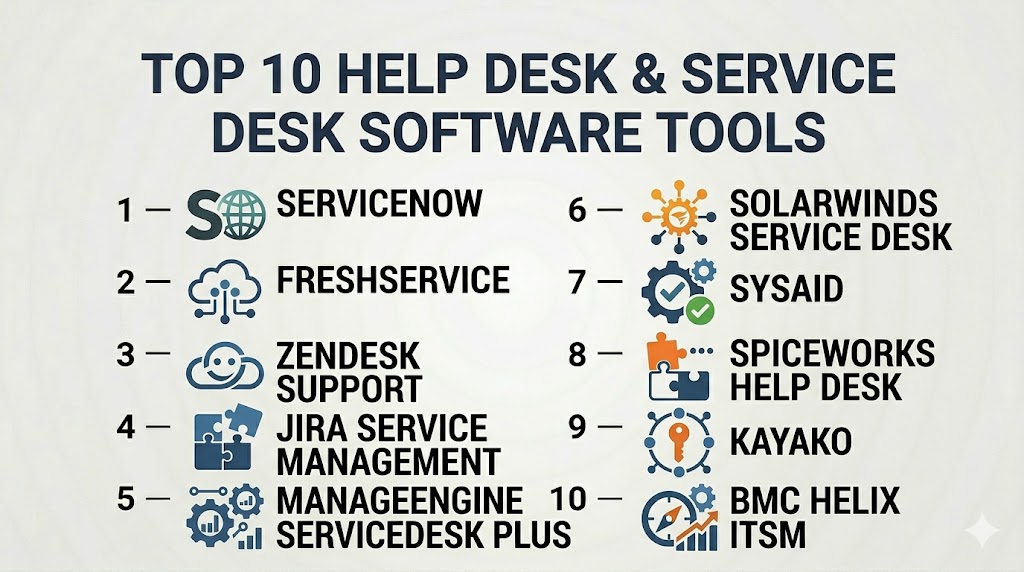
Top 10 Help Desk & Service Desk Software Tools
#1 — ServiceNow
Short description : ServiceNow is a robust enterprise service management platform offering comprehensive ITSM and help desk capabilities. It is ideal for large organizations seeking advanced workflow automation and AI-driven support.
Key Features
- AI and ML-assisted ticket routing
- Omnichannel support (email, chat, phone)
- Knowledge management and self-service portals
- SLA tracking and reporting dashboards
- Integration with IT operations and HR systems
- Automation of repetitive workflows
Pros
- Enterprise-grade scalability and security
- Advanced AI features and analytics
Cons
- High cost, less suitable for small teams
- Requires technical expertise for customization
Platforms / Deployment
- Web / Cloud
Security & Compliance
- SOC 2, ISO 27001, GDPR, HIPAA
Integrations & Ecosystem
- CRM platforms, collaboration tools, ITSM
- Open APIs for custom workflows
- Third-party analytics and reporting tools
Support & Community
- 24/7 enterprise support, extensive documentation, active community
#2 — Freshservice
Short description : Freshservice is a cloud-based ITSM and help desk solution designed for mid-market organizations. It emphasizes ease of use with automation and AI capabilities for incident management.
Key Features
- AI-powered ticket categorization and routing
- Self-service portal and knowledge base
- SLA and workflow automation
- Multichannel support
- Reporting and analytics dashboards
Pros
- Intuitive interface and easy onboarding
- Affordable for mid-market organizations
Cons
- Limited advanced customization compared to enterprise tools
- Fewer integrations for complex IT ecosystems
Platforms / Deployment
- Web, iOS, Android / Cloud
Security & Compliance
- GDPR, SOC 2, ISO 27001
Integrations & Ecosystem
- CRM and collaboration platforms
- APIs for workflow automation
- Integration with monitoring tools
Support & Community
- Email, chat support, knowledge base, community forums
#3 — Zendesk Support
Short description : Zendesk Support provides help desk and ticketing software for customer support teams, emphasizing simplicity, omnichannel engagement, and scalability for mid-market to enterprise organizations.
Key Features
- Omnichannel ticketing (email, chat, phone, social)
- AI and automation for ticket routing
- Knowledge base and self-service portals
- SLA management and reporting
- Integration with CRM and sales tools
Pros
- Easy to deploy and use
- Strong omnichannel capabilities
Cons
- Advanced enterprise features require higher-tier plans
- Reporting customization is limited
Platforms / Deployment
- Web, iOS, Android / Cloud
Security & Compliance
- SOC 2, GDPR
Integrations & Ecosystem
- Salesforce, Slack, Jira
- APIs for custom integration
- Marketplace apps and plugins
Support & Community
- 24/7 support, extensive documentation, active user community
#4 — Jira Service Management
Short description : Jira Service Management is an ITSM platform from Atlassian offering help desk, incident management, and workflow automation. Ideal for teams already using Jira for development projects.
Key Features
- ITIL-certified workflows
- AI-assisted incident prioritization
- SLA and reporting dashboards
- Automation of repetitive tasks
- Integration with Jira Software and Confluence
Pros
- Seamless integration with Atlassian tools
- Flexible and customizable workflows
Cons
- Learning curve for non-technical users
- Limited built-in AI features compared to competitors
Platforms / Deployment
- Web / Cloud / On-premises
Security & Compliance
- SOC 2, ISO 27001, GDPR
Integrations & Ecosystem
- Jira Software, Confluence, Bitbucket
- API access for custom workflows
- Marketplace apps and plugins
Support & Community
- Atlassian support, documentation, large community forums
#5 — ManageEngine ServiceDesk Plus
Short description : ManageEngine ServiceDesk Plus offers ITIL-ready help desk software with ticketing, asset management, and reporting. It caters to SMBs and mid-sized enterprises requiring affordable ITSM solutions.
Key Features
- Incident, problem, and change management
- Asset management integration
- Self-service portal and knowledge base
- SLA and workflow automation
- Multichannel support
Pros
- Affordable and feature-rich for mid-market
- Easy to deploy and maintain
Cons
- UI less modern compared to competitors
- Limited AI capabilities
Platforms / Deployment
- Web / Cloud / On-premises
Security & Compliance
- ISO 27001, GDPR
Integrations & Ecosystem
- Active Directory, CRM, monitoring tools
- API for custom workflows
- Third-party plugins
Support & Community
- Email and chat support, documentation, community forums
#6 — SolarWinds Service Desk
Short description : SolarWinds Service Desk is a cloud-based IT service management platform focused on ticketing, asset management, and process automation for IT teams.
Key Features
- Incident and request management
- Asset discovery and tracking
- Workflow automation
- SLA monitoring and reporting
- Self-service portal
Pros
- Integrated asset and service management
- Intuitive user interface
Cons
- Fewer integrations compared to enterprise solutions
- Limited AI and predictive analytics
Platforms / Deployment
- Web / Cloud
Security & Compliance
- SOC 2, GDPR
Integrations & Ecosystem
- Active Directory, monitoring tools, CRM platforms
- API for custom integrations
- Third-party apps
Support & Community
- Email, chat, phone support, knowledge base
#7 — SysAi
Short description : SysAid is a service desk platform providing ticketing, automation, and asset management, suitable for SMBs and mid-sized IT teams.
Key Features
- Ticketing and incident management
- Automation and workflow customization
- Asset management and CMDB
- SLA and reporting dashboards
- Self-service portal
Pros
- Cost-effective and flexible
- Supports ITIL processes
Cons
- UI and experience may feel outdated
- Advanced analytics limited
Platforms / Deployment
- Web / Cloud / On-premises
Security & Compliance
- Not publicly stated
Integrations & Ecosystem
- Active Directory, monitoring tools, APIs
- Integration with CRM and productivity platforms
Support & Community
- Email support, documentation, community forums
#8 — Spiceworks Help Desk
Short description : Spiceworks is a free help desk platform for IT teams, offering ticketing, asset management, and reporting. Suitable for small IT departments or budget-conscious organizations.
Key Features
- Ticketing and issue tracking
- Asset inventory and monitoring
- Self-service portal
- Basic workflow automation
- Reporting and dashboards
Pros
- Free to use, budget-friendly
- Simple and easy to deploy
Cons
- Limited advanced features
- Cloud and on-premises experience varies
Platforms / Deployment
- Web / Cloud / On-premises
Security & Compliance
- Not publicly stated
Integrations & Ecosystem
- Limited API support
- Integration with Active Directory
- Community-driven plugins
Support & Community
- Online documentation, forums, limited support
#9 — Kayako
Short description : Kayako is a customer service platform offering help desk ticketing, live chat, and automation for SMBs and mid-market companies.
Key Features
- Multichannel ticketing
- Automation and workflow rules
- SLA and reporting dashboards
- Self-service portal and knowledge base
- Chat and collaboration tools
Pros
- Easy to use and deploy
- Strong multichannel support
Cons
- Limited advanced ITSM features
- Reporting customization may be constrained
Platforms / Deployment
- Web / Cloud
Security & Compliance
- Not publicly stated
Integrations & Ecosystem
- CRM integrations, API support
- Collaboration and productivity tools
Support & Community
- Email and chat support, knowledge base
#10 — BMC Helix ITSM
Short description : BMC Helix ITSM provides enterprise-grade help desk and service desk solutions, leveraging AI, automation, and predictive analytics to enhance service delivery.
Key Features
- AI-assisted ticketing and incident management
- Predictive analytics for issue prevention
- Automation of workflows
- Knowledge management and self-service portal
- SLA monitoring and reporting
Pros
- Enterprise-scale capabilities
- Advanced AI and analytics features
Cons
- Higher cost and complexity
- Requires training for optimal use
Platforms / Deployment
- Web / Cloud
Security & Compliance
- SOC 2, ISO 27001, GDPR, HIPAA
Integrations & Ecosystem
- CRM, IT operations tools, collaboration platforms
- API access for custom workflows
- Third-party integrations
Support & Community
- 24/7 enterprise support, documentation, user community
Comparison Table (Top 10)
| Tool Name | Best For | Platform(s) Supported | Deployment | Standout Feature | Public Rating |
|---|---|---|---|---|---|
| ServiceNow | Enterprise | Web | Cloud | AI-driven workflow automation | N/A |
| Freshservice | Mid-market | Web, iOS, Android | Cloud | Easy-to-use AI ticketing | N/A |
| Zendesk Support | Mid-market to enterprise | Web, iOS, Android | Cloud | Omnichannel ticketing | N/A |
| Jira Service Management | IT teams / DevOps | Web | Cloud / On-prem | Integration with Jira ecosystem | N/A |
| ManageEngine ServiceDesk Plus | SMB / Mid-market | Web | Cloud / On-prem | ITIL-ready workflow automation | N/A |
| SolarWinds Service Desk | IT teams | Web | Cloud | Integrated asset management | N/A |
| SysAid | SMB / Mid-market | Web | Cloud / On-prem | ITIL support for small teams | N/A |
| Spiceworks Help Desk | Small IT teams | Web | Cloud / On-prem | Free and easy to deploy | N/A |
| Kayako | SMB / mid-market | Web | Cloud | Multichannel ticketing | N/A |
| BMC Helix ITSM | Enterprise | Web | Cloud | AI and predictive analytics | N/A |
Evaluation & Scoring of Help Desk & Service Desk Software
| Tool Name | Core (25%) | Ease (15%) | Integrations (15%) | Security (10%) | Performance (10%) | Support (10%) | Value (15%) | Weighted Total (0–10) |
|---|---|---|---|---|---|---|---|---|
| ServiceNow | 9 | 7 | 8 | 9 | 9 | 8 | 6 | 8.2 |
| Freshservice | 8 | 9 | 7 | 8 | 8 | 7 | 8 | 8.0 |
| Zendesk Support | 8 | 9 | 8 | 8 | 8 | 8 | 7 | 8.1 |
| Jira Service Management | 8 | 7 | 8 | 8 | 8 | 7 | 7 | 7.7 |
| ManageEngine ServiceDesk Plus | 8 | 8 | 7 | 8 | 8 | 7 | 8 | 7.9 |
| SolarWinds Service Desk | 7 | 8 | 7 | 8 | 7 | 7 | 8 | 7.6 |
| SysAid | 7 | 8 | 7 | 7 | 7 | 7 | 8 | 7.4 |
| Spiceworks Help Desk | 6 | 9 | 6 | 6 | 6 | 6 | 9 | 6.9 |
| Kayako | 7 | 8 | 7 | 6 | 7 | 7 | 7 | 7.0 |
| BMC Helix ITSM | 9 | 7 | 8 | 9 | 9 | 8 | 6 | 8.1 |
Scores are comparative; higher weighted totals indicate better balance of core features, usability, integration capabilities, security, performance, support, and overall value.
Which Help Desk & Service Desk Software Tool Is Right for You?
Solo / Freelancer
- Tools like Spiceworks Help Desk or Freshservice offer affordable, easy-to-deploy solutions with core ticketing features.
SMB
- ManageEngine ServiceDesk Plus, Zendesk Support, or SolarWinds Service Desk provide a balance of usability, automation, and multichannel support.
Mid-Market
- Freshservice, Zendesk Support, and Jira Service Management offer scalable workflows, AI features, and integration capabilities suitable for growing teams.
Enterprise
- ServiceNow, BMC Helix ITSM, and Zendesk Enterprise deliver robust automation, predictive analytics, and compliance features for large-scale operations.
Budget vs Premium
- Smaller teams can leverage free or low-cost options like Spiceworks. Premium solutions provide advanced AI, automation, and compliance capabilities but at higher costs.
Feature Depth vs Ease of Use
- Small teams prioritize simplicity and usability; large enterprises benefit from extensive workflow automation, AI-driven insights, and reporting.
Integrations & Scalability
- Select platforms that integrate seamlessly with CRM, collaboration, and ITSM tools, and scale to handle higher ticket volumes.
Security & Compliance Needs
- Enterprise organizations should prioritize SOC 2, ISO 27001, HIPAA, and GDPR compliance. SMBs may focus on encryption and secure user access.
Frequently Asked Questions (FAQs)
1. How much do help desk platforms cost?
Pricing depends on deployment, user count, and features. Cloud-based SaaS is typically subscription-based, while on-premises licensing may require upfront investment.
2. Can these platforms integrate with my CRM?
Yes, most leading tools integrate with Salesforce, Microsoft Dynamics, HubSpot, and other CRMs, enabling seamless workflow and customer data synchronization.
3. How long does implementation take?
Cloud-based platforms can be deployed in days, while enterprise-scale setups may require several weeks for configuration and migration.
4. Are help desk platforms secure and compliant?
Top tools comply with GDPR, HIPAA, SOC 2, and ISO 27001. Always verify certifications for your specific industry and region.
5. What features are most critical for IT teams?
Ticket management, automation, SLA tracking, knowledge bases, reporting dashboards, and AI-assisted workflows are key features.
6. Can small businesses benefit from these platforms?
Yes, cloud-based SaaS options like Freshservice or Spiceworks provide cost-effective, easy-to-use solutions suitable for small teams.
7. Do help desk tools support multichannel communication?
Yes, leading platforms support email, chat, phone, social media, and integrated self-service portals.
8. How does AI enhance service desk software?
AI assists in automated ticket classification, routing, resolution suggestions, predictive analytics, and workflow optimization.
9. Can I switch platforms easily?
Switching requires data migration, workflow mapping, and potential integration reconfiguration. Evaluate API support and data export options.
10. Are there alternatives for minimal ticket volumes?
Small teams may use email-based ticketing, CRM-integrated task tracking, or lightweight cloud tools without full ITSM functionality.
Conclusion
Help Desk and Service Desk Software are essential for organizations seeking efficient IT and customer support operations. Selecting the right platform depends on team size, operational complexity, desired AI and automation capabilities, and compliance requirements. SMBs and small IT teams may find cost-effective solutions in Freshservice, Spiceworks, or SolarWinds, while enterprises benefit from the robust features, scalability, and analytics of ServiceNow, BMC Helix ITSM, or Zendesk Enterprise. Prioritizing integration capabilities, security, and ease of use ensures a smooth deployment and long-term operational efficiency. Organizations should shortlist a few platforms, conduct pilot programs, and validate workflow automation and analytics before full-scale adoption to maximize ROI and service quality.

Find Trusted Cardiac Hospitals
Compare heart hospitals by city and services — all in one place.
Explore Hospitals
Help desk and service desk software comparison clearly shows how ticketing, automation, and reporting features improve IT support efficiency and make issue resolution faster and more organized.