Introduction
Internal Developer Platforms (IDPs) are centralized software environments that streamline how developers build, deploy, and manage applications, providing automated workflows, reusable services, and pre-configured infrastructure so teams can focus on coding rather than managing environments. IDPs reduce operational friction, enforce governance, and improve developer productivity across multiple teams. Modern IDPs enable self-service developer portals, consistent deployment pipelines, and centralized observability, while buyers should evaluate integration capabilities, automation, deployment flexibility, security, compliance, and scalability. The right platform ensures faster development cycles, consistent environments, and minimized operational risk for teams of all sizes and industries.
Real-World Use Cases
- Standardizing CI/CD Pipelines:
Enforces consistent build, test, and deployment processes across teams, reducing errors and improving reliability. - Automating Infrastructure Provisioning:
Minimizes manual setup errors and accelerates deployments using infrastructure-as-code templates. - Self-Service Developer Portals:
Provides developers access to pre-approved services, APIs, and templates, reducing dependency on platform teams. - Simplifying Observability and Monitoring:
Central dashboards track application health, performance metrics, and alerts for faster issue resolution. - Governance and Compliance:
Enforces RBAC, audit logs, and security policies to meet regulatory requirements. - Supporting Multi-Cloud and Hybrid Deployments:
Enables consistent deployment workflows across cloud and on-prem environments. - Accelerating Developer Onboarding:
New developers gain access to pre-configured environments and templates, shortening ramp-up time. - Enabling Experimentation and Feature Testing:
Isolated environments allow safe testing and faster iteration for microservices or features. - Centralized Secrets and Configuration Management:
Secures sensitive data while providing easy developer access without risking exposure.
Evaluation Criteria for Buyers
- Integration with existing CI/CD, source control, monitoring, and cloud tools
- Automation and self-service capabilities for environment provisioning
- Deployment flexibility across hybrid, multi-cloud, or on-prem environments
- Security and compliance: RBAC, audit logging, secrets management
- Observability and monitoring: dashboards, metrics, and alerts
- Scalability and performance to support multiple teams and clusters
- Ease of use and developer experience with templates and UI
- Cost and value considering TCO, licensing, and scaling
- Extensibility via APIs and plugins
- Support and community for guidance and issue resolution
Best for
IDPs are best for medium to large enterprises with multiple developer teams and complex deployment pipelines.
They suit DevOps-heavy organizations and regulated industries requiring governance and compliance.
Also ideal for companies scaling microservices or hybrid/multi-cloud applications with self-service developer needs.
Not ideal for
Small teams or startups with simple deployment workflows may not need an IDP.
Monolithic application environments or minimal CI/CD adoption make IDPs less necessary.
Teams already satisfied with existing DevOps tools might face unnecessary overhead adopting a new platform.
Key Trends in Internal Developer Platforms
- AI-driven automation optimizes deployments and detects anomalies
- Native multi-cloud and hybrid support for consistent operations
- Low-code/declarative workflows reduce configuration errors
- Enhanced observability with dashboards, metrics, and alerts
- Governance and compliance automation for RBAC, audit, and reporting
- Self-service developer portals reduce operational bottlenecks
- Modular, extensible architectures with plugins and APIs
- Metrics-driven productivity tracking
- Flexible pricing: subscription, usage-based, and enterprise licenses
- Platform consolidation integrates CI/CD, monitoring, and security
How We Selected These Tools (Methodology)
- Market adoption and mindshare
- Feature completeness: automation, self-service, observability
- Reliability and performance in production environments
- Security posture: RBAC, audit logs, encryption
- Integration ecosystem with CI/CD, monitoring, and cloud tools
- Customer fit across SMB, mid-market, and enterprise segments
- Developer experience and onboarding efficiency
- Observability and metrics support
- Support and community strength
- Alignment with modern DevOps and GitOps practices
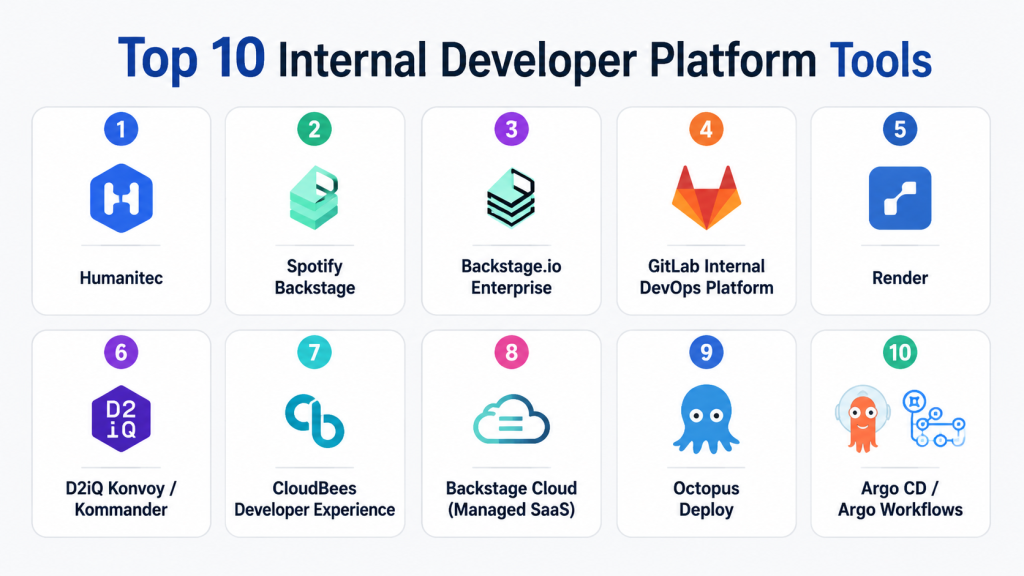
Top 10 Internal Developer Platform Tools
1- Humanitec
Short description: Humanitec automates environment provisioning and deployment workflows to reduce configuration overhead. It provides developers with reusable templates and declarative components for infrastructure management. Ideal for organizations needing standardized multi-cloud and hybrid deployments.
Key Features
- Declarative Environment as Code (EaC) templates
- Multi‑cloud and hybrid support (AWS, Azure, GCP, on‑prem)
- Automated environment orchestration and service discovery
- Centralized configuration & secrets management
- GitOps workflow support
- RBAC and audit logs
- Observability dashboards & metrics
Pros
- Speeds environment provisioning and onboarding
- Reduces manual deployment errors
- Abstracts complex infrastructure into reusable components
Cons
- Environment as Code templates have a learning curve
- Custom integrations can require engineering effort
- Licensing may be high for very small teams
Platforms / Deployment
- Web interface / Cloud / Hybrid
Security & Compliance
- Built‑in RBAC, audit logs
- Identity provider integration (SSO, MFA)
- Not publicly stated formal certifications
Integrations & Ecosystem
- GitHub, GitLab, Bitbucket
- Kubernetes, Terraform
- Slack, Microsoft Teams notifications
- Webhooks and API support
Support & Community
- Official documentation & knowledge base
- Community forums
- Enterprise tier support
2- Spotify Backstage
Short description: Backstage is an open‑source developer portal and service catalog to centralize tooling and internal infrastructure. It helps teams discover and reuse services, templates, and documentation. Best for engineering organizations building tailored internal platforms.
Key Features
- Centralized Service Catalog
- Extensible Plugin Architecture
- CI/CD pipeline visibility
- TechDocs auto‑generated internal docs
- Component scaffolding templates
- Searchable tooling directory
- RBAC support
Pros
- Free and open‑source
- Encourages standardization and governance
- Huge plugin ecosystem
Cons
- Requires significant internal hosting and configuration
- Advanced workflows need custom development
- Not a full platform‑as‑a‑service out of the box
Platforms / Deployment
- Web / Cloud / Self‑hosted
Security & Compliance
- Integration for identity (SSO/OAuth)
- Plugin security depends on implementation
- Not publicly stated formal certifications
Integrations & Ecosystem
- CI/CD: Jenkins, ArgoCD, CircleCI
- SCM: GitHub, GitLab, Bitbucket
- Identity providers: Okta, Azure AD
- Plugin marketplace
Support & Community
- Active open‑source community
- Slack channels and discussion forums
- Optional partner support
3- Backstage.io Enterprise
Short description: Enterprise edition of Spotify Backstage with governance, analytics, compliance, and commercial support. Helps large organizations adopt a standardized internal platform quickly. Designed for enterprise deployments with scale and control.
Key Features
- Enterprise authentication & audit logging
- Compliance dashboards and reporting
- Centralized RBAC and governance controls
- Enhanced observability and analytics
- Pre‑built enterprise integrations
Pros
- Enterprise support and SLAs
- Lowers internal maintenance overhead
- Built‑in compliance features
Cons
- Commercial licensing cost
- Still requires some internal development for custom workflows
- Larger footprint than simple open‑source
Platforms / Deployment
- Web / Cloud / Self‑hosted
Security & Compliance
- Enterprise identity and audit support
- RBAC and policy enforcement
- Not publicly stated formal compliance badges
Integrations & Ecosystem
- Atlassian suite, Slack/Teams
- Enterprise CI/CD tooling
- Monitoring and cloud resources
Support & Community
- Dedicated enterprise support
- Knowledge base and documentation
- Professional services
4- GitLab Internal DevOps Platform
Short description: GitLab unifies source control, CI/CD, and internal platform workflows in a single suite. It covers the entire DevOps lifecycle from planning to monitoring. Ideal for teams that want an end‑to‑end platform without stitching tools together.
Key Features
- Git repository and merge request workflows
- Integrated CI/CD pipelines
- Container registry & deployment automation
- Security scanning and compliance checks
- Environment dashboards and performance metrics
Pros
- One platform for code, CI/CD, security, and deployments
- Strong compliance and governance tooling
- Scales across large engineering teams
Cons
- Can be complex to configure advanced workflows
- Self‑hosted deployment is resource‑intensive
- Less flexible for non‑Git workflows
Platforms / Deployment
- Web | Linux | Cloud | Self‑hosted
Security & Compliance
- SSO/SAML, MFA
- RBAC, audit logs
- Code scanning and vulnerability management
- Not publicly stated formal certification list
Integrations & Ecosystem
- Kubernetes and container tooling
- Monitoring tools (Prometheus, Grafana)
- Slack, Jira, and other DevOps tools
- APIs for custom workflows
Support & Community
- Rich documentation
- Large global community
- Multiple paid support tiers
5- Render
Short description: Render is a cloud‑native IDP that automates deployment, scaling, and infrastructure management from Git. It simplifies operations for developers. Ideal for teams that want cloud app hosting with minimal setup.
Key Features
- Git‑based automated deployments
- Managed databases and backing services
- Infrastructure‑as‑code support
- Horizontal autoscaling and load balancing
- Secrets and configuration management
Pros
- Fast setup with minimal ops overhead
- Easy scaling and deployments
- User‑friendly interface
Cons
- Less control over underlying infrastructure
- Cost can grow with usage
- Hybrid or on‑premise support is limited
Platforms / Deployment
- Web / Cloud
Security & Compliance
- TLS encryption by default
- Role‑based access via team settings
- Not publicly stated formal compliance certifications
Integrations & Ecosystem
- GitHub, GitLab, Bitbucket
- Webhooks for automation
- Monitoring and alerting integrations
- Cloud provider resources
Support & Community
- Documentation and tutorials
- Community forum
- Paid support plans
6- D2iQ Konvoy / Kommander
Short description: D2iQ provides an enterprise‑grade Kubernetes platform IDP with automation, governance, and observability. Suited for organizations running large cloud‑native workloads and multi‑cluster environments.
Key Features
- Kubernetes cluster lifecycle management
- Multi‑cloud and hybrid support
- Automated upgrades and scaling
- RBAC and compliance policies
- Integrated monitoring & logging
Pros
- Enterprise‑ready Kubernetes orchestration
- Unified governance across clusters
- Built‑in observability
Cons
- Requires Kubernetes expertise
- Setup complexity for smaller teams
- Commercial licensing cost
Platforms / Deployment
- Web / Cloud / Hybrid
Security & Compliance
- RBAC and policy enforcement
- Centralized audit trails
- Not publicly stated formal certifications
Integrations & Ecosystem
- CI/CD pipelines
- Terraform integration
- Prometheus, Grafana
- Cloud provider tooling
Support & Community
- Enterprise support SLAs
- Partner ecosystem
- Documentation and guides
7- CloudBees Developer Experience
Short description: CloudBees Developer Experience centralizes developer self‑service, CI/CD, and automation workflows. It helps enterprises enforce governance while enabling developer autonomy. Ideal for large DevOps organizations.
Key Features
- CI/CD automation
- Developer self‑service portals
- RBAC and governance framework
- Observability and reporting
- Multi‑cloud deployment support
Pros
- Strong governance and compliance features
- Centralized service catalogs
- Reduces deployment bottlenecks
Cons
- Complex initial setup
- Enterprise pricing
- Less flexible for non‑standard workflows
Platforms / Deployment
- Web / Cloud / Hybrid
Security & Compliance
- RBAC and audit logging
- Identity provider integration
- Compliance reporting support
Integrations & Ecosystem
- GitHub, GitLab, Jira, Slack
- CI/CD tools and notifications
- Kubernetes and cloud services
Support & Community
- Enterprise support offerings
- Documentation and forums
- Professional services
8- Backstage Cloud (Managed SaaS)
Short description: Backstage Cloud is a managed SaaS offering of the Backstage platform that eliminates hosting overhead. It provides developer portals, analytics, and plugin support. Best for teams that want a hosted internal platform with minimal maintenance.
Key Features
- Hosted developer portal & service catalog
- Pre‑built integrations
- Usage and compliance metrics
- Plugin extensibility
- Automatic updates & maintenance
Pros
- No hosting operations required
- Simplifies internal platform adoption
- Continuous feature updates
Cons
- SaaS subscription cost
- Less deep customization than self‑hosted
- Limited offline deployment support
Platforms / Deployment
- Web / Cloud
Security & Compliance
- Provider‑managed hosting security
- Identity and access controls
- Not publicly stated certified compliance badges
Integrations & Ecosystem
- Git repos and CI/CD pipelines
- Slack/Teams notifications
- Plugin ecosystem
Support & Community
- Managed support team
- Documentation center
- Active user community
9- Octopus Deploy
Short description: Octopus Deploy specializes in multi‑environment release orchestration and deployment automation. It standardizes release processes and integrates with CI pipelines. Ideal for teams focused on reliable, governed deployments across environments.
Key Features
- Automated release pipelines
- Multi‑environment deployment flows
- RBAC and approvals
- Infrastructure as code patterns
- Tenant deployments and variables
Pros
- Strong release governance
- Visual deployment processes
- Integrates with many CI tools
Cons
- Learning curve for complex workflows
- Limited cloud‑native abstraction
- Enterprise features behind paid tiers
Platforms / Deployment
- Web / Windows / Cloud / Self‑hosted
Security & Compliance
- RBAC controls and audit trails
- Identity integration (SSO)
- Not publicly stated formal compliance
Integrations & Ecosystem
- Jenkins, GitLab, Azure DevOps
- Cloud provider APIs
- Slack, Teams alerts
- Config management tools
Support & Community
- Documentation and guides
- Paid enterprise support
- Community forums
10- Argo CD / Argo Workflows
Short description: Argo CD and Argo Workflows provide a GitOps‑centered IDP experience for Kubernetes continuous delivery and workflow automation. They automate deployments, manage clusters, and enforce declarative infrastructure. Best for cloud‑native teams adopting GitOps practices.
Key Features
- GitOps‑based continuous delivery
- Multi‑cluster support
- Automated rollbacks & promotions
- RBAC and SSO integration
- Workflow orchestration for CI/CD
Pros
- Open‑source and extensible
- Strong GitOps alignment
- Automates deployment state reconciliation
Cons
- Requires Kubernetes expertise
- Limited built‑in enterprise support
- Plugin ecosystem required for full extensibility
Platforms / Deployment
- Web / Cloud / Self‑hosted
Security & Compliance
- RBAC, SSO integration
- Audit logging via Kubernetes or tooling
- Not publicly stated formal certifications
Integrations & Ecosystem
- Helm, Kustomize
- CI/CD systems
- Slack/Teams notifications
- Kubernetes ecosystem
Support & Community
- Mature open‑source community
- Docs and tutorials
- Enterprise partner support
Comparison Table (Top 10)
| Tool Name | Best For | Platform(s) Supported | Deployment | Standout Feature | Public Rating |
|---|---|---|---|---|---|
| Humanitec | Multi-cloud teams | Web | Cloud / Hybrid | Environment as Code templates | N/A |
| Spotify Backstage | Dev portals | Web | Cloud / Self-hosted | Plugin-based extensibility | N/A |
| Backstage.io Enterprise | Enterprises | Web | Cloud / Self-hosted | Compliance & analytics | N/A |
| GitLab Internal DevOps | DevOps teams | Web, Linux | Cloud / Self-hosted | End-to-end CI/CD | N/A |
| Render | Cloud-native developers | Web | Cloud | Rapid deployment & scaling | N/A |
| D2iQ Konvoy | Kubernetes teams | Web | Cloud / Hybrid | Cluster orchestration | N/A |
| CloudBees DX | Enterprise DevOps | Web | Cloud / Hybrid | Self-service portals | N/A |
| Backstage Cloud | Managed IDP | Web | Cloud | SaaS portal | N/A |
| Octopus Deploy | Release management | Web, Windows | Cloud / Self-hosted | Multi-env deployments | N/A |
| Argo CD / Workflows | GitOps teams | Web | Cloud / Self-hosted | Declarative deployments | N/A |
Evaluation & Scoring of IDPs
| Tool | Core | Ease | Integrations | Security | Performance | Support | Value | Weighted Total |
|---|---|---|---|---|---|---|---|---|
| Humanitec | 9 | 8 | 8 | 7 | 8 | 8 | 7 | 8.1 |
| Spotify Backstage | 8 | 7 | 9 | 7 | 7 | 8 | 8 | 7.8 |
| Backstage.io Enterprise | 9 | 8 | 9 | 8 | 8 | 9 | 7 | 8.5 |
| GitLab | 9 | 7 | 8 | 8 | 8 | 8 | 8 | 8.2 |
| Render | 8 | 9 | 7 | 7 | 8 | 8 | 7 | 7.9 |
| D2iQ Konvoy | 9 | 7 | 8 | 8 | 9 | 8 | 7 | 8.2 |
| CloudBees DX | 9 | 7 | 8 | 8 | 8 | 8 | 7 | 8.0 |
| Backstage Cloud | 8 | 9 | 8 | 7 | 8 | 8 | 7 | 7.9 |
| Octopus Deploy | 8 | 8 | 7 | 7 | 8 | 7 | 7 | 7.6 |
| Argo CD | 8 | 7 | 8 | 7 | 8 | 7 | 7 | 7.6 |
Which Internal Developer Platform Tool Is Right for You?
Solo / Freelancer
Render or Backstage Cloud are ideal for simple deployments with minimal setup. Humanitec is good for lightweight automation without managing multiple clusters. Focus on ease-of-use and cost-efficiency.
SMB
GitLab or Render provide integrated CI/CD pipelines and reliable multi-environment deployments. Octopus Deploy standardizes releases and reduces errors.
Mid-Market
CloudBees DX or Backstage.io Enterprise deliver self-service portals, analytics, and governance. D2iQ Konvoy is excellent for Kubernetes-heavy workloads and hybrid cloud.
Enterprise
Humanitec, Backstage.io Enterprise, or CloudBees are ideal for compliance, governance, multi-cloud orchestration, and enterprise-scale deployments. GitLab ensures end-to-end DevOps lifecycle control.
Budget vs Premium
Open-source Backstage or Argo CD for low-cost teams. CloudBees or Backstage Enterprise for advanced features, enterprise support, and compliance.
Feature Depth vs Ease of Use
Render or Backstage Cloud are simple and user-friendly. Humanitec, D2iQ, and CloudBees offer deeper orchestration for complex environments.
Integrations & Scalability
Enterprise IDPs like CloudBees, GitLab, and Backstage.io Enterprise integrate widely with CI/CD, monitoring, and cloud systems. Open-source options are flexible but need internal effort.
Security & Compliance Needs
Backstage Enterprise, CloudBees, and GitLab support RBAC, audit logging, and compliance features. Open-source tools require careful configuration for sensitive environments.
Frequently Asked Questions (FAQs)
1- What pricing models do IDPs typically offer?
Most IDPs offer subscription-based pricing, usage-based billing, or enterprise licensing depending on team size and scale. Open-source options are free but require internal hosting and maintenance. Teams should calculate total cost including onboarding, integrations, and scaling. Premium plans often include dedicated support and advanced features. Evaluate carefully to balance cost versus productivity.
2- How long does onboarding take for developers?
Onboarding depends on platform complexity and team familiarity. With templates, self-service portals, and pre-built workflows, developers can start deploying within days. Advanced customization may take weeks. Training, documentation, and mentorship accelerate adoption. Feedback loops help refine workflows efficiently.
3- Can IDPs integrate with existing CI/CD tools?
Yes, most support GitHub, GitLab, Jenkins, CircleCI, and cloud pipelines. Custom APIs extend integrations for unique workflows. Integration reduces context switching and operational overhead. Ensures deployment consistency across teams. Reduces manual intervention and errors.
4- Are IDPs suitable for regulated industries?
Enterprise-grade IDPs include RBAC, audit logs, and compliance reporting. They help maintain governance for healthcare, finance, and government. Organizations must verify compliance with HIPAA, SOC2, GDPR, or relevant standards. Auditing and monitoring features support regulatory audits. Security configuration remains critical.
5- How do IDPs improve developer productivity?
IDPs automate environment setup, deployment, and configuration management. Standardized workflows and self-service portals reduce bottlenecks. Developers spend less time on infrastructure, more on coding. Metrics dashboards track efficiency and deployment frequency. Faster iteration cycles and fewer errors improve team output.
6- Can IDPs support hybrid or multi-cloud deployments?
Yes, they allow deployments across multiple cloud providers and on-prem environments. Ensures consistent configuration and reduces vendor lock-in. Manages networking, secrets, and scaling across clouds. Reliable deployment in any environment. Planning resources and access policies ensures smooth operation.
7- What are common mistakes when implementing an IDP?
Over-customizing workflows, skipping training, neglecting security, or failing to integrate with CI/CD and monitoring tools. Teams may underestimate adoption challenges. Monitoring usage metrics prevents workflow bloat. Phased rollouts and pilot testing mitigate risk. Documentation is essential for adoption.
8- Can IDPs replace DevOps tools?
No, IDPs complement existing tools. Centralize workflows while integrating with CI/CD, monitoring, and infrastructure systems. Avoids disruption to pipelines. Teams retain best-of-breed tools while gaining automation and governance. Evaluate overlap vs added value.
9- How scalable are IDPs?
Enterprise-grade IDPs scale across multiple teams, clusters, and regions. Multi-cloud support, automated provisioning, and RBAC enable growth without bottlenecks. Load testing ensures performance. Handles hundreds or thousands of developers. Planning prevents platform limitations.
10- What alternatives exist if an IDP is not suitable?
Standalone CI/CD platforms, cloud-native PaaS, or custom orchestration scripts. Smaller teams may manage with simple pipelines. Choice depends on team size, infrastructure complexity, and scaling. Open-source frameworks provide flexibility. Reassess periodically as needs evolve.
Conclusion
Internal Developer Platforms streamline workflows, improve productivity, and reduce operational risk. Choosing the right IDP depends on team size, infrastructure, compliance, and integrations. Open-source IDPs provide flexibility and cost savings, while enterprise platforms offer governance, advanced features, and support. Teams should shortlist 2–3 tools, run pilots, and validate integrations and security before full adoption. A well-chosen IDP accelerates delivery, standardizes operations, and empowers developers to focus on high-value work.

Find Trusted Cardiac Hospitals
Compare heart hospitals by city and services — all in one place.
Explore Hospitals
Internal Developer Platforms (IDPs) are most valuable when they provide developers with a self-service environment for building, deploying, and managing applications using standardized workflows. By integrating infrastructure automation, CI/CD pipelines, Kubernetes, security controls, service catalogs, and observability into a unified platform, IDPs reduce operational complexity, improve developer productivity, accelerate software delivery, and ensure consistent governance across engineering teams.