Introduction
Reverse proxy tools sit in front of backend servers, applications, APIs, containers, or microservices and forward client requests to the right internal destination. In simple terms, a reverse proxy acts like a smart traffic gateway between users and application infrastructure. It can hide backend servers, improve security, manage SSL/TLS, route traffic, cache content, balance load, compress responses, and protect applications from direct exposure. Reverse proxy tools matter because modern applications are distributed across cloud platforms, Kubernetes clusters, microservices, edge networks, and hybrid infrastructure. Teams need a reliable way to control traffic, secure APIs, route requests, handle certificates, and improve performance without exposing backend systems directly.
Real World Use Cases
- Application traffic routing: Reverse proxies route user requests to the correct backend application, API service, container, or microservice based on domain, path, header, or rule.
- SSL and TLS termination: Teams use reverse proxies to manage HTTPS certificates, decrypt traffic at the edge, and reduce certificate handling complexity across backend services.
- API gateway-style control: Reverse proxies can help manage API routing, rate limiting, authentication handoff, request rewriting, and backend service protection.
- Microservices and Kubernetes ingress: Cloud-native teams use reverse proxies to expose services safely inside Kubernetes, Docker, and container-based environments.
- Load balancing and failover: Reverse proxies distribute traffic across multiple backend servers and route requests away from unhealthy systems.
- Security hardening: Reverse proxies reduce direct backend exposure and can support access controls, WAF integrations, bot filtering, header policies, and request inspection.
- Caching and performance improvement: Reverse proxies can cache static or dynamic content, compress responses, and reduce backend load.
- Multi-domain hosting: Teams can host multiple applications behind one public endpoint and route traffic based on hostname or URL path.
- Zero trust and internal app access: Reverse proxies are used to protect private dashboards, admin panels, internal tools, and sensitive business applications.
- Legacy modernization: Organizations can place a reverse proxy in front of older applications to improve security, routing, TLS, and access patterns without rewriting the backend.
Evaluation Criteria for Buyers
- Protocol support: HTTP, HTTPS, TCP, UDP, gRPC, WebSocket, HTTP/2, and HTTP/3 support depending on use case.
- Routing flexibility: Host-based, path-based, header-based, service discovery, dynamic routing, and rule-based forwarding.
- Security controls: TLS termination, mTLS, access policies, WAF integration, rate limiting, request filtering, and secure headers.
- Performance: Low latency, high throughput, connection handling, caching, compression, and resource efficiency.
- Deployment fit: Bare metal, virtual machines, containers, Kubernetes, cloud, edge, or hybrid environments.
- Automation support: APIs, CLI, infrastructure-as-code, GitOps, dynamic configuration, and CI/CD integration.
- Observability: Logs, metrics, dashboards, tracing, request visibility, health checks, and alerting.
- Ease of operation: Configuration clarity, learning curve, upgrade process, documentation, and troubleshooting experience.
- Scalability: Ability to support high traffic, multi-region deployments, distributed systems, and service growth.
- Cost and value: Open-source availability, commercial support, licensing, cloud usage, operational effort, and long-term maintenance.
Best for: Reverse proxy tools are best for DevOps engineers, platform engineers, SRE teams, network teams, cloud architects, security teams, API teams, SaaS companies, e-commerce platforms, fintech systems, media platforms, and enterprises running distributed applications.
Not ideal for: Very small static websites, single-server hobby projects, or simple internal tools may not need a full reverse proxy setup immediately. In those cases, built-in hosting routing, basic web server configuration, or managed platform routing may be enough until traffic, security, or scaling requirements grow.
Key Trends in Reverse Proxy Tools
- Cloud-native reverse proxies are becoming standard: More teams are using reverse proxies inside Kubernetes, container platforms, and service mesh environments instead of relying only on traditional web server patterns.
- API gateway and reverse proxy roles are overlapping: Reverse proxies increasingly support API routing, authentication integration, rate limiting, request transformation, and traffic policy controls.
- Security is moving closer to the edge: Reverse proxies are now commonly used for TLS termination, WAF integration, DDoS protection, access control, and zero trust access patterns.
- Dynamic service discovery is critical: Modern applications change frequently, so reverse proxies must detect services automatically from Kubernetes, Docker, Consul, cloud APIs, or service registries.
- Automation-first configuration is expected: Teams want declarative configuration, GitOps workflows, REST APIs, Terraform support, CLI tools, and CI/CD-friendly deployment.
- Observability is no longer optional: Logs, metrics, distributed tracing, health checks, latency visibility, and error analytics are now core requirements for production reverse proxy operations.
- HTTP/2, HTTP/3, gRPC, and WebSocket support matter more: Modern apps are not limited to basic HTTP traffic, so protocol flexibility is a major buying factor.
- Multi-cloud and hybrid routing are growing: Enterprises need reverse proxies that work consistently across on-premises systems, public clouds, Kubernetes clusters, and edge networks.
- Performance and efficiency remain key: Teams are looking for reverse proxies that can handle high request volume with low memory and CPU overhead.
- Developer experience is improving: More reverse proxy platforms are focusing on simpler configuration, better dashboards, automatic certificates, and easier local-to-production workflows.
How We Selected These Tools
The tools in this list were selected based on practical usage, market recognition, infrastructure relevance, and fit across different organization sizes.
- Market adoption and mindshare: Tools widely used by DevOps, SRE, platform, network, and cloud teams were prioritized.
- Feature completeness: Reverse proxy routing, TLS termination, load balancing, caching, health checks, and dynamic configuration were evaluated.
- Cloud-native readiness: Kubernetes, Docker, service discovery, and microservices support were important selection factors.
- Performance and reliability: Tools known for stability, throughput, low latency, and production-grade deployment received stronger consideration.
- Security posture signals: TLS, mTLS, access control, WAF integration, rate limiting, and policy support were reviewed where confidently known.
- Integration ecosystem: Compatibility with cloud platforms, CI/CD tools, monitoring systems, identity providers, and infrastructure automation was considered.
- Customer fit: The list includes options for solo developers, SMBs, mid-market teams, enterprises, platform teams, and edge-first architectures.
- Operational maturity: Documentation quality, community strength, commercial support, and enterprise readiness were included.
- Use-case diversity: The list balances classic reverse proxies, cloud-native proxies, enterprise ADCs, developer-friendly tools, and edge platforms.
- Long-term maintainability: Tools with active ecosystems, clear configuration models, and strong adoption patterns were preferred.
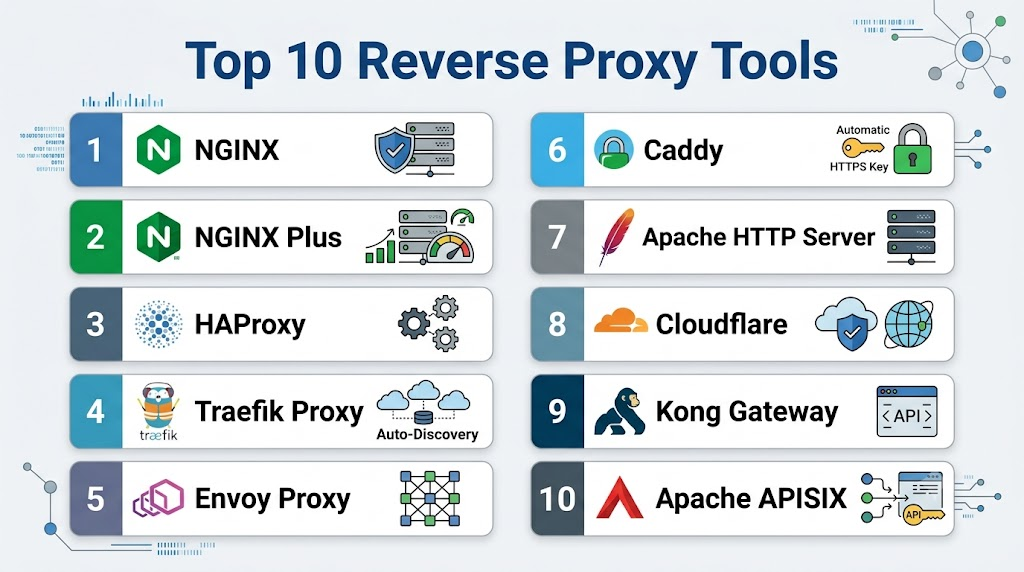
Top 10 Reverse Proxy Tools
1- NGINX
Short description: NGINX is one of the most widely used reverse proxy and web server technologies for routing HTTP traffic, handling TLS, caching content, and balancing requests. It is suitable for developers, DevOps teams, platform teams, and enterprises that need a flexible and high-performance reverse proxy.
Key Features
- HTTP and HTTPS reverse proxy support.
- Load balancing across backend servers.
- SSL and TLS termination.
- Static file serving and content caching.
- Request header modification and routing control.
- HTTP/2 and gRPC support depending on configuration.
- Strong performance for web and API traffic.
Pros
- Mature, widely adopted, and well understood by infrastructure teams.
- Strong performance with efficient resource usage.
- Flexible enough for websites, APIs, microservices, and edge routing.
Cons
- Advanced dynamic configuration can require extra tooling or commercial options.
- Complex configurations may become hard to maintain without standards.
- New users may need time to understand directives and module behavior.
Platforms / Deployment
Linux / Windows / macOS through supported builds and packages
Cloud / Self-hosted / Hybrid / Container-based deployment
Security & Compliance
NGINX supports TLS termination, secure headers, access controls, authentication patterns, and request filtering depending on configuration. Specific compliance certifications depend on the edition, vendor support, deployment model, and customer environment.
Integrations & Ecosystem
NGINX has a large ecosystem and fits into many application delivery, DevOps, and cloud infrastructure workflows. It is often used as a reverse proxy, ingress controller, API gateway component, and front-end web server.
- Docker
- Kubernetes
- Linux servers
- CI/CD pipelines
- Monitoring and logging tools
- Cloud platforms
Support & Community
NGINX has extensive documentation, a very large community, and broad operational knowledge across the industry. Commercial support and enterprise features are available through related commercial offerings.
2- NGINX Plus
Short description: NGINX Plus is the commercial version of NGINX designed for enterprise application delivery, advanced load balancing, monitoring, and support. It is useful for organizations that want NGINX performance with additional production-grade features and vendor-backed support.
Key Features
- Advanced load balancing and reverse proxy capabilities.
- Active health checks for backend services.
- Session persistence and traffic control.
- API gateway-style use cases.
- Real-time activity monitoring.
- Dynamic configuration options.
- Commercial support for production environments.
Pros
- Strong choice for teams that already use NGINX and need enterprise capabilities.
- Better operational visibility than basic open-source configurations.
- Suitable for high-traffic applications, APIs, and microservices.
Cons
- Requires paid licensing.
- May still require experienced administrators for complex environments.
- Some organizations may prefer fully managed cloud-native options.
Platforms / Deployment
Linux / Containers / Kubernetes-compatible environments
Cloud / Self-hosted / Hybrid
Security & Compliance
NGINX Plus supports enterprise security patterns such as TLS termination, access control, authentication integrations, and traffic policy enforcement. Compliance details should be validated based on deployment architecture and vendor documentation.
Integrations & Ecosystem
NGINX Plus works well in enterprise DevOps environments where teams need reverse proxy, load balancing, API gateway, and monitoring capabilities in one platform.
- Kubernetes
- Docker
- Public cloud platforms
- CI/CD tools
- Monitoring platforms
- API management workflows
Support & Community
NGINX Plus includes commercial support options, documentation, and enterprise guidance. It is a strong fit for organizations that need vendor-backed production support.
3- HAProxy
Short description: HAProxy is a high-performance reverse proxy and load balancer used for TCP and HTTP applications. It is popular among infrastructure teams that need reliability, speed, and fine-grained traffic control.
Key Features
- TCP and HTTP reverse proxy support.
- High-performance load balancing.
- Health checks and backend failover.
- SSL/TLS termination.
- ACL-based traffic routing.
- Detailed logging and traffic visibility.
- Strong reliability for high-traffic environments.
Pros
- Known for speed, stability, and production reliability.
- Excellent for both Layer 4 and Layer 7 traffic routing.
- Strong open-source value with enterprise options available.
Cons
- Configuration can be technical for beginners.
- GUI-based management may require additional tooling.
- Advanced enterprise security features may require commercial products.
Platforms / Deployment
Linux / Unix-like systems / Container environments
Cloud / Self-hosted / Hybrid
Security & Compliance
HAProxy supports TLS termination, access control lists, rate limiting patterns, traffic filtering, and secure routing configuration. Specific compliance claims depend on deployment model and commercial support options.
Integrations & Ecosystem
HAProxy works well across traditional servers, cloud platforms, Kubernetes environments, and infrastructure automation workflows.
- Docker
- Kubernetes
- Linux servers
- Cloud platforms
- Monitoring systems
- CI/CD pipelines
Support & Community
HAProxy has a strong open-source community, mature documentation, and commercial support through enterprise offerings. It is widely trusted for production-grade traffic management.
4- Traefik Proxy
Short description: Traefik Proxy is a cloud-native reverse proxy and ingress controller designed for dynamic environments such as Docker, Kubernetes, and microservices. It is best for DevOps and platform teams that need automatic service discovery and simplified routing.
Key Features
- Dynamic reverse proxy configuration.
- Kubernetes ingress and gateway use cases.
- Docker and container service discovery.
- Automatic certificate management.
- HTTP, TCP, and UDP routing support.
- Middleware support for request modification.
- Dashboard and observability features.
Pros
- Excellent fit for dynamic containerized environments.
- Easier service discovery than many traditional proxies.
- Strong developer and DevOps experience.
Cons
- May not be the best fit for classic enterprise ADC environments.
- Advanced production security and governance require careful configuration.
- Teams unfamiliar with dynamic routing may need onboarding.
Platforms / Deployment
Linux / Docker / Kubernetes / Container environments
Cloud / Self-hosted / Hybrid
Security & Compliance
Traefik supports TLS, middleware-based security patterns, access controls, and integration with certificate management workflows. Specific compliance certifications should be validated based on deployment model and commercial offering.
Integrations & Ecosystem
Traefik is designed to integrate with modern infrastructure platforms and service discovery systems. It is especially popular in cloud-native environments.
- Kubernetes
- Docker
- Docker Swarm
- Consul
- Etcd
- Rancher
- Cloud platforms
Support & Community
Traefik has active documentation, community resources, and commercial options through Traefik Labs. It is approachable for teams building containerized and Kubernetes-based applications.
5- Envoy Proxy
Short description: Envoy Proxy is a cloud-native edge and service proxy designed for microservices, service mesh, and high-performance distributed systems. It is best for platform teams, SRE teams, and organizations building advanced service-to-service traffic architectures.
Key Features
- Edge proxy and service proxy capabilities.
- HTTP, HTTP/2, gRPC, and TCP proxying.
- Advanced traffic routing and retries.
- Observability with metrics, logs, and tracing.
- Dynamic configuration through xDS APIs.
- Service mesh compatibility.
- Strong support for cloud-native architectures.
Pros
- Excellent for modern microservices and service mesh environments.
- Strong observability and dynamic configuration model.
- High-performance architecture for distributed systems.
Cons
- More complex than beginner-friendly reverse proxies.
- Usually requires strong platform engineering knowledge.
- Configuration and control plane design can be challenging.
Platforms / Deployment
Linux / Containers / Kubernetes
Cloud / Self-hosted / Hybrid
Security & Compliance
Envoy supports TLS, mTLS, access control patterns, external authorization, and secure service-to-service communication depending on configuration. Compliance depends on the broader platform and control plane implementation.
Integrations & Ecosystem
Envoy is widely used in cloud-native platforms and service mesh architectures. It integrates well with modern observability, control plane, and infrastructure systems.
- Kubernetes
- Istio
- Consul service mesh
- Observability tools
- gRPC systems
- Cloud-native platforms
Support & Community
Envoy has strong open-source community support and is part of the cloud-native ecosystem. Commercial support may be available through vendors building platforms around Envoy.
6- Caddy
Short description: Caddy is a modern web server and reverse proxy known for simple configuration and automatic HTTPS. It is useful for developers, startups, SMBs, and teams that want secure reverse proxy setup without heavy operational complexity.
Key Features
- Reverse proxy configuration with simple syntax.
- Automatic HTTPS certificate management.
- HTTP/2 and HTTP/3 support depending on setup.
- Static file serving and web server features.
- Modular plugin architecture.
- Easy local and production deployment.
- Suitable for simple and moderate application routing.
Pros
- Very easy to configure compared with many traditional proxies.
- Automatic HTTPS reduces certificate management overhead.
- Good fit for small teams and developer-friendly workflows.
Cons
- May not match NGINX or HAProxy for every advanced enterprise scenario.
- Smaller ecosystem than some older reverse proxy tools.
- Advanced traffic management may require plugins or additional configuration.
Platforms / Deployment
Linux / Windows / macOS / Containers
Cloud / Self-hosted / Hybrid
Security & Compliance
Caddy supports automatic HTTPS, TLS configuration, secure defaults, and access-related patterns depending on configuration. Specific enterprise compliance details are not publicly stated.
Integrations & Ecosystem
Caddy fits well into developer workflows, small production deployments, containerized environments, and projects that value simple secure configuration.
- Docker
- Linux servers
- Cloud VMs
- Static and dynamic web apps
- Plugin ecosystem
- Local development workflows
Support & Community
Caddy has clear documentation and an active community. Commercial support availability should be validated based on current vendor and project options.
7- Apache HTTP Server
Short description: Apache HTTP Server can be used as a reverse proxy through modules such as mod_proxy. It is suitable for organizations already using Apache and teams that need stable web server and proxy capabilities for traditional applications.
Key Features
- Reverse proxy support through Apache modules.
- HTTP and HTTPS routing.
- SSL/TLS termination.
- Load balancing through proxy modules.
- URL rewriting and header control.
- Mature web server ecosystem.
- Strong compatibility with traditional hosting environments.
Pros
- Mature, stable, and widely understood.
- Good fit for organizations already invested in Apache.
- Flexible module ecosystem for web and proxy use cases.
Cons
- May not be as lightweight as NGINX or HAProxy for high-concurrency workloads.
- Configuration can become complex with many modules.
- Less cloud-native by default compared with Traefik or Envoy.
Platforms / Deployment
Linux / Windows / macOS
Cloud / Self-hosted / Hybrid
Security & Compliance
Apache supports TLS, authentication modules, access controls, logging, and secure configuration patterns. Compliance depends on deployment architecture, modules used, and operational controls.
Integrations & Ecosystem
Apache integrates well with traditional web hosting, enterprise Linux environments, authentication systems, and application stacks.
- Linux distributions
- PHP and traditional web stacks
- Authentication modules
- Monitoring tools
- Logging systems
- Enterprise hosting platforms
Support & Community
Apache has a large community, mature documentation, and extensive operational history. Commercial support may be available from Linux vendors, hosting providers, and enterprise service providers.
8- Cloudflare
Short description: Cloudflare provides reverse proxy capabilities through its global edge network, helping teams route, secure, accelerate, and protect web applications. It is useful for organizations that want CDN, DDoS protection, WAF, DNS, and edge security in front of their applications.
Key Features
- Global edge reverse proxy for web traffic.
- CDN and caching capabilities.
- DDoS protection and WAF options.
- SSL/TLS management.
- DNS-based routing and traffic control.
- Bot management and access controls depending on plan.
- Performance and security analytics.
Pros
- Strong edge network and security ecosystem.
- Easy to place in front of websites and applications.
- Useful for global performance and protection.
Cons
- Best value often comes from using the broader Cloudflare platform.
- Advanced configuration may require plan-specific features.
- Not a direct replacement for every internal reverse proxy use case.
Platforms / Deployment
Cloud / SaaS / Edge network-based deployment
Security & Compliance
Cloudflare supports TLS, DDoS protection, WAF, access controls, bot management, and security analytics depending on plan and configuration. Specific compliance requirements should be validated by buyers.
Integrations & Ecosystem
Cloudflare fits well into internet-facing application architectures where teams need performance, security, DNS, and edge routing together.
- DNS
- CDN
- WAF
- Zero trust access
- Serverless edge functions
- Multi-cloud origins
Support & Community
Cloudflare provides documentation, community resources, and support options depending on plan. It is suitable for teams that want managed edge infrastructure instead of managing all proxy layers themselves.
9- Kong Gateway
Short description: Kong Gateway is an API gateway and reverse proxy platform built for managing, securing, and routing API traffic. It is best for API-first organizations, platform teams, and enterprises that need policy-based API traffic control.
Key Features
- API reverse proxy and gateway functionality.
- Route and service management.
- Authentication and authorization plugins.
- Rate limiting and traffic control.
- Observability and logging plugins.
- Kubernetes ingress support depending on setup.
- Plugin-based extensibility.
Pros
- Strong API gateway and reverse proxy combination.
- Good fit for API security, traffic policy, and platform governance.
- Extensible plugin ecosystem.
Cons
- More API-focused than general-purpose reverse proxy tools.
- Enterprise features may require paid plans.
- Requires careful governance for large API portfolios.
Platforms / Deployment
Linux / Containers / Kubernetes
Cloud / Self-hosted / Hybrid
Security & Compliance
Kong supports authentication plugins, TLS, rate limiting, access control, logging, and API security patterns. Specific compliance certifications and enterprise controls should be validated based on edition and deployment model.
Integrations & Ecosystem
Kong integrates with API platforms, identity providers, DevOps pipelines, monitoring systems, and Kubernetes environments.
- Kubernetes
- Docker
- Identity providers
- Observability tools
- CI/CD pipelines
- API developer portals depending on edition
Support & Community
Kong has active documentation, community resources, and commercial support options. It is a strong fit for teams building API platforms and internal developer ecosystems.
10- Apache APISIX
Short description: Apache APISIX is an open-source cloud-native API gateway and reverse proxy designed for dynamic routing, plugins, and high-performance API traffic management. It is suitable for API platform teams, microservices teams, and organizations seeking extensible open-source API gateway capabilities.
Key Features
- Dynamic API routing and reverse proxy support.
- Plugin-based architecture.
- Load balancing and upstream management.
- Authentication and traffic control plugins.
- Observability integrations.
- Kubernetes ingress support depending on setup.
- Cloud-native and microservices-friendly design.
Pros
- Strong open-source API gateway capabilities.
- Dynamic configuration is useful for modern infrastructure.
- Good fit for API-first and microservices environments.
Cons
- Requires technical expertise to operate well.
- Enterprise support depends on vendor or internal team capability.
- Smaller mainstream awareness than NGINX or HAProxy in some markets.
Platforms / Deployment
Linux / Containers / Kubernetes
Cloud / Self-hosted / Hybrid
Security & Compliance
Apache APISIX supports security-related plugins and policies such as authentication, authorization, traffic control, and TLS depending on configuration. Specific compliance details are not publicly stated.
Integrations & Ecosystem
Apache APISIX fits into API management, Kubernetes, observability, and microservices environments where teams need programmable traffic control.
- Kubernetes
- Docker
- Prometheus
- Grafana
- Identity systems
- CI/CD workflows
Support & Community
Apache APISIX has open-source community support and documentation. Commercial support availability depends on vendor ecosystem and enterprise service providers.
Comparison Table
| Tool Name | Best For | Platform Supported | Deployment | Standout Feature | Public Rating |
|---|---|---|---|---|---|
| NGINX | General-purpose reverse proxy and web traffic routing | Linux, Windows, macOS, containers | Cloud / Self-hosted / Hybrid | Mature high-performance reverse proxy | N/A |
| NGINX Plus | Enterprise reverse proxy and application delivery | Linux, containers, Kubernetes | Cloud / Self-hosted / Hybrid | Advanced health checks and enterprise support | N/A |
| HAProxy | High-performance TCP and HTTP proxying | Linux, containers, cloud | Cloud / Self-hosted / Hybrid | Reliable high-throughput traffic handling | N/A |
| Traefik Proxy | Kubernetes, Docker, and dynamic routing | Linux, Docker, Kubernetes | Cloud / Self-hosted / Hybrid | Automatic service discovery | N/A |
| Envoy Proxy | Microservices and service mesh environments | Linux, containers, Kubernetes | Cloud / Self-hosted / Hybrid | Dynamic cloud-native service proxy | N/A |
| Caddy | Simple secure reverse proxy setup | Linux, Windows, macOS, containers | Cloud / Self-hosted / Hybrid | Automatic HTTPS by default | N/A |
| Apache HTTP Server | Traditional web server and proxy environments | Linux, Windows, macOS | Cloud / Self-hosted / Hybrid | Mature module-based web proxy | N/A |
| Cloudflare | Edge reverse proxy and web protection | SaaS, edge network | Cloud / SaaS | Global edge security and acceleration | N/A |
| Kong Gateway | API gateway and reverse proxy use cases | Linux, containers, Kubernetes | Cloud / Self-hosted / Hybrid | Plugin-based API traffic control | N/A |
| Apache APISIX | Open-source API gateway and dynamic proxying | Linux, containers, Kubernetes | Cloud / Self-hosted / Hybrid | Dynamic routing and extensible plugins | N/A |
Evaluation and Scoring of Reverse Proxy Tools
| Tool Name | Core 25% | Ease 15% | Integrations 15% | Security 10% | Performance 10% | Support 10% | Value 15% | Weighted Total 0–10 |
|---|---|---|---|---|---|---|---|---|
| NGINX | 9 | 7 | 9 | 8 | 9 | 9 | 9 | 8.55 |
| NGINX Plus | 9 | 8 | 9 | 8 | 9 | 9 | 8 | 8.65 |
| HAProxy | 9 | 7 | 8 | 8 | 10 | 8 | 9 | 8.55 |
| Traefik Proxy | 8 | 9 | 9 | 7 | 8 | 8 | 9 | 8.35 |
| Envoy Proxy | 9 | 6 | 9 | 8 | 9 | 8 | 8 | 8.25 |
| Caddy | 7 | 10 | 7 | 8 | 8 | 7 | 9 | 8.00 |
| Apache HTTP Server | 7 | 7 | 8 | 7 | 7 | 9 | 9 | 7.70 |
| Cloudflare | 8 | 9 | 8 | 9 | 9 | 8 | 8 | 8.45 |
| Kong Gateway | 8 | 7 | 9 | 8 | 8 | 8 | 8 | 8.05 |
| Apache APISIX | 8 | 7 | 8 | 7 | 8 | 7 | 9 | 7.85 |
Which Reverse Proxy Tool Is Right for You?
Solo / Freelancer
Solo developers and freelancers usually need a reverse proxy that is simple, low-cost, and easy to maintain. Caddy is a strong option because it offers simple configuration and automatic HTTPS. NGINX is also a strong choice if the user wants a widely adopted and flexible reverse proxy.
Good choices:
- Caddy for simple HTTPS and fast setup.
- NGINX for flexible web and API routing.
- Traefik for Docker-based local or small production environments.
- Cloudflare for managed edge protection and simple public exposure.
SMB
Small and mid-sized businesses often need secure routing, TLS, basic load balancing, and manageable operations. They may not need heavy enterprise ADC platforms, but they do need reliable production behavior.
Good choices:
- NGINX for flexible self-hosted reverse proxy usage.
- NGINX Plus if vendor support and enterprise features are needed.
- HAProxy for high-performance traffic routing.
- Cloudflare for edge protection, CDN, and managed public-facing traffic.
- Caddy for simple teams that want automatic HTTPS.
Mid-Market
Mid-market teams usually run multiple apps, APIs, environments, and engineering teams. They need stronger configuration discipline, observability, automation, and security policies.
Good choices:
- NGINX Plus for enterprise-grade web and API traffic management.
- HAProxy for performance-heavy environments.
- Traefik for Kubernetes and Docker-based infrastructure.
- Kong Gateway for API-focused reverse proxy needs.
- Apache APISIX for open-source API gateway and dynamic routing.
- Cloudflare for global protection and edge performance.
Enterprise
Enterprise teams need governance, support, security controls, observability, reliability, compliance review, and integration with existing platforms.
Good choices:
- NGINX Plus for enterprise reverse proxy and application delivery.
- HAProxy Enterprise when high throughput and advanced traffic control matter.
- Envoy Proxy for service mesh, microservices, and platform engineering.
- Kong Gateway for API management and governance.
- Cloudflare for edge security, WAF, DDoS protection, and global routing.
- Apache HTTP Server for traditional enterprise web environments where Apache is already standardized.
Budget vs Premium
Open-source tools such as NGINX, HAProxy, Caddy, Apache HTTP Server, Envoy, and Apache APISIX can provide excellent value when the team has the skills to configure and maintain them. The main cost is usually operational effort, training, monitoring, and troubleshooting.
Premium or commercial options such as NGINX Plus, enterprise HAProxy offerings, Cloudflare paid plans, and Kong commercial editions can be valuable when teams need support, dashboards, governance, advanced security, and predictable enterprise operations.
Feature Depth vs Ease of Use
If ease of use is the main goal, Caddy and Traefik are strong options. Caddy simplifies HTTPS, while Traefik simplifies dynamic container routing.
If feature depth is more important, NGINX Plus, HAProxy, Envoy, Kong Gateway, and Apache APISIX offer deeper traffic management, API routing, or cloud-native capabilities. These tools may require more technical skill but provide more control.
Integrations and Scalability
For Kubernetes and containers, Traefik, Envoy, NGINX, Kong Gateway, and Apache APISIX are strong candidates. For traditional Linux servers, NGINX, HAProxy, and Apache HTTP Server remain practical.
For global edge infrastructure, Cloudflare is a strong managed option. For API-heavy organizations, Kong Gateway and Apache APISIX provide API-first routing, plugins, and policy control.
Security and Compliance Needs
Security-sensitive teams should evaluate TLS, mTLS, access control, rate limiting, secure headers, audit logs, WAF integration, DDoS protection, authentication integrations, and operational logging.
For edge protection, Cloudflare is often a strong candidate. For internal service-to-service security, Envoy can be powerful when used with the right control plane. For traditional enterprise reverse proxy needs, NGINX Plus and HAProxy Enterprise-style deployments can provide strong control when configured properly.
Frequently Asked Questions
1. What is a reverse proxy?
A reverse proxy is a server that sits in front of backend applications and forwards user requests to the right internal service. It protects backend systems from direct exposure and can improve security, performance, routing, and availability.
2. Why do companies use reverse proxy tools?
Companies use reverse proxies to manage traffic, terminate HTTPS, route requests, hide backend servers, improve performance, and add security controls. They are especially useful for APIs, SaaS platforms, microservices, and web applications.
3. What is the difference between a reverse proxy and a load balancer?
A reverse proxy forwards requests to backend services, while a load balancer distributes traffic across multiple backends. Many tools can do both, but the main reverse proxy role is traffic forwarding and gateway control.
4. Which reverse proxy is best for beginners?
Caddy is often beginner-friendly because of its simple configuration and automatic HTTPS. NGINX is also a good learning choice because it is widely used and has many examples, but it requires more configuration knowledge.
5. Which reverse proxy is best for Kubernetes?
Traefik, Envoy, NGINX, Kong Gateway, and Apache APISIX are strong choices for Kubernetes depending on the use case. Buyers should evaluate ingress support, service discovery, observability, and security controls.
6. Are open-source reverse proxies reliable?
Yes, many open-source reverse proxies are highly reliable and used in production. NGINX, HAProxy, Envoy, Caddy, Apache HTTP Server, and Apache APISIX can all be strong choices when configured and monitored properly.
7. Do reverse proxies improve security?
Yes, reverse proxies can improve security by hiding backend servers, managing TLS, applying access rules, rate limiting traffic, and integrating with WAF or identity systems. However, they must be configured correctly.
8. Can a reverse proxy help with performance?
Yes, a reverse proxy can improve performance through caching, compression, connection reuse, load balancing, and routing optimization. The actual benefit depends on application design and proxy configuration.
9. What are common mistakes when using reverse proxies?
Common mistakes include poor TLS configuration, missing health checks, exposing admin endpoints, weak logging, no rate limiting, overly complex rules, and not testing failover. Teams should document and review proxy configurations regularly.
10. How should teams choose a reverse proxy tool?
Teams should start with their environment. For Kubernetes, consider Traefik, Envoy, NGINX, Kong, or APISIX. For simple HTTPS, consider Caddy. For high-performance traffic, consider NGINX or HAProxy. For edge protection, consider Cloudflare.
11. Can reverse proxies support API gateway use cases?
Yes, some reverse proxies can support API gateway patterns such as routing, authentication, rate limiting, plugins, and request transformation. Kong Gateway and Apache APISIX are especially API-focused.
12. When should a company switch reverse proxy tools?
A company should consider switching when the current tool is hard to operate, lacks security controls, cannot scale, does not support Kubernetes, has poor observability, or creates too much manual configuration work.
Conclusion
Reverse proxy tools are essential for modern application delivery because they help teams route traffic, protect backend systems, manage HTTPS, improve performance, support microservices, and operate applications more reliably. The best tool depends on your architecture, traffic volume, security needs, team skills, and deployment model. NGINX and HAProxy are strong general-purpose choices, Traefik is excellent for dynamic container environments, Envoy is powerful for service mesh and microservices, Caddy is simple and secure for smaller teams, Cloudflare is strong for edge protection, and Kong Gateway or Apache APISIX are useful for API-first environments. A smart next step is to shortlist two or three tools, test them with real routes and certificates, validate monitoring and security controls, and choose the reverse proxy that fits your operating model instead of chasing one universal winner.

Find Trusted Cardiac Hospitals
Compare heart hospitals by city and services — all in one place.
Explore Hospitals
Reverse proxy tools are most effective when they securely route client requests to backend servers while improving application performance, scalability, and reliability. By offering load balancing, SSL/TLS termination, caching, traffic routing, authentication, and security features such as DDoS protection and rate limiting, these platforms help organizations optimize application delivery, enhance availability, and simplify the management of modern web services and microservices architectures.