Introduction
Timesheet Management Tools are software solutions designed to help organizations track, manage, and optimize employee time and project hours. They provide a digital alternative to manual tracking, offering insights into productivity, project costs, and resource allocation. In modern workplaces, these tools are increasingly critical as remote and hybrid work models grow, requiring accurate visibility into time spent across teams and tasks.
Businesses of all sizes use timesheet tools to streamline payroll, billing, and project management processes. Real-world use cases include:
- Professional services firms tracking billable hours for clients.
- Remote teams managing distributed work schedules.
- Agencies analyzing project time allocation to improve efficiency.
- HR departments enforcing labor compliance and overtime rules.
- Freelancers managing multiple client projects and invoicing.
When evaluating timesheet tools, buyers should consider criteria such as:
- Ease of use and intuitive interface
- Core features like time tracking, reporting, and approval workflows
- Integration capabilities with project management, HR, and payroll systems
- Security and compliance posture
- Platform support and deployment flexibility
- Pricing and scalability
- Automation and AI capabilities
- Performance and reliability
- Support and community resources
- Customization and configurability
Best for: Small to enterprise businesses, project managers, HR teams, finance departments, and freelancers seeking accurate time tracking and reporting.
Not ideal for: Organizations with minimal project tracking needs, very small teams, or those relying solely on manual timekeeping.
Key Trends in Timesheet Management Tools
- AI-powered time tracking and automatic activity recognition.
- Integration with project management, collaboration, and payroll systems.
- Cloud-first solutions with hybrid or self-hosted options for compliance.
- Advanced reporting and analytics dashboards for productivity insights.
- Mobile apps supporting remote and field workforce tracking.
- Compliance management for labor laws, overtime, and GDPR regulations.
- Subscription-based pricing models with modular features.
- Automation of reminders, approvals, and timesheet validations.
- Support for multi-currency and multi-country payroll tracking.
- Interoperability via APIs and workflow automation platforms.
How We Selected These Tools (Methodology)
- Reviewed market adoption and visibility across industry sectors.
- Analyzed feature completeness including core time tracking, approvals, and reporting.
- Evaluated performance, uptime, and reliability signals.
- Assessed security posture, including SSO, MFA, encryption, and audit logs.
- Considered integration depth with project management, HR, and finance systems.
- Examined customer fit for freelancers, SMBs, mid-market, and enterprise segments.
- Prioritized platforms with modern UX/UI and mobile support.
- Factored in pricing flexibility and value for different organization sizes.
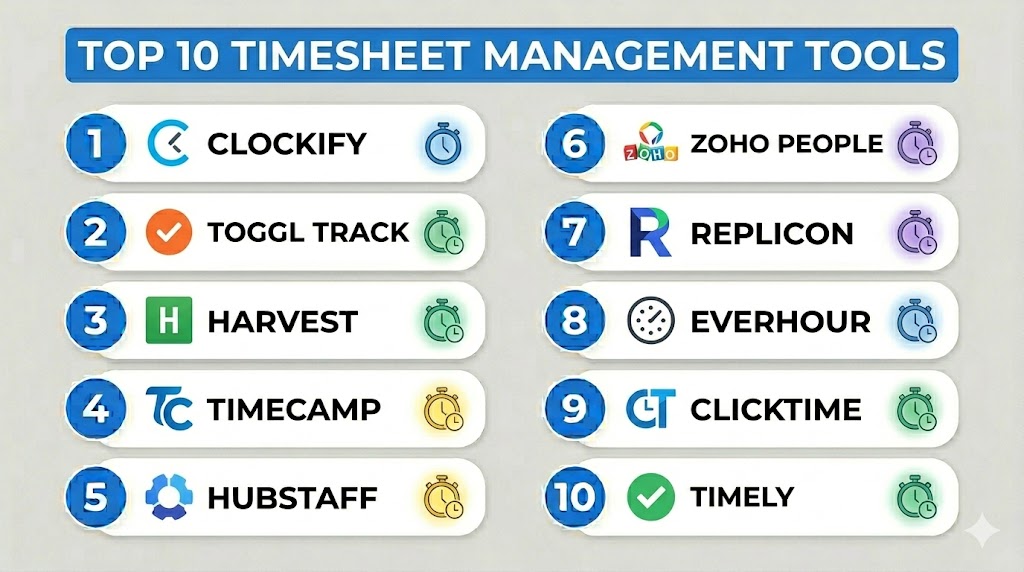
Top 10 Timesheet Management Tools
#1 — Clockify
Short description: Clockify is a popular free and paid timesheet tool suitable for freelancers, SMBs, and enterprises seeking simple, accurate time tracking.
Key Features
- Timer and manual time entry options
- Reporting dashboards and export functionality
- Billable hours tracking and invoicing
- Team management and timesheet approvals
- Project and task categorization
- Mobile apps and browser extensions
Pros
- Free plan supports unlimited users and projects
- Intuitive interface suitable for all skill levels
Cons
- Advanced reporting features require paid plan
- Limited customization for complex workflows
Platforms / Deployment
- Web, Windows, macOS, Linux, iOS, Android
- Cloud
Security & Compliance
- SSO/SAML, encryption
- GDPR compliance
Integrations & Ecosystem
Supports integrations with popular tools and APIs:
- Jira
- Asana
- Trello
- Slack
- Zapier
Support & Community
- Documentation and tutorials available
- Email support and community forums
#2 — Toggl Track
Short description: Toggl Track focuses on simple, visual time tracking for teams of any size, with strong reporting and project insights.
Key Features
- One-click timer and manual entries
- Custom reporting and dashboards
- Billable rates and client tracking
- Team management and workload visibility
- Browser extensions and desktop/mobile apps
- Offline mode and reminders
Pros
- Highly visual and easy-to-use interface
- Strong reporting for team productivity
Cons
- Limited free plan features
- Some advanced integrations require paid plan
Platforms / Deployment
- Web, Windows, macOS, Linux, iOS, Android
- Cloud
Security & Compliance
- SSO, encryption
- GDPR compliant
Integrations & Ecosystem
- Asana, Jira, Trello, GitHub, Slack
- Zapier and API support
Support & Community
- Extensive knowledge base
- Email support and active community
#3 — Harvest
Short description: Harvest combines time tracking with expense management, targeting agencies and service businesses requiring detailed reporting.
Key Features
- Timer and manual tracking
- Invoicing and expense capture
- Reporting and analytics dashboards
- Team and project management
- Multi-currency support
- Mobile and desktop apps
Pros
- Combines time tracking with invoicing
- Useful for client billing and agency workflows
Cons
- Limited integrations compared to competitors
- Higher cost for larger teams
Platforms / Deployment
- Web, Windows, macOS, iOS, Android
- Cloud
Security & Compliance
- SSL encryption, SSO
- GDPR compliance
Integrations & Ecosystem
- QuickBooks, Xero, Asana, Trello, Slack
Support & Community
- Email and chat support
- Documentation and onboarding guides
#4 — TimeCamp
Short description: TimeCamp is a versatile time tracking tool with project management insights and automated attendance tracking for SMBs and mid-market.
Key Features
- Automatic time tracking
- Project and task management
- Attendance and timesheet approvals
- Reporting and analytics
- Invoicing and billing
- Browser extensions
Pros
- Automation reduces manual entry
- Good for productivity insights
Cons
- Interface can feel dated
- Free plan limited to 1 user
Platforms / Deployment
- Web, Windows, macOS, Linux, iOS, Android
- Cloud
Security & Compliance
- Encryption, SSO
- GDPR compliance
Integrations & Ecosystem
- Asana, Trello, Jira, Slack, Zapier
Support & Community
- Knowledge base and email support
#5 — Hubstaff
Short description: Hubstaff offers advanced workforce monitoring alongside timesheet management, ideal for remote and distributed teams.
Key Features
- Time tracking with screenshots
- GPS/location tracking
- Payroll and invoicing
- Project budgeting and reporting
- Productivity monitoring
- Mobile and desktop apps
Pros
- Strong monitoring for remote teams
- Payroll automation
Cons
- Privacy concerns with screenshots
- Learning curve for advanced features
Platforms / Deployment
- Web, Windows, macOS, Linux, iOS, Android
- Cloud
Security & Compliance
- SSO, encryption
- SOC 2, GDPR
Integrations & Ecosystem
- QuickBooks, Xero, Asana, Trello, Jira
Support & Community
- Email and live chat
- Documentation and tutorials
#6 — Zoho People
Short description: Zoho People provides HR-centric timesheet and attendance tracking, suitable for SMBs and mid-market companies.
Key Features
- Timesheet approval workflows
- Attendance and leave management
- Reports and analytics
- Project and task tracking
- Mobile app support
- Integration with Zoho ecosystem
Pros
- Combines HR and time tracking
- Scalable for growing teams
Cons
- Can be complex for smaller teams
- Some features require higher-tier plans
Platforms / Deployment
- Web, iOS, Android
- Cloud
Security & Compliance
- SSO, encryption
- GDPR, ISO 27001
Integrations & Ecosystem
- Zoho Projects, Zoho CRM, Slack, QuickBooks
- API for custom integrations
Support & Community
- Email and phone support
- Knowledge base and forums
#7 — Replicon
Short description: Replicon focuses on enterprise-grade time tracking and workforce management with strong compliance features.
Key Features
- Global time tracking
- Compliance and labor law enforcement
- Advanced reporting
- Project and client tracking
- Mobile apps and offline mode
- Timesheet automation
Pros
- Strong enterprise focus
- Extensive compliance features
Cons
- Pricing can be high for small teams
- Complexity requires onboarding
Platforms / Deployment
- Web, iOS, Android
- Cloud
Security & Compliance
- SSO, encryption
- SOC 2, GDPR, HIPAA
Integrations & Ecosystem
- Workday, ADP, Jira, Slack, Salesforce
Support & Community
- Email, phone, and live chat
- Documentation and webinars
#8 — Everhour
Short description: Everhour is a project-focused timesheet tool integrated with popular project management platforms, targeting agencies and SMBs.
Key Features
- Time tracking inside project management tools
- Budgeting and forecasting
- Reporting and dashboards
- Task-level tracking
- Invoicing support
- Browser extensions
Pros
- Deep integration with project tools
- Easy adoption for teams using PM software
Cons
- Limited standalone features
- Some reporting limited to integrations
Platforms / Deployment
- Web, iOS, Android
- Cloud
Security & Compliance
- Encryption
- GDPR compliance
Integrations & Ecosystem
- Asana, Trello, Jira, Basecamp, ClickUp
Support & Community
- Email support
- Documentation and help articles
#9 — ClickTime
Short description: ClickTime offers flexible time tracking and resource planning for professional services and consulting firms.
Key Features
- Timesheet approvals and auditing
- Project budgeting and forecasting
- Expense tracking
- Reporting and analytics
- Mobile app support
- Multi-currency support
Pros
- Strong for project cost management
- Useful for consulting and professional services
Cons
- UI may feel dated
- Steeper learning curve for non-technical users
Platforms / Deployment
- Web, iOS, Android
- Cloud
Security & Compliance
- SSO, encryption
- GDPR
Integrations & Ecosystem
- QuickBooks, Xero, Jira, Salesforce
Support & Community
- Email and chat support
- Documentation
#10 — Timely
Short description: Timely uses AI-assisted time tracking to automatically log work hours, ideal for freelancers and teams valuing automation.
Key Features
- Automatic time capture via AI
- Project and client tracking
- Reporting and dashboards
- Billing and invoicing
- Mobile and desktop apps
- Integrations with calendars
Pros
- Reduces manual entry with AI
- Suitable for both freelancers and teams
Cons
- AI may require adjustments for accuracy
- Less flexible for complex workflows
Platforms / Deployment
- Web, Windows, macOS, iOS, Android
- Cloud
Security & Compliance
- SSO, encryption
- GDPR
Integrations & Ecosystem
- Google Calendar, Outlook, Asana, Trello, Zapier
Support & Community
- Documentation and email support
Comparison Table (Top 10)
| Tool Name | Best For | Platform(s) Supported | Deployment | Standout Feature | Public Rating |
|---|---|---|---|---|---|
| Clockify | Freelancers, SMBs, teams | Web, Windows, macOS, Linux, iOS, Android | Cloud | Free unlimited plan | N/A |
| Toggl Track | Teams needing visual reporting | Web, Windows, macOS, Linux, iOS, Android | Cloud | Visual dashboards | N/A |
| Harvest | Agencies, billable services | Web, Windows, macOS, iOS, Android | Cloud | Time + expense tracking | N/A |
| TimeCamp | SMBs, mid-market | Web, Windows, macOS, Linux, iOS, Android | Cloud | Automated time tracking | N/A |
| Hubstaff | Remote teams, monitoring | Web, Windows, macOS, Linux, iOS, Android | Cloud | Screenshots & GPS tracking | N/A |
| Zoho People | SMBs, HR-centric organizations | Web, iOS, Android | Cloud | HR + timesheet integration | N/A |
| Replicon | Enterprises, compliance-focused | Web, iOS, Android | Cloud | Global compliance features | N/A |
| Everhour | Agencies using PM tools | Web, iOS, Android | Cloud | PM tool integrations | N/A |
| ClickTime | Consulting, professional services | Web, iOS, Android | Cloud | Project cost management | N/A |
| Timely | Freelancers, automation-focused | Web, Windows, macOS, iOS, Android | Cloud | AI-assisted time tracking | N/A |
Evaluation & Scoring of Timesheet Management Tools
| Tool Name | Core (25%) | Ease (15%) | Integrations (15%) | Security (10%) | Performance (10%) | Support (10%) | Value (15%) | Weighted Total (0–10) |
|---|---|---|---|---|---|---|---|---|
| Clockify | 8 | 9 | 7 | 8 | 8 | 7 | 10 | 8.4 |
| Toggl Track | 8 | 9 | 7 | 8 | 8 | 7 | 9 | 8.3 |
| Harvest | 8 | 8 | 6 | 8 | 8 | 7 | 8 | 7.8 |
| TimeCamp | 7 | 7 | 7 | 8 | 8 | 6 | 8 | 7.4 |
| Hubstaff | 8 | 7 | 6 | 9 | 8 | 7 | 7 | 7.6 |
| Zoho People | 7 | 7 | 6 | 8 | 8 | 7 | 7 | 7.2 |
| Replicon | 9 | 7 | 7 | 9 | 8 | 8 | 7 | 8.1 |
| Everhour | 7 | 8 | 8 | 7 | 8 | 7 | 7 | 7.5 |
| ClickTime | 7 | 7 | 7 | 8 | 8 | 7 | 7 | 7.2 |
| Timely | 8 | 8 | 7 | 8 | 8 | 7 | 8 | 7.9 |
Interpretation: Higher weighted totals indicate stronger overall suitability. Scores are comparative across the Top 10 list, helping identify the best fit for organizational size, feature needs, and workflow priorities.
Which Timesheet Management Tools Tool Is Right for You?
Solo / Freelancer
- Clockify, Timely, and Toggl Track provide simple setups and free/affordable plans.
SMB
- Zoho People, Everhour, and TimeCamp balance core features, integrations, and ease of use.
Mid-Market
- Harvest, ClickTime, and Hubstaff offer advanced reporting, client management, and monitoring.
Enterprise
- Replicon and Hubstaff support global compliance, multiple teams, and advanced security.
Budget vs Premium
- Free plans like Clockify work for small teams. Paid tiers like Replicon or Hubstaff provide compliance and advanced features.
Feature Depth vs Ease of Use
- Timely and Toggl Track prioritize simplicity; Replicon and Hubstaff provide deep, complex capabilities for larger organizations.
Integrations & Scalability
- Everhour, Toggl Track, and Zoho People integrate well with project management and HR ecosystems, supporting growth.
Security & Compliance Needs
- Enterprise environments benefit from Replicon and Hubstaff with SOC 2, GDPR, and enhanced access controls.
Frequently Asked Questions (FAQs)
1. What pricing models do timesheet tools offer?
Most offer tiered subscriptions based on users or features. Some provide free plans for freelancers or small teams, while enterprise features come at a premium.
2. How long does onboarding typically take?
For small teams, setup can be a few hours. Larger teams may require a few days for configuration, training, and integration with existing systems.
3. Can these tools integrate with payroll systems?
Yes, most tools like Harvest, Hubstaff, and Replicon offer integrations with payroll platforms including QuickBooks, Xero, and ADP.
4. Are timesheet tools secure for remote teams?
Top tools implement encryption, SSO, MFA, and audit logs. Enterprise-focused solutions also comply with SOC 2, GDPR, or HIPAA.
5. How do AI features help?
AI-assisted tracking (e.g., Timely) can automatically capture work hours, reducing manual entry and increasing accuracy.
6. Can I switch tools without losing data?
Most providers support data export in CSV or Excel, enabling migration, but switching may require reconfiguration and testing.
7. Are these tools suitable for international teams?
Yes, tools like Replicon and Harvest support multi-currency, multi-country operations, and global labor compliance.
8. What are common mistakes when implementing?
Overcomplicating workflows, skipping employee training, or not integrating with existing tools can reduce adoption and ROI.
9. Do these tools support offline work?
Many mobile and desktop apps offer offline logging, syncing data once connected to the internet.
10. Can freelancers use these tools effectively?
Absolutely. Tools like Clockify, Timely, and Toggl Track are lightweight, affordable, and focused on individual use or small client projects.
Conclusion
Timesheet Management Tools have evolved beyond basic hour logging, providing insights into productivity, project costs, and compliance. Choosing the right tool depends on your team size, workflow complexity, integration needs, and budget. Freelancers benefit from simple, affordable solutions like Clockify or Timely, while enterprises may require Replicon or Hubstaff for compliance and global operations. Teams should shortlist 2–3 options, run pilots, and validate integrations and security to ensure smooth adoption and maximum ROI.

Find Trusted Cardiac Hospitals
Compare heart hospitals by city and services — all in one place.
Explore Hospitals
The comparison of different timesheet tools and their features really made it simple for me to learn and explore more about this topic.