Introduction
Translation Management Systems (TMS) are centralized platforms that help organizations manage, automate, and scale multilingual content translation and localization workflows. These systems go far beyond simple translation—they coordinate translators, automate workflows, integrate with software development pipelines, and ensure consistent brand messaging across languages.TMS platforms are essential for global digital businesses. As companies expand into multiple regions, managing multilingual websites, apps, marketing campaigns, and product documentation becomes complex without automation. Modern TMS solutions now include AI-assisted translation, real-time collaboration, glossary management, and deep integrations with development and CMS ecosystems.
Why Translation Management Systems (TMS) Matter
- Translation Management Systems matter because modern businesses are no longer operating in a single-language environment. As companies expand globally, they need a structured way to manage multilingual content across apps, websites, marketing, and support systems without losing consistency or speed.
- They replace chaotic manual translation workflows with centralized, automated systems. This helps teams coordinate translators, developers, and reviewers in one place while reducing errors and duplication of work. It also ensures brand consistency across all languages.
- TMS platforms are especially important because digital products are continuously updated. Without automation, every update would require manual re-translation, which is slow and expensive. TMS tools solve this with real-time syncing and continuous localization.
- They also improve user experience by making products feel native in every region. When users see content in their own language, engagement, trust, and conversion rates significantly improve.
- In short, TMS platforms are essential for scaling globally, improving efficiency, and delivering consistent multilingual experiences at speed.
Real-world use cases
- Localizing SaaS products for global markets
- Translating mobile apps and web platforms at scale
- Managing multilingual marketing campaigns
- Software documentation and knowledge base translation
- E-commerce product catalog localization
What buyers should evaluate
- Translation workflow automation and approval systems
- AI-assisted translation quality and post-editing tools
- Integration with CMS, Git, and development pipelines
- Terminology and glossary management capabilities
- Collaboration features for translators and reviewers
- Scalability for enterprise localization needs
- Security, compliance, and data handling standards
- API flexibility and developer experience
- Support for file formats and localization frameworks
- Cost structure (per word, subscription, or usage-based)
Best for
Enterprises, SaaS companies, product teams, localization managers, developers, and global marketing teams managing multilingual content at scale.
Not ideal for
Individuals or small teams with minimal translation needs, or one-time document translation use cases where simple translation tools are sufficient.
Key Trends in Translation Management Systems
- AI-powered machine translation with human-in-the-loop review
- Real-time localization integrated into CI/CD pipelines
- Neural machine translation customized for brand tone consistency
- Automated content detection and localization triggers
- Increased use of LLMs for context-aware translation
- Cloud-native TMS platforms replacing legacy on-prem systems
- Deep CMS, CRM, and product integration ecosystems
- Advanced terminology governance using AI classification
- Continuous localization instead of batch translation workflows
- Stronger compliance, data residency, and encryption standards
How We Selected These Tools (Methodology)
- Global market adoption and enterprise usage
- Depth of translation workflow management features
- Quality of machine translation and post-editing tools
- Integration ecosystem with CMS, Git, and SaaS platforms
- Developer API maturity and automation capabilities
- Scalability for enterprise localization operations
- Security posture and compliance readiness signals
- Collaboration and role-based access control capabilities
- Support for multiple file formats and frameworks
- Long-term reliability and innovation trajectory
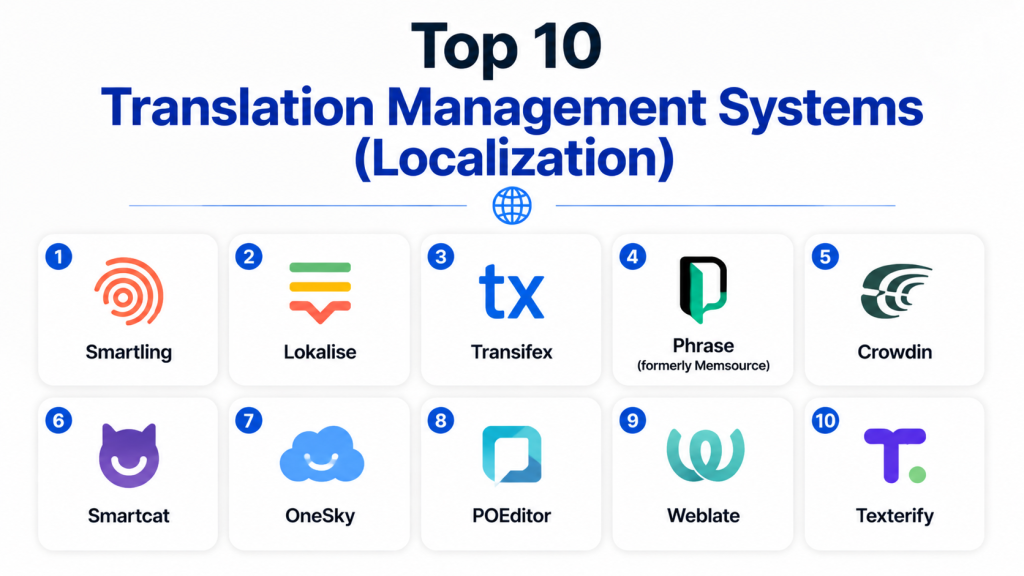
Top 10 Translation Management Systems
1 — Smartling
Short description: Enterprisefocusedtranslationmanagementsystemthatcentralizeslocalizationworkflowsautomationandcontentdeliveryforglobaldigitalproductsandmarketingteams
Key Features
- End-to-end translation workflow automation
- AI-assisted translation suggestions
- Visual context editing for UI strings
- Centralized translation memory system
- Real-time collaboration tools
- API-driven content integration
- Multi-language content orchestration
Pros
- Strong enterprise-grade workflows
- Excellent automation capabilities
- High scalability for global teams
Cons
- Complex onboarding for small teams
- Premium pricing structure
Platforms / Deployment
Cloud / Web
Security & Compliance
- Role-based access control (RBAC)
- Encryption in transit and at rest
- SOC 2 compliance: Not publicly stated
Integrations & Ecosystem
Smartling integrates with major CMS, marketing, and development ecosystems.
- Content management systems
- E-commerce platforms
- Developer APIs
- Marketing automation tools
Support & Community
Strong enterprise support with dedicated onboarding and documentation
2 — Lokalise
Short description: DeveloperfriendlytranslationmanagementplatformthatenablescontinuouslocalizationforsoftwareteamsmobileappsandSaaSproductswithautomationandcollaborationtools
Key Features
- Continuous localization workflows
- Git-based integration support
- In-context UI editing
- Translation memory and glossary tools
- AI-assisted translation suggestions
- Real-time collaboration
- API-first architecture
Pros
- Excellent developer experience
- Strong automation for CI/CD pipelines
- Easy integration with modern tech stacks
Cons
- Can be expensive at scale
- Requires technical setup for full usage
Platforms / Deployment
Cloud / Web
Security & Compliance
- Encryption and access controls
- SOC 2 compliance: Not publicly stated
- GDPR support: Not publicly stated
Integrations & Ecosystem
- GitHub and GitLab
- CMS platforms
- Mobile app frameworks
- API-based workflows
Support & Community
Strong developer documentation and responsive support
3 — Transifex
Short description: CloudbasedtranslationplatformdesignedforsoftwareanddigitalcontentlocalizationwithautomationAPIsandcollaborativetranslationworkflowsforglobalteams
Key Features
- Continuous localization support
- API-driven content updates
- Translation memory system
- Collaboration dashboard
- Machine translation integration
- Workflow automation rules
- Multi-format file support
Pros
- Strong API and automation support
- Scales well for SaaS products
- Reliable workflow management
Cons
- UI can feel complex for beginners
- Advanced features require learning curve
Platforms / Deployment
Cloud / Web
Security & Compliance
Not publicly stated
Integrations & Ecosystem
- Developer tools
- CMS systems
- Git-based workflows
- API integrations
Support & Community
Good documentation and enterprise support options
4 — Phrase (formerly Memsource)
Short description: CloudbasedtranslationmanagementsystemofferingAIassistedlocalizationworkflowautomationandenterprisegradetranslationmemoryforglobalbusinesses
Key Features
- AI-powered translation suggestions
- Advanced translation memory system
- Workflow automation engine
- Project management dashboards
- Terminology management tools
- API and SDK support
- Machine translation integration
Pros
- Strong enterprise localization features
- Highly scalable architecture
- Excellent workflow customization
Cons
- Pricing may be high for SMBs
- Complex configuration for beginners
Platforms / Deployment
Cloud / Web
Security & Compliance
- RBAC and encryption
- GDPR support: Not publicly stated
- SOC 2 compliance: Not publicly stated
Integrations & Ecosystem
- CMS platforms
- Developer APIs
- Enterprise SaaS tools
- Machine translation engines
Support & Community
Strong enterprise support and structured onboarding
5 — Crowdin
Short description: PopulartranslationmanagementplatformthatprovidescontinuouslocalizationAPIsandcollaborationtoolsforsoftwareteamsandopen-sourceprojects
Key Features
- Continuous localization workflows
- GitHub and GitLab integration
- Translation memory and glossary
- In-context editing
- API-first architecture
- Automation rules
- AI translation suggestions
Pros
- Excellent for developer teams
- Strong open-source adoption
- Flexible automation system
Cons
- UI can feel technical
- Requires setup for full efficiency
Platforms / Deployment
Cloud / Web
Security & Compliance
Not publicly stated
Integrations & Ecosystem
- Git repositories
- SaaS platforms
- CMS tools
- Developer APIs
Support & Community
Strong community support and documentation
6 — Smartcat
Short description: AIpoweredtranslationplatformcombiningtranslationmanagementfreelancermarketplaceandautomationtoolsforendtoendlocalizationworkflows
Key Features
- AI translation + human marketplace
- Built-in freelancer network
- Translation memory tools
- Workflow automation system
- Real-time collaboration
- Multi-format file support
- Project management tools
Pros
- Combines AI and human translation
- Easy freelancer access
- Good for fast scaling projects
Cons
- Marketplace quality varies
- Less developer-centric
Platforms / Deployment
Cloud / Web
Security & Compliance
Not publicly stated
Integrations & Ecosystem
- CMS systems
- Enterprise tools
- API integrations
- Content platforms
Support & Community
Moderate support with strong user base
7 — Lokalise AI (Studio ecosystem tools)
Short description: AIdrivenlocalizationtoolsetthatenhancestranslationaccuracyworkflowautomationandcontentconsistencyacrossproductandmarketingcontent
Key Features
- AI translation optimization
- Context-aware suggestions
- Workflow automation enhancements
- Terminology enforcement
- Multi-language scaling
- API integration support
- Collaboration tools
Pros
- Strong AI augmentation
- Improves translation consistency
- Fast localization cycles
Cons
- Depends on base platform setup
- Limited standalone usage
Platforms / Deployment
Cloud / Web
Security & Compliance
Not publicly stated
Integrations & Ecosystem
- Localization pipelines
- CMS integrations
- SaaS platforms
- Developer APIs
Support & Community
Depends on parent ecosystem support
8 — OneSky
Short description: Localizationplatformdesignedforappsanddigitalcontentofferingtranslationmanagementautomationandcollaborationforglobalproductteams
Key Features
- App localization support
- Translation memory system
- API integration support
- Workflow automation
- Multi-language project management
- Collaboration tools
- File format compatibility
Pros
- Strong mobile app localization
- Simple interface
- Good for SMBs
Cons
- Limited advanced enterprise features
- Less customization than competitors
Platforms / Deployment
Cloud / Web
Security & Compliance
Not publicly stated
Integrations & Ecosystem
- Mobile development tools
- CMS platforms
- API-based workflows
- SaaS applications
Support & Community
Moderate support with onboarding help
9 — POEditor
Short description: Lightweighttranslationmanagementplatformdesignedforsmallteamsanddevelopersneedingfastsimpleandaffordablelocalizationworkflowtools
Key Features
- Simple translation interface
- API-based integration
- Translation memory support
- Collaborative editing
- File import/export tools
- Glossary management
- Multi-language support
Pros
- Easy to use for beginners
- Affordable pricing model
- Fast setup and onboarding
Cons
- Limited enterprise features
- Not ideal for large-scale localization
Platforms / Deployment
Cloud / Web
Security & Compliance
Not publicly stated
Integrations & Ecosystem
- Developer APIs
- CMS integrations
- Git workflows
- SaaS tools
Support & Community
Basic documentation and support
10 — Weblate
Short description: Opensourcetranslationmanagementsystemprovidingselfhostedlocalizationworkflowautomationfordevelopersandorganizationsrequiringfulldatacontrol
Key Features
- Self-hosted deployment option
- Open-source architecture
- Git integration support
- Translation memory system
- Continuous localization workflows
- Role-based access control
- Multi-format file support
Pros
- Full data ownership
- Highly customizable
- Strong open-source flexibility
Cons
- Requires technical setup
- Maintenance responsibility on user
Platforms / Deployment
Self-hosted / Cloud optional
Security & Compliance
- RBAC support
- Encryption depends on deployment
- SOC/ISO compliance: Not publicly stated
Integrations & Ecosystem
- Git-based workflows
- Developer pipelines
- CMS integrations
- API extensibility
Support & Community
Strong open-source community support
Comparison Table (Top 10)
| Tool | Best For | Platforms | Deployment | Standout Feature | Public Rating |
|---|---|---|---|---|---|
| Smartling | Enterprises | Web | Cloud | Enterprise workflow automation | N/A |
| Lokalise | Dev teams | Web | Cloud | Continuous localization | N/A |
| Transifex | SaaS products | Web | Cloud | API automation | N/A |
| Phrase | Enterprises | Web | Cloud | Translation memory engine | N/A |
| Crowdin | Developers | Web | Cloud | Git integration | N/A |
| Smartcat | Hybrid teams | Web | Cloud | AI + freelancer marketplace | N/A |
| Lokalise AI | AI localization | Web | Cloud | AI-driven consistency | N/A |
| OneSky | SMB apps | Web | Cloud | App localization focus | N/A |
| POEditor | Small teams | Web | Cloud | Simple workflow | N/A |
| Weblate | Developers | Web | Self-hosted | Open-source control | N/A |
Evaluation & Scoring
| Tool | Core (25%) | Ease (15%) | Integrations (15%) | Security (10%) | Performance (10%) | Support (10%) | Value (15%) | Total |
|---|---|---|---|---|---|---|---|---|
| Smartling | 9 | 8 | 9 | 8 | 9 | 9 | 7 | 8.5 |
| Lokalise | 9 | 9 | 10 | 8 | 9 | 9 | 8 | 8.9 |
| Transifex | 9 | 8 | 9 | 8 | 9 | 8 | 8 | 8.6 |
| Phrase | 9 | 8 | 9 | 8 | 9 | 9 | 7 | 8.5 |
| Crowdin | 8 | 9 | 9 | 7 | 8 | 8 | 9 | 8.4 |
| Smartcat | 8 | 9 | 8 | 7 | 8 | 8 | 9 | 8.3 |
| Lokalise AI | 8 | 9 | 9 | 8 | 9 | 8 | 8 | 8.5 |
| OneSky | 8 | 9 | 8 | 7 | 8 | 8 | 8 | 8.1 |
| POEditor | 7 | 10 | 7 | 7 | 7 | 7 | 9 | 7.8 |
| Weblate | 8 | 8 | 9 | 7 | 8 | 8 | 10 | 8.3 |
Which Translation Management System Is Right for You?
Solo / Freelancer
POEditor, Weblate, Crowdin
SMB
OneSky, Smartcat, Lokalise
Mid-Market
Transifex, Phrase, Crowdin
Enterprise
Smartling, Phrase, Lokalise
Frequently Asked Questions (FAQs)
1. What is a Translation Management System?
It is a platform that manages multilingual content translation workflows. It centralizes translation, review, and publishing processes.
2. How is a TMS different from basic translation tools?
A TMS manages workflows and teams, while basic tools only translate text. It includes automation, memory, and integrations.
3. Do TMS platforms use AI?
Yes, most modern systems include AI-powered translation and suggestions. Human review is still often required.
4. Can TMS tools integrate with websites and apps?
Yes, they integrate with CMS, apps, and development pipelines using APIs and plugins.
5. Are TMS platforms expensive?
Pricing varies widely based on usage, features, and scale. Enterprise tools are generally more expensive.
6. Do I need technical skills to use a TMS?
Basic usage does not require coding, but integrations often require developer support.
7. What industries use TMS tools?
Software, SaaS, e-commerce, gaming, education, and global enterprises commonly use them.
8. Can TMS improve translation quality?
Yes, through translation memory, AI suggestions, and consistency rules.
9. Is self-hosted TMS better?
It depends on needs. Self-hosted offers control, while cloud offers ease and scalability.
10. How do I choose the right TMS?
Evaluate workflow needs, integrations, scalability, and budget before selecting a platform.
Conclusion
Translation Management Systems have become a core part of global digital operations .
They help businesses manage multilingual content in a structured, scalable, and efficient way.
From software localization to marketing and customer support, they ensure consistent communication across markets.
Modern TMS platforms reduce manual effort through automation, AI assistance, and real-time collaboration.
They also improve translation quality using memory systems and standardized terminology.
However, the right tool depends on team size, technical needs, and budget priorities.
Enterprise teams may prefer advanced platforms, while smaller teams benefit from simpler solutions.
Evaluating integrations, workflow flexibility, and scalability is critical before choosing a system.
Ultimately, the best TMS is the one that aligns with your global growth strategy and content needs.

Find Trusted Cardiac Hospitals
Compare heart hospitals by city and services — all in one place.
Explore Hospitals
I am learning about translation management systems, and this content helped me understand how different platforms can streamline localization workflows and improve collaboration across teams.