Introduction
Enterprise Content Management (ECM) refers to the systems and strategies that organizations use to capture, manage, store, preserve, and deliver content and documents. ECM is critical for digital transformation, regulatory compliance, and efficient knowledge management. Organizations increasingly rely on ECM platforms to streamline workflows, improve collaboration, and ensure information governance across multiple departments and geographies.
Real-world use cases include:
- Centralized storage of corporate documents for global teams
- Automated compliance with data privacy regulations
- Streamlined onboarding and HR documentation
- Integration with business process automation tools
- Archiving and retrieval of legal and financial records
Evaluation Criteria for Buyers:
- Ease of content capture and ingestion
- Workflow automation capabilities
- Security and compliance standards
- Integration with existing enterprise software
- User interface and collaboration features
- Scalability across departments and geographies
- AI-powered search and analytics
- Deployment flexibility (cloud, on-premises, hybrid)
- Cost-effectiveness and licensing options
Best for: Medium to large enterprises, knowledge-intensive industries (finance, healthcare, legal), IT managers, compliance officers, and teams managing high document volumes.
Not ideal for: Small businesses with minimal document management needs or organizations with simpler file-sharing requirements; in such cases, lightweight document storage or cloud file-sharing may suffice.
Key Trends in ECM for .
- Increasing adoption of AI for automated content tagging and metadata generation
- Cloud-first and hybrid deployment models becoming standard
- Integration of ECM with workflow automation and low-code platforms
- Enhanced compliance and audit reporting capabilities for GDPR, HIPAA, and SOC 2
- Advanced search engines with semantic and natural language processing
- Document analytics for operational insights and decision support
- Mobile-first access to ECM repositories for remote workforce enablement
- Use of blockchain and tamper-evident storage for critical legal and financial documents
- Emphasis on user experience and collaboration tools for multi-department workflows
- Subscription-based pricing models replacing traditional perpetual licenses
How We Selected These Tools (Methodology)
- Evaluated market adoption and mindshare across enterprises globally
- Assessed completeness of core content management features
- Reviewed performance, uptime, and reliability signals
- Verified security and compliance capabilities (SSO, encryption, GDPR/HIPAA adherence)
- Analyzed integration capabilities with ERP, CRM, workflow automation, and cloud services
- Considered customer segments and fit for SMBs, mid-market, and large enterprises
- Examined AI and automation features for metadata, search, and workflows
- Assessed ease of implementation and user onboarding
- Reviewed vendor support, documentation, and community presence
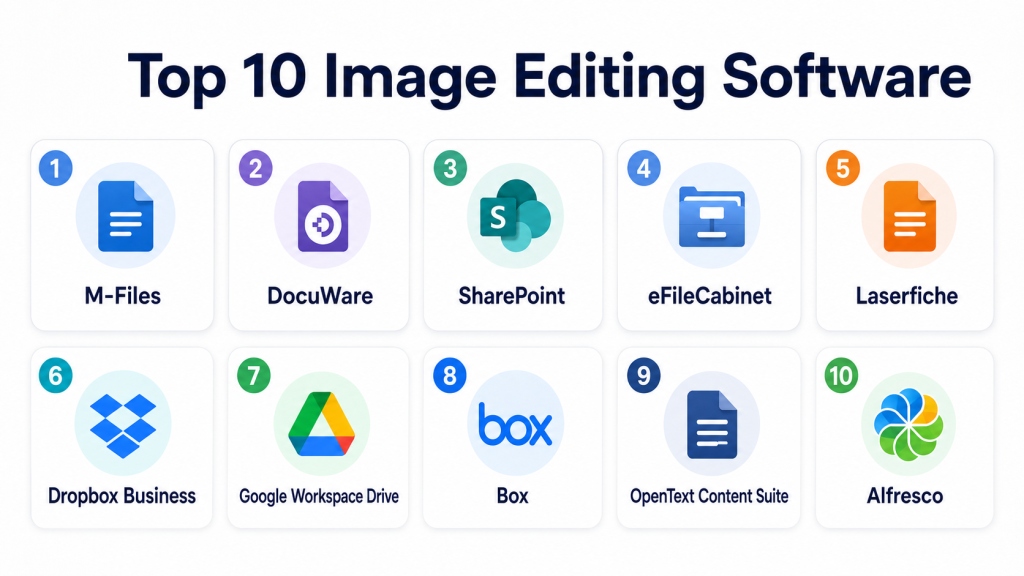
Top 10 Enterprise Content Management Tools
1 — M-Files
Short description: M-Files centralizes document and content management using metadata-driven architecture, suitable for mid to large enterprises seeking workflow automation and compliance tracking.
Key Features
- Metadata-driven document organization
- Automated workflows for approvals and reviews
- Version control and audit trail
- Integration with ERP and CRM systems
- Mobile and web access
Pros
- Flexible metadata approach reduces folder chaos
- Strong compliance and audit reporting
- Intuitive user interface
Cons
- Higher learning curve for complex workflows
- Advanced features may require additional licensing
Platforms / Deployment
- Web / Windows / macOS / iOS / Android
- Cloud / Hybrid
Security & Compliance
- SSO/SAML, MFA, encryption, RBAC
- ISO 27001, GDPR, SOC 2
Integrations & Ecosystem
Supports ERP and CRM platforms, collaboration tools, and APIs.
- Microsoft 365
- Salesforce
- SAP
- SharePoint integration
- REST APIs
Support & Community
Extensive documentation, dedicated support tiers, active online community.
2 — DocuWare
Short description: DocuWare provides cloud and on-premises ECM solutions with strong workflow automation, ideal for finance, HR, and legal departments.
Key Features
- Intelligent indexing and OCR
- Automated approval workflows
- Document retention policies
- Cloud-first deployment with hybrid options
- Role-based access control
Pros
- Fast document retrieval with smart search
- Scalable for mid-market to enterprise
- Strong workflow and approval automation
Cons
- UI can be overwhelming for small teams
- Advanced reporting requires premium modules
Platforms / Deployment
- Web / Windows / iOS / Android
- Cloud / On-premises / Hybrid
Security & Compliance
- Encryption at rest and in transit, MFA
- GDPR, SOC 2, HIPAA
Integrations & Ecosystem
Connects with ERPs, office suites, and cloud apps.
- Microsoft 365
- Salesforce
- SAP
- API-based integrations
Support & Community
Documentation, webinars, and professional service packages available.
3 — SharePoint
Short description: Microsoft SharePoint enables content collaboration, intranet portals, and document management, ideal for enterprises already invested in Microsoft 365.
Key Features
- Document libraries and metadata
- Enterprise search with AI-powered recommendations
- Team sites and intranet portals
- Workflow automation via Power Automate
- Integration with Microsoft ecosystem
Pros
- Seamless Microsoft 365 integration
- Highly customizable collaboration environment
- Extensive user adoption across enterprises
Cons
- Complexity for advanced configurations
- Requires careful governance to prevent sprawl
Platforms / Deployment
- Web / Windows / iOS / Android
- Cloud / On-premises / Hybrid
Security & Compliance
- SSO/SAML, MFA, RBAC
- ISO 27001, GDPR, SOC 2
Integrations & Ecosystem
Integrates tightly with Office apps, Teams, Dynamics, and third-party connectors.
- Microsoft 365
- Power Automate
- Teams
- ERP connectors
- API-based extensions
Support & Community
Large global community, extensive tutorials, professional support services.
4 — eFileCabinet
Short description: eFileCabinet delivers ECM solutions for document storage, workflow automation, and compliance, suitable for SMBs and mid-sized organizations.
Key Features
- Document scanning and OCR
- Automated workflows
- Role-based permissions
- Cloud and on-premises deployment
- Audit trail and reporting
Pros
- User-friendly interface
- Affordable pricing for SMBs
- Quick deployment and setup
Cons
- Limited advanced analytics
- Some integrations may require custom setup
Platforms / Deployment
- Web / Windows / iOS / Android
- Cloud / On-premises / Hybrid
Security & Compliance
- Encryption, SSO, RBAC
- GDPR, HIPAA, SOC 2
Integrations & Ecosystem
Supports accounting software, CRMs, and APIs.
- QuickBooks
- Salesforce
- Zapier integration
Support & Community
Documentation, email, phone support, community forums.
5 — Laserfiche
Short description: Laserfiche provides ECM with robust workflow automation and AI-driven document management, used across public and private sectors.
Key Features
- Intelligent content management
- Advanced workflow automation
- AI-based document capture and classification
- Compliance reporting
- Mobile access
Pros
- Strong automation and process efficiency
- Scalable for large organizations
- Advanced AI features for document processing
Cons
- Premium features can be costly
- Steeper learning curve for administrators
Platforms / Deployment
- Web / Windows / iOS / Android
- Cloud / On-premises / Hybrid
Security & Compliance
- Encryption, MFA, audit trails
- SOC 2, ISO 27001, GDPR, HIPAA
Integrations & Ecosystem
Integrates with ERP, CRM, and office productivity apps.
- Microsoft 365
- Salesforce
- SAP
- REST APIs
- Zapier
Support & Community
Comprehensive documentation, training programs, and professional support.
6 — Dropbox Business
Short description: Dropbox Business offers cloud-based ECM focused on file storage, collaboration, and sharing for teams of all sizes.
Key Features
- Cloud file storage and syncing
- Team collaboration tools
- File versioning and recovery
- Mobile access
- Integration with office apps
Pros
- Extremely user-friendly
- Quick file sharing and collaboration
- Strong cloud infrastructure
Cons
- Limited workflow automation
- Advanced compliance features may need add-ons
Platforms / Deployment
- Web / Windows / macOS / iOS / Android
- Cloud
Security & Compliance
- Encryption, SSO, MFA
- SOC 2, ISO 27001, GDPR
Integrations & Ecosystem
Integrates with Microsoft, Google Workspace, Slack, and CRM tools.
- Microsoft 365
- Google Workspace
- Slack
- Zoom
Support & Community
Email and chat support, community forums, extensive online resources.
#7 — Google Workspace Drive
Short description: Google Drive provides ECM features for cloud-native collaboration, document storage, and team workflows for organizations of all sizes.
Key Features
- Cloud storage and sharing
- AI-powered search
- Collaborative editing and commenting
- Version control
- Integration with Google Workspace apps
Pros
- Easy to use and widely adopted
- Strong collaboration features
- Cloud-native and mobile-friendly
Cons
- Limited enterprise workflow automation
- Security compliance may need additional admin controls
Platforms / Deployment
- Web / Windows / macOS / iOS / Android
- Cloud
Security & Compliance
- SSO/SAML, MFA, encryption
- SOC 2, ISO 27001, GDPR
Integrations & Ecosystem
Seamlessly integrates with Gmail, Docs, Sheets, and third-party apps.
- Google Workspace
- Slack
- Salesforce
- Zapier
Support & Community
Google support tiers, online forums, and extensive documentation.
8 — Box
Short description: Box offers secure cloud-based ECM with workflow automation and content governance for enterprises and regulated industries.
Key Features
- Secure content storage and sharing
- Workflow automation and approvals
- Compliance and retention management
- AI-powered search and insights
- Integration with collaboration tools
Pros
- Strong compliance and security features
- Cloud-native scalability
- Easy collaboration for distributed teams
Cons
- Higher cost for advanced plans
- May require training for workflow design
Platforms / Deployment
- Web / Windows / macOS / iOS / Android
- Cloud
Security & Compliance
- Encryption, MFA, SSO, RBAC
- SOC 2, ISO 27001, HIPAA, GDPR
Integrations & Ecosystem
Integrates with enterprise apps, CRM, and productivity suites.
- Microsoft 365
- Salesforce
- Slack
- Adobe Sign
Support & Community
Documentation, webinars, customer success programs.
9 — OpenText Content Suite
Short description: OpenText Content Suite is a robust ECM platform for enterprise-grade content management, compliance, and workflow automation.
Key Features
- Enterprise content management
- Business process automation
- Compliance and records management
- AI-driven insights and search
- Integration with enterprise systems
Pros
- Comprehensive feature set for large organizations
- Strong regulatory compliance
- Scalable for global deployments
Cons
- High complexity and implementation effort
- Costly licensing and customization
Platforms / Deployment
- Web / Windows / macOS / iOS / Android
- Cloud / On-premises / Hybrid
Security & Compliance
- SSO, MFA, encryption, audit logs
- ISO 27001, SOC 2, GDPR, HIPAA
Integrations & Ecosystem
Extensive connectors to ERP, CRM, and workflow tools.
- SAP
- Salesforce
- Microsoft 365
- API-based integrations
Support & Community
Professional services, training, global support network.
10 — Alfresco
Short description: Alfresco provides open-source ECM with content management, workflow automation, and cloud or on-premises deployment options.
Key Features
- Open-source content management
- Workflow automation and BPM
- Version control and audit trails
- Cloud and on-premises deployment
- Integration APIs
Pros
- Flexible and extensible platform
- Open-source community support
- Strong workflow automation
Cons
- Requires technical expertise for setup
- Community support may be less comprehensive than enterprise support
Platforms / Deployment
- Web / Windows / macOS / Linux
- Cloud / On-premises / Hybrid
Security & Compliance
- Not publicly stated
Integrations & Ecosystem
Supports ERP, CRM, and office productivity tools.
- Salesforce
- Microsoft 365
- REST APIs
- Custom connectors
Support & Community
Professional support available; active open-source community.
Comparison Table (Top 10 ECM)
| Tool Name | Best For | Platform(s) Supported | Deployment | Standout Feature | Public Rating |
|---|---|---|---|---|---|
| M-Files | Metadata-driven ECM | Web, Windows, macOS, iOS, Android | Cloud / Hybrid | Metadata-centric content organization | N/A |
| DocuWare | Workflow automation | Web, Windows, iOS, Android | Cloud / On-prem / Hybrid | Smart approval workflows | N/A |
| SharePoint | Collaboration & intranet | Web, Windows, iOS, Android | Cloud / On-prem / Hybrid | Seamless Microsoft 365 integration | N/A |
| eFileCabinet | SMBs & mid-market | Web, Windows, iOS, Android | Cloud / On-prem / Hybrid | Quick deployment, ease-of-use | N/A |
| Laserfiche | AI-driven ECM | Web, Windows, iOS, Android | Cloud / On-prem / Hybrid | Advanced automation & AI capture | N/A |
| Dropbox Business | File collaboration | Web, Windows, macOS, iOS, Android | Cloud | Cloud storage & syncing | N/A |
| Google Workspace Drive | Cloud collaboration | Web, Windows, macOS, iOS, Android | Cloud | AI-powered search & collaboration | N/A |
| Box | Secure enterprise ECM | Web, Windows, macOS, iOS, Android | Cloud | Compliance-focused content management | N/A |
| OpenText Content Suite | Enterprise ECM | Web, Windows, macOS, iOS, Android | Cloud / On-prem / Hybrid | Enterprise-grade compliance & automation | N/A |
| Alfresco | Open-source ECM | Web, Windows, macOS, Linux | Cloud / On-prem / Hybrid | Flexible open-source platform | N/A |
Evaluation & Scoring of ECM Tools
| Tool Name | Core (25%) | Ease (15%) | Integrations (15%) | Security (10%) | Performance (10%) | Support (10%) | Value (15%) | Weighted Total (0–10) |
|---|---|---|---|---|---|---|---|---|
| M-Files | 9 | 8 | 8 | 9 | 8 | 8 | 7 | 8.5 |
| DocuWare | 8 | 7 | 7 | 9 | 8 | 7 | 8 | 8.0 |
| SharePoint | 9 | 7 | 9 | 9 | 8 | 8 | 7 | 8.3 |
| eFileCabinet | 7 | 8 | 6 | 8 | 7 | 7 | 8 | 7.4 |
| Laserfiche | 9 | 7 | 8 | 9 | 8 | 8 | 7 | 8.3 |
| Dropbox Business | 6 | 9 | 7 | 8 | 8 | 7 | 8 | 7.6 |
| Google Workspace Drive | 7 | 9 | 8 | 8 | 8 | 7 | 8 | 8.0 |
| Box | 8 | 8 | 8 | 9 | 8 | 8 | 7 | 8.2 |
| OpenText Content Suite | 9 | 6 | 8 | 9 | 8 | 7 | 6 | 7.8 |
| Alfresco | 8 | 6 | 7 | 8 | 7 | 6 | 7 | 7.2 |
Interpretation: Weighted totals compare tools based on core features, usability, integration, security, performance, support, and value. Scores are relative; higher totals indicate stronger overall ECM capability for enterprise use cases.
Which ECM Tool Is Right for You?
Solo / Freelancer
Dropbox Business or Google Workspace Drive for cloud collaboration and document sharing without heavy IT overhead.
SMB
eFileCabinet, M-Files, or DocuWare for cost-effective ECM with workflow and compliance capabilities.
Mid-Market
Laserfiche or Box for robust workflow automation, compliance, and AI-powered search.
Enterprise
SharePoint, OpenText Content Suite, or Alfresco for large-scale deployment, regulatory compliance, and cross-department collaboration.
Budget vs Premium
Free/cloud-first options: Google Workspace Drive, Dropbox. Premium/enterprise-grade: OpenText, Laserfiche, M-Files.
Feature Depth vs Ease of Use
Deep features: OpenText, Laserfiche. Ease of use: Dropbox Business, Google Workspace Drive.
Integrations & Scalability
SharePoint and Box excel for Microsoft 365 and enterprise integration. Alfresco allows customization and scalability for tech-savvy teams.
Security & Compliance Needs
Box, Laserfiche, OpenText Content Suite provide strong compliance support. SMBs may leverage M-Files and DocuWare with cloud security standards.
Frequently Asked Questions (FAQs)
1. What pricing models do ECM tools typically use?
Most ECM platforms offer subscription-based pricing for cloud deployment, with enterprise licenses for on-premises setups. Costs vary by features, storage, and user count.
2. How long does implementation take?
Implementation ranges from a few weeks for SMB-focused tools to several months for enterprise solutions, depending on complexity and workflow integrations.
3. Can ECM systems integrate with existing ERP or CRM systems?
Yes, most top ECM tools provide APIs, connectors, or native integrations with ERP, CRM, and collaboration platforms for seamless workflow automation.
4. What security features are standard in ECM platforms?
Common security measures include encryption, SSO/SAML, MFA, role-based access control, and audit logging. Compliance with ISO 27001, SOC 2, GDPR, and HIPAA varies by tool.
5. How do ECM platforms help with regulatory compliance?
They automate document retention, versioning, approval workflows, and audit reporting, ensuring adherence to data privacy and industry regulations.
6. What common mistakes should organizations avoid?
Avoiding proper governance, inadequate user training, ignoring workflow optimization, and neglecting metadata standards are common pitfalls.
7. Are ECM solutions scalable for large organizations?
Yes, enterprise-grade ECM tools like OpenText, SharePoint, and Laserfiche scale to thousands of users and distributed teams.
8. Can small businesses benefit from ECM?
Yes, SMBs benefit from simplified ECM tools like eFileCabinet and M-Files for workflow automation and secure document storage without heavy IT resources.
9. How do AI features improve ECM platforms?
AI assists in automatic metadata tagging, content classification, semantic search, and predictive workflow routing, improving efficiency and accuracy.
10. How easy is it to switch ECM platforms?
Migration requires planning, data mapping, and workflow adaptation. Tools often provide migration services, but complexity depends on data volume and custom workflows.
Conclusion
Selecting the right ECM tool depends on your organization’s size, workflow complexity, compliance requirements, and budget. For SMBs, M-Files, eFileCabinet, and DocuWare offer simplicity and cost-effectiveness. Enterprises benefit from SharePoint, OpenText Content Suite, and Laserfiche, which provide advanced automation, AI-powered features, and global scalability. Cloud-native tools like Box and Google Workspace Drive excel in collaboration and ease of use. The key is to shortlist 2–3 tools, run a pilot, and validate integrations and compliance measures before full-scale deployment. With the right ECM strategy, organizations can streamline content management, improve productivity, and maintain regulatory confidence across departments.

Find Trusted Cardiac Hospitals
Compare heart hospitals by city and services — all in one place.
Explore Hospitals
Evaluating healthcare ECM platforms solely on a features list ignores the severe pressure of medical data compliance. A system might offer great storage, but if the audit logs or user permissions fail a HIPAA inspection, the platform becomes a massive liability. We used Dokmee to anchor our health record indexing because it maintains strict compliance architecture while keeping files immediately accessible to care teams. In healthcare, a platform’s security framework and data integrity must take absolute priority over superficial feature counts.