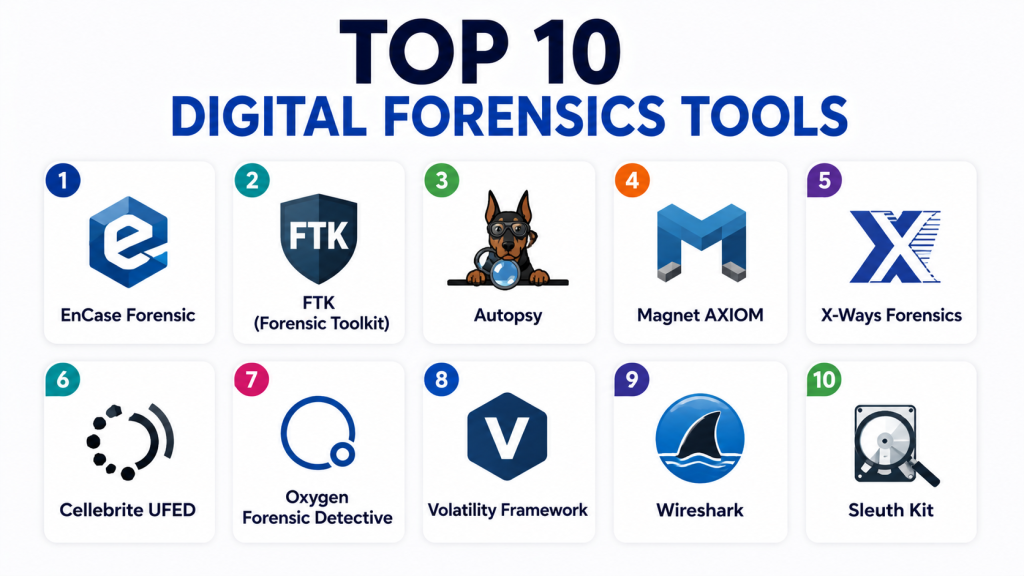
Introduction
Digital Forensics Tools are specialized cybersecurity solutions used to collect, analyze, preserve, and investigate digital evidence from computers, mobile devices, cloud systems, and networks. These tools help security professionals understand how a cyberattack happened, what data was affected, and who was responsible. In today’s digital-first world, cyber incidents are becoming more complex, involving ransomware, insider threats, and advanced persistent attacks. Digital forensics plays a critical role in incident response by providing clear evidence for investigations, legal processes, and security improvements. Modern forensic tools are no longer limited to manual investigation. They now include automation, AI-driven analysis, memory forensics, and cloud investigation capabilities to handle large-scale security incidents efficiently.
Common Real-world use cases include:
- Investigating cyberattacks and ransomware incidents
- Recovering deleted or hidden data
- Tracking insider threats and employee misconduct
- Analyzing malware behavior and attack patterns
- Supporting legal and compliance investigations
Buyers should Evaluate:
- Data acquisition and evidence collection capabilities
- Support for disk, memory, mobile, and cloud forensics
- Integration with SIEM and SOC tools
- Automation and timeline reconstruction features
- Scalability for enterprise investigations
- Reporting and evidence documentation features
- Support for encrypted data analysis
- Ease of use for investigators
- Performance on large datasets
- Chain of custody management
Best for: Cybersecurity teams, SOC analysts, law enforcement agencies, forensic investigators, and large enterprises.
Not ideal for: Small organizations with minimal security operations or non-technical users without investigation needs.
Key Trends in Digital Forensics
AI-powered automated forensic analysis
- Cloud forensics becoming a major focus area
- Integration with XDR and SIEM platforms
- Real-time incident response and investigation
- Growth of mobile and IoT forensics
- Encryption-aware forensic tools
- Increased use of behavioral analytics
- Automated timeline reconstruction
- Remote and distributed forensic investigation
- Strong compliance-driven evidence management
How We Selected These Tools
- Industry adoption and popularity in SOC environments
- Depth of forensic analysis capabilities
- Support for multiple platforms (endpoint, mobile, cloud)
- Accuracy of evidence collection and reporting
- Integration with cybersecurity ecosystems
- Performance in large-scale investigations
- Automation and AI capabilities
- Ease of use for forensic analysts
- Reliability and forensic integrity
- Enterprise scalability
Top 10 Digital Forensics Tools
1- EnCase Forensic
Short description: EnCase Forensic is one of the most widely used digital investigation tools for collecting and analyzing digital evidence in legal and enterprise environments.
Key Features
- Disk imaging and analysis
- Evidence collection and preservation
- File system investigation
- Email and browser analysis
- Timeline reconstruction
- Advanced reporting tools
- Chain of custody tracking
Pros
- Strong legal acceptance
- Highly reliable forensic integrity
- Widely used in enterprises and law enforcement
Cons
- Expensive licensing
- Steep learning curve
- Resource intensive
Platforms / Deployment
Windows / On-prem / Hybrid
Security & Compliance
Evidence integrity verification, audit logs, chain of custody tracking
Integrations & Ecosystem
- SIEM platforms
- SOC tools
- E-discovery systems
- Incident response platforms
Support & Community
Strong enterprise support and forensic community
2- FTK (Forensic Toolkit)
Short description: FTK is a powerful forensic analysis tool known for fast processing and deep data indexing capabilities.
Key Features
- High-speed data indexing
- Email analysis
- Registry analysis
- File carving
- Password recovery support
- Visualization tools
- Evidence management
Pros
- Fast data processing
- Strong visualization features
- Good scalability
Cons
- High system requirements
- Expensive for small teams
- Complex interface
Platforms / Deployment
Windows / On-prem
Security & Compliance
Chain of custody, encrypted evidence storage
Integrations & Ecosystem
- SOC tools
- SIEM systems
- Legal discovery platforms
Support & Community
Strong enterprise support
3- Autopsy
Short description: Autopsy is an open-source digital forensics platform widely used for disk and mobile investigation.
Key Features
- Disk image analysis
- Timeline analysis
- File recovery
- Keyword search
- Web activity analysis
- Plugin support
- Case management
Pros
- Free and open-source
- Easy to use
- Strong community support
Cons
- Limited enterprise features
- Slower performance on large datasets
- Requires plugins for advanced functions
Platforms / Deployment
Windows / Linux / On-prem
Security & Compliance
Basic evidence handling and logging
Integrations & Ecosystem
- Sleuth Kit framework
- SOC tools
- Third-party forensic plugins
Support & Community
Strong open-source community
4- Magnet AXIOM
Short description: Magnet AXIOM is a modern forensic platform focused on cloud, mobile, and computer investigations.
Key Features
- Cloud evidence extraction
- Mobile device forensics
- Timeline analysis
- Artifact recovery
- AI-powered data categorization
- Memory forensics
- Reporting tools
Pros
- Strong cloud + mobile support
- Easy-to-use interface
- Fast evidence processing
Cons
- Expensive licensing
- Requires training for advanced use
- Heavy system usage
Platforms / Deployment
Windows / Cloud / Hybrid
Security & Compliance
Encrypted evidence storage, chain of custody
Integrations & Ecosystem
- Cloud platforms
- SOC tools
- Mobile extraction tools
Support & Community
Strong enterprise support
5- X-Ways Forensics
Short description: X-Ways Forensics is a lightweight yet powerful forensic tool used for disk imaging and advanced analysis.
Key Features
- Disk cloning and imaging
- File system analysis
- Registry inspection
- Data recovery
- Hex editing tools
- Evidence filtering
- Case management
Pros
- Very lightweight
- High performance
- Cost-effective
Cons
- Complex interface
- Less modern UI
- Requires expertise
Platforms / Deployment
Windows / On-prem
Security & Compliance
Chain of custody support
Integrations & Ecosystem
- SOC tools
- Evidence management systems
Support & Community
Active technical community
6- Cellebrite UFED
Short description: Cellebrite UFED is a leading mobile forensics tool used for extracting and analyzing smartphone data.
Key Features
- Mobile data extraction
- Deleted data recovery
- App data analysis
- Cloud extraction
- Password bypass tools
- Logical and physical acquisition
- Reporting
Pros
- Industry leader in mobile forensics
- Strong data extraction capabilities
- Widely used in law enforcement
Cons
- Expensive
- Limited to mobile focus
- Legal restrictions in some regions
Platforms / Deployment
Windows / Hardware appliance
Security & Compliance
Evidence integrity and chain of custody
Integrations & Ecosystem
- Law enforcement systems
- SOC platforms
Support & Community
Strong government-level support
7- Oxygen Forensic Detective
Short description: Oxygen Forensics provides advanced mobile and cloud forensic investigation capabilities.
Key Features
- Mobile device extraction
- Cloud data analysis
- Social media forensics
- Password recovery
- Device backup analysis
- Timeline reconstruction
- Reporting
Pros
- Strong cloud + mobile support
- Good UI and usability
- Wide data source coverage
Cons
- Expensive licensing
- Requires training
- Resource intensive
Platforms / Deployment
Windows / Cloud
Security & Compliance
Chain of custody, secure evidence handling
Integrations & Ecosystem
- Cloud providers
- SOC tools
- Mobile systems
Support & Community
Strong enterprise support
8- Volatility Framework
Short description: Volatility is an open-source memory forensics framework used for analyzing volatile memory (RAM) dumps.
Key Features
- Memory dump analysis
- Malware detection
- Process analysis
- Rootkit detection
- Plugin-based architecture
- Live system forensics
- Cross-platform support
Pros
- Powerful memory analysis
- Free and open-source
- Highly customizable
Cons
- Requires technical expertise
- Command-line based
- No GUI by default
Platforms / Deployment
Linux / Windows / On-prem
Security & Compliance
Not publicly stated
Integrations & Ecosystem
- Malware analysis tools
- SOC platforms
Support & Community
Strong security research community
9- Wireshark
Short description: Wireshark is a widely used network protocol analyzer for capturing and analyzing network traffic.
Key Features
- Packet capture and analysis
- Protocol decoding
- Network troubleshooting
- Traffic filtering
- Real-time inspection
- Export capabilities
- Deep packet inspection
Pros
- Free and open-source
- Powerful network analysis
- Widely supported
Cons
- Complex for beginners
- High data volume handling needed
- Not full forensic suite
Platforms / Deployment
Windows / Linux / macOS
Security & Compliance
Not publicly stated
Integrations & Ecosystem
- Network monitoring tools
- SOC platforms
- SIEM systems
Support & Community
Very strong global community
10- Sleuth Kit
Short description: Sleuth Kit is a command-line forensic toolkit used for analyzing disk images and file systems.
Key Features
- File system analysis
- Disk image processing
- Metadata extraction
- Deleted file recovery
- Timeline creation
- Low-level disk investigation
- Integration with Autopsy
Pros
- Powerful open-source tool
- Highly flexible
- Strong forensic accuracy
Cons
- Command-line based
- Steep learning curve
- Requires technical expertise
Platforms / Deployment
Linux / Windows / On-prem
Security & Compliance
Not publicly stated
Integrations & Ecosystem
- Autopsy
- SOC tools
- Incident response platforms
Support & Community
Strong open-source community
Comparison Table
| Tool | Best For | Platform | Deployment | Standout Feature | Rating |
|---|---|---|---|---|---|
| EnCase | Enterprise forensics | Windows | Hybrid | Legal-grade evidence | N/A |
| FTK | Fast analysis | Windows | On-prem | High-speed indexing | N/A |
| Autopsy | Open-source analysis | Windows/Linux | On-prem | Free forensic suite | N/A |
| Magnet AXIOM | Cloud + mobile | Windows | Hybrid | Multi-source forensics | N/A |
| X-Ways | Lightweight analysis | Windows | On-prem | High performance | N/A |
| Cellebrite UFED | Mobile forensics | Windows | Appliance | Phone extraction | N/A |
| Oxygen | Mobile + cloud | Windows | Cloud | Social media forensics | N/A |
| Volatility | Memory forensics | CLI | On-prem | RAM analysis | N/A |
| Wireshark | Network forensics | Cross-platform | On-prem | Packet inspection | N/A |
| Sleuth Kit | Disk forensics | Linux/Windows | On-prem | Low-level analysis | N/A |
Evaluation & Scoring
| Tool | Core | Ease | Integrations | Security | Performance | Support | Value | Total |
|---|---|---|---|---|---|---|---|---|
| EnCase | 9.5 | 8 | 9 | 9 | 8.5 | 9 | 7.5 | 8.6 |
| FTK | 9 | 8 | 8.5 | 9 | 9 | 8.5 | 7.5 | 8.5 |
| Autopsy | 8.5 | 9 | 8 | 8 | 8 | 8 | 9 | 8.5 |
| Magnet AXIOM | 9 | 8.5 | 9 | 9 | 9 | 9 | 7.5 | 8.7 |
| X-Ways | 8.8 | 8 | 8.5 | 8.5 | 9 | 8 | 8.5 | 8.5 |
| Cellebrite | 9.5 | 8 | 9 | 9 | 9 | 9 | 7 | 8.6 |
| Oxygen | 9 | 8 | 9 | 9 | 8.5 | 8.5 | 7.5 | 8.4 |
| Volatility | 8.5 | 7.5 | 8.5 | 8.5 | 9 | 8 | 9 | 8.4 |
| Wireshark | 8.5 | 9 | 8 | 8 | 9 | 9 | 9 | 8.6 |
| Sleuth Kit | 8.5 | 7.5 | 8 | 8 | 9 | 8 | 9 | 8.3 |
Frequently Asked Questions FAQs
1. What are Digital Forensics Tools?
Digital Forensics Tools are software solutions used to collect, analyze, and preserve digital evidence.
They help investigators understand cyberattacks and recover important data.
These tools are widely used in cybersecurity investigations and legal cases.
2. Why are Digital Forensics Tools important?
They help organizations investigate security incidents and identify attackers.
They also support legal evidence collection and compliance requirements.
Without them, understanding cyberattacks becomes very difficult.
3. What types of data do forensic tools analyze?
They analyze disk data, memory (RAM), network traffic, mobile devices, and cloud data.
Some tools also analyze emails, logs, and deleted files.
This helps build a complete picture of an incident.
4. Who uses Digital Forensics Tools?
They are used by cybersecurity analysts, SOC teams, law enforcement, and forensic investigators.
Enterprises also use them for internal investigations.
They are essential for incident response teams.
5. What is the difference between forensic tools and antivirus software?
Antivirus software prevents and removes malware in real time.
Forensic tools investigate what happened after a security incident.
Both are important but serve different purposes.
6. Can Digital Forensics Tools recover deleted data?
Yes, many forensic tools can recover deleted or hidden files.
They analyze disk structures and storage artifacts.
However, recovery depends on how the data was deleted.
7. Are Digital Forensics Tools used in court cases?
Yes, forensic evidence is often used in legal investigations.
Tools like EnCase and FTK are designed for legal-grade evidence handling.
They ensure chain of custody and data integrity.
8. Do forensic tools work on cloud systems?
Yes, modern forensic tools support cloud environments.
They can analyze logs, cloud storage, and SaaS applications.
Cloud forensics is a growing area in cybersecurity.
9. Are open-source forensic tools reliable?
Yes, tools like Autopsy and Volatility are widely trusted.
They are used by professionals and researchers worldwide.
However, they may lack advanced enterprise features.
10. What should I consider before choosing a forensic tool?
You should evaluate data support, ease of use, and integration capabilities.
Also consider scalability, reporting features, and cost.
Choosing depends on your investigation needs and technical expertise.
Conclusion
Digital Forensics Tools are essential for investigating cyber incidents, analyzing evidence, and supporting legal and security operations. As cyber threats grow more sophisticated, organizations increasingly rely on advanced forensic platforms that integrate automation, AI, and cloud analysis capabilities. Enterprise-grade tools like EnCase, Magnet AXIOM, and Cellebrite dominate professional investigations due to their depth and reliability, while open-source tools like Autopsy, Volatility, and Wireshark provide powerful alternatives for analysts and researchers. The right forensic tool depends on investigation needs, technical expertise, and budget. A combination of enterprise and open-source tools often provides the most complete forensic capability in modern security environments.

Find Trusted Cardiac Hospitals
Compare heart hospitals by city and services — all in one place.
Explore Hospitals
Digital forensics tools are very important for investigating cyber incidents because they help in collecting, analyzing, and preserving digital evidence in a structured way for security and legal purposes.