Introduction
Accounts Payable Automation Tools are software platforms that help finance teams automate invoice capture, approval routing, payment processing, vendor communication, purchase order matching, and reconciliation. In simple terms, AP automation replaces manual invoice handling, email-based approvals, paper documents, spreadsheet tracking, and repetitive data entry with a structured digital workflow. These tools help businesses process supplier invoices faster, reduce payment errors, prevent duplicate invoices, improve audit readiness, and give finance teams better visibility into outgoing cash. Modern AP automation tools are no longer limited to invoice scanning. They now include AI-based invoice data extraction, automatic GL coding, three-way matching, fraud detection, approval workflows, payment scheduling, vendor portals, compliance controls, and deep integrations with ERP, accounting, procurement, and spend management systems. For growing businesses and enterprises, the right AP automation platform can reduce manual workload, improve cash flow control, and make finance operations more accurate and scalable.
Real World Use Cases
- Capturing supplier invoices from email, PDFs, portals, and scanned documents
- Extracting invoice data automatically using OCR and AI
- Routing invoices to the right approvers based on department, amount, vendor, or location
- Matching invoices with purchase orders and goods receipt records
- Detecting duplicate invoices, incorrect amounts, and payment errors
- Scheduling vendor payments and improving cash flow visibility
- Managing vendor records, tax documents, and payment details
- Reducing manual data entry in accounting and ERP systems
- Supporting multi-entity, multi-currency, and global payables workflows
- Creating audit trails for approvals, invoice history, and payment records
Evaluation Criteria for Buyers
- Invoice capture accuracy and automation quality
- Approval workflow flexibility for teams, departments, and entities
- Two-way and three-way matching capabilities
- ERP, accounting, procurement, and payment integrations
- Vendor onboarding and supplier communication features
- Payment automation, reconciliation, and cash flow visibility
- Duplicate invoice detection and fraud prevention controls
- Security features such as user roles, audit logs, permissions, and MFA
- Scalability for multiple entities, currencies, vendors, and regions
- Implementation effort, support quality, usability, and total cost of ownership
Best for: Finance teams, accounts payable departments, controllers, CFOs, procurement teams, shared service centers, mid-market companies, enterprises, and fast-growing businesses that process high invoice volumes or need stronger control over approvals, payments, vendors, and audit trails.
Not ideal for: Very small businesses with only a few monthly invoices, teams that can easily manage payables inside basic accounting software, or companies that do not need approval workflows, PO matching, payment automation, or detailed AP reporting.
Key Trends in Accounts Payable Automation Tools
- AI-powered invoice capture is improving data extraction from PDFs, scanned invoices, email attachments, and supplier portals.
- Touchless invoice processing is becoming a major goal as finance teams try to reduce manual coding, routing, and validation work.
- Automated PO matching is helping companies compare invoices with purchase orders and receipts before payments are approved.
- Fraud and duplicate payment detection is becoming more important as finance teams manage larger vendor networks and remote approvals.
- Real-time AP dashboards are improving visibility into liabilities, approval bottlenecks, due dates, cash needs, and payment status.
- Vendor self-service portals are helping suppliers submit invoices, check payment status, update details, and reduce email follow-ups.
- ERP-first integrations remain critical because AP data must flow cleanly into general ledger, reporting, and financial close processes.
- Global payment support is becoming more important for companies paying vendors across multiple countries, currencies, and tax environments.
- Policy-based approvals are replacing manual review by automatically routing invoices based on amount, vendor, entity, department, or category.
- Finance automation suites are expanding beyond AP to include expenses, cards, procurement intake, vendor payments, and spend visibility.
How We Selected These Tools
The tools in this list were selected using a practical accounts payable automation evaluation approach focused on finance operations, automation depth, adoption, and scalability.
- Market recognition across SMB, mid-market, and enterprise finance teams
- Strength of invoice capture, approval routing, coding, matching, and payment workflows
- Ability to reduce manual AP work and improve invoice processing accuracy
- Integration options with ERP, accounting, procurement, payments, and banking systems
- Support for vendor onboarding, vendor communication, and payment visibility
- Security and governance features such as access control, audit trails, and approval history
- Suitability for different company sizes, from growing businesses to global enterprises
- Reporting depth for invoice status, approval delays, cash flow, and payment analytics
- Support resources, documentation, onboarding quality, and implementation ecosystem
- Practical value based on automation, usability, scalability, and finance process improvement
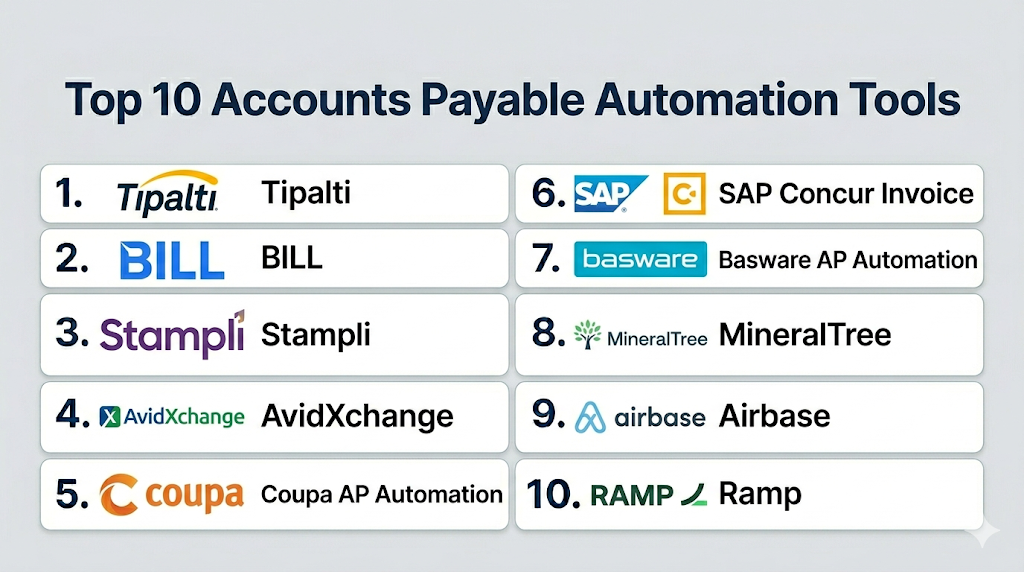
Top 10 Accounts Payable Automation Tools
1- Tipalti
Short description: Tipalti is an accounts payable automation and global payments platform designed for companies that need invoice processing, approvals, supplier onboarding, tax compliance, payments, and reconciliation in one system. It is well suited for mid-market and enterprise teams managing complex vendor payments.
Key Features
- Automated invoice capture and approval workflows
- Supplier onboarding and vendor information management
- Global payment processing and payment method support
- Tax and compliance document collection
- PO matching and invoice validation workflows
- Payment reconciliation and reporting
- ERP and accounting system integrations
Pros
- Strong fit for global vendor payment workflows
- Useful for companies managing many suppliers and payment methods
- Combines AP automation with supplier and payment management
Cons
- May be more advanced than small businesses need
- Implementation effort can increase with global entities and complex workflows
- Pricing and module scope should be reviewed carefully before rollout
Platforms / Deployment
Cloud / Web.
Security & Compliance
Supports enterprise finance security expectations such as approval controls, role-based access, audit trails, secure payment workflows, and vendor data management. Specific certifications should be verified directly with the vendor.
Integrations & Ecosystem
Tipalti connects AP automation with ERP, accounting, payment, supplier, and reconciliation workflows. It is especially useful for companies that need to process invoices and pay vendors across multiple regions.
- ERP systems
- Accounting platforms
- Supplier onboarding workflows
- Payment networks
- Tax and compliance processes
- Reporting and reconciliation tools
Support & Community
Tipalti provides onboarding support, documentation, customer success resources, and implementation assistance. It is best suited for finance teams that want structured AP automation with global payment capabilities.
2- BILL
Short description: BILL is a financial operations platform that supports accounts payable, accounts receivable, invoice approvals, payments, and cash flow visibility. It is a practical choice for small and mid-sized businesses that want simple AP automation connected with accounting workflows.
Key Features
- Bill capture and digital invoice management
- Approval workflows for vendor bills
- ACH, card, check, and payment workflow support
- Vendor record and payment detail management
- Accounting software integrations
- Cash flow and payment visibility
- Document storage and audit trail support
Pros
- Easy to use for SMB finance teams
- Strong fit for basic to moderate AP automation needs
- Helps reduce manual bill approvals and payment tracking
Cons
- May not provide deep enterprise procurement or complex PO matching
- Advanced global AP workflows may require additional tools
- Best suited for smaller and mid-sized finance operations
Platforms / Deployment
Cloud / Web / Mobile access varies by configuration.
Security & Compliance
Supports secure financial workflows, user permissions, approval controls, and payment authorization features. Specific compliance certifications should be verified with the vendor.
Integrations & Ecosystem
BILL integrates with common accounting and finance systems, making it useful for businesses that want to connect invoice approvals, payments, and bookkeeping.
- Accounting systems
- Banking and payment workflows
- Vendor records
- Expense and spend workflows
- Document management
- Reporting and reconciliation tools
Support & Community
BILL provides documentation, support resources, onboarding guidance, and customer assistance. It is approachable for SMBs and finance teams that want practical AP automation without heavy enterprise complexity.
3- Stampli
Short description: Stampli is an AP automation platform built around invoice collaboration, approval workflows, invoice capture, and finance team communication. It is best for teams that want to centralize every invoice conversation, document, approval, and audit trail in one place.
Key Features
- Invoice capture and data extraction
- Invoice approval routing and collaboration
- Centralized invoice communication history
- AI-assisted invoice processing features
- ERP and accounting integrations
- Audit trail and document management
- PO matching and payment workflow support depending on setup
Pros
- Strong invoice collaboration experience
- Useful for AP teams with many approval conversations
- Helps reduce scattered email communication around invoices
Cons
- May not be as broad as full procurement or spend suites
- Payment depth can vary depending on configuration
- Large enterprises should validate complex ERP and multi-entity needs
Platforms / Deployment
Cloud / Web.
Security & Compliance
Supports AP workflow security expectations such as user permissions, approval tracking, audit history, and secure invoice document handling. Specific certifications should be verified directly with the vendor.
Integrations & Ecosystem
Stampli integrates with accounting and ERP systems to support invoice workflows, coding, approvals, and financial posting. It is especially useful when invoice communication and approval visibility are major pain points.
- ERP systems
- Accounting platforms
- Invoice document workflows
- Payment processes
- Approval and communication workflows
- Reporting and audit tools
Support & Community
Stampli provides onboarding, documentation, customer support, and AP-focused implementation resources. It is often valued by teams that need better collaboration around invoice approvals.
4- AvidXchange
Short description: AvidXchange is an accounts payable automation and payment platform focused on invoice management, approval workflows, and supplier payments. It is especially relevant for mid-market businesses that want to automate invoice processing and reduce paper-based payables.
Key Features
- Invoice capture and digital approval workflows
- AP automation for finance teams
- Payment automation and supplier payment support
- Accounting and ERP system integrations
- Vendor and invoice visibility
- Approval routing and document management
- Reporting for invoice and payment status
Pros
- Strong fit for mid-market AP automation
- Useful for reducing paper invoices and manual payment processes
- Supports invoice-to-payment workflows
Cons
- May not be the best fit for very small companies
- Advanced global payment requirements should be validated
- Implementation quality depends on accounting system fit and process readiness
Platforms / Deployment
Cloud / Web.
Security & Compliance
Supports finance workflow controls such as permissions, approval tracking, secure payments, and audit history. Specific compliance certifications should be verified with the vendor.
Integrations & Ecosystem
AvidXchange connects AP automation with accounting, ERP, supplier, invoice, and payment workflows. It is often used by finance teams trying to digitize invoice receipt, approval, and payment processing.
- Accounting systems
- ERP platforms
- Vendor payment workflows
- Invoice capture processes
- Approval routing systems
- Reporting and audit workflows
Support & Community
AvidXchange provides support resources, onboarding, implementation assistance, and AP-focused customer services. It is suitable for teams that need guided automation of invoice and payment workflows.
5- Coupa AP Automation
Short description: Coupa AP Automation is part of Coupa’s broader spend management suite and helps organizations automate invoice capture, approvals, matching, payments, and spend visibility. It is best for companies that want AP connected with procurement, sourcing, suppliers, and spend control.
Key Features
- Invoice automation and approval workflows
- PO and contract-based invoice matching
- Supplier collaboration and invoice visibility
- Spend analytics and AP reporting
- Procurement and invoice workflow integration
- Payment and working capital visibility
- ERP and finance system integrations
Pros
- Strong fit for companies using Coupa spend management
- Connects AP with procurement and supplier workflows
- Useful for enterprise spend visibility and compliance
Cons
- May be more than needed for simple AP workflows
- Implementation can require broader process alignment
- Advanced suite capabilities may increase cost and rollout scope
Platforms / Deployment
Cloud / Web / Mobile access varies by configuration.
Security & Compliance
Supports enterprise security expectations such as role-based access, approval controls, audit trails, secure workflows, and administrative governance. Specific certifications should be verified directly with the vendor.
Integrations & Ecosystem
Coupa AP Automation works within the broader Coupa spend management ecosystem and connects with ERP, procurement, supplier, invoice, and payment systems.
- ERP systems
- Procurement workflows
- Supplier management tools
- Invoice and payment systems
- Spend analytics dashboards
- APIs and partner implementation options
Support & Community
Coupa provides customer success resources, implementation support, documentation, training, and partner services. It is a strong fit for businesses looking at AP as part of broader spend transformation.
6- SAP Concur Invoice
Short description: SAP Concur Invoice helps organizations automate invoice capture, approvals, and payment preparation while connecting invoice workflows with spend and finance processes. It is often used by companies that already use SAP Concur for travel and expense management.
Key Features
- Invoice capture and digital invoice processing
- Approval workflow automation
- Invoice status tracking and visibility
- Integration with expense and finance workflows
- Reporting for invoice and payment activity
- Vendor invoice document management
- ERP and accounting system connections
Pros
- Strong fit for SAP Concur users
- Useful for connecting invoice, travel, and expense workflows
- Helps reduce manual approval and invoice tracking work
Cons
- May not offer the same depth as full procure-to-pay suites
- Best value depends on existing SAP Concur ecosystem fit
- Advanced AP requirements should be validated during evaluation
Platforms / Deployment
Cloud / Web / Mobile access varies by configuration.
Security & Compliance
Supports enterprise access controls, approval tracking, secure invoice workflows, and auditability. Specific certifications should be verified by deployment and vendor documentation.
Integrations & Ecosystem
SAP Concur Invoice works well with SAP Concur travel and expense workflows, ERP systems, and finance platforms. It is especially useful for organizations standardizing employee spend and invoice approval processes.
- SAP Concur ecosystem
- ERP systems
- Accounting platforms
- Travel and expense workflows
- Invoice approval systems
- Reporting and analytics tools
Support & Community
SAP Concur provides support resources, documentation, training, onboarding, and partner assistance. It is best suited for companies already using Concur or SAP-related finance workflows.
7- Basware AP Automation
Short description: Basware AP Automation helps organizations automate invoice processing, supplier collaboration, purchase-to-pay workflows, and financial controls. It is suitable for mid-market and enterprise finance teams that need invoice automation connected with procurement and supplier processes.
Key Features
- Invoice capture and processing automation
- Purchase-to-pay workflow support
- Supplier portal and collaboration features
- Invoice matching and approval workflows
- Spend and AP visibility
- ERP and finance integrations
- Reporting and audit support
Pros
- Strong AP and procure-to-pay workflow focus
- Useful for invoice automation and supplier collaboration
- Good fit for larger finance teams with structured processes
Cons
- May require implementation planning for complex environments
- Smaller businesses may not need the full platform depth
- Product fit depends on ERP and procurement process requirements
Platforms / Deployment
Cloud / Web.
Security & Compliance
Supports enterprise access controls, approval workflows, audit trails, and secure financial process management. Specific compliance certifications should be verified with the vendor.
Integrations & Ecosystem
Basware connects AP automation with ERP, supplier, procurement, invoice, and finance workflows. It is useful where invoice automation and supplier collaboration are both priorities.
- ERP systems
- Finance platforms
- Supplier portals
- Invoice automation workflows
- Purchase-to-pay processes
- Reporting and analytics tools
Support & Community
Basware provides vendor support, onboarding assistance, documentation, and implementation services. It is well suited for organizations focused on structured AP automation and supplier invoice visibility.
8- MineralTree
Short description: MineralTree is an AP automation and payment platform focused on invoice capture, approval workflows, payment automation, and accounting integration. It is a practical choice for middle-market finance teams that want to streamline invoice-to-payment operations.
Key Features
- Invoice capture and automated data extraction
- Approval workflow routing
- Payment automation and vendor payments
- Accounting and ERP integrations
- Invoice status tracking and reporting
- Vendor payment detail management
- Audit trails and document storage
Pros
- Good fit for mid-market AP teams
- Helps automate both invoice approvals and payments
- Useful for reducing manual AP processing steps
Cons
- May not fit highly complex global enterprise AP requirements
- Advanced procurement or sourcing features may be limited
- Integration fit should be validated with existing accounting systems
Platforms / Deployment
Cloud / Web.
Security & Compliance
Supports finance workflow controls such as user permissions, approval tracking, payment authorization, and audit history. Specific certifications should be verified during vendor evaluation.
Integrations & Ecosystem
MineralTree connects AP automation with accounting, ERP, banking, and payment workflows. It is useful for teams that want to reduce manual invoice and payment handling.
- Accounting systems
- ERP platforms
- Banking workflows
- Vendor payment systems
- Invoice approval workflows
- Reporting and reconciliation tools
Support & Community
MineralTree provides support resources, onboarding, documentation, and implementation assistance. It is suitable for finance teams seeking practical invoice-to-payment automation.
9- Airbase
Short description: Airbase is a finance automation platform that includes accounts payable automation, bill payments, corporate cards, expense management, purchase approvals, and accounting automation. It is best for finance teams that want AP connected with broader non-payroll spend controls.
Key Features
- Bill payment and AP automation
- Invoice approval workflows
- Corporate cards and expense management
- Vendor management and payment tracking
- Purchase request and approval workflows
- Accounting automation and reconciliation
- Budget controls and spend reporting
Pros
- Strong coverage across AP, cards, and expenses
- Useful for finance teams managing non-payroll spend
- Helps centralize approvals, payments, and accounting workflows
Cons
- May not replace deep enterprise procurement suites
- Smaller teams may not need the full workflow scope
- Complex global AP requirements should be validated
Platforms / Deployment
Cloud / Web / Mobile access varies by configuration.
Security & Compliance
Supports access controls, approval workflows, audit trails, and secure finance operations. Specific compliance certifications should be verified directly with the vendor.
Integrations & Ecosystem
Airbase connects AP, payments, expenses, corporate cards, and accounting workflows. It is useful for finance teams that want centralized control over vendor bills and employee spending.
- Accounting systems
- ERP and finance tools
- HRIS and employee records
- Vendor payment workflows
- Corporate card transactions
- Approval and reporting systems
Support & Community
Airbase provides onboarding, documentation, customer support, and implementation guidance. It is suitable for finance teams that want structured controls across bills, cards, and expenses.
10- Ramp
Short description: Ramp is a finance automation platform that includes bill pay, expense management, corporate cards, vendor spend controls, procurement workflows, and accounting automation. It is best for modern finance teams that want real-time visibility and faster AP-related workflows.
Key Features
- Bill pay and vendor payment workflows
- Invoice intake and approval routing
- Corporate card and expense management
- Procurement intake and purchase approvals
- Accounting automation and reconciliation support
- Vendor and subscription spend visibility
- Real-time finance dashboards
Pros
- Strong real-time spend visibility
- Good fit for fast-growing companies and modern finance teams
- Helps reduce manual expense, bill, and reconciliation work
Cons
- May not replace deep enterprise AP suites in complex environments
- Product availability and eligibility may vary by region
- Large global AP teams should validate multi-entity and payment requirements
Platforms / Deployment
Cloud / Web / Mobile.
Security & Compliance
Supports modern finance security expectations such as access controls, approval workflows, audit trails, and secure financial data handling. Specific certifications should be verified directly with the vendor.
Integrations & Ecosystem
Ramp connects bill pay, card spend, expenses, procurement intake, and accounting workflows. It is useful for finance teams that want AP automation connected with broader spend control.
- Accounting systems
- ERP and finance tools
- HRIS and employee systems
- Bill payment workflows
- Corporate card transactions
- Reporting and reconciliation tools
Support & Community
Ramp provides customer support, onboarding resources, documentation, and finance workflow guidance. It is a strong fit for teams that want a modern, fast-adoption finance automation platform.
Comparison Table
| Tool Name | Best For | Platform Supported | Deployment | Standout Feature | Public Rating |
|---|---|---|---|---|---|
| Tipalti | Global AP and supplier payments | Web | Cloud | Global payables automation | N/A |
| BILL | SMB AP and payment workflows | Web / Mobile access varies | Cloud | Simple bill approval and payment management | N/A |
| Stampli | Collaborative invoice approvals | Web | Cloud | Invoice-centered communication | N/A |
| AvidXchange | Mid-market invoice and payment automation | Web | Cloud | Invoice-to-payment automation | N/A |
| Coupa AP Automation | Enterprise AP connected with spend management | Web / Mobile access varies | Cloud | AP and procurement visibility | N/A |
| SAP Concur Invoice | Concur users and invoice workflows | Web / Mobile access varies | Cloud | Invoice approval connected with spend workflows | N/A |
| Basware AP Automation | Procure-to-pay and invoice automation | Web | Cloud | Supplier and invoice collaboration | N/A |
| MineralTree | Mid-market invoice-to-payment workflows | Web | Cloud | AP and payment automation | N/A |
| Airbase | AP, cards, and expense control | Web / Mobile access varies | Cloud | Non-payroll spend management | N/A |
| Ramp | Modern finance automation | Web / Mobile | Cloud | Bill pay and real-time spend visibility | N/A |
Evaluation & Scoring of Accounts Payable Automation Tools
| Tool Name | Core 25% | Ease 15% | Integrations 15% | Security 10% | Performance 10% | Support 10% | Value 15% | Weighted Total |
|---|---|---|---|---|---|---|---|---|
| Tipalti | 9.2 | 8.0 | 8.8 | 8.7 | 8.8 | 8.5 | 8.0 | 8.62 |
| BILL | 8.0 | 8.8 | 8.0 | 8.0 | 8.2 | 8.2 | 8.6 | 8.26 |
| Stampli | 8.5 | 8.8 | 8.3 | 8.2 | 8.3 | 8.4 | 8.3 | 8.43 |
| AvidXchange | 8.6 | 8.0 | 8.2 | 8.3 | 8.4 | 8.3 | 8.1 | 8.31 |
| Coupa AP Automation | 9.0 | 7.8 | 9.0 | 8.8 | 8.8 | 8.7 | 7.8 | 8.58 |
| SAP Concur Invoice | 8.2 | 8.0 | 8.5 | 8.7 | 8.4 | 8.5 | 7.8 | 8.29 |
| Basware AP Automation | 8.6 | 7.8 | 8.6 | 8.5 | 8.4 | 8.2 | 8.0 | 8.34 |
| MineralTree | 8.0 | 8.2 | 8.0 | 8.2 | 8.1 | 8.0 | 8.2 | 8.10 |
| Airbase | 8.5 | 8.4 | 8.5 | 8.4 | 8.4 | 8.1 | 8.2 | 8.39 |
| Ramp | 8.2 | 9.0 | 8.6 | 8.5 | 8.6 | 8.3 | 8.7 | 8.54 |
The scoring is comparative and should be used as a practical buying guide, not a universal ranking. Enterprise AP tools score higher for workflow depth, ERP integration, governance, and scalability. SMB-friendly platforms may score higher for ease of use and value. Buyers should adjust the score based on invoice volume, ERP environment, payment complexity, number of entities, approval structure, and finance team maturity.
Which Accounts Payable Automation Tool Is Right for You?
Solo / Freelancer
Solo professionals usually do not need a dedicated AP automation platform. Basic accounting software, online banking, or simple bill payment tools may be enough. If invoice volume grows or vendor payments become harder to track, a lightweight platform such as BILL can be a practical starting point.
SMB
SMBs should prioritize ease of use, bill approval workflows, accounting integration, payment tracking, and simple vendor management. BILL, Stampli, Ramp, and MineralTree can be practical options depending on whether the company needs stronger bill pay, invoice collaboration, or finance automation.
Mid-Market
Mid-market companies often need stronger approval routing, invoice capture, payment automation, ERP integration, and AP reporting. Tipalti, AvidXchange, Stampli, Airbase, Ramp, and Basware can be useful depending on invoice volume, vendor complexity, and payment requirements.
Enterprise
Enterprises should focus on global payables, multi-entity support, ERP integration, supplier portals, PO matching, auditability, and compliance controls. Tipalti, Coupa AP Automation, SAP Concur Invoice, and Basware AP Automation are strong options for complex finance environments, while Airbase and Ramp may support broader spend control alongside AP.
Budget vs Premium
Budget-conscious businesses should avoid overbuying complex enterprise AP software before their processes are mature. BILL, Stampli, MineralTree, and Ramp may provide faster value for simpler workflows. Premium buyers with global payments, procurement integration, and complex controls should evaluate Tipalti, Coupa, Basware, or SAP Concur Invoice.
Feature Depth vs Ease of Use
For feature depth, Tipalti, Coupa AP Automation, Basware, and SAP Concur Invoice provide stronger enterprise workflow coverage. For ease of use, BILL, Stampli, Ramp, and Airbase may be more approachable. The right choice depends on whether the finance team prioritizes invoice processing, payments, collaboration, or broad spend control.
Integrations & Scalability
Companies should prioritize integrations with ERP, accounting, procurement, banking, payment, and reporting systems. Smaller teams may only need accounting integration, while enterprises need stronger ERP mapping, multi-entity support, SSO, audit trails, and advanced approval workflows.
Security & Compliance Needs
Finance teams should review SSO, MFA, role-based access, approval history, payment authorization, vendor bank change controls, audit logs, encryption, and compliance documentation. AP systems handle sensitive financial and supplier data, so security and governance should be evaluated carefully before purchase.
Frequently Asked Questions
1. What is Accounts Payable Automation?
Accounts Payable Automation is software that digitizes and automates invoice capture, approvals, coding, PO matching, payment processing, and reconciliation. It reduces manual work and helps finance teams process supplier invoices faster and more accurately.
2. How is AP automation different from accounting software?
Accounting software records financial transactions and supports bookkeeping, reporting, and financial close. AP automation focuses specifically on invoice intake, approvals, matching, vendor payments, and reducing manual accounts payable work before transactions are posted.
3. What pricing model do AP automation tools usually follow?
Pricing varies by vendor and may depend on users, invoice volume, payment volume, modules, entities, integrations, or company size. Many enterprise tools use custom pricing, while SMB-focused tools may offer simpler subscription-based plans.
4. How long does AP automation implementation take?
Implementation depends on invoice volume, ERP integration, approval workflows, vendor data, payment methods, and matching requirements. Simple setups may be faster, while enterprise deployments often require process mapping, testing, training, and phased rollout.
5. What are common mistakes when choosing AP automation software?
Common mistakes include ignoring ERP integration, underestimating invoice exceptions, skipping approval workflow design, not cleaning vendor data, and choosing a tool before understanding PO matching, payment, and reporting needs.
6. Is AP automation software secure?
Most serious AP platforms include security controls such as user permissions, approval history, audit logs, and secure payment workflows. Buyers should verify SSO, MFA, encryption, fraud controls, vendor bank change controls, and compliance documentation.
7. Can AP automation reduce costs?
Yes, AP automation can reduce costs by lowering manual data entry, preventing duplicate payments, reducing late fees, improving approval speed, and helping finance teams capture better payment timing and supplier visibility.
8. What integrations should buyers look for?
Buyers should look for integrations with ERP, accounting, procurement, banking, payment, tax, and reporting systems. ERP or accounting integration is usually the most important because AP data must flow accurately into the general ledger.
9. When should a company switch AP automation tools?
A company should switch when invoice processing is slow, approvals are stuck in email, duplicate payments occur, vendor data is hard to manage, reporting is weak, or the current system cannot support growth, integrations, or compliance needs.
10. Are there alternatives to AP automation tools?
Alternatives include accounting software, ERP AP modules, spreadsheets, email approvals, bank bill pay tools, and manual invoice workflows. These may work for very small teams, but dedicated AP automation is better for structured invoice and payment control.
Conclusion
Accounts Payable Automation Tools help finance teams reduce manual invoice processing, improve approval speed, prevent duplicate payments, strengthen vendor controls, and gain better visibility into outgoing cash. The right tool depends on invoice volume, company size, ERP environment, payment complexity, approval structure, vendor network, and compliance requirements. SMBs may prefer BILL, Stampli, Ramp, or MineralTree for easier adoption and practical invoice workflows. Mid-market companies may evaluate Tipalti, AvidXchange, Airbase, Basware, or Ramp depending on whether they need stronger payments, AP automation, or spend control. Enterprises may need Tipalti, Coupa AP Automation, SAP Concur Invoice, or Basware for deeper workflow governance, global scale, and ERP alignment. The best next step is to shortlist two or three tools, map your real AP workflows, validate ERP and accounting integrations, review security and payment controls, and run a pilot with real invoices before making a final decision.

Find Trusted Cardiac Hospitals
Compare heart hospitals by city and services — all in one place.
Explore Hospitals
Accounts payable automation tools are really helpful because they reduce manual invoice work, speed up payments, and make financial processes much more efficient.