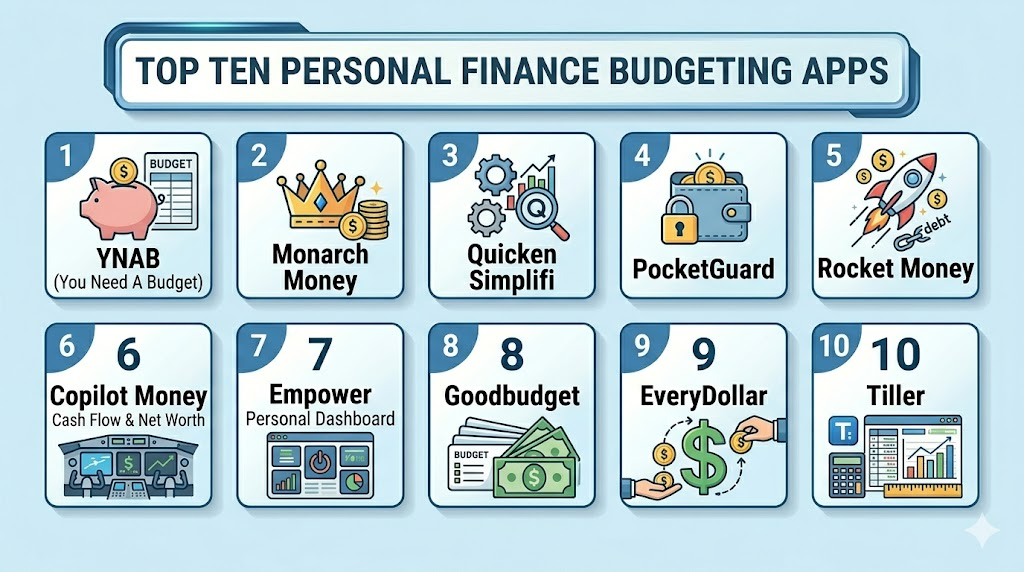
Introduction
Personal Finance Budgeting Apps help individuals, couples, families, freelancers, and small business owners track income, spending, bills, savings, debt, subscriptions, and financial goals from one place. These apps matter now because people are managing rising living costs, multiple bank accounts, digital subscriptions, credit cards, loans, investments, and shared household expenses. A good budgeting app turns scattered transactions into clear categories, spending limits, alerts, reports, and action steps. Real-world use cases include monthly budgeting, subscription tracking, debt payoff planning, savings goal management, couple budgeting, freelancer cash flow tracking, and net worth monitoring. Buyers should evaluate bank connectivity, privacy, budget method, ease of use, mobile experience, reporting, collaboration, automation, pricing, and data export options.
Real-world Use Cases
- Monthly household budgeting: Users can organize rent, groceries, utilities, transport, subscriptions, loan payments, and savings goals into clear budget categories.
- Couple and family money management: Couples can use shared dashboards, transaction review, monthly plans, and goal tracking to stay aligned on spending decisions.
- Debt payoff planning: Users can track credit card balances, loan payments, payoff progress, interest impact, and monthly repayment goals.
- Subscription and bill tracking: Budgeting apps help users identify recurring payments, forgotten subscriptions, upcoming bills, and monthly cash flow pressure.
- Savings goal management: Users can plan for emergency funds, vacations, education, home purchases, medical expenses, or large future purchases.
- Freelancer and variable income tracking: Independent workers can track irregular income, taxes, business expenses, savings buckets, and monthly spending limits.
- Net worth visibility: Users can connect bank accounts, loans, credit cards, investments, and assets to understand their full financial picture.
- Spending behavior improvement: Users can review category trends, impulse purchases, overspending patterns, and monthly progress to build better money habits.
Evaluation Criteria for Buyers
- Budgeting method: Check whether the app supports zero-based budgeting, envelope budgeting, automated tracking, spending limits, or simple category-based planning.
- Bank connectivity: Buyers should validate whether the app connects reliably with their banks, credit cards, loans, and investment accounts.
- Ease of use: The app should be simple enough to check daily or weekly without making budgeting feel like extra work.
- Transaction categorization: Look for smart categories, custom rules, tags, split transactions, and easy transaction review.
- Reporting and insights: Strong apps provide cash flow views, spending trends, net worth charts, category reports, and goal progress.
- Shared budgeting: Couples and families should check whether multiple users can collaborate on the same household budget.
- Privacy and security: Review encryption, account protection, data sharing, bank connection provider, MFA, and privacy practices.
- Pricing and value: Compare free plans, paid subscriptions, trial periods, annual pricing, and feature limits.
- Data export and portability: Buyers should check whether they can export transactions, reports, or budget history if they switch tools.
- Mobile and web experience: The app should work well across the devices users actually use, including mobile, desktop, and web.
Best for: Users who want comprehensive control over their finances, including tracking spending habits, managing savings goals, and planning budgets effectively across multiple accounts. Ideal for individuals, couples, or freelancers seeking consistent money management and long-term financial insight. Suitable for those who want both actionable insights and accountability in their financial routines.
Not ideal for: Users who only need simple tracking tools like a notebook, basic spreadsheet, or one-time expense calculator. Not suitable for people who prefer minimal setup or occasional budget checks. Best avoided by those who do not need ongoing account syncing or detailed financial reporting.
Key Trends in Personal Finance Budgeting Apps for 2026 and Beyond
- Mint replacement demand is still shaping the market: Many users continue looking for alternatives that combine bank syncing, spending tracking, and simple budgeting.
- AI-assisted money insights are becoming more common: Apps are adding smarter transaction categorization, spending alerts, cash flow predictions, and personalized suggestions.
- Couple budgeting is a major product focus: Shared budgets, joint dashboards, partner visibility, and household planning are becoming more important.
- Subscription tracking is now expected: Users want automatic detection of streaming services, app subscriptions, gym memberships, and recurring bills.
- Net worth tracking is merging with budgeting: Many buyers want spending control and investment visibility in one personal finance dashboard.
- Privacy and data handling matter more: Budgeting apps connect with bank accounts, so users are reviewing data sharing, encryption, MFA, and financial data access more carefully.
- Manual-first budgeting still has demand: Some users prefer apps that encourage active planning instead of passive spending summaries.
- Spreadsheet-connected workflows remain popular: Users who want control and customization increasingly choose tools that connect bank feeds to spreadsheets.
- Mobile-first design is essential: Users expect fast transaction review, push alerts, bill reminders, and budget updates from their phones.
- Freemium vs subscription value is under pressure: Users are comparing what they get for paid apps versus free financial dashboards and spreadsheet methods.
How We Selected These Tools
The tools below were selected using practical buyer-focused evaluation logic for personal finance budgeting users.
- Market adoption and mindshare among budgeting app users, personal finance communities, couples, families, and freelancers
- Feature completeness across bank syncing, transaction categorization, budgeting, goals, reporting, bills, and account tracking
- Budgeting style coverage including zero-based budgeting, envelope budgeting, automated budgeting, and dashboard-based tracking
- Reliability and performance signals such as app maturity, bank connection experience, sync behavior, and mobile usability
- Security posture signals including account protection, bank data handling, privacy practices, and user control
- Integrations and ecosystem depth including banks, credit cards, loans, investments, spreadsheets, and mobile platforms
- Customer fit across segments including solo users, couples, families, freelancers, beginners, and advanced spreadsheet users
- Ease of onboarding including bank setup, category setup, rule creation, transaction review, and first budget creation
- Reporting and insight quality for spending trends, net worth, cash flow, recurring bills, and savings goals
- Long-term value based on pricing, flexibility, data export, support, and usefulness over multiple budgeting cycles
Top 10 Personal Finance Budgeting Apps Tools
1- YNAB
Short description: YNAB is a zero-based budgeting app designed for users who want to actively plan every dollar before spending it. It is best for people who want discipline, category-level control, and a hands-on approach to money management.
Key Features
- Zero-based budgeting workflow
- Bank account and credit card syncing
- Manual transaction entry support
- Goal and target-based category planning
- Spending reports and progress visibility
- Shared budgeting support for households
- Educational resources and budgeting method guidance
Pros
- Strong for users who want active money control
- Helps build intentional spending habits
- Good fit for debt payoff and category-based planning
Cons
- Learning curve can be higher than passive trackers
- Subscription cost may feel high for budget-sensitive users
- Users must engage regularly to get the full value
Platforms / Deployment
Web / iOS / Android
Cloud
Security & Compliance
Specific certifications should be validated directly. MFA, encryption, bank data protection, audit logs, RBAC, SOC 2, ISO 27001, GDPR, and other controls: Not publicly stated for all items.
Integrations & Ecosystem
YNAB works best for users who want budgeting discipline rather than only spending summaries. Its ecosystem focuses on bank syncing, category planning, transaction review, and education around intentional money habits.
- Bank and credit card connections
- Manual transaction entry
- Mobile and web budgeting
- Category goals and targets
- Household budget collaboration
- Export and reporting options may vary
Support & Community
YNAB has strong educational content, onboarding guidance, support resources, and a large budgeting community. Users should review trial availability, learning resources, data import options, and support expectations before subscribing.
2- Monarch Money
Short description: Monarch Money is a personal finance dashboard for budgeting, net worth tracking, transaction review, investments, recurring bills, and household collaboration. It is best for users who want a clean financial overview across accounts.
Key Features
- Bank, credit card, loan, and investment tracking
- Budget categories and spending plans
- Net worth and account dashboard
- Recurring subscription and bill visibility
- Shared household budgeting
- Transaction review and categorization
- Reports and financial trend views
Pros
- Strong all-in-one financial dashboard
- Good fit for couples and households
- Useful for users who want spending and net worth together
Cons
- May be more tracking-focused than strict budgeting-focused
- Paid subscription may not suit users seeking free tools
- Bank connection reliability may vary by institution
Platforms / Deployment
Web / iOS / Android
Cloud
Security & Compliance
Specific controls should be validated directly. MFA, encryption, bank data protection, audit logs, RBAC, SOC 2, ISO 27001, GDPR, and data sharing practices: Not publicly stated for all items.
Integrations & Ecosystem
Monarch Money fits users who want a full personal finance view, not only monthly budgeting. It is useful for couples, families, and users tracking spending, subscriptions, investments, debts, and net worth together.
- Bank and card syncing
- Investment account tracking
- Recurring bill detection
- Shared household access
- Reports and trend views
- Transaction categories and rules
Support & Community
Monarch provides product support and onboarding resources. Buyers should review bank connection coverage, export options, support response expectations, and household sharing features before choosing it.
3- Quicken Simplifi
Short description: Quicken Simplifi is a budgeting and personal finance app focused on spending plans, account tracking, bills, subscriptions, savings goals, and cash flow visibility. It is best for users who want a modern budgeting app from a long-established personal finance brand.
Key Features
- Spending plan and budget tracking
- Bank, credit card, and account syncing
- Cash flow and upcoming bill visibility
- Savings goals and watchlists
- Subscription and recurring transaction tracking
- Reports and spending insights
- Mobile and web access
Pros
- Good balance of automation and budget visibility
- Strong for household expenses and recurring bills
- Useful for users who want simpler budgeting than traditional desktop finance software
Cons
- Paid subscription required for full use
- Users wanting strict zero-based budgeting may prefer YNAB
- Bank syncing quality may vary by institution
Platforms / Deployment
Web / iOS / Android
Cloud
Security & Compliance
Specific controls should be validated directly. MFA, encryption, bank connection security, audit logs, RBAC, SOC 2, ISO 27001, GDPR, and privacy controls: Not publicly stated for all items.
Integrations & Ecosystem
Quicken Simplifi is useful for users who want connected account tracking, budget planning, and recurring bill visibility without managing a traditional desktop finance file.
- Bank and credit card syncing
- Spending plan workflows
- Savings goals
- Recurring bill tracking
- Watchlists and reports
- Mobile and web dashboards
Support & Community
Quicken offers customer support and product resources. Users should check plan terms, import options, connected account coverage, support availability, and data export needs.
4- PocketGuard
Short description: PocketGuard is a budgeting app focused on showing how much spendable money users have after bills, goals, and essentials. It is best for beginners and overspenders who want simple cash flow guidance.
Key Features
- “In My Pocket” spendable money view
- Bank and credit card syncing
- Bill and subscription tracking
- Budget categories and spending limits
- Debt payoff and savings goal support
- Transaction categorization
- Web and mobile access
Pros
- Beginner-friendly and simple to understand
- Good for users who want overspending protection
- Useful subscription and bill visibility
Cons
- May feel less customizable than advanced budgeting tools
- Not ideal for users needing deep manual budgeting
- Some features may require paid access
Platforms / Deployment
Web / iOS / Android
Cloud
Security & Compliance
Specific controls should be validated directly. MFA, encryption, bank data protection, audit logs, RBAC, SOC 2, ISO 27001, GDPR, and privacy practices: Not publicly stated for all items.
Integrations & Ecosystem
PocketGuard is designed for users who want fast answers about available spending money. It is practical for simple budgeting, bill tracking, debt planning, and subscription awareness.
- Bank account syncing
- Credit card tracking
- Bill and subscription detection
- Spending category limits
- Savings and debt tools
- Web and mobile dashboards
Support & Community
PocketGuard provides app support and help resources. Buyers should review free vs paid limits, bank coverage, export options, and cancellation terms before committing.
5- Rocket Money
Short description: Rocket Money is a personal finance app known for subscription tracking, bill visibility, spending insights, and financial account monitoring. It is best for users who want to find recurring charges and control monthly spending leaks.
Key Features
- Subscription and recurring charge tracking
- Bill tracking and spending insights
- Account balance monitoring
- Budget category tools
- Alerts for spending and charges
- Net worth and financial dashboard features may vary
- Mobile-first money management experience
Pros
- Strong for subscription awareness and recurring charge cleanup
- Simple interface for users who dislike complex budgeting
- Useful for spotting monthly spending leaks
Cons
- Budgeting depth may be lighter than dedicated budget-first apps
- Some services and features may require paid plans
- Users should review privacy and account connection settings carefully
Platforms / Deployment
Web / iOS / Android features may vary
Cloud
Security & Compliance
Specific controls should be validated directly. MFA, encryption, bank data protection, audit logs, RBAC, SOC 2, ISO 27001, GDPR, and data sharing practices: Not publicly stated for all items.
Integrations & Ecosystem
Rocket Money is useful when recurring payments, subscriptions, and spending alerts are the main pain points. It can complement a more detailed budgeting method if users need deeper planning.
- Bank and card connections
- Recurring transaction tracking
- Subscription visibility
- Spending alerts
- Bill-related workflows
- Financial dashboard features depending on plan
Support & Community
Rocket Money provides customer support through its app and help resources. Users should check pricing terms, subscription cancellation workflows, account permissions, and premium feature scope.
6- Copilot Money
Short description: Copilot Money is a personal finance app known for clean design, smart transaction categorization, spending insights, and account dashboards. It is best for users in the Apple ecosystem who want a modern finance tracking experience.
Key Features
- Account and transaction syncing
- Smart transaction categorization
- Spending reports and budget views
- Subscription and recurring transaction visibility
- Investment and net worth tracking may vary
- Apple ecosystem-focused design
- Modern mobile-first user experience
Pros
- Clean and polished user experience
- Good for users who value smart categorization
- Strong fit for Apple-focused personal finance tracking
Cons
- Platform availability may not fit all Android or web-first users
- Paid subscription may not suit budget-sensitive users
- Not as method-driven as zero-based budgeting tools
Platforms / Deployment
iOS / macOS features may vary
Cloud
Security & Compliance
Specific controls should be validated directly. MFA, encryption, bank data protection, audit logs, RBAC, SOC 2, ISO 27001, GDPR, and privacy practices: Not publicly stated for all items.
Integrations & Ecosystem
Copilot Money is useful for users who want automated financial organization and a modern dashboard-style experience. It is especially relevant for Apple users who want spending, accounts, and trends in one clean interface.
- Bank and card syncing
- Transaction categorization
- Spending trend views
- Recurring transaction tracking
- Investment and account dashboards depending on plan
- Apple device ecosystem support
Support & Community
Support is product-led through app resources and customer help channels. Users should review platform availability, sync reliability, export options, and premium plan details.
7- Empower Personal Dashboard
Short description: Empower Personal Dashboard is a personal finance tool focused on net worth, investment tracking, cash flow, spending, and retirement visibility. It is best for users who want budgeting plus a broader investment and wealth dashboard.
Key Features
- Net worth tracking
- Investment and retirement account visibility
- Cash flow and spending reports
- Bank, credit card, and loan tracking
- Portfolio analysis features
- Budgeting and expense categorization
- Financial planning views
Pros
- Strong for investment and net worth visibility
- Useful for users tracking long-term financial health
- Good dashboard for accounts beyond basic spending
Cons
- Budgeting features may be less hands-on than budget-first apps
- Not ideal for users who only need daily expense control
- Some services may include financial advisory workflows
Platforms / Deployment
Web / iOS / Android
Cloud
Security & Compliance
Specific controls should be validated directly. MFA, encryption, account protection, audit logs, RBAC, SOC 2, ISO 27001, GDPR, and financial data privacy practices: Not publicly stated for all items.
Integrations & Ecosystem
Empower is useful for users who want spending visibility connected with investments, retirement, and net worth. It is better for broad financial tracking than strict category budgeting.
- Bank and card connections
- Investment account tracking
- Retirement planning views
- Cash flow reporting
- Net worth dashboard
- Portfolio-related insights
Support & Community
Empower offers support resources and financial dashboard access. Users should review advisory service boundaries, data sharing terms, account connection coverage, and privacy preferences.
8- Goodbudget
Short description: Goodbudget is an envelope budgeting app that helps users plan spending by assigning money to digital envelopes. It is best for users who like envelope budgeting but do not need heavy bank automation.
Key Features
- Envelope budgeting method
- Manual transaction tracking
- Household budget sharing
- Debt tracking support
- Spending reports
- Mobile and web access
- Budget planning across categories
Pros
- Simple envelope method for intentional spending
- Good for couples and households
- Works well for users who prefer manual control
Cons
- Bank syncing is not the main strength
- Manual entry may feel time-consuming for some users
- Advanced automation and investment tracking are limited
Platforms / Deployment
Web / iOS / Android
Cloud
Security & Compliance
Specific controls should be validated directly. MFA, encryption, account security, audit logs, RBAC, SOC 2, ISO 27001, GDPR, and financial data privacy controls: Not publicly stated for all items.
Integrations & Ecosystem
Goodbudget is best for users who want to follow envelope budgeting and control spending manually. It fits people who prefer planning before spending instead of relying fully on automation.
- Digital envelope budgeting
- Shared household budgets
- Manual transaction entry
- Debt tracking
- Reports and spending history
- Mobile and web budgeting
Support & Community
Goodbudget provides support resources and educational budgeting content. Buyers should review free envelope limits, paid plan details, household sharing, and data export options.
9- EveryDollar
Short description: EveryDollar is a zero-based budgeting app designed around assigning income to planned spending, savings, giving, and debt categories. It is best for users who want a simple budgeting method and structured monthly planning.
Key Features
- Zero-based monthly budget planning
- Budget categories and spending tracking
- Debt payoff workflow support
- Savings and goal planning
- Bank connection features may vary by plan
- Mobile and web access
- Simple household budget workflow
Pros
- Simple budgeting structure for beginners
- Strong fit for users who want monthly money planning
- Useful for debt payoff and goal-based budgeting
Cons
- Advanced automation may require paid access
- Less suitable for users wanting investment dashboards
- Some users may prefer more flexible category customization
Platforms / Deployment
Web / iOS / Android
Cloud
Security & Compliance
Specific controls should be validated directly. MFA, encryption, account protection, audit logs, RBAC, SOC 2, ISO 27001, GDPR, and privacy practices: Not publicly stated for all items.
Integrations & Ecosystem
EveryDollar works best for users who want a clear zero-based budgeting approach without needing a complex financial dashboard. It is useful for households focused on spending plans and debt reduction.
- Budget category planning
- Bank connection depending on plan
- Debt payoff workflows
- Savings goals
- Mobile and web budget management
- Spending plan tracking
Support & Community
EveryDollar provides support and budgeting education resources. Buyers should compare free vs paid features, bank syncing, export options, and account sharing needs.
10- Tiller
Short description: Tiller connects financial accounts to spreadsheets so users can build highly customizable budgets, reports, and financial dashboards. It is best for spreadsheet users who want automation without losing control.
Key Features
- Bank feed automation into spreadsheets
- Customizable budgeting templates
- Google Sheets and Excel workflows
- Category rules and transaction organization
- Net worth and spending reports
- Manual customization and formulas
- Data export and spreadsheet ownership
Pros
- Excellent for users who love spreadsheets
- Very flexible compared with fixed app dashboards
- Strong data portability and customization
Cons
- Not ideal for users who dislike spreadsheets
- Setup can take more effort than simple apps
- Mobile experience may be less app-like than dedicated budgeting tools
Platforms / Deployment
Web / Google Sheets / Microsoft Excel
Cloud / Spreadsheet-based
Security & Compliance
Specific controls should be validated directly. MFA, encryption, bank data protection, audit logs, RBAC, SOC 2, ISO 27001, GDPR, and privacy controls: Not publicly stated for all items.
Integrations & Ecosystem
Tiller is useful for users who want automated bank feeds inside flexible spreadsheets. It fits advanced budgeters, freelancers, financial planners, and anyone who wants custom categories, formulas, and reports.
- Bank feed connections
- Google Sheets workflows
- Microsoft Excel workflows
- Budget templates
- Transaction category rules
- Custom reporting dashboards
Support & Community
Tiller provides documentation, templates, and support resources. Users should evaluate spreadsheet comfort, bank connection coverage, template options, and data export preferences.
Comparison Table
| Tool Name | Best For | Platform(s) Supported | Deployment | Standout Feature | Public Rating |
|---|---|---|---|---|---|
| YNAB | Active zero-based budgeting | Web / iOS / Android | Cloud | Intentional category-based budgeting | N/A |
| Monarch Money | Couples and full financial dashboards | Web / iOS / Android | Cloud | Budgeting plus net worth tracking | N/A |
| Quicken Simplifi | Household expenses and cash flow | Web / iOS / Android | Cloud | Spending plan and recurring bill visibility | N/A |
| PocketGuard | Beginners and overspending control | Web / iOS / Android | Cloud | Simple spendable money view | N/A |
| Rocket Money | Subscription and bill tracking | Web / iOS / Android varies | Cloud | Recurring charge visibility | N/A |
| Copilot Money | Apple-focused finance tracking | iOS / macOS varies | Cloud | Smart categorization and clean design | N/A |
| Empower Personal Dashboard | Net worth and investment visibility | Web / iOS / Android | Cloud | Investment and retirement dashboard | N/A |
| Goodbudget | Envelope budgeting households | Web / iOS / Android | Cloud | Digital envelope budgeting | N/A |
| EveryDollar | Simple zero-based monthly planning | Web / iOS / Android | Cloud | Monthly budget assignment workflow | N/A |
| Tiller | Spreadsheet-based custom budgeting | Web / Google Sheets / Excel | Cloud / Spreadsheet-based | Automated bank feeds into spreadsheets | N/A |
Evaluation & Scoring of Personal Finance Budgeting Apps
The scoring below is a comparative buyer-focused model. It is not a public rating, certification score, or vendor-provided score. Scores reflect relative fit for budgeting apps based on core budgeting features, usability, integrations, security expectations, reliability, support, and value.
| Tool Name | Core 25% | Ease 15% | Integrations 15% | Security 10% | Performance 10% | Support 10% | Value 15% | Weighted Total 0–10 |
|---|---|---|---|---|---|---|---|---|
| YNAB | 9 | 7 | 8 | 8 | 8 | 9 | 8 | 8.15 |
| Monarch Money | 9 | 8 | 9 | 8 | 8 | 8 | 7 | 8.20 |
| Quicken Simplifi | 8 | 8 | 8 | 8 | 8 | 8 | 8 | 8.00 |
| PocketGuard | 8 | 9 | 8 | 7 | 8 | 7 | 8 | 7.95 |
| Rocket Money | 7 | 9 | 8 | 7 | 8 | 8 | 8 | 7.85 |
| Copilot Money | 8 | 9 | 8 | 8 | 8 | 8 | 7 | 8.05 |
| Empower Personal Dashboard | 8 | 8 | 9 | 8 | 8 | 8 | 9 | 8.25 |
| Goodbudget | 8 | 8 | 6 | 7 | 8 | 7 | 8 | 7.45 |
| EveryDollar | 8 | 8 | 7 | 7 | 8 | 8 | 8 | 7.75 |
| Tiller | 9 | 6 | 8 | 8 | 8 | 8 | 8 | 7.95 |
Which Personal Finance Budgeting Apps Tool Is Right for You?
Solo / Freelancer
Solo users and freelancers should choose a budgeting app that fits their income pattern and review habits. YNAB is strong if you want to assign every dollar and manage variable income carefully. PocketGuard is better if you want a quick answer to “How much can I spend?” Tiller is useful for freelancers who prefer spreadsheet control and custom reports.
SMB
Small households, couples, and side-business users need tools that support shared visibility, recurring bills, categories, and cash flow planning. Monarch Money is strong for couples and shared dashboards. Quicken Simplifi is practical for household expenses and upcoming bills. Goodbudget works well for families that like envelope-style planning.
Mid-Market
For more complex personal finances, multiple accounts, investments, loans, and long-term goals, users need broader dashboards and stronger reporting. Monarch Money, Empower Personal Dashboard, Quicken Simplifi, and Tiller are better fits. These tools help users see spending, debt, net worth, and cash flow together.
Enterprise
Most personal finance budgeting apps are consumer-first, not enterprise software. However, financial coaches, employee wellness programs, and advisory teams may use tools like Tiller, YNAB, or Monarch Money for education, coaching, and budgeting workflows. Enterprise buyers should validate privacy, data sharing, user consent, and scalability before recommending any app widely.
Budget vs Premium
Budget-conscious users should consider Empower Personal Dashboard, Goodbudget, or free tiers where available. These can be enough for basic tracking, net worth visibility, or envelope budgeting. Premium apps like YNAB, Monarch Money, Quicken Simplifi, Copilot Money, and Tiller may be worth it when they reduce money stress, improve spending control, or replace manual spreadsheets.
Feature Depth vs Ease of Use
If ease of use matters most, PocketGuard, Rocket Money, and Quicken Simplifi are easier starting points. If deeper budgeting discipline matters more, YNAB, EveryDollar, and Goodbudget offer stronger planning methods. If you want advanced customization, Tiller is powerful but requires spreadsheet comfort.
Integrations & Scalability
Integration quality matters because budgeting apps depend on bank feeds, credit cards, loan accounts, investment accounts, and transaction syncing. Monarch Money, Empower, Quicken Simplifi, YNAB, and Tiller are strong options to evaluate for connected account workflows. Users should test their actual banks before committing because sync quality can vary.
Security & Compliance Needs
Personal finance apps handle sensitive financial data, so privacy and account security are essential. Buyers should review encryption, MFA, bank connection providers, data retention, export options, and data sharing practices. If security certifications or controls are unclear, mark them as Not publicly stated and validate directly before connecting accounts.
Frequently Asked Questions
1. What are Personal Finance Budgeting Apps?
Personal Finance Budgeting Apps are tools that help users track income, expenses, bills, savings, debt, and financial goals.
They organize transactions into categories and show where money is going each month.
Some apps focus on strict budgeting, while others focus on dashboards and spending insights.
They help users make better money decisions with clearer financial visibility.
2. How much do budgeting apps cost?
Pricing depends on the app, features, subscription model, and whether bank syncing or premium tools are included.
Some apps offer free versions, while others charge monthly or annual subscription fees.
Premium plans may include shared budgets, advanced reports, account syncing, and custom rules.
Users should compare total value, not only the lowest price.
3. Which budgeting app is best for beginners?
Beginners often need an app that is simple, visual, and easy to check regularly.
PocketGuard, Quicken Simplifi, and Rocket Money are useful for users who want quick spending visibility.
EveryDollar and Goodbudget are good for people who want simple structured budgeting.
The best beginner app is the one the user can maintain every week.
4. Which app is best for zero-based budgeting?
YNAB and EveryDollar are strong options for zero-based budgeting.
This method helps users assign income to categories before spending, so every dollar has a purpose.
It is useful for debt payoff, variable income, and people who want stronger spending discipline.
However, it requires regular review and active participation.
5. Are budgeting apps safe to connect to bank accounts?
Many budgeting apps use secure bank connection providers, encryption, and account protection practices.
However, security varies, so users should review privacy policies, MFA options, and data sharing rules.
It is also important to check whether the app stores login credentials or uses secure token-based access.
If details are unclear, users should validate security directly before connecting accounts.
6. Can couples use budgeting apps together?
Yes, many budgeting apps support shared household budgeting or partner access.
Monarch Money, YNAB, Goodbudget, and Quicken Simplifi are commonly evaluated for household workflows.
Couples should check whether both users can view transactions, edit categories, track goals, and review spending.
Shared budgeting works best when both people agree on categories and review habits.
7. Do budgeting apps help reduce debt?
Budgeting apps can support debt reduction by tracking balances, payment goals, spending leaks, and monthly cash flow.
They help users see where money can be redirected toward credit cards, loans, or emergency savings.
Some apps offer dedicated debt payoff tools, while others rely on categories and manual planning.
The app helps most when paired with a clear repayment strategy.
8. What common mistakes should users avoid?
A common mistake is connecting accounts but never reviewing transactions or adjusting categories.
Users should also avoid creating too many budget categories, which can make the system hard to maintain.
Another mistake is choosing a complex tool when a simpler app would be easier to use consistently.
Start with essential categories, review weekly, and improve the system over time.
9. What integrations should buyers check first?
Buyers should first check bank accounts, credit cards, loans, investment accounts, and account syncing reliability.
They should also review support for shared access, exports, spreadsheets, mobile apps, and recurring bill detection.
If the user has uncommon banks or regional institutions, testing sync during a trial is important.
Integration quality can vary even when an app looks strong on paper.
10. What alternatives exist to budgeting apps?
Alternatives include spreadsheets, paper budgets, envelope cash systems, bank dashboards, accounting tools, and manual expense journals.
These can work well for users who prefer full control or do not want to connect bank accounts.
Budgeting apps are better when users want automation, reminders, reports, and mobile access.
The best option depends on comfort level, privacy needs, financial complexity, and consistency.
Conclusion
Personal Finance Budgeting Apps help users turn scattered financial activity into a clear plan for spending, saving, debt payoff, bills, subscriptions, and long-term goals. The best app depends on budgeting style, household needs, privacy expectations, account syncing, price, and how much control the user wants. YNAB is strong for active zero-based budgeting, Monarch Money is excellent for shared financial dashboards, Quicken Simplifi works well for household cash flow, PocketGuard is useful for beginners and overspending control, Rocket Money is strong for subscription visibility, Copilot Money fits Apple-focused users, Empower is useful for net worth and investments, Goodbudget supports envelope budgeting, EveryDollar works for simple monthly planning, and Tiller is best for spreadsheet power users. The best next step is to shortlist two or three apps, test them with real accounts and real monthly spending, review privacy controls, compare pricing, and choose the one you can use consistently.

Find Trusted Cardiac Hospitals
Compare heart hospitals by city and services — all in one place.
Explore Hospitals
I didn’t realize budgeting apps could provide such detailed insights into spending habits and help with better financial planning.