Introduction
Investing Portfolio Trackers help investors monitor stocks, ETFs, mutual funds, bonds, crypto, retirement accounts, dividends, asset allocation, net worth, and portfolio performance from one dashboard. These tools matter now because investors often hold assets across multiple brokers, retirement accounts, robo-advisors, wallets, and international platforms, making manual tracking difficult and error-prone. A good portfolio tracker gives users a clearer view of gains, losses, risk exposure, fees, income, diversification, and long-term progress. Real-world use cases include tracking multi-broker portfolios, monitoring dividends, checking asset allocation, reviewing tax performance, comparing returns against benchmarks, and identifying overexposure to sectors or individual holdings. Buyers should evaluate supported asset types, broker syncing, manual entry, reporting depth, tax tools, privacy, mobile experience, alerts, pricing, and data export.
Real-world Use Cases
- Multi-broker portfolio tracking: Investors can combine accounts from different brokers, retirement plans, and investment platforms into one dashboard.
- Dividend income monitoring: Dividend-focused users can track payouts, dividend growth, income schedules, and portfolio yield.
- Asset allocation review: Investors can see whether their portfolio is overweight in stocks, bonds, cash, sectors, countries, or individual companies.
- Net worth visibility: Some trackers combine investments, cash, loans, real estate, crypto, and alternative assets into one financial picture.
- Tax and performance reporting: Investors can review capital gains, realized returns, unrealized returns, dividend income, and taxable events depending on the tool.
- Benchmark comparison: Users can compare portfolio performance with indices, model portfolios, or custom benchmarks.
- Risk concentration checks: Trackers help reveal duplicate holdings, sector concentration, currency exposure, or overdependence on a few assets.
- Long-term goal tracking: Investors can monitor retirement goals, financial independence targets, education funds, and wealth-building milestones.
Evaluation Criteria for Buyers
- Asset coverage: Check whether the tracker supports stocks, ETFs, mutual funds, bonds, crypto, real estate, cash, retirement accounts, and alternative assets.
- Broker and account syncing: Buyers should confirm whether their actual brokers, banks, and custodians can connect reliably.
- Manual entry flexibility: Investors who use unsupported brokers or private assets need strong manual transaction entry and custom asset tracking.
- Performance reporting: Look for time-weighted returns, money-weighted returns, dividends, realized gains, unrealized gains, and benchmark comparisons.
- Tax tools: Tax-focused investors should evaluate capital gains reports, dividend reports, holding periods, and export options.
- Portfolio analytics: Buyers should review allocation charts, sector exposure, geography exposure, risk metrics, income projections, and rebalancing views.
- Ease of use: The tracker should be simple enough for regular review without requiring too much manual cleanup.
- Security and privacy: Review data access methods, encryption, MFA, account permissions, read-only syncing, and data sharing practices.
- Mobile and web experience: Investors should test whether the platform works well on the devices they use most.
- Pricing and value: Compare free plans, premium analytics, tax reporting, account limits, export tools, and long-term subscription costs.
Best for: individual investors, dividend investors, long-term portfolio builders, financial coaches, DIY investors, and wealth-focused households.
Not ideal for: users who only hold one simple account and are satisfied with their broker dashboard.
Key Trends in Investing Portfolio Trackers
- All-asset dashboards are becoming more popular: Investors increasingly want one view for stocks, ETFs, crypto, real estate, cash, private equity, collectibles, and liabilities.
- AI-assisted insights are expanding: Some tools are beginning to use automation for categorization, portfolio summaries, risk alerts, income projections, and personalized insights.
- Dividend and income tracking is a major focus: More users want trackers that show future income, dividend calendars, yield trends, and income reliability.
- Tax-aware reporting is becoming more valuable: Investors want better capital gains visibility, tax lot tracking, dividend tax reporting, and export-ready reports.
- Privacy-first portfolio tracking is gaining attention: Many users want read-only account syncing, limited data sharing, local controls, and transparent security practices.
- Crypto and traditional assets are converging: Investors want tools that can track brokerage accounts and wallets together without using separate dashboards.
- Benchmarking is becoming a standard expectation: DIY investors want to compare portfolio performance against indices, model portfolios, and custom benchmarks.
- Subscription value is under pressure: Users are comparing paid portfolio analytics tools against free broker dashboards, spreadsheet templates, and finance portals.
- Mobile alerts are becoming more practical: Price alerts, dividend alerts, portfolio movement alerts, and news alerts help investors react without checking dashboards constantly.
- Advisory and self-directed workflows are blending: Investors increasingly want educational insights and tracking tools without necessarily handing over portfolio management.
How We Selected These Tools
The tools below were selected using practical buyer-focused evaluation logic for investing portfolio trackers.
- Market adoption and recognition among DIY investors, dividend investors, long-term investors, wealth trackers, and portfolio analysts
- Feature completeness across portfolio tracking, performance reporting, allocation views, income tracking, and account consolidation
- Asset coverage including stocks, ETFs, mutual funds, crypto, real estate, cash, bonds, and alternative assets where relevant
- Reliability and performance signals such as app maturity, syncing options, reporting quality, and usability across devices
- Security posture signals including account connection methods, privacy controls, read-only access, encryption, and account protection
- Integrations and ecosystem depth including broker connections, bank connections, spreadsheet workflows, crypto wallets, and finance data sources
- Customer fit across segments including beginners, dividend investors, spreadsheet users, advanced traders, households, and high-net-worth users
- Reporting and analytics value for returns, dividends, allocation, tax, net worth, risk, and benchmark comparison
- Ease of onboarding including transaction imports, broker syncing, manual entry, portfolio setup, and dashboard customization
- Long-term value based on pricing, exportability, flexibility, support, and usefulness across multiple investing styles
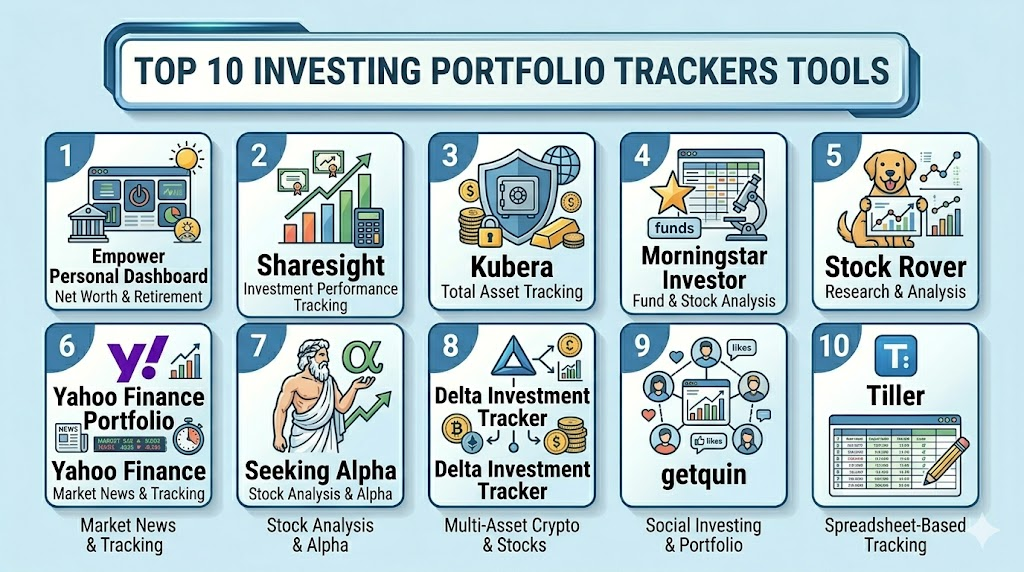
Top 10 Investing Portfolio Trackers Tools
1- Empower Personal Dashboard
Short description: Empower Personal Dashboard is a free personal finance and investment tracking tool that gives users a broad view of net worth, investments, retirement accounts, cash flow, and spending. It is best for investors who want a combined wealth dashboard rather than a stock-only tracker.
Key Features
- Net worth and investment account tracking
- Portfolio allocation and performance visibility
- Retirement account monitoring
- Cash flow and spending views
- Investment fee and portfolio insight tools
- Bank, credit card, loan, and investment account connections
- Web and mobile dashboard access
Pros
- Strong for users who want full financial visibility beyond investments
- Useful for tracking net worth, retirement accounts, and portfolio allocation
- Free dashboard can be valuable for long-term investors
Cons
- Budgeting and portfolio analytics may not be as deep as specialist tools
- Some users may not want advisory-related workflows
- Asset coverage for complex alternatives may be limited
Platforms / Deployment
Web / iOS / Android
Cloud
Security & Compliance
Specific certifications and controls should be validated directly. MFA, encryption, read-only account access, audit logs, RBAC, SOC 2, ISO 27001, GDPR, and other controls: Not publicly stated for all items.
Integrations & Ecosystem
Empower is useful for investors who want investments, cash, loans, spending, and net worth in one dashboard. It works well for households and long-term investors who want to see the bigger financial picture.
- Bank and credit card connections
- Brokerage and retirement account connections
- Net worth dashboard
- Portfolio allocation views
- Cash flow tracking
- Retirement planning workflows
Support & Community
Empower provides support resources and dashboard help. Users should review data sharing preferences, advisory service boundaries, account connection coverage, and privacy settings before connecting accounts.
2- Sharesight
Short description: Sharesight is a portfolio tracker focused on performance reporting, dividend tracking, and tax-friendly investment reporting. It is especially useful for DIY investors who need accurate performance views across stocks, ETFs, and income-focused portfolios.
Key Features
- Portfolio performance tracking
- Dividend and income tracking
- Tax reporting support
- Broker and trade import options
- Multi-currency portfolio tracking
- Benchmark comparison
- Capital gains and performance reports
Pros
- Strong for dividend investors and tax-aware reporting
- Useful for investors with international or multi-currency holdings
- Good fit for performance-focused DIY investors
Cons
- May be more detailed than beginners need
- Some advanced reports may require paid plans
- Broker support and tax fit may vary by region
Platforms / Deployment
Web / Mobile access may vary
Cloud
Security & Compliance
Specific controls should be validated directly. MFA, encryption, account security, audit logs, RBAC, SOC 2, ISO 27001, GDPR, and regional tax compliance documentation: Not publicly stated for all items.
Integrations & Ecosystem
Sharesight is built for investors who care about performance, dividends, and tax reporting. It is useful for investors who need more than simple account balances and want detailed return calculations.
- Broker import support
- Dividend tracking
- Tax reports
- Multi-currency tracking
- Benchmark comparisons
- Exportable reports
Support & Community
Sharesight provides support resources, documentation, and investor-focused guidance. Buyers should validate supported brokers, tax reporting coverage, plan limits, and export needs before subscribing.
3- Kubera
Short description: Kubera is a wealth and portfolio tracker designed to track a wide range of assets, including stocks, crypto, real estate, private investments, vehicles, domains, collectibles, and liabilities. It is best for users who want a clean net worth tracker for both traditional and alternative assets.
Key Features
- Broad asset tracking across public and private assets
- Net worth dashboard
- Crypto wallet and exchange tracking options
- Real estate and alternative asset tracking
- Bank and brokerage connections
- Manual asset entry
- Beneficiary and estate-style visibility features may vary
Pros
- Strong for users with diverse asset types
- Clean dashboard for high-level wealth visibility
- Useful for investors who want more than stocks and ETFs
Cons
- Less focused on deep stock research or tax reporting
- Paid pricing may not suit casual investors
- Some assets may require manual updates
Platforms / Deployment
Web / Mobile access may vary
Cloud
Security & Compliance
Specific controls should be validated directly. MFA, encryption, read-only account connections, audit logs, RBAC, SOC 2, ISO 27001, GDPR, and estate data protection practices: Not publicly stated for all items.
Integrations & Ecosystem
Kubera is useful for wealth tracking across multiple asset classes. It is especially relevant for investors who hold assets outside traditional brokerage accounts and want one clean net worth view.
- Bank and brokerage connections
- Crypto wallets and exchanges
- Real estate tracking
- Alternative asset tracking
- Manual asset entry
- Net worth reporting
Support & Community
Kubera provides product support and onboarding resources. Buyers should verify account connection coverage, supported asset types, pricing, data export, and privacy controls.
4- Morningstar Investor
Short description: Morningstar Investor is a research and portfolio analysis platform for investors who want fund research, stock insights, portfolio analysis, and investment ratings from a research-focused provider. It is best for research-driven investors and fund-focused portfolios.
Key Features
- Portfolio analysis tools
- Fund and stock research
- Investment screeners
- Analyst-style research content
- Portfolio X-ray and allocation insights may vary
- Watchlists and investment tracking
- Risk and diversification analysis
Pros
- Strong investment research ecosystem
- Useful for mutual fund and ETF analysis
- Good fit for users who want portfolio analysis plus research
Cons
- Not primarily designed as a lightweight budgeting-style tracker
- Some research and portfolio tools may require paid access
- Beginners may need time to understand research metrics
Platforms / Deployment
Web / iOS / Android features may vary
Cloud
Security & Compliance
Specific controls should be validated directly. MFA, encryption, account security, audit logs, RBAC, SOC 2, ISO 27001, GDPR, and privacy controls: Not publicly stated for all items.
Integrations & Ecosystem
Morningstar Investor fits users who want investment research and portfolio analysis together. It is more research-oriented than simple tracker apps.
- Mutual fund and ETF research
- Stock research
- Watchlists
- Portfolio analysis
- Screeners
- Research reports and insights
Support & Community
Morningstar provides product support, research resources, and investor education. Users should review plan details, supported portfolio tools, and whether the research depth matches their investing style.
5- Stock Rover
Short description: Stock Rover is an investment research and portfolio analysis platform focused on stocks, ETFs, screening, portfolio analytics, and research metrics. It is best for investors who want deeper analysis and screening alongside portfolio tracking.
Key Features
- Portfolio tracking and analytics
- Stock and ETF screeners
- Research metrics and financial data
- Watchlists and alerts
- Portfolio rebalancing insights may vary
- Dividend and income tracking features may vary
- Performance comparison tools
Pros
- Strong research and screening capabilities
- Useful for stock and ETF-focused investors
- Good fit for analytical DIY investors
Cons
- May feel complex for beginners
- More research-focused than simple portfolio trackers
- Some advanced data and features may require paid plans
Platforms / Deployment
Web
Cloud
Security & Compliance
Specific controls should be validated directly. MFA, encryption, account security, audit logs, RBAC, SOC 2, ISO 27001, GDPR, and privacy practices: Not publicly stated for all items.
Integrations & Ecosystem
Stock Rover is useful for investors who want both portfolio views and research workflows. It is especially relevant for users who screen stocks, evaluate fundamentals, and monitor portfolio performance.
- Stock and ETF screeners
- Watchlists
- Portfolio analytics
- Alerts
- Research dashboards
- Data exports depending on plan
Support & Community
Stock Rover provides documentation, support resources, and investor education materials. Buyers should review feature tiers, learning curve, data coverage, and export options.
6- Yahoo Finance Portfolio
Short description: Yahoo Finance Portfolio is a widely used portfolio tracking tool for creating watchlists, tracking holdings, monitoring market news, setting alerts, and following price movements. It is best for users who want simple market tracking and portfolio visibility.
Key Features
- Portfolio and watchlist creation
- Manual holdings tracking
- Brokerage sync options may vary by region
- Real-time or delayed market data depending on asset and plan
- News and market alerts
- Custom portfolio views
- Mobile and web access
Pros
- Familiar and easy to access for many investors
- Good for watchlists, news, and price tracking
- Useful free functionality for casual investors
Cons
- Advanced portfolio analytics may require premium access
- Tax reporting and deep allocation tools may be limited
- Data and broker sync availability can vary
Platforms / Deployment
Web / iOS / Android
Cloud
Security & Compliance
Specific controls should be validated directly. MFA, encryption, account protection, audit logs, RBAC, SOC 2, ISO 27001, GDPR, and data sharing controls: Not publicly stated for all items.
Integrations & Ecosystem
Yahoo Finance Portfolio is useful for investors who want quick portfolio visibility with market news and alerts. It works well for tracking public market investments and watchlists.
- Manual portfolio tracking
- Watchlists
- Market news
- Price alerts
- Broker sync options depending on availability
- Mobile and web dashboards
Support & Community
Yahoo Finance provides product help resources and a large user base. Users should validate data availability, premium feature limits, account security, and supported broker connections.
7- Seeking Alpha Portfolio
Short description: Seeking Alpha Portfolio combines portfolio tracking with investment research, news, analysis, alerts, and investor commentary. It is best for stock-focused investors who want portfolio monitoring connected with research content.
Key Features
- Portfolio and watchlist tracking
- Stock news and market alerts
- Earnings and dividend visibility
- Quant-style ratings and research content may vary by plan
- Analyst and contributor commentary
- Portfolio-related notifications
- Mobile and web access
Pros
- Strong for stock news and research-driven monitoring
- Useful for investors who follow individual companies
- Good alerting and content ecosystem
Cons
- Premium research features may require paid access
- Not ideal for users who want pure net worth tracking
- Commentary quality and relevance can vary by topic
Platforms / Deployment
Web / iOS / Android
Cloud
Security & Compliance
Specific controls should be validated directly. MFA, encryption, account security, audit logs, RBAC, SOC 2, ISO 27001, GDPR, and privacy practices: Not publicly stated for all items.
Integrations & Ecosystem
Seeking Alpha Portfolio is useful for investors who want their portfolio connected to research, alerts, market news, and investment opinions.
- Portfolio tracking
- Watchlists
- Market news
- Stock ratings and analysis depending on plan
- Earnings and dividend alerts
- Mobile notifications
Support & Community
Seeking Alpha provides customer support, user resources, and a large investing community. Buyers should review premium plan terms, content access, alerts, and data export needs.
8- Delta Investment Tracker
Short description: Delta Investment Tracker is a portfolio tracking app for stocks, ETFs, crypto, and other assets, with a mobile-first interface and performance dashboard. It is best for users who want to monitor traditional and digital assets from one app.
Key Features
- Stocks, ETFs, and crypto tracking
- Portfolio performance dashboard
- Price alerts and market notifications
- Manual and connected tracking options may vary
- Watchlists and asset views
- Mobile-first user experience
- Multi-asset portfolio visibility
Pros
- Good for users holding both stocks and crypto
- Mobile-first design is easy for daily monitoring
- Useful alerts and watchlist features
Cons
- Deep tax reporting may be limited
- Broker and exchange support can vary
- Advanced analytics may require premium access
Platforms / Deployment
iOS / Android / Web features may vary
Cloud
Security & Compliance
Specific controls should be validated directly. MFA, encryption, account security, audit logs, RBAC, SOC 2, ISO 27001, GDPR, and crypto data privacy practices: Not publicly stated for all items.
Integrations & Ecosystem
Delta is useful for investors who want traditional securities and crypto in the same tracking experience. It is practical for users who prefer mobile monitoring.
- Stock and ETF tracking
- Crypto tracking
- Watchlists
- Price alerts
- Portfolio performance views
- Exchange and broker connections depending on availability
Support & Community
Delta provides product support and app resources. Buyers should verify exchange coverage, broker support, pricing, security settings, and data export options.
9- getquin
Short description: getquin is a portfolio tracker and investing community platform that helps users track stocks, ETFs, crypto, and other assets while engaging with other investors. It is best for users who want portfolio tracking with a social investing layer.
Key Features
- Multi-asset portfolio tracking
- Stocks, ETFs, and crypto support
- Community and social investing features
- Dividend and performance tracking may vary
- Portfolio analytics and allocation views
- Account syncing and manual entry options may vary
- Mobile and web access
Pros
- Combines tracking with community discussion
- Useful for users who want social accountability and investing ideas
- Supports multiple asset types
Cons
- Social features may distract users who want private tracking only
- Deep tax tools may vary by region
- Account sync support should be validated before adoption
Platforms / Deployment
Web / iOS / Android
Cloud
Security & Compliance
Specific controls should be validated directly. MFA, encryption, account security, audit logs, RBAC, SOC 2, ISO 27001, GDPR, and privacy controls: Not publicly stated for all items.
Integrations & Ecosystem
getquin is useful for investors who want to track investments and interact with a community. It may be appealing to users who want social comparison, discussion, and portfolio visibility.
- Portfolio tracking
- Community features
- Multi-asset support
- Dividend and performance views
- Manual entries
- Broker or account sync options depending on availability
Support & Community
getquin has a community-driven model and product support resources. Users should review privacy settings, social sharing controls, supported brokers, and account sync behavior.
10- Tiller
Short description: Tiller connects financial accounts to spreadsheets, allowing investors to create custom portfolio, net worth, cash flow, and allocation dashboards. It is best for spreadsheet users who want full control over portfolio tracking and financial data.
Key Features
- Automated financial feeds into spreadsheets
- Custom portfolio and net worth dashboards
- Google Sheets and Excel support
- Flexible categories and formulas
- Manual asset tracking support
- Data exports and customization
- Budgeting and investing views in one workflow
Pros
- Highly customizable for advanced users
- Strong data ownership and spreadsheet flexibility
- Useful for users tracking investments alongside personal finances
Cons
- Requires spreadsheet comfort
- Not as plug-and-play as dedicated portfolio apps
- Market data and reporting depend on templates and setup
Platforms / Deployment
Web / Google Sheets / Microsoft Excel
Cloud / Spreadsheet-based
Security & Compliance
Specific controls should be validated directly. MFA, encryption, bank data protection, account permissions, audit logs, RBAC, SOC 2, ISO 27001, GDPR, and privacy controls: Not publicly stated for all items.
Integrations & Ecosystem
Tiller is ideal for investors who want custom reports, formulas, and full spreadsheet flexibility. It can track investments, cash, debt, budgets, and net worth in one financial model.
- Bank and account feeds
- Spreadsheet dashboards
- Custom formulas
- Portfolio tracking templates
- Net worth tracking
- Data export and customization
Support & Community
Tiller provides documentation, templates, and support resources. Users should evaluate spreadsheet comfort, bank feed support, template quality, and long-term maintenance effort.
Comparison Table
| Tool Name | Best For | Platform(s) Supported | Deployment | Standout Feature | Public Rating |
|---|---|---|---|---|---|
| Empower Personal Dashboard | Net worth and retirement visibility | Web / iOS / Android | Cloud | Full financial dashboard | N/A |
| Sharesight | Dividend and tax-aware investors | Web / Mobile access varies | Cloud | Performance and dividend reporting | N/A |
| Kubera | All-asset wealth tracking | Web / Mobile access varies | Cloud | Traditional and alternative asset tracking | N/A |
| Morningstar Investor | Research-driven investors | Web / iOS / Android varies | Cloud | Portfolio analysis plus research | N/A |
| Stock Rover | Stock and ETF analysis | Web | Cloud | Screening and deep research metrics | N/A |
| Yahoo Finance Portfolio | Simple watchlists and market tracking | Web / iOS / Android | Cloud | Market news and portfolio alerts | N/A |
| Seeking Alpha Portfolio | Stock investors using research alerts | Web / iOS / Android | Cloud | Portfolio tracking plus investment research | N/A |
| Delta Investment Tracker | Stocks plus crypto tracking | iOS / Android / Web varies | Cloud | Multi-asset mobile tracking | N/A |
| getquin | Social investing and multi-asset tracking | Web / iOS / Android | Cloud | Portfolio tracking with community layer | N/A |
| Tiller | Spreadsheet-powered portfolio dashboards | Web / Google Sheets / Excel | Cloud / Spreadsheet-based | Custom spreadsheet tracking | N/A |
Evaluation & Scoring of Investing Portfolio Trackers
| Tool Name | Core 25% | Ease 15% | Integrations 15% | Security 10% | Performance 10% | Support 10% | Value 15% | Weighted Total 0–10 |
| Empower Personal Dashboard | 8 | 8 | 9 | 8 | 8 | 8 | 9 | 8.30 |
| Sharesight | 9 | 7 | 8 | 8 | 8 | 8 | 8 | 8.10 |
| Kubera | 9 | 8 | 8 | 8 | 8 | 8 | 7 | 8.10 |
| Morningstar Investor | 8 | 7 | 7 | 8 | 8 | 8 | 7 | 7.55 |
| Stock Rover | 9 | 6 | 7 | 7 | 8 | 8 | 8 | 7.70 |
| Yahoo Finance Portfolio | 7 | 9 | 7 | 7 | 8 | 7 | 9 | 7.80 |
| Seeking Alpha Portfolio | 8 | 8 | 7 | 7 | 8 | 8 | 7 | 7.65 |
| Delta Investment Tracker | 8 | 9 | 8 | 7 | 8 | 7 | 8 | 8.00 |
| getquin | 8 | 8 | 8 | 7 | 8 | 7 | 8 | 7.80 |
| Tiller | 8 | 6 | 8 | 8 | 8 | 8 | 8 | 7.70 |
Which Investing Portfolio Tracker Tool Is Right for You?
Solo / Freelancer
Solo investors should choose based on their portfolio complexity and preferred review style. Yahoo Finance Portfolio is useful for simple watchlists and public market monitoring. Empower Personal Dashboard is stronger for net worth and retirement account visibility. Sharesight is better if dividends, taxable performance, and reporting accuracy are priorities.
SMB
For households, couples, small advisory-style workflows, and financially active families, account consolidation becomes more important. Empower, Kubera, and Tiller are useful when users want investments, cash, debt, and assets in one place. getquin may fit users who want tracking plus community discussion, while Delta suits users with both stocks and crypto.
Mid-Market
More advanced investors with multiple accounts, taxable portfolios, retirement plans, crypto, and alternative assets need deeper reporting. Sharesight, Kubera, Stock Rover, and Morningstar Investor are stronger options to evaluate. These tools offer better performance, research, tax, or asset coverage than simple watchlist tools.
Enterprise
Most portfolio trackers are consumer or prosumer tools, not full institutional portfolio management systems. However, financial coaches, family offices, small advisory teams, and wealth educators may use Sharesight, Kubera, Tiller, or Morningstar Investor for reporting and client-style analysis. Enterprise users should validate privacy, permissions, data exports, and compliance boundaries before using them with client data.
Budget vs Premium
Budget-focused users can start with free or lower-cost dashboards such as Yahoo Finance Portfolio or Empower Personal Dashboard. These are useful when basic portfolio visibility, watchlists, and net worth tracking are enough. Premium tools like Sharesight, Kubera, Morningstar Investor, Stock Rover, and Tiller may be worth it when investors need better reporting, research, tax visibility, or customization.
Feature Depth vs Ease of Use
If ease of use matters most, Yahoo Finance Portfolio, Empower, Delta, and getquin are easier starting points. If feature depth matters more, Sharesight, Kubera, Morningstar Investor, Stock Rover, and Tiller offer stronger analytics or customization. The best tool should match the investor’s review habits, not just offer the most features.
Integrations & Scalability
Integration quality matters because portfolio trackers depend on broker feeds, bank feeds, crypto exchanges, wallet connections, spreadsheets, and market data sources. Empower, Kubera, Tiller, Delta, and Sharesight are strong options to evaluate for connected workflows. Buyers should test their actual broker and account connections before subscribing because sync quality can vary.
Security & Compliance Needs
Portfolio trackers may connect to sensitive financial accounts, so security and privacy should be reviewed carefully. Buyers should check read-only access, encryption, MFA, data retention, data sharing, export controls, and account deletion processes. If a tool will be used for coaching, family office, or client-facing workflows, permissions and compliance boundaries become even more important.
Frequently Asked Questions
1. What are Investing Portfolio Trackers?
Investing Portfolio Trackers are tools that help users monitor investments such as stocks, ETFs, mutual funds, crypto, bonds, cash, and alternative assets.
They show portfolio value, gains, losses, allocation, dividends, and performance trends in one dashboard.
Some tools also include tax reports, benchmark comparisons, research, alerts, and net worth tracking.
They help investors make better decisions with clearer portfolio visibility.
2. How much do portfolio trackers cost?
Pricing varies depending on the tool, asset coverage, reports, account limits, and premium analytics.
Some trackers offer free dashboards, while others charge monthly or annual subscriptions.
Paid plans may include tax reporting, dividend tracking, broker syncing, research, exports, or multi-asset support.
Investors should compare value based on the features they actually use.
3. Which portfolio tracker is best for beginners?
Beginners usually need a tracker that is simple, visual, and easy to update.
Yahoo Finance Portfolio, Empower Personal Dashboard, and Delta Investment Tracker are practical starting points.
They help users see holdings, performance, and basic portfolio movement without too much setup.
As portfolios grow, users may move to more advanced tools like Sharesight or Kubera.
4. Which portfolio tracker is best for dividend investors?
Sharesight is a strong option for dividend investors because it focuses on income tracking, performance reporting, and tax-aware investment reports.
Dividend investors may also consider tools that show payment history, projected income, and yield trends.
The best choice depends on country, broker support, and tax reporting needs.
Users should test dividend imports and report accuracy before subscribing.
5. Are portfolio trackers safe to connect to brokerage accounts?
Many portfolio trackers use secure, read-only connections or third-party financial data providers.
However, security practices vary, so investors should review encryption, MFA, account permissions, and data sharing policies.
Read-only access is safer than tools that require trading permissions.
If security details are unclear, users should validate them directly before connecting accounts.
6. Can portfolio trackers handle crypto investments?
Some trackers support crypto wallets, exchanges, and manual crypto entries, but coverage varies widely.
Kubera, Delta, and getquin are useful options to evaluate for multi-asset and crypto tracking.
Investors should check whether the tool supports their exact exchange, wallet, chain, or token type.
Manual entry may still be required for unsupported assets.
7. What common mistakes should investors avoid?
A common mistake is relying only on broker balances without checking total portfolio allocation across accounts.
Investors should also avoid ignoring duplicate holdings, sector concentration, fees, and tax impact.
Another mistake is choosing a tracker that does not support their brokers or asset types.
Testing real accounts during a trial can prevent frustration later.
8. Do portfolio trackers help with taxes?
Some portfolio trackers provide tax reports, capital gains summaries, dividend reports, and transaction exports.
However, tax support varies by country, asset type, broker import quality, and plan level.
Tools like Sharesight are more tax-reporting focused than simple watchlist apps.
Users should still verify reports with a tax professional when needed.
9. What integrations should buyers check first?
Buyers should check brokerage accounts, banks, retirement accounts, crypto exchanges, wallets, spreadsheets, and market data support.
They should also review whether the tracker supports manual entries for unsupported assets.
If an investor uses international brokers, multi-currency support is important.
Testing account syncing before committing is highly recommended.
10. What alternatives exist to portfolio tracker apps?
Alternatives include broker dashboards, spreadsheets, financial advisor portals, manual ledgers, investment research platforms, and accounting tools.
These can work well for simple portfolios or users who do not want to connect accounts.
Dedicated portfolio trackers are better when users need consolidation, alerts, analytics, and reporting across multiple accounts.
The best option depends on portfolio complexity, privacy needs, and review frequency.
Conclusion
Investing Portfolio Trackers help investors understand what they own, how their assets are performing, where risk is concentrated, and whether their portfolio supports long-term financial goals. The best tracker depends on investing style, portfolio complexity, asset types, broker support, privacy expectations, reporting needs, and budget. Empower Personal Dashboard is strong for net worth and retirement visibility, Sharesight is useful for performance and dividend reporting, Kubera fits all-asset wealth tracking, Morningstar Investor and Stock Rover support research-driven investors, Yahoo Finance Portfolio is practical for simple market tracking, Seeking Alpha Portfolio combines holdings with research alerts, Delta and getquin fit multi-asset and crypto-aware users, and Tiller is best for spreadsheet power users. The best next step is to shortlist two or three tools, test them with real accounts, verify broker syncing, review privacy controls, compare reporting depth, and choose the platform that matches your actual investing workflow.

Find Trusted Cardiac Hospitals
Compare heart hospitals by city and services — all in one place.
Explore Hospitals
I learned that portfolio trackers can provide much better visibility into investments than simply checking account balances.