Introduction
Wellness Habit Tracking Apps help users build, monitor, and improve daily routines such as drinking water, exercising, meditating, sleeping better, journaling, reading, stretching, taking breaks, and practicing mindfulness. In simple words, these apps turn wellness goals into trackable actions through reminders, streaks, checklists, charts, notes, and progress views. They matter now because people are managing stress, digital overload, remote work routines, fitness goals, and preventive health habits with more personal accountability tools. Common real-world use cases include daily wellness tracking, fitness habit building, mental wellbeing routines, sleep and hydration reminders, and personal productivity improvement. Buyers should evaluate ease of use, reminder flexibility, mobile experience, privacy controls, analytics, habit customization, gamification, wearable integrations, cross-platform support, and pricing value.
Real-world Use Cases
- Daily wellness routine building: Users can track habits like drinking water, walking, stretching, meditation, journaling, reading, and sleep routines in one place.
- Fitness and activity consistency: People working on fitness goals can track workouts, steps, mobility drills, yoga sessions, or recovery habits to stay consistent.
- Mental wellness support: Users can create habits for gratitude journaling, breathing exercises, screen breaks, therapy homework, mood check-ins, or mindfulness practice.
- Productivity and focus improvement: Professionals and students can track habits like deep work, planning the day, avoiding distractions, studying, or taking regular breaks.
- Lifestyle change programs: Wellness coaches, habit coaches, and small communities can use habit tracking apps to support accountability, behavior change, and progress reviews.
- Sleep and recovery tracking: Users can monitor bedtime routines, wake-up consistency, caffeine limits, evening screen reduction, and relaxation habits.
- Health prevention habits: People can track preventive habits such as medication reminders, hydration, meal prep, posture checks, regular movement, or health appointments.
Evaluation Criteria for Buyers
- Ease of use: The app should be simple enough to open daily, update habits quickly, and avoid unnecessary complexity.
- Habit customization: Buyers should check whether the app supports daily, weekly, flexible, positive, negative, and goal-based habits.
- Reminder reliability: Strong notification control is important because missed reminders can reduce consistency and habit completion.
- Progress tracking: Look for streaks, charts, habit history, weekly summaries, completion rates, and visual reports.
- Motivation style: Some users prefer streaks, some prefer gamification, some prefer coaching, and others prefer minimalist tracking.
- Platform support: Check whether the app works on iOS, Android, web, Apple Watch, widgets, or multiple devices.
- Privacy and data control: Users should review data storage, account security, export options, backup settings, and data sharing practices.
- Integrations: Buyers may need Apple Health, Google Fit, wearables, calendars, reminders, or productivity app integrations.
- Pricing and value: Compare free limits, premium features, one-time purchase options, subscriptions, and long-term usefulness.
- Scalability: Coaches, teams, and wellness groups should check if the app supports shared goals, accountability, coaching, or group habit tracking.
Best for: individuals, wellness coaches, students, remote workers, productivity-focused professionals, fitness users, mental wellness seekers, and small teams that want simple daily accountability and visible progress.
Not ideal for: users who need medical monitoring, clinical treatment, regulated healthcare workflows, or advanced care management tools; in those cases, a healthcare app, therapy platform, fitness coaching platform, or EHR-connected solution may be better.
Key Trends in Wellness Habit Tracking Apps
- AI-assisted habit suggestions are becoming more common: Apps are increasingly using behavior patterns, missed habit history, and goal preferences to recommend better routines, reminders, and habit schedules.
- Privacy-first habit tracking is gaining attention: Users are becoming more careful about how apps store wellness data, streaks, notes, mood logs, and personal routines.
- Gamification remains a strong engagement driver: Points, streaks, badges, levels, challenges, and social accountability help users stay motivated when discipline drops.
- Wearable and health app integrations are more important: Users want habit trackers to connect with steps, sleep, workouts, mindfulness minutes, hydration, heart rate, and other wellness data.
- Minimalist apps are still popular: Many users prefer simple checklists and streak views instead of complex dashboards, especially for daily habits.
- Cross-platform access is a growing expectation: Users often want their habits synced across iOS, Android, web, tablets, and widgets.
- Wellness tracking is merging with productivity: Habit apps increasingly combine personal wellness, task management, routines, reminders, and goal tracking in one workflow.
- Coaching and accountability features are expanding: Some platforms support communities, coaches, public goals, commitment contracts, or shared habit groups.
- Visual analytics are improving: Charts, streak calendars, habit strength scores, weekly summaries, and progress trends help users understand consistency over time.
- Subscription fatigue is shaping buying decisions: Users are comparing free, one-time purchase, freemium, and subscription models more carefully before committing.
How We Selected These Tools
The tools below were selected using practical buyer-focused evaluation logic for wellness habit tracking apps.
- Market adoption and mindshare among habit tracking, wellness, productivity, and self-improvement users
- Feature completeness across habit creation, reminders, streaks, analytics, notes, widgets, and goal tracking
- Wellness use-case fit for sleep, hydration, exercise, meditation, journaling, reading, self-care, and routine building
- Ease of use for beginners, casual users, productivity-focused professionals, and habit-building enthusiasts
- Reliability signals such as reminder consistency, cross-device syncing, app maturity, and simple daily logging
- Security and privacy posture signals including data handling transparency, offline options, and privacy-friendly design
- Integrations and ecosystem depth including Apple Health, Google Fit, widgets, calendar tools, wearables, and productivity apps
- Customer fit across segments including solo users, coaches, students, teams, and wellness-focused professionals
- Motivation model including streaks, gamification, accountability, visual progress, and habit scoring
- Overall value based on free features, paid plans, one-time purchase options, and long-term usefulness
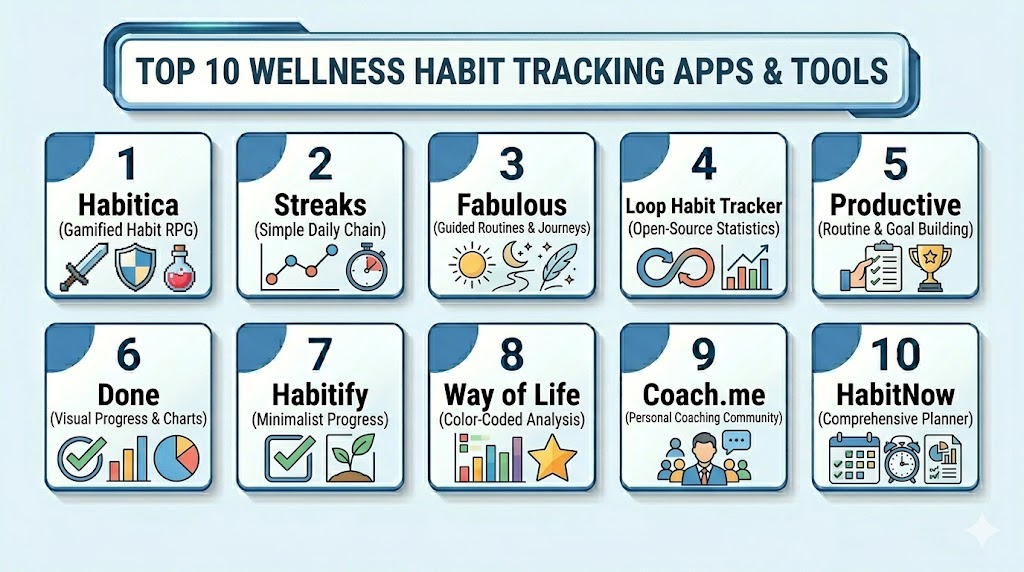
Top 10 Wellness Habit Tracking Apps Tools
1- Habitica
Short description: Habitica turns habits, tasks, and routines into a role-playing game where users earn rewards for completing real-life goals. It is best for people who enjoy gamification, accountability, and playful motivation.
Key Features
- Gamified habit, daily task, and to-do tracking
- Rewards, levels, avatars, pets, and quests
- Party and group accountability features
- Positive and negative habit tracking
- Daily routines and recurring goals
- Web and mobile access
- Community-driven motivation model
Pros
- Strong motivation for users who enjoy games and rewards
- Good for habit building, chores, wellness routines, and productivity goals
- Community and group features support accountability
Cons
- Gamified interface may feel distracting for minimalist users
- Not ideal for users who only want a simple habit checklist
- Some users may need time to understand the game mechanics
Platforms / Deployment
Web / iOS / Android
Cloud
Security & Compliance
Not publicly stated for all specific controls. Buyers should validate encryption, account security, data export, privacy controls, MFA, SSO, audit logs, RBAC, GDPR, SOC 2, ISO 27001, and HIPAA if required.
Integrations & Ecosystem
Habitica works best as a standalone gamified habit and productivity environment. It is useful for users who want habits, tasks, rewards, and social accountability inside one playful system.
- Web and mobile habit tracking
- Group accountability
- Task and routine management
- Community challenges
- Personal reward systems
- Third-party integration depth varies
Support & Community
Habitica has an active community-style ecosystem with user groups, documentation, and community participation. Support depth may vary, so users should review available help resources and account management options.
2- Streaks
Short description: Streaks is a simple habit tracking app focused on building consistency through visual streaks and daily completion tracking. It is best for Apple users who want a clean, focused, and low-friction habit tracker.
Key Features
- Daily, weekly, and custom habit tracking
- Streak-based motivation
- Apple Health integration for selected habits
- Widgets and Apple ecosystem support
- Negative habit tracking support
- Flexible habit frequency options
- Simple visual progress design
Pros
- Clean and simple experience for daily habit tracking
- Strong fit for Apple users who want minimal friction
- Good visual motivation through streaks and completion circles
Cons
- Best suited for Apple ecosystem users
- Less ideal for users needing Android or full web support
- Advanced coaching or community features are limited
Platforms / Deployment
iOS / macOS / Apple Watch features may vary
Cloud / Device-based sync may vary
Security & Compliance
Not publicly stated for all specific controls. Buyers should validate privacy practices, data storage, Apple Health permissions, encryption, MFA, SSO, audit logs, RBAC, GDPR, SOC 2, ISO 27001, and HIPAA if needed.
Integrations & Ecosystem
Streaks fits users who want habit tracking closely aligned with Apple devices and health-related data. It is best for simple wellness routines and personal consistency.
- Apple Health integrations
- Apple Watch support
- Widgets
- Habit reminders
- Streak tracking
- Device ecosystem sync depending on setup
Support & Community
Support is typically product-led through app documentation and app store resources. Users should validate backup, sync behavior, device support, and update history before committing.
3- Fabulous
Short description: Fabulous is a wellness and routine-building app focused on guided behavior change, morning routines, health habits, and self-improvement journeys. It is best for users who want coaching-style guidance rather than only a checklist.
Key Features
- Guided habit-building journeys
- Morning and evening routine support
- Wellness challenges and coaching-style prompts
- Habit reminders and progress tracking
- Self-care, focus, sleep, and fitness routines
- Motivational content and behavior change structure
- Mobile-first habit experience
Pros
- Strong guided experience for users who need structure
- Good for wellness routines, motivation, and lifestyle change
- More supportive than a basic habit checklist
Cons
- May feel too guided for users who prefer full customization
- Some advanced features may require paid access
- Not ideal for users wanting a lightweight tracker only
Platforms / Deployment
iOS / Android
Cloud
Security & Compliance
Not publicly stated for all specific controls. Buyers should validate encryption, privacy controls, data retention, MFA, SSO, audit logs, RBAC, GDPR, SOC 2, ISO 27001, and HIPAA if required.
Integrations & Ecosystem
Fabulous works best as a guided self-improvement and wellness habit app. Its ecosystem is centered on routines, coaching prompts, challenges, and personal behavior change.
- Morning routine workflows
- Wellness challenges
- Habit reminders
- Coaching-style content
- Progress tracking
- Integration depth varies by platform
Support & Community
Fabulous provides app-based support and guided onboarding. Users should check plan details, cancellation policies, support channels, and whether the guided experience matches their motivation style.
4- Loop Habit Tracker
Short description: Loop Habit Tracker is a simple, privacy-friendly, open-source habit tracker for Android users. It is best for users who want a free, ad-free, minimalist habit tracker with charts and long-term consistency tracking.
Key Features
- Habit creation and flexible schedules
- Daily reminders
- Habit strength scoring
- Charts and statistics
- Minimalist Android interface
- Offline-friendly habit tracking
- Open-source and ad-free design
Pros
- Free and open-source
- Good privacy-friendly option for Android users
- Simple tracking with useful charts and habit strength views
Cons
- Android-focused, so it may not fit iOS users
- No advanced coaching or social accountability
- Interface is practical but not as polished as some premium apps
Platforms / Deployment
Android
Device-based / Local-first experience may vary
Security & Compliance
Not publicly stated for enterprise controls. Loop is known for privacy-friendly open-source design, but buyers should validate encryption, backup behavior, data export, MFA, SSO, audit logs, RBAC, GDPR, SOC 2, ISO 27001, and HIPAA if required.
Integrations & Ecosystem
Loop is best for users who want lightweight and private habit tracking without unnecessary subscriptions or social features. It is especially useful for simple wellness routines.
- Android habit tracking
- Charts and statistics
- Reminder notifications
- Habit strength scoring
- Local tracking workflow
- Open-source community ecosystem
Support & Community
Support is community-oriented and open-source based. Users should review documentation, source code availability, update activity, and backup options before relying on it long term.
5- Productive
Short description: Productive is a habit tracker focused on daily routines, reminders, streaks, and personal productivity. It is useful for users who want a polished mobile habit app with wellness and productivity habits in one place.
Key Features
- Habit tracking and routine planning
- Daily reminders and streaks
- Habit categories for wellness and productivity
- Progress views and completion history
- Challenge-style habit building
- Mobile-first user experience
- Personal goal tracking
Pros
- Polished interface for daily habit building
- Good balance of wellness and productivity tracking
- Useful for users who want visual motivation and reminders
Cons
- Some features may require paid access
- Not ideal for users seeking open-source or fully free tools
- Advanced integrations and clinical tracking are limited
Platforms / Deployment
iOS / Android features may vary
Cloud
Security & Compliance
Not publicly stated for all specific controls. Buyers should validate privacy controls, encryption, account security, MFA, SSO, audit logs, RBAC, GDPR, SOC 2, ISO 27001, and HIPAA if needed.
Integrations & Ecosystem
Productive is useful for personal habit formation where reminders, streaks, and simple routine design matter most. It works well for everyday wellness and productivity goals.
- Habit reminders
- Streak tracking
- Routine planning
- Progress history
- Challenge-style habit building
- Mobile app ecosystem
Support & Community
Support is typically provided through app help resources and product support channels. Users should check pricing, subscription terms, data export options, and reminder reliability.
6- Done
Short description: Done is a habit tracker designed to help users build good habits and reduce bad habits through simple visual tracking. It is best for users who want a colorful, easy-to-use habit tracker with progress views.
Key Features
- Positive and negative habit tracking
- Streak and goal tracking
- Colorful progress visualization
- Daily, weekly, and custom habits
- Simple habit logging
- Reminder notifications
- Mobile-first interface
Pros
- Easy and visually appealing habit tracking
- Good for both building and breaking habits
- Simple enough for casual users
Cons
- Advanced analytics may be limited
- Some features may require paid access
- Not ideal for users needing deep integrations or team features
Platforms / Deployment
iOS / Android features may vary
Cloud
Security & Compliance
Not publicly stated. Buyers should validate encryption, privacy controls, account security, MFA, SSO, audit logs, RBAC, GDPR, SOC 2, ISO 27001, and HIPAA if required.
Integrations & Ecosystem
Done is focused on personal habit tracking rather than enterprise workflows. It works well for simple wellness routines, daily goals, and behavior change tracking.
- Habit streaks
- Goal tracking
- Reminder notifications
- Progress visuals
- Positive and negative habits
- Mobile app habit management
Support & Community
Support and documentation vary by plan and platform. Users should review app support, backup behavior, subscription terms, and available help resources.
7- Habitify
Short description: Habitify is a modern habit tracker designed for tracking routines, goals, and wellness habits across devices. It is useful for users who want analytics, reminders, and cross-platform habit management.
Key Features
- Habit tracking across multiple categories
- Reminders and recurring schedules
- Progress charts and analytics
- Cross-platform syncing
- Notes and habit logs
- Goal and routine organization
- Widgets and productivity-focused views
Pros
- Good cross-platform support
- Strong analytics and clean progress views
- Useful for users tracking multiple wellness and productivity habits
Cons
- Some features may require premium access
- May be more detailed than needed for very casual users
- Social or coaching features are limited
Platforms / Deployment
Web / iOS / Android / macOS features may vary
Cloud
Security & Compliance
Not publicly stated for all specific controls. Buyers should validate encryption, privacy practices, account security, MFA, SSO, audit logs, RBAC, GDPR, SOC 2, ISO 27001, and HIPAA if required.
Integrations & Ecosystem
Habitify is useful for users who want structured habit tracking across devices and stronger analytics than a basic checklist.
- Cross-device habit sync
- Widgets
- Analytics and charts
- Habit notes
- Routine organization
- Productivity ecosystem support
Support & Community
Habitify provides support resources and app-based help. Users should validate data export, sync reliability, premium plan details, and platform compatibility.
8- Way of Life
Short description: Way of Life is a habit tracker focused on simple journaling, trend tracking, and visual habit patterns. It is best for users who want quick daily logging with notes and color-coded progress.
Key Features
- Yes, no, and skip habit logging
- Habit journaling and notes
- Trend charts and visual progress
- Weekly habit views
- Reminder notifications
- Simple goal tracking
- Behavior pattern analysis
Pros
- Simple habit journaling workflow
- Good for users who want quick reflection with each habit
- Helpful visual trends for long-term consistency
Cons
- Interface may feel basic compared with newer apps
- Advanced automation and integrations are limited
- Not ideal for users wanting gamification or coaching
Platforms / Deployment
iOS / Android features may vary
Cloud / Device-based sync may vary
Security & Compliance
Not publicly stated. Buyers should validate privacy controls, backup behavior, encryption, MFA, SSO, audit logs, RBAC, GDPR, SOC 2, ISO 27001, and HIPAA if needed.
Integrations & Ecosystem
Way of Life is focused on personal habit awareness through logging and trend visualization. It works best for users who want a simple but reflective habit journal.
- Habit journaling
- Reminder notifications
- Trend charts
- Weekly views
- Notes and reflections
- Mobile habit tracking
Support & Community
Support is usually app-based and documentation-led. Users should verify platform support, backup options, and whether the app’s journaling style fits their routine.
9- Coach.me
Short description: Coach.me combines habit tracking with optional coaching and community accountability. It is best for users who want more support than a basic tracker and may benefit from coach-led behavior change.
Key Features
- Habit tracking and goal setting
- Community accountability
- Optional coaching workflows
- Progress tracking
- Habit reminders
- Public or shared goals
- Mobile and web access
Pros
- Strong accountability model
- Useful for users who want coaching or community support
- Good for behavior change beyond simple reminders
Cons
- Coaching costs may vary
- Not ideal for users who want a private offline tracker only
- App experience may feel less minimalist than simple habit tools
Platforms / Deployment
Web / iOS / Android features may vary
Cloud
Security & Compliance
Not publicly stated for all specific controls. Buyers should validate privacy settings, coaching data handling, encryption, MFA, SSO, audit logs, RBAC, GDPR, SOC 2, ISO 27001, and HIPAA if required.
Integrations & Ecosystem
Coach.me works well for users who want social accountability, coaching support, and habit tracking together. It is more accountability-oriented than many simple habit apps.
- Habit tracking
- Coaching options
- Community support
- Goal sharing
- Reminder workflows
- Web and mobile access
Support & Community
Coach.me includes a community-driven support model with coaching options. Users should review coach quality, pricing, privacy expectations, and support channels.
10- HabitNow
Short description: HabitNow is a habit tracker and routine planner that combines habit tracking, task management, reminders, and productivity workflows. It is useful for Android users who want wellness habits and daily tasks in one app.
Key Features
- Habit and task management
- Daily routine planning
- Reminder notifications
- Calendar and progress views
- Streak tracking
- Goal and completion tracking
- Simple productivity workflow
Pros
- Good combination of habits and tasks
- Useful for users who want one app for routines and to-dos
- Practical interface for daily planning
Cons
- Android-focused
- Advanced cross-platform support may be limited
- Not designed for clinical wellness monitoring or enterprise programs
Platforms / Deployment
Android
Cloud / Device-based sync may vary
Security & Compliance
Not publicly stated. Buyers should validate encryption, backup behavior, privacy controls, MFA, SSO, audit logs, RBAC, GDPR, SOC 2, ISO 27001, and HIPAA if required.
Integrations & Ecosystem
HabitNow is useful for users who want personal task and habit management in one place. It fits daily wellness routines, productivity habits, and simple planning workflows.
- Habit tracking
- Task management
- Calendar views
- Reminders
- Streak tracking
- Routine planning
Support & Community
Support and documentation depend on the app’s support channels. Users should review backup options, export flexibility, premium features, and update history.
Comparison Table
| Tool Name | Best For | Platform(s) Supported | Deployment | Standout Feature | Public Rating |
|---|---|---|---|---|---|
| Habitica | Gamification lovers and accountability users | Web / iOS / Android | Cloud | RPG-style habit tracking | N/A |
| Streaks | Apple users wanting simple habit streaks | iOS / macOS / Apple Watch varies | Cloud / Device sync varies | Clean streak-based habit tracking | N/A |
| Fabulous | Guided wellness routines and behavior change | iOS / Android | Cloud | Coaching-style habit journeys | N/A |
| Loop Habit Tracker | Privacy-first Android users | Android | Device-based / Local-first varies | Free open-source habit tracking | N/A |
| Productive | Mobile-first wellness and productivity users | iOS / Android varies | Cloud | Polished habit reminders and routines | N/A |
| Done | Visual habit building and breaking | iOS / Android varies | Cloud | Positive and negative habit tracking | N/A |
| Habitify | Cross-platform habit analytics | Web / iOS / Android / macOS varies | Cloud | Analytics and cross-device tracking | N/A |
| Way of Life | Habit journaling and trend tracking | iOS / Android varies | Cloud / Device sync varies | Simple journal-style progress tracking | N/A |
| Coach.me | Coaching and accountability | Web / iOS / Android varies | Cloud | Habit tracking with coaching options | N/A |
| HabitNow | Android habit and task planning | Android | Cloud / Device sync varies | Habits plus daily task planning | N/A |
Evaluation & Scoring of Wellness Habit Tracking Apps
The scoring below is a comparative buyer-focused model. It is not a public rating, certification score, or vendor-provided score. Scores reflect relative fit for wellness habit tracking based on core functionality, usability, integrations, privacy expectations, reliability, support, and value.
| Tool Name | Core 25% | Ease 15% | Integrations 15% | Security 10% | Performance 10% | Support 10% | Value 15% | Weighted Total 0–10 |
|---|---|---|---|---|---|---|---|---|
| Habitica | 8 | 7 | 7 | 7 | 8 | 8 | 9 | 7.85 |
| Streaks | 8 | 9 | 8 | 7 | 9 | 7 | 8 | 8.10 |
| Fabulous | 8 | 8 | 7 | 7 | 8 | 8 | 7 | 7.65 |
| Loop Habit Tracker | 8 | 8 | 6 | 8 | 8 | 7 | 10 | 8.00 |
| Productive | 8 | 8 | 7 | 7 | 8 | 7 | 7 | 7.55 |
| Done | 7 | 9 | 6 | 7 | 8 | 7 | 7 | 7.45 |
| Habitify | 8 | 8 | 8 | 7 | 8 | 8 | 7 | 7.85 |
| Way of Life | 7 | 8 | 6 | 7 | 8 | 7 | 8 | 7.35 |
| Coach.me | 8 | 7 | 7 | 7 | 8 | 8 | 7 | 7.55 |
| HabitNow | 8 | 8 | 6 | 7 | 8 | 7 | 8 | 7.55 |
Which Wellness Habit Tracking Apps Tool Is Right for You?
Solo / Freelancer
Solo users should choose based on motivation style and device preference. If you want simple daily tracking, Streaks, Done, Loop Habit Tracker, or HabitNow may be enough. If you enjoy game-style motivation, choose Habitica. If you want guided habit coaching, Fabulous is a stronger fit.
SMB
Small teams, wellness coaches, and productivity groups should prioritize apps that support accountability, easy habit creation, and visible progress. Coach.me is useful when coaching or social accountability matters. Habitica can work for team-style gamification. Habitify is better when cross-platform tracking and analytics are important.
Mid-Market
Mid-market wellness programs need stronger reporting, cross-device access, and flexible habit categories. Habitify, Coach.me, and Fabulous are practical options to evaluate for structured programs. If privacy and low cost matter more than platform features, Loop Habit Tracker can still be useful for Android-based users.
Enterprise
Large organizations should be careful because most habit tracking apps are consumer-first, not enterprise wellness platforms. If the goal is employee wellbeing at scale, enterprise buyers may need a broader wellness platform instead. Still, Fabulous, Coach.me, and Habitify may be useful for smaller pilot programs, behavior-change challenges, or self-guided wellbeing initiatives.
Budget vs Premium
Budget-conscious users should consider Loop Habit Tracker, Habitica, or basic versions of common habit apps. These can support daily routines without heavy cost. Premium apps may be worth it when users need guided programs, advanced analytics, cross-device sync, widgets, or coaching support.
Feature Depth vs Ease of Use
If simplicity matters most, choose Streaks, Done, Loop Habit Tracker, or Way of Life. These apps are easier to use for daily check-ins. If feature depth matters more, choose Habitify, Fabulous, Coach.me, or Habitica because they offer stronger analytics, guided workflows, community support, or gamification.
Integrations & Scalability
Integrations matter when habits connect with health data, wearable devices, calendar workflows, or productivity systems. Streaks is strong for Apple ecosystem users, while Habitify is useful for cross-platform habit visibility. For users who only need manual tracking, integration depth is less important than reminder reliability and ease of logging.
Security & Compliance Needs
Wellness habit apps may store sensitive personal routines, mood-related notes, health habits, and lifestyle data. Users should review privacy policies, data export options, backup behavior, encryption, account security, and data sharing practices. For healthcare, employer, or regulated use cases, avoid assuming compliance unless the vendor clearly states it and provides documentation.
Frequently Asked Questions
1. What are Wellness Habit Tracking Apps?
Wellness Habit Tracking Apps are digital tools that help users track daily routines like exercise, meditation, hydration, sleep, journaling, reading, or stretching.
They usually include reminders, streaks, checklists, charts, and progress views to make habits easier to maintain.
These apps are useful for people who want more accountability and structure in their wellness routines.
They help turn vague goals into small, repeatable actions.
2. How much do Wellness Habit Tracking Apps cost?
Pricing depends on the app, platform, features, and subscription model.
Some apps are free or open source, while others use freemium plans, one-time purchases, or monthly subscriptions.
Paid versions may include unlimited habits, advanced analytics, widgets, cloud sync, coaching, or premium routines.
Users should compare total value, not only the lowest price.
3. Do habit tracking apps really help build better routines?
Yes, they can help when users track consistently and choose realistic habits.
The biggest benefit is visibility because users can see patterns, streaks, missed days, and progress over time.
However, the app alone does not build the habit; users still need clear goals and daily follow-through.
A simple habit tracked consistently is usually better than a complex system used occasionally.
4. Which app is best for beginners?
Beginners should choose an app that is simple, visual, and easy to update daily.
Streaks, Done, Loop Habit Tracker, and Way of Life are good options for users who want low-friction tracking.
Users who need more guidance may prefer Fabulous because it provides structured routines.
Gamification-focused beginners may enjoy Habitica.
5. Are Wellness Habit Tracking Apps secure?
Security varies by app, so users should review privacy settings, data storage, backups, account protection, and data sharing policies.
Some apps store habit data locally, while others sync data through cloud accounts.
If habits include health, mood, or personal notes, privacy becomes more important.
For regulated or workplace use, compliance details should be validated directly with the vendor.
6. Can these apps track health and fitness habits?
Yes, many habit apps can track exercise, steps, hydration, sleep, meditation, stretching, and nutrition-related routines.
Some apps integrate with health platforms or wearables, while others require manual check-ins.
The best choice depends on whether you want automatic tracking or simple accountability.
Users should test whether the app supports their preferred health data source.
7. What common mistakes should users avoid?
A common mistake is adding too many habits at once, which makes the system hard to maintain.
Users should also avoid choosing an app based only on design without testing reminder reliability and logging speed.
Another mistake is tracking vague habits like “be healthy” instead of clear actions like “walk 20 minutes.”
Start small, review weekly, and adjust habits based on real progress.
8. Do these apps work for mental wellness habits?
Yes, many users track meditation, breathing, journaling, gratitude, screen breaks, therapy homework, sleep routines, and mood-support habits.
However, habit trackers are not replacements for therapy or clinical mental health care.
They can support healthy routines between professional sessions or personal self-care practices.
Users in crisis or with serious symptoms should seek qualified professional support.
9. What integrations should buyers check first?
Buyers should check integrations with Apple Health, Google Fit, wearables, widgets, calendars, reminders, and productivity apps.
Integration needs depend on whether the user wants automatic tracking or manual habit check-ins.
For simple routines, integrations may not be necessary at all.
For wellness programs, cross-device sync and data export may matter more.
10. What alternatives exist to habit tracking apps?
Alternatives include paper habit trackers, journals, wall calendars, spreadsheets, reminders, smartwatches, coaching programs, and accountability groups.
These can work well for users who prefer offline tracking or do not want another app.
Digital apps are better when users want reminders, charts, streaks, sync, or mobile access.
The best option depends on personal motivation style, privacy needs, and routine complexity.
Conclusion
Wellness Habit Tracking Apps help users build healthier routines by turning daily goals into visible, repeatable actions with reminders, streaks, charts, notes, and progress tracking. The best app depends on motivation style, device ecosystem, privacy expectations, budget, and how much structure the user needs. Habitica is strong for gamification, Streaks is excellent for simple Apple-based habit tracking, Fabulous works well for guided wellness routines, Loop Habit Tracker is a strong free and privacy-friendly Android choice, and Habitify, Productive, Done, Way of Life, Coach.me, and HabitNow each fit different tracking styles. Buyers should shortlist two or three apps, test real habits for at least one week, check reminder reliability, review privacy controls, and choose the tool that feels easiest to use every day.

Find Trusted Cardiac Hospitals
Compare heart hospitals by city and services — all in one place.
Explore Hospitals
I learned that habit tracking apps are not just for reminders—they can actually help build consistency and long-term healthy routines.