Introduction
Accessibility Auditing Tools are platforms designed to evaluate digital content, websites, and applications for accessibility compliance. In plain English, they help organizations ensure that their digital experiences are usable by people with disabilities, including vision, hearing, motor, and cognitive impairments. as accessibility regulations strengthen worldwide and inclusive design becomes a core UX expectation, these tools are critical for legal compliance, user satisfaction, and market reach.
Real-world use cases include:
- Website accessibility evaluation: Automatically scanning web pages to identify WCAG compliance issues.
- PDF and document auditing: Ensuring PDFs, forms, and office documents meet accessibility standards.
- Mobile app testing: Auditing apps for screen reader compatibility and color contrast issues.
- Continuous monitoring: Integrating audits into CI/CD pipelines for ongoing compliance.
- User experience validation: Identifying barriers for users with disabilities to enhance usability.
What buyers should evaluate:
- Coverage of WCAG, ADA, Section 508 compliance
- Automated scanning vs. manual review capabilities
- Integration with CI/CD and development workflows
- Reporting, dashboards, and remediation guidance
- Multi-platform support: web, mobile, and documents
- Visual and cognitive accessibility checks
- Real-time monitoring and alerts
- API access and extensibility
- Cost and licensing flexibility
- Customer support and community resources
Best for: Accessibility specialists, QA teams, UX designers, and enterprises with digital properties requiring compliance with accessibility laws and inclusive design practices.
Not ideal for: Small personal websites, internal prototypes with limited public access, or organizations with minimal accessibility obligations.
Key Trends in Accessibility Auditing Tools
- AI-powered automated audits that identify complex accessibility issues.
- Integration with CI/CD pipelines for continuous compliance checks.
- Browser extensions for real-time auditing during development.
- Support for mobile and hybrid apps alongside traditional web content.
- Cloud-based monitoring and dashboards for enterprise-scale reporting.
- Enhanced visual accessibility checks including color contrast and focus order.
- Remediation guidance and fix suggestions integrated into workflows.
- Multi-language support for global accessibility compliance.
- API-first platforms allowing custom integrations and automation.
- Subscription and usage-based pricing models for flexibility across organizations.
How We Selected These Tools (Methodology)
- Market adoption and visibility in enterprise and SMB sectors.
- Feature completeness including automated and manual audit capabilities.
- Reliability and accuracy of audit results, including AI validation.
- Security posture and compliance with data privacy regulations.
- Integration capabilities with CI/CD, code repositories, and collaboration tools.
- Applicability across multiple platforms: web, mobile, PDF, documents.
- Ease of use, onboarding experience, and user interface quality.
- Vendor support quality and active user communities.
- Update frequency to cover evolving accessibility standards.
- Cost-effectiveness and flexibility of licensing for different organization sizes.
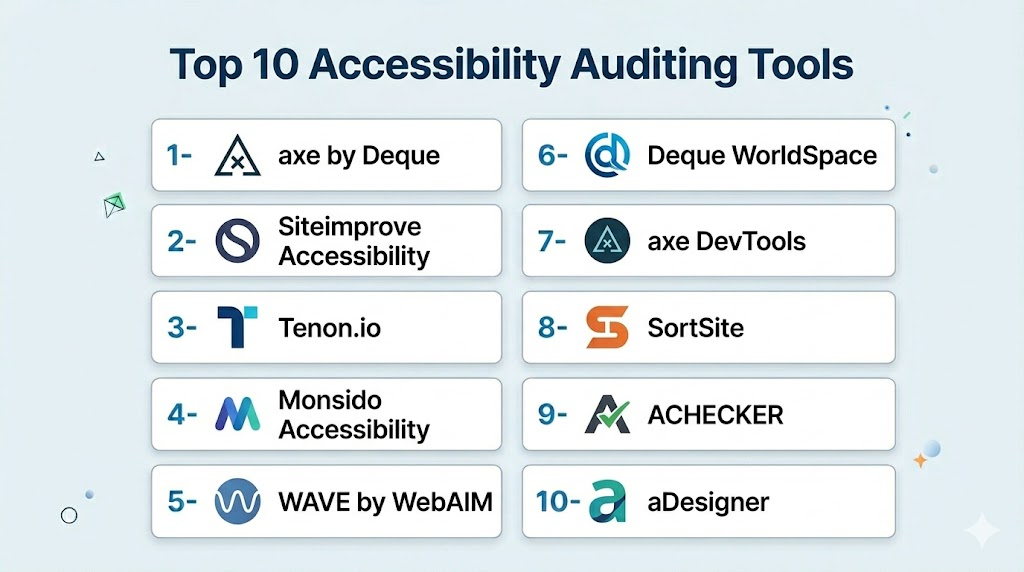
Top 10 Accessibility Auditing Tools
1- axe by Deque
Short description (2–3 lines): axe is a developer-focused accessibility testing platform for web and mobile applications. It integrates directly into browsers and CI/CD pipelines for continuous accessibility auditing and compliance monitoring.
Key Features
- Automated WCAG and ADA compliance checks
- Browser extensions for Chrome and Firefox
- CI/CD integration for continuous testing
- Detailed violation reporting
- API access for custom workflows
Pros
- Fast, developer-friendly testing
- Integrates well with development pipelines
Cons
- Advanced enterprise analytics require premium subscription
- Limited support for documents and PDFs
Platforms / Deployment
- Web / Chrome / Firefox / Edge
- Cloud / Self-hosted
Security & Compliance
- Not publicly stated
Integrations & Ecosystem
Supports CI/CD and bug tracking integrations.
- GitHub / GitLab / Bitbucket
- Jira / Slack
- Selenium / Cypress
Support & Community
Active developer community; documentation and forums available.
2- Siteimprove Accessibility
Short description (2–3 lines): Siteimprove provides automated accessibility audits and actionable reports for websites and digital content. Ideal for enterprises seeking continuous monitoring and compliance tracking.
Key Features
- Automated WCAG compliance scans
- PDF and website audits
- Visual dashboards for tracking
- Prioritized remediation guidance
- Multi-language content support
Pros
- Comprehensive reporting for enterprise teams
- Ongoing monitoring and alerts
Cons
- Higher cost for smaller organizations
- Advanced integration requires technical setup
Platforms / Deployment
- Web
- Cloud
Security & Compliance
- Not publicly stated
Integrations & Ecosystem
- CMS integrations
- Slack / Teams notifications
- API for custom automation
Support & Community
Enterprise support with documentation and onboarding resources.
3- Tenon.io
Short description (2–3 lines): Tenon.io is a flexible accessibility testing platform for developers and designers, supporting automated and API-based audits for websites and web applications.
Key Features
- WCAG 2.1 compliance checking
- API-based accessibility testing
- Automated and manual auditing support
- Real-time feedback and violation reports
- Integration with CI/CD pipelines
Pros
- Lightweight and API-focused
- Flexible for developer workflows
Cons
- Limited visual reporting dashboards
- Mobile app testing coverage is minimal
Platforms / Deployment
- Web
- Cloud
Security & Compliance
- Not publicly stated
Integrations & Ecosystem
- GitHub / GitLab
- Jenkins / CI/CD pipelines
- Slack notifications
Support & Community
Documentation available; responsive support for developers.
4- Monsido Accessibility
Short description (2–3 lines): Monsido provides automated website accessibility audits and content monitoring, helping enterprises maintain WCAG and ADA compliance continuously.
Key Features
- Automated accessibility scans
- PDF and website auditing
- Compliance dashboards and reporting
- Remediation guidance
- Continuous monitoring with alerts
Pros
- Enterprise-ready dashboards
- Good for ongoing compliance tracking
Cons
- Less developer-focused
- Manual testing capabilities limited
Platforms / Deployment
- Web
- Cloud
Security & Compliance
- Not publicly stated
Integrations & Ecosystem
- CMS and analytics platforms
- Email alerts
- API for workflow automation
Support & Community
Documentation and customer support available.
5- WAVE by WebAIM
Short description (2–3 lines): WAVE is a web accessibility evaluation tool that highlights accessibility issues directly on web pages. It’s suitable for QA teams and designers for visual analysis and remediation planning.
Key Features
- Visual representation of accessibility issues
- WCAG and Section 508 evaluation
- Browser extensions for Chrome and Firefox
- PDF and HTML content auditing
- Issue documentation and reporting
Pros
- Easy to use for visual inspection
- Free for basic web testing
Cons
- Limited automation for large-scale projects
- No CI/CD integration
Platforms / Deployment
- Web / Chrome / Firefox
- Cloud
Security & Compliance
- Not publicly stated
Integrations & Ecosystem
- Manual reporting integration
- CMS workflows
- API access limited
Support & Community
Active WebAIM community; documentation available.
6- Deque WorldSpace
Short description (2–3 lines): Deque WorldSpace provides enterprise accessibility auditing with both automated and manual testing capabilities. Best for large organizations needing comprehensive compliance coverage.
Key Features
- WCAG and Section 508 compliance
- Automated and manual audits
- PDF, mobile, and web content support
- Enterprise dashboards and reporting
- Continuous monitoring
Pros
- Enterprise-focused compliance tools
- Broad content coverage
Cons
- Premium pricing
- Setup and training required
Platforms / Deployment
- Web / iOS / Android / PDF
- Cloud / Self-hosted
Security & Compliance
- Not publicly stated
Integrations & Ecosystem
- CI/CD pipelines
- Slack / Teams
- CMS integrations
Support & Community
Enterprise-grade support; documentation and training available.
7- axe DevTools
Short description (2–3 lines): axe DevTools offers browser-based accessibility auditing for developers and QA teams. Ideal for integrating accessibility testing into development workflows with actionable guidance.
Key Features
- Real-time WCAG evaluation in browsers
- Automated testing and reporting
- Visual feedback for developers
- CI/CD integration
- Detailed violation logs
Pros
- Developer-friendly
- Fast feedback for remediation
Cons
- Limited PDF and mobile app testing
- Advanced reporting requires paid version
Platforms / Deployment
- Web / Chrome / Firefox / Edge
- Cloud
Security & Compliance
- Not publicly stated
Integrations & Ecosystem
- CI/CD pipelines
- GitHub / GitLab
- Slack / Jira
Support & Community
Documentation available; active community forums.
8- SortSite
Short description (2–3 lines): SortSite provides automated accessibility, SEO, and web standards audits. Suitable for QA teams and web teams aiming for compliance and performance monitoring.
Key Features
- Accessibility audits against WCAG and Section 508
- PDF and web page evaluation
- Compliance reports
- CI/CD integration
- SEO and quality checks
Pros
- Multi-audit capabilities
- Easy reporting for teams
Cons
- Limited browser extension support
- Mobile app auditing minimal
Platforms / Deployment
- Web
- Cloud / Self-hosted
Security & Compliance
- Not publicly stated
Integrations & Ecosystem
- CI/CD pipelines
- CMS and analytics integration
- Email reporting
Support & Community
Responsive support; documentation available.
9- ACHECKER
Short description (2–3 lines): ACHECKER is an open-source accessibility evaluation tool that checks web pages for WCAG compliance. It’s suitable for developers and small teams seeking a free auditing solution.
Key Features
- Automated WCAG and Section 508 checks
- Web-based evaluation
- Reporting on violations
- Free and open-source
- API access for custom use
Pros
- Free and open-source
- Easy for small teams
Cons
- Limited automation and CI/CD integration
- No mobile app auditing
Platforms / Deployment
- Web
- Cloud
Security & Compliance
- Not publicly stated
Integrations & Ecosystem
- Basic API support
- Manual workflow integration
- Minimal third-party integrations
Support & Community
Community support only; limited documentation.
10- aDesigner
Short description (2–3 lines): aDesigner is a professional accessibility evaluation and testing tool for web and desktop content. Best for enterprises requiring assistive technology simulation and detailed remediation guidance.
Key Features
- Automated accessibility audits
- Assistive technology simulation
- WCAG and Section 508 compliance
- Reporting and remediation guidance
- Continuous monitoring
Pros
- Enterprise-focused features
- Supports multiple content types
Cons
- Higher cost
- Steeper learning curve
Platforms / Deployment
- Web / Windows / macOS
- Cloud / Self-hosted
Security & Compliance
- Not publicly stated
Integrations & Ecosystem
- CI/CD and workflow integration
- CMS and content management tools
- Reporting dashboards
Support & Community
Enterprise support available; detailed documentation.
Comparison Table (Top 10)
| Tool Name | Best For | Platform(s) Supported | Deployment | Standout Feature | Public Rating |
|---|---|---|---|---|---|
| axe by Deque | Developer-focused web apps | Web / Chrome / Firefox / Edge | Cloud / Self-hosted | Browser integration & CI/CD | N/A |
| Siteimprove Accessibility | Enterprise website audits | Web / PDF | Cloud | Continuous compliance monitoring | N/A |
| Tenon.io | API & developer integration | Web | Cloud | API-based accessibility testing | N/A |
| Monsido Accessibility | Enterprise digital properties | Web / PDF | Cloud | Dashboards & monitoring | N/A |
| WAVE | Designers & QA teams | Web / Chrome / Firefox | Cloud | Visual issue representation | N/A |
| Deque WorldSpace | Enterprise-scale auditing | Web / Mobile / PDF | Cloud / Self-hosted | Broad content coverage | N/A |
| axe DevTools | Developer & QA | Web / Chrome / Firefox / Edge | Cloud | Browser-based real-time auditing | N/A |
| SortSite | Web & QA teams | Web / PDF | Cloud / Self-hosted | Multi-audit: accessibility + SEO | N/A |
| ACHECKER | Small teams & developers | Web | Cloud | Open-source WCAG auditing | N/A |
| aDesigner | Enterprise content evaluation | Web / Windows / macOS | Cloud / Self-hosted | Assistive technology simulation | N/A |
Evaluation & Scoring of Accessibility Auditing Tools
| Tool Name | Core (25%) | Ease (15%) | Integrations (15%) | Security (10%) | Performance (10%) | Support (10%) | Value (15%) | Weighted Total (0–10) |
|---|---|---|---|---|---|---|---|---|
| axe by Deque | 9 | 8 | 9 | 8 | 8 | 8 | 8 | 8.3 |
| Siteimprove Accessibility | 8 | 7 | 8 | 8 | 8 | 7 | 7 | 7.6 |
| Tenon.io | 8 | 8 | 7 | 7 | 7 | 7 | 7 | 7.4 |
| Monsido Accessibility | 8 | 7 | 7 | 7 | 7 | 7 | 7 | 7.3 |
| WAVE | 7 | 8 | 6 | 6 | 6 | 7 | 8 | 7.0 |
| Deque WorldSpace | 9 | 6 | 8 | 8 | 8 | 7 | 7 | 7.7 |
| axe DevTools | 8 | 8 | 8 | 7 | 7 | 7 | 7 | 7.5 |
| SortSite | 7 | 7 | 7 | 7 | 7 | 7 | 7 | 7.0 |
| ACHECKER | 6 | 8 | 6 | 6 | 6 | 6 | 7 | 6.5 |
| aDesigner | 8 | 6 | 7 | 7 | 7 | 7 | 7 | 7.2 |
Which Accessibility Auditing Tool Is Right for You?
Solo / Freelancer
- ACHECKER, WAVE, or Tenon.io provide free or lightweight solutions suitable for individual developers or small teams.
SMB
- axe by Deque, SortSite, and Monsido offer affordable subscriptions with automation and reporting.
Mid-Market
- Tenon.io, Siteimprove, and axe DevTools provide continuous monitoring, CI/CD integration, and broader platform support.
Enterprise
- Deque WorldSpace, Siteimprove, and aDesigner offer comprehensive auditing, assistive technology simulation, and enterprise dashboards.
Budget vs Premium
- Budget-friendly: ACHECKER, WAVE, SortSite
- Premium: Siteimprove, Deque WorldSpace, aDesigner, axe DevTools
Feature Depth vs Ease of Use
- Easy for small teams: ACHECKER, WAVE
- Advanced enterprise features: Deque WorldSpace, aDesigner, Siteimprove
Integrations & Scalability
- Choose tools with APIs and CI/CD integration for automated workflows and enterprise scalability.
Security & Compliance Needs
- Enterprise teams should prioritize tools with SSO, RBAC, and data privacy compliance.
Frequently Asked Questions (FAQs)
- What standards do these tools check?
Most tools evaluate WCAG 2.1, ADA, and Section 508 compliance for web, PDF, and mobile content. - Can I automate accessibility testing?
Yes, tools like axe, Siteimprove, and Tenon.io integrate with CI/CD pipelines for automated scanning. - Do they cover mobile apps?
Some tools, such as Deque WorldSpace, support mobile accessibility audits alongside web and PDFs. - Is manual testing possible?
Yes, WAVE and axe DevTools provide visual feedback for manual inspections. - Are PDF and document audits included?
Yes, many tools like Siteimprove, Monsido, and Deque WorldSpace scan PDF and Office documents. - Can these tools integrate with my CI/CD pipelines?
Yes, most enterprise-focused platforms support integration with Jenkins, GitHub Actions, and GitLab CI. - Do they offer remediation guidance?
Tools like axe and Siteimprove provide actionable recommendations to fix accessibility violations. - Are AI features available?
Some tools use AI for anomaly detection, automated issue prioritization, and predictive remediation suggestions. - What is the pricing model?
Pricing varies: subscription-based for enterprise tools and free tiers for open-source solutions like WAVE and ACHECKER. - How do I choose the right tool?
Consider platform coverage, CI/CD integration, report quality, budget, and team size; pilot testing 2–3 options is recommended.
Conclusion
Accessibility auditing tools are essential for ensuring digital inclusivity, compliance, and optimal user experience. Small teams can leverage ACHECKER, WAVE, or Tenon.io for lightweight audits and basic remediation guidance. Mid-market organizations benefit from axe DevTools, SortSite, and Siteimprove for automated scanning and reporting. Enterprise teams should consider Deque WorldSpace, aDesigner, or Siteimprove for comprehensive coverage, assistive technology simulation, and continuous monitoring. Teams should shortlist 2–3 tools, run pilot audits, and validate integration and reporting capabilities before adoption. Using the right platform ensures legal compliance, enhances user experience, and reduces accessibility-related risks.

Find Trusted Cardiac Hospitals
Compare heart hospitals by city and services — all in one place.
Explore Hospitals
I am learning about accessibility testing, and this content helped me understand how different auditing tools can identify usability issues and improve digital accessibility for all users.