Introduction
Outbound email sequencing tools automate multi-step email campaigns, helping sales, marketing, and customer success teams manage follow-ups efficiently. They allow users to schedule personalized emails, track engagement, and optimize outreach based on prospect behavior. inbox saturation and stricter privacy regulations make these tools essential for maintaining high deliverability and meaningful engagement. Teams can use them to automate cold outreach, nurture leads, onboard clients, follow up with candidates, or manage post-event communications. Key evaluation criteria include automation complexity, personalization options, analytics, deliverability, CRM integrations, security, compliance, ease of use, and pricing flexibility. Effective tools save time, improve response rates, and provide actionable insights for data-driven decision-making. Choosing the right platform ensures outreach efforts are strategic, scalable, and measurable.
Real-world use cases include:
- Sales teams automating cold outreach with personalized email sequences.
- Marketing teams nurturing leads with targeted campaigns.
- Customer success teams onboarding new clients through structured email journeys.
- Recruiting teams sending follow-ups to candidates in bulk while maintaining personalization.
- Event teams reminding attendees and following up with post-event engagement.
What buyers should evaluate:
- Automation capabilities and sequence complexity.
- Personalization and dynamic content support.
- Deliverability optimization and anti-spam measures.
- Analytics and reporting quality.
- Integration with CRM, marketing automation, and data platforms.
- Security and compliance (SOC 2, GDPR, HIPAA where applicable).
- Ease of use and onboarding support.
- Pricing flexibility and value for team size.
Best for: Sales teams, SMBs to enterprises, marketing professionals, customer success managers, and recruiters who need consistent, personalized email engagement.
Not ideal for: Individuals or teams sending low-volume emails without automation needs, or companies prioritizing messaging via other channels like social, chat, or SMS.
Key Trends in Outbound Email Sequencing Tools
- AI-assisted content generation for subject lines, body copy, and personalized follow-ups.
- Predictive engagement scoring to prioritize leads based on response likelihood.
- Omnichannel sequencing combining email with LinkedIn, SMS, or in-app notifications.
- Enhanced deliverability tools using AI to prevent spam filters and optimize send times.
- Deep CRM integrations for real-time data synchronization and automation triggers.
- Privacy-first features to comply with GDPR, CCPA, and evolving global regulations.
- Dynamic A/B testing for multi-step campaigns with performance optimization.
- Template marketplaces for faster sequence creation with proven workflows.
- Real-time analytics dashboards for insights on open, click, and reply rates.
- Cloud-native platforms with cross-device access for global teams.
How We Selected These Tools (Methodology)
- Reviewed market adoption and customer base across SMB and enterprise segments.
- Evaluated feature completeness: sequence creation, automation triggers, personalization, analytics.
- Assessed reliability and performance: uptime, delivery success, and email sending infrastructure.
- Verified security posture: encryption, role-based access, audit logs, and compliance certifications.
- Examined integration ecosystem: CRM, marketing platforms, and third-party APIs.
- Considered ease of onboarding, support quality, and community engagement.
- Weighed flexibility and scalability for teams of varying sizes.
- Focused on tools with modern AI features for 2026 relevance.
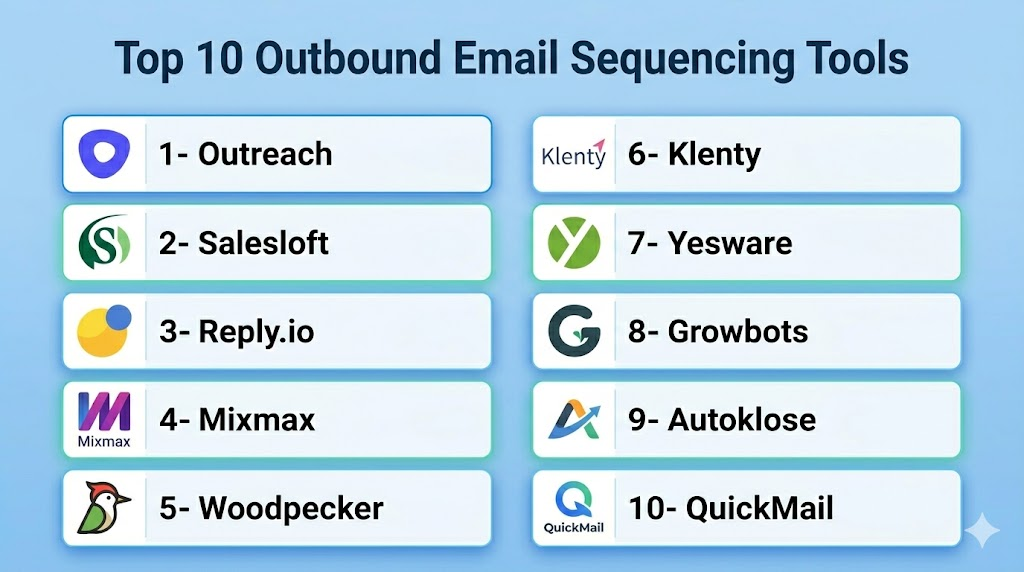
Top 10 Outbound Email Sequencing Tools
1- Outreach
Short description: Outreach is a leading sales engagement platform for automating outbound email sequences, calls, and follow-ups across enterprise and mid-market teams.
Key Features
- Multi-step automated email campaigns.
- AI-powered email suggestions and response predictions.
- Real-time analytics dashboards.
- CRM integration with Salesforce, Microsoft Dynamics, and HubSpot.
- Sequence branching based on engagement triggers.
- A/B testing for subject lines and content.
Pros
- Strong enterprise-level capabilities and scalability.
- Advanced analytics and reporting.
Cons
- Pricing may be high for small teams.
- Steep learning curve for advanced features.
Platforms / Deployment
- Web / iOS / Android
- Cloud
Security & Compliance
- SSO, MFA, encryption
- SOC 2, GDPR
Integrations & Ecosystem
Outreach integrates deeply with CRMs and marketing tools, plus offers API access for custom workflows.
- Salesforce
- HubSpot
- Microsoft Dynamics
- ZoomInfo
- Slack
- LinkedIn Sales Navigator
Support & Community
- Extensive documentation, training, and onboarding programs.
- Enterprise support tiers available.
- Active user community forums.
2- Salesloft
Short description: Salesloft helps sales teams automate email sequences, dialer activity, and cadence tracking with AI-driven recommendations.
Key Features
- Drag-and-drop sequence builder.
- AI insights for timing and content optimization.
- Multi-channel engagement: email, call, social touchpoints.
- Analytics on opens, clicks, and replies.
- CRM synchronization and activity logging.
Pros
- User-friendly interface for rapid adoption.
- Strong analytics and engagement reporting.
Cons
- Can be resource-intensive for smaller teams.
- Limited advanced AI features compared to competitors.
Platforms / Deployment
- Web / iOS / Android
- Cloud
Security & Compliance
- SSO, encryption
- SOC 2, GDPR
Integrations & Ecosystem
Integrates with CRMs, communication platforms, and analytics tools.
- Salesforce
- HubSpot
- Microsoft Teams
- Slack
Support & Community
- Knowledge base and onboarding support.
- Active community for best practices.
3- Reply.io
Short description: Reply.io automates outbound email sequences and follow-ups with AI-assisted personalization for SMB and mid-market teams.
Key Features
- Multi-step email and task sequences.
- AI personalization and content suggestions.
- Auto follow-up based on prospect behavior.
- Real-time engagement analytics.
- CRM and calendar integrations.
Pros
- Cost-effective for SMB teams.
- Easy to set up and use.
Cons
- Less suitable for complex enterprise workflows.
- Reporting dashboards are basic compared to top enterprise tools.
Platforms / Deployment
- Web
- Cloud
Security & Compliance
- SSO, MFA
- GDPR
Integrations & Ecosystem
Supports CRM and workflow integrations with focus on simplicity.
- Salesforce
- HubSpot
- Pipedrive
- Gmail / Outlook
- Zapier
Support & Community
- Email and chat support.
- Active knowledge base with tutorials.
4- Mixmax
Short description: Mixmax combines email sequencing, automation, and tracking directly within Gmail for small teams and individual users.
Key Features
- Gmail-native sequence automation.
- Real-time open, click, and reply tracking.
- Calendar scheduling and reminders.
- AI-assisted email content recommendations.
- Template management and sharing.
Pros
- Seamless Gmail integration.
- Lightweight and easy to adopt.
Cons
- Limited functionality outside Gmail.
- Not ideal for large enterprise teams.
Platforms / Deployment
- Web / Chrome Extension
- Cloud
Security & Compliance
- SSO, encryption
- GDPR
Integrations & Ecosystem
Works primarily with Google Workspace and related apps.
- Gmail
- Salesforce
- HubSpot
- Slack
- Zoom
Support & Community
- Knowledge base and tutorials.
- Email support; community forums available.
5- Woodpecker
Short description: Woodpecker focuses on SMB outbound sales with automated sequences, personalization, and deliverability optimization.
Key Features
- Multi-step automated sequences.
- Personalized email fields and variables.
- Bounce management and deliverability optimization.
- Analytics and reporting dashboards.
- CRM and lead management integration.
Pros
- Affordable pricing for small teams.
- Focus on high deliverability.
Cons
- Limited AI-driven insights.
- Less suited for enterprise-scale deployments.
Platforms / Deployment
- Web
- Cloud
Security & Compliance
- SSO, encryption
- GDPR
Integrations & Ecosystem
Integrates with major CRMs and marketing tools.
- Salesforce
- HubSpot
- Pipedrive
- Zapier
Support & Community
- Email support.
- Help center and knowledge base.
6- Klenty
Short description: Klenty automates email outreach with sequences, follow-ups, and analytics for SMBs and sales teams.
Key Features
- Drag-and-drop email sequence builder.
- Auto follow-ups and reply detection.
- CRM sync and activity logging.
- Reporting on opens, clicks, and replies.
- Personalized template management.
Pros
- Affordable and intuitive.
- Strong CRM integration.
Cons
- Lacks some advanced AI insights.
- Limited enterprise support.
Platforms / Deployment
- Web
- Cloud
Security & Compliance
- Encryption
- GDPR
Integrations & Ecosystem
Connects with multiple CRM platforms and email providers.
- Salesforce
- HubSpot
- Pipedrive
- Gmail / Outlook
- Zapier
Support & Community
- Chat and email support.
- Knowledge base resources.
7- Yesware
Short description: Yesware provides email tracking, templates, and outbound sequencing within Gmail and Outlook for sales teams.
Key Features
- Sequence automation for email and call tasks.
- Open, click, and reply tracking.
- Template library with personalization.
- Calendar integration.
- Analytics dashboards.
Pros
- Tight integration with email clients.
- Simple setup for sales teams.
Cons
- Limited AI automation.
- Not ideal for multi-channel campaigns.
Platforms / Deployment
- Web / Chrome / Outlook Add-in
- Cloud
Security & Compliance
- SSO, encryption
- GDPR
Integrations & Ecosystem
Integrates with email and CRM ecosystems.
- Gmail
- Outlook
- Salesforce
- HubSpot
Support & Community
- Email support and onboarding.
- Documentation and best-practice guides.
8- Growbots
Short description: Growbots automates outbound sales by combining AI-powered prospecting with email sequencing.
Key Features
- Automated prospect discovery.
- Multi-step email sequences.
- AI-driven personalization.
- Analytics on engagement and performance.
- CRM and marketing automation integration.
Pros
- Strong AI for lead targeting.
- End-to-end outbound automation.
Cons
- Pricing may be high for smaller teams.
- Limited customizability in sequences.
Platforms / Deployment
- Web
- Cloud
Security & Compliance
- Encryption
- GDPR
Integrations & Ecosystem
Works with major CRMs and email platforms.
- Salesforce
- HubSpot
- Pipedrive
- Gmail / Outlook
Support & Community
- Email and chat support.
- Tutorials and onboarding assistance.
9- Autoklose
Short description: Autoklose is a sales automation platform combining email sequencing with verified leads and CRM integration.
Key Features
- Multi-step email campaigns.
- Lead database with verified contacts.
- Personalization and merge fields.
- Analytics dashboards.
- CRM integrations.
Pros
- Integrated lead discovery.
- Easy to set up for SMBs.
Cons
- Limited enterprise-level features.
- Reporting less advanced than top-tier tools.
Platforms / Deployment
- Web
- Cloud
Security & Compliance
- Encryption
- GDPR
Integrations & Ecosystem
Integrates with CRM and email providers.
- Salesforce
- HubSpot
- Pipedrive
- Gmail / Outlook
Support & Community
- Email and chat support.
- Knowledge base resources.
10- QuickMail
Short description: QuickMail focuses on simplicity, providing automated email sequences and follow-ups for SMB sales teams.
Key Features
- Automated outbound email sequences.
- Open, click, and reply tracking.
- Reply detection and follow-up automation.
- Personalization fields and templates.
- CRM and lead management integration.
Pros
- Affordable and easy to use.
- Focused on small sales teams.
Cons
- Limited AI automation and analytics.
- Not ideal for enterprise-scale operations.
Platforms / Deployment
- Web
- Cloud
Security & Compliance
- Encryption
- GDPR
Integrations & Ecosystem
Integrates with major email and CRM tools.
- Salesforce
- HubSpot
- Pipedrive
- Gmail / Outlook
Support & Community
- Email support and tutorials.
- Documentation available online.
Comparison Table (Top 10)
| Tool Name | Best For | Platform(s) Supported | Deployment | Standout Feature | Public Rating |
|---|---|---|---|---|---|
| Outreach | Enterprise sales teams | Web / iOS / Android | Cloud | AI-driven email insights | N/A |
| Salesloft | Mid-market sales teams | Web / iOS / Android | Cloud | Multi-channel engagement | N/A |
| Reply.io | SMB / mid-market | Web | Cloud | AI personalization | N/A |
| Mixmax | Gmail power users | Web / Chrome Extension | Cloud | Gmail-native automation | N/A |
| Woodpecker | SMB teams | Web | Cloud | Deliverability optimization | N/A |
| Klenty | SMB teams | Web | Cloud | CRM integration simplicity | N/A |
| Yesware | Gmail & Outlook teams | Web / Chrome / Outlook | Cloud | Client integration | N/A |
| Growbots | AI-driven prospecting | Web | Cloud | End-to-end automation | N/A |
| Autoklose | SMB sales + verified leads | Web | Cloud | Lead discovery + sequencing | N/A |
| QuickMail | Small sales teams | Web | Cloud | Simple, lightweight automation | N/A |
Evaluation & Scoring of Outbound Email Sequencing Tools
| Tool Name | Core (25%) | Ease (15%) | Integrations (15%) | Security (10%) | Performance (10%) | Support (10%) | Value (15%) | Weighted Total |
|---|---|---|---|---|---|---|---|---|
| Outreach | 9 | 7 | 8 | 9 | 9 | 8 | 7 | 8.3 |
| Salesloft | 8 | 8 | 8 | 9 | 8 | 8 | 7 | 8.0 |
| Reply.io | 7 | 8 | 7 | 8 | 7 | 7 | 8 | 7.5 |
| Mixmax | 6 | 9 | 6 | 8 | 7 | 7 | 8 | 7.3 |
| Woodpecker | 6 | 8 | 6 | 8 | 7 | 7 | 8 | 7.2 |
| Klenty | 6 | 8 | 7 | 8 | 7 | 7 | 8 | 7.4 |
| Yesware | 6 | 8 | 6 | 8 | 7 | 7 | 8 | 7.2 |
| Growbots | 8 | 7 | 7 | 8 | 8 | 7 | 7 | 7.6 |
| Autoklose | 6 | 8 | 6 | 8 | 7 | 7 | 8 | 7.2 |
| QuickMail | 5 | 9 | 6 | 8 | 7 | 7 | 8 | 7.1 |
Which Outbound Email Sequencing Tool Is Right for You?
Solo / Freelancer
Tools like Mixmax, QuickMail, or Woodpecker offer lightweight automation and easy setup for individual sales or outreach efforts. These options provide simple tracking and personalization without overwhelming features.
SMB
Reply.io, Klenty, and Autoklose provide cost-effective automation, personalization, and CRM integration for growing teams. They balance functionality with affordability and can scale as your outreach needs increase.
Mid-Market
Salesloft, Growbots, and Yesware support multi-channel outreach, analytics, and AI insights for mid-sized sales teams. These tools help coordinate team-wide campaigns and improve engagement with data-driven optimizations.
Enterprise
Outreach and Salesloft are ideal for large teams requiring advanced AI, extensive CRM integrations, and enterprise-level reporting. They enable highly structured sequences and comprehensive analytics across global operations.
Budget vs Premium
Budget-conscious teams should focus on Woodpecker, QuickMail, or Klenty. Premium tools like Outreach and Salesloft offer deeper analytics, multi-channel campaigns, and AI-driven insights for high-volume enterprise needs.
Feature Depth vs Ease of Use
Enterprise tools provide depth and AI-driven insights but may require longer onboarding. SMB-focused tools prioritize usability and speed of setup over advanced analytics. Choosing the right balance ensures your team adopts the tool effectively.
Integrations & Scalability
Choose tools with robust CRM and communication platform integrations if scaling team operations or multi-channel outreach. Tools with open APIs allow custom workflows and automation for evolving business needs.
Security & Compliance Needs
For regulated industries, prioritize platforms with SOC 2, GDPR compliance, SSO, MFA, and audit logging. Enterprise teams should select security-first platforms to safeguard prospect and customer data while maintaining workflow efficiency. Always review compliance features in line with your business or industry requirements.
1. What are outbound email sequencing tools?
Outbound email sequencing tools automate multi-step email campaigns, allowing sales, marketing, and customer success teams to schedule personalized emails, track engagement, and manage follow-ups efficiently. They save time, improve response rates, and ensure consistent communication with prospects or customers. These tools often include analytics dashboards, templates, AI suggestions, and integrations with CRM platforms. By structuring sequences, teams can maintain a strategic outreach approach without manual intervention.
2. How do these tools improve email deliverability?
Sequencing platforms optimize send timing, manage bounces, and monitor engagement to prevent emails from landing in spam folders. AI-driven features suggest subject lines and content improvements to increase open and reply rates. Many tools provide domain and IP reputation monitoring, authentication (SPF, DKIM, DMARC), and compliance alerts. This ensures that outreach campaigns reach inboxes consistently and maintain brand credibility.
3. Can outbound email tools integrate with CRMs?
Yes, most tools integrate directly with popular CRMs such as Salesforce, HubSpot, Pipedrive, and Microsoft Dynamics. Integration allows automatic syncing of leads, contacts, sequence activity, and responses. This keeps data consistent, reduces manual entry, and enables triggers like sending emails when a lead reaches a certain stage. Seamless CRM connectivity also supports reporting and analytics, linking email engagement directly to sales outcomes.
4. Are AI features available in these tools?
Modern outbound sequencing platforms increasingly include AI capabilities, such as generating subject lines, body copy, and personalized follow-ups. AI predicts engagement likelihood, prioritizes leads, and can optimize sequence timing. Enterprise tools often offer predictive analytics dashboards showing which prospects are most likely to respond. AI also helps identify patterns in successful campaigns to improve future outreach.
5. How scalable are these tools for growing teams?
Enterprise-focused platforms like Outreach and Salesloft support hundreds of users, complex sequences, and multi-channel campaigns. SMB-focused tools like Reply.io and Klenty scale efficiently for smaller teams with simpler workflows. Most platforms allow flexible team management, user permissions, and role-based access, making it possible to expand operations without major disruptions. Cloud deployment ensures accessibility from multiple locations.
6. What security and compliance features do they include?
Key security features include SSO, multi-factor authentication (MFA), encryption at rest and in transit, and audit logs. Compliance with regulations like GDPR and SOC 2 is common, ensuring data protection for prospects and clients. Some platforms also offer role-based access controls and team-level permission management. Security measures protect sensitive customer information and maintain trust during outreach campaigns.
7. Can I A/B test sequences in these platforms?
Yes, most tools allow A/B testing for subject lines, email content, and sequence timing. This enables teams to evaluate which approach generates higher opens, clicks, and replies. AI or analytics dashboards often provide actionable insights to optimize campaigns. Iterative testing helps improve engagement rates and allows marketers and salespeople to fine-tune messaging for different audience segments.
8. How easy is it to switch from one tool to another?
Switching platforms can be straightforward for SMB tools, with lead data and sequence exports importing into the new system. Enterprise tools may require careful planning due to complex workflows, integrations, and sequence rules. Most providers offer migration support or APIs to transfer contacts and sequence logic. It’s essential to verify compatibility with your CRM and email infrastructure before switching.
9. Are there multi-channel sequencing options?
Yes, many modern platforms support LinkedIn messages, SMS, or calls alongside email sequences. This allows sales teams to reach prospects through multiple touchpoints, increasing engagement and response likelihood. Multi-channel sequencing helps tailor outreach based on prospect behavior and preferences, providing a cohesive engagement strategy across platforms.
10. Who benefits most from using these tools?
Sales reps, marketing teams, customer success managers, and recruiters gain the most from outbound sequencing tools. Teams needing consistent outreach at scale, personalized messaging, and data-driven insights see measurable improvements. Companies with large lead volumes, multi-channel campaigns, or remote sales teams benefit from automation, analytics, and integration features. Smaller teams may prefer lightweight or budget-friendly tools.
Conclusion
Choosing the right outbound email sequencing tool depends on your team size, outreach goals, and integration needs. Enterprise teams benefit from robust AI-driven platforms like Outreach or Salesloft, while SMBs and individual users may prefer simpler, cost-effective tools such as Reply.io, Klenty, or QuickMail. Evaluating deliverability, personalization, analytics, and compliance ensures your campaigns are effective and secure. Multi-channel capabilities and CRM integrations can further enhance engagement and streamline workflows. Testing sequences with A/B experiments and monitoring results helps optimize performance over time. Security, compliance, and scalability remain critical for regulated industries or growing organizations. Ultimately, there is no one-size-fits-all solution; selecting a tool that aligns with your workflow and business objectives will maximize results. As a next step, shortlist 2–3 tools, run a pilot campaign, and validate integrations and deliverability before scaling across your team.

Find Trusted Cardiac Hospitals
Compare heart hospitals by city and services — all in one place.
Explore Hospitals
Outbound email sequencing tools are most effective when they automate personalized outreach campaigns with scheduled follow-ups, contact segmentation, and performance tracking. By integrating with CRM systems, email verification, and engagement analytics, these platforms help sales and marketing teams increase response rates, streamline prospecting, and build stronger relationships while saving time through intelligent automation.