Introduction
Digital Proofing Tools are software solutions designed to streamline the review, approval, and collaboration process for creative assets, documents, and digital content. They replace traditional email chains and manual feedback loops with a centralized platform, enabling teams to provide comments, track revisions, and finalize approvals efficiently. as remote work and distributed creative teams become standard, these tools are increasingly essential for reducing bottlenecks, preventing miscommunication, and accelerating time-to-market.
Real-world use cases include:
- Marketing teams collaborating on ad creatives, banners, and social media posts.
- Agencies coordinating client feedback on campaigns, videos, and graphic designs.
- Product teams reviewing UI/UX designs before launch.
- Publishing houses managing editorial content and approvals.
- Legal and compliance departments tracking changes in sensitive documents.
Evaluation criteria buyers should consider:
- Ease of collaboration – real-time commenting, annotation, and approval workflows.
- Version control – track revisions, maintain histories, and restore previous versions.
- Integration capabilities – compatibility with design, project management, and cloud storage tools.
- Security and compliance – encryption, access controls, and audit trails.
- Scalability – ability to handle multiple projects and users.
- Performance and reliability – fast load times, uptime guarantees.
- AI-powered features – automated approval suggestions, content analysis, and intelligent notifications.
- User experience – intuitive UI for both reviewers and creators.
- Reporting and analytics – insights into review cycles and bottlenecks.
- Cost and licensing flexibility – subscription tiers, pay-per-user, or enterprise options.
Best for: Marketing teams, creative agencies, design studios, and enterprises requiring structured asset approvals.
Not ideal for: Small teams with minimal content approval needs or those using simple email-based reviews; alternatives like collaborative document platforms may suffice.
Key Trends in Digital Proofing Tools
- AI-assisted feedback highlighting inconsistencies, errors, or compliance risks.
- Seamless integration with cloud design platforms (Figma, Adobe Creative Cloud, Canva).
- Automated versioning and rollback features to reduce human error.
- Enhanced security protocols including SSO, MFA, and end-to-end encryption.
- Hybrid deployment models combining cloud access with on-premises control.
- Mobile-friendly review interfaces to support remote and field-based teams.
- Advanced reporting dashboards tracking approval cycles, delays, and bottlenecks.
- Collaboration across external stakeholders with granular access controls.
- Real-time annotation and live commenting to reduce feedback loops.
- Subscription-based pricing with scalable user tiers and enterprise packages.
How We Selected These Tools (Methodology)
- Analyzed market adoption and user mindshare across industries.
- Evaluated feature completeness including annotation, workflow, and automation capabilities.
- Assessed reliability through uptime, performance, and latency measures.
- Reviewed security posture: encryption, access control, and compliance certifications.
- Examined integration ecosystem with popular creative, cloud storage, and project management tools.
- Considered fit across solo, SMB, mid-market, and enterprise segments.
- Factored in AI-driven enhancements for review and approval efficiency.
- Prioritized intuitive user interfaces and onboarding experiences.
- Cross-checked customer satisfaction signals and community engagement.
- Ensured diversity in deployment options: cloud, self-hosted, or hybrid.
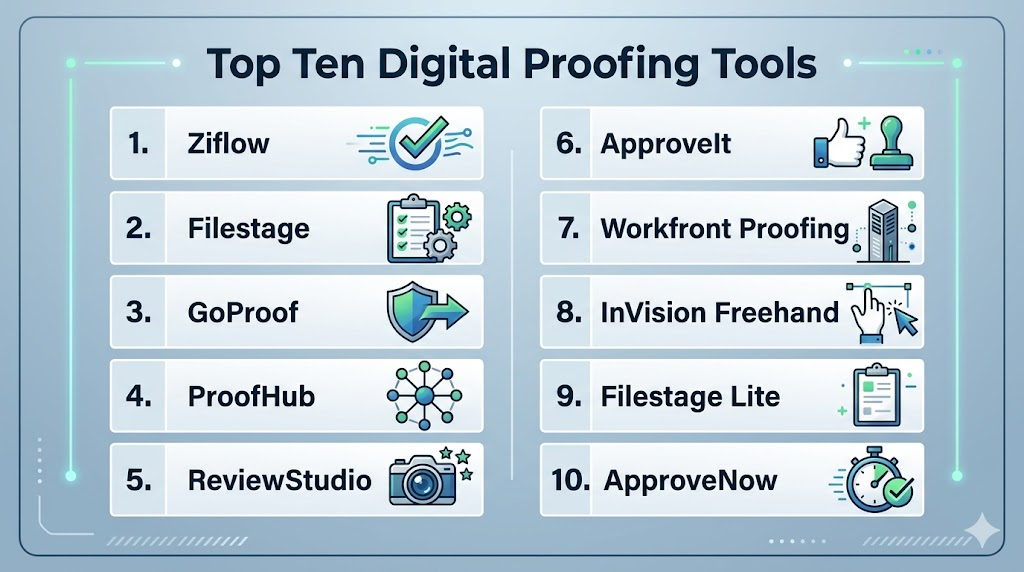
Top 10 Digital Proofing Tools
1- Ziflow
Short description: Centralized proofing and approval platform for creative teams, enabling streamlined feedback on marketing and design assets.
Key Features
- Real-time annotations and commenting.
- Version tracking and history management.
- Approval workflow automation.
- AI-driven content checks.
- Integration with Adobe Creative Cloud, Slack, and project management tools.
- Role-based access control.
- Reporting and analytics dashboards.
Pros
- Reduces review cycles significantly.
- Supports multiple file types (PDF, images, video, audio).
Cons
- Learning curve for first-time users.
- Some advanced AI features require higher-tier plans.
Platforms / Deployment
- Web, iOS, Android
- Cloud-based
Security & Compliance
- SSO/SAML, MFA, RBAC
- Not publicly stated for specific certifications
Integrations & Ecosystem
Supports extensive integrations with creative tools, storage, and collaboration platforms.
- Adobe Creative Cloud
- Slack
- Google Drive
- Trello
- Asana
Support & Community
- Online documentation, email support, and community forums
- Varies / Not publicly stated for dedicated enterprise support
2- Filestage
Short description: Workflow-focused proofing tool designed for agencies and marketing teams to collect approvals efficiently.
Key Features
- Sequential and parallel review workflows.
- Inline commenting and annotations.
- File version comparison.
- Automated reminders and notifications.
- Analytics for review cycles.
- Access permissions by role.
Pros
- Easy setup and intuitive UI.
- Flexible approval workflows.
Cons
- Limited offline functionality.
- Integrations fewer than competitors.
Platforms / Deployment
- Web, iOS, Android
- Cloud
Security & Compliance
- MFA, encryption, role-based access
- Not publicly stated
Integrations & Ecosystem
- Slack
- Dropbox
- Google Workspace
- Zapier
Support & Community
- Knowledge base, webinars, support tickets
3- GoProof
Short description: Collaboration and proofing solution for creative teams, emphasizing mobile-friendly review capabilities.
Key Features
- Real-time commenting on design assets.
- Version control and history tracking.
- Automated approval routing.
- Mobile app support for reviews on the go.
- Integration with Adobe CC and Slack.
Pros
- Strong mobile capabilities.
- Streamlines multi-stakeholder approvals.
Cons
- Limited advanced reporting.
- Interface may feel dated for some users.
Platforms / Deployment
- Web, Windows, macOS, iOS, Android
- Cloud
Security & Compliance
- Not publicly stated
Integrations & Ecosystem
- Adobe Creative Cloud
- Slack
- Microsoft Teams
Support & Community
- Email and live chat support, basic community forums
4- ProofHub
Short description: All-in-one project management and proofing tool targeting small and mid-sized creative teams.
Key Features
- Visual proofing with annotations.
- Task management and Gantt charts.
- Version control for files.
- Comment threads for discussions.
- Time tracking and workflow automation.
Pros
- Combines project management with proofing.
- Cost-effective for SMBs.
Cons
- May be too lightweight for large enterprises.
- Reporting capabilities limited.
Platforms / Deployment
- Web, iOS, Android
- Cloud
Security & Compliance
- Not publicly stated
Integrations & Ecosystem
- Google Drive
- Dropbox
- OneDrive
- Slack
Support & Community
- Email, chat support, online resources
5- ReviewStudio
Short description: Cloud-based digital proofing platform with collaborative feedback for video, image, and document assets.
Key Features
- Video and image proofing.
- Time-stamped comments for video content.
- Version tracking and approvals.
- Integration with creative and storage tools.
- Task assignment and notifications.
Pros
- Strong multimedia proofing capabilities.
- Easy collaboration across distributed teams.
Cons
- Higher cost for enterprise use.
- Limited AI-assisted automation.
Platforms / Deployment
- Web
- Cloud
Security & Compliance
- Not publicly stated
Integrations & Ecosystem
- Adobe CC
- Google Drive
- Slack
Support & Community
- Knowledge base and support tickets
6- ApproveIt
Short description: Streamlined proofing tool for marketing and creative approvals with emphasis on simplicity.
Key Features
- Centralized proof repository.
- Role-based access and approvals.
- Email and in-app notifications.
- Version history tracking.
- Comment threads for feedback.
Pros
- Simple, clean interface.
- Minimal setup required.
Cons
- Fewer integrations.
- Limited reporting features.
Platforms / Deployment
- Web
- Cloud
Security & Compliance
- Not publicly stated
Integrations & Ecosystem
- Slack
- Google Workspace
Support & Community
- Email support and help documentation
7- Workfront Proofing
Short description: Part of Workfront platform, offering proofing capabilities tightly integrated with project management for enterprise teams.
Key Features
- Inline comments and annotations.
- Automated approval routing.
- Version management.
- Project timeline visibility.
- Reporting on review cycles.
Pros
- Enterprise-ready.
- Tight integration with Workfront ecosystem.
Cons
- Steep learning curve.
- Best suited for existing Workfront users.
Platforms / Deployment
- Web, Windows, macOS
- Cloud
Security & Compliance
- Not publicly stated
Integrations & Ecosystem
- Workfront suite
- Adobe CC
- Slack
Support & Community
- Enterprise support tiers, documentation, community forums
8- InVision Freehand
Short description: Collaborative visual proofing tool for designers and product teams within InVision ecosystem.
Key Features
- Whiteboard-style feedback.
- Real-time annotations.
- Version history tracking.
- Integration with design tools.
Pros
- Excellent for creative brainstorming and reviews.
- Lightweight and intuitive.
Cons
- Limited document proofing.
- Focused primarily on visual assets.
Platforms / Deployment
- Web, iOS, Android
- Cloud
Security & Compliance
- Not publicly stated
Integrations & Ecosystem
- Figma
- Adobe XD
- Slack
Support & Community
- Knowledge base and community forums
9- Filestage Lite
Short description: Scaled-down version of Filestage targeting smaller teams and freelancers.
Key Features
- Simplified review workflows.
- Inline annotations.
- Notifications for approvals.
- Version control for files.
Pros
- Affordable for small teams.
- Easy setup.
Cons
- Fewer advanced features.
- Limited integrations.
Platforms / Deployment
- Web, iOS, Android
- Cloud
Security & Compliance
- Not publicly stated
Integrations & Ecosystem
- Google Workspace
- Slack
Support & Community
- Email support, online documentation
10- ApproveNow
Short description: Proofing and approval platform for enterprise marketing and creative teams, with customizable workflows.
Key Features
- Workflow automation for approvals.
- Centralized asset repository.
- Real-time annotations and comments.
- Integration with creative and project management tools.
Pros
- Enterprise-friendly, flexible workflows.
- Multi-stakeholder collaboration.
Cons
- Interface may be overwhelming for small teams.
- Higher cost for advanced features.
Platforms / Deployment
- Web
- Cloud
Security & Compliance
- Not publicly stated
Integrations & Ecosystem
- Adobe CC
- Slack
- Microsoft Teams
Support & Community
- Dedicated enterprise support, documentation, training resources
Comparison Table (Top 10)
| Tool Name | Best For | Platform(s) Supported | Deployment | Standout Feature | Public Rating |
|---|---|---|---|---|---|
| Ziflow | Creative teams | Web, iOS, Android | Cloud | AI-assisted proofing | N/A |
| Filestage | Agencies & marketing | Web, iOS, Android | Cloud | Sequential/parallel workflows | N/A |
| GoProof | Creative teams on mobile | Web, Windows, macOS, iOS, Android | Cloud | Mobile-first proofing | N/A |
| ProofHub | SMBs, project teams | Web, iOS, Android | Cloud | Combined project mgmt & proofing | N/A |
| ReviewStudio | Video & image teams | Web | Cloud | Time-stamped video comments | N/A |
| ApproveIt | Simple approvals | Web | Cloud | Lightweight, easy-to-use | N/A |
| Workfront Proofing | Enterprise | Web, Windows, macOS | Cloud | Integration with Workfront | N/A |
| InVision Freehand | Designers & product teams | Web, iOS, Android | Cloud | Collaborative visual proofing | N/A |
| Filestage Lite | Freelancers & small teams | Web, iOS, Android | Cloud | Simplified workflows | N/A |
| ApproveNow | Enterprise marketing | Web | Cloud | Customizable approval workflows | N/A |
Evaluation & Scoring of Digital Proofing Tools
| Tool Name | Core (25%) | Ease (15%) | Integrations (15%) | Security (10%) | Performance (10%) | Support (10%) | Value (15%) | Weighted Total (0–10) |
|---|---|---|---|---|---|---|---|---|
| Ziflow | 9 | 8 | 8 | 7 | 9 | 8 | 7 | 8.2 |
| Filestage | 8 | 9 | 7 | 7 | 8 | 8 | 8 | 8.0 |
| GoProof | 8 | 8 | 6 | 6 | 8 | 7 | 7 | 7.3 |
| ProofHub | 7 | 8 | 7 | 6 | 7 | 7 | 8 | 7.3 |
| ReviewStudio | 8 | 7 | 6 | 6 | 8 | 7 | 7 | 7.2 |
| ApproveIt | 6 | 8 | 5 | 6 | 7 | 7 | 8 | 6.9 |
| Workfront Proofing | 9 | 6 | 8 | 7 | 8 | 8 | 6 | 7.8 |
| InVision Freehand | 7 | 9 | 6 | 6 | 7 | 7 | 7 | 7.2 |
| Filestage Lite | 6 | 9 | 5 | 6 | 7 | 6 | 8 | 6.8 |
| ApproveNow | 8 | 7 | 7 | 7 | 8 | 8 | 6 | 7.5 |
Which Digital Proofing Tool Is Right for You?
Solo / Freelancer
- Filestage Lite, ApproveIt, InVision Freehand
- Focus on simplicity, affordability, and essential review features.
SMB
- ProofHub, Filestage, Ziflow
- Need combined project management, collaboration, and scalable proofing.
Mid-Market
- Ziflow, ReviewStudio, GoProof
- Prioritize robust version control, multi-format support, and moderate integration needs.
Enterprise
- Workfront Proofing, ApproveNow, Ziflow
- Require advanced workflows, large team support, security controls, and enterprise integrations.
Budget vs Premium
- Budget: Filestage Lite, ApproveIt
- Premium: Ziflow, Workfront Proofing, ApproveNow
Feature Depth vs Ease of Use
- High feature depth: Ziflow, Workfront Proofing
- Ease of use: Filestage Lite, ApproveIt
Integrations & Scalability
- Best: Ziflow, Workfront Proofing
- Moderate: ProofHub, ReviewStudio
Security & Compliance Needs
- Enterprise-grade tools with SSO/MFA: Ziflow, Workfront Proofing
- Lightweight tools: ApproveIt, Filestage Lite
Frequently Asked Questions (FAQs)
- What pricing models are typical for digital proofing tools?
Most digital proofing platforms offer subscription-based pricing. Plans are usually per user or per project, with tiered options for SMBs versus enterprises. Some tools provide free trials or lite versions for small teams. Higher tiers often include advanced features, automation, and analytics. Enterprise packages may add custom workflows and dedicated support. Consider both user count and feature needs when budgeting. - How long does onboarding typically take?
Onboarding duration depends on team size and tool complexity. Small teams can start within a few hours with minimal setup. Larger teams may require 1–2 weeks for configuring workflows, permissions, and integrations. Training sessions or documentation are often needed for complete adoption. Integration with creative tools can extend setup time. Clearly defined roles speed up the process and reduce errors. - Can these tools handle video and multimedia assets?
Yes, many proofing tools support images, PDFs, video, and audio files. Video proofing usually includes time-stamped comments for precise feedback. Platforms like Ziflow, ReviewStudio, and GoProof excel in multimedia handling. Reviewers can annotate and approve directly within the platform. Version tracking ensures changes are visible across iterations. This improves collaboration on complex media projects. - Are there AI-powered proofing capabilities?
Some platforms integrate AI to enhance review efficiency. AI can highlight inconsistencies, missing elements, or compliance issues automatically. Certain tools provide automated suggestions that reduce manual oversight and speed approvals. AI may analyze multiple assets for consistency across campaigns. Capabilities vary by tool and subscription tier. Evaluate AI features carefully to ensure alignment with your workflow needs. - How do these platforms manage version control?
Digital proofing tools maintain full version histories for each asset. Users can compare revisions side by side and restore previous versions if needed. Annotations are preserved across iterations for clear context. Automatic notifications inform stakeholders of new versions. Version control reduces confusion and approval delays. It ensures accountability and a clear audit trail for all assets. - Can external stakeholders participate in proofing?
Yes, most platforms allow guests or clients to review and approve content. Access is restricted based on role or permissions for security. External users can comment, annotate, and approve without full platform access. Notifications alert all parties to updates and deadlines. Collaboration with clients, vendors, or partners is simplified. Security measures ensure sensitive content remains protected. - How secure are these digital proofing platforms?
Security varies by platform and plan level. Enterprise-grade tools include SSO, MFA, encryption, and role-based access control. Audit logs may track all user actions for compliance. Not all platforms publicly disclose certifications like SOC 2 or ISO 27001. Security practices should be reviewed before storing sensitive assets. Choose platforms that align with organizational compliance requirements. - What integrations are commonly available?
Popular integrations include creative tools like Adobe Creative Cloud, Figma, and Canva. Collaboration tools such as Slack, Microsoft Teams, and Asana are also supported. Cloud storage options include Google Drive, Dropbox, and OneDrive. Some platforms offer APIs for custom integrations. Automation tools like - What are common mistakes teams make when adopting proofing tools?
Teams often overcomplicate workflows or fail to define approval roles. Ignoring integrations can create isolated feedback loops. Not training users on annotations and version control causes inefficiencies. Overreliance on email notifications may duplicate work. Choosing tools without scalable features can hinder growth. Proper setup and training are essential for effective adoption. - Are there alternatives to dedicated proofing platforms?
Yes, collaborative document platforms like Google Docs or Microsoft Office 365 can handle basic approvals. Design review tools such as Figma or Miro are suitable for creative assets. These alternatives are generally easier and more affordable for small teams. They may lack version control, workflow automation, or AI-assisted proofing. Larger teams benefit more from dedicated proofing platforms. Evaluate based on team size and complexity of assets.
Conclusion
Digital Proofing Tools have become essential for accelerating creative approvals, reducing errors, and enabling remote collaboration. The choice depends on team size, workflow complexity, and integration needs. Freelancers and small teams benefit from lightweight, cost-effective tools, while mid-market and enterprise organizations gain efficiency and security from robust platforms like Ziflow and Workfront Proofing. To maximize success, shortlist 2–3 tools, run a pilot to test workflow compatibility, and validate security and integration capabilities before full deployment. These steps ensure faster approvals, better collaboration, and improved content quality across the organization.

Find Trusted Cardiac Hospitals
Compare heart hospitals by city and services — all in one place.
Explore Hospitals
I am learning about digital proofing tools, and this content helped me understand how different platforms streamline review, feedback, and approval workflows for creative projects.