Introduction
Voiceover tools are AI-powered platforms that convert text into natural-sounding speech, clone human voices, and generate multilingual audio for videos, ads, training content, and podcasts. these tools have become a core part of content production workflows because they dramatically reduce cost, production time, and dependency on recording studios. Instead of hiring voice actors for every project, teams now generate studio-quality narration in minutes using AI systems. This shift is driven by global content demand, short-form video growth, and the need for fast localization across multiple languages.
Why Voiceover Tools Matter
- Reduce cost of hiring human voice actors and studio recording
- Save time by generating voiceovers in minutes instead of hours or days
- Enable instant multilingual content creation for global audiences
- Remove technical barriers for non-professionals to create voice content
- Support automation in apps, videos, and AI-driven workflows
- Improve scalability for content-heavy businesses and creators
- Help brands maintain consistent voice across all content
Real-World Use Cases of Voiceover Tools
- YouTube content creation (faceless channels, explainer videos, storytelling videos)
- Digital marketing and advertisements (multi-language ad campaigns)
- Corporate training and e-learning modules (employee onboarding, internal training videos)
- Film and media dubbing (localizing movies, series, documentaries)
- SaaS products and AI applications (voice-enabled chatbots and assistants)
- Social media content creation (Reels, Shorts, TikTok videos at scale)
- Audiobooks and publishing (converting books into audio format without narrators)
- Accessibility solutions (text-to-speech for visually impaired users)
What buyers should evaluate
- Voice realism and emotional quality
- Language and accent coverage
- Voice cloning accuracy and control
- Dubbing and lip-sync features
- Editing workflow and usability
- API and automation support
- Pricing and scalability
- Security and compliance readiness
Best for
Content creators, marketers, educators, SaaS companies, and enterprises that need fast, scalable, multilingual audio/video production with automation and AI efficiency.
Not ideal for
High-end cinematic voice acting, emotionally nuanced studio performances, or projects that require full human artistic direction and live voice control.
Key Trends in Voiceover Tools
- Near-human AI voice generation quality
- Voice cloning with consent and watermarking systems
- End-to-end video + voice production platforms
- Real-time dubbing for live streams and webinars
- API-first automation ecosystems
- Multilingual content scaling at global level
- Cloud-based rendering replacing local workflows
- Integration with video editors and CMS tools
- Usage-based pricing models replacing fixed plans
- Strong focus on deepfake prevention and voice authentication
How We Selected These Tools
- Market adoption and industry popularity
- AI voice quality and realism
- Multilingual and dubbing capabilities
- Feature completeness across workflows
- Integration and API ecosystem strength
- Scalability for SMB and enterprise use
- Reliability and performance consistency
- Ease of use vs advanced control balance
- Product maturity and stability
- Real-world usability in production environments
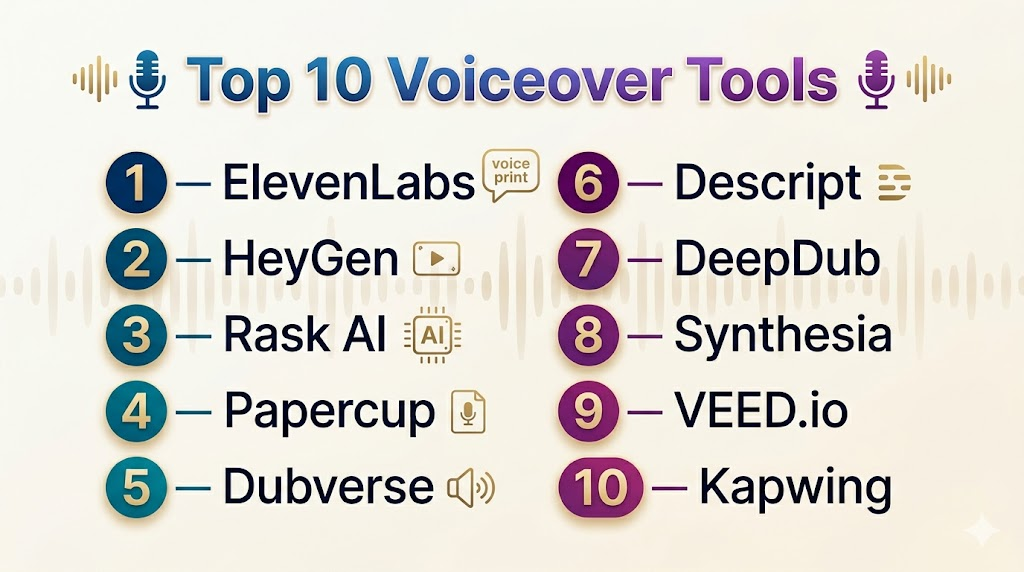
Top 10 Voiceover Tools
1 — ElevenLabs
Short description: AIvoicegenerationplatformthatcreatesultra-realistictext-to-speechandvoicecloningforcreatorsdevelopersandenterprises.
ElevenLabs is one of the most advanced AI voice platforms focused on realistic speech generation and voice cloning.
It is widely used for audiobooks, video narration, apps, and AI assistants.
It also offers a powerful API for developers building scalable voice applications.
Key Features
- Ultra-realistic voice synthesis
- Voice cloning from short samples
- Multilingual support
- Emotion and tone control
- API integration
- Long-form narration support
Pros
- Extremely natural voice output
- Fast voice cloning workflow
- Strong developer ecosystem
Cons
- Can become expensive at scale
- Advanced features require learning curve
Platforms / Deployment
Cloud / Web / API
Security & Compliance
Not publicly stated
Integrations & Ecosystem
- Video editing tools
- LMS platforms
- Developer APIs
- Publishing systems
Support & Community
Strong documentation and active developer community.
2 — HeyGen
Short description: AIvideoplatformthatcombinesavatarsvoiceovergenerationandautomateddubbingforfastcontentcreation.
HeyGen is an AI video generation platform that combines avatars with AI voiceovers.
It is widely used for marketing videos, training content, and social media production.
It helps teams create videos quickly using templates and automation.
Key Features
- AI avatar video generation
- Text-to-speech voiceovers
- Auto dubbing
- Lip-sync technology
- Multilingual support
- Video templates
Pros
- All-in-one video + voice platform
- Fast content creation
- Ideal for marketing teams
Cons
- Limited voice customization
- Avatar realism varies
Platforms / Deployment
Cloud / Web
Security & Compliance
Not publicly stated
Integrations & Ecosystem
- Marketing tools
- Social platforms
- API support
Support & Community
Good onboarding and growing user base.
3 — Rask AI
Short description: AIvideolocalizationplatformthatautomatesdubbingtranslationandsubtitlegenerationformultilingualcontent.
Rask AI focuses on video translation and dubbing for global audiences.
It automates subtitles, voiceovers, and lip-sync alignment.
It is widely used for scaling video content across multiple languages.
Key Features
- Video dubbing and translation
- Voice cloning
- Subtitle generation
- Lip-sync alignment
- Speaker detection
- Batch processing
Pros
- Strong localization capabilities
- Scalable workflows
- High-quality output
Cons
- Not a full creative studio
- Advanced features require higher plans
Platforms / Deployment
Cloud / Web
Security & Compliance
Not publicly stated
Integrations & Ecosystem
- YouTube workflows
- Marketing systems
- API automation
Support & Community
Standard SaaS support.
4 — Papercup
Short description: EnterpriseAIdubbingplatformthatdeliversbroadcastgradevoicelocalizationwithhumanreviewworkflows.
Papercup is built for media companies that need broadcast-quality dubbing at scale.
It combines AI translation with human review for accuracy and quality control.
It is designed for professional media localization workflows.
Key Features
- AI dubbing for long-form content
- Human-in-the-loop review system
- Editorial workflow tools
- Broadcast-grade output
- Voice consistency management
- Enterprise pipelines
Pros
- High-quality professional output
- Strong editorial control
- Trusted by media companies
Cons
- Enterprise-focused
- Slower due to review process
Platforms / Deployment
Cloud / Enterprise SaaS
Security & Compliance
Not publicly stated
Integrations & Ecosystem
- Media CMS systems
- Broadcasting tools
- Enterprise APIs
Support & Community
Dedicated enterprise support model.
5 — Dubverse
Short description: AIvoiceoverplatformthatprovidesfastmultilingualdubbingandsubtitlegenerationforcreatorsandbusinesses.
Dubverse enables fast multilingual voiceover generation for creators and businesses.
It includes subtitle generation and script-based editing tools.
It is designed for quick and scalable localization workflows.
Key Features
- Multilingual voiceovers
- Subtitle generation
- Script-based editor
- Fast rendering engine
- Voice library
- Video translation tools
Pros
- Easy to use
- Fast output generation
- Good multilingual support
Cons
- Limited customization
- Voice realism varies
Platforms / Deployment
Cloud / Web
Security & Compliance
Not publicly stated
Integrations & Ecosystem
- Marketing tools
- Video platforms
- APIs
Support & Community
Good support for SMB users.
6 — Descript
Short description: All-in-oneaudioandvideoeditingplatformwithAIvoiceovertranscriptionandtextbasededitingworkflow.
Descript allows editing audio and video using text-based workflows.
It includes AI voice cloning and automatic transcription.
It is widely used by podcasters, creators, and media teams.
Key Features
- Text-based editing
- Voice cloning (Overdub)
- Transcription
- Screen recording
- Podcast tools
- Multi-track editing
Pros
- Excellent creator workflow
- Unique editing system
- All-in-one platform
Cons
- Not purely voice focused
- Learning curve for beginners
Platforms / Deployment
Web / Windows / macOS
Security & Compliance
Not publicly stated
Integrations & Ecosystem
- Podcast platforms
- Cloud storage
- Video tools
Support & Community
Strong creator community.
7 — DeepDub
Short description: AIdubbingplatformfocusedonemotionallyaccuratevoicelocalizationforfilmsTVandstorytellingcontent.
DeepDub focuses on emotionally accurate AI dubbing for films and storytelling content.
It preserves tone, emotion, and expression across languages.
It is designed for high-end entertainment localization workflows.
Key Features
- Emotional AI dubbing
- Multilingual translation
- Voice style adaptation
- Lip-sync alignment
- Character consistency tools
- Studio-grade output
Pros
- High emotional realism
- Great for storytelling
- Premium output quality
Cons
- Complex workflows
- Enterprise-focused
Platforms / Deployment
Cloud / Enterprise SaaS
Security & Compliance
Not publicly stated
Integrations & Ecosystem
- Media production systems
- Streaming platforms
- Enterprise APIs
Support & Community
Enterprise-level support.
8 — Synthesia
Short description: AIvideogenerationplatformthatcreatesavatarbasedvideoswithautomatedvoiceoverandmultilingualsupport.
Synthesia generates AI avatar videos with built-in voiceovers.
It is widely used for corporate training and internal communication.
It simplifies video production for enterprise teams.
Key Features
- AI avatar videos
- Voiceovers
- Templates
- Multilingual support
- Branding tools
- Training modules
Pros
- Easy enterprise video creation
- Scalable workflow
- Good for training content
Cons
- Limited audio-only usage
- Avatar repetition over time
Platforms / Deployment
Cloud / Web
Security & Compliance
Not publicly stated
Integrations & Ecosystem
- LMS platforms
- Enterprise tools
- APIs
Support & Community
Enterprise onboarding support.
9 — VEED.io
Short description: BrowserbasedvideoeditingplatformwithAIvoiceoverautocaptionsandsimplecontentcreationtools.
VEED.io is a browser-based video editor with AI voiceover features.
It is widely used for social media content creation.
It enables fast editing directly in the browser.
Key Features
- AI voiceovers
- Auto subtitles
- Video editor
- Templates
- Screen recording
- Multilingual support
Pros
- Very easy to use
- Fast workflow
- Beginner-friendly
Cons
- Limited voice control
- Browser dependency
Platforms / Deployment
Cloud / Web
Security & Compliance
Not publicly stated
Integrations & Ecosystem
- Social platforms
- Cloud storage
- Marketing tools
Support & Community
Good help center and documentation.
10 — Kapwing
Short description: CollaborativecontentcreationplatformwithAIvoiceovereditingandsubtitlegenerationtools.
Kapwing is a collaborative content creation platform for teams.
It includes AI voice generation and subtitle tools.
It is designed for fast team-based video production workflows.
Key Features
- Voiceovers
- Video editing
- Subtitle generation
- Collaboration tools
- Cloud workspace
- Social exports
Pros
- Strong collaboration
- Easy workflow
- Fast production
Cons
- Not voice-specialized
- Limited audio control
Platforms / Deployment
Cloud / Web
Security & Compliance
Not publicly stated
Integrations & Ecosystem
- Social tools
- Cloud storage
- Team workflows
Support & Community
Active user base.
Comparison Table (Top 10)
| Tool | Best For | Platforms | Deployment | Standout Feature | Public Rating |
|---|---|---|---|---|---|
| ElevenLabs | Voice cloning | Web, API | Cloud | Realistic AI voice | N/A |
| HeyGen | AI video | Web | Cloud | Avatar videos | N/A |
| Rask AI | Dubbing | Web | Cloud | Localization automation | N/A |
| Papercup | Enterprise media | Web | Cloud | Broadcast dubbing | N/A |
| Dubverse | Multilingual voice | Web | Cloud | Fast dubbing | N/A |
| Descript | Editing + voice | Web | Cloud | Text-based editing | N/A |
| DeepDub | Film dubbing | Web | Cloud | Emotional dubbing | N/A |
| Synthesia | Training videos | Web | Cloud | AI avatars | N/A |
| VEED.io | Social content | Web | Cloud | Easy editor | N/A |
| Kapwing | Team content | Web | Cloud | Collaboration | N/A |
Evaluation & Scoring
| Tool | Core (25%) | Ease (15%) | Integrations (15%) | Security (10%) | Performance (10%) | Support (10%) | Value (15%) | Total |
|---|---|---|---|---|---|---|---|---|
| ElevenLabs | 10 | 8 | 9 | 7 | 10 | 8 | 9 | 9.1 |
| HeyGen | 9 | 9 | 8 | 7 | 9 | 8 | 8 | 8.6 |
| Rask AI | 8 | 8 | 8 | 7 | 8 | 8 | 8 | 8.1 |
| Papercup | 8 | 7 | 7 | 8 | 9 | 8 | 7 | 7.9 |
| Dubverse | 8 | 9 | 7 | 7 | 8 | 7 | 9 | 8.0 |
| Descript | 9 | 8 | 9 | 7 | 9 | 9 | 8 | 8.7 |
| DeepDub | 8 | 7 | 7 | 8 | 9 | 8 | 7 | 7.8 |
| Synthesia | 9 | 9 | 8 | 8 | 8 | 8 | 7 | 8.4 |
| VEED.io | 7 | 10 | 8 | 7 | 7 | 8 | 9 | 8.0 |
| Kapwing | 7 | 10 | 8 | 7 | 7 | 8 | 9 | 8.0 |
Which Voiceover Tool Is Right for You?
Solo / Freelancer
Best options: VEED.io, Kapwing, Dubverse, ElevenLabs
Fast, simple tools for short-form content and quick voice generation.
SMB
Best options: ElevenLabs, Descript, HeyGen
Balanced tools for marketing, training, and scalable content creation.
Mid-Market
Best options: Rask AI, HeyGen, Synthesia
Strong for multilingual workflows and automation.
Enterprise
Best options: Papercup, DeepDub, Synthesia
Built for large-scale, compliant, structured production pipelines.
Budget vs Premium
- Budget: VEED.io, Kapwing, Dubverse
- Premium: ElevenLabs, Papercup, DeepDub
Feature Depth vs Ease of Use
- Advanced: ElevenLabs, Descript, Rask AI
- Easy: VEED.io, Kapwing, HeyGen
Integrations & Scalability
- API-heavy: ElevenLabs
- Workflow tools: Descript, Rask AI
- Enterprise scale: Papercup, Synthesia
Security & Compliance Needs
Most tools do not publicly disclose certifications.
Enterprises should verify data handling, encryption, and compliance before adoption.
Frequently Asked Questions (FAQs)
1. What are voiceover tools used for?
Voiceover tools are used to convert written text into natural-sounding speech for videos, ads, podcasts, training, and social media content. They help speed up production and reduce recording costs.
2. How do AI voiceover tools work?
They use artificial intelligence and text-to-speech models to analyze text and generate human-like audio. Advanced tools also support tone control, emotion, and voice cloning.
3. Can I clone my own voice using these tools?
Yes, many platforms allow voice cloning by training the AI on your recorded samples. This lets you generate content in your own voice without re-recording every time.
4. Are voiceover tools suitable for beginners?
Yes, most tools are no-code and beginner-friendly with simple text input interfaces. Users can generate professional voiceovers without technical knowledge.
5. Can I use AI voiceovers for YouTube or monetized content?
Yes, in most cases AI-generated voiceovers can be used for monetized content. However, each platform has its own licensing rules that should be checked before publishing.
6. Do voiceover tools support multiple languages?
Yes, leading tools support dozens of languages and accents. This makes them useful for global audiences and localization projects.
7. What is the difference between TTS and voice cloning?
Text-to-speech (TTS) generates generic AI voices, while voice cloning replicates a specific person’s voice using training data. Cloning offers more personalization.
8. Are AI voiceover tools expensive?
Pricing varies from free plans to enterprise subscriptions. Costs usually depend on usage volume, features, and voice quality requirements.
9. What are the limitations of voiceover tools?
They may lack deep emotional expression compared to human actors and sometimes produce inconsistent pronunciation in complex sentences or niche languages.
10. Which industries use voiceover tools the most?
They are widely used in media, marketing, education, SaaS, e-learning, and social media content creation for scalable audio production.
Conclusion
Voiceover tools have transformed the way audio and video content is created and beyond.
They allow creators and businesses to generate high-quality voiceovers quickly without traditional recording setups.
These tools are especially useful for scaling content across multiple languages and global audiences.
Different platforms serve different needs, from simple social media creation to enterprise-grade localization.
The right choice depends on your budget, workflow complexity, and quality requirements.
While AI voices are powerful, human voice actors still play an important role in emotional storytelling.
Overall, voiceover tools are becoming a core part of modern digital content production pipelines.

Find Trusted Cardiac Hospitals
Compare heart hospitals by city and services — all in one place.
Explore Hospitals
I am learning about voiceover tools, and this content helped me understand how different platforms can be used to create high-quality audio for various projects.