Introduction
Time Blocking Apps are digital tools that help individuals and teams schedule tasks, projects, and activities into dedicated time slots, enhancing focus, productivity, and efficiency. In 2026, as remote work, flexible schedules, and multitasking increase, these apps are crucial for managing attention, reducing burnout, and ensuring priorities are met. Modern time blocking solutions often integrate AI-driven suggestions, automated reminders, and cross-device synchronization to maximize effectiveness.
Real-world use cases include:
- Planning focused work sessions and deep work blocks.
- Coordinating team schedules and collaborative project timelines.
- Managing personal routines, meetings, and recurring tasks.
- Optimizing productivity for freelancers and solo professionals.
- Tracking progress and analyzing how time is spent.
Evaluation criteria for buyers include:
- Ease of use and intuitive scheduling interface.
- Cross-platform support and device synchronization.
- AI-assisted suggestions for time allocation.
- Integration with calendars, task managers, and communication apps.
- Recurring block scheduling and flexibility.
- Notifications, reminders, and analytics dashboards.
- Security, privacy, and data backup options.
- Cost and subscription flexibility.
Best for: Professionals, freelancers, teams, and anyone seeking structured time management for productivity.
Not ideal for: Users who prefer unstructured schedules or rely on analog planners exclusively.
Key Trends in Time Blocking Apps
- AI-driven time allocation suggestions based on workload and priorities.
- Integration with calendars, task management, and communication platforms.
- Focused work and deep work analytics to optimize productivity.
- Gamification and streak tracking for motivation.
- Cross-device synchronization for desktop, mobile, and web access.
- Enhanced privacy and encryption for scheduling sensitive meetings.
- Collaboration features for teams, including shared blocks and project timelines.
- Recurring task automation and habit tracking.
- Voice assistant support for hands-free time blocking.
- Freemium and subscription-based models with premium analytics features.
How We Selected These Tools (Methodology)
- Market adoption and visibility among productivity app users.
- Feature completeness, including AI suggestions, scheduling, and analytics.
- Reliability and performance across platforms.
- Security posture including encryption, authentication, and backups.
- Integration capabilities with calendar, task, and communication apps.
- Applicability for solo users, SMBs, and enterprise teams.
- User experience and interface intuitiveness.
- Community support and educational resources.
- Value relative to subscription cost or free tier.
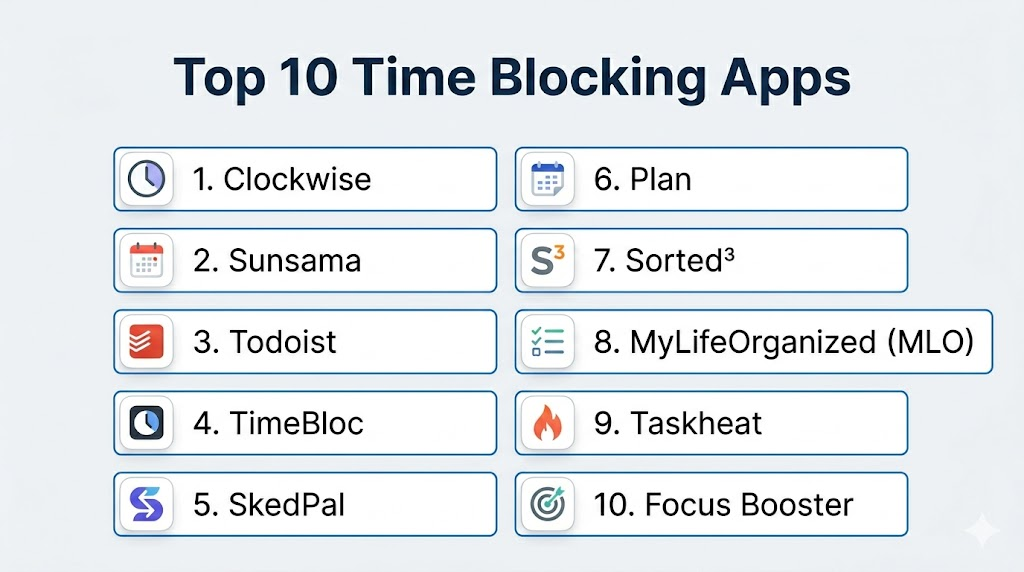
Top 10 Time Blocking Apps
1- Clockwise
Short description: Clockwise optimizes team schedules by automatically arranging time blocks for meetings and focused work.
Key Features
- AI-assisted schedule optimization
- Automatic focus time creation
- Calendar conflict detection
- Team schedule visibility
- Daily summaries and analytics
Pros
- Reduces scheduling conflicts
- Enhances deep work productivity
- Intuitive automation features
Cons
- Works best with Google Calendar
- Limited offline functionality
Platforms / Deployment
- Web, iOS, Android
- Cloud
Security & Compliance
- Not publicly stated
Integrations & Ecosystem
- Google Workspace
- Slack
- Outlook
- API access for custom workflows
Support & Community
- Email support, help center, community forums
2- Sunsama
Short description: Sunsama helps users plan their day and week with time-blocked tasks and integrated productivity workflows.
Key Features
- Daily and weekly planning
- Drag-and-drop calendar integration
- Task and project linking
- Focus mode for uninterrupted work
- Analytics on task completion
Pros
- Highly visual planning interface
- Seamless task integration
- Supports individual and team workflows
Cons
- Subscription-based pricing
- Mobile version limited compared to desktop
Platforms / Deployment
- Web, iOS, Android
- Cloud
Security & Compliance
- Not publicly stated
Integrations & Ecosystem
- Trello, Jira, Asana
- Google Calendar
- Slack
- Zapier
Support & Community
- Email support, webinars, tutorials
3- Todoist
Short description: Todoist is a task management app that supports time blocking through scheduling and priority labeling.
Key Features
- Task prioritization
- Recurring task scheduling
- Labeling and filters for projects
- Calendar integration
- Productivity tracking
Pros
- Flexible for personal and team use
- Cross-platform support
- Integration with multiple productivity apps
Cons
- Limited visual time-blocking interface
- Advanced analytics require premium
Platforms / Deployment
- Web, iOS, Android, macOS, Windows
- Cloud
Security & Compliance
- Data encrypted in transit and at rest
Integrations & Ecosystem
- Google Calendar
- Slack
- Zapier
- Outlook
Support & Community
- Knowledge base, email support, community forums
4- TimeBloc
Short description: TimeBloc allows users to visually schedule tasks and block time for personal productivity or team collaboration.
Key Features
- Color-coded calendar blocks
- Daily, weekly, and monthly planning
- Drag-and-drop scheduling
- Focus mode
- Recurring block automation
Pros
- Simple, visual interface
- Easy block customization
- Offline access available
Cons
- Limited AI features
- Mobile UI can feel cramped
Platforms / Deployment
- iOS, Android
- Cloud
Security & Compliance
- Not publicly stated
Integrations & Ecosystem
- Google Calendar
- Task import/export
- Notifications
Support & Community
- Email support, help center
5- SkedPal
Short description: SkedPal combines task management and AI-driven scheduling to automatically assign time blocks for goals and tasks.
Key Features
- Smart scheduling with AI
- Priority-based task allocation
- Calendar integration
- Notifications and reminders
- Analytics on time usage
Pros
- Automates complex schedules
- Optimizes focus and efficiency
- Detailed task insights
Cons
- Premium subscription required
- Learning curve for AI features
Platforms / Deployment
- Web, iOS, Android
- Cloud
Security & Compliance
- Not publicly stated
Integrations & Ecosystem
- Google Calendar
- Outlook
- Asana
- API access
Support & Community
- Email support, tutorials
6- Plan
Short description: Plan provides a workspace for time blocking and task management, integrating personal and team calendars.
Key Features
- Calendar-based task blocking
- Team collaboration
- Visual dashboards
- Recurring task automation
- Progress tracking
Pros
- Unified view of tasks and time blocks
- Collaborative features for teams
- Intuitive scheduling interface
Cons
- Premium plan needed for team features
- Limited offline mode
Platforms / Deployment
- Web, iOS, Android
- Cloud
Security & Compliance
- Not publicly stated
Integrations & Ecosystem
- Google Workspace
- Slack
- Outlook
Support & Community
- Tutorials, email support
7- Sorted³
Short description: Sorted³ helps users organize daily tasks with integrated calendar blocks and smart scheduling.
Key Features
- Auto-scheduling tasks
- Daily and weekly planning
- Focus timer and reminders
- Task grouping and tagging
- Analytics and progress reports
Pros
- Efficient daily planning
- Combines tasks and calendar visually
- Encourages focus and time discipline
Cons
- Mobile UI less robust than desktop
- Limited integrations with third-party apps
Platforms / Deployment
- iOS, macOS
- Cloud
Security & Compliance
- Not publicly stated
Integrations & Ecosystem
- Apple Calendar
- Reminders
- Notifications
Support & Community
- Email support, help guides
8- MyLifeOrganized (MLO)
Short description: MLO integrates hierarchical task management with time-blocking and schedule automation.
Key Features
- Task hierarchy and dependencies
- Calendar integration
- Smart scheduling
- Recurring task support
- Progress analytics
Pros
- Handles complex projects
- Flexible scheduling
- Strong reporting tools
Cons
- Interface can be complex for beginners
- Desktop-focused, mobile features limited
Platforms / Deployment
- Windows, iOS, Android
- Cloud
Security & Compliance
- Not publicly stated
Integrations & Ecosystem
- Outlook
- Google Calendar
- Notifications
Support & Community
- Email support, online tutorials
9- Taskheat
Short description: Taskheat provides flow-based scheduling, allowing users to connect tasks and time blocks visually.
Key Features
- Flow-based task connections
- Calendar integration
- Visual time-block planning
- Notifications and reminders
- Progress tracking
Pros
- Intuitive flow-based interface
- Encourages sequential task completion
- Visual clarity for scheduling
Cons
- Limited AI assistance
- Desktop-focused design
Platforms / Deployment
- macOS, iOS
- Cloud
Security & Compliance
- Not publicly stated
Integrations & Ecosystem
- Apple Calendar
- Reminders
- Push notifications
Support & Community
- Email support, help center
10- Focus Booster
Short description: Focus Booster combines Pomodoro technique with time-blocking for personal productivity.
Key Features
- Pomodoro timer integration
- Focus time blocks
- Daily/weekly analytics
- Notifications and reminders
- Task tracking
Pros
- Encourages focused work sessions
- Easy-to-use timer and analytics
- Boosts productivity
Cons
- Limited team collaboration
- Basic scheduling features
Platforms / Deployment
- iOS, Android, Windows, macOS
- Cloud
Security & Compliance
- Not publicly stated
Integrations & Ecosystem
- Google Calendar
- Slack
- Email reminders
Support & Community
- Email support, online tutorials
Comparison Table (Top 10)
| Tool Name | Best For | Platform(s) Supported | Deployment | Standout Feature | Public Rating |
|---|---|---|---|---|---|
| Clockwise | Team schedule optimization | Web, iOS, Android | Cloud | AI schedule optimization | N/A |
| Sunsama | Daily & weekly planning | Web, iOS, Android | Cloud | Visual planning workflow | N/A |
| Todoist | Task & goal tracking | Web, iOS, Android, macOS, Windows | Cloud | Productivity analytics | N/A |
| TimeBloc | Personal & team blocking | iOS, Android | Cloud | Color-coded blocks | N/A |
| SkedPal | AI-driven scheduling | Web, iOS, Android | Cloud | Smart AI scheduling | N/A |
| Plan | Team & personal planning | Web, iOS, Android | Cloud | Unified calendar & tasks | N/A |
| Sorted³ | Daily task management | iOS, macOS | Cloud | Auto-scheduling & focus timer | N/A |
| MyLifeOrganized | Complex project scheduling | Windows, iOS, Android | Cloud | Hierarchical tasks | N/A |
| Taskheat | Visual flow-based planning | macOS, iOS | Cloud | Flow-based task linking | N/A |
| Focus Booster | Pomodoro + time blocking | iOS, Android, Windows, macOS | Cloud | Pomodoro integration | N/A |
Evaluation & Scoring of Time Blocking Apps
| Tool Name | Core | Ease | Integrations | Security | Performance | Support | Value | Weighted Total |
|---|---|---|---|---|---|---|---|---|
| Clockwise | 9 | 9 | 8 | 7 | 8 | 8 | 7 | 8.0 |
| Sunsama | 8 | 9 | 8 | 7 | 8 | 8 | 7 | 7.9 |
| Todoist | 8 | 9 | 8 | 8 | 9 | 8 | 7 | 8.3 |
| TimeBloc | 8 | 8 | 7 | 7 | 8 | 7 | 7 | 7.5 |
| SkedPal | 9 | 7 | 8 | 7 | 8 | 7 | 7 | 7.9 |
| Plan | 8 | 8 | 8 | 7 | 8 | 7 | 7 | 7.7 |
| Sorted³ | 7 | 8 | 7 | 7 | 8 | 7 | 7 | 7.4 |
| MyLifeOrganized | 8 | 7 | 7 | 7 | 8 | 7 | 7 | 7.6 |
| Taskheat | 7 | 8 | 7 | 7 | 8 | 7 | 7 | 7.4 |
| Focus Booster | 7 | 8 | 6 | 7 | 8 | 7 | 7 | 7.3 |
Which Time Blocking App Is Right for You?
Solo / Freelancer
- TimeBloc, Focus Booster, or Todoist for personal scheduling and focus.
SMB
- Sunsama or Plan for coordinating team blocks and collaborative tasks.
Mid-Market
- SkedPal or Clockwise for AI-driven scheduling and analytics.
Enterprise
- Clockwise or MyLifeOrganized for team optimization and complex project scheduling.
Budget vs Premium
- Free tiers like Todoist and Focus Booster provide basic scheduling.
- Premium features unlock AI assistance, team collaboration, and analytics.
Feature Depth vs Ease of Use
- TimeBloc and Focus Booster: simple and intuitive.
- SkedPal and Clockwise: advanced features, steeper learning curve.
Integrations & Scalability
- Prioritize apps with calendar, task, and communication integrations for growing teams.
Security & Compliance Needs
- Ensure encryption and backups if handling sensitive corporate schedules.
Frequently Asked Questions (FAQs)
1. Are time blocking apps free?
Many apps offer free tiers with basic scheduling.
Premium unlocks AI scheduling, analytics, and team collaboration.
Evaluate features before choosing a subscription.
Free versions suit solo users or simple workflows.
2. Can I sync across devices?
Yes, most apps sync across web, desktop, and mobile.
Offline entry is supported by some apps.
Cross-device sync ensures consistency of time blocks.
Check platform compatibility before adopting.
3. Can teams collaborate on time blocks?
Apps like Clockwise and Sunsama support shared calendars.
Team members can view, edit, and coordinate schedules.
Permissions help manage access and visibility.
Collaboration boosts accountability and productivity.
4. How secure is my schedule?
Security varies by app and subscription level.
Many apps provide encryption, authentication, and backups.
Sensitive schedules require apps with enterprise-grade protections.
Verify privacy policies before storing critical information.
5. Can I automate recurring blocks?
Yes, recurring tasks and blocks can be scheduled automatically.
This ensures routines and repeated tasks are tracked.
Reminders maintain consistency for daily or weekly activities.
Automation reduces manual scheduling effort.
6. Are AI suggestions included?
Premium apps like SkedPal or Clockwise offer AI-assisted scheduling.
They suggest optimal time allocation and block placement.
AI helps prioritize tasks based on workload.
Basic apps may not include AI features.
7. Can I integrate with calendars?
Most apps integrate with Google Calendar, Outlook, and task managers.
Integration ensures all events and blocks stay synchronized.
Some support notifications via email or mobile alerts.
Check supported integrations for your workflow needs.
8. Can I track productivity or analytics?
Many apps provide dashboards, summaries, and progress reports.
Users can analyze time spent, task completion, and focus metrics.
Analytics support efficiency improvement and planning.
Premium features often enhance these insights.
9. Are mobile versions robust?
iOS and Android apps vary in functionality.
Some features may be limited compared to desktop or web.
Offline support is available in select apps.
Check mobile capabilities before relying fully on them.
10. Can I switch apps without losing blocks?
Export calendars or tasks in CSV, PDF, or integrated formats.
Backups ensure no data loss during migration.
Some apps support direct import/export to other platforms.
Test migration before fully switching tools.
Conclusion
Time Blocking Apps provide structured, intelligent scheduling to maximize focus, productivity, and efficiency. The best app depends on your needs: solo productivity, SMB coordination, or enterprise-level planning. Prioritize security, integrations, AI features, and analytics when choosing. Start by shortlisting 2–3 apps, pilot them to test usability and collaboration, and validate cross-device sync. Use dashboards and progress reports to maintain focus and motivation. Premium features may include AI suggestions, team sharing, and advanced reporting. Offline access and reminders ensure consistency. The right time-blocking app turns scheduling into measurable, manageable, and actionable blocks. Shortlist, pilot, and adopt the solution that aligns with your workflow.

Find Trusted Cardiac Hospitals
Compare heart hospitals by city and services — all in one place.
Explore Hospitals
Time blocking apps are most effective when they help users allocate dedicated time for important tasks instead of simply managing to-do lists. By combining calendar integration, task prioritization, focus reminders, and progress tracking, these tools improve productivity, reduce distractions, and promote better time management throughout the day.