Introduction
Bookmark Managers are digital tools that help users save, organize, and retrieve web content efficiently. They streamline the process of managing online resources, allowing individuals and teams to maintain a structured library of important links.with the explosion of online information and remote workflows, these tools are essential for productivity and knowledge management. Professionals, marketers, and researchers use them to store and categorize web pages, articles, and videos. Teams rely on shared folders to collaborate and centralize resources for projects. Individuals benefit from offline access and cross-device synchronization for seamless browsing. Choosing the right bookmark manager ensures efficient content organization, quick retrieval, and improved workflow.
Real-world use cases include:
- Research and study: Academics and students organize references, research articles, and online resources.
- Marketing and content curation: Teams save and categorize competitor insights, campaigns, and market trends.
- Project collaboration: Shared bookmark folders allow teams to collaborate and access resources collectively.
- Personal organization: Individuals manage favorite websites, tutorials, and blogs efficiently.
- Knowledge management: Professionals store and tag content for quick retrieval and workflow integration.
Evaluation criteria for buyers include:
- Ease of saving and organizing bookmarks
- Tagging, categorization, and search capabilities
- Cross-device synchronization
- Integration with browsers and productivity apps
- Collaboration and shared folders
- AI-assisted recommendations (if available)
- Security and privacy compliance
- Performance and reliability
- Free vs premium features
- Customization and scalability
Best for: Researchers, students, content marketers, professionals managing multiple online resources, and teams requiring shared libraries.
Not ideal for: Casual internet users who do not actively manage or curate content, or organizations that rely primarily on internal knowledge portals.
Key Trends in Bookmark Managers
- AI-driven content suggestion and bookmarking automation
- Cross-browser and multi-platform synchronization
- Enhanced tagging, categorization, and smart search features
- Collaboration for teams with shared folders and annotations
- Offline access and cloud-based storage
- Integration with note-taking, project management, and knowledge platforms
- Privacy-first designs with encryption and secure authentication
- Freemium and subscription-based monetization models
- Mobile-first applications with seamless UX
- Analytics for link engagement and resource usage tracking
How We Selected These Tools (Methodology)
- Evaluated market adoption and user mindshare
- Assessed feature completeness, including AI, search, and organization tools
- Reviewed performance and reliability metrics
- Checked security posture and compliance standards
- Analyzed integration capabilities with browsers, productivity, and knowledge tools
- Examined user fit across solo users, SMBs, mid-market, and enterprises
- Verified cross-platform support (Web, desktop, mobile)
- Considered pricing models and value
- Evaluated community and support resources
- Ensured relevance to modern 2026+ online workflows
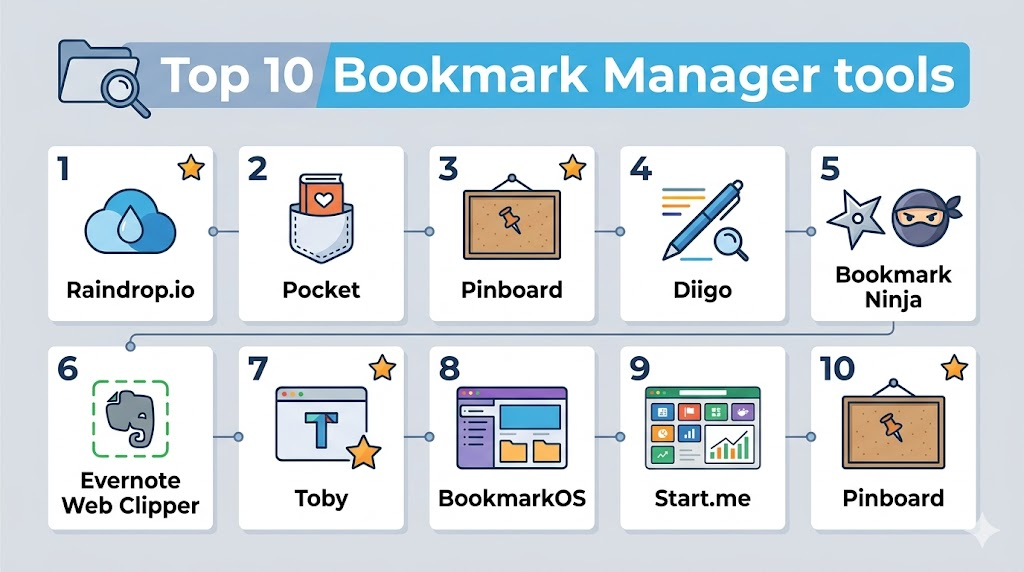
Top 10 Bookmark Managers
1- Raindrop.io
Short description: Raindrop.io is a versatile bookmark manager for individuals and teams, allowing rich media bookmarking, tagging, and collections.
Key Features
- Save bookmarks with tags and collections
- Web, video, and article previews
- Cross-device sync
- Shared collections for teams
- AI-assisted search and discovery
- Browser extensions
Pros
- Visual and organized layout
- Multi-platform support
- Team collaboration features
Cons
- Free tier limited for teams
- Advanced features require subscription
Platforms / Deployment
- Web / Windows / macOS / iOS / Android
- Cloud
Security & Compliance
- Not publicly stated
Integrations & Ecosystem
- Browser extensions (Chrome, Firefox, Safari)
- Zapier automation
- Slack notifications
Support & Community
- Documentation and tutorials
- Active user forums
- Email support
2- Pocket
Short description: Pocket allows users to save web pages, articles, and videos for later offline reading with cross-device access and tagging.
Key Features
- Save articles, videos, and web pages
- Offline reading
- Tagging and search
- Cross-device sync
- AI-based recommendations
- Integration with browsers
Pros
- Offline access
- Personalized suggestions
- Easy to use
Cons
- Limited organization options
- Free tier has restricted features
Platforms / Deployment
- Web / iOS / Android / Desktop
- Cloud
Security & Compliance
- Not publicly stated
Integrations & Ecosystem
- Browser extensions
- Integration with Evernote and note-taking apps
Support & Community
- Help center
- Online community
- Email support
3- Pinboard
Short description: Pinboard is a minimalist bookmark manager focused on speed, privacy, and permanent link storage.
Key Features
- Fast bookmarking and search
- Tags for organization
- Archive and permanent storage of web pages
- Read-later functionality
- Simple, distraction-free interface
Pros
- Lightweight and fast
- Privacy-focused
- Reliable permanent storage
Cons
- Paid one-time fee
- Limited collaboration features
Platforms / Deployment
- Web
- Cloud
Security & Compliance
- Not publicly stated
Integrations & Ecosystem
- Browser bookmarks import
- RSS feeds
Support & Community
- Email support
- Basic documentation
4- Diigo
Short description: Diigo is a research-focused bookmark manager offering annotations, highlights, and team collaboration features.
Key Features
- Save, highlight, and annotate bookmarks
- Tagging and organization
- Shared groups and team libraries
- Web clipping tools
- Cross-device sync
Pros
- Rich annotation tools
- Collaboration-ready
- Suitable for research and education
Cons
- Interface can be complex
- Premium required for advanced features
Platforms / Deployment
- Web / iOS / Android
- Cloud
Security & Compliance
- Not publicly stated
Integrations & Ecosystem
- Browser extensions
- Integration with knowledge management apps
Support & Community
- Documentation
- Online tutorials
- Email support
5- Bookmark Ninja
Short description: Bookmark Ninja helps users organize bookmarks with folders, tags, and search for both personal and professional use.
Key Features
- Folder and tag organization
- Cross-browser support
- Private and shared bookmarks
- Searchable bookmark library
- Mobile access
Pros
- Simple and easy to use
- Cloud-based access
- Multi-device support
Cons
- Limited AI or recommendation features
- Paid subscription required
Platforms / Deployment
- Web / iOS / Android
- Cloud
Security & Compliance
- Not publicly stated
Integrations & Ecosystem
- Browser extensions
- RSS feeds
Support & Community
- Documentation
- Email support
6- Evernote Web Clipper
Short description: Evernote Web Clipper allows users to save bookmarks, web pages, and articles directly into their Evernote notebooks.
Key Features
- Save bookmarks to notebooks
- Tagging and annotation
- Cross-device sync
- Highlight content in pages
- Integration with Evernote notes
Pros
- Integrates directly with Evernote
- Annotation capabilities
- Organized notebook structure
Cons
- Requires Evernote account
- Limited team features without premium
Platforms / Deployment
- Web / Windows / macOS / iOS / Android
- Cloud
Security & Compliance
- Not publicly stated
Integrations & Ecosystem
- Evernote
- Browser extensions
Support & Community
- Evernote support
- Documentation
7- Toby
Short description: Toby organizes browser tabs into collections for easy retrieval and team collaboration.
Key Features
- Save and organize tabs into collections
- Shared collections for teams
- Tagging and search
- Drag-and-drop organization
- Cross-device sync
Pros
- Visual and intuitive
- Reduces tab clutter
- Team collaboration features
Cons
- Browser-focused
- Limited offline use
Platforms / Deployment
- Web / Chrome / Firefox
- Cloud
Security & Compliance
- Not publicly stated
Integrations & Ecosystem
- Slack
- Productivity apps via extensions
Support & Community
- Tutorials and guides
- Email support
8- BookmarkOS
Short description: BookmarkOS offers a desktop-like interface to organize bookmarks, notes, and tasks visually.
Key Features
- Drag-and-drop organization
- Tagging and folders
- Desktop-like dashboard
- Notes and bookmarks in one interface
- Team sharing
Pros
- Visual interface
- Multi-functional (bookmarks + notes)
- Collaboration-friendly
Cons
- Slight learning curve
- Paid subscription for team features
Platforms / Deployment
- Web / iOS / Android
- Cloud
Security & Compliance
- Not publicly stated
Integrations & Ecosystem
- Slack
- Chrome extensions
- Task management apps
Support & Community
- Documentation
- Tutorials
- Email support
9- Start.me
Short description: Start.me is a bookmark manager and personal dashboard for teams and individuals to save, organize, and access links quickly.
Key Features
- Save bookmarks and notes
- Dashboard widgets
- Shared pages for teams
- Cross-device sync
- Tags and folder organization
Pros
- Customizable dashboard
- Team collaboration
- Visual organization
Cons
- Premium required for team features
- Slightly complex UI for beginners
Platforms / Deployment
- Web / iOS / Android
- Cloud
Security & Compliance
- Not publicly stated
Integrations & Ecosystem
- Browser extensions
- RSS feeds
- Productivity apps
Support & Community
- Online documentation
- Email support
10- Pinboard
Short description: Pinboard is a fast and minimalist bookmark manager for privacy-focused users seeking permanent storage of bookmarks.
Key Features
- Tags for organization
- Archival of web pages
- Read-later functionality
- Searchable bookmarks
- Simple, minimal interface
Pros
- Lightweight and fast
- Permanent storage
- Privacy-focused
Cons
- Paid one-time fee
- Limited collaboration
Platforms / Deployment
- Web
- Cloud
Security & Compliance
- Not publicly stated
Integrations & Ecosystem
- Browser import/export
- RSS feeds
Support & Community
- Documentation
- Email support
Comparison Table (Top 10)
| Tool Name | Best For | Platform(s) Supported | Deployment | Standout Feature | Public Rating |
|---|---|---|---|---|---|
| Raindrop.io | Individual & Teams | Web, Windows, macOS, iOS, Android | Cloud | Visual collections | N/A |
| Personal | Web, iOS, Android, Desktop | Cloud | Offline reading & AI | N/A | |
| Pinboard | Privacy-focused | Web | Cloud | Minimalist & permanent storage | N/A |
| Diigo | Research & Education | Web, iOS, Android | Cloud | Annotations & highlights | N/A |
| Bookmark Ninja | Personal & Teams | Web, iOS, Android | Cloud | Folders & tags | N/A |
| Evernote Web Clipper | Evernote users | Web, Windows, macOS, iOS, Android | Cloud | Notebook integration | N/A |
| Toby | Browser tab managers | Web, Chrome, Firefox | Cloud | Visual collections | N/A |
| BookmarkOS | Visual organization | Web, iOS, Android | Cloud | Desktop-like interface | N/A |
| Start.me | Dashboards & Teams | Web, iOS, Android | Cloud | Custom dashboards | N/A |
| Pinboard | Privacy-focused | Web | Cloud | Minimalist & permanent storage | N/A |
Evaluation & Scoring of Bookmark Managers
| Tool Name | Core (25%) | Ease (15%) | Integrations (15%) | Security (10%) | Performance (10%) | Support (10%) | Value (15%) | Weighted Total |
|---|---|---|---|---|---|---|---|---|
| Raindrop.io | 9 | 8 | 8 | 7 | 9 | 8 | 8 | 8.35 |
| 8 | 9 | 7 | 7 | 8 | 8 | 7 | 7.95 | |
| Pinboard | 7 | 8 | 6 | 8 | 8 | 7 | 8 | 7.65 |
| Diigo | 8 | 7 | 7 | 7 | 8 | 7 | 7 | 7.5 |
| Bookmark Ninja | 7 | 8 | 6 | 7 | 8 | 7 | 7 | 7.35 |
| Evernote Web Clipper | 8 | 8 | 7 | 7 | 8 | 7 | 7 | 7.55 |
| Toby | 7 | 8 | 7 | 7 | 8 | 7 | 7 | 7.35 |
| BookmarkOS | 8 | 7 | 7 | 7 | 8 | 7 | 7 | 7.5 |
| Start.me | 8 | 8 | 7 | 7 | 8 | 7 | 7 | 7.55 |
| Pinboard | 7 | 8 | 6 | 8 | 8 | 7 | 8 | 7.65 |
Which Bookmark Manager Tool Is Right for You?
Solo / Freelancer
Use Pocket, Raindrop.io, or Pinboard for personal bookmark organization and offline access.
SMB
Diigo, Bookmark Ninja, or Start.me provide collaborative features and tagging for small teams.
Mid-Market
Raindrop.io Teams, BookmarkOS, and Toby offer multi-user collaboration, shared collections, and cross-device sync.
Enterprise
Diigo Enterprise, Raindrop.io Teams, or Start.me provide scalable solutions with security, workflow integrations, and team management.
Budget vs Premium
Free tools like Pocket and Pinboard are ideal for individual users. Paid plans unlock team collaboration, AI suggestions, and analytics.
Feature Depth vs Ease of Use
Tools like Diigo and Raindrop.io offer advanced annotations and AI features but may require onboarding. Simpler tools like Pocket or Pinboard focus on usability.
Integrations & Scalability
For organizations needing CMS, browser, and workflow integrations, Raindrop.io Teams, Diigo, and Start.me are ideal.
Security & Compliance Needs
Enterprises handling sensitive bookmarks or internal resources should prioritize tools with encryption, SSO, and privacy compliance.
Frequently Asked Questions (FAQs)
1. What pricing models do bookmark managers use?
Most tools offer freemium, subscription-based, or enterprise pricing. Free versions allow basic bookmarking, while paid plans unlock AI suggestions, team collaboration, and analytics. Enterprise pricing often depends on the number of users.
2. How easy is onboarding for teams?
Cloud-based tools like Raindrop.io and Diigo offer straightforward onboarding with shared folders, tagging, and role-based access. Enterprise tools may require configuration and training for full adoption.
3. Can I organize multiple types of content?
Yes, modern bookmark managers support web links, articles, videos, PDFs, and notes. Some platforms also provide highlighting, annotation, and tagging for richer organization.
4. Are bookmark managers secure for enterprise use?
Enterprise-grade tools provide encryption, SSO, and GDPR/CCPA compliance. Free or individual-focused tools may lack advanced security and admin controls.
5. Do these tools support cross-device synchronization?
Yes, most support synchronization across web, desktop, mobile, and browser extensions, enabling seamless access to bookmarks from any device.
6. Can multiple users collaborate on bookmarks?
Yes, enterprise and team-focused tools allow shared collections, collaborative tagging, and annotations for improved knowledge sharing.
7. Are AI features available?
Some tools like Raindrop.io offer AI-based recommendations, content suggestions, and automated organization to improve efficiency.
8. Can I search and tag bookmarks effectively?
Yes, robust search, tagging, and folder options are standard in modern bookmark managers, making retrieval fast and intuitive.
9. Are there free alternatives?
Yes, Pocket, Pinboard, and Toby provide free versions suitable for individual users or small teams, while premium plans unlock advanced features.
10. Can I integrate bookmark managers with other tools?
Most tools integrate with browsers, productivity apps, CMS platforms, and workflow automation tools like Zapier or Slack for seamless operations.
Conclusion
Bookmark Managers streamline saving, organizing, and retrieving web resources for individuals and teams. Solo users benefit from Pocket, Raindrop.io, or Pinboard, while SMBs and mid-market teams can leverage Diigo, Start.me, or BookmarkOS for collaboration and cross-device sync. Enterprise solutions like Raindrop.io Teams and Diigo Enterprise offer AI suggestions, analytics, and security for large teams. Shortlist 2–3 tools, run a pilot to test workflow integration, and validate security and collaboration features before full adoption.

Find Trusted Cardiac Hospitals
Compare heart hospitals by city and services — all in one place.
Explore Hospitals
I was exploring bookmark managers, and this content helped me understand how different tools can organize and manage saved links more effectively.