Introduction
Password Sharing Tools are platforms that securely store, manage, and share login credentials within teams and organizations. They help reduce the risk of password leaks and enforce consistent security practices.with the rise of remote work and SaaS adoption, managing shared credentials safely has become critical. Teams and enterprises rely on these tools to centralize access to internal systems and external apps. They streamline collaboration by enabling role-based access and temporary sharing for contractors or external partners. Advanced tools provide audit trails, encryption, and compliance reporting to meet regulatory requirements. AI-assisted password generation and breach detection enhance security further. Choosing the right password sharing tool ensures efficiency, safety, and compliance across teams and workflows.
Real-world use cases include:
- Team collaboration: Share passwords for tools, SaaS apps, and internal systems securely.
- IT administration: Manage and rotate access credentials across multiple users.
- Project-based access: Temporary password sharing for contractors or external collaborators.
- Auditing and compliance: Track password access and ensure secure handling for regulatory standards.
- Enterprise security: Centralize credential storage and reduce weak password reuse.
Evaluation criteria for buyers include:
- End-to-end encryption and security protocols
- Multi-user and role-based access controls
- Ease of password sharing and management
- Audit trails and reporting
- Integration with identity management systems
- Cross-platform accessibility
- Offline access and mobile support
- AI-assisted password generation and recommendations
- Compliance certifications (SOC 2, ISO 27001, GDPR)
- Pricing and scalability
Best for: IT teams, security-conscious enterprises, SaaS administrators, and teams managing multiple shared accounts.
Not ideal for: Individual users with minimal password sharing needs or teams relying solely on personal password managers.
Key Trends in Password Sharing Tools
- AI-driven password generation and security scoring
- Multi-factor authentication (MFA) integration
- Cross-platform and browser extension support
- End-to-end encryption for secure sharing
- Integration with identity and access management (IAM) systems
- Audit logs for tracking access and compliance
- Temporary or time-bound password sharing features
- Subscription-based and enterprise-tier pricing models
- Mobile-first design and offline access
- Automated password rotation and breach alerts
How We Selected These Tools (Methodology)
- Evaluated market adoption and mindshare
- Assessed feature completeness including security, sharing, and AI capabilities
- Reviewed reliability and performance signals
- Verified security posture and compliance certifications
- Analyzed integration potential with IAM, productivity, and SaaS tools
- Considered customer fit across solo users, SMBs, mid-market, and enterprise
- Reviewed multi-platform support and deployment flexibility
- Examined pricing tiers and subscription value
- Evaluated documentation, onboarding, and community support
- Ensured relevance to secure password sharing workflows
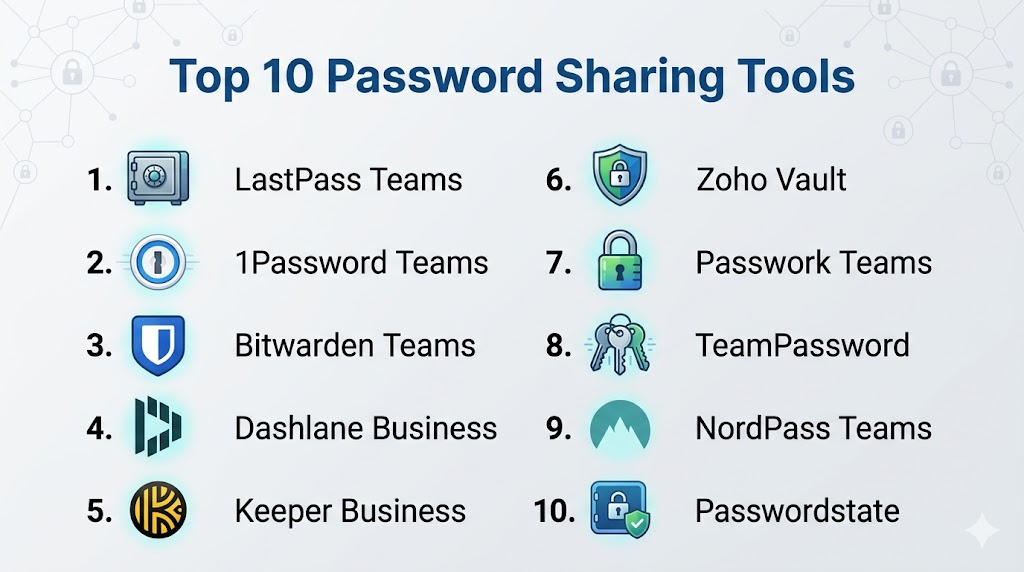
Top 10 Password Sharing Tools
1- LastPass Teams
Short description: LastPass Teams allows small teams to securely store, manage, and share passwords with role-based access controls.
Key Features
- End-to-end encryption
- Password sharing with permissions
- Secure password generator
- Multi-factor authentication
- Cross-device sync
- Admin console and reporting
Pros
- Easy for teams to adopt
- Strong encryption and security
- Centralized password management
Cons
- Premium subscription required for full features
- Some learning curve for administrators
Platforms / Deployment
- Web / Windows / macOS / iOS / Android
- Cloud
Security & Compliance
- MFA, encryption, RBAC
- SOC 2 compliant
Integrations & Ecosystem
- Active Directory
- SSO systems
- Browser extensions
Support & Community
- Documentation
- Email and chat support
- Community forums
2- 1Password Teams
Short description: 1Password Teams secures password storage and sharing for small to medium teams with granular control over access.
Key Features
- Vault-based password management
- Role-based access permissions
- AI-driven password generation
- Browser extension and mobile apps
- Audit logs and access tracking
Pros
- Strong security protocols
- Intuitive UI for teams
- Good cross-platform support
Cons
- Paid subscription required
- Advanced enterprise features limited to higher tiers
Platforms / Deployment
- Web / Windows / macOS / iOS / Android
- Cloud
Security & Compliance
- End-to-end encryption
- SOC 2, GDPR
Integrations & Ecosystem
- SSO providers
- Browser extensions
- API for automation
Support & Community
- Tutorials and guides
- Customer support
- Active user community
3- Bitwarden Teams
Short description: Bitwarden Teams provides an open-source password management solution for secure sharing within teams and organizations.
Key Features
- End-to-end encryption
- Shared vaults for teams
- Role-based access controls
- Cross-platform sync
- Self-hosting option
Pros
- Open-source transparency
- Strong security features
- Affordable for teams
Cons
- Advanced setup for self-hosting
- UI slightly less polished than competitors
Platforms / Deployment
- Web / Windows / macOS / Linux / iOS / Android
- Cloud / Self-hosted
Security & Compliance
- Encryption, MFA
- SOC 2, GDPR
Integrations & Ecosystem
- SSO integration
- API access
- Browser extensions
Support & Community
- Documentation and forums
- Email support
- Developer community
4- Dashlane Business
Short description: Dashlane Business offers secure password sharing and management with advanced security analytics for mid-market teams.
Key Features
- Shared password vaults
- Security dashboard with breach alerts
- Password generator
- Multi-factor authentication
- Reporting and compliance
Pros
- Strong analytics and breach monitoring
- User-friendly interface
- Team management tools
Cons
- Premium pricing for business features
- Limited free tier
Platforms / Deployment
- Web / Windows / macOS / iOS / Android
- Cloud
Security & Compliance
- MFA, encryption
- SOC 2, GDPR
Integrations & Ecosystem
- SSO
- Active Directory
- Browser extensions
Support & Community
- Documentation
- Customer support tiers
- Community forums
5- Keeper Business
Short description: Keeper Business secures team credentials with centralized management, auditing, and compliance features.
Key Features
- Encrypted vaults for teams
- Role-based access control
- Password generation and audit logs
- Secure file storage
- SSO and MFA
Pros
- Enterprise-grade security
- Detailed access controls
- Supports compliance and auditing
Cons
- Paid subscription required
- Some advanced features may require training
Platforms / Deployment
- Web / Windows / macOS / iOS / Android
- Cloud
Security & Compliance
- SOC 2, ISO 27001, GDPR
- MFA, encryption, RBAC
Integrations & Ecosystem
- SSO systems
- Active Directory
- API and browser extensions
Support & Community
- Documentation and knowledge base
- Tiered support
- Community forums
6- Zoho Vault
Short description: Zoho Vault enables secure password storage and sharing for teams with role-based access and audit capabilities.
Key Features
- Shared vaults for team passwords
- Role-based access control
- Password auditing and reporting
- Browser extensions
- Cross-platform synchronization
Pros
- Affordable for SMBs
- Easy integration with Zoho ecosystem
- Detailed auditing tools
Cons
- UI can be complex for new users
- Limited AI-assisted features
Platforms / Deployment
- Web / Windows / macOS / iOS / Android
- Cloud
Security & Compliance
- Encryption, MFA
- GDPR
Integrations & Ecosystem
- Zoho suite apps
- SSO providers
- Browser extensions
Support & Community
- Documentation
- Email support
- Online tutorials
7- Passwork Teams
Short description: Passwork Teams provides a team-focused password management solution with secure sharing and self-hosting options.
Key Features
- Team vaults
- Role-based access and permissions
- Audit logs
- Self-hosting available
- Cross-platform sync
Pros
- Open-source self-hosted option
- Strong team collaboration
- Affordable licensing
Cons
- Interface less modern
- Some setup complexity for self-hosting
Platforms / Deployment
- Web / Windows / macOS / iOS / Android
- Cloud / Self-hosted
Security & Compliance
- Encryption, MFA
- Not publicly stated
Integrations & Ecosystem
- SSO
- Browser extensions
- API for automation
Support & Community
- Documentation
- Email support
- Developer community
8- TeamPassword
Short description: TeamPassword is a cloud-based tool designed for small to mid-size teams to securely share and manage passwords.
Key Features
- Shared team vaults
- Role-based access and permissions
- Password auditing and reporting
- Two-factor authentication
- Browser extensions
Pros
- Simple and easy to adopt
- Affordable for small teams
- Security-focused features
Cons
- Limited advanced features
- Best suited for small to medium teams
Platforms / Deployment
- Web / iOS / Android
- Cloud
Security & Compliance
- MFA, encryption
- Not publicly stated
Integrations & Ecosystem
- Browser extensions
- SSO support
- API access
Support & Community
- Documentation
- Email support
9- NordPass Teams
Short description: NordPass Teams offers secure password sharing with encrypted storage and business-focused administration tools.
Key Features
- Encrypted vaults
- Shared team credentials
- Role-based access
- Password auditing
- Multi-platform access
Pros
- Strong encryption and security
- Simple user interface
- Business-focused features
Cons
- Premium subscription required
- Limited offline access
Platforms / Deployment
- Web / Windows / macOS / iOS / Android
- Cloud
Security & Compliance
- MFA, encryption
- Not publicly stated
Integrations & Ecosystem
- SSO integration
- Browser extensions
- API support
Support & Community
- Documentation
- Email support
- Online tutorials
10- Passwordstate
Short description: Passwordstate is an enterprise-grade password management tool with secure sharing, auditing, and compliance features.
Key Features
- Centralized vaults for teams
- Role-based access controls
- Audit logging and reporting
- Integration with AD and SSO
- Password generator and rotation
Pros
- Enterprise-level security
- Compliance-ready
- Extensive admin controls
Cons
- Higher learning curve
- Premium pricing
Platforms / Deployment
- Web / Windows / iOS / Android
- Cloud / On-premises
Security & Compliance
- SOC 2, ISO 27001
- MFA, RBAC, encryption
Integrations & Ecosystem
- Active Directory
- SSO providers
- API integrations
Support & Community
- Documentation
- Tiered enterprise support
- Customer community
Comparison Table (Top 10)
| Tool Name | Best For | Platform(s) Supported | Deployment | Standout Feature | Public Rating |
|---|---|---|---|---|---|
| LastPass Teams | SMBs & Teams | Web, Windows, macOS, iOS, Android | Cloud | Shared vaults & AI | N/A |
| 1Password Teams | SMBs & Mid-Market | Web, Windows, macOS, iOS, Android | Cloud | Vault-based control | N/A |
| Bitwarden Teams | Open-source & Teams | Web, Windows, macOS, Linux, iOS, Android | Cloud / Self-hosted | Open-source transparency | N/A |
| Dashlane Business | Mid-Market | Web, Windows, macOS, iOS, Android | Cloud | Security dashboard | N/A |
| Keeper Business | Enterprise | Web, Windows, macOS, iOS, Android | Cloud | Audit & compliance | N/A |
| Zoho Vault | SMBs | Web, Windows, macOS, iOS, Android | Cloud | Integration with Zoho | N/A |
| Passwork Teams | SMBs & Mid-Market | Web, Windows, macOS, iOS, Android | Cloud / Self-hosted | Self-hosting option | N/A |
| TeamPassword | Small Teams | Web, iOS, Android | Cloud | Simple team sharing | N/A |
| NordPass Teams | SMBs & Teams | Web, Windows, macOS, iOS, Android | Cloud | Encrypted team vaults | N/A |
| Passwordstate | Enterprise | Web, Windows, iOS, Android | Cloud / On-premises | Enterprise-grade controls | N/A |
Evaluation & Scoring of Password Sharing Tools
| Tool Name | Core (25%) | Ease (15%) | Integrations (15%) | Security (10%) | Performance (10%) | Support (10%) | Value (15%) | Weighted Total |
|---|---|---|---|---|---|---|---|---|
| LastPass Teams | 9 | 8 | 8 | 9 | 8 | 8 | 8 | 8.45 |
| 1Password Teams | 9 | 8 | 8 | 9 | 8 | 8 | 8 | 8.4 |
| Bitwarden Teams | 8 | 7 | 8 | 9 | 8 | 7 | 8 | 8.05 |
| Dashlane Business | 8 | 7 | 7 | 8 | 8 | 7 | 7 | 7.65 |
| Keeper Business | 9 | 8 | 8 | 9 | 8 | 8 | 8 | 8.45 |
| Zoho Vault | 8 | 7 | 7 | 8 | 8 | 7 | 7 | 7.65 |
| Passwork Teams | 8 | 7 | 7 | 8 | 8 | 7 | 7 | 7.65 |
| TeamPassword | 7 | 8 | 7 | 7 | 8 | 7 | 7 | 7.35 |
| NordPass Teams | 8 | 8 | 7 | 9 | 8 | 7 | 8 | 7.9 |
| Passwordstate | 9 | 7 | 8 | 9 | 8 | 8 | 8 | 8.3 |
Which Password Sharing Tool Is Right for You?
Solo / Freelancer
Use Bitwarden Teams or 1Password Teams for personal and small collaborative projects with secure sharing.
SMB
LastPass Teams, TeamPassword, or Zoho Vault provide simple shared vaults and team access for small businesses.
Mid-Market
Dashlane Business, Passwork Teams, and NordPass Teams offer enterprise-grade security and team workflows for growing companies.
Enterprise
Keeper Business and Passwordstate provide robust controls, auditing, and compliance for large organizations managing multiple credentials.
Budget vs Premium
Free or low-cost plans are suitable for small teams, while premium subscriptions unlock advanced security, analytics, and admin features.
Feature Depth vs Ease of Use
Bitwarden and LastPass balance ease of use with robust security. Dashlane and Keeper offer deeper enterprise capabilities at the cost of complexity.
Integrations & Scalability
Tools like Passwordstate, Keeper Business, and Dashlane integrate with SSO, AD, and productivity platforms for scalable enterprise deployment.
Security & Compliance Needs
Enterprises handling sensitive credentials should select tools with end-to-end encryption, MFA, audit logs, and compliance certifications like SOC 2 and ISO 27001.
Frequently Asked Questions (FAQs)
1. What pricing models do password sharing tools use?
Most offer freemium, subscription, and enterprise plans. Free versions are limited; premium unlocks team collaboration, auditing, and AI features.
2. How easy is onboarding for teams?
Cloud-based tools like LastPass Teams and 1Password allow quick setup with shared vaults. Enterprise tools may require admin configuration and training.
3. Can multiple users collaborate on passwords?
Yes, team-focused tools provide shared vaults, role-based access, and auditing for secure collaboration.
4. Are these tools secure for enterprise use?
Enterprise-grade tools use encryption, MFA, and comply with SOC 2, ISO 27001, and GDPR standards. Free or personal versions may have fewer controls.
5. Do password sharing tools support AI features?
Some platforms offer AI-driven password generation, breach detection, and suggestions for stronger credentials.
6. Can I integrate these tools with other platforms?
Yes, most tools integrate with SSO providers, Active Directory, productivity apps, and browser extensions.
7. Are they cross-platform?
Most support Web, Windows, macOS, iOS, and Android, ensuring secure access across devices.
8. Do these tools provide audit trails?
Yes, premium and enterprise tools log user activity for compliance and monitoring access to shared credentials.
9. Can I share passwords temporarily?
Many platforms allow time-bound sharing or one-time access for contractors and temporary collaborators.
10. Are there free alternatives?
Yes, Bitwarden offers free tiers suitable for small teams or individual users, while advanced features require paid plans.
Conclusion
Password Sharing Tools are essential for securing credentials and enabling efficient team collaboration. Solo users can rely on Bitwarden or 1Password for secure individual access. SMBs benefit from tools like LastPass Teams or Zoho Vault to manage shared accounts safely. Enterprises gain the most value from Keeper Business or Passwordstate with advanced auditing and compliance features. AI-assisted password generation and breach alerts enhance security across all levels. Cross-platform access ensures seamless workflows for remote and hybrid teams. Shortlist 2–3 tools, pilot them in your environment, and evaluate integrations, security, and usability. Proper adoption of these tools improves productivity, safeguards sensitive information, and ensures regulatory compliance.

Find Trusted Cardiac Hospitals
Compare heart hospitals by city and services — all in one place.
Explore Hospitals
I was looking for information about password sharing tools, and this content helped me understand how different platforms support secure credential sharing and access management.