Introduction
Classroom Interactive Whiteboards are advanced digital boards that combine the functionality of traditional whiteboards with interactive technology. They allow educators and students to write, draw, annotate, and engage with content directly on the board while integrating multimedia, collaboration tools, and remote access features. these tools are increasingly essential as hybrid and tech-enhanced classrooms become the norm worldwide. Schools and universities rely on interactive whiteboards to make lessons more dynamic, support remote and in-person learning simultaneously, and facilitate real-time collaboration among students. They are particularly valuable in STEM labs, language classrooms, art studios, and business training rooms, where visual and interactive content enhances comprehension and retention.
Real-world use cases include:
- Conducting live, interactive lessons with integrated quizzes and polls.
- Collaborating with remote students through cloud-based whiteboard sessions.
- Annotating digital textbooks, presentations, and multimedia content.
- Facilitating group brainstorming and idea mapping in classrooms or workshops.
- Recording and sharing lectures for later review or asynchronous learning.
Evaluation criteria for buyers:
- Responsiveness and multi-touch capability
- Ease of installation and integration with existing systems
- Cloud and remote collaboration support
- Annotation, drawing, and content management tools
- Compatibility with devices and operating systems
- Security and access control features
- Software update and support quality
- Price and total cost of ownership
- Durability and maintenance requirements
- Vendor ecosystem and third-party integrations
Best for: K–12 schools, universities, corporate training rooms, STEM labs, and educators who prioritize interactive and collaborative learning.
Not ideal for: Small classrooms with limited budgets or environments where basic whiteboard functionality suffices; traditional pen-and-paper teaching may be more cost-effective.
Key Trends in Classroom Interactive Whiteboards
- AI-powered lesson planning and real-time content suggestions.
- Cloud-native collaboration enabling remote student participation.
- Enhanced multi-touch and stylus recognition for simultaneous users.
- Integration with LMS platforms, video conferencing, and educational apps.
- Modular hardware design for easier installation and upgrades.
- Data analytics on student engagement and participation metrics.
- Sustainability-focused materials and low-power consumption boards.
- Subscription-based software models replacing one-time hardware costs.
- Improved security features like SSO, MFA, and GDPR compliance.
- Support for immersive AR/VR content for next-level experiential learning.
How We Selected These Tools (Methodology)
- Evaluated market adoption and global presence among schools and institutions.
- Analyzed feature completeness, including annotation, multimedia, and collaboration tools.
- Considered reliability and performance signals such as responsiveness and multi-touch accuracy.
- Reviewed security posture, including authentication, encryption, and compliance.
- Assessed integrations and ecosystem for LMS, conferencing, and content platforms.
- Examined customer fit across segments, from small classrooms to large universities.
- Considered vendor support and community, including documentation, training, and forums.
- Compared pricing models and total cost of ownership.
- Reviewed hardware durability and warranty offerings.
- Ensured compatibility with modern OS and devices.
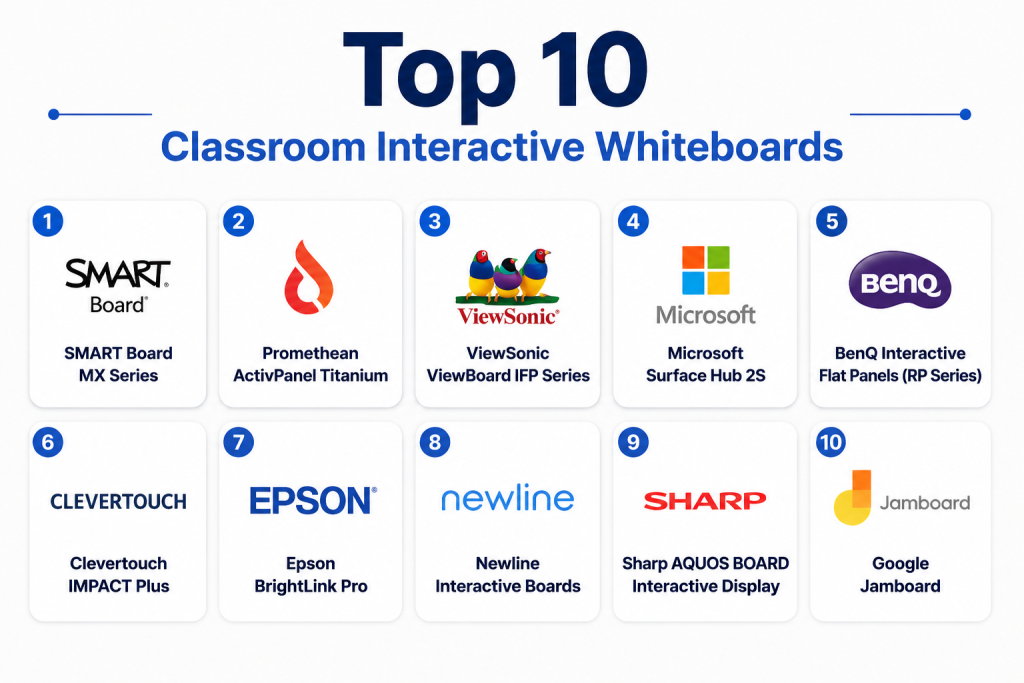
Top 10 Classroom Interactive Whiteboards
1- SMART Board MX Series
Short description: The SMART Board MX series offers interactive display boards designed for K–12 and higher education, integrating touch, stylus input, and cloud collaboration tools.
Key Features
- Multi-touch capabilities for up to 10 users simultaneously
- Integrated lesson capture and recording
- Compatibility with SMART Learning Suite
- 4K Ultra HD resolution
- Embedded cloud-based collaboration tools
- Annotation tools and digital ink
- Durable anti-glare glass
Pros
- Excellent multi-user support
- Wide educational software ecosystem
Cons
- Premium pricing
- Requires compatible devices for full features
Platforms / Deployment
- Windows, macOS, iOS, Android
- Hybrid (hardware + cloud services)
Security & Compliance
- Not publicly stated
Integrations & Ecosystem
Supports LMS platforms, video conferencing tools, and SMART Learning Suite.
- Google Workspace
- Microsoft Teams
- Zoom
- Clever integration
- API support for custom apps
Support & Community
- Tiered support plans and extensive online resources
2- Promethean ActivPanel Titanium
Short description: ActivPanel Titanium is a high-end interactive whiteboard focusing on seamless classroom interaction, collaboration, and integration with digital curricula.
Key Features
- 4K UHD display with anti-glare coating
- Multi-touch and dual stylus support
- Integrated Android apps and lesson software
- Whiteboard and annotation tools
- Remote classroom sharing
- Energy-efficient design
- Cloud connectivity
Pros
- Smooth touch response
- Strong ecosystem of apps and educational content
Cons
- Higher learning curve for teachers
- Requires network connectivity for cloud features
Platforms / Deployment
- Windows, macOS, Android
- Cloud-enabled, hybrid deployment
Security & Compliance
- Not publicly stated
Integrations & Ecosystem
- LMS integration (Google Classroom, Canvas)
- Video conferencing tools
- Digital curriculum apps
- REST API access for developers
Support & Community
- Dedicated support, online tutorials, and educator forums
3- ViewSonic ViewBoard IFP Series
Short description: ViewBoard IFP series offers interactive displays for classrooms and corporate training with multi-touch support, cloud sharing, and collaborative annotation.
Key Features
- 4K UHD panel with anti-glare surface
- 20-point multi-touch
- myViewBoard software for collaboration
- Integrated digital whiteboard
- Remote access and cloud storage
- Interactive annotation tools
- Screen recording and broadcast
Pros
- Affordable for medium-to-large classrooms
- Easy cloud collaboration
Cons
- Limited preloaded apps compared to competitors
- Stylus performance can vary
Platforms / Deployment
- Windows, macOS, Android
- Cloud-enabled hybrid
Security & Compliance
- Not publicly stated
Integrations & Ecosystem
- Google Workspace, Microsoft 365, Zoom
- API for educational apps
- LMS integrations
Support & Community
- Online resources, community forums, and live support
4- Microsoft Surface Hub 2S
Short description: Microsoft Surface Hub 2S is designed for collaborative classrooms and meeting rooms, combining large interactive displays with Windows 10/11 ecosystem integration.
Key Features
- 4K+ display with 10-point touch
- Pen and multi-touch support
- Microsoft Teams native integration
- Digital whiteboarding and sticky notes
- Remote collaboration and conferencing
- Integrated camera and microphone
- Rotatable display options
Pros
- Deep Microsoft ecosystem integration
- Strong video conferencing features
Cons
- Expensive for smaller institutions
- Heavier hardware
Platforms / Deployment
- Windows 10/11
- Cloud + on-prem hybrid
Security & Compliance
- Enterprise-grade security features (SSO, encryption)
- GDPR compliant
Integrations & Ecosystem
- Microsoft 365 apps
- Teams, OneDrive
- Third-party educational apps
Support & Community
- Enterprise support and online community
5- BenQ Interactive Flat Panels (RP Series)
Short description: BenQ RP Series provides interactive flat panels suitable for classrooms with multi-touch input, cloud collaboration, and integrated teaching software.
Key Features
- 4K UHD resolution
- 20-point multi-touch
- EZWrite digital whiteboard
- Remote collaboration support
- Eye-care technology
- Annotation and lesson capture
- Cloud storage integration
Pros
- Affordable for large classrooms
- Easy-to-use software
Cons
- Limited native apps
- Stylus accuracy can lag
Platforms / Deployment
- Windows, macOS, Android
- Hybrid/cloud-enabled
Security & Compliance
- Not publicly stated
Integrations & Ecosystem
- Google Workspace, Zoom, LMS
- API support
Support & Community
- Documentation, webinars, and online forums
6- Clevertouch IMPACT Plus
Short description: Clevertouch IMPACT Plus interactive boards are designed for engaging classrooms with responsive touch, integrated collaboration tools, and Android-based apps.
Key Features
- 4K UHD display
- Multi-touch support
- Built-in educational apps
- Annotation and collaboration tools
- Cloud integration
- Remote screen sharing
- Screen recording
Pros
- Strong interactive features
- Good value for mid-range budgets
Cons
- Android ecosystem may limit Windows integration
- Requires teacher training
Platforms / Deployment
- Android, Windows
- Cloud-enabled hybrid
Security & Compliance
- Not publicly stated
Integrations & Ecosystem
- LMS, Google Workspace, video conferencing
- API access
Support & Community
- Online tutorials and dedicated support
7- Epson BrightLink Pro
Short description: Epson BrightLink Pro offers interactive projector-based solutions for classrooms, combining projection and touch interaction on any flat surface.
Key Features
- Ultra-short throw projectors
- Multi-touch and pen input
- Annotation software
- Cloud collaboration tools
- Screen capture and recording
- Integration with lesson plans
- Multi-device connectivity
Pros
- Flexible projection-based setup
- Lower hardware footprint
Cons
- Requires projector maintenance
- Ambient light sensitivity
Platforms / Deployment
- Windows, macOS
- Hybrid
Security & Compliance
- Not publicly stated
Integrations & Ecosystem
- LMS integration, Zoom, Google Workspace
- API support
Support & Community
- Vendor support and online community
8- Newline Interactive Boards
Short description: Newline offers interactive displays with responsive touch, collaboration software, and classroom management features for modern learning environments.
Key Features
- 4K display
- Multi-touch and pen support
- Whiteboarding and annotation tools
- Remote collaboration
- Cloud storage
- Integrated app ecosystem
- Screen recording
Pros
- Easy-to-use interface
- Strong collaboration features
Cons
- Higher price for smaller classrooms
- Limited native content
Platforms / Deployment
- Windows, Android
- Hybrid
Security & Compliance
- Not publicly stated
Integrations & Ecosystem
- LMS, Google Workspace, Teams
- API support
Support & Community
- Online resources and community forums
9- Sharp AQUOS BOARD Interactive Display
Short description: Sharp AQUOS BOARD provides touchscreen displays with collaborative features, annotation tools, and classroom-ready software.
Key Features
- 4K UHD touchscreen
- Multi-touch and dual pen input
- Cloud collaboration tools
- Annotation and recording features
- Remote access
- Education software preloaded
- Interactive lesson management
Pros
- Reliable hardware
- Preloaded educational apps
Cons
- Limited third-party software integration
- Higher initial cost
Platforms / Deployment
- Windows, Android
- Hybrid
Security & Compliance
- Not publicly stated
Integrations & Ecosystem
- LMS integration, Google Workspace
- API support
Support & Community
- Vendor support and tutorials
10- Google Jamboard
Short description: Google Jamboard is a cloud-based interactive whiteboard optimized for remote and collaborative classrooms with Google Workspace integration.
Key Features
- Multi-user real-time collaboration
- Cloud-based access from any device
- Annotation and drawing tools
- Integration with Google Workspace apps
- Remote access and sharing
- Touch and stylus input
- Recording and exporting sessions
Pros
- Seamless Google ecosystem integration
- Excellent remote collaboration
Cons
- Limited offline functionality
- Smaller hardware options
Platforms / Deployment
- Web, iOS, Android
- Cloud
Security & Compliance
- Google Workspace enterprise security
- SSO and encryption
Integrations & Ecosystem
- Google Workspace apps
- Third-party LMS integrations
- APIs for custom workflows
Support & Community
- Online help, tutorials, and community forums
Comparison Table (Top 10)
| Tool Name | Best For | Platform(s) Supported | Deployment | Standout Feature | Public Rating |
|---|---|---|---|---|---|
| SMART Board MX Series | K–12 & universities | Windows, macOS, iOS, Android | Hybrid | Multi-user touch & SMART Learning Suite | N/A |
| Promethean ActivPanel Titanium | Schools & classrooms | Windows, macOS, Android | Hybrid | Dual stylus & Android apps | N/A |
| ViewSonic ViewBoard IFP Series | Classrooms & training | Windows, macOS, Android | Hybrid | myViewBoard collaboration software | N/A |
| Microsoft Surface Hub 2S | Enterprise & higher education | Windows 10/11 | Hybrid | Microsoft Teams integration | N/A |
| BenQ RP Series | Mid-size classrooms | Windows, macOS, Android | Hybrid | EZWrite annotation software | N/A |
| Clevertouch IMPACT Plus | K–12 | Android, Windows | Hybrid | Built-in education apps | N/A |
| Epson BrightLink Pro | Projector-based classrooms | Windows, macOS | Hybrid | Ultra-short throw interactive projection | N/A |
| Newline Interactive Boards | Modern classrooms | Windows, Android | Hybrid | Classroom management & collaboration | N/A |
| Sharp AQUOS BOARD | Education & corporate | Windows, Android | Hybrid | Preloaded educational apps | N/A |
| Google Jamboard | Remote & collaborative learning | Web, iOS, Android | Cloud | Cloud-native Google Workspace integration | N/A |
Evaluation & Scoring of Classroom Interactive Whiteboards
| Tool Name | Core (25%) | Ease (15%) | Integrations (15%) | Security (10%) | Performance (10%) | Support (10%) | Value (15%) | Weighted Total (0–10) |
|---|---|---|---|---|---|---|---|---|
| SMART Board MX Series | 9 | 8 | 8 | 7 | 9 | 8 | 6 | 8.1 |
| Promethean ActivPanel Titanium | 8 | 7 | 8 | 7 | 8 | 7 | 6 | 7.5 |
| ViewSonic ViewBoard IFP Series | 8 | 8 | 7 | 7 | 8 | 7 | 7 | 7.6 |
| Microsoft Surface Hub 2S | 9 | 7 | 9 | 8 | 9 | 8 | 5 | 7.9 |
| BenQ RP Series | 7 | 8 | 7 | 7 | 7 | 7 | 8 | 7.4 |
| Clevertouch IMPACT Plus | 8 | 8 | 7 | 7 | 8 | 7 | 7 | 7.6 |
| Epson BrightLink Pro | 7 | 7 | 6 | 7 | 7 | 7 | 8 | 7.1 |
| Newline Interactive Boards | 8 | 8 | 7 | 7 | 8 | 7 | 7 | 7.6 |
| Sharp AQUOS BOARD | 8 | 7 | 6 | 7 | 8 | 7 | 7 | 7.3 |
| Google Jamboard | 7 | 8 | 8 | 8 | 7 | 7 | 8 | 7.7 |
Which Classroom Interactive Whiteboard Tool Is Right for You?
Solo / Freelancer
For individual educators or small tutors, Google Jamboard is optimal due to cloud collaboration and low hardware costs.
SMB
Small to mid-size schools benefit from ViewSonic ViewBoard IFP Series or BenQ RP Series for affordability and ease of use.
Mid-Market
Medium-sized institutions can adopt SMART Board MX Series or Clevertouch IMPACT Plus to maximize multi-user collaboration.
Enterprise
Large schools, universities, and corporate training centers should consider Microsoft Surface Hub 2S or Promethean ActivPanel Titanium for integration with enterprise systems.
Budget vs Premium
Lower budgets: BenQ RP Series, Google Jamboard.
Premium: SMART Board MX, Microsoft Surface Hub 2S, Promethean ActivPanel Titanium.
Feature Depth vs Ease of Use
Choose Microsoft Surface Hub 2S for depth, ViewSonic ViewBoard for balanced ease and features.
Integrations & Scalability
Enterprise classrooms: prioritize SMART Board MX or Surface Hub 2S for LMS and cloud integrations.
Security & Compliance Needs
For sensitive data, enterprise-grade boards with SSO, encryption, and GDPR compliance like Surface Hub 2S are recommended.
Frequently Asked Questions (FAQs)
1: What is the typical lifespan of an interactive whiteboard?
Most interactive whiteboards last 7–10 years with proper maintenance. Projector-based systems may require bulb replacements.
2: Can multiple users write simultaneously?
Yes, most modern boards support 10–20 touch points, allowing multiple students or teachers to collaborate in real-time.
3: Are these boards compatible with all devices?
Compatibility varies; check OS support for Windows, macOS, Android, and iOS. Cloud-based boards offer cross-device access.
4: How difficult is installation?
Installation depends on hardware type. Standalone boards require wall mounting, projectors need placement calibration, and cloud-enabled boards need network setup.
5: Do these boards support remote learning?
Yes, most boards integrate with Zoom, Teams, or Google Meet, enabling remote students to participate interactively.
6: What maintenance is required?
Regular cleaning, firmware/software updates, and stylus battery replacement are typical. Projector-based boards may require bulb replacements.
7: Are there recurring costs?
Some boards have subscription fees for advanced software or cloud services; hardware is a one-time cost.
8: Can I integrate with LMS platforms?
Yes, most boards integrate with Google Classroom, Canvas, or Moodle to manage lessons and track student participation.
9: How secure are the boards?
Enterprise models support SSO, encryption, and access controls. Always check vendor specifications for compliance standards.
10: Are there alternatives to interactive whiteboards?
Digital tablets, projectors with annotation software, or simple cloud whiteboards like Jamboard can be used for smaller classrooms or remote teaching.
Conclusion
Classroom Interactive Whiteboards are transforming teaching and learning by making lessons more engaging, collaborative, and visually dynamic. Choosing the right board depends on classroom size, budget, integration needs, and remote learning requirements. High-end boards offer extensive features and deep integrations, while budget-friendly options provide core interactivity for smaller classrooms. Multi-touch, cloud collaboration, and LMS compatibility are key differentiators to consider. Maintenance, security, and support are critical for long-term success. Educators should pilot shortlisted boards to evaluate usability and student engagement. Balancing cost, features, and scalability ensures optimal classroom impact.

Find Trusted Cardiac Hospitals
Compare heart hospitals by city and services — all in one place.
Explore Hospitals
I wanted to understand how interactive whiteboards are used in classrooms, and this content helped me learn about their features and benefits for teaching and learning.