Introduction
Email spam filtering tools help organizations identify, block, quarantine, and manage unwanted, malicious, or suspicious emails before they reach users’ inboxes. Modern email threats go far beyond traditional spam and now include phishing attacks, business email compromise, ransomware delivery, credential theft, impersonation attacks, and AI-generated social engineering campaigns. As organizations increasingly rely on cloud email platforms such as Microsoft 365 and Google Workspace, advanced email protection has become a critical component of cybersecurity strategy. Email remains one of the most common attack vectors, making effective spam filtering essential for businesses of all sizes.
Real-World Use Cases
- Blocking phishing and credential theft campaigns
- Preventing malware and ransomware delivery via email
- Reducing employee exposure to malicious links
- Protecting executives from impersonation attacks
- Improving productivity by reducing inbox clutter
Evaluation Criteria for Buyers
When evaluating email spam filtering tools, consider:
- Detection accuracy and threat intelligence
- AI-powered phishing protection
- Ease of deployment and administration
- Microsoft 365 and Google Workspace integration
- Reporting and visibility capabilities
- User awareness and training features
- Security and compliance controls
- Scalability for growing organizations
- Incident response and remediation features
- Total cost of ownership
Best for: IT administrators, security teams, managed service providers, healthcare organizations, financial institutions, educational institutions, and enterprises handling sensitive communications.
Not ideal for: Very small organizations with minimal email usage that can rely on built-in protections from email providers alone.
Key Trends in Email Spam Filtering Tools
- AI-powered phishing detection is becoming the primary defense mechanism.
- Behavioral analysis is replacing traditional signature-based filtering.
- Integrated security awareness training is becoming standard.
- API-based deployment models are gaining popularity.
- Email security platforms increasingly include account takeover protection.
- Automated remediation and threat response capabilities are expanding.
- Protection against AI-generated phishing content is becoming critical.
- Zero-trust email security architectures are gaining adoption.
- Cloud-native deployment models continue to dominate the market.
- Unified protection across email, collaboration, and messaging platforms is growing.
How We Selected These Tools (Methodology)
The tools in this list were evaluated using the following criteria:
- Market adoption and industry recognition
- Effectiveness against spam and phishing threats
- Feature completeness and innovation
- Reliability and scalability
- Security capabilities and compliance support
- Integration ecosystem and API availability
- Administrative experience and usability
- Customer support quality
- Fit across SMB, mid-market, and enterprise organizations
- Long-term viability and product maturity
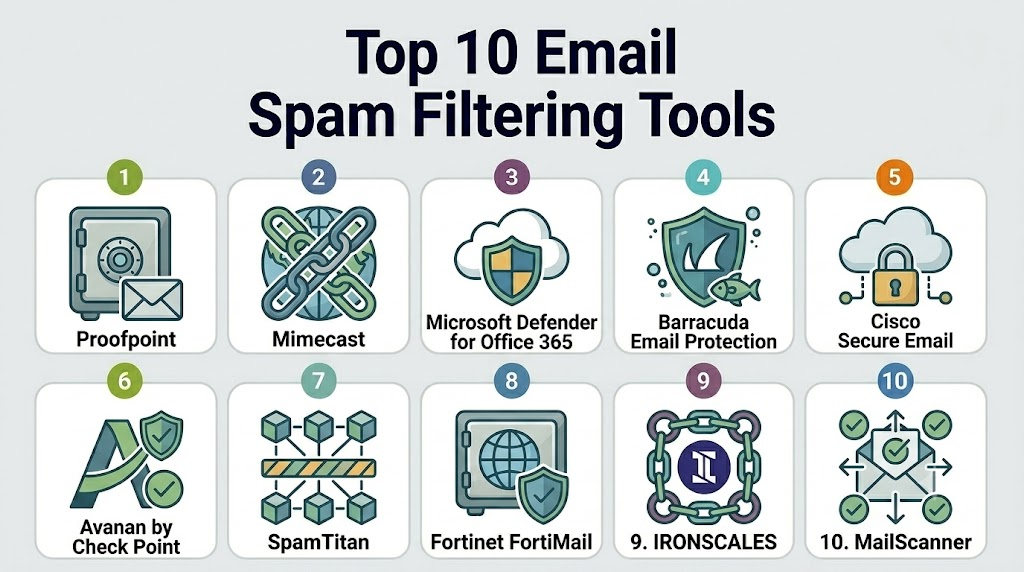
Top 10 Email Spam Filtering Tools
1- Proofpoint Email Protection
Short description: Proofpoint is one of the most widely deployed enterprise email security platforms. It specializes in advanced threat protection, phishing defense, and targeted attack prevention.
Key Features
- Advanced phishing detection
- AI-driven threat analysis
- Business email compromise protection
- URL and attachment sandboxing
- Threat intelligence feeds
- Data loss prevention
- Email encryption options
Pros
- Strong enterprise-grade protection
- Excellent threat intelligence
- Comprehensive security ecosystem
Cons
- Premium pricing
- Can require experienced administrators
- Advanced features may increase complexity
Platforms / Deployment
Cloud
Security & Compliance
SSO, MFA support, encryption, audit capabilities, RBAC, GDPR support. Additional certifications vary by deployment.
Integrations & Ecosystem
Integrates with major enterprise security environments and cloud email systems.
- Microsoft 365
- Google Workspace
- SIEM platforms
- SOAR solutions
- Threat intelligence systems
Support & Community
Strong enterprise support with extensive documentation and training resources.
2- Mimecast Email Security
Short description: Mimecast offers email security, archiving, continuity, and threat protection capabilities in a unified platform.
Key Features
- Anti-spam filtering
- Impersonation protection
- Email continuity services
- Attachment sandboxing
- URL protection
- Security awareness tools
- Archiving capabilities
Pros
- Comprehensive email security suite
- Strong continuity capabilities
- Mature enterprise platform
Cons
- Pricing can be higher than SMB solutions
- Some configuration complexity
- Advanced reporting learning curve
Platforms / Deployment
Cloud
Security & Compliance
Encryption, audit logs, RBAC, SSO support. Additional compliance certifications vary.
Integrations & Ecosystem
Strong integration support across enterprise environments.
- Microsoft 365
- Google Workspace
- SIEM platforms
- Identity providers
- Security operations tools
Support & Community
Well-established support organization and extensive knowledge resources.
3- Microsoft Defender for Office 365
Short description: Microsoft’s native email security platform protects Microsoft 365 users against spam, phishing, malware, and advanced email threats.
Key Features
- Safe Links
- Safe Attachments
- Threat Explorer
- Anti-phishing protection
- Automated investigation
- Attack simulation training
- Threat intelligence integration
Pros
- Deep Microsoft integration
- Easy deployment for Microsoft customers
- Strong automation capabilities
Cons
- Best suited for Microsoft environments
- Some advanced features require premium licensing
- Limited value outside Microsoft ecosystem
Platforms / Deployment
Cloud
Security & Compliance
Supports MFA, RBAC, audit logging, encryption, compliance integration.
Integrations & Ecosystem
Native integration across Microsoft security products.
- Microsoft 365
- Microsoft Sentinel
- Microsoft Entra ID
- Microsoft Defender Suite
Support & Community
Large global support ecosystem and extensive documentation.
4- Cisco Secure Email
Short description: Cisco Secure Email provides advanced threat defense and spam filtering capabilities designed for enterprise-scale deployments.
Key Features
- Anti-spam protection
- Malware defense
- Reputation filtering
- Threat intelligence
- Outbound email controls
- Encryption support
- Message tracking
Pros
- Strong security reputation
- Enterprise scalability
- Extensive security ecosystem
Cons
- Administration can be complex
- Higher implementation effort
- Enterprise-focused pricing
Platforms / Deployment
Cloud, Hybrid
Security & Compliance
Encryption, RBAC, audit logging, authentication controls.
Integrations & Ecosystem
Strong Cisco ecosystem integration.
- Cisco XDR
- Cisco SecureX
- SIEM platforms
- Identity providers
Support & Community
Comprehensive enterprise support options.
5- Barracuda Email Protection
Short description: Barracuda offers accessible email protection for SMBs and enterprises, combining spam filtering, phishing protection, and incident response.
Key Features
- Anti-spam filtering
- Threat scanning
- Link protection
- Account takeover detection
- Incident response tools
- Email archiving
- Data protection
Pros
- User-friendly administration
- Broad feature coverage
- Suitable for SMBs and enterprises
Cons
- Some advanced analytics are limited
- Enterprise features may require upgrades
- Customization can be less extensive
Platforms / Deployment
Cloud, Hybrid
Security & Compliance
Encryption support, RBAC, MFA integration, audit capabilities.
Integrations & Ecosystem
Supports common cloud productivity and security platforms.
- Microsoft 365
- Google Workspace
- SIEM platforms
- Backup solutions
Support & Community
Good documentation and responsive support services.
6- SpamTitan
Short description: SpamTitan focuses on efficient spam filtering and phishing protection for SMBs, educational institutions, and managed service providers.
Key Features
- Anti-spam engine
- Phishing protection
- Malware filtering
- Email quarantine
- Reporting dashboards
- Policy management
- Multi-tenant administration
Pros
- MSP-friendly architecture
- Cost-effective deployment
- Easy administration
Cons
- Smaller ecosystem than enterprise leaders
- Advanced threat hunting capabilities limited
- Fewer premium features
Platforms / Deployment
Cloud, Self-hosted
Security & Compliance
Encryption support and administrative controls available.
Integrations & Ecosystem
Supports common email infrastructures.
- Microsoft 365
- Google Workspace
- Active Directory
- MSP management tools
Support & Community
Strong MSP-focused support model.
7- IRONSCALES
Short description: IRONSCALES specializes in AI-powered phishing protection and automated incident response for modern organizations.
Key Features
- AI phishing detection
- Automated remediation
- Threat sharing
- User reporting
- Security awareness training
- Incident response workflows
- Email threat intelligence
Pros
- Strong phishing focus
- Automation-driven workflows
- User-friendly experience
Cons
- Less comprehensive than full email suites
- Primarily focused on phishing
- Some advanced features require higher tiers
Platforms / Deployment
Cloud
Security & Compliance
SSO support, audit logging, access controls.
Integrations & Ecosystem
Works alongside major email platforms.
- Microsoft 365
- Google Workspace
- SIEM tools
- Security orchestration platforms
Support & Community
Strong onboarding and customer success services.
8- Avanan
Short description: Avanan delivers API-based cloud email security focused on Microsoft 365 and Google Workspace environments.
Key Features
- API-based deployment
- Phishing protection
- Malware scanning
- Collaboration security
- Threat detection
- User behavior analysis
- Automated remediation
Pros
- Fast deployment
- Cloud-native architecture
- Strong phishing defense
Cons
- Focused primarily on cloud environments
- Less suitable for legacy infrastructures
- Enterprise pricing may vary
Platforms / Deployment
Cloud
Security & Compliance
Encryption, RBAC, audit logging, access management.
Integrations & Ecosystem
Designed for modern SaaS environments.
- Microsoft 365
- Google Workspace
- Collaboration platforms
- Security tools
Support & Community
Strong customer support and implementation assistance.
9- Sophos Email
Short description: Sophos Email combines spam filtering with broader cybersecurity capabilities through the Sophos security ecosystem.
Key Features
- Anti-spam filtering
- Anti-phishing protection
- URL analysis
- Attachment sandboxing
- Threat intelligence
- Email encryption
- Security synchronization
Pros
- Strong integration with Sophos ecosystem
- Easy administration
- Good SMB support
Cons
- Best value within Sophos environments
- Advanced enterprise features may be limited
- Smaller ecosystem than some competitors
Platforms / Deployment
Cloud
Security & Compliance
Encryption support, MFA integration, RBAC controls.
Integrations & Ecosystem
Integrates well with Sophos security products.
- Sophos Central
- Endpoint security
- Firewall products
- Identity providers
Support & Community
Strong support and documentation resources.
10- Mailinblack
Short description: Mailinblack provides spam filtering and phishing prevention solutions focused on simplifying email security management.
Key Features
- Spam filtering
- Anti-phishing controls
- Sender verification
- Threat blocking
- Reporting dashboards
- Administrative policies
- User management
Pros
- Easy deployment
- User-friendly interface
- Effective spam reduction
Cons
- Smaller global footprint
- Fewer enterprise capabilities
- Limited ecosystem compared to market leaders
Platforms / Deployment
Cloud
Security & Compliance
Access controls and encryption capabilities available.
Integrations & Ecosystem
Supports common email environments.
- Microsoft 365
- Google Workspace
- Administrative tools
Support & Community
Growing support ecosystem and documentation.
Comparison Table
| Tool Name | Best For | Platforms Supported | Deployment | Standout Feature | Public Rating |
|---|---|---|---|---|---|
| Proofpoint | Enterprise Security | Web | Cloud | Advanced Threat Intelligence | N/A |
| Mimecast | Enterprise Email Security | Web | Cloud | Email Continuity | N/A |
| Microsoft Defender for Office 365 | Microsoft Users | Web | Cloud | Native Microsoft Integration | N/A |
| Cisco Secure Email | Large Enterprises | Web | Cloud, Hybrid | Reputation Filtering | N/A |
| Barracuda Email Protection | SMB to Enterprise | Web | Cloud, Hybrid | Incident Response Tools | N/A |
| SpamTitan | MSPs and SMBs | Web | Cloud, Self-hosted | Multi-Tenant Management | N/A |
| IRONSCALES | Phishing Defense | Web | Cloud | AI-Based Remediation | N/A |
| Avanan | Cloud Email Security | Web | Cloud | API-Based Protection | N/A |
| Sophos Email | Sophos Customers | Web | Cloud | Security Synchronization | N/A |
| Mailinblack | Simplicity-Focused Teams | Web | Cloud | Sender Verification | N/A |
Evaluation & Scoring of Email Spam Filtering Tools
| Tool | Core | Ease | Integrations | Security | Performance | Support | Value | Weighted Total |
|---|---|---|---|---|---|---|---|---|
| Proofpoint | 10 | 8 | 9 | 10 | 10 | 9 | 7 | 9.0 |
| Mimecast | 9 | 8 | 9 | 9 | 9 | 9 | 8 | 8.7 |
| Microsoft Defender | 9 | 9 | 10 | 9 | 9 | 9 | 9 | 9.1 |
| Cisco Secure Email | 9 | 7 | 9 | 9 | 9 | 8 | 7 | 8.3 |
| Barracuda | 8 | 9 | 8 | 8 | 8 | 8 | 9 | 8.4 |
| SpamTitan | 8 | 9 | 7 | 8 | 8 | 8 | 9 | 8.2 |
| IRONSCALES | 8 | 9 | 8 | 8 | 8 | 8 | 8 | 8.1 |
| Avanan | 9 | 9 | 8 | 9 | 9 | 8 | 8 | 8.7 |
| Sophos Email | 8 | 8 | 8 | 8 | 8 | 8 | 8 | 8.0 |
| Mailinblack | 7 | 9 | 7 | 7 | 8 | 7 | 8 | 7.6 |
Which Email Spam Filtering Tool Is Right for You?
Solo / Freelancer
Built-in protections from major email providers may be sufficient. Sophos Email and Mailinblack can provide additional protection with minimal complexity.
SMB
Barracuda, SpamTitan, and Sophos Email provide strong security capabilities while remaining manageable for smaller IT teams.
Mid-Market
Mimecast, Avanan, and Barracuda offer balanced functionality, scalability, and administrative simplicity.
Enterprise
Proofpoint, Microsoft Defender for Office 365, Cisco Secure Email, and Mimecast are strong choices for complex environments and advanced threat protection.
Budget vs Premium
Budget-conscious organizations should evaluate SpamTitan and Barracuda. Premium buyers seeking advanced threat intelligence should consider Proofpoint or Mimecast.
Feature Depth vs Ease of Use
Proofpoint and Cisco provide extensive security capabilities. Barracuda and Avanan generally offer simpler administration experiences.
Integrations & Scalability
Microsoft Defender excels in Microsoft ecosystems. Cisco performs well in Cisco-centric infrastructures. Proofpoint and Mimecast offer broad enterprise integration options.
Security & Compliance Needs
Highly regulated industries such as finance, healthcare, and government should evaluate Proofpoint, Mimecast, Microsoft Defender, and Cisco Secure Email first.
Frequently Asked Questions (FAQs)
1- What is an email spam filtering tool?
An email spam filtering tool analyzes incoming and outgoing emails to identify spam, phishing attempts, malware, and other threats before they reach users.
2- Are built-in Microsoft 365 protections enough?
For many small organizations they may be sufficient. However, businesses facing advanced threats often add specialized email security platforms for stronger protection.
3- How do modern spam filters detect phishing?
Modern platforms use AI, machine learning, behavioral analysis, threat intelligence, and content inspection to identify suspicious emails.
4- Can spam filters stop ransomware attacks?
They can significantly reduce ransomware risk by blocking malicious attachments, dangerous links, and suspicious email campaigns before delivery.
5- How long does deployment usually take?
Cloud-native solutions can often be deployed within hours or days, while larger enterprise implementations may require longer planning and testing cycles.
6- Do these tools work with Google Workspace?
Most leading solutions support Google Workspace alongside Microsoft 365 and other email platforms.
7- What is the biggest mistake when choosing an email security tool?
Many organizations focus solely on spam detection rates and overlook integrations, administration, reporting, and incident response capabilities.
8- Are AI-powered spam filters better?
AI significantly improves detection of sophisticated phishing attacks and social engineering attempts, but human oversight and policy management remain important.
9- Can users recover legitimate emails from quarantine?
Most platforms provide quarantine management features that allow administrators or users to review and release legitimate messages.
10- Should organizations replace or supplement native email security?
Many organizations use specialized tools alongside native protections to create multiple layers of defense against modern email threats.
Conclusion
Email security has evolved far beyond traditional spam blocking. Modern organizations face phishing, ransomware, impersonation attacks, and AI-generated threats that require advanced protection capabilities. While platforms such as Proofpoint, Mimecast, Microsoft Defender for Office 365, and Cisco Secure Email dominate the enterprise market, strong alternatives like Barracuda, SpamTitan, Avanan, and Sophos Email provide excellent protection for SMBs and mid-market organizations. The right choice depends on your existing email platform, security requirements, compliance obligations, budget, and administrative resources. Start by shortlisting two or three tools that match your environment, run a pilot deployment, validate integrations and security controls, and then select the platform that delivers the best balance of protection, usability, and long-term value.

Find Trusted Cardiac Hospitals
Compare heart hospitals by city and services — all in one place.
Explore Hospitals
One aspect often overlooked is the ongoing tuning required to reduce false positives without affecting legitimate communication. As threat patterns evolve, continuous monitoring and policy adjustments become critical for maintaining long-term effectiveness.