Introduction
Music notation software is a category of applications designed to help composers, arrangers, educators, and performers create, edit, and share sheet music and musical scores. These tools allow users to input notes, rests, articulations, dynamics, and other performance markings, generate playback audio, and export professional‑quality scores for printing or digital distribution. Whether you’re composing orchestral works, transcribing jazz solos, preparing choir arrangements, or teaching music theory, notation software turns musical ideas into readable, publish‑ready notation.
In the current creative ecosystem, where content crosses audio, video, and interactive experiences, music notation software matters more than ever. Composers collaborate remotely, educational content requires integrated audio/visual scores, and indie artists need tools that bridge composition and production workflows. High‑resolution displays, real‑time playback engines, plugin integrations with DAWs, and AI‑assisted input further expand the capabilities of modern notation applications.
Real‑world use cases:
- Composing and arranging music for ensembles, bands, choir, and orchestras
- Preparing lead sheets and parts for performance settings
- Teaching music theory and notation in academic environments
- Transcribing performances into readable sheet music
- Exporting digital scores for distribution and publishing
What buyers should evaluate:
- Ease of note input and editing workflows
- Playback quality and instrument sample libraries
- Export formats (PDF, MusicXML, MIDI, audio)
- Support for advanced notation (microtones, tablature, percussion)
- Integration with DAWs and virtual instruments
- Collaboration and cloud features
- Compatibility with educational tools
- Cross‑platform support
- Plugin and extension ecosystem
- Licensing and pricing models
Best for: Composers, arrangers, music educators, students, performers, and music publishers who need professional‑quality scores and flexible editing tools.
Not ideal for: Users who only need simple audio recording or DAW editing — audio editors or DAWs may suffice for non‑notation tasks.
Key Trends in Music Notation Software
- AI‑assisted note entry and transcription from audio or MIDI input
- Real‑time collaborative editing with cloud project sharing
- Integration with DAWs and virtual instrument libraries for playback realism
- Support for modern formats (MusicXML, MIDI 2.0) for seamless interchange
- Enhanced tablature and percussion support for contemporary genres
- Cross‑platform deployments — desktop, mobile, and web applications
- Template and score‐style libraries for fast score creation
- Integrated audio rendering engines for lifelike playback
- Adaptive licensing models including subscriptions and perpetual licenses
How We Selected These Tools (Methodology)
- Assessed feature completeness across notation, input methods, playback, and export
- Evaluated market adoption and mindshare among professional and educational users
- Reviewed score rendering quality and real‑time playback engines
- Checked integration signals with DAWs, virtual instruments, and cloud services
- Considered performance and reliability on large, complex scores
- Looked at platform support (Windows, macOS, mobile, web)
- Examined learning curve and usability for beginners to pros
- Balanced free/open‑source and commercial solutions
- Evaluated community support, documentation, and training resources
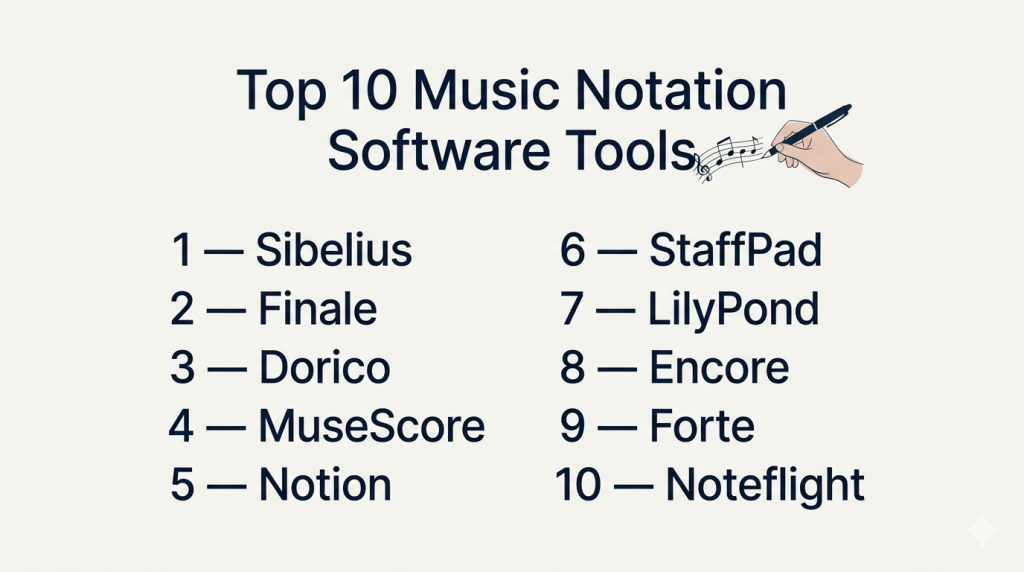
Top 10 Music Notation Software Tools
#1 — Sibelius
Short description: Sibelius is a widely used professional music notation application known for its refined engraving quality and industry adoption in publishing and education.
Key Features
- Advanced score layout and engraving tools
- Real‑time playback with high‑quality instrument samples
- Flexible note input (keyboard, MIDI, mouse, touch)
- Extensive library of templates and presets
- Plugin support for custom workflows
- Integration with DAWs and MusicXML export
Pros
- Professional‑grade notation and engraving
- Robust and mature feature set
- Strong educational and publishing presence
Cons
- Higher cost compared with some alternatives
- Learning curve for advanced features
Platforms / Deployment
Windows / macOS / Hybrid
Security & Compliance
Not publicly stated
Integrations & Ecosystem
Sibelius integrates with virtual instruments and DAWs via standard export formats:
- MusicXML and MIDI export/import
- Plugin support
- DAW export workflows
- Score libraries and templates
Support & Community
Large community, extensive official documentation, and dedicated training resources.
#2 — Finale
Short description: Finale is a robust, professional notation program offering deep customization and flexible layout controls for composers and publishers.
Key Features
- Full control over notation and layout
- Dynamic parts generation
- Advanced articulation and expression handling
- High‑quality playback with Garritan libraries
- MIDI and MusicXML support
- Layered editing and template systems
Pros
- Extremely customizable
- Strong layout and publishing tools
- Deep expression and articulation features
Cons
- Interface can be overwhelming for new users
- Perpetual license cost is significant
Platforms / Deployment
Windows / macOS / Self‑hosted
Security & Compliance
Not publicly stated
Integrations & Ecosystem
Finale supports common interchange formats and instrument libraries:
- MIDI and MusicXML compatibility
- Virtual instrument integration
- Plugin libraries
- Score sharing
Support & Community
Vast documentation, score forums, and user community resources.
#3 — Dorico
Short description: Dorico is a modern notation platform emphasizing intelligent workflows, automated engraving, and deep integration with music production tools.
Key Features
- Intelligent note placement and layout engine
- Real‑time playback with expression
- Advanced rhythmic and tuple editing
- Integration with expression maps and VST instruments
- Multi‑platform support
- Engraving presets and design control
Pros
- Excellent automated engraving
- Intuitive modern workflow
- Strong integration with production tools
Cons
- Subscription option may be confusing for some
- Smaller third‑party plugin ecosystem so far
Platforms / Deployment
Windows / macOS / Hybrid
Security & Compliance
Not publicly stated
Integrations & Ecosystem
Dorico supports deep export and instrument workflows:
- MusicXML and MIDI export/import
- VST instrument playback
- DAW interoperability
- Engraving plugins and templates
Support & Community
Growing community with official tutorials and forums.
#4 — MuseScore
Short description: MuseScore is a free, open‑source music notation tool with a strong community and solid core features suitable for beginners to intermediate users.
Key Features
- Full notation toolset
- Playback with soundfonts
- Plugin support
- MusicXML and MIDI import/export
- Chord symbols and tablature
- Cross‑platform support
Pros
- Free and open‑source
- Active community development
- Easy to learn for newcomers
Cons
- Playback quality depends on soundfonts
- Less sophisticated engraving than premium tools
Platforms / Deployment
Windows / macOS / Linux / Self‑hosted
Security & Compliance
Not publicly stated
Integrations & Ecosystem
MuseScore supports standard interchange:
- MusicXML and MIDI
- Plugin framework
- Community score sharing
- Export to common formats
Support & Community
Active open‑source community and documentation.
#5 — Notion
Short description: Notion is a notation and composition tool with strong handwriting recognition and integrated playback using sampled instruments.
Key Features
- Real‑time playback with sampled instruments
- Handwriting recognition on supported devices
- MIDI and MusicXML support
- Tablature and score generation
- Percussion and drum notation
- Integrated library of instruments
Pros
- Great for quick composition and sketching
- Natural input options on tablets
- Good sampled playback
Cons
- Less depth in engraving features
- Smaller ecosystem than flagship tools
Platforms / Deployment
Windows / macOS / iOS / Hybrid
Security & Compliance
Not publicly stated
Integrations & Ecosystem
Notion supports export/import workflows:
- MIDI and MusicXML
- DAW import bridges
- Instrument library integration
Support & Community
Official tutorials and evolving user forums.
#6 — StaffPad
Short description: StaffPad is a notation app designed around handwriting recognition and expressive performance capture, ideal for composers on tablet devices.
Key Features
- Handwritten input recognition
- Real‑time playback with sample libraries
- Dynamic score editing
- Tablature and percussion support
- Page layout automation
Pros
- Excellent for mobile sketching and composition
- Natural input with stylus
- High‑quality playback
Cons
- Limited to tablet workflows
- Not as robust for publishing layouts
Platforms / Deployment
Windows / iOS / Hybrid
Security & Compliance
Not publicly stated
Integrations & Ecosystem
Supports export for downstream workflows:
- MusicXML and MIDI export
- DAW and notation import
- Sample library usage
Support & Community
Active forums and user guides.
#7 — LilyPond
Short description: LilyPond is an open‑source text‑based music engraving tool focused on producing high‑quality, publication‑ready scores.
Key Features
- Text‑based score input
- High‑quality engraving output
- Support for complex notation
- Scriptable workflows
- Open file formats
- Batch processing
Pros
- Excellent quality of engraving
- Ideal for automated and batch tasks
- Free
Cons
- Steep learning curve (text input)
- Not WYSIWYG (what‑you‑see‑is‑what‑you‑get)
Platforms / Deployment
Windows / macOS / Linux / Self‑hosted
Security & Compliance
Not publicly stated
Integrations & Ecosystem
LilyPond works with other tools via file export and scripting:
- MusicXML interchange
- Integration with text editors
- Batch score processing
- Scripting languages
Support & Community
Open‑source community and manuals.
#8 — Encore
Short description: Encore is a classic music notation program with decades of use in educational and composition settings, known for its straightforward interface.
Key Features
- Standard notation editing tools
- MIDI input
- Tablature and percussion support
- Playback controls
- Layout presets
Pros
- Easy for beginners
- Familiar interface
- Good for educational use
Cons
- Less advanced than modern software
- Limited update‑cycle and modern integrations
Platforms / Deployment
Windows / macOS / Self‑hosted
Security & Compliance
Not publicly stated
Integrations & Ecosystem
Supports MIDI and basic interchange:
- MIDI import/export
- Printer‑ready score layouts
Support & Community
Smaller but longstanding user base.
#9 — Forte
Short description: Forte is a notation tool aimed at students, educators, and hobbyists with a balanced feature set and approachable workflow.
Key Features
- Note entry and editing
- Playback and dynamics controls
- MusicXML and MIDI export
- Part extraction
- Chord and scale tools
Pros
- Good for educational environments
- Intuitive workflow
- Reasonable pricing
Cons
- Less powerful for complex engraving
- Smaller ecosystem
Platforms / Deployment
Windows / macOS / Hybrid
Security & Compliance
Not publicly stated
Integrations & Ecosystem
Standard interchange support:
- MIDI and MusicXML
- Basic export workflows
Support & Community
Documentation and user forums.
#10 — Noteflight
Short description: Noteflight is a web‑based music notation platform that enables online creation, collaboration, and sharing.
Key Features
- Browser‑based notation editing
- Real‑time collaboration
- Playback with instrument library
- Export to MusicXML and audio
- Embeddable score viewers
- Tablature and percussion support
Pros
- Accessible from any browser
- Collaborative scoring
- Easy for educational and community use
Cons
- Relies on internet connectivity
- Playback quality depends on browser engine
Platforms / Deployment
Web / Cloud
Security & Compliance
Not publicly stated
Integrations & Ecosystem
Supports export and sharing workflows:
- MusicXML and audio export
- Embeddable scores
- Online community sharing
Support & Community
User forums and online documentation.
Comparison Table (Top 10)
| Tool Name | Best For | Platform(s) Supported | Deployment | Standout Feature | Public Rating |
|---|---|---|---|---|---|
| Sibelius | Professional composers | Windows/macOS | Hybrid | High‑quality engraving | N/A |
| Finale | Publishers & advanced layouts | Windows/macOS | Self‑hosted | Deep customization | N/A |
| Dorico | Intelligent workflows | Windows/macOS | Hybrid | Automated engraving | N/A |
| MuseScore | Free & open‑source | Windows/macOS/Linux | Self‑hosted | Cost‑free robust notation | N/A |
| Notion | Score + handwriting | Windows/macOS/iOS | Hybrid | Natural input & playback | N/A |
| StaffPad | Tablet composition | Windows/iOS | Hybrid | Handwritten input | N/A |
| LilyPond | Text engraving | Windows/macOS/Linux | Self‑hosted | Publication quality engraving | N/A |
| Encore | Beginner notation | Windows/macOS | Self‑hosted | Simple interface | N/A |
| Forte | Education & hobbyists | Windows/macOS | Hybrid | Intuitive for learners | N/A |
| Noteflight | Web & collaboration | Web | Cloud | Online collaboration | N/A |
Evaluation & Scoring of Music Notation Software
| Tool Name | Core (25%) | Ease (15%) | Integrations (15%) | Security (10%) | Performance (10%) | Support (10%) | Value (15%) | Weighted Total |
|---|---|---|---|---|---|---|---|---|
| Sibelius | 10 | 7 | 9 | 6 | 9 | 9 | 7 | 8.40 |
| Finale | 10 | 6 | 8 | 6 | 9 | 8 | 7 | 8.15 |
| Dorico | 9 | 8 | 9 | 6 | 8 | 8 | 8 | 8.20 |
| MuseScore | 8 | 9 | 7 | 6 | 7 | 7 | 10 | 7.75 |
| Notion | 8 | 8 | 7 | 6 | 7 | 7 | 8 | 7.85 |
| StaffPad | 7 | 8 | 7 | 6 | 7 | 7 | 8 | 7.60 |
| LilyPond | 9 | 5 | 6 | 6 | 8 | 6 | 10 | 7.50 |
| Encore | 6 | 9 | 5 | 6 | 6 | 6 | 8 | 6.75 |
| Forte | 7 | 8 | 6 | 6 | 7 | 7 | 8 | 7.25 |
| Noteflight | 7 | 9 | 8 | 6 | 7 | 7 | 9 | 7.85 |
How to interpret the scores:
- Scores reflect comparative editorial assessments based on feature depth, usability, ecosystem support, and value.
- Higher weighted totals indicate tools that excel at both core notation features and broader workflow integrations.
- Tools with strong value (like MuseScore or Noteflight) score well for accessibility and cost efficiency.
Which Music Notation Software Tool Is Right for You?
Solo / Freelancer
- MuseScore, Notion, and StaffPad are excellent for individual composers and hobbyists with low cost and flexible workflows.
SMB
- Dorico, Notion, and Noteflight provide rich features without enterprise complexity.
Mid‑Market
- Sibelius, Finale, and Dorico offer professional features with collaborative and publishing workflows.
Enterprise
- Sibelius and Finale are widely adopted in publishing, education, and professional scoring environments.
Budget vs Premium
- Budget: MuseScore, Noteflight, StaffPad
- Premium: Sibelius, Finale, Dorico
Feature Depth vs Ease of Use
- Depth: Sibelius, Finale, Dorico
- Ease: MuseScore, Notion, Noteflight
Integrations & Scalability
- Best: Sibelius, Dorico, Noteflight (for cloud collaboration)
Security & Compliance Needs
- Evaluate platform data policies when using cloud solutions (Noteflight).
Frequently Asked Questions (FAQs)
1. What is music notation software?
Music notation software helps composers and arrangers create, edit, and publish musical scores with professional engraving and playback features.
2. Do these tools play back music?
Yes — most include playback engines and instrument libraries to hear scores in real time.
3. Can I export scores to other programs?
Most support standard formats like MusicXML and MIDI for interoperability with other software.
4. Which tool is best for beginners?
MuseScore, Notion, and Noteflight are approachable for learners and hobbyists.
5. Do these tools support tablature?
Many do — Notion, MuseScore, and Sibelius support guitar tablature and percussion notation.
6. Can I collaborate in real‑time?
Web‑based tools like Noteflight support real‑time sharing and collaborative editing.
7. Are these tools cross‑platform?
Several are — MuseScore and Dorico support Windows, macOS, and some Linux workflows; Noteflight works in browsers.
8. Can notation software integrate with DAWs?
Yes — formats like MusicXML and MIDI make it possible to import/export scores to and from DAWs.
9. What formats can I export?
Common formats include PDF, MusicXML, MIDI, audio (WAV/MP3), and sometimes MusicXML parts.
10. Is there free notation software?
Yes — MuseScore and browser‑based Noteflight (free tier) offer robust free options.
Conclusion
Music notation software spans from entry‑level, free tools like MuseScore and Noteflight to industry standards like Sibelius and Finale. Dorico represents a modern approach with intelligent layout and production integration, while StaffPad offers natural handwriting input for tablet users. Free tools provide accessible paths for learners and hobbyists, while premium offerings deliver professional engraving and publishing control.To choose the best fit for your workflow, shortlist tools based on platform, notation complexity, collaboration needs, and integration workflows — especially if you are part of ensembles, education programs, or publishing environments. Testing real scoring projects and interoperability with your existing audio/production tools will ensure the right fit for your creative goals.

Find Trusted Cardiac Hospitals
Compare heart hospitals by city and services — all in one place.
Explore Hospitals