Introduction
RAW Photo Processing Tools are specialized software applications designed to edit and enhance images captured in RAW format. Unlike standard JPEG images, RAW files retain uncompressed data directly from the camera sensor, giving photographers significantly more control over exposure, color, detail, and dynamic range during post-processing.
In modern photography workflows, especially with high-resolution cameras and AI-driven editing capabilities, RAW processing has become essential for achieving professional-quality results. Whether for commercial shoots, social media content, or fine art photography, these tools enable precise adjustments that are simply not possible with compressed formats.
Common use cases include:
- Professional photo editing and retouching
- High-end product and fashion photography
- Landscape and HDR image processing
- Batch editing for event photography
- Color grading and tone correction
What buyers should evaluate:
- RAW file compatibility (camera support)
- Non-destructive editing capabilities
- AI-powered enhancements
- Performance with large files
- Color accuracy and grading tools
- Batch processing features
- Workflow management (cataloging, tagging)
- Integration with editing/design tools
- Hardware acceleration support
- Pricing and licensing model
Best for: Professional photographers, content creators, agencies, and media teams handling high-quality image workflows.
Not ideal for: Casual users who only edit JPEG images or need quick edits without advanced control.
Key Trends in RAW Photo Processing Tools
- AI-driven auto-enhancement and subject detection
- Cloud-based photo libraries and syncing
- GPU acceleration for faster rendering
- Mobile-first RAW editing workflows
- Advanced noise reduction using AI
- Integration with DAM (Digital Asset Management) systems
- Non-destructive editing becoming standard
- Real-time preview and editing
- Subscription and hybrid pricing models
- Cross-platform workflow continuity
How We Selected These Tools (Methodology)
- Strong adoption among professional photographers
- Comprehensive RAW processing capabilities
- Performance with high-resolution images
- Stability and reliability in production workflows
- Integration with broader creative ecosystems
- Availability across platforms
- Continuous innovation and feature updates
- Balance between ease of use and advanced control
- Community support and learning resources
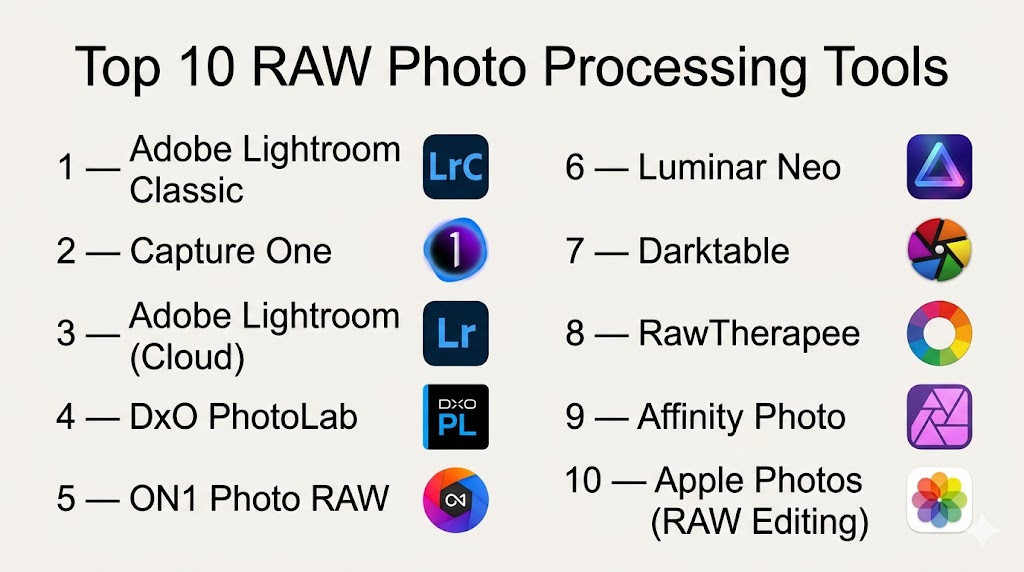
Top 10 RAW Photo Processing Tools
#1 — Adobe Lightroom Classic
Short description: A professional-grade RAW photo editor and organizer widely used by photographers for advanced editing workflows.
Key Features
- Non-destructive RAW editing
- Advanced color grading tools
- AI-based masking and adjustments
- Batch processing
- Catalog-based photo management
- Lens correction profiles
- Presets and automation
Pros
- Industry-standard workflow
- Strong editing and organization
Cons
- Subscription-based
- Learning curve for beginners
Platforms / Deployment
Windows / macOS
Security & Compliance
Not publicly stated
Integrations & Ecosystem
Lightroom integrates deeply with the Adobe ecosystem and photography workflows.
- Photoshop
- Adobe Cloud storage
- Mobile apps
- Camera import tools
Support & Community
Extensive tutorials, strong global community.
#2 — Capture One
Short description: A high-end RAW processor known for superior color grading and tethered shooting capabilities.
Key Features
- Advanced color editing tools
- Tethered shooting support
- Layer-based editing
- High-performance rendering
- Customizable interface
- Batch editing
- Camera-specific profiles
Pros
- Excellent color accuracy
- Professional-grade performance
Cons
- Expensive
- Complex interface
Platforms / Deployment
Windows / macOS
Security & Compliance
Not publicly stated
Integrations & Ecosystem
- Studio workflows
- Camera integrations
- Export tools
Support & Community
Professional support and active user base.
#3 — Adobe Lightroom (Cloud)
Short description: A cloud-based version of Lightroom designed for cross-device editing and syncing.
Key Features
- Cloud storage and sync
- AI-powered enhancements
- Mobile editing
- Presets and filters
- Automatic backups
- Simplified interface
- RAW support
Pros
- Easy to use
- Cross-device workflow
Cons
- Less control than Classic
- Subscription required
Platforms / Deployment
Web / Windows / macOS / iOS / Android
Security & Compliance
Not publicly stated
Integrations & Ecosystem
- Adobe ecosystem
- Mobile apps
- Cloud storage
Support & Community
Strong community and documentation.
#4 — DxO PhotoLab
Short description: A RAW processor known for advanced noise reduction and optical corrections.
Key Features
- AI noise reduction
- Lens correction database
- DeepPRIME processing
- Local adjustments
- Smart lighting tools
- RAW conversion
- High-quality output
Pros
- Excellent image quality
- Powerful noise reduction
Cons
- Limited asset management
- Paid software
Platforms / Deployment
Windows / macOS
Security & Compliance
Not publicly stated
Integrations & Ecosystem
- Plugin support
- External editors
Support & Community
Good documentation and support.
#5 — ON1 Photo RAW
Short description: An all-in-one RAW editor with editing, effects, and asset management features.
Key Features
- Non-destructive editing
- Effects and filters
- AI tools
- Photo organization
- Layers support
- Batch processing
- HDR and panorama tools
Pros
- No subscription required
- Feature-rich
Cons
- Performance can vary
- UI complexity
Platforms / Deployment
Windows / macOS
Security & Compliance
Not publicly stated
Integrations & Ecosystem
- Plugin compatibility
- Cloud sync (limited)
Support & Community
Growing community support.
#6 — Luminar Neo
Short description: AI-focused RAW editor designed for fast and automated enhancements.
Key Features
- AI sky replacement
- AI portrait tools
- RAW editing
- Layer-based editing
- Presets
- Background removal
- Quick adjustments
Pros
- Easy AI tools
- Fast editing workflow
Cons
- Limited manual control
- Performance issues on large files
Platforms / Deployment
Windows / macOS
Security & Compliance
Not publicly stated
Integrations & Ecosystem
- Plugin for Lightroom
- Photoshop integration
Support & Community
Active community and tutorials.
#7 — Darktable
Short description: An open-source RAW processing tool for photographers seeking a free alternative.
Key Features
- Non-destructive editing
- Advanced color correction
- RAW processing pipeline
- Tethered shooting
- Module-based workflow
- GPU acceleration
- Batch processing
Pros
- Free and open-source
- Powerful capabilities
Cons
- Steep learning curve
- Complex UI
Platforms / Deployment
Windows / macOS / Linux
Security & Compliance
Not publicly stated
Integrations & Ecosystem
- Open-source plugins
- File export tools
Support & Community
Strong open-source community.
#8 — RawTherapee
Short description: A high-performance open-source RAW editor focused on image quality.
Key Features
- Advanced demosaicing
- Color management tools
- Batch processing
- Noise reduction
- RAW conversion
- Non-destructive editing
Pros
- High-quality output
- Free to use
Cons
- Complex interface
- Limited integrations
Platforms / Deployment
Windows / macOS / Linux
Security & Compliance
Not publicly stated
Integrations & Ecosystem
Limited integrations
Support & Community
Active community support.
#9 — Affinity Photo
Short description: A professional image editor with strong RAW processing capabilities and no subscription.
Key Features
- RAW editing engine
- Layer-based editing
- HDR merging
- Panorama stitching
- Advanced retouching
- PSD compatibility
Pros
- One-time purchase
- High performance
Cons
- Limited cataloging features
- Smaller ecosystem
Platforms / Deployment
Windows / macOS / iOS
Security & Compliance
Not publicly stated
Integrations & Ecosystem
- File compatibility
- Export tools
Support & Community
Growing user base.
#10 — Apple Photos (RAW Editing)
Short description: A built-in macOS tool offering basic RAW editing for everyday users.
Key Features
- RAW support
- Basic adjustments
- Cloud sync
- Easy interface
- Photo organization
- Integration with Apple ecosystem
Pros
- Free for Apple users
- Simple workflow
Cons
- Limited advanced features
- macOS only
Platforms / Deployment
macOS / iOS
Security & Compliance
Not publicly stated
Integrations & Ecosystem
- Apple ecosystem
- iCloud
Support & Community
Standard Apple support.
Comparison Table (Top 10)
| Tool Name | Best For | Platform(s) Supported | Deployment | Standout Feature | Public Rating |
|---|---|---|---|---|---|
| Lightroom Classic | Professionals | Windows, macOS | Local | Catalog workflow | N/A |
| Capture One | Studios | Windows, macOS | Local | Color grading | N/A |
| Lightroom Cloud | Creators | Cross-platform | Cloud | Sync workflow | N/A |
| DxO PhotoLab | Quality-focused users | Windows, macOS | Local | AI noise reduction | N/A |
| ON1 Photo RAW | All-in-one users | Windows, macOS | Local | Effects suite | N/A |
| Luminar Neo | AI editing | Windows, macOS | Local | AI tools | N/A |
| Darktable | Open-source users | Cross-platform | Local | Free RAW editing | N/A |
| RawTherapee | Advanced users | Cross-platform | Local | Image quality | N/A |
| Affinity Photo | Professionals | Cross-platform | Local | One-time license | N/A |
| Apple Photos | Casual users | Apple devices | Cloud/Local | Simplicity | N/A |
Evaluation & Scoring of RAW Photo Processing Tools
| Tool Name | Core | Ease | Integrations | Security | Performance | Support | Value | Weighted Total |
|---|---|---|---|---|---|---|---|---|
| Lightroom Classic | 10 | 8 | 9 | 7 | 9 | 9 | 7 | 8.7 |
| Capture One | 10 | 7 | 7 | 7 | 9 | 8 | 6 | 8.2 |
| Lightroom Cloud | 8 | 9 | 8 | 7 | 8 | 8 | 7 | 8.0 |
| DxO PhotoLab | 9 | 7 | 6 | 6 | 9 | 7 | 7 | 7.8 |
| ON1 Photo RAW | 8 | 7 | 6 | 6 | 8 | 7 | 8 | 7.6 |
| Luminar Neo | 7 | 9 | 6 | 6 | 7 | 7 | 8 | 7.5 |
| Darktable | 9 | 6 | 5 | 6 | 8 | 7 | 10 | 7.8 |
| RawTherapee | 9 | 6 | 5 | 6 | 8 | 7 | 10 | 7.8 |
| Affinity Photo | 9 | 8 | 6 | 6 | 9 | 7 | 9 | 8.0 |
| Apple Photos | 6 | 10 | 5 | 7 | 7 | 7 | 9 | 7.5 |
How to interpret scores:
These scores provide a relative comparison across tools. Higher scores reflect stronger capabilities in specific areas but may not suit every use case. Always align tool selection with workflow needs, budget, and skill level.
Which RAW Photo Processing Tool Is Right for You?
Solo / Freelancer
Lightroom Cloud or Luminar Neo are ideal for simplicity and speed.
SMB
ON1 Photo RAW and Affinity Photo offer strong value.
Mid-Market
Lightroom Classic and Capture One provide advanced workflows.
Enterprise
Capture One and Adobe ecosystem tools are best for scalability.
Budget vs Premium
Free tools like Darktable offer strong alternatives.
Feature Depth vs Ease of Use
Capture One offers depth, Luminar offers ease.
Integrations & Scalability
Adobe tools lead in integrations.
Security & Compliance Needs
Verify vendor policies for enterprise use.
Frequently Asked Questions (FAQs)
1. What is RAW photo editing?
RAW editing involves processing uncompressed image data for maximum quality.
2. Why use RAW instead of JPEG?
RAW provides more flexibility in editing and higher quality output.
3. Are free tools good enough?
Yes, tools like Darktable are powerful but require learning.
4. Do these tools support all cameras?
Most support major brands, but compatibility varies.
5. Can I edit RAW on mobile?
Yes, some tools support mobile RAW editing.
6. Is AI useful in RAW editing?
Yes, AI helps automate complex adjustments.
7. Do I need high-end hardware?
For large files, better hardware improves performance.
8. Can I batch edit photos?
Yes, most tools support batch processing.
9. Are these tools secure?
Security varies; review vendor policies.
10. How do I choose the right tool?
Evaluate your workflow, budget, and skill level.
Conclusion
RAW Photo Processing Tools are essential for achieving high-quality image results in professional workflows. They provide unmatched control over image data, enabling photographers and creators to produce visually compelling content. While tools like Lightroom Classic and Capture One dominate professional environments, newer AI-driven tools like Luminar Neo are simplifying workflows for broader audiences. The best choice ultimately depends on your editing needs, technical expertise, and budget. A practical approach is to shortlist a few tools, test them with real projects, and evaluate how well they fit into your workflow. This ensures long-term efficiency and creative flexibility.

Find Trusted Cardiac Hospitals
Compare heart hospitals by city and services — all in one place.
Explore Hospitals
RAW photo tools give photographers much more control over editing, but handling large numbers of high-resolution files can quickly become difficult. Storage space, backups, and file organization matter when a photo library keeps growing. A simple workflow for sorting and archiving images can save a lot of time later.