Introduction
Low-Code App Development Platforms are software solutions that allow users to build, deploy, and manage applications with minimal manual coding. By leveraging visual interfaces, prebuilt components, and workflow automation, these platforms enable faster development and reduce dependency on highly skilled developers.
Low-code platforms are essential for organizations seeking to accelerate digital transformation, improve operational efficiency, and deliver applications faster to meet business needs. They empower IT teams, business analysts, and citizen developers to create internal tools, customer-facing apps, and integrations quickly and efficiently.
Real-world use cases include:
- Building internal workflow and business process automation apps
- Developing customer portals and self-service applications
- Creating mobile apps for sales, field service, or operations
- Integrating applications with existing CRM, ERP, or database systems
- Rapid prototyping and MVP development for startups
Key evaluation criteria for buyers:
- Ease of use and learning curve
- Visual design and workflow capabilities
- Integration with APIs, databases, and external systems
- Multi-platform deployment (web, iOS, Android)
- Security, compliance, and role-based access
- Performance, scalability, and reliability
- Collaboration and team management features
- Pricing, licensing, and total cost of ownership
- Support, community, and documentation quality
Best for: SMBs, enterprise teams, citizen developers, IT departments, and agencies seeking to rapidly develop applications with low-code efficiency.
Not ideal for: Organizations requiring highly customized applications with complex backend logic or heavy enterprise-grade customization, where traditional development may be more suitable.
Key Trends in Low-Code App Development Platforms
- AI-assisted app development and workflow automation
- Multi-platform deployment with responsive design support
- Integration-first approach connecting APIs, SaaS tools, and databases
- Built-in analytics, monitoring, and reporting dashboards
- Cloud-native and hybrid deployment options
- Collaboration tools and version control for team development
- Compliance and security for GDPR, HIPAA, SOC 2, and enterprise standards
- Template-driven app creation and reusable components
- Subscription and consumption-based pricing models
- Growing adoption for rapid MVPs and internal business apps
How We Selected These Tools (Methodology)
- Market adoption and global mindshare
- Feature completeness including UI, workflow, and automation capabilities
- Reliability and performance signals from active users
- Security posture including encryption, authentication, and access control
- Integration capabilities and ecosystem support
- Fit across various user segments from freelancers to enterprise teams
- Ease of use and learning curve for citizen developers
- Community and support infrastructure
- Deployment flexibility and scalability
- Pricing structure and value for money
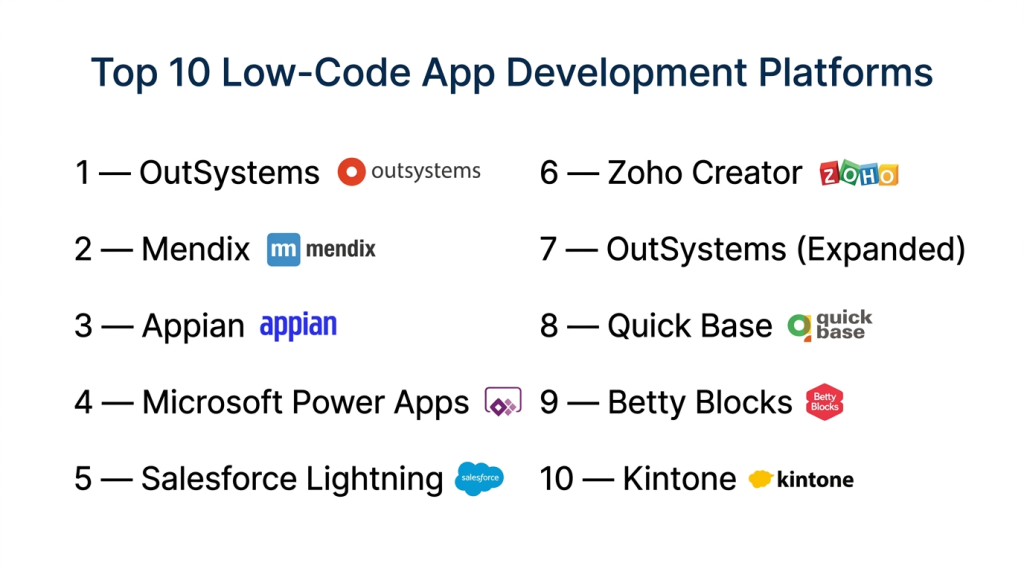
Top 10 Low-Code App Development Platforms
#1 — OutSystems
Short description: OutSystems is an enterprise-grade low-code platform that enables rapid development and deployment of web and mobile applications, ideal for large businesses and IT teams.
Key Features
- Visual development environment
- Full-stack application deployment
- Multi-channel mobile support
- Built-in workflow automation and process modeling
- Integration with external APIs and enterprise systems
- DevOps automation
Pros
- Enterprise-ready with scalability
- Strong integration and automation capabilities
Cons
- Higher cost for smaller teams
- Steeper learning curve
Platforms / Deployment
- Web / Windows / macOS / Linux / iOS / Android
- Cloud / Hybrid / On-premises
Security & Compliance
- SSO/SAML, MFA, encryption, audit logs
- GDPR, SOC 2, ISO 27001 compliance
Integrations & Ecosystem
Supports integrations with ERP, CRM, and external services:
- Salesforce, SAP, Oracle
- REST and SOAP APIs
- Databases and cloud storage
Support & Community
- Enterprise-grade support, forums, and documentation
- Active global community
#2 — Mendix
Short description: Mendix provides a comprehensive low-code development platform with visual modeling, collaboration tools, and multi-platform deployment capabilities, suitable for enterprises and SMBs.
Key Features
- Visual app modeling and workflow design
- Multi-channel deployment (web and mobile)
- Collaboration and agile project management
- Prebuilt templates and widgets
- Cloud-native architecture
Pros
- Strong collaboration features
- Rapid deployment with reusable components
Cons
- Learning curve for complex apps
- Higher pricing tiers for enterprise features
Platforms / Deployment
- Web / iOS / Android / Cloud / Hybrid
Security & Compliance
- SSO, encryption, audit logs
- GDPR, SOC 2 compliance
Integrations & Ecosystem
- Salesforce, SAP, Microsoft Dynamics
- REST APIs and connectors
- Third-party widgets and marketplace
Support & Community
- Tutorials, forums, and professional support
- Active developer community
#3 — Appian
Short description: Appian is a low-code platform focused on enterprise applications, process automation, and case management, designed for large organizations with complex workflows.
Key Features
- Visual process modeling and workflow automation
- Low-code UI and UX design
- Mobile and web app deployment
- AI and RPA integration
- Analytics and reporting dashboards
Pros
- Enterprise-grade process automation
- Strong analytics and AI support
Cons
- Premium pricing
- Complexity may be overkill for small teams
Platforms / Deployment
- Web / iOS / Android / Cloud / Hybrid
Security & Compliance
- SSO, encryption, RBAC
- GDPR, SOC 2, ISO 27001
Integrations & Ecosystem
- ERP, CRM, and database systems
- REST APIs, AI tools, and RPA
- Enterprise connectors
Support & Community
- Enterprise support tiers, documentation
- Active community of developers
#4 — Microsoft Power Apps
Short description: Microsoft Power Apps is a low-code platform that integrates seamlessly with Microsoft 365 and Dynamics 365, enabling rapid app creation for business users and IT teams.
Key Features
- Drag-and-drop app design
- Prebuilt templates and components
- Integration with Microsoft ecosystem
- Data modeling and workflows
- Multi-platform app deployment
Pros
- Strong integration with Microsoft tools
- Easy for business users
Cons
- Limited flexibility outside Microsoft ecosystem
- Advanced features require learning
Platforms / Deployment
- Web / Windows / iOS / Android / Cloud
Security & Compliance
- SSO/SAML, MFA, encryption
- GDPR, HIPAA, ISO 27001
Integrations & Ecosystem
- Microsoft 365, Dynamics 365
- Power Automate workflows
- API connectors
Support & Community
- Extensive documentation and tutorials
- Microsoft support and community forums
#5 — Salesforce Lightning
Short description: Salesforce Lightning is a low-code platform for building enterprise-grade apps on the Salesforce ecosystem, ideal for CRM and customer-facing applications.
Key Features
- Visual app builder with components
- Workflow and automation tools
- Mobile-ready applications
- Integration with Salesforce CRM
- Analytics and reporting
Pros
- Tight integration with Salesforce ecosystem
- Rapid app development for sales and service processes
Cons
- Salesforce dependency
- Costly for smaller businesses
Platforms / Deployment
- Web / iOS / Android / Cloud
Security & Compliance
- SSO, encryption, audit logs
- GDPR, SOC 2, HIPAA
Integrations & Ecosystem
- Salesforce apps and APIs
- External REST/SOAP services
- AppExchange marketplace
Support & Community
- Salesforce support, documentation, Trailhead
- Large developer community
#6 — Zoho Creator
Short description: Zoho Creator is a low-code platform for building business applications with workflow automation, data management, and multi-platform support.
Key Features
- Drag-and-drop UI builder
- Workflow automation and scripting
- Multi-platform deployment
- Prebuilt templates and reports
- API and integration support
Pros
- Affordable for SMBs
- Quick deployment for internal apps
Cons
- Limited advanced customization
- Performance may vary for complex apps
Platforms / Deployment
- Web / iOS / Android / Cloud
Security & Compliance
- SSL, encryption, role-based access
- GDPR compliance
Integrations & Ecosystem
- Zoho suite, third-party APIs
- Payment gateways, cloud storage
- Zapier
Support & Community
- Tutorials, forums, and email support
- Active SMB community
#7 — OutSystems (Expanded)
Short description: OutSystems allows rapid development of complex enterprise apps with visual modeling, full-stack capabilities, and multi-platform deployment.
Key Features
- Visual UI and backend design
- Workflow automation and integration
- Cross-platform deployment
- Analytics and monitoring
- API and custom component support
Pros
- Scalable enterprise apps
- Flexible integrations
Cons
- Higher learning curve
- Licensing cost
Platforms / Deployment
- Web / iOS / Android / Cloud / Hybrid
Security & Compliance
- SSL, SSO/SAML, GDPR
- SOC 2, ISO 27001
Integrations & Ecosystem
- ERP, CRM, third-party APIs
- DevOps and CI/CD pipelines
Support & Community
- Enterprise support, active forums
#8 — Quick Base
Short description: Quick Base is a low-code platform for workflow-driven applications, emphasizing data management and process automation for mid-market and enterprise teams.
Key Features
- Visual app and workflow builder
- Database management
- Integration with external apps
- Reporting and analytics
- Role-based access control
Pros
- Excellent for workflow automation
- Easy for non-developers
Cons
- Limited UI flexibility
- Cost can scale with users
Platforms / Deployment
- Web / iOS / Android / Cloud
Security & Compliance
- SSL, RBAC
- GDPR compliance
Integrations & Ecosystem
- Salesforce, Slack, REST APIs
- Zapier
Support & Community
- Tutorials, forums, and support
#9 — Betty Blocks
Short description: Betty Blocks is a cloud-native low-code platform for building complex web and mobile applications quickly, targeting enterprises and SMBs.
Key Features
- Drag-and-drop visual builder
- Multi-platform deployment
- Workflow automation
- API integration
- Prebuilt components and templates
Pros
- Cloud-native and scalable
- No code or low-code flexibility
Cons
- Learning curve for complex apps
- Premium pricing for advanced features
Platforms / Deployment
- Web / iOS / Android / Cloud
Security & Compliance
- SSL, GDPR
- Not publicly stated
Integrations & Ecosystem
- APIs, Zapier, third-party connectors
Support & Community
- Documentation, community forums
#10 — Kintone
Short description: Kintone is a low-code platform for building business apps, workflows, and dashboards, ideal for SMBs and internal operations teams.
Key Features
- Drag-and-drop app builder
- Workflow automation
- Data management and reporting
- API and third-party integration
- Multi-platform deployment
Pros
- Easy for business teams
- Rapid internal app creation
Cons
- Limited advanced customization
- Pricing scales with users and apps
Platforms / Deployment
- Web / iOS / Android / Cloud
Security & Compliance
- SSL, role-based access
- GDPR compliance
Integrations & Ecosystem
- Slack, Zapier, APIs
- Cloud storage and databases
Support & Community
- Tutorials, email support, forums
Comparison Table (Top 10)
| Tool Name | Best For | Platform(s) Supported | Deployment | Standout Feature | Public Rating |
|---|---|---|---|---|---|
| OutSystems | Enterprise apps | Web / iOS / Android | Cloud / Hybrid | Full-stack low-code | N/A |
| Mendix | Enterprise / SMB | Web / iOS / Android | Cloud / Hybrid | Visual modeling & automation | N/A |
| Appian | Enterprise workflows | Web / iOS / Android | Cloud / Hybrid | Process automation | N/A |
| Microsoft Power Apps | SMB & enterprise | Web / iOS / Android | Cloud | Microsoft ecosystem integration | N/A |
| Salesforce Lightning | Enterprise | Web / iOS / Android | Cloud | Salesforce integration | N/A |
| Zoho Creator | SMB apps | Web / iOS / Android | Cloud | Rapid internal apps | N/A |
| Quick Base | Mid-market workflows | Web / iOS / Android | Cloud | Workflow automation | N/A |
| Betty Blocks | Enterprise & SMB | Web / iOS / Android | Cloud | Cloud-native & scalable | N/A |
| Kintone | Internal business apps | Web / iOS / Android | Cloud | Easy workflow and dashboards | N/A |
| Appgyver | Cross-platform apps | Web / iOS / Android | Cloud | Advanced logic & offline support | N/A |
Evaluation & Scoring of Low-Code App Development Platforms
| Tool Name | Core (25%) | Ease (15%) | Integrations (15%) | Security (10%) | Performance (10%) | Support (10%) | Value (15%) | Weighted Total (0–10) |
|---|---|---|---|---|---|---|---|---|
| OutSystems | 9 | 7 | 9 | 8 | 9 | 8 | 7 | 8.45 |
| Mendix | 9 | 8 | 8 | 8 | 8 | 7 | 7 | 8.25 |
| Appian | 8 | 7 | 8 | 8 | 8 | 7 | 7 | 7.95 |
| Microsoft Power Apps | 8 | 9 | 7 | 8 | 8 | 7 | 7 | 8.05 |
| Salesforce Lightning | 8 | 8 | 8 | 8 | 8 | 7 | 7 | 7.95 |
| Zoho Creator | 7 | 8 | 7 | 7 | 7 | 6 | 7 | 7.1 |
| Quick Base | 7 | 8 | 7 | 7 | 7 | 6 | 7 | 7.05 |
| Betty Blocks | 8 | 7 | 8 | 7 | 8 | 7 | 7 | 7.7 |
| Kintone | 7 | 8 | 7 | 7 | 7 | 6 | 7 | 7.05 |
| Appgyver | 8 | 7 | 8 | 7 | 8 | 7 | 7 | 7.55 |
Interpretation: Weighted totals indicate how well a platform balances features, usability, integrations, security, and value. Higher scores represent platforms suitable for complex enterprise scenarios, while lower scores reflect simplicity or niche use cases.
Which Low-Code App Development Platforms Tool Is Right for You?
Solo / Freelancer
- Zoho Creator, Kintone, Appgyver for rapid prototyping and small internal apps
SMB
- Microsoft Power Apps, Mendix, Zoho Creator for business apps and workflow automation
Mid-Market
- Quick Base, Betty Blocks, Mendix for scalable internal applications
Enterprise
- OutSystems, Appian, Salesforce Lightning for complex workflows and enterprise integration
Budget vs Premium
- Budget: Zoho Creator, Kintone, Quick Base
- Premium: OutSystems, Appian, Mendix
Feature Depth vs Ease of Use
- Easy and fast: Zoho Creator, Kintone
- Advanced capabilities: OutSystems, Mendix, Appian
Integrations & Scalability
- Enterprise-ready: OutSystems, Appian, Mendix
- Moderate: Zoho Creator, Quick Base
Security & Compliance Needs
- Enterprise compliance: OutSystems, Appian, Salesforce Lightning
- Standard compliance: Zoho Creator, Kintone
Frequently Asked Questions (FAQs)
1. What pricing models do low-code platforms follow?
Subscription-based models are standard, often tiered by users, app complexity, and deployment options. Enterprise plans include enhanced support and security.
2. How difficult is onboarding?
Tools like Zoho Creator and Kintone are beginner-friendly. OutSystems, Mendix, and Appian require more learning for complex logic.
3. Can apps be deployed across multiple platforms?
Yes. Most platforms support web, iOS, and Android deployment.
4. Are AI capabilities integrated?
Some platforms offer AI-assisted workflows, logic suggestions, and automation tools.
5. Can teams collaborate in real-time?
Yes. Tools like Mendix, Appian, and OutSystems provide collaboration, comments, and version control.
6. Are apps secure?
Enterprise-grade security includes SSL, encryption, role-based access, and audit logs. Compliance with GDPR, SOC 2, and ISO standards varies by platform.
7. Can platforms integrate with external services?
Yes. Integrations include CRM, ERP, payment systems, analytics, and REST/SOAP APIs.
8. Can low-code apps handle complex workflows?
Yes, platforms like OutSystems, Appian, and Mendix can manage multi-step, automated workflows.
9. What common mistakes do users make?
- Overcomplicating apps
- Ignoring integration possibilities
- Neglecting performance and scalability
10. Are there alternatives to low-code platforms?
Yes. Traditional coding, hybrid development, or no-code tools may be alternatives depending on complexity and scalability.
Conclusion
Low-Code App Development Platforms accelerate application creation, reduce dependency on development teams, and enable rapid digital innovation. Selection depends on organizational size, complexity, integrations, and compliance needs. SMBs and mid-market teams may choose Microsoft Power Apps, Zoho Creator, or Quick Base, while enterprises benefit from OutSystems, Appian, or Mendix for advanced workflows and scalability. Running pilot projects is recommended to validate workflows, integrations, and performance, ensuring the chosen platform meets organizational objectives and delivers secure, reliable, and maintainable applications.

Find Trusted Cardiac Hospitals
Compare heart hospitals by city and services — all in one place.
Explore Hospitals
Low-code makes it easier to build apps quickly, but long-term maintenance can become difficult when many people change the same application. Clear ownership and simple documentation can help teams understand how the app works later. This becomes especially important when the original builder is no longer working on it.